
Your smart devices should work for you. But what if they’re working for someone else too?
Every year, NETGEAR and Bitdefender publish the IoT Security Landscape Report, a look at the threats facing the smart devices in our homes.
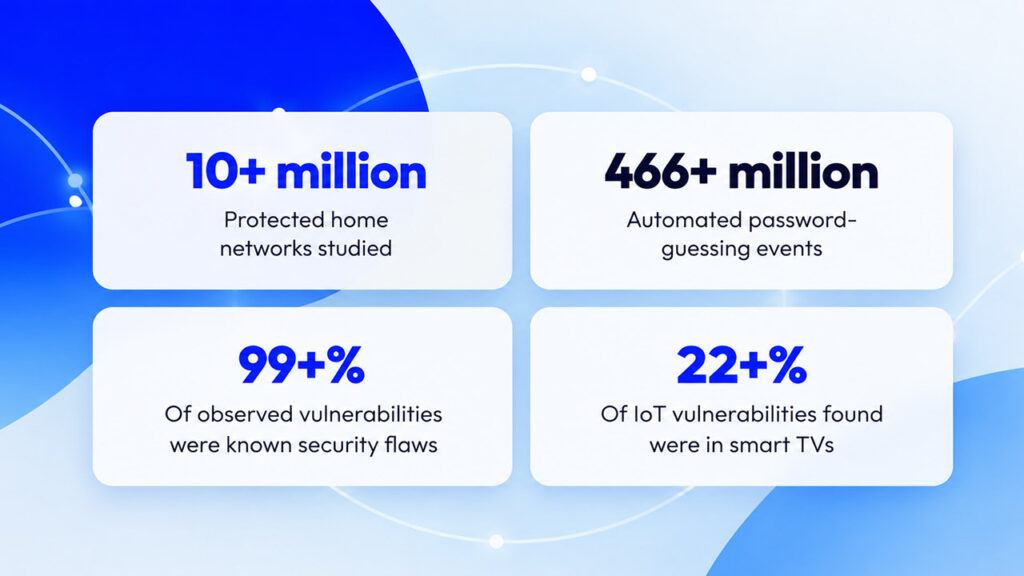
This year’s edition draws on anonymized security data from about 10.4 million homes, collected from January to September 2026. It shows a clear shift: smart devices aren’t just things hackers try to break into anymore. They can also be used to borrow your internet connection, collect information about your home, or give someone a way into everything else on your WiFi.
The average home now has 24 connected devices. The TV, the kids’ tablets, the smart plug running the lamp, the drive full of family photos. Most of us set them up once and never think about them again.
That’s where the trouble starts. Many devices stop getting safety updates long before we stop using them. And this year, some of the risks don’t even look like hacking.
The good news: most of it is easy to fix, and you don’t have to do it all yourself. NETGEAR Armor, powered by Bitdefender, works quietly in the background to help block threats at the router and flag devices that need attention. Here’s what the report found, and the simple steps that make a difference.
THE REALITY
Families keep smart devices for 5 to 10 years. Most makers send safety updates for just 2 to 4. That gap is where most of the risk lives, and the good news is it’s easy to close.
01 It’s not just hacking anymore
For years, the big question was whether a device could be hacked. This year’s report asks a bigger one: what could someone do with your devices once they’re on your WiFi? The answer is that a device can be given one of four jobs, and only one of them looks like a break-in.
| The job | What it means | A real example from 2026 |
|---|---|---|
| Break-in target | Automated programs try the door, hunting for an old device or a weak password | About 90% of the attack activity in this year’s report |
| Borrowed connection | Your home internet is used to carry someone else’s online traffic | Free TV apps that send other companies’ traffic through your TV |
| Eyes and ears | A device collects information about your home and family | TVs reported to record audio; hacked street cameras |
| Open door | One weak device gives access to everything else on your WiFi | Routers and photo drives at the heart of the home network |
Here’s what makes this tricky: the last three can happen while everything seems fine. The TV still streams. The plug still turns on the lamp.
02 Someone’s always knocking on your digital front door
Your router is your home’s front door to the internet, and it gets a lot of uninvited visitors. Across the homes in this report, Bitdefender recorded 4.85 billion automated attempts to find a way in over nine months. That’s about two a day for every home, every single day.
This isn’t a person watching your house. It’s automated programs checking millions of homes for an easy target, like a device still using the password it came with. The next most common trick was simply guessing passwords, with 466.6 million attempts recorded.
NETGEAR Armor helps block these attempts at the router level, before they reach your family’s devices. It runs quietly in the background, so there’s nothing to manage.
03 Your TV may know more than you think
The TV is now the riskiest device in most homes, with the largest share of known weak spots in the report (22.7%). TVs stay on the wall for years, often long after the maker stops updating them. One TV model from 2020 still showed up 29.1 million times in the report’s data.
Two other things came to light this year:
-
- Some free TV apps can borrow your internet. They let other companies send their online traffic through your TV, using your home’s connection. You agree to it in the fine print when you install the app.
- Some TVs collect more than what you watch. Public reports, suggest some TVs can pick up voice recordings, your location and details about other devices in your home, even when the TV looks like it’s off.
None of this is hacking in the usual sense. But it’s your home and your internet connection, so your privacy settings across your apps are worth a quick look.
04 The devices you forgot you had
Two of the quietest devices in your home are also among the riskiest:
- Smart plugs (22.4% of weak spots). They’re cheap, tucked behind furniture and rarely updated. Once a plug stops being sold, it often stops getting fixes, but it stays connected for years.
- Photo and file drives (22%). If your family photos live on a storage drive plugged into your router, it’s a favorite target for criminals who lock up files and demand payment to unlock them.
Add TVs, and these three devices hold 2 in 3 of all the known weak spots in the report.
GOOD NEWS: UPDATES WORK
Last year, streaming sticks and boxes were among the riskiest devices in the home. This year they’re not, largely because people installed their updates.
NETGEAR Armor spots devices in your home with known weak spots, so you know what to update or replace. And it keeps protecting your WiFi after a device stops getting fixes.
05 When the problem comes built in
Some of 2026’s biggest stories weren’t about hackers breaking in. They were about devices that had a problem before they ever reached their owners:
- Cameras with a hidden back door. In Slovakia, officials examined 279 newly delivered traffic cameras and found a hidden way to take control of them remotely, including built-in passwords that couldn’t be changed. The cameras were kept offline until fixed. About 13,000 similar cameras are in use across Europe.
- Routers with a back door from the factory. Researchers found a hidden way in, installed before shipping, on 20 router models from one Chinese manufacturer.
- Hijacked devices put to work. In March, US authorities shut down four networks built from hijacked everyday devices like routers and cameras. One of them, Aisuru, powered record-breaking attacks in 2025.
THE LESSON FOR HOME
A bargain device from a brand you’ve never heard of can cost more than it saves. Who makes a device, and how long they’ll keep it updated, matters as much as the price.
06 What to watch for in 2027
- More apps that borrow your internet, Especially on cheap streaming boxes and apps from outside the official app stores. Stick to official app stores and well-known brands.
- One flaw, many brands. Many smart devices, even from different brands, are built from the same off-the-shelf parts and software. That means a single flaw could affect cameras and video recorders from several brands at once, and some makers will fix it much faster than others. Your best defense: choose brands with a track record of regular updates, keep automatic updates switched on, and retire devices whose maker has gone quiet.
- More attention on TV privacy. Expect a closer look at what TVs collect and who they share it with. A few minutes in your TV’s privacy settings puts you ahead of the curve.
07 Your six step home check up
Most smart home risks come from devices that are outdated, set up once and forgotten. All of that is fixable, and most of it takes minutes.
| Step | What to do |
|---|---|
| 1. Turn on automatic router updates | Fixes arrive on their own. |
| 2. Change default passwords | Router first, then cameras and other devices. |
| 3. Retire devices that no longer get updates | Start with old smart plugs. |
| 4. Check your TV’s privacy settings | Turn off viewing data and voice features you don’t use. |
| 5. Put smart gadgets on your guest network | Keep them apart from the family’s phones and laptops. |
| 6. Add protection that runs on its own | NETGEAR Armor, powered by Bitdefender, helps protect every device on your WiFi, from the kids’ tablets to the smart TV. |
And if you ever need a hand, we’re here to help.Learn more about NETGEAR Armor →
Read the full 2026 IoT Security Landscape Report →