When a store’s point-of-sale (POS) system stalls during a holiday rush, the impact means longer lines, frustrated shoppers, and missed sales. Peak shopping periods test more than staffing and inventory. They test whether the store’s network can keep everything connected and running reliably under pressure—from the guest Wi-Fi to in-store cameras.
For most retailers, the pressure doesn’t stop at the front door. It stretches across stores, warehouses, back offices, e-commerce, and a growing list of connected devices, all while lean IT teams juggle more with fewer hands.
Stores have become connected, data-driven experience centers. AI, the Internet of Things (IoT), mobile workflows, and omnichannel expectations are placing growing demand on the network at the edge—demand that traditional infrastructure was never built to carry.
So what does keeping up require? Retail IT leaders need a network that’s secure, simple to run, and ready for whatever comes next. This is where Cisco comes in, bringing networking, security, and AI-driven operations together in one platform.
Retail demand rarely holds steady. Promotions, peak seasons, and new omnichannel services create bursts of traffic that can expose weak points fast. Shoppers also expect high-bandwidth, low-latency connectivity for mobile checkout, dynamic pricing, and AI-driven experiences.
Guest Wi-Fi adds another layer to that demand, staying fast and reliable at every location without becoming a separate network for a small team to manage.
Retailers are also running more locations with fewer people to manage them. This means keeping policy, visibility, and connectivity consistent across dozens or hundreds of stores without adding headcount every time the business grows.
Mike’s Bikes felt the strain firsthand as it expanded its network to 12 Bay Area locations. Working with Cisco Select Partner Stratus Information Systems to set up and roll out networking and security and introduce new automation like digital price tags, the retailer built a foundation that delivered seamless operations, letting the team focus on maintaining the small bike shop feel that started years earlier, even as the business grew.
SAMSØE SAMSØE faced a similar challenge at a much larger scale, growing to 69 locations in 19 countries. Centralized management through the Cisco Meraki dashboard and templated deployments let the retailer launch new stores with up to 66% less IT effort. Different scale, same lesson. Growth shouldn’t strain the team running the network.
That same distributed footprint raises the stakes for security. Every camera, digital sign, sensor, and POS terminal added to a store is another endpoint, and another potential risk.
Retailers must maintain payment card industry (PCI) compliance across thousands of connected devices while guarding against cameras and digital signage that can become entry points. Physical security and cybersecurity are no longer separate jobs.
As a result, secure networking becomes foundational. Room & Board, a modern furnishings retailer, built its operations on a secure networking foundation from Cisco, including Cisco Meraki MX, Cisco Catalyst SD-WAN, and Cisco Umbrella. The retailer also uses cloud-managed Cisco Meraki MS switches for access switching in its retail locations, with Cisco Catalyst switches anchoring the core network.
That reliability matters most on the sales floor, where design associates rely on tablets to guide customers through frequently changing showroom displays. With a lean, three-person IT team, Room & Board leveraged the platform’s AgenticOps capabilities, including AI-Enhanced Radio Resource Management (AI-RRM) and the Cisco AI Assistant, to manage that wireless network with minimal hands-on effort.
“The convergence of security and network infrastructure is just that—it’s there. It’s built in at the base layer of the Cisco solution,” said Mark Rodrigue, Senior Network Engineer, Room & Board. For a lean IT team, this built-in approach removes the friction of stitching together multiple point solutions.
This convergence extends beyond security alone. Retailers don’t need another disconnected tool bolted on top of the network. They need one platform, bringing together networking, security, and observability, that helps retailers run simply, stay secure by design, and scale for AI.
Operational simplicity matters as much as security. A “one platform, one policy” approach helps smaller retail IT teams manage many locations from a single source of truth instead of juggling separate systems for each site.
AgenticOps is Cisco’s approach to AI-assisted network operations, combining automation, assurance, and human oversight to help teams understand user experience, diagnose issues, take action, and validate results. For retailers, it can help detect problems earlier, resolve them faster, and reduce disruption to store operations. Pairing it with end-to-end visibility across owned and unowned environments helps shorten resolution time.
Visibility matters because so much of retail depends on services outside a retailer’s direct control. It’s exactly why Room & Board relies on Cisco ThousandEyes. “ThousandEyes helps us deliver the quality experience that we want to put forward to our employees and customers,” Rodrigue said.
Built-in security and simplicity only matter if the network can grow with the business. A refresh means more than swapping out old hardware. It means making room for AI-powered analytics, real-time video, and connected store experiences, without adding complexity for lean IT teams.
For growing retailers, the Meraki dashboard brings together Cisco wireless access points, Cisco Secure Routers, Meraki MV cameras, and Cisco Assurance from ThousandEyes. Together, they give IT teams one place to manage their networks across stores, strengthen security, and scale as the business grows.
SAMSØE SAMSØE is already treating its network that way. The retailer describes Wi-Fi 7 as a platform for innovation, powering a new loyalty program, smoother POS operations, and soon, smart dressing rooms. “It’s no longer just the Wi-Fi access point. It’s a data entry point for us,” said Simeon Solarsky, Head of IT Infrastructure and Operations at SAMSØE SAMSØE.
That’s the shift retailers need to plan for, as the network itself becomes part of the shopping experience.
Modern retail networks have to carry more than traffic. They have to keep the POS system running during the holiday rush, keep guest Wi-Fi steady across every location, and keep every connected camera, sensor, and device protected without adding more work for a lean IT team. The retailers best prepared for what’s next are building networks that are secure by design, simpler to manage, and ready to scale when demand spikes.
The same tension surfaces in nearly every campus networking conversation with customers: security teams need to move faster, but the network cannot afford to stop.
That tension isn’t new. What’s new is the speed of security threats. In a post-Mythos world, attackers are using AI-assisted tooling to find, adapt, and weaponize vulnerabilities faster than traditional infrastructure operating models were designed to handle. At the same time, campus networks carry more critical traffic than ever: clinicians and carts in hospitals, robots and sensors on factory floors, point-of-sale systems in stores, students and research on university campuses, and now, AI agents that can act continuously across applications and data.
The question is no longer only, “How do I remediate faster?” but also, “How do I reduce exposure immediately, preserve uptime, and still make permanent software updates in a controlled way?”
That’s the operating model this blog post is about. Live Protect and Extended Fast Software Upgrade (xFSU) are two different capabilities, but together they point to a future where campus infrastructure can defend, adapt, and update with minimal disruption.
Live Protect changes the first part of the workflow.
It’s not a replacement for patching; a permanent software update is still the end state. Live Protect is a targeted runtime capability, validated by Cisco, that can help reduce exposure to a known vulnerability while the infrastructure continues to run.
Instead of forcing every vulnerability response into an emergency upgrade cycle, security and networking teams get a staged model:
The value isn’t just speed. It’s confidence.
At Cisco, we create and validate Live Protect shield through the appropriate Cisco Product Security Incident Response Team (PSIRT), engineering, and support workflows before we publish customer guidance. They are each targeted to a specific vulnerability condition, observable by operators, reversible when needed, and temporary by design. That’s very different from asking every enterprise to invent custom runtime rules during a crisis.
Live Protect is for supported Cisco products and releases. While it’s not a universal protection for every vulnerability, a generic third-party workload control, or a substitute for permanent remediation, that boundary is a feature, not a weakness. The trust comes from knowing exactly what’s supported, how it’s governed, and when the temporary control should be retired.
For campus and branch networks, this is a major shift. Infrastructure is now part of the attack surface. The switch, router, or controller is no longer just something you remediate after the fact. It becomes an active protection point in the infrastructure itself.
Live Protect helps reduce risk before permanent remediation. A software maintenance upgrade (SMU) can be the patch-style path when that is available and appropriate. xFSU solves a different operational problem: it changes the economics of full software image upgrades.
Extended Fast Software Upgrade solves a different operational problem: many access-layer switches don’t have a redundant forwarding path for every endpoint. A traditional reload can take users offline for several minutes. In environments like healthcare, manufacturing, transportation, retail, and higher education, that’s not just an inconvenience—it can become a business continuity issue.
xFSU reduces that disruption by separating the control plane and data plane during the software transition. The control plane can restart and move to the new software while the data plane keeps forwarding using the state already programmed in hardware. Then the data plane is updated in a much shorter disruption window and forwarding resumes using the preserved forwarding state.
Put simply: the network keeps doing its job for most of the upgrade process.
For Cisco Catalyst 9300 Series Switch deployments, this can reduce traffic impact from minutes to seconds where supported. On stacks, xFSU staggers the process across members and uses stateful switchover to preserve continuity. Operators still need to run eligibility checks, meet platform and software prerequisites, and account for feature caveats, but the direction is important: upgrades become more predictable and repeatable, and less dependent on heroic overnight change windows.
That changes behavior.
Traditional upgrades cause three to five minutes or more of downtime. When image upgrades are painful, they get deferred. When they are low impact and validated up front, teams can move toward a more regular software lifecycle. That’s the real security outcome. xFSU isn’t just an availability feature; it’s a security enabler because it helps close the gap between “fixed image is available” and “fixed image is deployed” when an image upgrade is the right remediation path—reducing traffic downtime to less than five seconds on Catalyst 9300 switches running IOS XXE 17.15.2 or later.
Live Protect and xFSU should not be viewed as competing solutions. They are two parts of the same operating model. By pairing these capabilities, organizations can move beyond the binary choice between urgent remediation and uptime.
When a vulnerability is disclosed, this pairing allows for a staged, collaborative response. Security operations (SecOps) teams gain a faster path to exposure reduction through Live Protect, while network operations (NetOps) teams maintain the stability of the production environment. Once the immediate exposure is shielded, teams can transition to permanent remediation—whether via SMU or full image upgrade—using xFSU to help make the process is repeatable and predictable.
This model replaces the high-pressure maintenance window with a calculated, transparent workflow. Security teams spend less time pushing for emergency changes that risk business continuity. Network teams gain the operational headroom to execute updates as part of a standard lifecycle. The business gets resilience without pretending uptime and security are separate goals.
It’s tempting to borrow operating models from the data center and assume they apply everywhere, but the campus has a different set of operational constraints.
It’s where the physical world connects: users, cameras, badges, building systems, access points, medical devices, industrial endpoints, and AI-enabled workflows. Many of those endpoints are not easy to patch. Many are operationally sensitive, mobile, unmanaged, or single-homed. Increasingly, their traffic is encrypted, machine-generated, and lateral.
That makes the access layer both a security challenge and a security opportunity.
The challenge is that downtime is visible immediately. The opportunity is that the network is already present at the point of connection. If security can be fused into that network layer, then protection doesn’t have to wait for a centralized inspection point or a bolt-on appliance path. It can happen where the user, device, application, or agent enters the environment.
This evolution is the cornerstone of a secure network architecture: moving beyond perimeter-based defense to build trust directly into the platforms that forward data. A network that can protect itself at runtime and update with less disruption serves as a stronger foundation for segmentation, Encrypted Traffic Analytics, zero-trust access, and closed-loop operations.
The era of AI-driven threats demands a move away from static infrastructure management. Attackers are accelerating their tooling, and your networks carry increasingly critical data. To keep up with this pace, the answer cannot be a network that only evolves during rare, high-stakes windows.
Instead, aim for a model that can absorb change safely.
For network teams, this requires several practical shifts in how you manage campus environments:
The ultimate goal is infrastructure that defends and evolves while it’s running. By using runtime protections like Live Protect and streamlining the path to full upgrades with xFSU, you can turn campus security from a maintenance-window problem into a pillar of business continuity. This is the promise of secure networking: controls that operate in the right place, at the right speed, without trading uptime for protection.
Explore how Extended Fast Software Upgrade (xFSU) enables campus switch upgrades and reloads with minimal disruption
As an Official Technology Partner, Cisco’s Industry-Leading Solutions Will Modernize the University’s Infrastructure to Meet the Demands of Higher Education in the AI Era
SAN JOSE, Calif., and SOUTH BEND, Ind. — September 22, 2026 — Cisco (NASDAQ: CSCO) and Notre Dame Athletics today announced a multi-year partnership to modernize the University of Notre Dame’s network, delivering advanced connectivity, resiliency and operational efficiency powered by Cisco’s latest networking technologies. The collaboration reflects Notre Dame’s commitment to establishing a future-ready learning environment and the importance of a network able to support the demands of higher education in the AI era.
As AI continues to impact all facets of higher education—from research to classroom learning to student life—the demands placed on the network continue to grow exponentially. Notre Dame is investing in a network able to support current and future device loads and AI applications, reflecting the University’s status as a top-tier academic institution and its commitment to being at the forefront of technological innovation for the next decade and beyond.
“Modernizing our campus network is about far more than just replacing hardware; it is about building a foundation for the future of learning, research and campus life. By eliminating years of technical debt and consolidating our infrastructure onto a unified Cisco multi-gigabit platform managed through Cisco Catalyst Center, we have transformed our operations,” said John Buysse, Senior Director Network & Telephony Services at the University of Notre Dame. “Our team now has the proactive, centralized visibility needed to deliver a seamless, secure and fast digital experience to our campus community.”
Cisco’s technology will directly enhance the daily campus experience. For students, this means a seamless, high-performance connectivity experience that supports bandwidth-intensive applications—from immersive virtual reality labs to real-time collaborative projects—ensuring they stay connected from the moment they step on campus. For faculty and staff, the modernized infrastructure provides the reliability needed for teaching and administrative efficiency, ensuring that digital resources are always available.
“In the dynamic world of higher education, speed is a requirement, not a luxury,” said Mike Witzman, Vice President, Public Sector Solutions Engineering at Cisco. “Together, Notre Dame and Cisco are doing more than just connecting a campus; we’re building an AI-ready foundation that will redefine the future of learning for generations of students, faculty and staff. Fast, seamless and reliable connectivity will transform the modern education and research experience, pushing the boundaries of what’s possible.”
The campus-wide deployment relies on Cisco Catalyst Center to automate and assure the end-to-end network. With nearly 1,000 new switches across the South Bend campus, the integration of Catalyst Center and zero touch deployment will allow for consistent configuration across the University’s digital footprint, which will be standardized on the Cisco Catalyst 9300x switch platform.
The partnership also includes utilization of Cisco Professional Services, which will provide ongoing support for the network and help the University to maximize their investment through custom expert guidance throughout the length of the partnership. Additionally, Cisco ThousandEyes will assure the delivery of seamless digital experiences across the campus by providing the University with visibility into every network that can impact performance, across both owned and unowned third-party environments, giving them unmatched insight into how everything is connecting.
This new collaboration with Notre Dame Athletics comes on the heels of Cisco’s recent partnership with Georgetown University to launch one of the largest deployments of Wi-Fi 7 in higher education, further cementing Cisco as the preferred partner of leading universities in the United States.
About Cisco
Cisco (NASDAQ: CSCO) is the worldwide technology leader that is revolutionizing the way organizations connect and protect in the AI era. For more than 40 years, Cisco has securely connected the world. With its industry leading AI-powered solutions and services, Cisco enables its customers, partners and communities to unlock innovation, enhance productivity and strengthen digital resilience. With purpose at its core, Cisco remains committed to creating a more connected and inclusive future for all. Discover more on The Newsroom and follow us on X at @Cisco.
Cisco and the Cisco logo are trademarks or registered trademarks of Cisco and/or its affiliates in the U.S. and other countries. A listing of Cisco’s trademarks can be found at http://www.cisco.com/go/trademarks. Third-party trademarks mentioned are the property of their respective owners. The use of the word ‘partner’ does not imply a partnership relationship between Cisco and any other company.
About Notre Dame Athletics
As it pertains to athletic and academic success, the University of Notre Dame has few peers across the nation. Sponsoring 26 varsity athletic programs, Notre Dame teams have won 38 national championships that span over 100 years of competitive excellence. The University’s first national title was earned by football in 1924, led by legendary head coach Knute Rockne. Notre Dame athletic teams have continued to claim noteworthy national championships recently, including back-to-back titles by men’s lacrosse in 2023 and 2024 and the fencing team earning its 16th team national title in 2026. The Fighting Irish football team also appeared in the 2025 College Football Playoff Championship Game. Notre Dame athletic teams have produced the third-most Academic All-Americans among Division I schools and Fighting Irish student-athletes have ranked first or second among Football Bowl Subdivision teams in the NCAA’s Graduation Success Rating for 18 straight years.
In nearly every conversation I have with networking teams at large enterprises, security comes up as a top priority, right alongside keeping the network running. The AI shift is raising the stakes on both.
Every AI agent and AI-powered experience depends on the network. At the same time, attackers are using AI to find and exploit vulnerabilities faster, distributed workloads create more paths that must be protected, and quantum-era risks are changing how organizations think about long-lived data. Compromised identities and workloads can open paths for lateral movement and amplify breach impact. Networking teams are being asked to assess risk and respond at machine speed without sacrificing availability.
The network has always been part of the attack surface. What’s changed is how much it matters. It’s the one layer that connects every identity and carries every flow across users, devices, workloads, applications, IoT and OT systems, and AI agents. Because it sees connections as they happen, the network can establish and sustain trust, enforce policy close to where traffic moves, and supply the telemetry NetOps and SecOps teams need to detect and respond faster without disrupting the experience. In this blog, we will examine why the network can no longer be passive transport—and how it can become an active security and enforcement layer.
Defense in depth has always assumed multiple layers so that no single failure is fatal. For years, networking teams were often asked to contribute VLANs, access control lists (ACLs), and perhaps a network admission control (NAC) deployment. That role no longer matches the risks networking teams face today.
Infrastructure risk is outpacing traditional protection. AI-accelerated exploitation is compressing remediation windows and increasing exposure before teams can patch. The answer isn’t to abandon patch discipline; it’s to know what you operate, prioritize the exposure that matters most, and apply validated runtime protection while permanent fixes move through change control. This same infrastructure must also become cryptographically agile. Data captured today may be exposed later, so organizations need a practical, phased path to post-quantum migration without wholesale replacement. Trust and security evidence must also remain continuously visible, so teams can support compliance without reconstructing it at audit time.
AI agents, distributed workloads, and quantum risks expand exposure, while lateral movement amplifies the impact of a breach. Networking teams need to understand what’s connecting, authorize least-privilege access, and limit reach wherever traffic moves. Visibility gaps put every experience at risk. Fragmented NetOps and SecOps tools delay root cause, coordinated action, and service restoration. Teams need shared operational context, governed automation, and end-to-end assurance so they can act quickly without breaking legitimate connectivity, performance, or the user experience.
You can assemble parts of a solution from point products: an overlay here, an appliance there, another agent, another console, another policy model. The result is often backhauled traffic, blind spots between tools, and teams reconciling different identities, policies, telemetry sources, and workflows.
What matters is how these pieces work together. The network is uniquely positioned to address these challenges. It connects identities wherever they work; carries the flows attackers try to use; and reaches across campus, branch, WAN, data center, cloud, internet, software as a service (SaaS), remote, and industrial environments. That makes it the right place to keep infrastructure protected and verifiable; limit reach and enforce policy close to where traffic moves; and supply the telemetry needed to strengthen detection, response, and assurance.
This is where Cisco is different. The Cisco secure networking reference architecture brings together networking, security, observability, data, and AI through a unified operating model, a common data platform powered by Cisco Data Fabric, and resilient infrastructure. Common Policy context shares trusted context across the architecture so connected policy engines can make consistent decisions, while extended integrations carry policy, telemetry, threat intelligence, and governed automation across Cisco and third-party environments.
Together, these platform layers keep infrastructure protected and verifiable; protect east-west traffic and workloads; secure the human and agentic workforce; and give teams the shared context to detect, respond, and verify outcomes. In other words, the network stops being passive transport and becomes an active defense layer.
Before building solutions, it’s worth being precise about the outcomes. Secure networking should reduce risk, limit disruption, and keep critical services secure and available. Cisco delivers this platform approach through three connected pillars: Trust the Infrastructure, Secure Every Flow, and Assure Every Experience.
These are not separate workstreams, but one connected design system. Trust the Infrastructure encompasses resilient architecture that stays protected, continuously proves trust, and is ready for post-quantum change. Secure Every Flow is where distributed protection, trusted identity, and machine-speed detection and response come together. Assure Every Experience describes a unified operating model across network and security operations where teams can verify outcomes, accelerate governed action, and make consistent policy decisions using shared context.
What ties the pillars together is how the platform layers work. Resilient infrastructure provides the trusted and available foundation. Cisco Data Fabric powers the common data platform connecting network, security, identity, application, experience, and third-party data. Common Policy context is defined and governed, then shared across the architecture so connected policy engines can make consistent decisions. Policy is enforced at the points closest to the traffic. Extended integrations carry policy, telemetry, shared context, and governed automation across Cisco and third-party environments.
For networking teams, this isn’t about becoming the security operations center (SOC). It’s about putting the infrastructure you already operate to work as an active security and enforcement layer. Here’s how I think about each pillar and what it means for the network operator.
Trust starts with the infrastructure itself. Attackers are moving faster, and a compromised switch or router can give them deep, persistent access that’s hard to spot. The outcome networking teams need is resilient infrastructure that stays protected, makes trust and security evidence continuously visible, and is ready for post-quantum change.
Keeping infrastructure protected means establishing trust at power-on and sustaining it through runtime. With Cisco secure networking, Splunk Exposure Analytics helps teams prioritize the exposure that matters most, while Cisco Live Protect provides validated runtime protection on supported platforms as permanent fixes move through change control.
Trust must also be easy to demonstrate. Platform integrity, software provenance, encryption, access policy, monitoring, and governed change evidence should remain visible so teams can support compliance without reconstructing everything at audit time. Finally, crypto-agile Media Access Control Security (MACsec) and Internet Protocol Security (IPsec), together with supported post-quantum capabilities, give teams a phased path to protecting long-lived data and adopting new algorithms without replacing the entire infrastructure at once.
In this model, networking teams can strengthen protection, demonstrate trust, and modernize cryptography through normal refresh and change cycles. Security becomes part of how the network operates, not another overlay to manage.
Most breaches don’t stop at the point of entry. They spread laterally through east-west traffic that centralized controls may never see.
The desired outcome is straightforward: make it harder for threats to move and easier for teams to reduce their impact. In addition to protecting east-west traffic and workloads by limiting reach and enforcing policy close to where traffic moves, it also means securing people and AI agents with trusted identity and least-privilege access, so each gets only the access needed.
When a threat is detected, the network should help teams respond just as quickly. Shared network and security telemetry, threat intelligence, and connected enforcement points give NetOps and SecOps teams the context to take governed, post-detection action at machine speed and scale; reduce threat impact; and accelerate recovery across campus, branch, data center, cloud, and remote environments.
You can’t secure what you can’t see, and you shouldn’t automate what you can’t verify. Networking teams need a shared operating view, a consistent way to act, and confidence that every action achieved its intended outcome. That means connecting operational and security context, turning insight into governed action with people in control, and making consistent policy decisions using the same trusted context.
Cisco Cloud Control brings inventory, topology, health, assurance, security, and operational context across connected Cisco domains into a unified operating experience. Cisco AI Canvas and Cisco AI Assistant help teams investigate faster and move from insight to governed action, with people in control. Splunk extends monitoring and analytics across Cisco and third-party environments, while ThousandEyes provides visibility across enterprise and third-party paths, including infrastructure you do not own.
Common Policy context is defined and governed to give connected policy engines the same trusted facts, so teams can make consistent decisions. Policy is then enforced at the points closest to the traffic. Together, these capabilities close the loop by verifying security, connectivity, performance, and the resulting digital experience.
The advantage of a platform approach is that you don’t have to address every challenge at once or treat each area as a separate architecture project. Start with the outcome that maps to your biggest concern: build infrastructure that stays protected, continuously proves trust, and is ready for post-quantum change; protect east-west traffic and workloads, secure the human and agentic workforce, and detect and respond at machine speed and scale to reduce threat impact and accelerate recovery; or give NetOps and SecOps teams a shared operating view, governed action, consistent policy decisions, and verified outcomes. As your priorities evolve, build on the infrastructure and tools already in place.
Wherever you begin, bring your hardest questions to the conversations that follow and put the network to work. Because the pillars share a unified operating model, a common data platform, and resilient infrastructure, progress in one area can strengthen the others.
The network is too important to remain passive. Make it one of the strongest, most adaptable layers of your defense without trading away availability, performance, or experience.
The data center industry is transforming faster than at any point in its history. For decades, the story of the data center was a story of steady, predictable growth with more racks, more servers, and more power each year. That era is over. Artificial intelligence (AI) workloads are driving infrastructure demands to unprecedented levels.
Behind that surge lies an equally urgent challenge: the unseen supporting infrastructure that connects, secures, and keeps the AI systems operational. It is not glamorous, yet it quietly determines whether an AI data center stays online, efficient, and secure.
The modern AI data center is composed of two distinct but deeply connected worlds: the white space and the gray space.
The white space is what most people imagine when they think of a data center: servers, network gear, and the high-speed IT fabric that stitches them together into a single compute core. It is the domain where AI models are trained and served, and as such, draws the most attention and investments.
Conversely, the gray space is easy to overlook precisely because it is designed to be invisible. This domain includes the industrial facilities that surround and sustain the compute engine. There are four groups that make up the gray space:
The discipline of tying these industrial subsystems together (e.g. networking, monitoring, and security on a single observable, standards-based system) is referred to as ‘gray space automation’. It is the practice of taking dozens of independent operational technology (OT) systems that historically ran in isolation and connecting them into one coherent whole. In the AI era, that connective tissue is as critical as the compute core it powers.
The gray space brings together the physical systems that determine whether AI infrastructure stays available, secure, and efficient. Four interconnected challenges must be addressed together as weakness in any one facility can reduce compute capacity or take critical systems offline.
Continuous operations in demanding environments: Gray space systems extend into electrical rooms, pump areas, rooftops, and outdoor locations where heat, moisture, vibration, and electrical noise can challenge conventional networking. As AI densities rise, even a brief communication failure can create operational blind spots or interrupt critical coordination. Uptime Institute reports that one in ten data center outages still cause serious or severe disruption.
Growing, interconnected attack surface: Every connected controller, sensor, camera, and vendor-access pathway creates operational value, but it also creates new risk. Limited network visibility, flat communications, and fragmented security policies can allow a compromised device to threaten adjacent systems. Operators need to identify assets, restrict unnecessary communications, and detect threats without disrupting critical processes.
Complexity compounded by skills shortages: Gray-space domains are often built by different vendors and managed through separate tools, creating inconsistent architectures and heavy manual workloads. Nearly two-thirds of operators report difficulty finding or retaining qualified staff. Scaling requires familiar tools, repeatable designs, automation, and shared visibility across IT, security, and facilities teams.
Growing pressure to operate efficiently: Rising power and cooling demands make static operating models increasingly costly and unsustainable. Reliable telemetry from gray space systems is essential for preventive maintenance, capacity planning, and improvements in PUE and WUE. Without it, emerging failures go unnoticed and efficiency opportunities remain out of reach.
Cisco brings the entire AI data center on one foundation, bridging the white space where AI workloads run and the gray space systems that continuously power, cool, monitor, and protect them. By extending one trusted networking and security foundation across both environments, Cisco helps operators reduce silos, apply consistent policies, and oversee the entire infrastructure supporting AI capacity.
It starts with Cisco Cloud Control, the AI native operations layer that brings inventory, topology, alerts, identity, and workflows from supported domains into one governed experience. It preserves the depth of specialized domain tools while connecting operations at the management layer: AI Canvas to bring teams and insights together, Nexus Dashboard and Intersight for deep control of white space networking, and Catalyst Center and Meraki Dashboard from Cisco Cloud Control to extend familiar operations into gray space. Together, they turn separate domains into one coordinated operating model, helping teams see more and do more in a collective effort to protect uptime, capacity, and efficiency.
Extending the Cisco foundation into the gray space domain
Cisco IIoT extends the one foundation from the compute core into the operational backbone of gray space systems that keep AI infrastructure running. Cisco Industrial Ethernet (IE) switches pair rugged, low power, fanless designs with lossless industrial resiliency protocols that keep critical systems connected even when something goes wrong. With Cisco Cyber Vision embedded directly into the switches, the network becomes the defense layer passively discovering every connected asset and creating segmentation policies that IE switches then enforce to isolate gray space systems from one another and from IT. And because IE switches integrate with the Meraki Dashboard or Catalyst Center, IT teams can comfortably deploy, onboard, and manage gray space facilities using tools and skills they already possess.
Where a multi-category vendor stitches together disparate products, Cisco treats the network itself as both the connectivity layer and an embedded security sensor. Cisco offers a single, battle-tested networking architecture that’s backed by a technology ecosystem that spans design, deployment, support, and lifecycle guidance for every data center.
For over 20 years, Cisco has helped connect and secure industrial environments where downtime carries serious operational and safety consequences, from manufacturing floors and energy grids to transportation systems. Combined with decades of data center networking leadership, Cisco is positioned to unite the white space where AI runs with the gray space systems that keep it running. The result is a proven foundation that strengthens resilience, embeds security, simplifies operations, and improves efficiency across the entire AI data center.
Cisco is already helping some of the biggest names in AI bring their data center facilities onto a unified architecture. Connect with a Cisco Networking expert to learn about how we’re helping to unlock the future of AI data centers.
What happens when internet connectivity is interrupted at a hospital in the middle of running live diagnostics? What about a retailer processing thousands of transactions? Or a global conference streaming live to millions? In each scenario, business stops. Internet access becomes the single point of failure for the applications and services that keep the business running.
When the internet is the primary path to your applications, a connection failure isn’t just an IT issue. As the standard for connecting branch users and applications, direct internet access (DIA) requires resilient connectivity and robust security to ensure uninterrupted productivity and uptime.
AI-driven workloads, cloud services, and distributed teams are pushing more business-critical traffic directly onto the internet. As that traffic grows, the demand for performance and resilience accelerates.
Bringing networking and security together at the edge, Cisco 8000 Series Secure Routers are built to meet this demand. Independent validation from Miercom confirms that the 8000 series delivers, providing high-performance DIA with integrated security services in a single platform.
Miercom evaluated Cisco 8000 Series Secure Routers on two fronts: how much traffic they can handle and how well they stop threats while doing it. Miercom tested the routers across simulated small, medium, and large branch environments that mimicked real-world enterprise architectures, including cloud applications and SD-WAN controllers.
Across the portfolio, the platforms sustained throughput ranging from 1.0 Gbps to 9.5 Gbps while running next-generation firewall, intrusion prevention, URL filtering, application control, advanced malware protection, and network address translation (NAT) simultaneously. These results demonstrate that high-performance connectivity and comprehensive security can coexist as enterprises scale AI, cloud, and software-as-a-service (SaaS) applications.
Miercom also validated the platform’s integrated security capabilities. The Cisco 8235 Secure Router blocked 98.3% of evaluated attack strikes while sustaining approximately 2 Gbps of bidirectional throughput under load. Combined with identity-based microsegmentation, these capabilities help enterprises securely scale AI and cloud connectivity without sacrificing performance.

Figure 1. Cisco 8235 Secure Router results from Miercom’s independent testing
Increasing volumes of internet-bound application traffic are reshaping enterprise networks, making DIA a foundational service for modern branches. Cisco 8000 Series Secure Routers combine high-performance routing, integrated security, embedded visibility, and built-in post-quantum cryptography (PQC) in a single platform, simplifying operations and helping organizations securely scale.
As internet traffic becomes more distributed, bandwidth-intensive, and security-sensitive, enterprises need more than fast connectivity. Edge operations demand high-performance routing, consistent security, and end-to-end visibility. Integrating these capabilities in a single platform makes this manageable. Miercom’s testing confirms that Cisco 8000 Series Secure Routers deliver everything the AI-driven enterprise needs, providing a trusted foundation for secure DIA while helping organizations simplify operations and prepare for future traffic demands.
There’s no Ethernet port on tablets. It sounds like a simple, annoying fact, but for Mark Rodrigue, Senior Network Engineer at Room & Board, that simple fact was the spark that changed everything. His team of three manage IT for about 1100 employees across 34 branch locations, split between retail environments, delivery centers, and warehouses. They used to rely on cables for everything because they didn’t trust wireless to be consistent.
But showrooms change often, furniture moves, and displays frequently shift. Chasing those layout changes with a tablet—the primary selling tool for Room & Board design associates—is a massive chore; and since you can’t plug a cable into a tablet, it’s a non-starter.
Mark joined the Heavy Wireless podcast with Keith Parsons and Cisco’s Dan Davis to discuss how they are now using wireless as the primary way to connect. They’re keeping performance high with a lean team—and you can steal from their playbook to enhance your own.
“We don’t really have time and resources to spend managing management tools,” Mark said. That’s the rule. If your tools require a full-time babysitter, you’ve already lost.
By using cloud-based management, the team stopped worrying about the daily care and feeding of the network. They wanted a system that did the heavy lifting. As Mark put it, “The wireless fabric at the location is tracking, monitoring, and validating itself.”
They use the platform’s AgenticOps capabilities to set the guardrails, then step back. Whether it’s letting AI-Enhanced Radio Resource Management (AI-RRM) balance channel distribution or using the Cisco AI Assistant to interpret complex logs, the network stays in its own lane. It’s not about ignoring the gear, it’s about trusting the tech to handle the noise so you can focus on work that actually moves the business forward.
Wireless engineers know the drill. A user complains about slow Wi-Fi. Suddenly, it’s your fault and you spend days chasing ghosts in the logs. Mark calls it getting to “mean time to innocence.” How do you prove the network isn’t the problem? You need proof—now. The team at Room & Board uses the Meraki dashboard to grab proactive packet captures the second a device trips up, providing a perfect snapshot of the failure.
“One of the things that we’ve gotten additional benefit from the platform is the proactive packet capture piece,” Mark explained. “So when there is a failure, the environment has a snapshot at that point in time.”
They don’t guess. They show the data. “It’s not me, it’s you,” is a lot easier to say when you have a packet trace to back it up. It saves days of back-and-forth. It stops the blame game before it starts. By pulling packets from both the air and the wired side of the access point, they get the full story instantly, providing similar level of insight as the network protocol analyzer Wireshark directly within the dashboard.
This shift toward data-driven validation also changed how they handle deployment. Mark’s team no longer performs manual post-deployment site surveys at every location. Instead, they rely on the cloud-managed dashboard to confirm the network is performing as expected. By monitoring roaming times, handoffs, and response times, they can identify sticky or troublesome clients in real time. The roaming analysis in the dashboard has become a core strength, allowing their lean team to validate the network’s health without ever stepping foot on the floor.
“Cisco Cloud Control has allowed us to focus less on navigating management platforms and more on the infrastructure we support. A single platform makes us more efficient, gives us a centralized view of our entire environment, and helps us quickly identify areas that need attention.”
— Mark Rodrigue, Senior Engineer, Room & Board
Tuning channels in a crowded store is a nightmare. Before, the team spent hours tweaking settings for dense spots like Chelsea or San Francisco. Now? The Meraki dashboard handles it. The Room & Board team started using AI-RRM about six months ago. It balances power and channel distribution without a human in the loop. Mark noted, “We’ve been able to free up some capacity on the access points. We’ve also seen a much better balancing in power and channel distribution by letting the platform start to make those decisions on its own.”
It takes a few weeks for the network to fall into a rhythm. Once it settles, its rock solid. They even let the platform learn their busy hours automatically. Now there’s no sudden, disruptive changes while customers are shopping for furniture. It just works.
At the heart of this transformation is Cisco Cloud Control, a unified platform that brings network management into one intuitive, cloud-based dashboard. By centralizing management, the team moved away from the fragmented, manual tasks that used to consume their day. As Mark noted, “Cisco Cloud Control has allowed us to focus less on navigating management platforms and more on the infrastructure we support. A single platform makes us more efficient, gives us a centralized view of our entire environment, and helps us quickly identify areas that need attention.”
Sometimes, AI can’t fix a wall of mattresses. In the warehouses, high-density storage was jamming the signal—a literal wall the team had to solve for. Instead of just increasing the power, they swapped to directional access points, aimed at a 50-degree angle, shooting right down the aisles. Proof that the best fix isn’t always more tech. Sometimes it’s just pointing the antenna the right way.
You don’t need a massive team to run a massive network. You just need to stop letting manual processes keep you so busy that you don’t have time for the bigger-picture stuff. Trust the platform to handle the day-to-day noise so you can focus on what matters for your business.
Mark’s team isn’t just “doing wireless.” They’re building a foundation that the rest of the company trusts. That’s the goal, right? When the business stops thinking about the network, you’ve done your job.
Want the full breakdown? Check out the latest episode of Heavy Wireless to hear the whole conversation.
Picture a hospital during a busy shift. A physician opens a patient’s X-ray to plan what is next, but the image is slow to load and then stalls. The IT team wants to fix it right away, but they cannot easily tell whether the issue is the local Wi-Fi or the internet connection. When several providers each manage a different piece of the network, simply finding the source can take time. In medicine, that kind of lag is more than an inconvenience. It can delay a diagnosis and the care that follows.
That scenario plays out because most distributed networks are not one network at all. They are built from separate systems and tools spread across every site. When something goes wrong, there is no single place to see the whole picture.
That is why Lumen chose Cisco. Our experience as the leading provider of cloud-managed networking solutions, including Cisco routers with built-in firewall, is the foundation for a fully managed network experience. Cisco provides the secure, scalable platform that brings WAN, LAN and security together. Lumen runs it day to day with 24/7 operational expertise. Organizations get fast, secure and reliable connectivity from a single partner accountable for all of it.
When the WAN and the LAN are managed separately, small IT teams juggle different tools and vendors, which makes problems harder to see and slower to solve.
That changes when you manage the WAN and LAN as one network. The WAN links your sites together. The LAN runs inside each site. Manage both from one place, and the network is much easier to run. New sites provision themselves, so they come online fast. The same security policies protect every location. And because the design is modular, you can scale quickly to handle heavy AI and cloud workloads without building the network by hand.
The answer is not another tool. It is a Cisco-powered platform for the branch, delivered through Lumen’s managed service experience, built on three principles: simple, secure and responsive.
Simple: run the business, not the network. Cisco gives you one place to see and control everything. Lumen runs it day to day.
Secure: Cisco’s protection covers every site, with Lumen watching around the clock.
Responsive: a Cisco-powered network that adapts to demand.
Underneath the three principles is a single, integrated stack. Cisco 8000 Series Secure Routers deliver secure, reliable connectivity with SD-WAN and firewall built in and expand the network with zero-touch provisioning. With everything managed through the Cisco dashboard, organizations get a unified operating model that Lumen can manage consistently across locations.
It is a standardized, full-stack solution built on Cisco hardware and managed from the cloud. WAN, LAN and security are all covered under a single Cisco platform, while Lumen designs, deploys and manages the devices and licenses. That makes the offer far more scalable, because Lumen certifies standardized devices to match each location’s use case and requirements.
With Cisco’s Secure Networking solutions delivered as a managed service by Lumen, organizations can simplify the full network lifecycle and free IT teams to focus on strategic goals instead of firefighting. Managed centrally through Cisco, the network stops being overhead and becomes a foundation for faster execution. Together, Cisco and Lumen help organizations gain a more secure, scalable and responsive foundation for an evolving digital landscape.
The next time an X-ray is slow to load during a busy shift, you should not have to wonder which vendor to call. A Cisco-powered platform shows what is happening, and Lumen’s managed service team can resolve issues quickly.
This partnership helps organizations scale secure connectivity and applications across locations. Explore how Cisco and Lumen can simplify your network operations.
A fundamental shift is underway in IT operations. At Cisco Live 2026 in Las Vegas, Cisco President and Chief Product Officer Jeetu Patel highlighted this change firsthand. As infrastructure scales from the core data center to the edge, the primary challenge IT teams face is no longer a shortage of tools, but rather the need for a platform that provides unified operational context. Managing distributed environments through separate consoles, different permission models, and disconnected alert systems has become a drag on operational efficiency. This problem is especially challenging during slowdowns or outages that span data center infrastructure. Teams lose critical time navigating disconnected systems, leading to potentially significant business impacts like lost revenue, supply chain delays, disgruntled customers, and compliance violations.
To bridge existing management console silos and provide a cohesive management experience, Jeetu introduced Cisco Cloud Control at Cisco Live. This unified platform manages your entire Cisco estate, including Nexus One and Cisco Intersight, bringing each platform’s powerful capabilities into one place to unlock the context needed for the complexity of cross-domain, agentic operations. Launched with controlled availability for U.S. commercial customers and general availability later this year, Cisco Cloud Control represents a critical operational innovation: instead of managing multiple individual tools, you can now manage data center domains through a unified platform that enhances efficiency and delivers a comprehensive data center view for IT teams.
Modern data centers rely on a multiplicity of platforms and tools, each optimized for specific domains such as networking, compute, security, and observability. However, having so many separate tools creates a problem: when something goes wrong, IT teams have to manually piece together information from all those different sources to figure out what changed, what’s impacted, and what actions to take. A unified operations platform eliminates that problem.
The importance of unification is even more crucial today because of AI-driven workloads, where infrastructure is highly complex and autonomous operations can scale up or down rapidly. AI infrastructure—high-density GPU clusters and specialized AI networking fabrics—must be managed through a single, unified view to prevent blind spots and avoid fragmented insights. When networking, security, and compute data are in separate silos, troubleshooting a performance drop in an AI pipeline becomes a needle-in-a-haystack search. Every minute spent moving between tools is a minute where expensive AI resources sit idle or underutilized.
Cisco Cloud Control is a comprehensive data center platform that unifies key operational capabilities. The workspace integrates data and workflows from multiple Cisco products, such as Cisco Intersight, Nexus One, Meraki, ThousandEyes, and Security Cloud Control.
With a single login, operators can gain access to their entire Cisco portfolio, creating a consistent and efficient entry point for operations. This unified platform delivers a normalized inventory and real-time topology that visually maps assets and their relationships. By correlating alerts from multiple domains into a consolidated view, teams can identify root causes faster. By preserving the depth and autonomy of individual domain tools while eliminating the need for manual data reconciliation, Cisco Cloud Control empowers teams to move quickly from signal to action, powered by AgenticOps and collaborative workspaces.
This unified foundation also powers Cisco AI Canvas, the industry’s first multi-user workspace for cross-domain AgenticOps. While Cisco Cloud Control provides the shared context, AI Canvas uses AI agents to investigate, reason, plan, and execute across the entire infrastructure stack, providing operators with clear plans and guided actions. This integrated functionality allows teams to move from reactive troubleshooting to proactive, agent-assisted resolution, while keeping the human operator firmly in control of every decision.
When an application performance issue arises, the workflow shifts from manual investigation to intelligent orchestration, including:
Cisco Cloud Control fundamentally transforms troubleshooting from a series of reactive, isolated tasks to a collaborative, consistent experience. By simply sharing a link, you can instantly bring cross-domain experts into a unified investigation board for real-time collaboration. Because context is maintained throughout the investigation, the need for bridge calls, manual data copy and paste, and the loss of information during shift changes are all eliminated, significantly reducing mean time to resolution (MTTR).
Cisco Cloud Control extends the value of your existing operating environment by delivering a unified platform that drives improved efficiency and business continuity across both networking and compute domains.
Key benefits:
Cisco Cloud Control is designed to act as a force multiplier for your existing environment. The familiar operational models for Nexus One and Intersight remain unchanged. You don’t need to relearn your existing workflows. All current inventory, health monitoring, and policy management capabilities are still accessible. Furthermore, the depth and autonomy of your domain-specific tools are maintained, ensuring that your team can continue to rely on the operational tools you trust.
Cisco Cloud Control introduces a shared, persistent investigation workspace that enables real-time collaboration across teams. Alerts can now be correlated across products, providing guided remediation steps that simplify complex troubleshooting. Deep reasoning gives data center operators a structured investigation experience—competing hypotheses, supporting evidence, impact assessment, and a recommended resolution—for the cross-domain problems that simple playbooks cannot solve. Additionally, you gain integrated observability data, which offers the comprehensive, cross-domain context needed to understand how network events impact compute and security. Beyond this, an open connectivity layer links data exchange among external tools (such as ServiceNow) to pull in ticket context, allowing AI Canvas to expedite the troubleshooting of complex compute and network issues.
By showing observability data directly within the unified dashboard, Cisco Cloud Control also empowers operators to correlate infrastructure health with cross-domain telemetry, ensuring your infrastructure remains resilient and fully optimized for mission-critical workloads. This integration eliminates the “swivel chair” effect, the inefficiency and frustration that occurs when employees must manually switch between multiple, disconnected software systems to complete a single task. Instead, operators gain greater operational control and a clearer path from signal to action across Cisco compute, networking, security, and AI-powered operations.
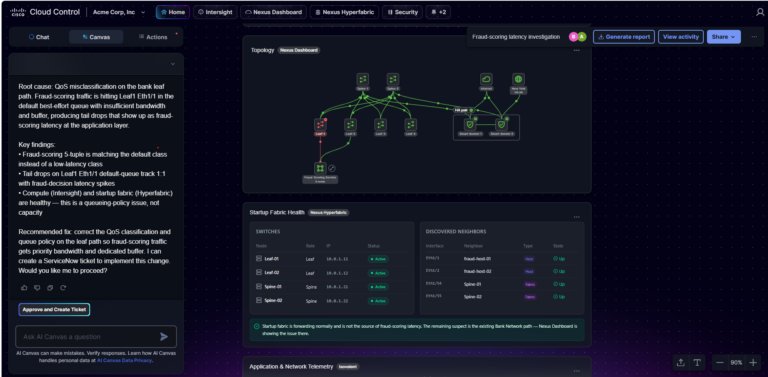
Customers in the U.S. can now request access on cloud.cisco.com. To help you get started quickly, no additional licensing costs are required. Access requires two or more connected Cisco products and U.S.-hosted deployment. Regional availability outside the U.S. is planned for later in the year.
Stop wasting time navigating disconnected consoles and start managing your Cisco Nexus infrastructure through a single, unified lens. Cisco Cloud Control streamlines cross-domain troubleshooting by integrating your Nexus One estate, ensuring your infrastructure stays optimized for complex AI workloads and whatever comes next.
Network demands are surging as businesses adopt AI across more applications, branches, and cloud environments. At the same time, networking and security teams are under growing pressure to protect distributed users, devices, applications, and data—without adding more operational complexity.
In today’s distributed, cloud-first environments, legacy overlay security can’t protect high-bandwidth AI workloads, remote users, hybrid branches, and dynamic data flows.
To safely scale AI initiatives while protecting corporate data and preventing data leakage—and without overwhelming already-stretched IT teams—growing businesses need embedded network security, infusing protection into the network itself.
AI and agentic workloads demand massive bandwidth and create complex, unpredictable traffic patterns. Data now flows dynamically across hybrid environments, remote branches, cloud applications, and multicloud infrastructures. In fact, a single agentic task generates 450% more traffic than a human doing equivalent work. Securing that movement requires a more agile, intelligent network.
At the same time, attackers are using AI to increase the volume, speed, and sophistication of cyberattacks. Phishing campaigns are now hyper-personalized, malware is adapting to evade detection, and automated bots are probing networks for weaknesses at an unprecedented scale.
AI-era threats require AI-assisted network and security operations. By integrating AI directly into network devices and leveraging AI-enabled SecOps tools, networking and security teams can move from reactive firefighting to faster detection, prioritization, troubleshooting, and response. This can help growing businesses adopt AI with more operational confidence, while helping lean teams reduce manual investigation and contain risk faster.
Traditional overlay security adds appliances and software to existing infrastructure. This often creates more operational complexity: fragmented visibility, disjointed consoles, inconsistent policy enforcement, and bottlenecks that can slow performance.
Some businesses may look into upgrading a firewall appliance or investing in new routers, but with this add-on approach, traffic may need to be routed out of its way to a security checkpoint and back again. That added latency and complexity can be especially challenging for AI workloads, distributed users, and cloud-first environments.
Embedded network security changes the model. Instead of treating security as a separate layer, protection is integrated across the network fabric itself, including routing, switching, wireless access, cloud access, and identity-aware controls. The network becomes a point of visibility, intelligence, and enforcement.
In this model, every node becomes both a sensor and an enforcer, and every connection becomes a point of visibility and control.
Moving away from fragmented point solutions and adopting a secure networking model can help reduce operational complexity, improve resilience, and give lean IT teams more consistent control across distributed environments.
The Cisco approach to secure networking is a model that can support business continuity, modernization, and scale without a linear increase in tools or manual work.
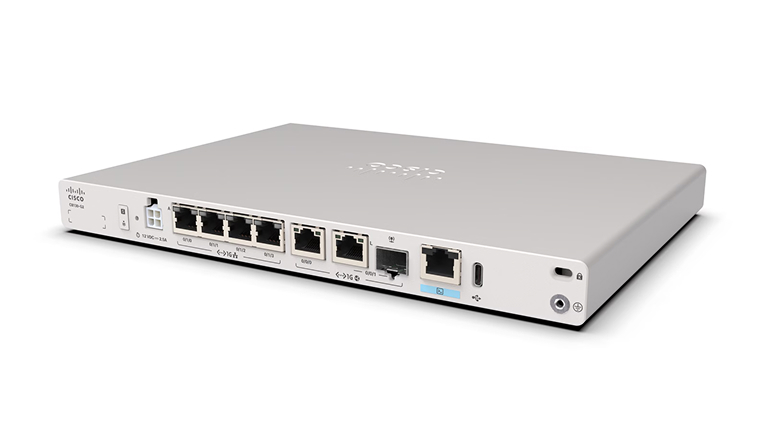
Secure networking starts by embedding protection into the infrastructure, not bolting it on piecemeal. Cisco 8000 Series Routers with built-in Cisco firewall provide protection at the WAN edge, helping organizations secure distributed environments and support cloud-managed security. Cisco Wi-Fi 7 and Cisco Smart Switches extend embedded security directly into campus and branch infrastructure, where users, devices, and applications connect.
Cisco Multicloud Fabric (announced at Cisco Live 2026) helps IT connect sites directly to clouds and cloud-to-cloud with built-in security, end-to-end visibility, and a fabric that scales with AI workloads.
These solutions help IT teams gain visibility and enforce policy closer to where activity begins, whether supporting remote employees, securing branch connectivity, or protecting regulated environments where consistent access control and uptime are critical.
The agentic AI era requires a network that can support true innovation while defending against rapidly evolving threats. At Cisco Live 2026, the secure harness for agentic AI was announced: Cisco Cloud Control.
Cisco Cloud Control is an AI-native management solution for orchestrating and securing enterprise IT infrastructure. Cisco Cloud Control gives humans and agents a unified operations platform that brings every Cisco domain and third-party tool into one environment—one login, one view, one operating model.
Cisco also delivers AI tools to enhance security operations. Cisco AI Assistant and AI Canvas make ops more actionable by helping teams detect threats faster, simplify management, and respond more effectively. These capabilities can reduce the burden on lean IT teams by making complex network and security tasks easier to understand and act on.
With intelligence built into the operating model, teams can move from manual investigation and reactive troubleshooting to more proactive, AI-assisted operations.
Firewalls remain essential, but modern security can no longer rely on firewall-centric thinking alone. Users, devices, applications, and data now operate across branch locations, cloud services, software-as-a-service (SaaS) platforms, remote environments, and hybrid infrastructures.
Cisco’s approach to secure networking goes beyond the firewall by integrating protection across routing, access, and cloud environments. Secure routers and firewalls help protect traffic moving between sites, clouds, and users while SASE extends identity-aware protection to cloud applications and remote users.
This equips IT teams with consistent control across WAN edge, campus, branch, cloud, and remote access environments.
In distributed environments, trust cannot be assumed based on location. A user in the office, a remote employee, a branch device, and a cloud application all need consistent, identity-aware access control.
Cisco Access Manager enables unified access control across users, devices, and applications. It helps organizations verify who and what is connecting, apply appropriate policy, and reduce the risk of unauthorized access.
Together with Cisco SASE for Meraki, organizations can extend secure, identity-aware access to remote users and cloud applications without multiplying management tools.
For many growing businesses, the biggest security challenge isn’t just the number of threats. It’s the number of tools required to manage them.
Cisco helps simplify operations through a unified platform that brings networking and security together across routers, firewalls, wireless, switches, access control, SASE, and AI-powered operations. This integrated approach helps lean IT teams maintain high performance and strong security while reducing complexity.
Policies can be applied more consistently. Visibility improves across users, devices, branches, and clouds. AI-assisted capabilities help teams investigate, troubleshoot, and respond faster. The result? Integrated security and network performance that lean teams can manage more consistently across distributed environments.
For teams building a business case, the Cisco secure networking model can also support tool consolidation and operational efficiency discussions.
As a maritime technology company helping the shipping industry improve vessel efficiency and reduce emissions, Silverstream Technologies depends on digital collaboration and dependable access across a growing global business.
For a company focused on serving customers across a complex maritime ecosystem, the network is more than infrastructure. With the Cisco Meraki dashboard and Cisco Secure Client, Silverstream strengthened the technology foundation needed to support its operations, connect teams, and scale securely.
The company now enforces consistent policies, encryption, and monitoring across all facilities and remote connections—including a London HQ with more than 1600 detectable wireless networks.
Silverstream’s secure, cloud-managed Cisco network also helps it achieve ISO 27001 certification by adhering to the rigorous data protection standards demanded by the world’s leading shipbuilders.
YMCA of Niagara is a mission-driven organization with a goal to deliver better digital experiences across distributed locations. Supporting multiple facilities, programs, staff, members, and guests requires reliable connectivity and simplified IT operations.
With Cisco Meraki switches and SD-WAN appliances, YMCA of Niagara transformed their network foundation to better support secure access and consistent connectivity across community environments. Thanks to the Cisco Premier Breach Protection Suite, YMCA of Niagara deploys threat detection and response across network, cloud, endpoint, and email, with integrated tools like XDR Premier and Cisco Secure Email Threat Defense combined with 24/7 managed services.
By moving to the centralized Cisco Meraki dashboard, their IT team is now spending less time managing complexity and more time supporting the services and experiences people rely on. They have achieved an 80%+ decrease in mean time to resolution (MTTR) and 70% reduction in support incidents with Cisco.
The AI era has rewritten the rules of enterprise technology. To keep pace with business demands while defending against automated, intelligent threats, organizations can no longer rely on fragmented, bolt-on security tools.
The future belongs to those who build security from the ground up. By unifying networking and security into a single embedded architecture, IT teams can simplify daily operations, reduce complexity, and build more consistent availability, policy control, and operational resilience.
It’s time for your network to do more than connect your business. With Cisco, your network actively defends itself—everywhere—so you can scale assuredly as you grow.