Every IT team knows employees are using AI tools nobody approved. Most have accepted it as a cost of doing business. Our new research shows that cost is already being paid in security incidents.
In June 2026, DNSFilter and CensusWide surveyed 400 IT and cybersecurity professionals across the US and Canada for The Visibility Deficit: The 2026 AI Cybersecurity Report. AI adoption is effectively universal: 99.75% of respondents say someone in their organization uses AI tools at work, and 55% run three to five of them. Nearly half of organizations (46%) have had an employee connect an unauthorized AI tool directly to corporate systems. For one in five (20.1%), that connection caused a security incident. Another 14.8% suspect it happened but can’t confirm it.
The incidents are already here. The bigger problem is how few organizations see them coming.
Shadow AI is any AI tool, model, browser extension, or agent that employees use or connect to corporate systems without IT’s approval or knowledge. It includes chatbots used through personal accounts, AI features inside approved SaaS apps that were never reviewed, and AI tools granted OAuth or API access to company email, files, or code repositories.
This increased risk comes from access. Once a tool holds a token to corporate data, it can read, store, and move that data without anyone reviewing each step. An employee pasting text into a chatbot exposes what they paste. An AI tool connected through OAuth can reach everything the employee can.
Most organizations already have rules for AI. 81% have a formal AI tool policy in place, and 55.75% say it’s consistently enforced. The gap is that a policy only works when someone can see it being broken.
When a new AI tool requests OAuth or API access to corporate systems, 43% of organizations let employees grant it themselves. IT either hears about it after the fact or, for 6.5% of organizations, never hears about it at all. Leadership and practitioners also disagree on how tight that gate is: 73.9% of executives surveyed believe new AI tools require admin approval, while only 58% to 60% of practitioners say that approval actually happens.
Detection leans on the same weak link. Asked how they identify incidents involving third-party SaaS or AI tools, 41.5% of respondents rely on user reporting, nearly the same share that use CASB or SaaS security tools (41.75%). In other words, a large share of shadow AI surfaces only when someone happens to mention it. Yet 91.5% are confident they would detect a breach within six hours.
The 20.1% incident rate is also likely an undercount. 37.75% of respondents say their organization has had a security incident that was never formally reported, and 43.5% say their organization has, at times, downplayed the severity of an incident because it lacked the resources to fix it.
Company size also doesn’t solve it. The largest organizations surveyed (2,500 to 5,000 employees) that have the most mature AI governance in the study still report the highest shadow AI incident rate: 32.5% say an unauthorized AI tool caused a security incident. At the smallest organizations (150 to 499 employees), half have already had unauthorized AI tool connections, and 24% say those connections have caused an incident.
Shadow AI rarely looks like a new, unknown application. It usually arrives through one of three routes:
Each route has the same starting point: A tool connects before anyone checks it.
Every AI tool, sanctioned or not, has to resolve a domain before it can do anything. That makes the DNS layer the earliest place to see shadow AI, at the moment a tool arrives instead of the moment it causes a problem. DNSFilter provides DNS-level visibility into the AI tools and agents communicating from your network, secure access for the AI your teams have sanctioned, and governance for the autonomous agents arriving next.
With that visibility, your team can answer three questions that most organizations in our survey can’t:
For existing DNSFilter customers, this visibility lives in the dashboard you already use. For MSPs, shadow AI is a client conversation worth having now, especially with SMB clients that carry the heaviest exposure and the least governance. “We have an AI policy” is a different conversation than “we can show you every AI tool talking to your network.”
The Visibility Deficit: The 2026 AI Cybersecurity Report covers the complete findings, including the gap between what executives believe and what practitioners see, and how autonomous AI agents raise the stakes. Download the report, or start a free trial to see what’s running on your network today.
Shadow AI is any AI tool, model, extension, or agent used or connected to corporate systems without IT’s approval or knowledge. The biggest risk comes from unapproved AI tools granted OAuth or API access to corporate data.
Very common. In DNSFilter’s 2026 survey of 400 IT and cybersecurity professionals, 46% said an employee had connected an unauthorized AI tool to corporate systems, and another 14.8% suspected it had happened but couldn’t confirm it.
Yes. 20.1% of respondents said an unauthorized AI tool connection caused a security incident at their organization. Among the largest organizations surveyed, that figure rose to 32.5%.
Most organizations combine SIEM, CASB or SaaS security tools, audits, and user reporting, and 41.5% of respondents in DNSFilter’s 2026 survey rely on user reporting. Monitoring at the DNS layer shows AI tools when they first connect, before they are granted access to data. DNS filtering is an optimal way to detect unauthorized AI usage on the corporate network, while also providing a way to control that AI usage.
Not on its own. 81% of organizations surveyed have a formal AI tool policy, yet 43% still let employees grant AI tools OAuth or API access without prior approval. A policy needs visibility behind it to be enforced. DNSFilter gives you the ability to create an enforceable policy, allowing sanctioned AI tooling and blocking tools that you do not want your employees to access.
Between June 15 and 26, 2026, DNSFilter partnered with CensusWide to survey 400 IT and cybersecurity professionals across the US and Canada. Respondents were manager-level and above at companies with 150 to 5,000 employees, across all industries.
Your team is getting watched in two different ways right now, and neither one shows up in a security report.
The first is the network. The moment someone opens a laptop in a hotel, an airport, or a conference hall, their outbound traffic is visible to anyone else watching that network.
The second happens everywhere, including on the network you own. The sites your team visits are quietly collecting: Location trackers, mail trackers, data brokers, and ad networks build profiles in the background on every single visit.
We have had tools for the first problem for years. The catch is that most of them only work when the user remembers to turn them on. They forget. They skip it on fast hotel Wi-Fi. They turn it off when it slows something down.
That gap, between “we have a tool for that” and “protection is actually running,” is where traffic gets intercepted and users get profiled.
SecureTransit closes it.
SecureTransit is endpoint privacy, enforced as policy. It does two things.
It encrypts outbound traffic before it leaves the device. Every time your team connects from a hotel, an airport, or a conference, they are on a network you do not own, and traffic on those networks can be observed and intercepted. SecureTransit encrypts it at the device, so what crosses the wire is unreadable to anyone watching locally.
It blocks trackers at the source. Location trackers, mail trackers, data brokers, and ad networks get cut off before data ever leaves the device. This one applies on any network, from the office to home network to hotel Wi-Fi.
SecureTransit ships inside the DNSFilter Roaming Client, the same lightweight agent you already use for filtering and for user activity intelligence through CyberSight. There is no second agent to deploy and no second console to learn.
Admins set the mode per organization or per device: Always-On, Manual, or Disabled. Credentials are provisioned and managed server-side, so your users never configure anything. That means they cannot misconfigure anything, and in Always-On mode, they cannot opt out.
SecureTransit is currently in beta and is available in our existing two-week free trial.
Login or start your free trial today.
Fair question, and yes, at the DNS layer. DNS filtering blocks trackers during DNS resolution, before a connection is ever made, and it runs everywhere your Roaming Clients run.
SecureTransit blocks the tracker connection at the source, as traffic passes through the tunnel. That catches what DNS-layer blocking alone cannot, and it encrypts everything else along the way.
One distinction worth making: DNS-over-TLS and DNS-over-HTTPS encrypt the DNS query itself, but everything that comes after that query is still in the clear. SecureTransit encrypts the whole path, device to internet.
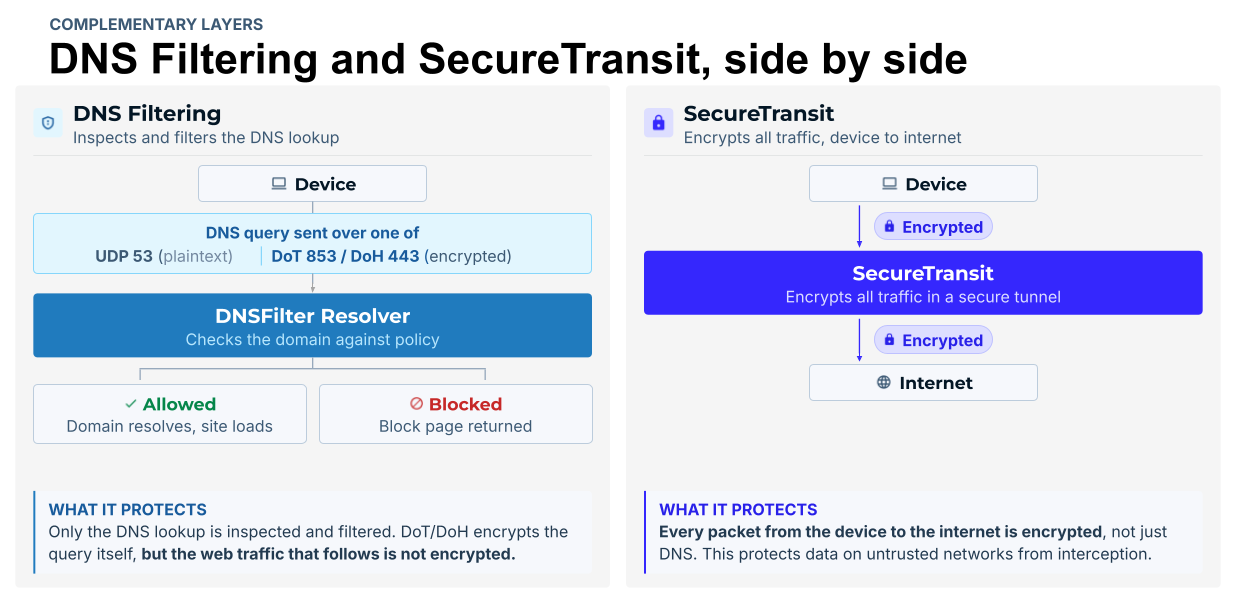
The two run as complementary layers with a graceful fallback. If the tunnel is disconnected or disabled, the device falls back to DNS-layer tracker filtering. Protection degrades. It never disappears.
This is the part I want to be clearest about, because “privacy” can sound a lot like “a place my users go that I cannot see.”
SecureTransit shields users from local-network observers and third-party trackers. It never shields them from your own admins. You keep the same DNS query visibility you have today, so there are no blind tunnels and no reporting gaps. Your users get privacy from outsiders, and you keep the audit trail.
With SecureTransit, the DNSFilter Roaming Client delivers three distinct capabilities through a single lightweight agent:
One deployment. Three capabilities. One place to manage all of them.
SecureTransit is a per-device add-on. You license it where the risk lives instead of paying for every endpoint in the building.
For most teams, that is a short list: The people who travel, the executives, the fully remote staff, and honestly, the users who keep failing your phishing simulations. If you are running 100 Roaming Clients and 10 of those users are the ones genuinely working off untrusted networks, you cover those 10.
Cost scales with exposure, not headcount.
For MSPs, that is what makes it sellable. SecureTransit runs inside the same multi-tenant dashboard you already use, so your techs deploy it without adding a vendor, a console, or a new workflow. This way, you can lead the conversation around privacy with: “Privacy is enforced as policy on every device that needs it.”
Enforcement has been a weak point for structural reasons more than technical ones. Most privacy tools are separate products with a separate agent, a separate console, and a separate vendor. That means another deployment to manage, another set of credentials to maintain, and a dependency on users to actually connect.
Every one of those is a place where it can quietly fail. The tool sits in a different workflow than your filtering policy. There is no way to tie enforcement to the organizational hierarchy you already manage. And when a user is off-network on a connection you do not control, you have no way to confirm anything is running at all.
We built SecureTransit for managed environments, where policy enforcement, not user behavior, is the security model.
DNSFilter blocks the threats. SecureTransit handles the privacy. Your data should be yours: On hotel Wi-Fi, on the office network, and inside every site your team visits.
SecureTransit entered beta on Aug. 17, 2026, and it is available today on the Windows Roaming Client, version 3.7 and up. Support for our other platforms is coming.
You can test it today in our 14-day trial. Then go look at how many trackers it blocked for those people in two weeks. That number tends to be the whole argument.
By Ken Carnesi, CEO & Co-Founder, DNSFilter
I’ve been going to Black Hat for years, and I can tell you plainly: This year was different.
Shadow AI and AI governance are top of mind now, an evolution from what we were hearing at RSA earlier this year. In an AI era, taking a DNS First approach to cybersecurity isn’t optional, and we’re built to solve exactly that problem.
We have a team focused entirely on DNS First security, backed by real solutions, and the momentum around DNSFilter this year was obvious: We were flooded with meeting requests and demand for a sneak peek at our new platform.
The biggest news of the week was ours: LUMINATE by DNSFilter™, upcoming platform launch that will include controls for Shadow AI and AI Governance. It drove more interest than anything else on the floor, and it’s not close.
Security leaders already know their employees are using AI tools nobody sanctioned. What they don’t have is visibility: Which ones, what data is leaving through them, or when a new one shows up unannounced. LUMINATE by DNSFilter is our answer to that, and the AI Governance conversations we had this week were some of the longest and most detailed of the show.
We’ll have a full GA offer ready in just a few weeks. Thank you to every Beta tester who’s given us the feedback that got us here.
Walk any expo floor this year and you’ll hear the same handful of words from booth after booth: Agentic AI. Autonomous response. Identity security. Those problems are real. The trouble is almost every vendor on the floor is pitching a version of the same story, and buyers have gotten very good at tuning that out.
We competed differently with something real to show, and a point of view most of the floor doesn’t share. A DNS First approach to security is the only control point that sees everything, from managed laptops to AI agents making requests on a user’s behalf. That point of view, backed by real solutions, is what made people stop at our booth instead of walking past it.
We hosted an enterprise dinner at Gordon Ramsay Steak and an MSP and channel partner dinner at the Bellagio this week. Time off the show floor like that matters because it’s where we get to hear what’s actually on your mind, not just pitch across a booth.
On the floor itself, our team ran thousands of demos under the banner “Protect Every Click.” Want the full, unfiltered, booth-level version of the week? Our Sr. Director of Product & Content Marketing, Serena Raymond, wrote it up here.
Room after room, customers, prospects, and partners described the same pain points: Remote and hybrid users nobody can see, AI tools nobody approved, and point solutions that don’t share signals with each other. Then, unprompted, they told us they see DNSFilter as uniquely positioned to solve it. We’re not making that claim ourselves. The rooms made it for us, all week.
To everyone who stopped by, asked hard questions, raced our slot cars, or sat down with us for a meal this week: Thank you. So many of you already consider us one of your leading partners, and weeks like this are exactly why.
We have some big announcements still coming. This was just the preview. Stay tuned.
Want to understand why DNSFilter is a market leader, and why a DNS First approach to cybersecurity is the right call in an AI era? We’re happy to show you. Schedule a personalized demo today.
– Ken
by DNSFilter Team on Jul 8, 2026 8:00:02 AM
WASHINGTON, D.C. July 08 2026 — DNSFilter, the global leader in AI-powered protective DNS and content filtering, today launched an Original Equipment Manufacturing (OEM) program that lets external ISPs, cybersecurity firms, device makers, and other consumer app developers to embed their best-in-class DNS threat protection, domain analysis, and privacy solutions into their own platforms and solutions. Partners can choose between two product paths: DNSFilter Protective DNS, for DNS-layer filtering and threat blocking, and/or DNSFilter Guardian Firewall and VPN services, for full-device traffic encryption and privacy or bundle both.
The program offers partners three commercial models: resell and bundle, embedded (headless), or white-label co-brand for ISPs and MSSPs. There is no platform lock-in, and integrations block threats from day one. The program is already being used by some of the world’s largest partners today and is now being made publicly available.
“ISPs, device makers, and security vendors have been quietly looking for a DNS protection layer they can trust and build on. We are opening up the same global network that already blocks threats for over 60 million users every day, backed by threat intelligence that catches attacks up to ten days before anyone else. Partners do not have to build any of it, they plug into infrastructure proven at a scale most companies will never touch and ship protection from day one,” said Ken Carnesi, CEO and Co-Founder of DNSFilter.
DNSFilters’ Guardian Firewall and VPN is already running at consumer scale, powering privacy and threat blocking on Amazon’s eero home and small business networks. Today, DNSFilter’s existing OEM integrations support upwards of 65 million users daily.
The move marks a significant expansion of DNSFilter’s reach. Today, the company’s platform processes 200 billion DNS queries per day across a global dual anycast network spanning more than 225 servers in over 85 countries, blocks more than 235 million threats per day, scans 2 million domains per second, and protects over 45,000 organizations. With the OEM program, that same protection, running at production scale across millions of devices, is now available to power the next generation of security products built by partners, wherever their customers are.
To better facilitate developers who need to map out, configure and model their systems prior to initiating an OEM partnership with DNSFilter, a dedicated developer Software Developer Kit (SDK) has been created to compress the time from interest to integration and is currently deployed on over 2 million devices at scale. Rather than navigating a lengthy procurement process, developers can access a sandbox environment, run their first privacy block in minutes, and build from there. The SDK supports integration across iOS, macOS, tvOS, Android, FireOS and Windows.
“Partners told us the fastest way to earn their trust was to put the platform in their developers’ hands and get out of the way. That insight drove everything about how we created our OEM program. When a developer can spin up a sandbox, write a policy, and see a real threat blocked, that’s when trust moves from the sales team to the engineering team,” said Kate Trojanowski, VP of Product and Engineering, DNSFilter. “The OEM program now formalizes that path for the next wave of partners.
“The window to get ahead on embedded DNS protection is now and the organizations moving early will have a real advantage as built-in security becomes the expectation. DNSFilter has proven this model at scale across thousands of organizations. This program gives partners the infrastructure and support to grow with it,” said Warren Small, Founder and CEO, Castle Ventures.
The OEM and Embed Partner Program is open now. Partners can explore partnership options and request SDK access at dnsfilter.com/oem or emailing [email protected].
New tiered program delivers deeper GTM support, named account management, and co-marketing investment for MSPs growing their security practice on DNSFilter
WASHINGTON, D.C., June 30, 2026 — DNSFilter, a global leader in AI-powered protective DNS and content filtering, today announced a significant expansion of its MSP Partner Program. The enhanced program introduces a structured three-tier model designed to meet MSPs where they are and invest more deeply in those growing their security services practice.
New research from DNSFilter reveals the scale of the commercial pressure MSPs are navigating with 85% of MSP leaders surveyed admitting there is a security capability they cannot effectively deliver today as they spend more time stitching tools together than stopping threats. The financial impact is direct: 49% cite security tool licensing costs as their single biggest obstacle to growing security revenue, 26% point to an unmanageable tech stack, and 23% to training overheads.
AI-Phishing top concern among MSPs surveyed
The top threats MSPs are most worried about over the next 12–18 months are operating at a layer that most current tools do not cover:
The common thread: these attacks operate at the DNS and web layer, before the endpoint agent can intervene. By the time an endpoint agent sees a threat, the user has already clicked, the page has loaded, and the resolution has happened. 38% of MSPs say they cannot effectively deliver protection against AI-generated threats today with 30% saying they cannot deliver network-level visibility beyond the endpoint.
The Security Opportunity MSPs Are Sitting On
DNSFilter’s 2026 MSP Research* found that 47% of MSP leaders cannot effectively deliver security posture reporting for compliance or cyber insurance purposes, the second-largest capability gap in the market, behind only advanced threat detection. For MSPs serving finance, healthcare, manufacturing, and legal clients, that gap is both a risk and a missed revenue opportunity.
“Our research makes the commercial reality facing MSPs impossible to ignore, but the flip side of that is a real opportunity we want to help our partners capture. When our partners succeed, more businesses get protected. That’s the outcome we’re building for,” said Ken Carnesi, CEO and Co-Founder of DNSFilter.
Built for MSPs from Day One: Introducing the Three-Tier MSP Partner Program
Today, more than 6000 MSPs use DNSFilter, and last year the company made its largest MSP investment to date, acquiring Zorus and launching CyberSight to identify phishing infrastructure and lookalike domains before they reach client networks.
The new enhanced MSP Partner Program builds on this foundation with a three-tier structure designed to match the level of investment DNSFilter makes to the level of commitment an MSP brings:
DNSFilter Select Partner: Partners get immediate access to our multi-tenant platform and the DNSFilter Partner Edge Portal, white-label campaign assets, self-paced training, and volume-based pricing with no application form, no approval queue, and no long-term contract standing between them and a security layer their clients will feel.
DNSFilter Accelerator Partner: By invitation or application, for MSPs committed to growing their security services practice. Accelerator Partners receive a named account manager, sales engineer support for demos and POCs, co-marketing resources backed by MDF investment, and a dedicated annual business review so growth conversations are grounded in actual numbers, not guesswork.
DNSFilter Strategic Partner: DNSFilter’s deepest commitment, reserved for partners going all-in on security services growth. Includes custom enablement, joint selling motions, co-branded/white-label marketing, ongoing MDF, and a dedicated DNSFilter team aligned to the partner’s revenue goals. When a Strategic Partner wins, DNSFilter wins with them.
“The MSP community is where cybersecurity protection actually gets delivered to the businesses that need it most. With this next chapter in our program, we’re putting more resources, more people, and more structure behind the partners who are growing with us. If you’re an MSP who’s been thinking about making DNSFilter a bigger part of your stack, this is the right time” said Dan Cucchi, VP of MSP and Channel Sales, DNSFilter.
“DNSFilter has been a core part of our security stack for years, and this new MSP program reflects exactly what we’ve always valued about this partnership, a team that understands how MSPs operate and builds programs to match,” said Rick Dupuis, Sr. Manager, Technical Solutions, Mainstay Technologies. “For Mainstay, DNS protection isn’t optional; it’s a non-negotiable first layer of defense for every client we onboard. Having a partner program that reinforces that model with the right pricing, support, and tooling makes it easier for us to deliver consistent security outcomes at scale.”
“Being part of DNSFilter’s MSP program isn’t just about adding another tool to our stack, it’s about aligning with a team that genuinely understands how we operate and what our clients need. DNSFilter has earned that trust. The platform delivers where it matters: reliable protection, a management experience built for multi-tenant environments, and a support team that treats us like partners. That’s what makes the relationship sticky and what makes it easy for us to put DNSFilter in front of our clients with confidence,” commented Charles Love, COO, ShowTech Solutions.
For more information please read our blog or visit the Partner Page for further details.
*About the Research Methodology
Survey of 100 senior-level cybersecurity and IT professionals at US-based Managed Service Providers. Fieldwork conducted in spring 2026. Respondents hold titles of Director level and above. Full report can be found here
About DNSFilter
DNSFilter is a cybersecurity company that protects every click, leveraging AI-driven content filtering and threat protection to block threats up to 10 days earlier than competitors. DNSFilter’s solution secures workers wherever they are, helping organizations boost productivity, minimize compliance risk, and protect corporate brands on public Wi-Fi networks. Trusted by more than 45,000 organizations worldwide, DNSFilter enables organizations to deploy powerful protection in minutes while gaining deep visibility into their security posture. Learn more at dnsfilter.com
Media Contacts:
Rebecca Cradick
Vice President, Global Communications and Investor Relations
[email protected]
The relationship between DNSFilter and Pax8 just got stronger. We’re proud to announce that DNSFilter has reached Platinum partner status with Pax8 and we’re heading to Pax8 Beyond as a Gold Sponsor June 7-9.
Cyber threats aren’t slowing down. Phishing campaigns launch in minutes and malicious domains go live before traditional threat intelligence can catch them.
DNSFilter is designed for that exact environment. Trusted by more than 3,000 MSPs, our AI-powered platform catches malicious domains an average of 10 days before traditional threat feeds list them. This happens at the DNS layer, before the connection ever completes, so your clients never see the payload. No waiting on threat feed updates. No relying on yesterday’s data.
At Beyond, you will see DNSFilter’s latest and greatest in action:
One of the fastest-growing risks for your end customers right now is Shadow AI: Employee use of unsanctioned AI tools. These unmanaged apps create data exposure risks and compliance gaps that most traditional security tools don’t address.
DNSFilter detects and blocks unauthorized AI usage via AppAware, giving you a way to manage this risk without adding complexity to your stack.
More and more MSPs are finding DNSFilter through Pax8 to help their clients enhance protection against phishing, malware and advanced cyber threats. For example, Kazmarek Technology Solutions found DNSFilter at a previous Beyond conference when they were urgently searching for a replacement for a sunsetting web security vendor. According to Danny Kazmarek, President and CEO, the switch was a clear call: “Not only was it a comparable market price, but their user interface is way more modern than the previous solution. That made it a no brainer for us.” Read the full case study here.
Stop by the DNSFilter booth #333 to see CyberSight, PreCheck, and AppAware in action. Our team will be there to walk you through how DNS security fits into your existing security stack.
Ready to check these new features out for yourself? Start your free trial today.
When we launched CyberSight in March, the goal was clear: close the visibility gap between what DNS logs show and what users actually do. Activity logs, full URL tracking, application usage, device state—the data security teams need but haven’t had from their DNS provider.
With a strong foundation of user behavior data in place, we can now help our customers take visibility to the next level and empower them to make sense of this data faster than ever. Today we’re delivering two new CyberSight capabilities: Threat Trends and Timeline.
Activity logs give you depth but when you’re managing hundreds of users, you need a way to surface what matters without scrolling through individual events. Threat Trends provides that elevated view.
Threat Trends aggregates threat intelligence across your environment to show:
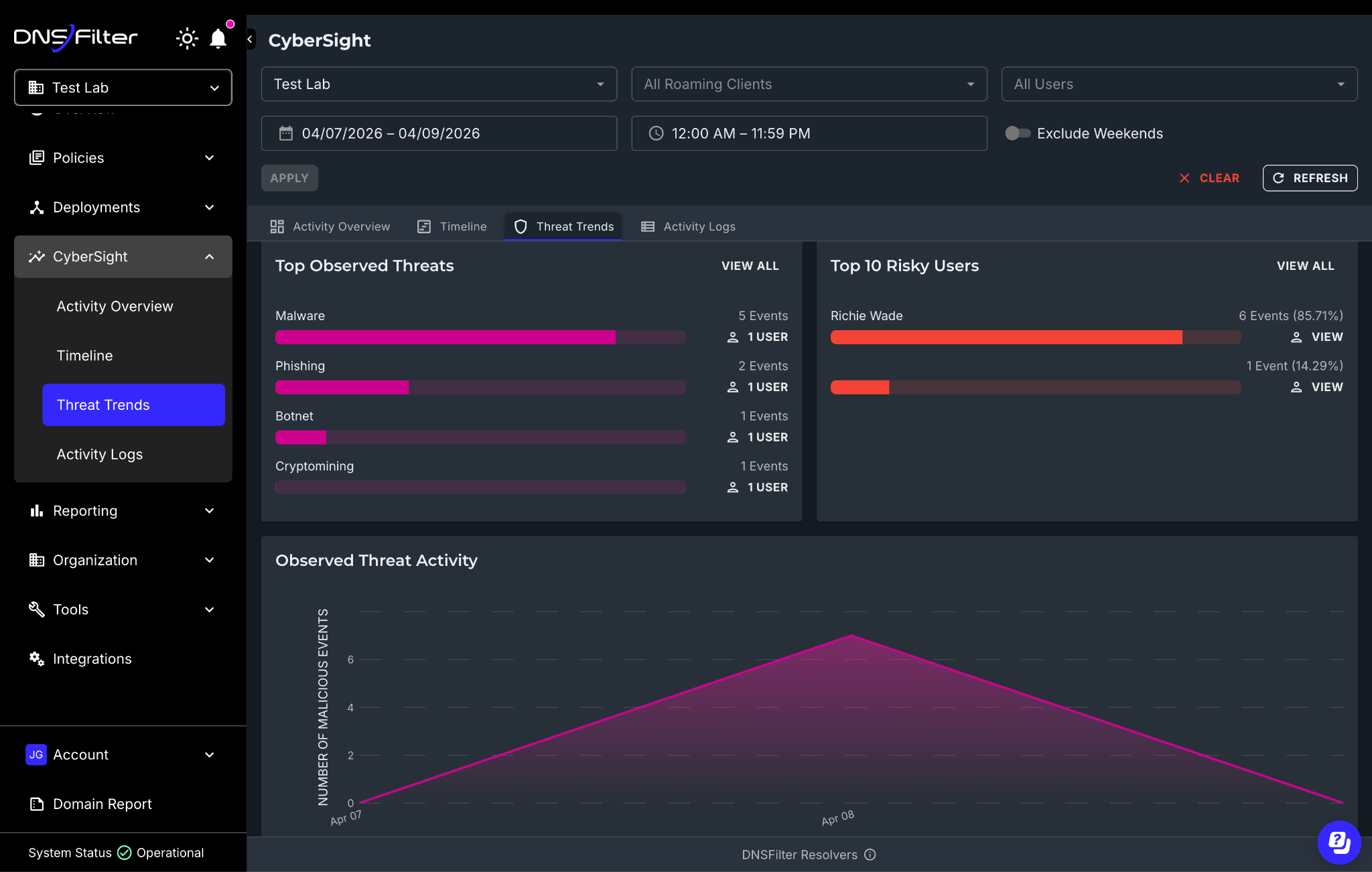
CyberSight Threat Trends dashboard showing top threats and riskiest users
All of this data is exportable via CSV through the API, so if you’re building QBR reports for clients or feeding data into your own workflows, you can pull in what you need.
Before Threat Trends, answering a question like “which threat categories are hitting us hardest this month?” meant manually filtering activity logs, user by user. Now you have a single view that surfaces the signal across your entire environment.
For MSPs, this is especially practical. You can pull up Threat Trends per-organization and immediately see which client environments have the highest concentration of observed threats without building custom reports or switching between tools.
If Threat Trends tells you where to look, Timeline tells you what happened.
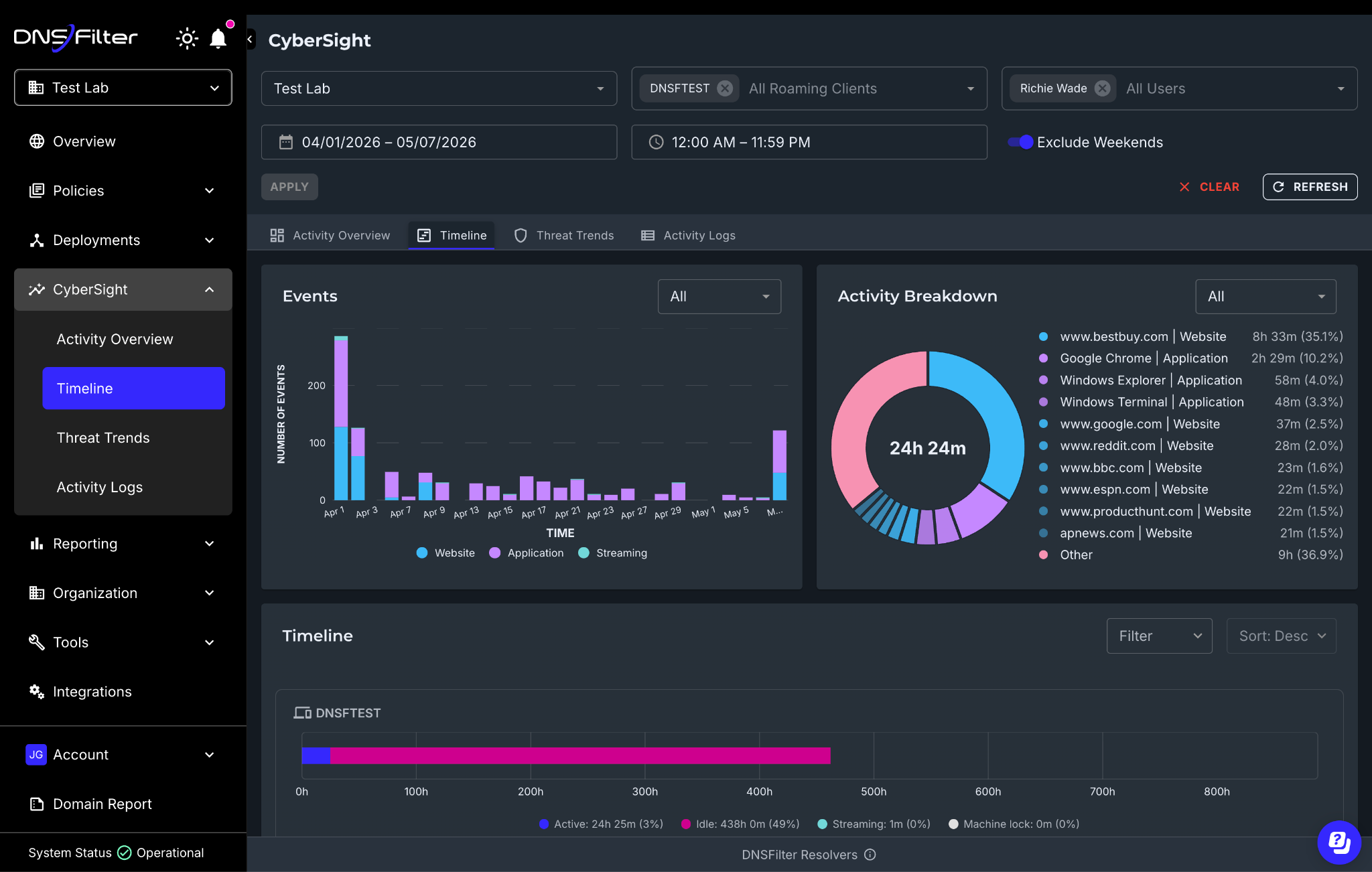
Timeline provides an hour-by-hour, chronological reconstruction of user activity within any given time period. It’s built to support you during active investigations when you already know something is wrong and need to understand the sequence of events.
It’s designed to make patterns and anomalies visible at a glance by:
This is where CyberSight goes from a visibility tool to an investigation tool.
Consider the scenario we discussed in this article: A device starts a high-speed upload to cloud storage at 2:00 AM while the user is idle. CyberSight’s activity logs already capture that event. But with the Timeline, you can now reconstruct everything that user’s device was doing in the hours before and after—what applications were open, which websites were visited, when the machine was locked and unlocked, and whether the activity pattern looks like a compromised device or a legitimate process.
Understanding the context of what happened when an alert is triggered is critical for validating real threats. Timeline compresses what used to be a multi-tool, multi-day investigation into something you can walk through in a single view.
A few things worth reiterating since the launch:
Threat Trends and Timeline complete our initial suite of capabilities for CyberSight, all working together to give you a full picture from high-level trends down to granular event forensics.
But we’re not stopping here. Scheduled reports, deeper integration between CyberSight data and the DNS query log, and expanded export capabilities are all in the pipeline. We’ll share more as they ship.
If you’re already a customer, Threat Trends and Timeline are live in your CyberSight dashboard today. Log in and explore.
If you’re not yet using CyberSight, try it for free today.
WASHINGTON, D.C. – May 4, 2026 — DNSFilter, a cybersecurity company that protects every click, proudly announced today that CRN®, a brand of The Channel Company, has recognized Kate Trojanowski, Virginia McKeon, Wasam (Sam) Youssef on the prestigious Women of the Channel list for 2026.
This annual CRN list celebrates women from vendors, distributors, solution providers and other channel-focused organizations who make a positive difference in the IT ecosystem. The CRN 2026 Women of the Channel honorees are innovative and strategic leaders committed to advancing channel excellence and supporting the success of their partners and customers.
Kate Trojanowski, Virginia McKeon, Sam Youssef each bring a distinct and complementary contribution to DNSFilter’s channel business. McKeon, Partner Development Manager with eight years in the MSP channel, has driven partner growth through relationship-first execution, guiding MSPs through discovery, onboarding, and pricing while serving as an internal advocate for partner needs. Trojanowski, Vice President of Product with more than 15 years in the industry, has strengthened DNSFilter’s channel by embedding a partner-informed perspective into product strategy, relaunching the beta program to create earlier feedback loops, and hosting recurring product webinars to improve enablement across both DNSFilter and Zorus audiences. Youssef, Partner Success Manager, managed a portfolio of more than 220 MSP partners over the past year, facilitating onboarding, driving contract renewals and expansions, and delivering 119% Net Revenue Retention in Q3 and 113% NRR year-to-date.
“It’s a privilege to celebrate the remarkable achievements of these women who are driving meaningful change across the IT channel,” said Jennifer Follett, VP of U.S. Content and Executive Editor, CRN at The Channel Company. “Each honoree has demonstrated exceptional leadership and a commitment to bold, innovative strategies that fuel transformation, growth, and success for their organizations and the broader channel. We’re proud to recognize their impact and look forward to seeing how they continue to shape the future of our industry.”
Kate Trojanowski, Vice President of Product, DNSFilter: “This recognition means a great deal, especially in a year focused on building the right foundation for partner-led growth. Product and channel don’t always speak the same language, but bridging that gap has been my priority. When MSPs have a direct line into the roadmap, everyone wins, and I’m committed to keeping that feedback loop strong in 2026 and beyond.”
Virginia McKeon, Partner Development Manager, DNSFilter: “Being recognized on the CRN Women of the Channel list is a reflection of the partners I get to work with every day. The MSP community runs on trust, and my goal has always been to show up as a reliable, long-term resource, not just another sales contact. I’m proud to represent DNSFilter and the channel relationships we’re building together.”
Wasam (Sam) Youssef, Partner Success Manager, DNSFilter: “I’m honored to be included alongside such accomplished women shaping the channel. Watching MSP partners move from onboarding to confident, growing deployments is what drives me. Hitting our NRR targets this year wasn’t just a number, it was proof that when you invest in the partner relationship first, the results follow.”
The 2026 Women of the Channel will be featured online beginning May 4 at crn.com/wotc.
About DNSFilter
DNSFilter is a cybersecurity company that protects every click, leveraging AI-driven content filtering and threat protection to block threats 10 days earlier than competitors. DNSFilter’s solution secures workers anywhere they are, helping to boost productivity, minimize compliance risk, and protect corporate brands on public Wi-Fi networks. Unlike traditional filtering solutions, DNSFilter deploys in minutes instead of days and is trusted by more than 43,000 organizations worldwide. Learn more about how DNSFilter is the first and last line of defense for corporate and hybrid networks at dnsfilter.com.
About The Channel Company
The Channel Company (TCC) is the global leader in channel growth for the world’s top technology brands. We accelerate success across strategic channels for tech vendors, solution providers and end users with premier media brands, integrated marketing and event services, strategic consulting, and exclusive market and audience insights. TCC is a portfolio company of investment funds managed by EagleTree Capital, a New York City-based private equity firm. For more information, visit thechannelco.com.
Growth should feel like progress.
But for a lot of MSPs, there comes a point where growth starts to feel heavier instead. New clients are coming in, and revenue is rising, yet the day-to-day operation feels more stretched, not more efficient. The service desk is constantly busy. Senior techs keep getting pulled into escalations. The team is working harder just to maintain the same standard of delivery.
The usual response is to hire more people. On paper, it makes sense. More demand requires more capacity. In practice, it’s where margins start to plateau because hiring doesn’t fix the underlying problem, it just helps you keep up.
The linear model that breaks margins
Most MSPs experience demand in a simple, linear way: More clients mean more tickets, and more tickets require more staff. It feels logical because it reflects what the team sees every day: More endpoints, user issues, performance complaints, and security-related noise.
But the model only works for so long, and isn’t scalable.
Headcount is one of the most expensive and least flexible ways to increase capacity. It comes with recruiting pressure, onboarding time, management overhead, and ongoing labor costs. It also increases dependency on specific individuals, which creates real risk when key technicians leave, burn out, or simply become the bottleneck.
It’s the daily MSP leader balancing act: Protect service quality and keep clients happy, without letting labor costs eat margins.
The real constraint isn’t demand
The hard truth is that most service desks aren’t under pressure because of major incidents every day. They are under pressure because of volume. Small, repetitive (and often preventable) issues that fill the day and steadily drain capacity like:
This is operational noise, and it exists regardless of how many techs you hire.
When you hire more people, you increase your ability to process that noise, but you don’t reduce the amount of it. The same patterns keep creating the same work, and over time, you end up with a larger team handling the same problems at a higher cost.
Growth becomes less profitable because revenue rises, but the cost of delivering it rises right alongside it. Your margins don’t improve because the system underneath the business hasn’t changed.
The hidden cost is where your best people spend their time
As the linear model scales, your most capable people stop doing your most valuable work.
When senior staff are tied up in low-value investigations, constant escalation, and reactive firefighting, they are not improving the business. They’re being pulled away from the work they should be focused on, like standardizing service delivery, building repeatable processes, rolling out new security offerings, or creating operational improvements that increase margins over time.
The business keeps moving but it doesn’t move forward as it should, and it’s one of the clearest signs that the system is under strain. Your most experienced people are spending too much of their time protecting the present and not enough improving the future.
Reduce the work, scale well
The MSPs that scale most effectively don’t focus solely on adding capacity. Instead, they focus on reducing the effort required to deliver their services. That starts with prevention.
Every security event that reaches the helpdesk has already created work for the team. There is detection, alerting, triage, investigation, remediation, client communication, and the usual context switching that breaks a technician’s flow. Even if the event turns out to be harmless, the time has already been spent.
Across dozens or hundreds of clients, that creates a significant operational load. The earlier you stop the problem, you stop a significant amount of “noisy” work from ever appearing.
Prevention creates a quieter operation
If you can stop threats before a connection is made, a payload is downloaded, or an alert is generated, you remove the whole chain of downstream effort.
Fewer threats getting through means fewer alerts, fewer tickets, fewer investigations, and less need for senior escalation on routine security issues.
The impact is a quieter system that allows each technician to support more users and endpoints without constantly feeling stretched. It makes onboarding smoother because new clients don’t immediately feed unnecessary noise into the service desk. It gives the business a more predictable cost base and reduces the need to keep solving the same operational problems with more people.
Over time, it stabilizes your cost base. Instead of revenue and headcount rising together, you increase the number of clients each technician can support. Margin improves not because you charge more, but because it costs less to deliver the same service at the same (or higher) standard.
The advantage of provable value
When your security approach is preventative rather than reactive, the conversation with clients changes. You are no longer limited to showing how many tickets were closed or how quickly incidents were handled. You can show how much disruption and risk was avoided in the first place.
Value is easier to demonstrate because the outcome isn’t activity; it’s stability.
That creates a stronger foundation for pricing, packaging, and expanding security services.
Growth isn’t a bigger team, it’s a better system
Hiring more techs will always increase capacity in the short term.
But it will not, on its own, make your MSP more scalable. It will not reduce operational noise, simplify delivery, or lower the cost to support each client.
Only removing unnecessary work from the system does that. That is what separates growth from profitable growth. Not a bigger team, but a better operating model.
Learn how DNSFilter helps MSPs cut ticket volume, reduce technician workload, and improve margins at the DNS layer; start your free trial today.
DNSFilter Wins Market Leader Placement for Internet Filtering, Protective DNS, SMB Cybersecurity in 14th Annual Global InfoSec Awards at #RSAC 2026
SAN FRANCISCO, CA – MARCH 23, 2026 – DNSFilter is proud to announce we have won the following award(s) from Cyber Defense Magazine (CDM), the industry’s leading electronic information security magazine:
“We are thrilled to be named a market leader in three distinct categories by Cyber Defense Magazine during their 14th anniversary. On the heels of launching our DNS PreCheck and CyberSight capabilities, we have shown that we are committed to innovation and supporting enterprises, SMBs, and MSPs,” said Ken Carnesi, CEO of DNSFilter.
“DNSFilter embodies three major features we judges look for to become winners: understanding tomorrow’s threats, today, providing a cost-effective solution and innovating in unexpected ways that can help mitigate cyber risk and get one step ahead of the next breach,” said Gary S. Miliefsky, Publisher of Cyber Defense Magazine.
We’re thrilled to be a member on this coveted group of winners, located here: http://www.cyberdefenseawards.com/
Please join us at the #RSAC RSAC Conference 2026, https://www.rsaconference.com/usa today, as we share our red-carpet experience and proudly display our trophy online at our website, our blog and our social media channels.
About DNSFilter
DNSFilter is a cybersecurity company that protects every click, leveraging AI-driven content filtering and threat protection to block threats up to 10 days earlier than competitors. DNSFilter’s solution secures workers wherever they are, helping organizations boost productivity, minimize compliance risk, and protect corporate brands on public Wi-Fi networks. Trusted by more than 45,000 organizations worldwide, DNSFilter enables organizations to deploy powerful protection in minutes while gaining deep visibility into their security posture. Learn more at dnsfilter.com.
About the Global InfoSec Awards
This is Cyber Defense Magazine’s thirteenth year of honoring InfoSec innovators from around the Globe. Our submission requirements are for any startup, early stage, later stage, or public companies in the INFORMATION SECURITY (INFOSEC) space who believe they have a unique and compelling value proposition for their product or service. Learn more at www.cyberdefenseawards.com