
Enea brings a wealth of software and expertise, spanning both the 3GPP ecosystem and Carrier Wi-Fi. Our goal is to enhance the Wi-Fi offloading solution to improve on QoE-based decisions to always ensure that the user device selects the best available network across cellular and Wi-Fi networks, all while keeping the mobile operator firmly in control. While it’s still early in the process, we’re eager to share our ideas and would love to hear your feedback. Feel free to reach out to us through this form.
We believe the market needs a pragmatic solution. Here are some problems we aim to solve:
In our companion white paper, Wi-Fi offloading – Why?, we suggest that mobile operators adopt selective offloading by deploying Wi-Fi only where it’s needed for indoor coverage and additional capacity. Now, taking this a step further, we propose making Wi-Fi offloading dynamic through a more intelligent network selection.
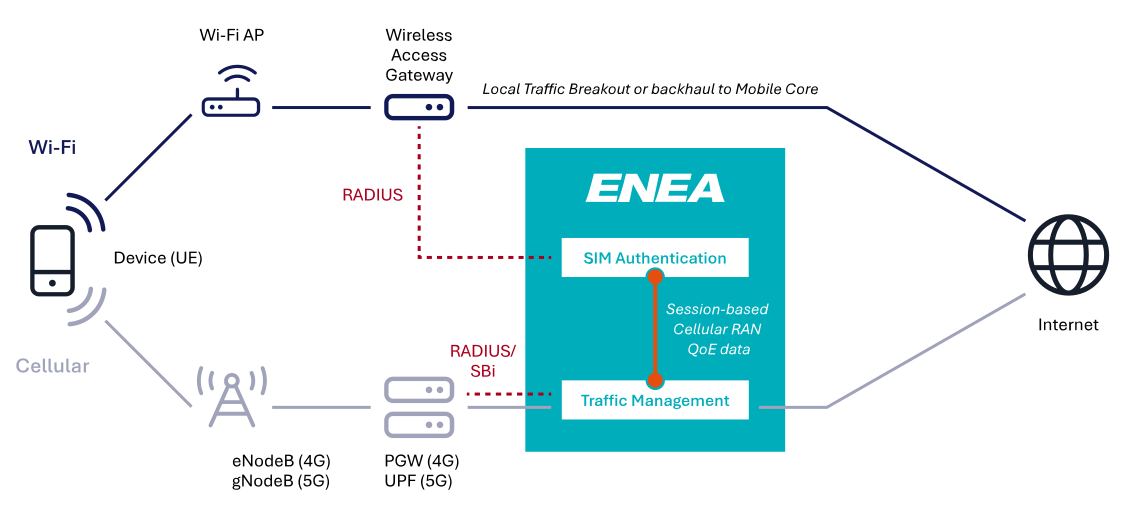
As discussed in the The Device is King insights post, the decision of connecting to a Wi-Fi network is in the hands of the device. A prerequisite for Intelligent Selective Offloading is to find a way to occasionally prevent the device from connecting without affecting its willingness to do so the next time. We have found a way to achieve this.
A first ambition is to prevent the device from automatically connecting to the MNO controlled Wi-Fi network if the quality and performance of the cellular session is already considered to be good. This means offloading will only occur when it clearly benefits the user, optimizing the overall network performance and maintaining a high quality of experience (QoE).
As a next step, we also aim to incorporate real-time quality data from the Wi-Fi network, allowing us to dynamically evaluate both cellular and Wi-Fi network performance. Using frequent Change of Authorization (CoA) requests, we can ensure that users are always connected to the network offering the best experience. Ideally, the Wi-Fi quality information would be provided during the authorization process and continuosly updated throughout the session.
Many Wi-Fi equipment vendors support signaling connection-related information using the RADIUS Connect-Info attribute (#77) defined in RFC2869. Some vendors have also extended this approach to include information about the Received Signal Strength Indication and Wi-Fi Channel Numbers. A challenge is that vendors have defined their own syntax for encoding the attribute’s quality information. There is ongoing work within the Wireless Broadband Alliance (WBA) to formalize the syntax for encoding the Wi-Fi quality information. If this is broadly implemented by Wi-Fi vendors, it will pave the way for a fully standardized way of providing Wi-Fi quality information to Wi-Fi service management systems such as the Enea Aptilo SMP. We are also able to extract performance KPI data via proprietary Wi-Fi vendor APIs if available.
Operators may want to monetize their Wi-Fi network by opening it for public use. The Enea Aptilo SMP (software) and SMP-S (service on AWS) are ideal for this use case as they encompass a 3GPP AAA server with additional features designed for monetizing Wi-Fi. These additional features include captive portals, Wi-Fi AAA, Wi-Fi Policy & Charging, Wi-Fi subscriber management, and our ServiceGlue concept with configurable logic.
An additional emerging need for going beyond the standard 3GPP AAA is to support 5G mobile operators aiming to deliver a comprehensive solution for their enterprise customers within Private 5G or 5G network slicing environments. These enterprises often manage a mix of cellular and Wi-Fi-only devices and require unified service delivery to streamline authentication and policy enforcement across diverse network types and support the selection of the best available network at any given time and location.
By adding the optional Enea Aptilo SMP Venue Wi-Fi Manager, mobile operators can turn their mobile data offloading footprint into a profitable service rather than a significant investment. This is achieved by offering managed B2B Wi-Fi services and deploying an additional secure SSID for Wi-Fi offloading at each location.
When you buy the Enea Aptilo SMP, you don’t only buy a product. You will also get the Enea experts covering your back. When Enea acquired Aptilo Networks in 2020, it gained a significant foothold in the Wi-Fi offloading market. Aptilo brought decades of expertise as a pioneer in Wi-Fi offloading, with its first deployments dating back to 2010 and with the first large-scale Wi-Fi service management deployments in 2001.
Today, the Enea Aptilo Service Management Platform (SMP) remains one of the most widely deployed back-end systems for Wi-Fi offloading. It is also available as SaaS with a dedicated instance per customer at Amazon Web Services (AWS), offering the same functionality and flexibility. This flexibility empowers customers to cherry-pick the functions they need, such as SIM authentication, and integrate them with their existing systems.
Our Wi-Fi offloading solution, based on Enea Aptilo SMP, encompasses so much more than just SIM-based authentication. It provides robust support for a broader range of carrier-grade Wi-Fi features, including multitenancy B2B management (to expand Wi-Fi coverage for offloading), Wi-Fi policy control, and OpenRoaming capabilities.
“Enea Aptilo SMP turns a service provider’s Wi-Fi networks into a service and allows them to monetize directly and indirectly.”
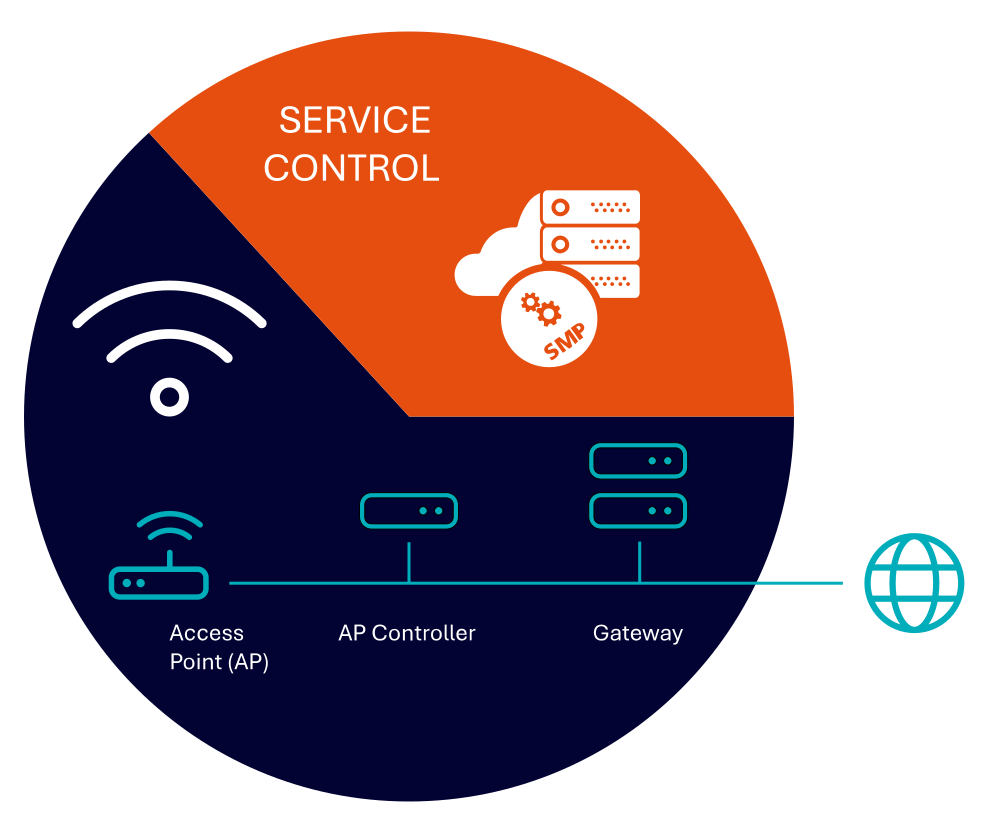
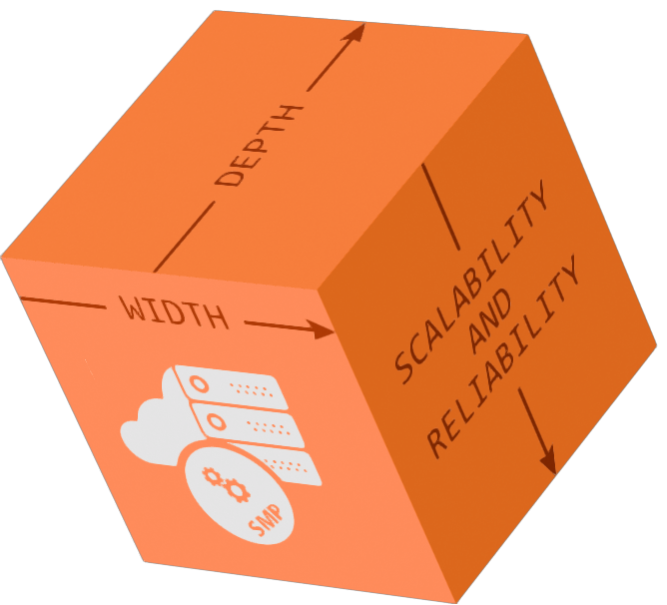
The most impactful innovations come from close customer collaboration. The above features—and many others—have been developed through partnerships with over 100 customers globally, ensuring the platform meets the demanding needs of real-world deployments. Over the years, we have focused on the width, scalability, and reliability needed for successful Carrier Wi-Fi and Wi-Fi offloading.
When speaking with mobile operators, their primary concern regarding the use of Wi-Fi for indoor coverage and additional capacity is the Quality of Experience (QoE) for their subscribers. While this concern is understandable, it can also be seen as somewhat irrational—and even ironic. Many of these same operators have already implemented Wi-Fi Calling, which utilizes any available Wi-Fi network for voice services. This means they are willing to deliver voice—one of the most latency-sensitive services—over Wi-Fi networks that they do not control. Yet, they remain hesitant to use secure Wi-Fi networks under their own management for services like web browsing, downloads, and video streaming, which are far more tolerant of variable network conditions.
In fact, the need to backhaul traffic to the mobile core for session continuity has diminished as devices and applications have become more adept at maintaining a positive user experience when transitioning between Wi-Fi (with local traffic breakout) and cellular networks. For instance, if you step out of the range of your home Wi-Fi during a Microsoft Teams session, you might experience a brief disruption as the device switches to the mobile network. This minor interruption is similar to what can happen during a cellular call when the user moves between different base stations.
The simple explanation may lie in the differing perspectives: while devices—and many users—operate in a Wi-Fi-first world, mobile operators naturally adopt a cellular-first mindset. They fear that a user could unintentionally switch to a Wi-Fi network with a lower QoE than the cellular network they previously connected to.
This fear is further reinforced by common misconceptions about Wi-Fi, which we have addressed in a previous post Top Five Myths About Wi-Fi. Another reason could be that mobile operators are less concerned about Wi-Fi Calling, as it utilizes external networks, they neither manage nor fund. In such cases, we recommend leveraging the free Wi-Fi networks available through the OpenRoaming federation for Wi-Fi offloading. These networks are managed by reputable Wi-Fi access providers, offering reliable connectivity. For more details, refer to the OpenRoaming in Wi-Fi Offloading chapter.
Ultimately, some mobile operators’ concerns about Wi-Fi stem from the perception that it is outside their area of control. While we have emphasized throughout this paper that many of these concerns are unwarranted, we also recognize the importance of addressing them seriously.
With expertise spanning both the 3GPP ecosystem and Carrier Wi-Fi, Enea is uniquely positioned to offer practical solutions that increase mobile operators’ control over Wi-Fi offloading. We are actively looking at a concept for QoE-based communication across mobile and Wi-Fi networks. For more details, refer to the More Intelligent Network Selection chapter.
The user experience in Wi-Fi networks is influenced by a mix of persistent and intermittent factors, and each type requires a different resolution approach. Here’s a deeper look at these factors.
These are typically structural issues that remain constant unless the underlying design or hardware is improved. Addressing them often involves network redesign or hardware upgrades:
These factors can cause performance fluctuations that come and go, often influenced by changes in the environment or network load. Managing these requires ongoing monitoring and dynamic adjustments:
All of these challenges can be mitigated with effective network design, regular monitoring, and proper investment in modern infrastructure:
With the right planning and technology, Wi-Fi networks can achieve a much higher quality of service, making them capable of delivering a consistent, high-quality user experience.
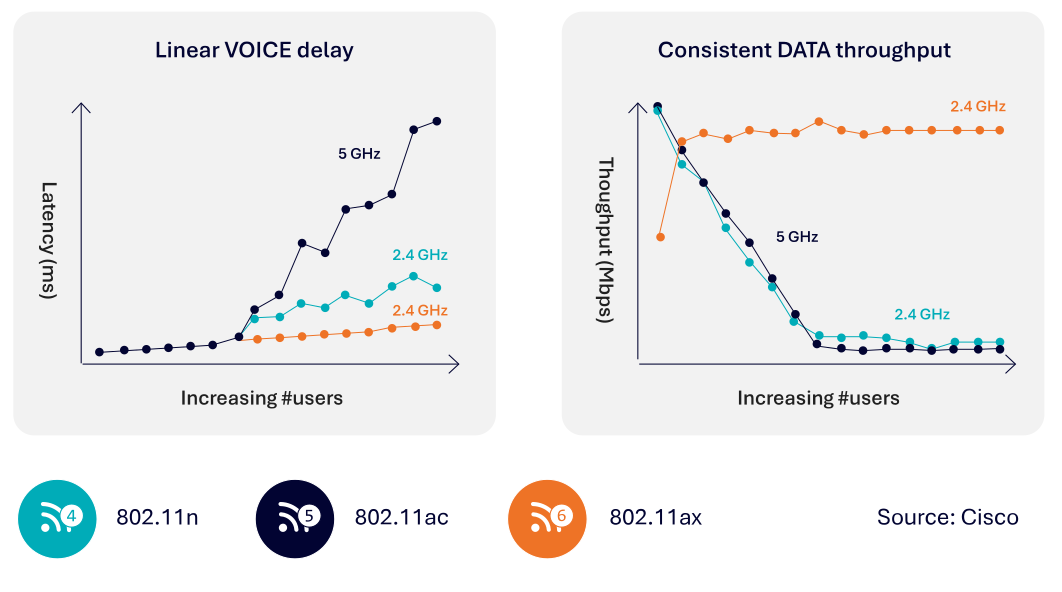 Previous Wi-Fi generations (Wi-Fi 4 and Wi-Fi 5) can be compared to a chaotic cocktail party, where everyone tries to talk at once; the more people present, the harder it is to communicate effectively. As a result, many messages had to be retransmitted, leading to increased latency and reduced data throughput. As shown in the diagrams below, the critical parameters for a good user experience—latency and data throughput—deteriorate rapidly as more users connect to a single Wi-Fi access point in these earlier Wi-Fi versions.
In contrast, this degradation is significantly mitigated with the introduction of Wi-Fi 6/6E and Wi-Fi 7. Wi-Fi 6 introduced Orthogonal Frequency-Division Multiple Access (OFDMA), a scheduling mechanism also used in cellular networks, which allows for more efficient and organized use of the spectrum. Today’s Wi-Fi is more like a well-coordinated choir, where a conductor controls when each voice can sing, resulting in a smoother and more deterministic user experience.
Though Wi-Fi operates on unlicensed spectrum, there is growing interest in using unlicensed spectrum for cellular as well. This shift, along with the improved efficiency and performance of Wi-Fi 6/6E and Wi-Fi 7, has led to increased respect and acceptance from 3GPP proponents.
It’s easy to blame the Wi-Fi radio network for a poor user experience since it’s the most visible part of the connection. However, based on our experience, backend systems often play an equally significant role in user satisfaction. The Enea Aptilo SMP has repeatedly improved existing Wi-Fi networks by addressing backend deficiencies.
A common example is an overloaded DHCP server. At large venues like stadiums or trade shows, where thousands of users try to connect simultaneously, an overwhelmed DHCP server can prevent users from obtaining an IP address, rendering Wi-Fi access impossible. Ensuring DHCP capacity to handle such surges—and implementing overload protection—is essential. It’s better to deny a portion of users than risk a situation where no users can connect or renew their leases.
Some VPN clients cause DHCP-related issues by modifying the routing table whenever a VPN connection is established. These clients retain only the route to the VPN server, rerouting the default pathway through the VPN tunnel. This configuration causes DHCP renewal requests to be sent through the tunnel rather than directly to the DHCP server, preventing the server from receiving and responding to them. Consequently, the client may lose its IP address when the lease expires and the gateway may mark the client as “inactive” due to its lack of response to pings. The DHCP server can then reassign the IP address to another device, potentially resulting in an
IP address conflict.
To effectively diagnose Wi-Fi performance issues, the entire network stack—from radio to backend systems—needs consideration. Furthermore, being able to troubleshoot individual sessions among potentially millions is critical and the trace should always be on otherwise it will be hard to capture intermittent issues.
Enea Aptilo SMP’s stability, scalability, powerful Distributed Tracing function, and overload protection are all vital to delivering an excellent user experience. Learn more in the next chapter.
We will only give a technical overview of OpenRoaming here and what it could mean in the Wi-Fi offloading context. For deeper insights about OpenRoaming and exactly how the Roaming Consortium Organization Identifiers (RCOIs) are encoded, please read our White Paper, All You Need to Know About OpenRoaming.
OpenRoaming is a groundbreaking initiative by the Wireless Broadband Alliance (WBA) that aims to revolutionize how we connect to Wi-Fi networks worldwide. Enea is a member of the WBA.
OpenRoaming is growing fast. In May 2022, the OpenRoaming federation had around 1 million hotspots globally. In February 2023, the count was over 3 million. It may become the silver bullet for neutral host Wi-Fi offloading.
An ANP provides the Wi-Fi network, and they can be anything from major Wi-Fi service providers to hotel chains, malls, airports, or congress centers. Any organization with a Wi-Fi network can apply to be part of the OpenRoaming federation.
An IdP authenticates and authorizes users for the OpenRoaming service offered by ANPs. Anyone providing a user account can apply to join the OpenRoaming federation. An excellent example is device manufacturers. Both Samsung and Google are identity providers. But in the Wi-Fi offloading context, the IdP will, of course, be the mobile operator.
The beauty of the OpenRoaming federation is that any IdP and ANP can roam with each other without even being aware that the other party exists. Roaming is enabled by well-established technology standards, including Passpoint, Dynamic Peer Discovery (DPD), Public Key Infrastructure (PKI), and RADIUS over TLS (RadSec).
Both an IdP and an ANP can control the characteristics of a roaming partner by implementing so-called Closed Access Group policies (CAG). An IdP can, for example, choose to only roam with ANPs that provide a specific Quality of Service (QoS). The CAG is an optional part of the Passpoint Roaming Consortium Organization Identifier (RCOI) for OpenRoaming. However, Wi-Fi offloading is a use case that may drive adoption as MNOs acting as IdPs may only want to cooperate with Wi-Fi networks of a certain quality.
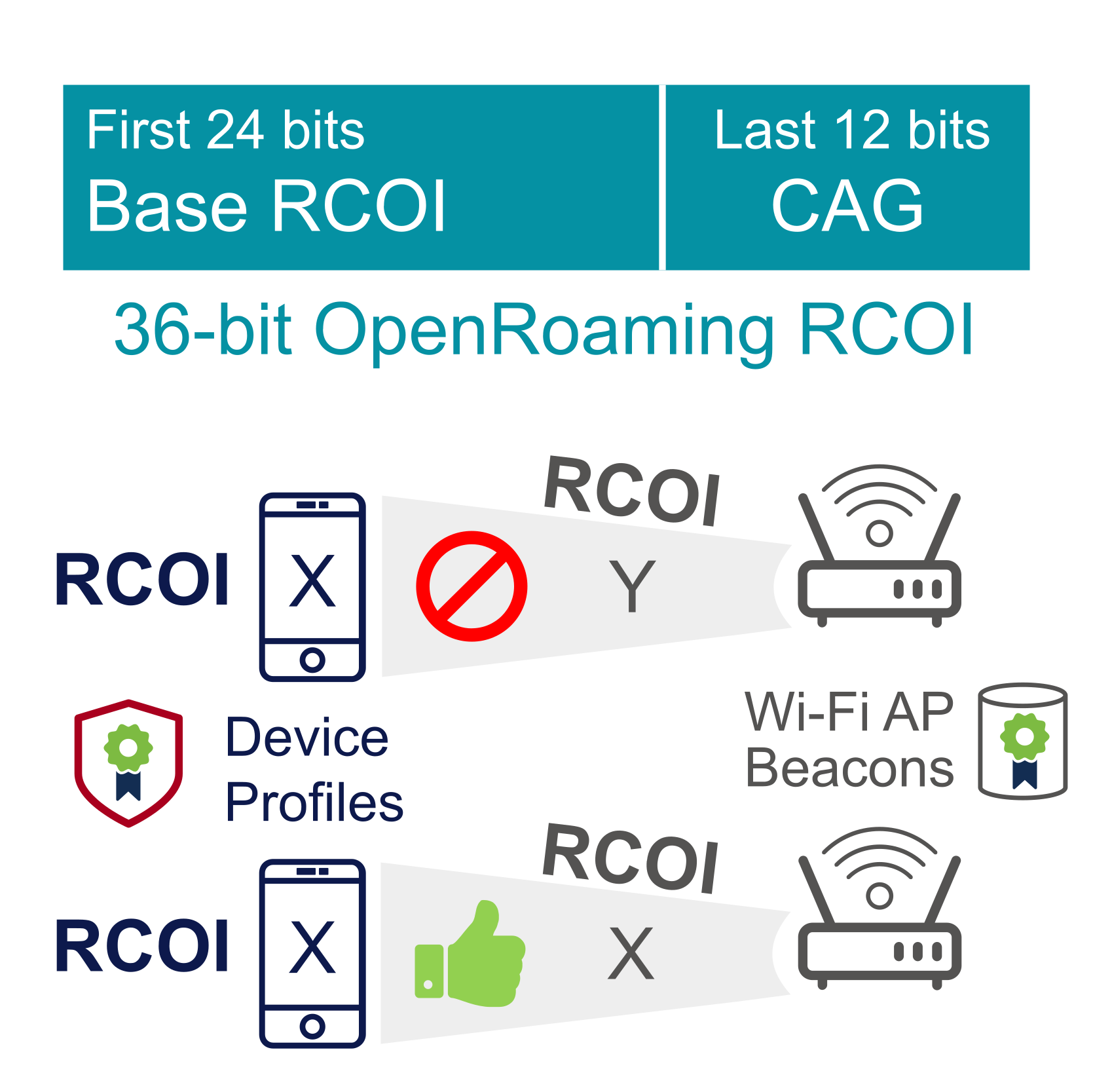 There are two base Passpoint Roaming Consortium Organization Identifiers (RCOIs) for OpenRoaming:
OpenRoaming-Settled: BA-A2-D0-xx-xx
OpenRoaming-Settlement-Free: 5A-03-BA -xx-xx
The last 12-bit extension (xx-xx) of the base RCOI is used to implement Closed Access Group Policies (CAG). The RCOIs are provisioned in the device’s OpenRoaming Passpoint profile(s) and advertised in the Wi-Fi Access Point beacon. If there are more RCOIs to be advertised than what fits in the beacon, a list of available RCOIs can be sent through the Passpoint Access Network Query Protocol (ANQP) messages.
Only IdPs and ANPs with fully matching RCOIs, including the CAG, will roam.
Let’s now move into the more advanced use cases of OpenRoaming using the last 12-bit extension in the OpenRoaming RCOIs to encode the Closed Access Group (CAG) policies. The aim is to deliver an equivalent functionality to the CAG policies encoded in 3GPP using one or more CAG-IDs.
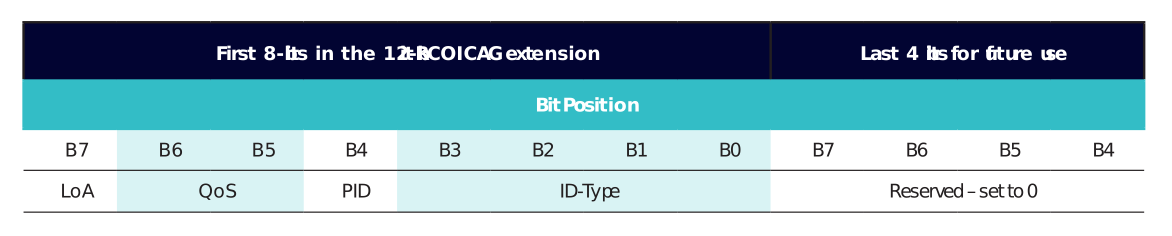
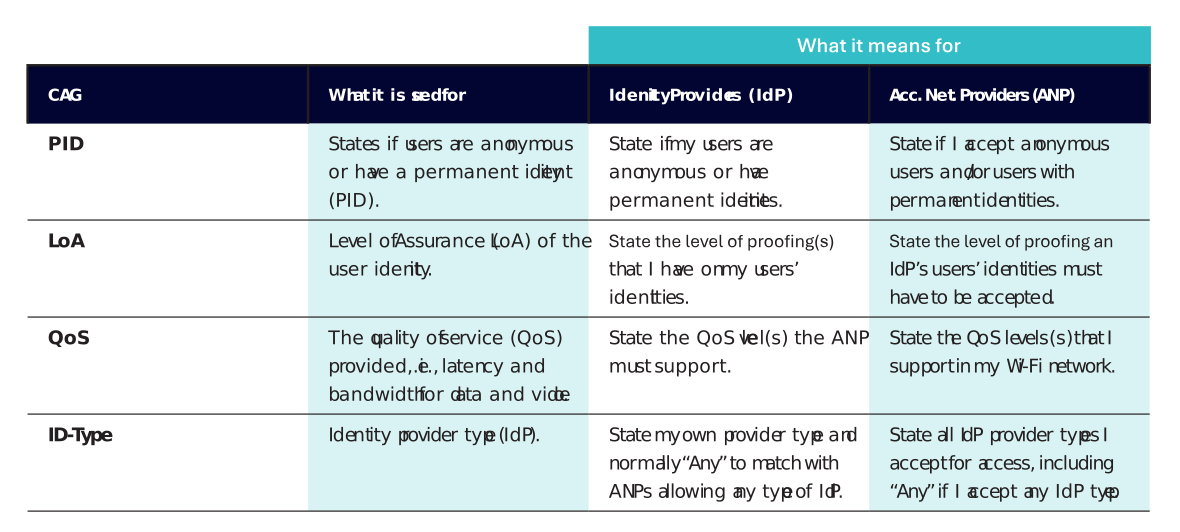
Note that there is no implicit logic behind the RCOI extensions. It is just a matter of matching the exact RCOIs between the IdP and the ANP. As a result, IdPs and ANPs must advertise multiple RCOIs to cover all cases. This, even if it might feel superfluous to, e.g., explicitly say that you accept users with Permanent IDs if you want to allow anyone, including anonymous users, onto your network.
It is vital for ANPs and IdPs to also include the tiered CAG policies that go above their minimum requirement and below what they provide:

There are many high-quality Wi-Fi networks in the OpenRoaming federation that mobile operators could utilize to achieve indoor coverage for their subscribers.
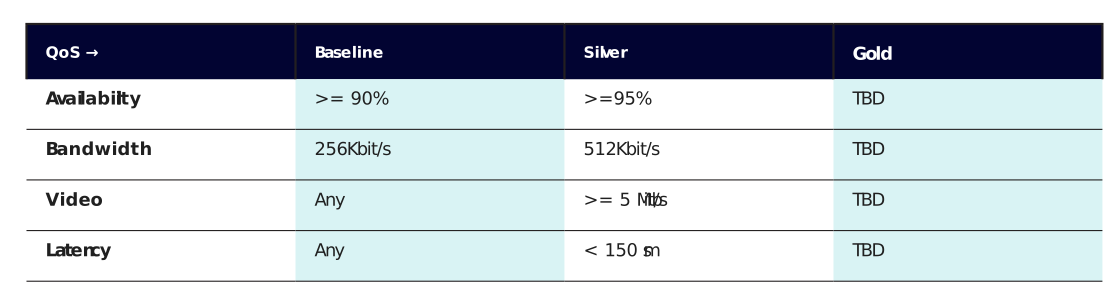
A mobile operator IdP can, for example, decide to roam only with ANPs fulfilling at least the Silver QoS level by using the corresponding Closed Access Group (CAG) policies.
By doing so, the mobile operator will ensure the quality of service for the offloaded user is good enough for, e.g., Wi-Fi Calling and video. This is crucial for settlement-free use cases where they may roam with ANPs with which they have no relationship.
A venue such as a shopping mall could advertise the settled RCOI and make bilateral commercial agreements with multiple mobile operators acting as IDPs.
The shopping mall can even prioritize the mobile operators’ subscribers over other users if they comply with the advertised QoS level for all. This will allow the shopping mall to charge more for the offloaded users.
It is not a problem that the user may have multiple installed OpenRoaming profiles on the device, such as one from the mobile operator and one from the device manufacturer. The shopping mall can utilize the Home Service Provider preference functionality defined in Passpoint to prioritize the mobile operators over other IdPs.
It should be noted that the CAG policies are based on trust between the different actors in the OpenRoaming federation, so the QoS level is not verified independently. Some ANPs may also only advertise the base RCOI without any CAG policies. However, if OpenRoaming advances to become the go-to solution for neutral host Wi-Fi offloading, this could lead to significant changes. For instance, OpenRoaming might evolve to deliver consistent, verified QoS levels across all ANPs.
The Dynamic Peer Discovery (DPD) mechanism is used in OpenRoaming to find the IdP authentication server by looking up the IdP’s realm in DNS. This is a problem when the mobile operator acts as an IdP as the 3gppnetwork. org realm, which all mobile operators use, is not publicly resolvable by DNS because of security concerns.
The remedy is to use the subdomain pub.3gppnetwork.org for DPD, which 3GPP specifies for public use and is thus resolvable by DNS.
Mobile Operators in the OpenRoaming federation must provision their public subdomain in DNS. In the example of Swisscom, that would be:
wlan.mnc001.mcc228.pub.3gppnetwork.org
The public subdomain enables DPD-based discovery of their SIM-Authentication server (3GPP AAA) used to authenticate subscribers in the OpenRoaming federation.
However, the authentication request from a user with a mobile operator Passpoint profile will likely come in the form used by mobile operators, i.e., without the pub subdomain, e.g., <user>@wlan.mnc<MNC>.mcc<MCC>.3gppnetwork.org.
The <user> is the subscriber’s international mobile subscriber identity (IMSI).
As discussed, the DNS-based DPD cannot resolve this realm, so the ANP must dynamically add “pub” in the DNS lookup.
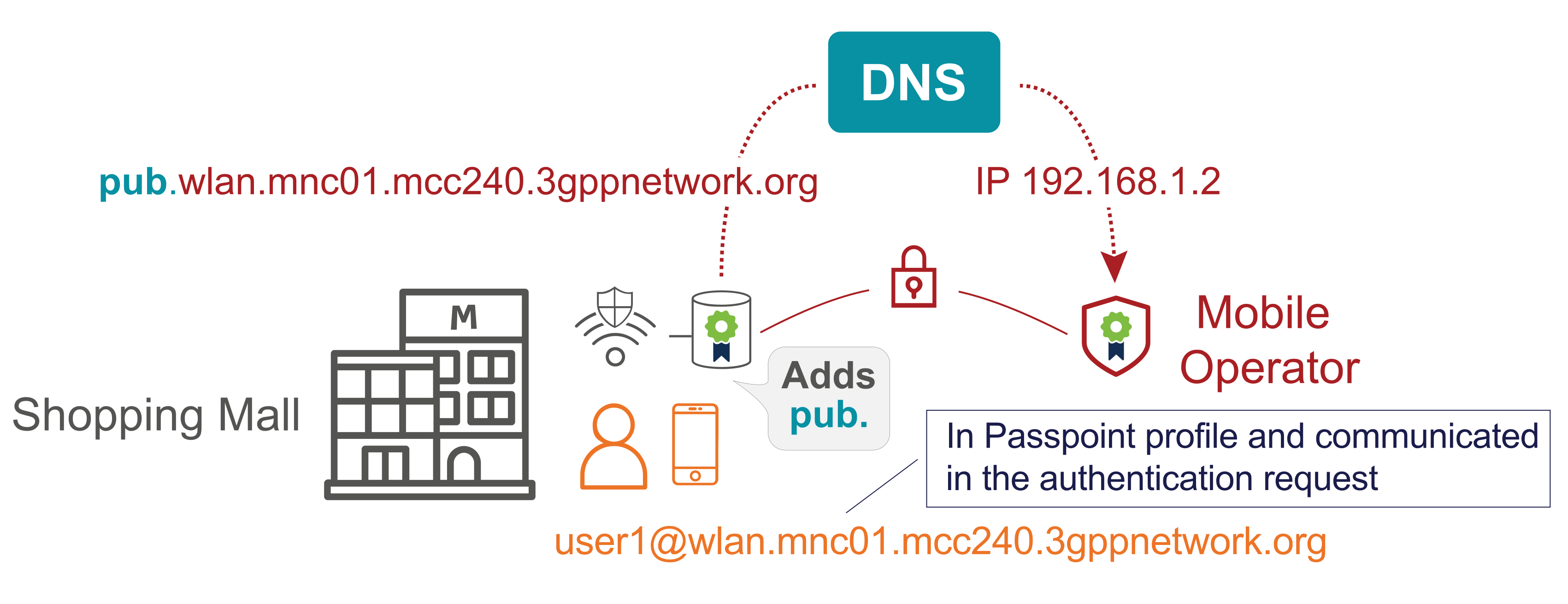
Once the ANP’s and the IdP’s AAA servers have established communication through RADIUS over TLS (RadSec), it is business as usual, and the user can be authenticated using the user credentials from the OpenRoaming Passpoint profile.
Imagine if Wi-Fi connectivity was as secure, simple, and seamless as cellular. Just switch on your device, and you are connected. This is the promise of Passpoint® (previously known as Hotspot 2.0), as defined by the Wi-Fi Alliance.
Passpoint enables compatible devices to automatically and silently discover Wi-Fi access points and then automatically and securely connect to the secure Wi-Fi network.
Introduced in 2012, but it is not until recently that the technology has reached a wider adoption stage than some service provider deployments in the USA.
Passpoint shines in the roaming use case. The WBA OpenRoaming initiative, which already has millions of hotspots globally, has quickly transformed Passpoint from a promising technology to potential mass adoption. The fact that Passpoint profiles for OpenRoaming are now enabled in many handsets from the factory will vouch for rapid development.
While Passpoint is a prerequisite for OpenRoaming, it is not for Wi-Fi offloading. Since 2011, Enea (Aptilo) have provided seamless and secure Wi-Fi offloading solutions utilizing SIM authentication. It should also be noted that EAP based authentication (SIM/AKA/AKA′ and TLS/TTLS) is not equivalent to Passpoint as such, which is a common misunderstanding.
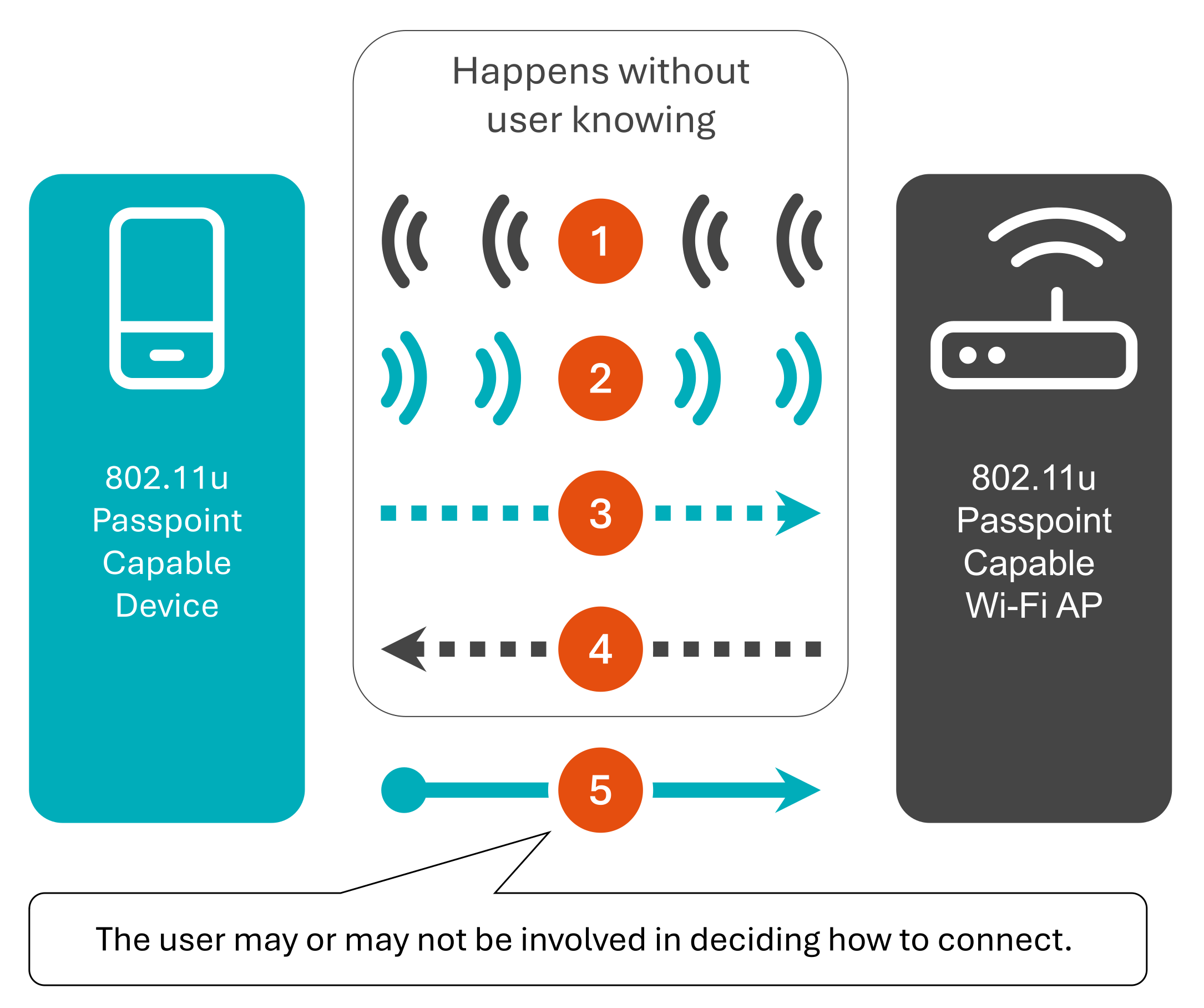
Note that this happens in the background without user interaction, except in the last step, where the user may or may not be involved in deciding how to connect, for instance, if the Wi-Fi network and the device support the same set of multiple Passpoint services.
Let’s explore the different
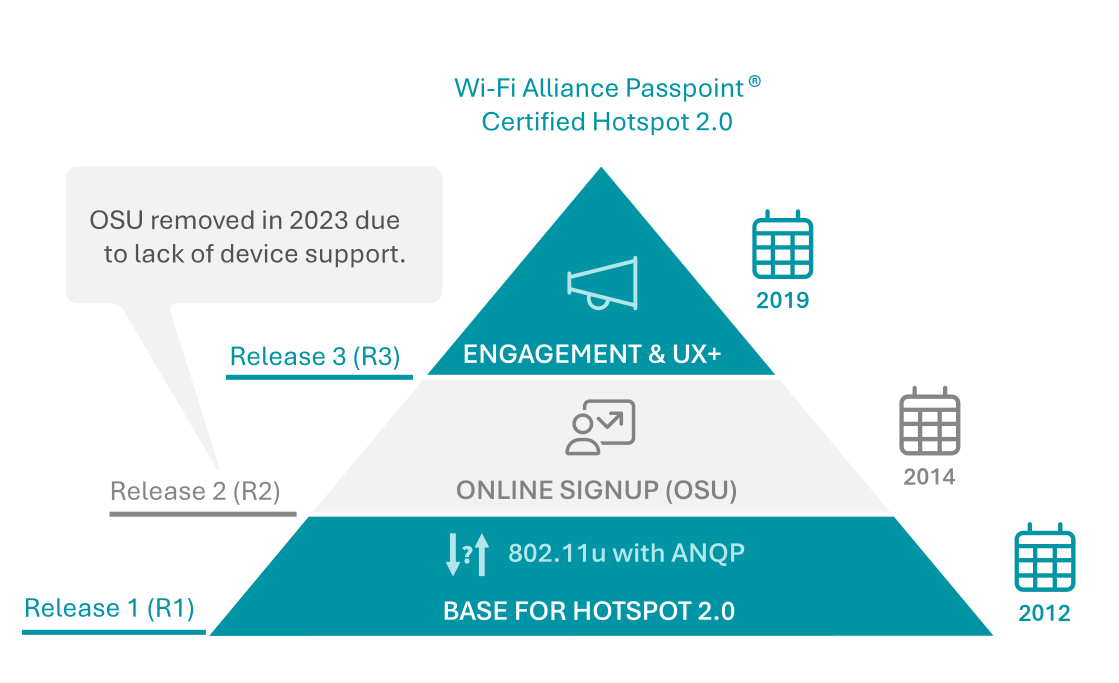
Passpoint exists in three sequential releases.
Passpoint was first introduced in 2012, bringing a new set of protocols and standards, including 802.11u and ANQP. These innovations allowed devices to automatically discover and connect to networks that support Passpoint, selecting the most optimal connection.
Nearly all modern mobile phones and laptops, including Apple iPhones (despite not being formally certified by Apple), support Passpoint Release 1 (R1). However, onboarding new devices remains a challenge. Users typically need to manually provision Passpoint R1 credentials by downloading a file that contains the necessary connection profile and credential information. While mobile operators can push these profiles to devices over-the-air (OTA), other service providers can streamline this process using an app. SDKs are available to help integrate this functionality into existing apps, making it seamless for users.
In 2023, the Wi-Fi Alliance removed Passpoint Release 2 (R2) from the standard due to the industry’s inability to secure support from Apple. The key feature of R2 was the Online Sign-Up (OSU) function, which allowed users to provision Passpoint profiles on an ad-hoc basis. Although this feature might be reintroduced in a simplified form in the future, Passpoint profiles can currently be provisioned over-the-air, through an app, or via a third option—our pragmatic approach using a portal and the Captive Portal API.
Passpoint R2, released in 2014, included the now-discontinued OSU server. This feature enabled new users to create accounts and easily provision Passpoint credentials at the point of access, allowing for seamless ad-hoc sign-up. Users could even choose their preferred service provider if multiple options were available. Passpoint R2 required a separate SSID for Online Sign-Up, which could be either an open SSID or an OSEN (OSU Server-only Authenticated L2 Encryption Network).
Passpoint Release 3 (R3), introduced in 2019, is supported by Android 12 and higher, while iPhone remains on R1. Passpoint R3 introduces several new ANQP protocol elements and enhances operator and end-user interaction. While earlier versions focused primarily on automatic connection and user onboarding, Passpoint R3 aims to improve captive portal functions through enhanced ANQP messaging.
For the first time, Passpoint allows operators to provide B2B customers with tools to engage visitors through a Venue URL. This feature displays information about the Wi-Fi service while also offering local promotions and deals. Additionally, R3 includes functionality for end-users to approve the Wi-Fi service’s terms, conditions, and charges.
However, we believe Passpoint R3 may have overextended its focus on user engagement features. Deploying these features via ANQP locally at access points complicates central management, particularly in multi-vendor deployments where support for different Passpoint versions varies. Given the challenges in management and the lack of widespread device support, there is a risk that R3 may never be widely adopted in carrier Wi-Fi networks.
Security in R3 has been further enhanced, with support for WPA3-Enterprise, compared to the WPA2-Enterprise support in R2 and R1. Additionally, R3 allows the use of the same SSID for both the Wi-Fi service (WPA2/WPA3) and the online sign-up (OSEN) functionality if the OSU feature from R2 were to be reintroduced.
Strategies for
The Passpoint certification is a moving target, and things may have changed by the time you read this. But, as of October 2024, iPhones does not support Passpoint release (R3). Android from version 12 and above support R3, but Android OEM vendors usually customize the Android platform to match their product requirements. So, just because it works with one vendor it doesn’t mean it works with another.
It’s important to note that smartphone vendors typically customize the Android platform to meet their specific product requirements. Therefore, certification for one Android vendor does not guarantee compatibility with another. Furthermore, the Passpoint certification from the Wi-Fi Alliance only certifies the radio protocols. In practice, new releases from R2 and above, which include more complex service-related features, cannot be guaranteed to work seamlessly in a Wi-Fi service. Conversely, it’s likely that some devices support R3 without being Passpoint certified, just as iOS, MacOS and Windows support R1 without official certification. However, service providers cannot rely on such unknown variables.
On a more positive note, most smartphones, tablets, and laptops now support at least Passpoint R1. Therefore, operators should design and deploy Wi-Fi services based on R1, possibly with selective use of R3.
One thing is certain: Operators who wait for new standards to be fully deployed and for mobile device manufacturers to adopt them risk waiting indefinitely. The decision to support standards like 3GPP or Passpoint
R2/R3 is influenced by device manufacturers’ priorities and may also depend on whether implementing these standards aligns with their best interests. The more operators that utilize these standards, the more likely it is that device manufacturers will support them.
Fortunately, there is no reason to delay introducing Passpoint-based carrier-grade Wi-Fi services.
Below, we will explore how Passpoint R1, in conjunction with the new Captive Portal API, might serve as an interim solution that could potentially become the permanent, pragmatic approach for Passpoint-enabled networks. This is particularly relevant for devices that need to be provisioned ad-hoc and cannot utilize the best practices of over-the-air provisioning or app-based provisioning.
a pragmatic approach to passpoint
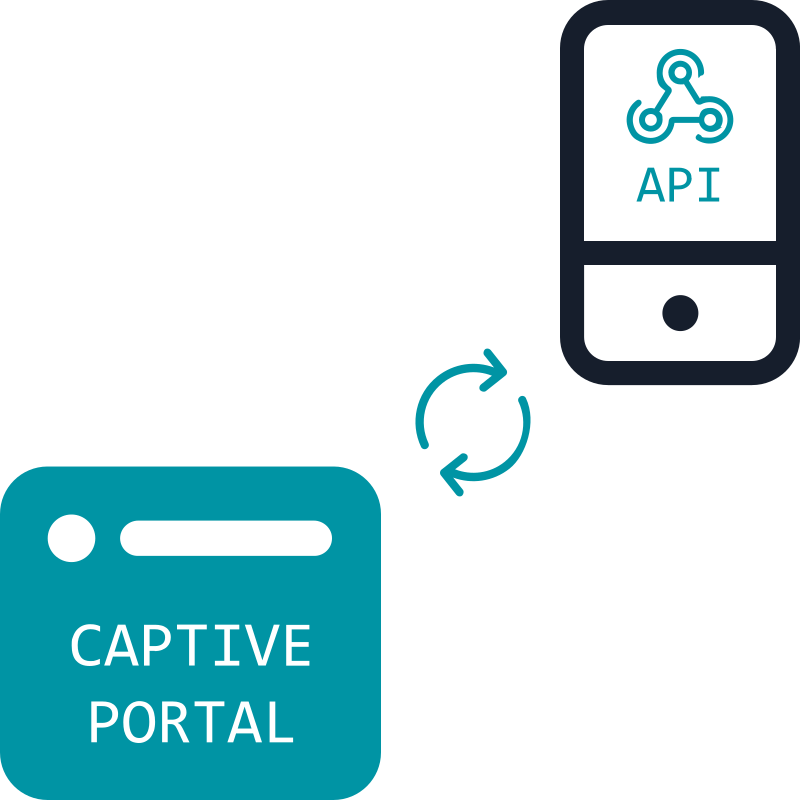
The Internet Engineering Task Force (IETF) Captive Portal API (RFC 8908 and RFC 8910), introduced in September 2020, is a significant advancement.
The Captive Portal API not only enhances the user experience for traditional Captive Portal implementations but, when combined with Passpoint R1, has the potential to deliver much of the user experience intended for Passpoint R2 and R3.
The adoption of the Captive Portal API among handset manufacturers has been swift. Google was the first to integrate it with Android 11, and Apple quickly followed with support in iOS 14 and macOS Big Sur. With a growing number of supporting devices, widespread adoption across major operating systems seems imminent.
The Captive Portal API also offers service management platforms, such as the Enea Aptilo Service Management Platform (SMP), improved control over Captive Portal flows in traditional hotspots. This results in a more reliable service experience for users.
The Captive Portal API significantly enhances the overall user experience. Traditionally, Access Gateways intercepted user web requests and redirected them to a Captive Portal. With the Captive Portal API, this interception is no longer necessary. Instead, when users connect to the Wi-Fi network and receive an IP address via DHCP (or Router Advertisement in IPv6), the DHCP server provides the URL to the Captive Portal API. The device then queries the API to determine if it is in captive mode.
If the API indicates that the device is in captive mode, the device will launch the Captive Network Assistant (CNA) browser for login. If the API indicates that the device is not in captive mode, the device will proceed directly to the Internet.
Engage users without Captive Portal
New standards take time to be fully integrated into every device, so some details of the Captive Portal API may still need to be implemented on certain devices. However, the standardized interaction defined by the Captive Portal API ensures consistent support for devices to determine their state and access auxiliary information, such as remaining session time or data usage. This allows devices to take proactive steps before reaching these limits, enabling users to extend their session in a controlled manner. As a result, the interaction between the device and the Wi-Fi service management system is smoother. Previously, with only device-based captive portal detection and system control, devices often remained unaware of post-authentication status, leading to sessions that could freeze once time or data limits were exceeded.
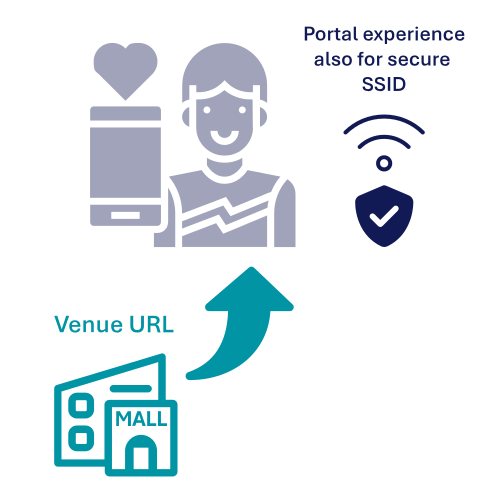
Another key advantage of the Captive Portal API is its capability to provide a Venue Info URL. This feature allows service providers to empower their B2B customers to engage users locally with targeted information and offers.
Currently, users receive a link to the Venue Info URL through an on-screen system message, which appears as a text alert during the session. This message remains on the lock screen or the network details page (device-dependent). The Venue Info URL is included in the message, and clicking the link directs users to the brand or location-specific portal.
The Venue Info URL is displayed when users connect either manually via an open SSID or automatically through a secure Passpoint-enabled network. It also enables anonymous Network Providers to present local information and customized advertising to users connecting through services like OpenRoaming.
Offering such a portal experience on a secure SSID represents a significant advancement, allowing venue owners to engage users effectively. This is crucial for establishing secure Wi-Fi as the standard rather than relying predominantly on open SSIDs with traditional captive portals.
A pragmatic approach
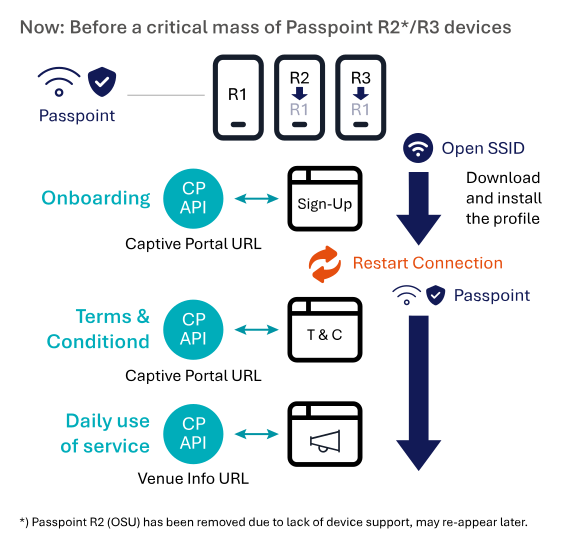
The Captive Portal API’s compatibility with secure Passpoint-enabled networks (802.1x) and its similarity to the Venue URL concept in Passpoint R3 open up new possibilities. We believe that combining the Captive Portal API with Passpoint R1 can deliver much of the user experience intended for Passpoint R2 and R3. With Passpoint R2’s online sign-up (OSU) now removed, alternative methods for provisioning Passpoint profiles for ad-hoc users must be considered. Building specialized venue portal flows for the few devices that support an end-to-end Passpoint R3 service would be impractical. Instead, leveraging R1 support as a common denominator is a more sensible approach.
Devices not yet provisioned for Passpoint R1 through methods such as SIM profiles (EAP-SIM/AKA/AKA’) or apps (EAP-TLS/TTLS) need to be provisioned ad-hoc via a sign-up portal over an open SSID or through another connection in advance.
Critical mass of R2/R3 devices
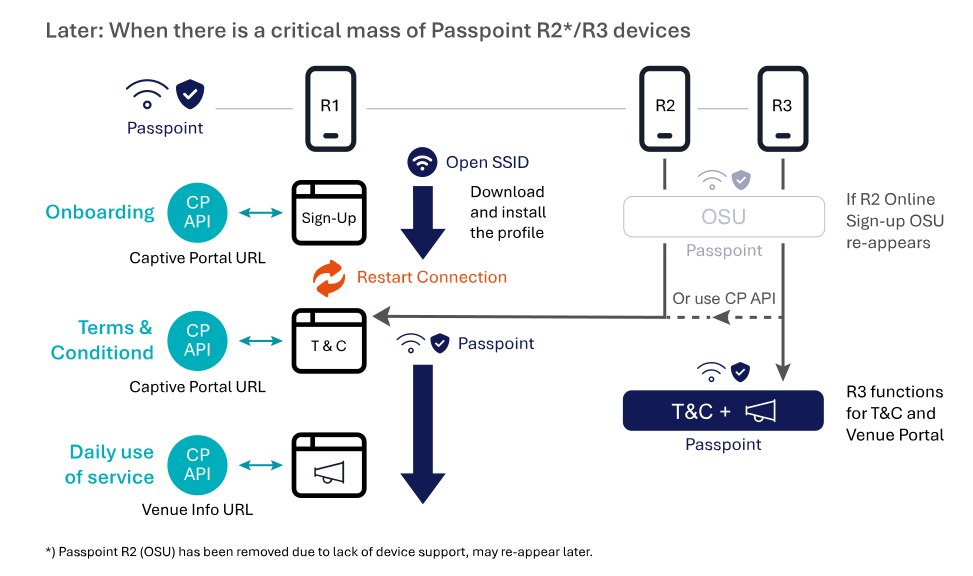
Again, we recommend a pragmatic approach to Passpoint: begin with Passpoint R1 and add support for R3 when there is a critical mass of device support. If R2 online sign-up reappears in the standard, it can also be incorporated.
We have shifted the approval of terms and conditions (T&C) from the sign-up page to the initial connection on the Passpoint-enabled network. This allows the T&C process to be applied to R2/R3 devices as well as to the many devices that support only R1. Users who sign up at the site will experience a nearly seamless flow, as the connection can be terminated immediately after profile installation, allowing users to reconnect as pre-provisioned.
It remains to be seen whether the additional benefits of Passpoint R3’s terms and conditions and user engagement features will outweigh the advantages of using a uniform and established process for all devices (R1, R2, and R3), as indicated by the dotted line in the figure.
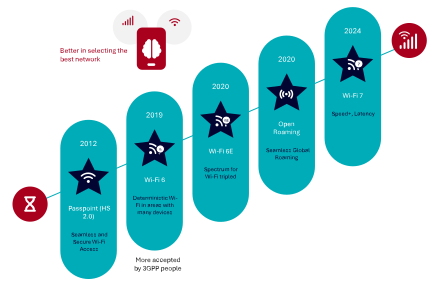
There has never been a better time for Wi-Fi offloading. In recent years, Wi-Fi technology developments have advanced more than in the previous decade, bringing improvements that enable mobile operators to deploy Wi-Fi offloading more effectively and provide a superior user experience. We have already covered Passpoint in a recent white paper excerpt. This time we will focus on the next-generation Wi-Fi radio technologies making Wi-Fi more carrier-class than ever before. In an upcoming post we will talk about the WBA OpenRoaming initiative, but we have plenty of information about OpenRoaming already here in Enea Insights.
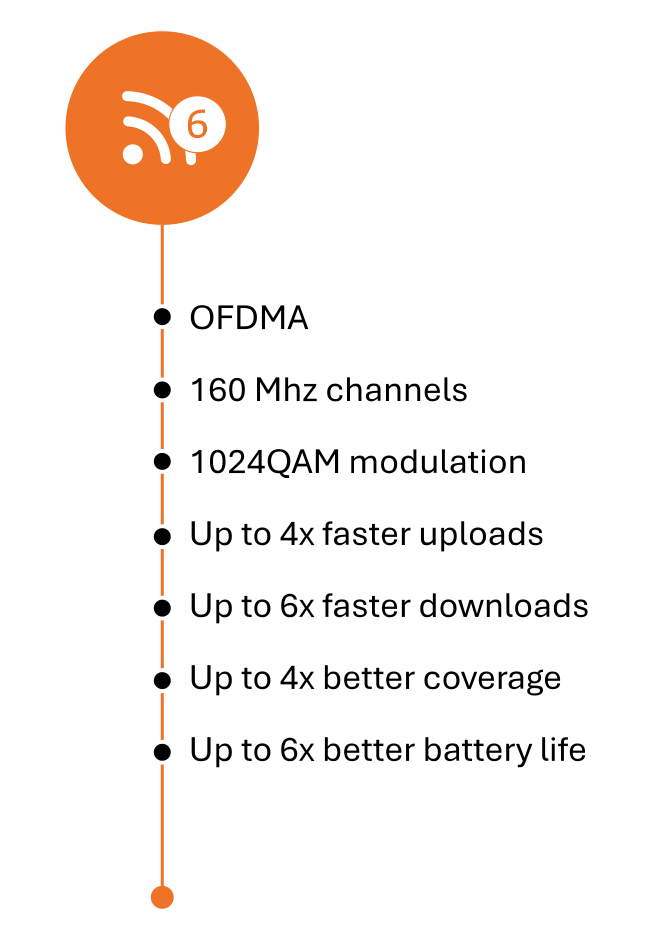
The introduction of Wi-Fi 6 marks a paradigm shift for Carrier Wi-Fi and Wi-Fi offloading, bringing a level of quality of service (QoS) comparable to that of cellular networks—an unprecedented achievement in the history of Wi-Fi technology. The cornerstone of Wi-Fi 6 is Orthogonal Frequency Division Multiple Access (OFDMA), which incorporates cellular-style scheduling to deliver deterministic performance, especially in high-density environments. With OFDMA and other technical advancements, Wi-Fi 6 can accommodate a significantly higher number of devices and offers up to four times the data transmission capacity of previous Wi-Fi generations.
We will cover more details about how Wi-Fi 6/6E and 7 Improve Quality of Experience (QoE) in an upcoming white paper excerpt. To get access to that chapter already now, download the full white paper.
Wi-Fi 6 also extends the range and reliability of Wi-Fi services, particularly through enhanced modulation techniques like 1024-QAM and improved beamforming, making it more effective in challenging environments. Additionally, it includes features like Target Wake Time (TWT), which is particularly advantageous for IoT applications. TWT allows access points to schedule specific times for IoT devices to access the network, resulting in up to six times better battery life—a critical improvement for battery-powered IoT deployments.
Wi-Fi 6 also offers other enhancements, such as UL (uplink) MU-MIMO, 160 MHz channels, and more. These improvements collectively deliver a substantial boost in high-density connectivity and performance quality. As a result, Wi-Fi service providers can offer a significantly enhanced Quality of Experience (QoE) to both consumers and professional users in venues like transportation hubs, stadiums, and shopping malls, as well as in enterprise environments, hospitality, and other high-traffic areas.
In short, wherever people gather, Wi-Fi will be there—elevated by Wi-Fi 6 to provide a much-improved user experience.
Up to 3X more spectrum
Wi-Fi 6E
 Wi-Fi 6E extends the capabilities of Wi-Fi 6 into the pristine 6 GHz spectrum, with its availability determined by regional or country-specific regulations.
April 23, 2020, is a landmark date in the history of wireless technology. On this day, the commissioners of the U.S. Federal Communications Commission (FCC) voted unanimously to release 1.2 GHz of 6 GHz spectrum for unlicensed Wi-Fi use. Since then, numerous other countries have followed suit, and it is widely anticipated that many more will allocate parts of the 6 GHz band for unlicensed spectrum over the coming years. In the U.S., the full 6 GHz band is now available for indoor Wi-Fi use under Low Power Indoor (LPI) regulations.
This new allocation significantly expands the Wi-Fi spectrum, more than tripling the available bandwidth in the U.S. and nearly doubling it in the European Union. In the U.S., Wi-Fi users can access a total of seven 160 MHz-wide channels, while in Europe, three such channels will be available. This additional spectrum allows Wi-Fi devices—such as smartphones, tablets, and laptops—to achieve multiple gigabits per second of throughput over Wi-Fi.
Wi-Fi 6 itself already represents a significant leap in quality and data rates compared to older standards, such as Wi-Fi 5 (802.11ac, 5 GHz) and Wi-Fi 4 (802.11n, 2.4 GHz). With the introduction of Wi-Fi 6E, these improvements are further amplified by the ability to operate in the interference-free 6 GHz band. The result is a connectivity experience that is substantially
faster and more reliable.
Free from Interference from Legacy Wi-Fi
A key advantage of Wi-Fi 6E and Wi-Fi 7 is their exclusive access to the 6 GHz band, free from interference from legacy Wi-Fi systems. Only these newer Wi-Fi generations are certified to operate in this spectrum, ensuring a cleaner, interference-free environment for communication.
Wi-Fi 6E and 7 also promise ultra-low latency. This capability will enable highly responsive and immersive connectivity experiences, initially benefiting applications like gaming, high-quality video conferencing, and AR/VR. Over time, it will pave the way for innovative new wireless enterprise applications.
Wi-Fi 6/6E on Steroids
Wi-Fi 7
As the world adjusts to widespread deployments of Wi-Fi 6 and 6E access points, Wi-Fi 7 has already begun making its debut. Consumer brands like TP-Link, Asus, Eero, Linksys, and Netgear have released Wi-Fi 7 access points even before the IEEE officially ratified the 802.11be standard (Wi-Fi 7) on September 26, 2024. With the standard now approved, other vendors focused on enterprise-grade access points are expected to follow suit.
It’s fair to describe Wi-Fi 7 as “Wi-Fi 6/6E on steroids,” marking another significant leap in capabilities that further positions Wi-Fi as a carrier-class solution. Like previous generations, Wi-Fi 7 is backward compatible. However, many Wi-Fi 7 routers may not support devices using anything less than WPA2 security. This could potentially limit the functionality of legacy Wi-Fi 4 devices, which may only connect in less secure open networks. But given the pace of Wi-Fi advancements, this is likely to be more of a theoretical issue than a practical one.
Why is Wi-Fi 7 Like Wi-Fi 6/6E on Steroids?
The following comparison highlights the theoretical improvements of Wi-Fi 7 over Wi-Fi 6, though real-world results depend on various implementation factors. (We have summarized the most important differences in the table below.)
Wi-Fi 7 offers speeds ranging from 30 to 46 Gbps—three to nearly five times faster than Wi-Fi 6. It also reduces latency significantly, promising performance below 5 milliseconds compared to Wi-Fi 6’s average of 20 milliseconds. With support for up to 16 spatial streams (double that of Wi-Fi 6) and a maximum channel bandwidth of 320 MHz, Wi-Fi 7 offers impressive improvements in speed and capacity. For context, the entire 2.4 GHz band is just 83 MHz wide.
Wi-Fi 7’s increased modulation, reaching 4096-QAM, allows for better performance over the same channel width compared to the 1024-QAM in Wi-Fi 6. This translates to more efficient data transmission and better throughput under ideal conditions.A Standout Feature: Multi-Link Operation (MLO)
What truly sets Wi-Fi 7 apart is its new multi-link operation (MLO) capability. For the first time, devices will be able to operate simultaneously on both the 5 GHz and 6 GHz bands. This ability to bond multiple bands brings several advantages, including improved reliability and increased bandwidth through load-balancing. It also enhances the likelihood of maintaining a stable connection over longer distances while utilizing maximum bandwidth.
However, realizing MLO’s full potential will require support from new devices, meaning it may take time before this feature becomes widely beneficial.
The Enea Aptilo Service Management Platform™ (SMP) is a comprehensive, vendor-neutral system designed to manage and monetize large-scale Wi-Fi services. Since 2001, SMP has been enhanced through over 100 deployments worldwide, demonstrating its proven expertise in delivering secure, scalable Wi-Fi solutions. Today, we highlight our latest innovation: QoE-based Traffic Steering Across Mobile and Wi-Fi Networks, strengthening our position as the leading provider of large-scale Wi-Fi service management solutions.
Enea Aptilo SMP remains one of the most widely deployed back-end systems for Wi-Fi offloading and service provider Wi-Fi. It is also available as a SaaS offering, with a dedicated instance for each customer on Amazon Web Services (AWS), providing the same robust functionality and flexibility. This allows customers to select and tailor the specific features they need—such as SIM authentication—and seamlessly integrate them with their existing systems.
Our Wi-Fi offloading solution, built on SMP, extends far beyond simple SIM-based authentication. It offers comprehensive support for a wide range of carrier-grade Wi-Fi features, including multitenancy B2B management—designed to expand Wi-Fi coverage for offloading—and OpenRoaming capabilities.
Innovation for Improved Operator Control in Wi-Fi Offloading
This innovation further solidifies Enea’s position as the world’s leading provider of Wi-Fi offloading solutions, enabling Mobile Network Operators (MNOs) and Mobile Virtual Network Operators (MVNOs) to proactively optimize user experience by dynamically offloading traffic between Wi-Fi and cellular networks.
Unlike traditional device-driven network selection, our QoE-based traffic steering utilizes real-time quality KPIs and/or historical data to ensure seamless, high-quality connectivity. This intelligent approach empowers operators to take control, unlocking new levels of network efficiency and enhancing user satisfaction by shifting the final decision-making in network selection from the device to the operator.
With one foot in the 3GPP ecosystem and the other in carrier Wi-Fi service management, Enea is currently the only vendor capable of providing this type of real-time QoE-based traffic steering across both mobile and Wi-Fi networks.
We retrieve session quality data from our Traffic Management solution and utilize the powerful policy engine within Enea Aptilo SMP to determine whether a specific user should be offloaded to Wi-Fi or kept on cellular. Furthermore, our traffic management solution ensures that operators can optimize the traffic remaining on the mobile network—such as reducing video traffic load by up to 20%.
5G introduces new network architectural concepts for Wi-Fi integration with the 5G standalone mobile core (5G SA). The simplified diagram below shows Wi-Fi service integration with the new service-based 5G Core (5GC) introduced in 3GPP release 15 (untrusted Wi-Fi) and 16 (trusted Wi-Fi).
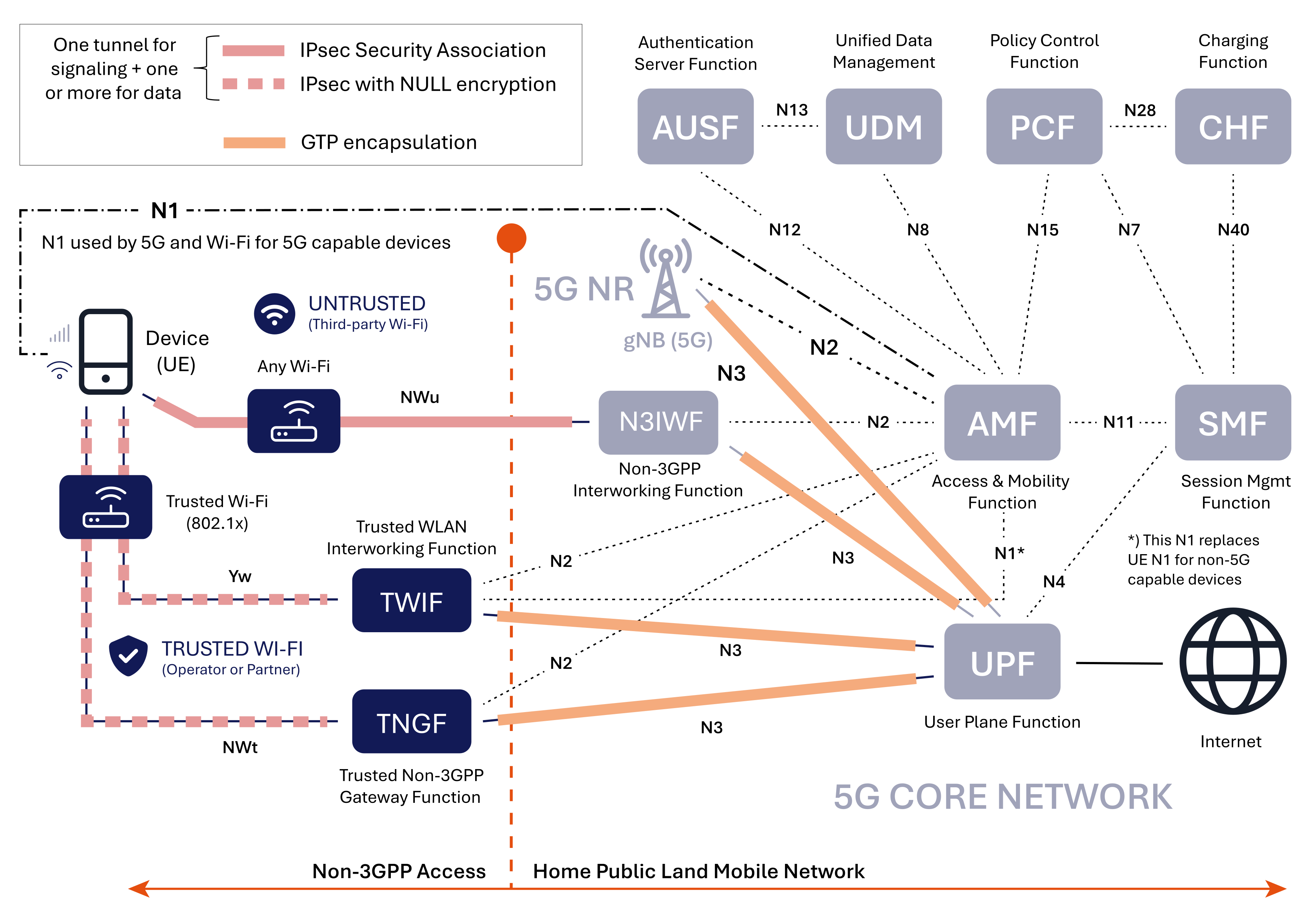
The first thing to observe is that this architecture is radio network (RAN) agnostic since both the Cellular and Wi-Fi access use the same interfaces (N1, N2, and N3).
Furthermore, 5G has adopted an EAP-based authentication framework (EAP-AKA’ or 5G-AKA), similar to Wi-Fi, for user equipment (UE) authentication with the 5G core.
The 5G signaling and user traffic are transported over IPsec tunnels established between the device, aka user equipment (UE), and the gateway functions (N3IWF, TWIF, and TNGF).
The GPRS Tunneling Protocol (GTP) encapsulation creates tunnels for traffic between the gateway functions and the user plane function (UPF), aka packet gateway.
Let’s now examine the new functions for Wi-Fi access (non-3GPP access). Please note that these functions are not the same as physical gateways. In practice, these functions could all reside in the same gateway.
The Non-3GPP Interworking Function (N3IWF) is a crucial component in the 5G architecture that enables seamless connectivity between 5G networks and untrusted non-3GPP networks, such as a Wi-Fi network not trusted by the mobile operator.
The N3IWF is the IPsec tunnel terminating node for 5G, similar to the ePDG in 4G. It is located in the Mobile Core and communicates with the Access and Mobility Management Function (AMF) control plane over the N2 interface. For the data plane, it communicates with the User Plane Function (UPF) over the N3 interface.
Because it works transparently with any Wi-Fi network, it is the gateway of choice for Wi-Fi Calling but can also be used for all types of data traffic.
Key functions include:
The trusted non-3GPP Gateway Function (TNGF) plays a crucial role in integrating trusted non-3GPP networks, such as a Wi-Fi network trusted by the mobile operator, with the 5G Core Network, providing a secure and standardized way to extend 5G services beyond the traditional cellular network.
The TNGF is, for 5G, the equivalent to the Wireless Access Gateway (WAG) used for trusted access to the 4G Core. The TNGF is located in a trusted environment, often the Wi-Fi network, and communicates with the AMF control plane over the N2 interface. For the data plane, it communicates with the User Plane Function (UPF) over the N3 interface.
The device and the TNGF are connected using an IPsec tunnel with null encryption, more about this later. After successful authentication, a TNGF key is established between TNGF and the device, aka user equipment (UE). Another key is derived from the TNGF key and sent to the Wi-Fi Access Point (AP) for Wi-Fi layer-2 security (WPA2/WPA3).
The trusted WLAN Interworking Function (TWIF) is a 5G function for interoperability with legacy devices. This resolves the contingency that some devices may support 5G SIM authentication but do not support 5G NAS signaling over trusted Wi-Fi access. These devices lack the support for the EAP-5G and IKEv2 protocols, meaning they cannot directly communicate with the 5G core network using the N1 interface over Wi-Fi. 3GPP refers to such devices as non-5G-Capable over WLAN (N5CW). The TWIF contains the NAS protocol stack and exchanges NAS messages with the AMF on behalf of these types of devices.
The TWIF is located in a trusted environment, often the Wi-Fi Network, and communicates with the Access and Mobility Management Function (AMF) control plane over the N1 and N2 interface. For the data plane, it communicates with the User Plane Function (UPF) over the N3 interface. Just as in the case of TNGF, the device connects with the TWIF using an IPsec tunnel with NULL encryption.
There are also other 5G network functions in play for Wi-Fi integration, we will mention them briefly here:
For Cellular networks, the N2 and N3 interfaces connect the base station (gNB) with the AMF and UPF. For Wi-Fi, they use the non-3GPP interworking and gateway functions (N3IWF, TNGF, TWIF) to connect with the AMF and UPF.
5G introduces a new principle for non-3GPP access. Multiple non-access stratum (NAS) connections over the N1 interface make simultaneous connections via cellular and Wi-Fi possible. This is a prerequisite for the new ATSSS (Access Traffic Steering, Switching, and Splitting) specification. The same authentication procedures, EAP-AKA′ and 5G-AKA are used for both Cellular and Wi-Fi.
A new protocol, EAP-5G, has been introduced to support NAS messages over Wi-Fi networks through the N1 interface. The IKEv2 protocol is utilized to establish an IPsec SA tunnel between the device and the gateway functions (N3IWF, TNGF, and TWIF). The EAP-5G protocol then encapsulates NAS messages over the IKEv2 protocol.
Another interesting new principle is the use of IPsec SA also for trusted Wi-Fi networks. Why would you want to use an IPsec connection in a secure Wi-Fi network? The IPsec tunnel, with NULL encryption to avoid duplicated encryption, primarily serves for integrity protection and as a consistent framework for both untrusted and trusted Wi-Fi access. Implementations in devices and gateways with dual support for both trusted and untrusted access will be easier to implement.
The N1 is a control plane interface between the device (User Equipment – UE) and the Access and Mobility Management Function (AMF). It handles Non-Access Stratum (NAS) signaling between the UE and the AMF in the 5G Core Network. The AMF is primarily used for authentication and mobility management.
The N1 interface is used both for Cellular and Wi-Fi for 5G-capable devices. Although the N1 signaling passes through the Radio Access Network (RAN), it is transparent to the RAN and is not processed by the intermediate network elements such as the N3IWF and the TNGF.
The N1 interface plays a crucial role in enabling UEs to communicate with the 5G Core Network for various control plane functions, ensuring proper connectivity, mobility, and service access.
These are the main functions N1 enables:
The N2 is the control plane interface between the cellular or Wi-Fi access networks and the 5G Core Network. It carries Next Generation Application Protocol (NGAP) messages between the RAN (cellular and Wi-Fi) and the AMF. NGAP handles the exchange of control information related to the establishment, modification, and release of connections between gNBs and the AMF for cellular and between the gateway functions (N3IWF, TWIF, and TNGF) and the AMF for Wi-Fi.
The N2 interface is crucial for enabling communication and coordination between the radio access network and the 5G core network. It supports a wide range of control plane functions necessary for network operation and management:
The N3 is the data plane interface between the access network and the User Plane Function (UPF) in the 5G Core. The UPF is the packet gateway that transports data to the internet.
As discussed, traffic is delivered to the UPF through tunnels created by GTP encapsulation. Each subscriber will have one or more GTP tunnels, one for each active PDU session. The GTP tunnels are identified by a TEID (Tunnel Endpoint Identifier) in the GTP messages. The GTP tunnel is updated when a user moves between Wi-Fi and cellular networks to maintain session continuity.
The answer is “yes likely,” and there are a few reasons why:
The answer is “maybe,” largely depending on the adoption of the Access Traffic Steering, Switching & Splitting (ATSSS) standard by device manufacturers. Without ATSSS, there is limited incentive to backhaul Wi-Fi offloading traffic to the mobile core. Instead, the industry is expected to continue with local traffic breakout for Wi-Fi offloading and reserve backhauling primarily for Wi-Fi Calling.
However, if widely adopted, ATSSS could provide a compelling reason for operators to backhaul all traffic. Most web applications do not currently support multipath streaming (using both Wi-Fi and cellular connections simultaneously), requiring an aggregation point to merge these streams. The Packet Gateway in the Mobile Core (UPF) is well-positioned to serve this function. Nonetheless, history suggests that many promising 3GPP standards do not achieve widespread deployment. For a deeper dive, see our upcoming post on Will ATSSS Be the Future of Wi-Fi and Cellular Convergence?
The 3GPP AAA server is located within the 3GPP Home Public Land Mobile Network (HPLMN). For 3GPP Wi-Fi access in 4G and 5G non-standalone (5G NSA) networks, the 3GPP AAA provides authentication, authorization, policy enforcement, and routing information to the packet gateways in both the Wi-Fi core and mobile core networks. It performs EAP-SIM/AKA/AKA′ authentication via the SIM card for automatic and secure authentication of Wi-Fi devices.
Below, we will explore the role of the standard 3GPP AAA for SIM authentication in various 4G and 5G NSA Wi-Fi access scenarios, including all 3GPP-specified options for 3GPP Wi-Fi access. To provide a comprehensive view, we include the Enea Aptilo SMP in the diagrams with an integrated 3GPP AAA and additional functions that may be essential for real-world deployments. We will cover the Enea Aptilo SMP in more depth in the upcoming Enea’s Wi-Fi Offloading Expertise chapter, download the full white paper to get access to it now.
The two first, local WLAN break-out and access through DPI, are not standardized by 3GPP but are extensively used and could also be used for 5G as long as SIM authentication can be carried out in the corresponding 5G architecture.
Local WLAN Break-Out
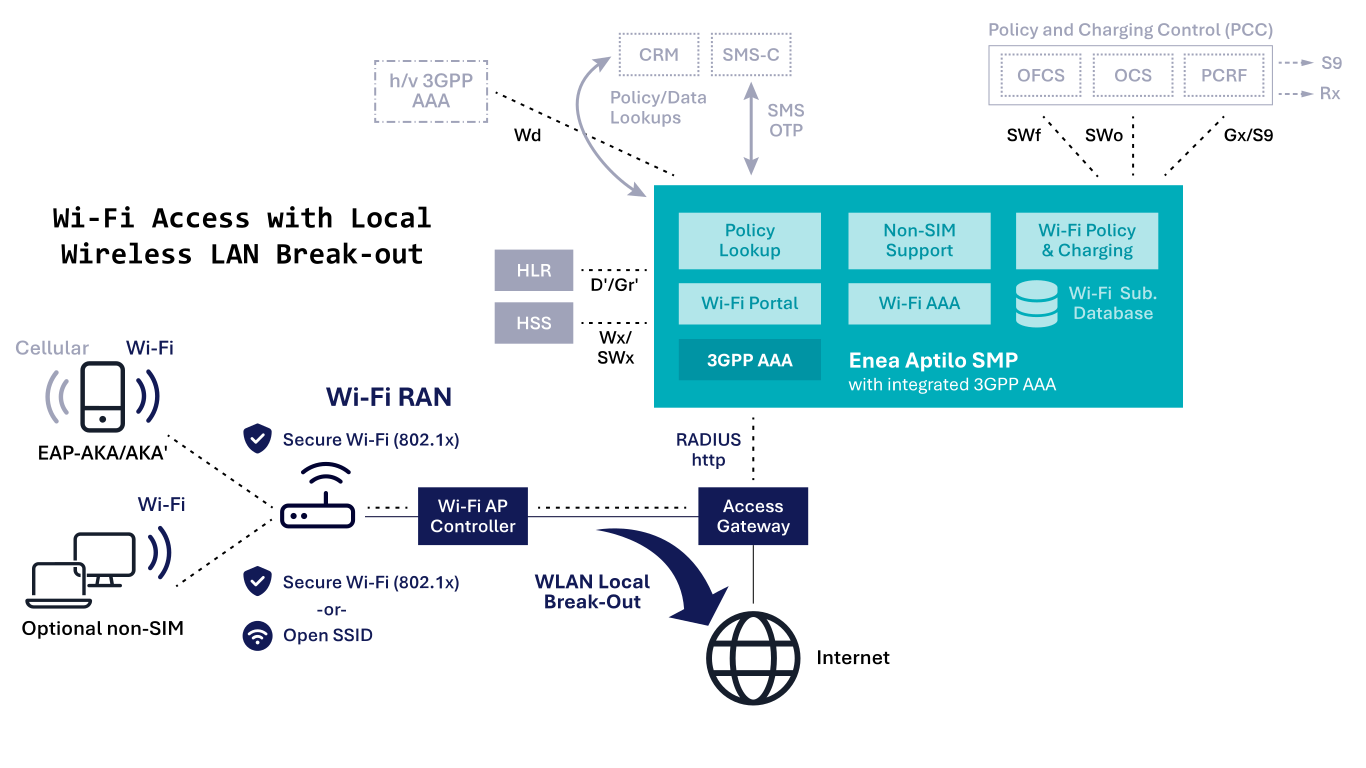
As discussed, this option can be used for any generation of cellular networks and is currently mobile operators’ most widely deployed architecture. It enables local traffic breakout for all clients at the Wi-Fi access gateway and utilizes standard RADIUS and EAP methods for authentication with the HSS/HLR. The Wi-Fi access point must support 802.1x authentication with EAP-SIM/AKA/AKA′. Integration with the HLR for SIM authentication is facilitated through the D′/Gr′ MAP interfaces or with the HSS via the Wx/SWx Diameter interfaces.
Access Through DPI
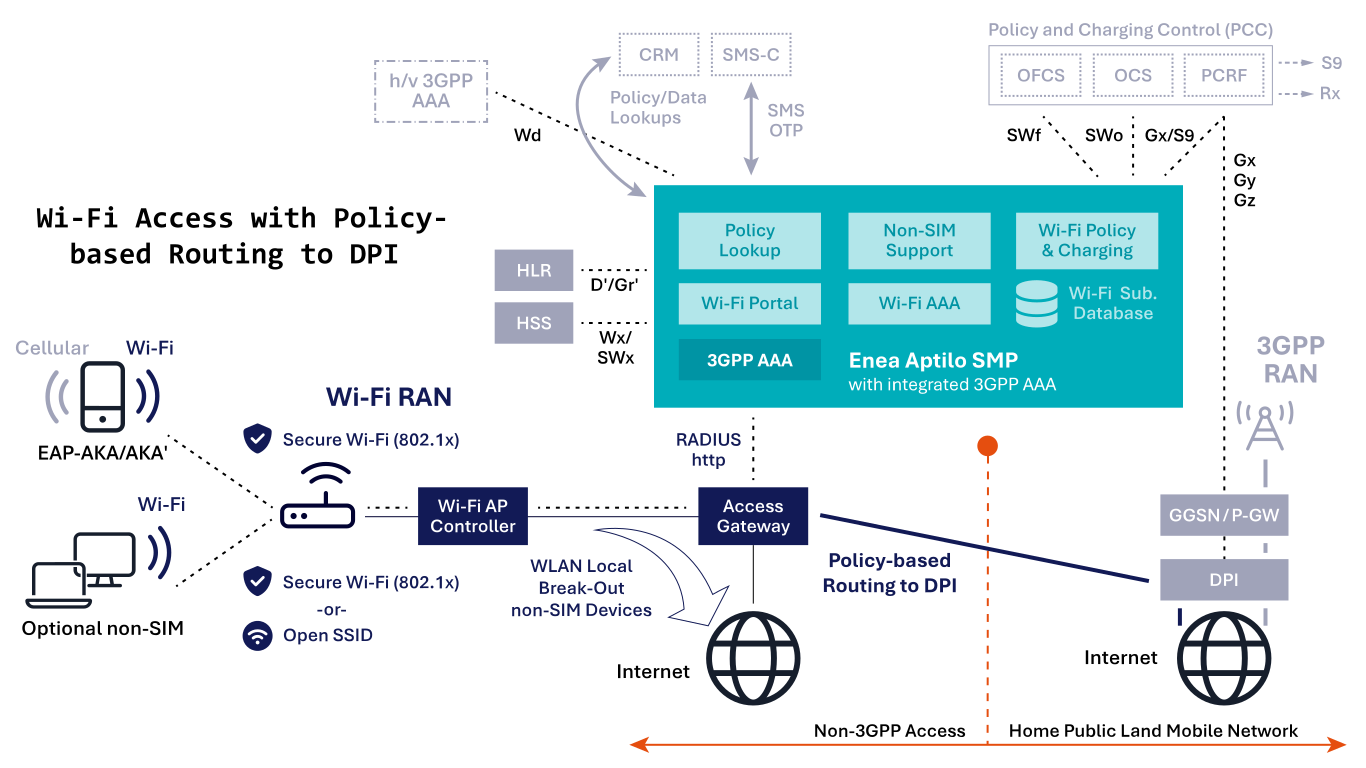
This option can be used for any generation of cellular networks. The mobile operator typically uses the DPI to inspect and enforce policies for SIM-enabled devices.
All traffic for devices with SIM authentication support is terminated at the Deep Packet Inspection (DPI) node in the mobile core. In contrast, traffic from non-SIM devices is directed to the Internet locally.
This option uses standard RADIUS and EAP methods for authentication with HLR/HSS. The Wi-Fi access point requires support for 802.1x authentication with EAP-SIM/AKA/AKA′. Integration with the HLR for SIM authentication is facilitated through the D′/Gr′ MAP interfaces or with the HSS via the Wx/SWx Diameter interfaces.
Policy-based routing is utilized to route the traffic from the Wi-Fi access gateway to the DPI.
Trusted Wi-Fi Access in EPC
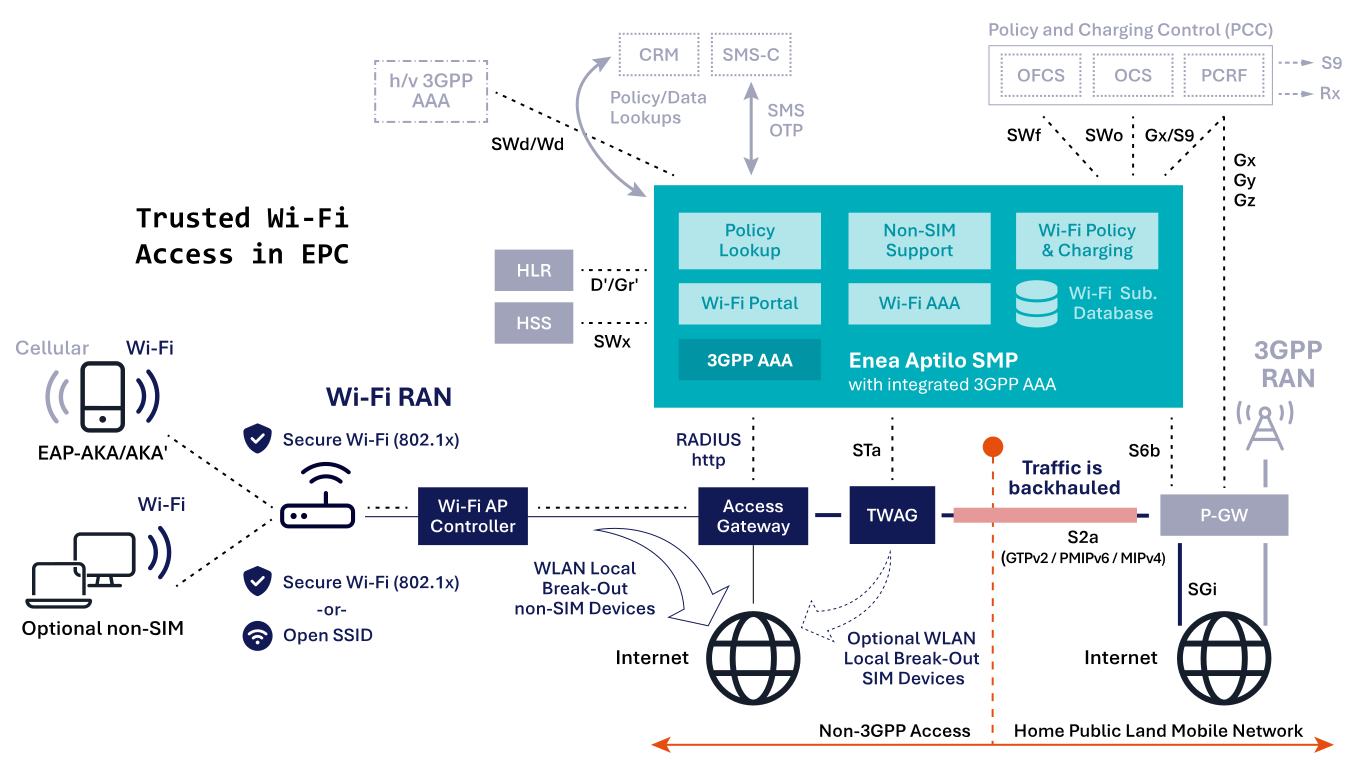
This option is for 4G and 5G non-standalone (5G NSA) and based on 3GPP specification TS23.402 with the introduction of the Trusted Wireless Access Gateway (TWAG) node. The TWAG establishes GTPv2, PMIP, or MIP tunnel (the S2a interface) to the P-GW in the EPC core for all trusted traffic.
“Trusted” traffic means an operator-controlled secure Wi-Fi environment with 802.1x. SIM authentication with the HLR is integrated through the D′/Gr′ MAP interfaces or with the HSS via the SWx Diameter interfaces. The Wi-Fi access point requires support for 802.1x and EAP-SIM/AKA/AKA′ authentication methods. This option also requires support for EAP in the device.
The STa interface is mainly used for EAP client authentication with HSS and S2a option selection of which tunnel type to use. The S6b interface between 3GPP AAA and P-GW is mainly used for tunnel authentication, static quality of service, and mobility (if applicable).
The 3GPP specification also allows for a full or partial local breakout of Wi-Fi traffic at the TWAG in the Wi-Fi core.
Untrusted Wi-Fi Access in EPC
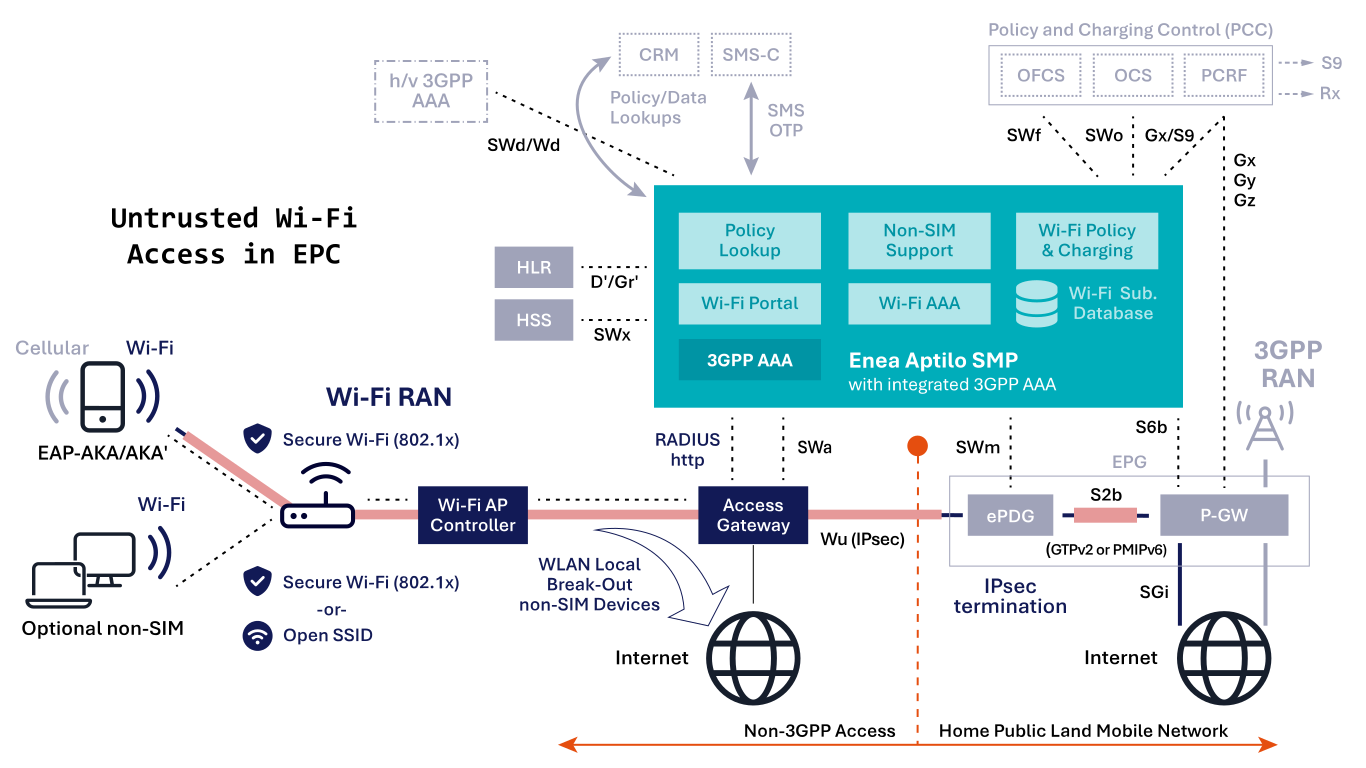
This option is for 4G and 5G non-standalone (5G NSA) and based on 3GPP spec TS23.402 with the introduction of the evolved Packet Data Gateway (ePDG) node. This option requires an EAP client in the device with IPsec support. There is no impact on the Wi-Fi core or Wi-Fi RAN; any Wi-Fi network will function seamlessly. IPsec tunnels are terminated in the ePDG, a mobile core node specifically
introduced for this purpose. The ePDG maps the IPsec tunnels into GTPv2 or PMIP tunnels, which are terminated in the P-GW. In practice, both ePDG and P-GW functions are typically integrated into the same Evolved Packet Gateway (EPG).
The SWa interface is mainly used for EAP client authentication with HSS through the SWx interface. The SWm interface is used for additional authentication parameters, including subscription profiles and S2b option selection of which tunnel type to use. The S6b interface is mainly used between 3GPP AAA and P-GW for tunnel authentication, static quality of service, and mobility (if applicable).
The 3GPP specifications define two types of
non-3GPP access: trusted and untrusted. Non-3GPP access includes technologies such as Wi-Fi, WiMAX, fixed-line, and CDMA networks.
In the next three posts, we will explore the differences between trusted and untrusted 3GPP Wi-Fi Access and the various 3GPP standard methods for integrating these access types with cellular networks across different cellular generations (3G/4G/5G). We will only focus on 4G and 5G as the methods for 3G are essentially the same as for 4G, only with different names on the 3GPP nodes.
The numerous acronyms introduced with each new 3GPP release can be overwhelming and confusing. We’ve provided a ‘translation table’ to assist those of you already familiar with the terminology for 3G, 4G, or 5G.
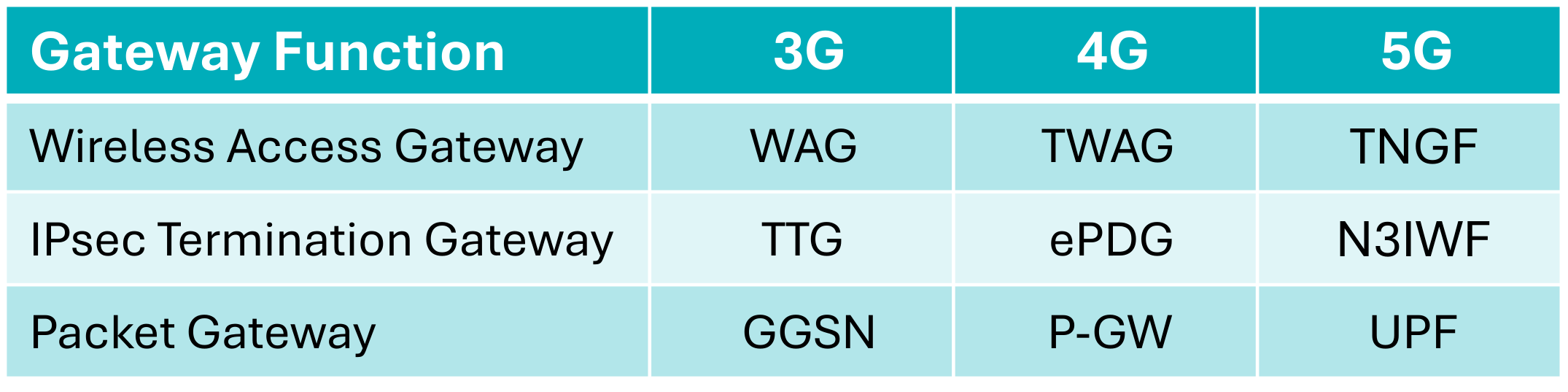
Please note that these are simply ‘functions’ that may be delivered as a combined solution with one or more nodes, deployed as containerized functions, or integrated into the same virtual or physical gateway node.
Trusted 3GPP Wi-Fi Access
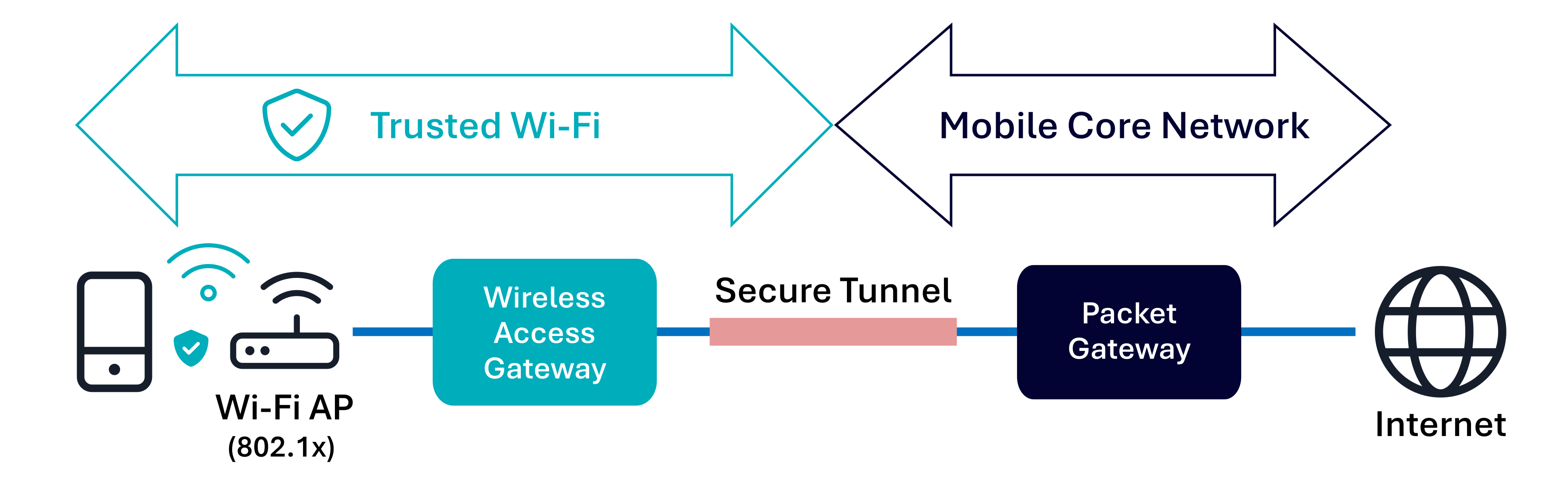
Trusted non-3GPP (Wi-Fi) access was first introduced with the LTE standard in 3GPP Release 8 (2008). Trusted access typically refers to operator-managed Wi-Fi networks that use encryption (enabled by 802.1x) within the Wi-Fi radio access network (RAN) and secure authentication methods like EAP.
In the case of trusted access, the user device (UE) connects through a Wireless Access Gateway (WAG/TWAG/TNGF/TWIF) in the Wi-Fi core. The gateway, in turn, establishes a secure tunnel directly with the Packet Gateway (GGSN/P-GW/UPF), which is also used for cellular traffic in the Mobile Core. For 5G standalone (5G SA) architectures, a null-encrypted tunnel is utilized between the device and the TNGF/TWIF—more details on this can be found in the Wi-Fi and 5G convergence section.
SIM authentication (EAP-SIM/AKA/AKA′ or 5G-AKA), performed by a 3GPP AAA server, is crucial for trusted non-3GPP access. Beyond authenticating, the device for access to the Wi-Fi network, it also generates cryptographic keys used for the Wi-Fi encryption (WPA2/WPA3).
Untrusted 3GPP Wi-Fi Access
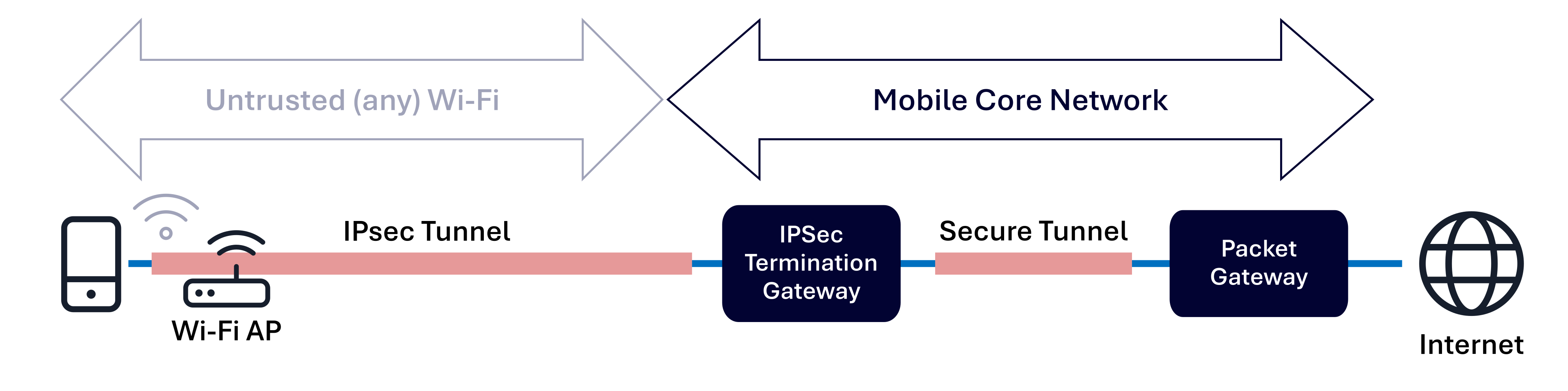
Untrusted non-3GPP (Wi-Fi) access was first introduced in the Wi-Fi specification of 3GPP Release 6 (2005). At that time, Wi-Fi access points with advanced security features were uncommon, so Wi-Fi was generally considered open and unsecured by default.
Untrusted access refers to any Wi-Fi network over which the operator has no control, including public hotspots, subscribers’ home Wi-Fi, and corporate Wi-Fi networks. This also encompasses Wi-Fi networks that lack adequate security mechanisms, such as EAP authentication and radio link encryption (802.1x enabling WPA2/WPA3-Enterprise encryption). Conversely, a Wi-Fi network using EAP and 802.1x outside the operator’s control, for instance, an Enterprise Wi-Fi network, is still considered untrusted.
The flexibility of untrusted non-3GPP access, which works over any Wi-Fi network, makes it the preferred method for services like Wi-Fi Calling (aka Voice over Wi-Fi).
The untrusted model requires no modifications to the Wi-Fi network itself but does impact the device side, as an IPsec client must be deployed natively on the device. The device connects through a secure IPsec tunnel directly to an IPsec Termination Gateway (TTG/ePDG/N3IWF) in the Mobile Core, which is then linked through an encrypted tunnel to the Packet Gateway (GGSN/P-GW/UPF), which handles both cellular and Wi-Fi traffic. This integration means that the device must interact with mobile core network components like the HLR/HSS/AUSF-UDM for SIM-based EAP authentication (EAP-SIM/AKA/AKA′ or 5G-AKA) to establish the IPsec tunnel, but not for granting Wi-Fi access. This ensures the same level of authentication security as in the cellular network.