

On the off chance that you live in a jam-packed spot, you may have seen times when your Wi-Fi unexpectedly drops off out of the blue. The Wi-Fi routers and neighbours’ devices could be using the same radio channels that meddle with your internet connection. It’s ideal to discover and utilize a Wi-Fi channel that offers less interference and a smoother connection to improve the Wi-Fi speeds and connectivity.
Choosing the optimal Wi-Fi channel can improve your Wi-Fi coverage and signal strength, giving you an overall boost in performance.
Most Wi-Fi routers nowadays are utilizing 2.4 GHz and 5 GHz frequency bands, while some of the latest routers now equipped with using the 6 GHz band. Each band is split into channels used by your devices to send and receive information over the network.
Much like cars on a road, information sent across the network via data channels slow down in areas with higher traffic and congestions. The time it takes for a device to send and receive information from the router is increased on the congested channel, and you might be left waiting for your turn to access the web.
Depending on the router you use, you may have some channels that don’t overlap:
WI-FI INTERFERENCE:
The reason why some channels aren’t ideal for you to use might be caused by channel interference.
There are a couple of different types of channel interference:

Co-Channel interference occurs when many wireless devices are accessing the same channel, causing congestion on that channel.
Non-Wi-Fi interference occurs when other devices that work on non-Wi-Fi 802.11 radio frequencies compete for the same frequency band.
Adjacent-channel interference occurs when information sent is on an adjacent or partly overlapping channel. The channel bleeds over on an overlapping channel, which adds interference.
Luckily for the users, there are ways to mitigate network interference with several types of channel switching.
TYPES OF CHANNEL SWITCHING:
Channel switching and channel width selection enable users to optimize their Wi-Fi performance in 3 ways:

Manual Channel Switching:
With manual channel switching, the access point uses the default channel set by the manufacturer. The user is then able to manually change the selected channel based on:
Today, consumers can find various third-party “wireless network analyzer” apps and software online, giving them an overview of network performance, signal strength, and channel congestion. The user then is able to determine the optimal channel based on this analysis for maximum speed and stability.
Auto-channel Switching:
Many routers feature auto-channel switching (ACS) feature by default, and with this enabled, the router will automatically select the least congested channel for you each time the system boots up. Since auto-channel switching relies on scanning the air once (when it powers on) the change in the wireless environment in the future could cause channel interference, and prompt sluggish Wi-Fi performance.
Dynamic Channel Switching (DCS):
Dynamic channel switching helps the user avoid highly congested channels and lets routers and access points (AP) automatically switch to the least crowded channel without any manual input from the user.
With DCS, the router continuously scans the air for the best available channel and switches to it automatically.
There are several available methods for dynamic channel switching:
For more information about Mercku’s Connectivity Suite, our hardware and how you can partner with Mercku, please reach out to the team at [email protected]
Thank you for reading our blog! Mercku Blogs covers the latest in wireless technology – subscribe to our newsletter to make sure you don’t miss our newest releases!

The growing popularity of Wi-Fi mesh networks lies with their core benefit – fast, reliable Wi-Fi in every corner of the house. However, as connectivity and wireless technology continue to evolve, the number of available options from different vendors hit the market at an ever-increasing rate.

Wi-Fi companies such as Eero, Netgear, Google or Mercku often implement a proprietary mesh networking protocol that only allows their mesh systems to mesh with each other. The networking principles and features between the different mesh systems from these providers are mostly the same but, all of them operate independently. For example, it’s not possible to mesh one Mercku M2 Queen router with two Eero nodes to create one network. With so many options, there was a lack of a reliable industry standard for mesh networks that operators and consumers could reference when selecting their next best Wi-Fi mesh solution.
Historically, the Wi-Fi Alliance leads new initiatives around Wi-Fi standards, and in 2018, they introduced EasyMesh certification to make a mesh industry standard a reality. Wi-Fi CERTIFIED EasyMesh™ is a Wi-Fi Alliance® certification program that brings a standards-based approach to multiple AP home Wi-Fi networks. EasyMesh establishes controller routers to manage and coordinate activity among the mesh nodes and ensures that each AP does not interfere with the other, bringing both expanded, uniform coverage and more efficient service.

Source: Wi-Fi Alliance
One key benefit of this standard is allowing consumers to combine EasyMesh certified Wi-Fi access points from multiple vendors to create unified mesh networks – regardless of the product line or brand. This feature gives consumers and operators more freedom in deploying their Wi-Fi 5 or Wi-Fi 6 Mesh systems in the future.
Wi-Fi routers that are Wi-Fi EasyMesh certified will provide a list of useful features to improve the overall user experience. Some of the most important are:
As with every new technological standard, there are some limitations to consider as well. For instance, a standardized protocol could mean the loss of unique network features from individual equipment manufacturers. Moreover, it can be hard to pinpoint the cause of bottlenecking or other performance issues on the network with a variety of different APs.
As Wi-Fi Alliance is continuing to develop the standard, EasyMesh R2 brings about even more enhancements to Mesh networking, with standardized Wi-Fi diagnostics, improved channel management, traffic separation mode and enhanced client steering, which we will cover in the future blogs (subscribe to our newsletter to make sure you don’t miss it!).
Last year, we released the Mercku M6 Wi-Fi 6 Mesh system, which supports EasyMesh R2 standard out of the box. We can’t wait for our users to start deploying the M6 in their custom Mesh networks – alongside other best EasyMesh certified routers in 2021!

Mercku’s M6 Wi-Fi 6 system was named the Consumer Technology Association’s Networking Product of the Year in the Mark of Excellence 2021 Awards – an award series that annually recognizes the tech industry’s top smart home innovations.
Every year, The Mark of Excellence Awards, presented by the Smart Home Division of the Consumer Technology Association (CTA)®, recognizes the best in custom integration and installed technology. The most innovative technology companies compete in more than 20 award categories and are judged by independent experts from established industry leaders. In a year where consumers are spending more time at home than ever before, we are honored to have received the 2021 Mark of Excellence Award for M6 AX Mesh in the Networking Product of the Year category.


This recognition embodies Mercku’s commitment to building the next era of connectivity. By awarding Mercku with the Mark of Excellence Award, CTA spotlights the impact we have on our users’ daily lives and shows the importance of innovative Wi-Fi products as the foundation of all connected smart home technology. We share this award with all our partners, distributors and users around the world, as we are thrilled to lead the way into an innovative, user-centered, connected future.
Read the full story on CTA.tech

Have you ever wondered how your laptop, cellphone, or other mobile devices connect to the internet? “Through Wi-Fi”- that’s the most obvious answer. It is, but then how does Wi-Fi communicate with our devices? Well, the quick response is via radio frequencies, and we’ll jump into more detail in just a bit, along with insights on the much anticipated 6 GHz spectrum and what it means for your Wi-Fi experience.
Restricted to the 2.4 GHz and 5 GHz bands in recent years, we have reached the point where there are now more Wi-Fi networks in a building than radio stations available to listen to in a city. In April of 2020, the Federal Communication Commission (FCC) announced its approval to allocate an uncharted fresh spectrum, the 6 GHz band, to reduce pressure from current frequency bands while delivering high speeds.
Well, what makes the 6 GHz band different?

The number of devices connected to Wi-Fi in homes and public areas has significantly increased over the last decade, especially in this era of home automation and IoT. Current frequency bands are not sufficient to cater to growing bandwidth requirements. With the new 6 GHz band, more throughput is available for reasons including an increased number of non-overlapping channels and greater bandwidth.
There is a limit to the number of channels each band has, which are limited further by the number of non-overlapping channels. These non-overlapping channels are essential in reducing signal interference between devices, ultimately resulting in slower wireless speeds.
The 2.4 GHz band has 11 channels with only three non-overlapping channels (1, 6, 11); therefore, in crowded areas where many devices are connected, signal interference will result in slower internet speeds.

The 5 GHz band overcomes the weaknesses of 2.4 GHz and is ten times wider than the 2.4 GHz band with 24 non-overlapping channels, making it even better. However, some channels of 5 GHz have been in use for the government and the military, so in reality, there are only eight non-overlapping channels available to the public.
The introduction of 6 GHz includes 14 non-overlapping 80 MHz channels, all for public use, reducing the opportunity for co-channel signal interference and ultimately give you better wireless speeds.
The new 6 GHz band will be adding 1,200 MHz of extra bandwidth, meaning users can utilize the 40 MHz and 80 MHz channels plus the newly available 160 MHz channel widths. It is recommended to use smaller channel widths despite reduced throughput to reduce co-channel interference; however, the 6 MHz band overcomes this with extra space on the wireless spectrum. To put this into perspective, 5 GHz band can only support two non-overlapping 80 MHz channels or a single 160 MHz channel, while the 6 GHz band can support fifteen 80 MHz channels and seven 160 MHz channels. This means much less channel overlap and much more bandwidth!
Similar to how the 5 GHz band has a shorter ranger than 2.4 GHz, higher throughput, a more significant number of channels, and higher bandwidth come at the cost of more considerable signal attenuation in the new 6 GHz band; this is where Mesh Wi-Fi comes in. In a mesh Wi-Fi system, the central router and multiple mesh points may be installed throughout a large space to increase wireless 6 GHz coverage. However, unlike the signal extenders, the units form one seamless and unified blanket network that broadens reach and connectivity strength. When roaming, your device maintains a connection to a single SSID without hiccups in connection, giving you the full potential of 6 GHz Wi-Fi around any space.
6 GHz Wi-Fi delivers 1.2 Gbps at even 7 meters away from an access point with obstructions.
Use Cases:
The development of 6 GHz and Wi-Fi 6 alone are grand achievements in this new age of Wi-Fi, and combining the two to become Wi-Fi 6E is game-changing for the tech world and the economy. Wi-Fi Alliance* statistics show that the value of Global Wi-Fi will increase by up to $3.47 trillion by 2023, and unlocking 6 GHz Wi-Fi will lead to even more significant economic contributions and a better-connected world.
Wi-Fi 6E delivers a considerable increase in network efficiency and capacity for dense population centers. Wi-Fi 6E will immediately impact network performance in crowded places such as stadiums or apartment buildings. With the global increase in fibre internet coverage, the necessity of Wi-Fi 6E will increase to leverage the full capacity of gigabit broadband connections.
Much like how there is not much 8K video content available, it’s not as beneficial yet to purchase an 8K television when you can’t use it to its full potential. Similarly, the biggest issue with purchasing Wi-Fi 6E routers is that there are only a few devices on the market capable of using its Wi-Fi 6 features or utilize the 6 GHz band. The few devices available on the market now are using a prototype version of the new standard. In 2021, markets will see an influx of 6E chips for commercial use. With that being said, devices compatible with Wi-Fi 6E will be hitting the mainstream markets within the next few years.
With a completely new spectrum unlocked, we are sure to see many innovative products being released in the future.
As more smart home products enter the market each year and consumers continue adopting the Internet of Things into their homes, it’s inevitable that the world would have run out of 4.3 billion unique IPv4 addresses. To combat this, innovators have developed the IPv6 protocol introducing over 340 undecillion (that’s 340,000,000,000,000,000,000,000,000,000,000,000,000) addresses!
What makes IPv4 and IPv6 so different? Let’s begin with understanding what IP (or Internet Protocol) is.
Internet Protocol
“Protocol” refers to using a set of rules and guidelines for communicating over the internet. It is the language of the internet that forces users to follow the standard rules for communication. An IP address is like your home address, which you use for communicating with the outside world. It is a string of unique numbers that identify your device over the internet, allowing your device to communicate with others using their unique IP addresses.
IPv4 and IPv6 addresses are both binary numbers that are expressed either in decimal or hexadecimal forms, respectively, and have two parts: the network the host parts. The network portion in the address is the unique identification assigned to the network, and the host part is the unique identification of each device connected to the network. So, for each device’s address connected to the network, the network portion in the address will be the same, however, the host part will differ.
IPv4
IPv4 uses 32-bit addressing, which is 232 addresses, allowing for 4,294,967,296 unique IP addresses worldwide. The IP address consists of four sets separated by dots, with each set ranging between 0 to 255.
At the time IPv4 was engineered in the 1980s, 4 billion IP addresses seemed like more than enough considering this protocol was initially used as an experiment for the US Department of Defense. IPv4 has since become the default protocol for the internet and with a world population of greater than 7.5 billion the IPv4 address space is not sufficient.
Knowing this, how are we still managing to provide unique IP addresses? You guessed it – by reusing IP addresses! Network address translation (NAT) helps reduce the use of public IP addresses by translating private IP addresses to public IP addresses. Inside a local network usually managed by a router, there may be multiple private IP addresses that are translated into public IP addresses when they want to communicate over the internet. Mercku’s M2 Queen router is enabled to perform translations and is capable of supporting 60 devices at once without compromising on communication speeds.
Figure 1: Smart Homes Worldwide
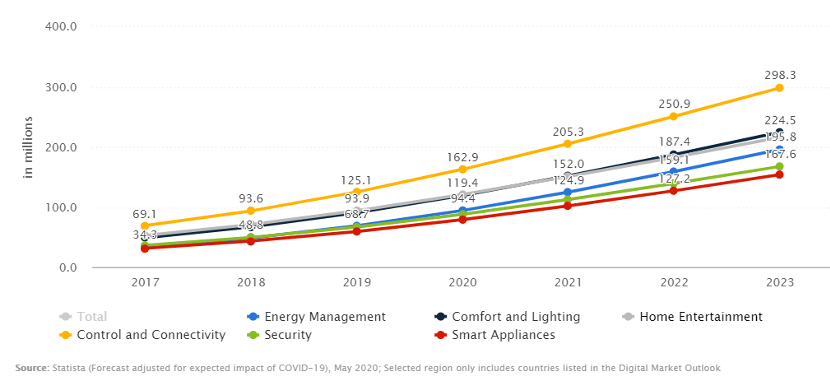
Source: Statista, May 2020, based on Statista Digital Market Outlook – Market Report
Figure 2: Forecast number of mobile devices worldwide from 2019 to 2023
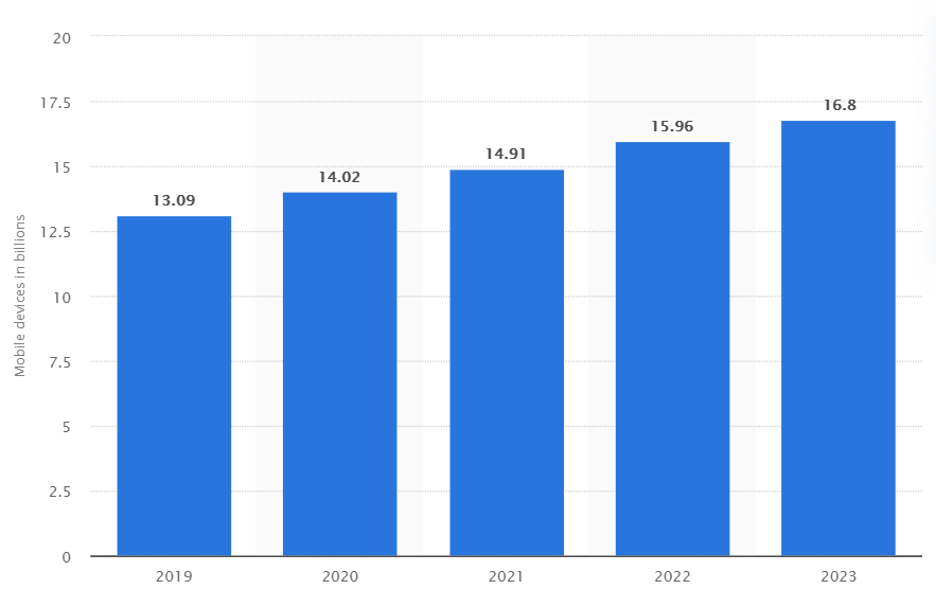
Source: Statista, February 2020, based on Mobile Statistics Report, 2019-2023
By observing Figures 1 and 2, it is evident that the number of devices worldwide has been increasing and is forecasted to further increase for which Ipv4 address space is certainly not enough.
Since IPv4 address space has become insufficient, computer engineers around the world (Internet Engineering Task Force) decided to address this issue by introducing IPv6 with the intent to replace IPv4.
IPv6 uses 128-bit addressing, which overcomes the insufficiency of IP addresses worldwide. The number of unique IP addresses that can be generated with IPv6 is 2128 which is 340,282,366,920,938,463,463,374,607,431,768,211,456 IP addresses. IPv6 address has eight sets that are separated by a colon and have hexadecimal digits.
The Future of IP Addressing
IPv4 and IPv6 are not compatible and can’t directly communicate with each other, although there are transition mechanisms like NAT64 that allow for communication.
Many routers and servers that are currently in use are not IPv6 compatible quite yet and can only communicate with IPv4 addresses. However, as the world transitions more towards IPv6, internet service providers will need to replace their customer’s existing routers with newer ones that are IPv6-compatible.
There is no confirmed date when a complete transition will happen and it may take place over years, with an increasing number of applications and content accessible by IPv6. It is better to transition beforehand to IPv6 to avoid inconveniences in the future, and consumers with Mercku’s WiFi router won’t require any replacement.
Some of the additional features that IPv6 has includes:
To check if your device is IPv6-ready, you can visit http://test-ipv6.com/ for free online testing.
