Breaking News

Wi-Fi news from ENEA

Local Break-Out: The Dominant Deployment Model

Historically, not all standardized functions—like those defined in 3GPP—make it into real-world networks. Vendors and service providers only implement features when there are strong commercial incentives. The integration of Wi-Fi with 3G and 4G data planes is a prime example. Most mobile operators have implemented local break-out (LBO) for Wi-Fi traffic directly from their secure Wi-Fi networks (802.1x).

Without a compelling operational or commercial rationale for backhauling Wi-Fi traffic to the Mobile Core, operators have instead leveraged secure SIM-based authentication, often paired with policy control from the Mobile Core. This approach avoids adding unnecessary load to the Mobile Core, allowing operators to enforce policies locally through advanced service management systems like the Enea Aptilo SMP.

Mobile device vendors also play a critical role in determining what capabilities are implemented and what functionality that gets deployed into real-life services (Learn more about this in our recent post Wi-Fi Offloading and the Device). For instance, it took nearly a decade for device vendors to adopt the IPsec client required for untrusted Wi-Fi access. The motivation for this change materialized with the rise of Wi-Fi Calling, which served both the device manufacturers’ interests and the consumers. Backhauling Wi-Fi Traffic to the Mobile Core: Control vs. Efficiency In certain markets, some mobile operators choose to backhaul Wi-Fi traffic to the mobile core, mainly for perceived control and regulatory aspects. However, a vast majority (90%) prefer local traffic breakout due to cost and network optimization reasons.

The preference for local offloading is driven by the desire to minimize latency and reduce core network load. There are two primary reasons operators still consider backhauling traffic: Deep Packet Inspection (DPI): By routing traffic through the mobile core, operators can perform DPI to analyze and manage data flows. However, this can also be achieved outside the 3GPP standards using policy-based routing to a dedicated DPI function outside the mobile core. Policy Control, Quota Management, and Charging: Although these functions are managed in the mobile core, there is no strong justification for this approach. A well-integrated Wi-Fi service management system can handle policy enforcement, quota tracking, and charging locally within the Wi-Fi network while still maintaining alignment with the mobile core. Explore our solutions for local policy and charging integration. Learn More About Wi-Fi Offloading Architectures In the next upcoming white paper excerpts, we will cover the 3GPP specified architectures for Wi-Fi Offloading integrated with the Evolved Packet Core (EPC) and the 5G standalone mobile core (5G SA). If you don’t want to wait for these posts, go here for further insights on all the different Wi-Fi offloading architectures, and to learn why a standard 3GPP AAA function is not enough for effective Wi-Fi offloading.

Wi-Fi Offloading and the Device

The device is King

Let’s face it. The network selection, which cellular or Wi-Fi network to connect to, is entirely in the hands of the device and, ultimately, the user.

Apple is clear about this:

“When auto-joining networks, macOS, iOS, and iPadOS start with the most preferred network, followed by private networks, then public networks.”

The Apple device tries to connect to networks in this order:

  1. The user’s “most preferred” network
    Known networks are scored based on the user’s actions. If the user manually switches to a network, its score increases. If the user manually disconnects from a network, its score decreases. The “most preferred” network is the one with the highest score.
  2. A private network
    Private networks are those set up in homes and offices and can include the Personal Hotspot on the user’s iOS or iPadOS device. Devices with macOS, iOS, or iPadOS reconnect to known private networks in order of most recently joined.
  3. A public network
    Public networks are designed for general access in public places like hotels, airports, and coffee shops. Other examples include Passpoint (Hotspot 2.0) and EAP-SIM/AKA/AKA′ in Wi-Fi connections provided by cellular carriers and network access providers.

Android and other devices use similar algorithms to ensure a great user experience. While it’s natural for mobile operators to initially feel concerned about not having control over Wi-Fi network selection, is “the device is king” necessarily a negative development?

From a Wi-Fi offloading and happy user standpoint, prioritizing the user’s preferred Wi-Fi network makes sense, followed by their home or workplace network, and last in priority, the public service provider networks. Furthermore, modern mobile devices use sophisticated algorithms to select the Wi-Fi network that offers the best user experience when multiple networks are available at the same location. For further details, refer to the Wi-Fi network selection section.

In other words, leave the Wi-Fi network selection decision to the device!

Mobile operators often seek greater control over the decision to remain on the cellular network or switch to Wi-Fi. Enea, positioned at the intersection of the 3GPP ecosystem and Wi-Fi technology, is uniquely suited to develop a solution for this challenge. In an upcoming post More Intelligent Network Selection, we will share our vision on this topic.

Wi-Fi Connection Profiles

Wi-Fi connection profiles are collections of settings that allow devices to identify and connect to specific wireless networks. They are supported across various platforms, including iOS/iPadOS, Android, Windows, and macOS. Each platform (OS) may have specific features or limitations regarding Wi-Fi profile management.

Wi-Fi connection profiles contain essential information needed to connect to a Wi-Fi network. The information varies depending on the connection type but can include:

  • SSID (network name).
  • Network Access Identifier (NAI) Realm, used for user authentication.
  • Fully Qualified Domain Name (FQDN), which is used to specify the hostname of the authentication server.
  • Security type (e.g. WPA2-Personal, WPA2/WPA3-Enterprise).
  • Encryption method.
  • Settings for SIM authentication, such as the International mobile subscriber identity (IMSI).
  • Trust certificate for EAP-TTLS and EAP-TLS.
  • Username/Password for EAP-TTLS.
  • Digital device certificate and security key for EAP-TLS.
  • Passpoint-specific settings such as Roaming Consortium Organization Identifiers (RCOIs). More about this is below.
  • Authentication settings, including the EAP method.
  • Connection preferences.

These profiles can allow devices to automatically connect to known networks without requiring users to manually enter credentials each time. A typical example is SIM authentication for automatic authentication of users.

To support Wi-Fi offloading, the Wi-Fi connection profile can be provisioned from the factory or added over the air through Apple’s carrier settings and similar mechanisms for Android phones.

For other types of devices and Wi-Fi-only devices, the Wi-Fi connection profile can be provisioned through an app. The recommended approach is to integrate a Software Development Kit (SDK) into existing applications, such as a service provider’s loyalty app, to implement this provisioning mechanism effectively.

Settings for Wi-Fi Offloading

Wi-Fi offloading using SIM authentication has always been secure, and the user’s automatic connection to the Wi-Fi network is seamless. To support this, there are some important settings in the Wi-Fi connection profile related to Wi-Fi offloading.

IMSI

The International Mobile Subscriber Identity (IMSI) is a numeric value composed of two parts <PLMN Id><MSIN>:

  1. Public Land Mobile Network Identifier (PLMN ID): Uniquely identifies the individual mobile operator by their Mobile Network Code (MNC) and Mobile Country Code (MCC). The PLMN ID is of the format <MCC><MNC>; for instance, the PLMN ID for Swisscom with MNC 001 and MCC 228 is 228001.
  2. Mobile Subscription Identification Number (MSIN): A unique identifier for the subscriber, such as 123123123.

The subscriber’s IMSI in the above example would then be 228001123123123. Mobile operators normally use wild cards in the Wi-Fi connection profile, such as 228001*, because it is enough to identify the PLMN ID in the Wi-Fi network selection process.

Realm

An NAI realm is the domain portion of a Network Access Identifier (NAI), which follows the standard syntax of “user@realm.” The realm specifies the domain or organization to which the user belongs, for instance, “enea.com.” The NAI realm is normally the same as FQDN and is used to find the authentication server.

The NAI realm field, when used for Wi-Fi offloading, has a specific format for 3GPP interworking. In this case, mobile operators use NAI realms that end with 3gppnetwork.org. For the interworking with Wi-Fi networks and the use of EAP-SIM/AKA/AKA’ and 5G-AKA authentication methods, the (NAI) realm field is of the format:

wlan.mnc<MNC>.mcc<MCC>.3gppnetwork.org

The individual mobile operator is uniquely identified by their Mobile Network Code (MNC) and Mobile Country Code (MCC). For instance, the NAI realm for Swisscom with MNC 001 and MCC 228 is:

wlan.mnc001.mcc228.3gppnetwork.org

For Wi-Fi offloading on their own Wi-Fi network, which does not require interworking with others, the operator may use another NAI realm format with a domain name they own.

SIM

This field is required for SIM based authentication (EAP-SIM/AKA/AKA′). The EAPType field must be set to the appropriate EAP type.

Settings for Passpoint

There might be some confusion about the terms Wi-Fi connection profile and Passpoint profile, but they are closely related. A Passpoint profile is the wire format of the device-specific Wi-Fi connection profile. When a Passpoint profile is received by a device, it is turned into a Wi-Fi connection profile specific to that device. Wi-Fi connection profiles can also be created through other means, for example manually configured or deployed using an app installed on the device. While Passpoint Release 1 defines the content of the profile, Passpoint Release 2 also standardizes the formatting of the profile with the intention to ensure interoperability across different devices and networks. Devices only supporting Release 1 have the same functionality, but uses a vendor-specific format.

Passpoint enables seamless and secure connectivity, just as SIM authentication does, and SIM authentication can also be used with Passpoint. Further more, Passpoint also enables seamless roaming as the device connects to a Wi-Fi service rather than a specific Wi-Fi SSID. Learn more in the upcoming post about Passpoint.

In a Passpoint profile, there are other parameters than SSID in play for the device to automatically identify and select the Passpoint-enabled Wi-Fi network. Once a device tries to connect, the NAI realm is used for finding the authentication server. As discussed, the NAI realm for Wi-Fi offloading is normally in the format wlan. mnc<MNC>.mcc<MCC>.3gppnetwork.org, especially for 3GPP interworking.

Network Selection for Wi-Fi Offloading in a Non-Roaming Scenario

  • For SIM-based devices using EAP-SIM, EAP-AKA, or EAP-AKA′, the primary identifier is the IMSI. To streamline network identification, mobile operators often use a wildcard IMSI, such as 228001* for Swisscom, which denotes the operator’s unique identifier (PLMN ID) without including the full subscriber-specific IMSI. During network selection, the device compares the PLMN IDs provided by the Wi-Fi access point via the Access Network Query Protocol (ANQP) with its stored wildcard IMSI (PLMN ID) associated with its SIM/USIM credentials. If a match is identified, the device proceeds with SIM-based authentication to establish a secure connection.
  • For non-SIM devices using EAP-TLS or EAP-TTLS, the Fully Qualified Domain Name (FQDN) serves as the primary identifier for specific networks or service providers. To determine whether to connect, the device compares the FQDN stored in its Passpoint profile with the domain name list provided by the Passpoint Wi-Fi access point through the Access Network Query Protocol (ANQP). Service providers may advertise multiple domain names; for instance, a single provider might use names such as wlan.mnc410. mcc310.3gppnetwork.org, att.com, and attwireless.com. In addition to FQDNs, the device can utilize other identifiers, such as the NAI Realm or Roaming Consortium Organization Identifier (RCOI), to ensure accurate network matching.

Network Selection for Wi-Fi Offloading in a Roaming Scenario

The Roaming Consortium Organization Identifiers (RCOIs) in the Passpoint profile are used for devices to recognize and automatically connect to compatible networks for roaming.

One of the key advantages of Passpoint is that it doesn’t require all connectivity parameters to be embedded directly in the Wi-Fi access point beacon. Instead, the Access Network Query Protocol (ANQP) operates in the background, enabling devices to silently communicate and negotiate network details. For example, the shorter 24-bit base RCOI can be included in the beacon frames, allowing devices to quickly assess potential network compatibility before proceeding with a more detailed ANQP query that includes the full 36-bit RCOI list. Additionally, information like the Venue Info URL introduced in Passpoint R3 is also exchanged via ANQP, enhancing the user experience without overwhelming the beacon frames.

Another important Passpoint-specific parameter, introduced in Passpoint R1, is the Operator Friendly Name. It provides a human-readable name for the service provider, which helps users identify the network they are connecting to.

Wi-Fi Offloading Settings for OpenRoaming

With the OpenRoaming Passpoint service, identity providers (IdP) can roam with any access network provider (ANP) in the OpenRoaming federation.

An “OpenRoaming profile” is just a Wi-Fi connection profile with Passpoint and OpenRoaming settings.

Since OpenRoaming is a Passpoint service, all that is needed from a profile point of view is to add the required Roaming Consortium Organization Identifiers (RCOIs) for OpenRoaming to an existing Wi-Fi connection profile which has been adapted for Passpoint.

In the case of Wi-Fi Offloading with OpenRoaming Access Network Providers (ANP), must make some more adaptations outside the scope of the Wi-Fi connection profile. Learn more about this in the upcoming post about Wi-Fi offloading and OpenRoaming.

Wi-Fi Network Selection

The device’s ability to select the right network is critical for optimizing Wi-Fi offloading. The good news is that modern devices, such as iPhones and Android phones, employ sophisticated algorithms to determine whether to connect to a Wi-Fi network or remain on the cellular network, balancing factors such as signal strength, network performance, and user preferences. It is no longer the case that devices blindly prefer Wi-Fi over cellular networks. If the cellular connection performs well, the device is less likely to switch to Wi-Fi unless the user has indicated that they prefer Wi-Fi, e.g., by selecting Wi-Fi manually.

It should be noted that while iOS has a consistent behavior, Android devices may have smaller differences in behavior across different OEM vendors.

Wi-Fi Network Discovery and Evaluation

When a device detects available Wi-Fi networks, it initiates a multi-stage process to evaluate and select the most suitable network:

  1. Network Discovery: The device scans for available Wi-Fi networks within range.
  2. Attribute Collection: For each detected network, the device collects key attributes such as signal strength (RSSI), supported Wi-Fi standards, frequency band, and security type.
  3. Network Filtering: The device filters out networks that don’t meet minimum requirements, such as those with signal strength below a certain threshold.

Wi-Fi Network Selection Criteria

Devices consider multiple factors when selecting a Wi-Fi network:

  • Signal Strength: Networks with stronger signals are enerally preferred.
  • User Preferences: Networks manually selected by users receive a higher score in future selection processes. Manually disconnected networks get a lower score.
  • Frequency Band: Due to their higher performance capabilities, 6 GHz and 5 GHz networks are typically prioritized over 2.4 GHz networks.
  • Security: WPA Enterprise has the highest priority, and WPA Personal networks are favored over less secure options.
  • Previous Connections: Networks that the device has successfully connected to in the past are given higher priority.

If multiple Passpoint Identity Providers (IdPs), responsible for authenticating the user for Wi-Fi access, are configured in the Wi-Fi connection profile, the Home Service Provider will be prioritized.


EAP and Seamless Access with SIM Authentication

Seamless Access with SIM Based Authentication

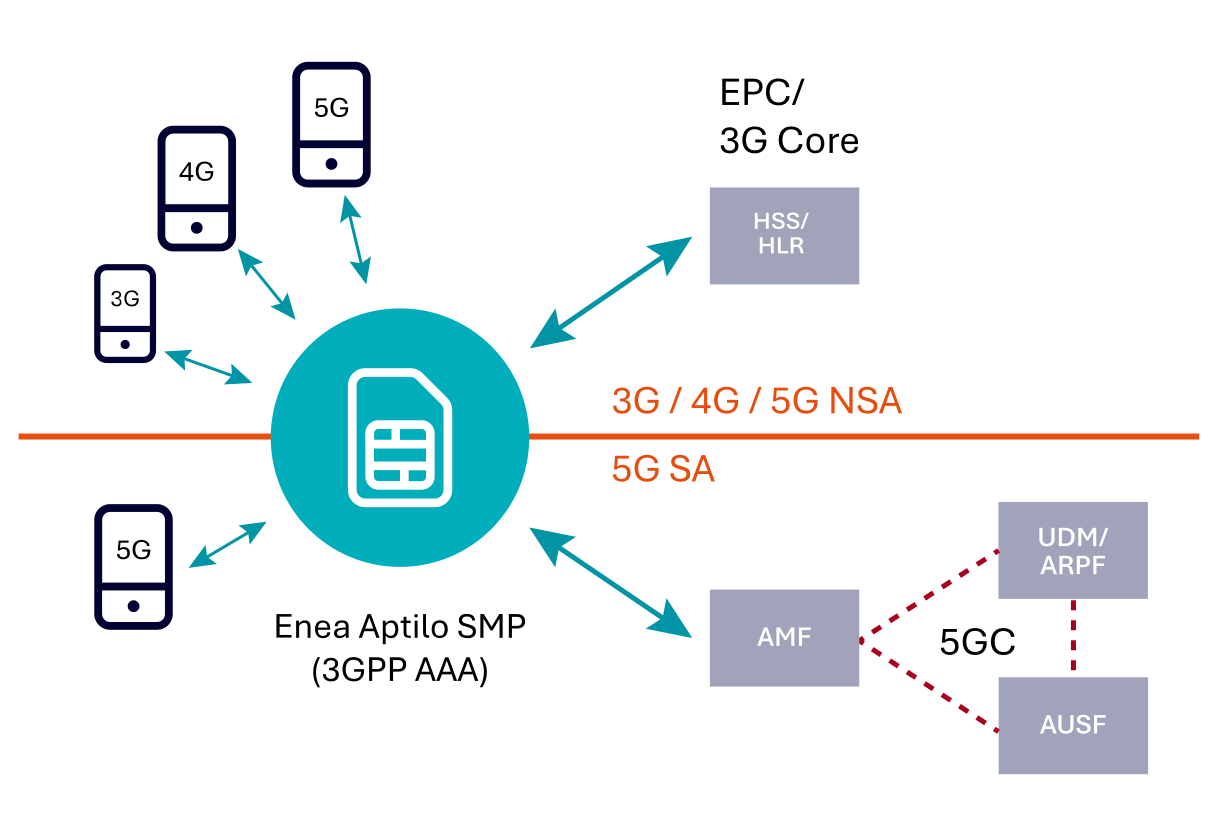
A key component of Wi-Fi offloading is SIM-based authentication, which provides a seamless, secure Wi-Fi experience comparable to cellular networks. This section will examine the mechanics of SIM authentication from a standards perspective. The 3GPP AAA server plays a central role in SIM authentication for 3G, 4G, and 5G networks using the 5G non-standalone architecture (5G NSA), which relies on the existing Evolved Packet Core (EPC) from 4G. However, as we will discuss later, real-world implementations often require capabilities beyond the standard 3GPP AAA function.

The 5G standalone architecture (5G SA) introduced some changes to how SIM-based authentication works for Wi-Fi access (untrusted and trusted non-3GPP Access) compared to previous generations. In 5G SA, no 3GPP AAA server is specified. Instead, the authentication process for Wi-Fi access using SIM credentials is more tightly integrated with the 5G core network and distributed across multiple core network components. Looking ahead, the 3GPP AAA may evolve into a comprehensive bridging function, providing unified management for Wi-Fi access across all generations of cellular networks. SIM Authentication for Wi-Fi Access in 3G, 4G and 5G NSA

The 3GPP AAA server, exemplified here by the Enea Aptilo SMP, plays a crucial role in SIM authentication for 3G, 4G, and 5G NSA networks. It securely manages the authentication process by integrating with the mobile core to verify the device’s credentials. Free Wi-Fi at restaurant SIM Authentication for Untrusted Wi-Fi Access in 3G, 4G and 5G NSA Networks

Untrusted non-3GPP Access is used for Wi-Fi networks that the mobile operator does not trust. This is why this is the access method of choice for Wi-Fi Calling, which must be available wherever there is a Wi-Fi network. Note that the 5G non-standalone (5G NSA) networks use the same mobile core (EPC) as 4G.

The user device is already assumed to be onboarded to the Wi-Fi network, for instance in a home, office or public hotspots. So, SIM authentication has nothing to do with security or login to the Wi-Fi network. Instead, SIM authentication is used to authenticate and authorize the user device to access the mobile core through an IPsec tunnel. The keys for setting up the IPsec tunnel are derived from the SIM authentication process.


EAP SIM-AKA in 3G/4G/5G NSA untrusted 3GPP access (Wi-Fi)

EAP SIM-AKA in 3G/4G/5G NSA untrusted 3GPP access (Wi-Fi)

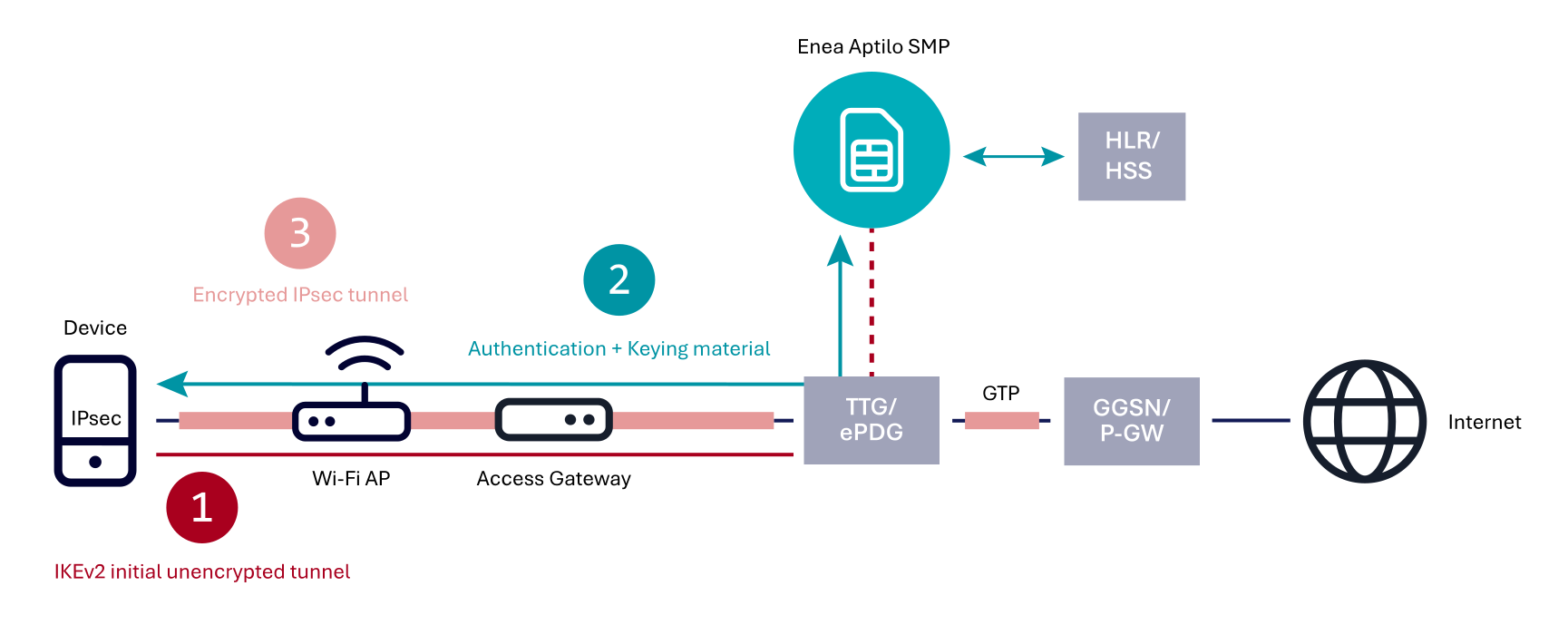
The device initiates an Internet Key Exchange version 2 (IKEv2) connection to the evolved Packet Data Gateway (ePDG) in 4G/5G NSA or Tunnel Termination Gateway (TTG) in 3G, located in the mobile core. This creates an initial, unauthenticated tunnel.
The device sends an IKE_AUTH request containing its identity through this initial tunnel. The ePDG/TTG forwards this request to the Enea Aptilo SMP (SMP) acting as a 3GPP AAA server to initiate the EAP-AKA authentication process. The SMP communicates with the Home Subscriber Server (HSS) or Home Location Register (HLR) to retrieve the user’s authentication vector. Based on the authentication vector, the SMP generates an EAP challenge (EAP-SIM/AKA/AKA’). This challenge is sent back through the ePDG/TTG to the device. The device processes the challenge using its SIM credentials and sends the response back to the SMP through the ePDG/TTG. The SMP verifies the device’s response and if successful, the SMP generates keying material for the IPsec tunnel and sends it to the ePDG/TTG. The SMP also sends an EAP Success message to the ePDG/TTG, which is forwarded to the device. The device independently derives keys for IPsec tunnel establishment based on the shared secret and parameters received in the EAP authentication process.
The ePDG/TTG and device complete the IKEv2 exchange, utilizing the generated keys to establish a fully authenticated and encrypted IPsec tunnel. Optionally, additional IPsec Security Associations (SAs) may be established for different traffic types or QoS levels. The ePDG/TTG then establishes a GTP connection to the Packet Gateway (P-GW/GGSN) to provide the device with access to the mobile network services and the Internet.

Trusted secure Wi-Fi. SIM Authentication for Trusted Wi-Fi Access in 3G, 4G and 5G NSA Networks

In Wi-Fi networks, the 3GPP AAA serves a dual purpose for trusted non-3GPP access.

It authenticates users through SIM-based authentication for Wi-Fi network access.
It enables WPA2/WPA3 encryption of the Wi-Fi network upon successful authentication. This encryption ensures secure, over-the-air communication within the Wi-Fi network.

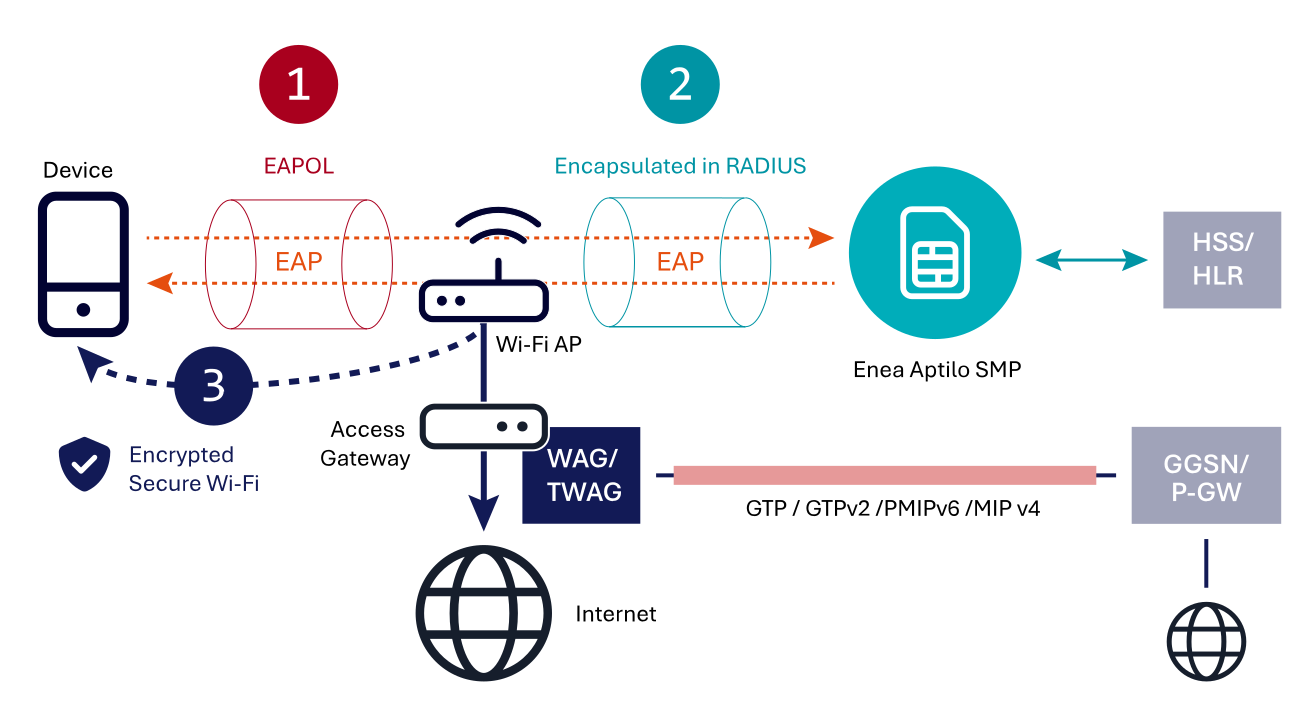
The user gets internet access through the local gateway, as shown in the picture below (the most common scenario). The traffic can also be backhauled to the mobile core using the 3GPP-specified trusted WAG/TWAG gateway functionality with an optional local traffic breakout.


EAP SIM-AKA in 3G/4G/5G NS trusted non-3GPPP access (Wi-Fi)


EAP SIM-AKA in 3G/4G/5G NS trusted non-3GPPP access (Wi-Fi)

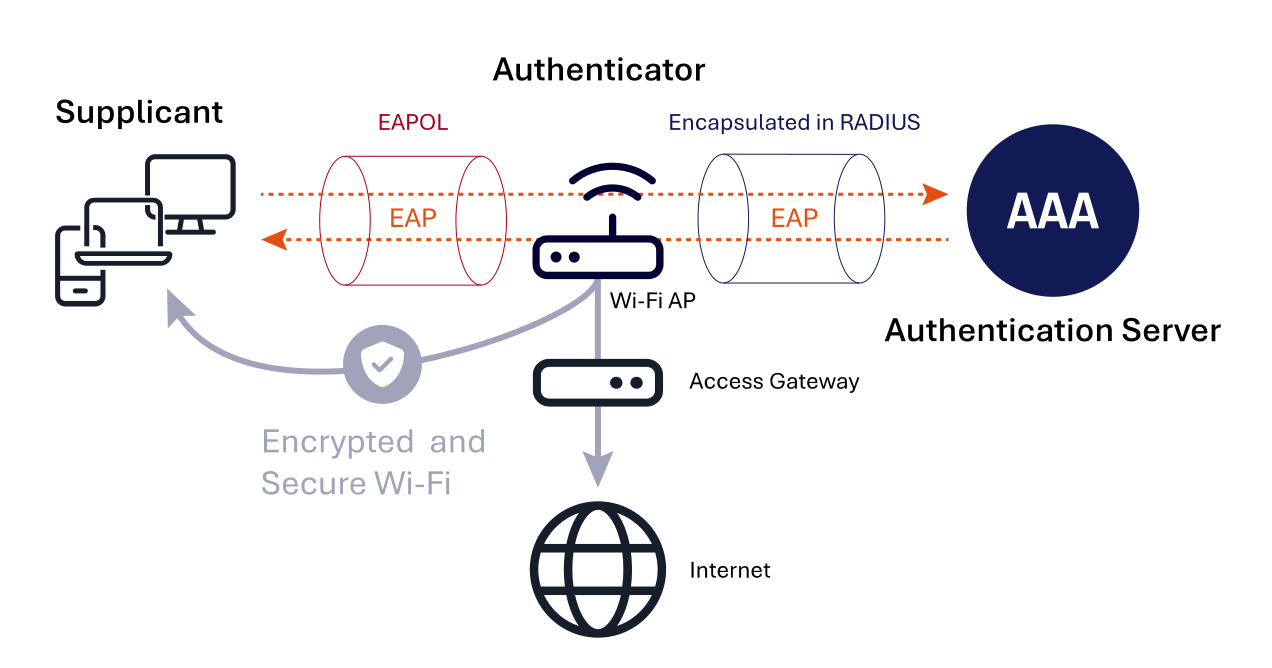
During initialization, only EAP over LAN (EAPOL) 802.1x traffic is permitted between the device and the Wi-Fi access point (AP). All other traffic, such as DHCP or HTTP, is blocked. Initially, the Wi-Fi AP sends an EAP identity request to the device (EAP-SIM/AKA/AKA’). From this point, a secure end-to-end communication channel is established between the device and the Enea Aptilo Service Management Platform (SMP), which acts as a 3GPP AAA server for SIM authentication. The Wi-Fi AP’s role is to forward EAP messages over EAPOL to the AAA by encapsulating them in RADIUS and vice versa.
In this multi-round trip EAP exchange, the device sends its identity to the SMP. The SMP contacts the HSS/HLR via the SS7/MAP or Diameter D’/Gr’ interface to retrieve the 3GPP authentication vectors needed to authenticate this identity. The SMP challenges the device for authentication based on these vectors. Note that it is not only the SMP that authenticates the device. The device also authenticates the network, i.e., the SMP and its connection to the mobile core.
Upon mutual successful authentication, the Enea Aptilo SMP sends the generated encryption keys to the access point over RADIUS. The encryption keys are used to secure the Wi-Fi radio network through WPA2-Enterprise or WPA3-Enterprise encryption. The client must generate the same encryption keys to gain network access and correctly validate the authentication vectors through the SIM card. The derived encryption keys are unique to the connection, ensuring the device has its own encrypted and secure Wi-Fi connection.

SIM Authentication for Wi-Fi Access in 5G SA

Today (November 2024), relatively few 5G networks (50-60 networks) are utilizing the 5G standalone (5G SA) architecture, but this architecture will grow in importance over time. The authentication process for non-3GPP access, such as Wi-Fi, is more unified with the cellular authentication process, which introduces new technical challenges. One of these is how to be able to use Non-Access Stratum (NAS) signaling over Wi-Fi. The EAP-5G protocol has been introduced to encapsulate NAS messages to go over Wi-Fi through an IKV2 connection. So, EAP-5G is not an authentication protocol, which can be a bit confusing at first look. SIM Authentication for untrusted Wi-Fi Access in 5G SA Networks

The principles are the same as for untrusted Wi-Fi access towards the Evolved Packet Core (4G/5G NSA). The user is assumed to be already onboarded to the Wi-Fi network, and security is enforced by having an IPsec tunnel between the device and the mobile core.

EAP-SIM in 5G standalone architecture for untrusted 3GPP access (Wi-Fi)

EAP-SIM in 5G standalone architecture for untrusted 3GPP access (Wi-Fi)

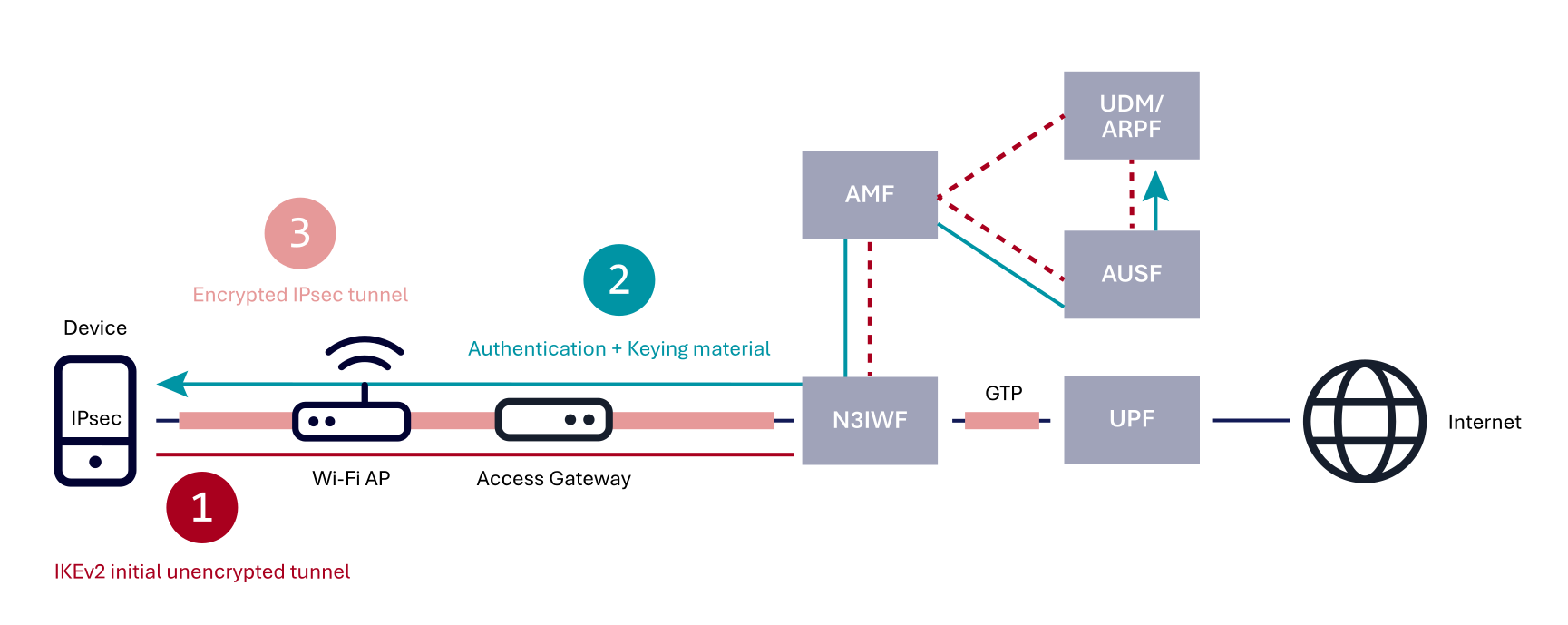
The device initiates an Internet Key Exchange version 2 (IKEv2) connection to the selected Non-3GPP Interworking Function (N3IWF) located in the mobile core. This creates an initial unauthenticated tunnel.
The device sends a NAS Registration Request message encapsulated in EAP-5G to the N3IWF over this initial tunnel. The N3IWF extracts and forwards the NAS message to the Access and Mobility Management Function (AMF). The NAS signaling between the device and AMF uses the N1 interface, similar to cellular access. The AMF initiates the authentication procedure by sending an authentication request to the Authentication Server Function (AUSF). The AUSF communicates with the Unified Data Management (UDM) to retrieve authentication data and the subscriber’s profile. The UDM, together with the Authentication credential Repository and Processing Function (ARPF), generates an authentication vector. The AUSF receives the authentication vector and initiates the EAP authentication procedure (EAP-AKA’ or 5G-AKA). The authentication challenge is returned to the device through the AMF and N3IWF. The device processes the challenge using its SIM credentials and sends the response back to the AUSF through the N3IWF and AMF. The AUSF verifies the device’s response. If successful, the AUSF generates keying material for the IPsec tunnel establishment and sends it to the AMF’s security anchor function. The AMF derives further keys for NAS security and N3IWF communication. The AMF initiates the NAS Security Mode Command procedure with the device to establish NAS security. The AUSF sends an EAP-Success message to the AMF, which in turn sends the EAP-Success message to the device through the N3IWF, utilizing the NAS security mode. The AMF also sends keying material to the N3IWF for IPsec tunnel establishment. The device independently derives keys for IPsec tunnel establishment based on the shared secret and parameters received in the EAP authentication process.
The N3IWF and device complete the IKEv2 exchange, utilizing the generated keys to establish a fully authenticated and encrypted IPsec tunnel. Optionally, additional IPsec Security Associations (SAs) may be established for different traffic types or QoS levels. The N3IWF then establishes a GTP tunnel to the User Plane Function (UPF) packet gateway to provide the device with access to the mobile network services and the Internet.

SIM Authentication for Trusted Wi-Fi Access in 5G SA Networks

The authentication process is very similar to the process for untrusted Wi-Fi access, with some important exceptions:

The device is authenticated for access to the Wi-Fi network, while with untrusted Wi-Fi access, the device is assumed to be already onboarded to the Wi-Fi network.
The initial unauthorized IKEv2 connection used for untrusted Wi-Fi access is not necessary as the underlying link layer can transfer NAS messages encapsulated in EAP-5G.
The IPsec tunnel is NULL encrypted to avoid duplicated encryption with the encrypted (WPA2/WPA3) Wi-Fi network connection created in the EAP authentication process.
The N3IWF is replaced by the Trusted Non-3GPP Gateway Function (TNGF) or the Trusted WLAN Interworking Function (TWIF) used for legacy devices that do not support 5G NAS signaling over trusted Wi-Fi access. Note that these are all functions, so all three functions could be incorporated in the same gateway.

EAP-AKA in 5G-standalone architectures for trusted 3GPP access (Wi-Fi)


EAP-AKA in 5G-standalone architectures for trusted 3GPP access (Wi-Fi)

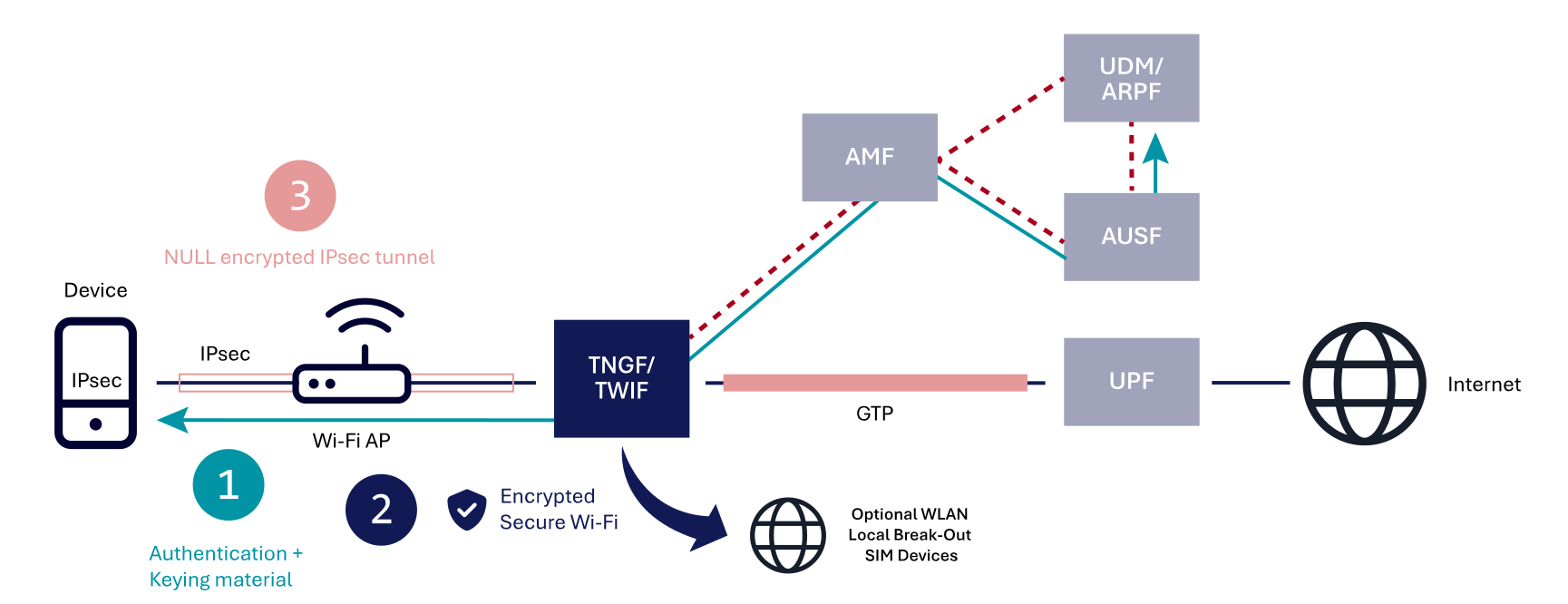
The device discovers a trusted Wi-Fi network (trusted non-3GPP) and initiates an EAP-based authentication procedure towards the selected public or private cellular network (PLMN/SNPN) by sending a NAS Registration Request message encapsulated in EAP-5G to the trusted Wi-Fi AP (TNAP), which forwards it to the TNGF/TWIF gateway function. The TNGF/TWIF extracts and forwards the NAS message to the Access and Mobility Management Function (AMF). The NAS signaling between the device and AMF uses the N1 interface, similar to cellular access. The AMF initiates the authentication procedure by sending an authentication request to the Authentication Server Function (AUSF). The AUSF communicates with the Unified Data Management (UDM) to retrieve authentication data and the subscriber’s profile. The UDM, with the often-co-located Authentication credential Repository and Processing Function (ARPF), generates an authentication vector. The AUSF receives the authentication vector and initiates the EAP authentication procedure (EAP-AKA’ or 5G-AKA). The authentication challenge is sent back to the device through the AMF and TNGF/TWIF. The device processes the challenge using its SIM credentials and sends the response back to the AUSF through the TNGF/TWIF and AMF. The AUSF verifies the device’s response. If successful, the AUSF generates keying material for the NULL encryption IPsec tunnel establishment and sends it to the AMF’s security anchor function. The AMF derives further keys for NAS security and TNGF/TWIF communication. The AMF initiates the NAS Security Mode Command procedure with the device to establish NAS security. The AUSF sends an EAP-Success message to the AMF, which in turn sends the EAP-Success message to the device through the TNGF/TWIF, utilizing the NAS security mode. The AMF also sends keying material to the TNGF/TWIF for the (WPA2/WPA3) encryption of the Wi-Fi network connection and the IPsec tunnel establishment. The device independently derives keys for IPsec tunnel establishment and secure Wi-Fi connection based on the shared secret and parameters received in the EAP authentication process.
Upon mutual successful authentication, the TNGF/TWIF sends the generated encryption keys to the access point over RADIUS. The encryption keys are used to secure the Wi-Fi radio network through WPA2-Enterprise or WPA3-Enterprise encryption. The device must generate the same encryption keys to gain network access and correctly validate the authentication vectors through the SIM card. The derived encryption keys are unique to the connection, ensuring the device has its own encrypted and secure Wi-Fi connection.
The TNGF/TWIF and the device use the generated keys to establish the NULL-encrypted IPsec tunnel using IKEv2 signaling. Optionally, additional IPsec Security Associations (SAs) may be established for different traffic types or QoS levels. The TNGF/TWIF then establishes a GTP tunnel to the User Plane Function (UPF) packet gateway to provide the device with access to the mobile network services and the Internet.

Bridging the 3GPP Standard with Real-World Solutions

While the outlined flows above reflect 3GPP standards for SIM authentication, practical network implementations often favor pragmatic, hybrid approaches due to existing network design, equipment and investments. In real-world deployments, the RADIUS protocol—widely used in Wi-Fi and various gateways—will likely continue to play a significant role alongside emerging 5G standards and protocols.

Historically, many 3GPP-specified interworking gateway functions for Wi-Fi (non-3GPP Access) have not seen widespread adoption for Wi-Fi offloading. For example, in 4G with the Evolved Packet Core (EPC), the tunnel-terminating ePDG gateway has primarily been used for Wi-Fi Calling rather than Wi-Fi offloading. Wi-Fi Offloading

Unified SIM-authentication for 3G, 4G,5G NSA and 5G SAFor Wi-Fi offloading in trusted Wi-Fi network environments, there has been limited demand for the WAG/TWAG to backhaul traffic to the EPC mobile core. In fact, the vast majority (around 90%) of Enea’s Wi-Fi offloading customer deployments opt to route traffic directly to the internet via a non-3GPP gateway, bypassing the mobile core. We foresee a similar trend in 5G SA, with a strong preference for local traffic breakout. Backhauling traffic through the mobile core only offloads the radio network (RAN), while local breakout delivers a more efficient solution by directly handling traffic at the edge.

Unified SIM-authentication for 3G, 4G,5G NSA and 5G SA

In this context, the 3GPP AAA is expected to evolve and take the role of SIM-based authentication (control plane only) also in 5G SA, effectively offering a unified SIM authentication function across all generations of cellular networks. This evolution would give mobile operators a streamlined and pragmatic architecture, capable of handling SIM authentication seamlessly across both 4G and 5G core networks. Wi-Fi Calling

For Wi-Fi Calling utilizing untrusted Wi-Fi access in 5G SA, the N3IWF function will still be required. One potential scenario is the adaptation of the 3GPP AAA function as a “bridging function” within the authentication flow for Wi-Fi Calling. Mobile Network Operators (MNOs) often prefer leveraging established, proven technologies over quickly adopting new standards when practical alternatives exist. It’s important to note that the N3IWF is only a reference in the 3GPP standard and not a specific gateway product. An adaptive authentication server (3GPP AAA), like Enea’s Aptilo SMP, could potentially evolve to integrate with the 5G SA core for control plane authentication while the existing ePDG gateways manage the N3IWF roles within the traffic plane. The same scenario could also happen for trusted access, with the existing WAG/TWAG gateways taking over the TNGF/TWIF functions in the traffic plane. These scenarios would require cooperation between the 3GPP AAA and gateway vendors.

Secure Wi-Fi with 802.1x and WPA2/WPA3

Wi-Fi Offloading, How? – Chapter 2.1


IEEE 802.1x is a key standard in network security. It provides port-based Network Access Control (PNAC) that serves as the first line of defense against unauthorized access in both wired and wireless networks. By enforcing authentication at the network port level, 802.1x ensures that only authorized devices can access the network, thereby mitigating risks associated with rogue devices and unauthorized users.

White Paper: Wi-Fi Offloading, How?

This is an excerpt from our white paper, Wi-Fi Offloading, How?,  a technical deep dive into deploying Wi-Fi offloading solutions. If you like what you read, download the full white paper. As a bonus, you’ll also gain access to Wi-Fi Offloading, Why?, outlining the business benefits for mobile operators.

Wi-Fi Offloading, How? Banner

The 802.1x Architecture

Secure Wi-Fi with 802.1x, EAP and WPA2/WPA3

At the heart of 802.1x is a triad of entities that work together to enforce access control:

  1. Supplicant: The device seeking to join the network (e.g., a laptop, smartphone, or IoT device). The supplicant initiates the authentication process by requesting access to the network.
  2. Authenticator: Typically, a Wi-Fi Access Point (AP) or Wi-Fi AP Controller, the authenticator acts as a gatekeeper. It controls the port to which the supplicant is connected and facilitates the communication between the supplicant and the authentication server.
  3. Authentication Server: The server, often a RADIUS AAA server, validates the supplicant’s credentials. It makes the final decision on whether the supplicant can access the network.

The communication among these entities follows a defined process that leverages the Extensible Authentication Protocol (EAP). The communication between the Supplicant and the Authentication Server is secured end-to-end by only allowing EAP over LAN (EAPOL) between the Supplicant and the Authenticator, and EAP encapsulated in RADIUS between the Authenticator and Authentication Server.

The 802.1x authentication process is orchestrated through a series of EAP messages. In the Seamless Access with SIM Authentication chapter, we will cover this in more depth in the context of Wi-Fi Offloading.

Depending on the EAP method used, a series of challenge-response exchanges occurs between the supplicant and the authentication server. These exchanges can involve using certificates, username/password combinations, or other authentication credentials.

If the authentication server validates the credentials successfully, it sends an EAP-Success message to the authenticator, which then authorizes the port, granting the supplicant full network access. If authentication fails, an EAP-Failure message is sent, and the port remains unauthorized.

Once authenticated, data transmitted over the network can be encrypted by the Authenticator with WPA2/WPA3 to ensure confidentiality and integrity. Many, including Enea, refer to 802.1x as secure and encrypted Wi-Fi. However, the 802.1x authentication scheme only enables the WPA2/WPA3 encryption.

802.1x Security Considerations

802.1x significantly enhances network security, but it is not without vulnerabilities.

Some EAP methods, such as EAP-MD5, are considered weak because they do not support encryption or mutual authentication. Without mutual authentication between the Supplicant and Authentication Server, attackers can insert themselves between the supplicant and the authenticator, potentially intercepting or altering communication.

It’s crucial to use stronger methods like EAP-TLS, which offers certificate-based mutual authentication. The EAP methods (EAP-AKA/AKA′/5G-AKA) for Wi-Fi Offloading using the device’s SIM credentials are also at the same security level as EAP-TLS. The legacy EAP-SIM protocol used for 2G/3G has weaker encryption than its successors. We recommend that EAP-SIM is not used.

802.1x Deployment and Configuration

Deploying 802.1x requires careful planning and configuration:

  • Infrastructure: Ensure that network devices, such as switches and access points, support IEEE 802.1x. Additionally, a robust RADIUS AAA server, such as Enea Aptilo SMP, is essential for handling authentication requests.
  • Configuration: Configure the authenticator devices to enable 802.1x on the relevant ports. Set up the RADIUS AAA server with the appropriate policies and credentials. Ensure that supplicants (client devices) are configured to support the required EAP method.
  • Testing: Before full deployment, conduct thorough testing to ensure that devices authenticate correctly and that the network behaves as expected under various scenarios.
  • Scalability: Consider the scalability of your IEEE 802.1x deployment. Load balancing across multiple RADIUS AAA nodes, including optional geographical redundancy and the use of high-availability configurations, will help ensure consistent performance.

OpenRoaming for IoT Onboarding

When you switch on a brand-new cellular or wired IoT device, it can be bootstrapped to connect to a provisioning server immediately. The IoT connectivity is secure and seamless from the moment the device is switched on.

This is not the case with Wi-Fi-based IoT devices. We have all tried to onboard these devices to the Wi-Fi network using an app, QR code, or Bluetooth, which may be okay for consumer devices. But what about industrial and enterprise use cases with thousands of devices? The onboarding issue is currently the largest showstopper for a mass market of Wi-Fi-based IoT devices.

At Enea, we have tried to solve this with the Zero-touch Wi-Fi IoT onboarding invention utilizing the already installed device certificates. The idea is excellent, but it requires industrywide acceptance and deployment. This was before OpenRoaming.

We now see the potential in using OpenRoaming to make Wi-Fi IoT onboarding as secure and seamless as Cellular and Wired IoT. It is a complex task with many use cases, and it may require a separate base RCOI for IoT and a different set of CAG policies. But it can be done.

Update March 2024

The FIDO Alliance is leading the way in automatically onboarding IoT and headless devices. They have a well-thought-out process with their FIDO Device Onboard (FDO), an automatic onboarding protocol for edge nodes and IoT devices. FDO enables late binding of device credentials so that one manufactured device may be onboarded to many different cloud and edge management platforms. But to perform this late binding of credentials, the device needs connectivity to reach a so-called Rendezvous Service. This works well for wired and cellular devices that get connected when powered up but not for Wi-Fi-based IoT devices.

We are happy to announce that Enea and Intel have taken the initiative to form a working group within WBA called OpenRoaming & FIDO Device Onboarding with the mission to use OpenRoaming for a zero-touch connectivity for Wi-Fi-based IoT devices. The work is still in its initial stage,  the goal is to make FDO as seamless for Wi-Fi as it is for fixed and cellular.

AAA & Access Management – VoWiFi

In previous articles we have talked about the critical nature of AAA / Access Manager and why the functions remain at the core of telecom services. Enabling Voice over Wi-Fi for a telecom operator is a case in point; this is also called Wi-Fi Calling, but for the rest of this article the label VoWiFi is used. At a simple level it enables telephony services over available Wi-Fi access points. In effect, Wi-Fi Calling links telephony from a telecom operator to an internet environment, so you can make, answer, and maintain calls seamlessly when moving in and out of Wi-Fi and mobile networks.

VoWifi provides for low-cost coverage expansion of voice communications for Telcos to create and maintain reliable voice connectivity using pre-existing Wi-Fi access/IP connectivity. It is complementary to voice over LTE (VoLTE) but different, in that it uses Wi-Fi access points not LTE. The business case for this is driven by:

  • Necessity – disabling older circuit switched technology
  • maintaining quality of experience for voice calls
  • creating new service offers such as sponsored roaming.

In a world of apps, it may seem old fashioned, but making a phone call (and expecting it connect reliably and with quality) is still what customers do. A USwitch[1] survey in the UK rated phone calls as the third most popular activity (73%) (just behind messaging (78%) & email (74%)). Long call or short call it doesn’t matter – if the call quality is bad, users blame the network and there is plenty of choice if they want to switch networks. Voice quality and coverage is also a key factor on network assessment with leaders in testing like Umlaut[2] in their ‘Walk tests’ in big cities, or RootMetrics Call Performance tests.[3] Further, it can also be a misconception that coverage issues will be fixed by 5G – as 5G is a mix of radio technologies and pure 5G frequencies can be more affected in dense urban areas.

The voice use case matters for a third reason – a strategy to provide more capacity cost effectively is needed to meet the increasing data demands of the network. An integrated Wi-Fi solution is a building block of that strategy, in urban scenarios; data follows voice and integrating access for mobile and IP networks provides seamless, cost effective, capacity expansion.

The core case for VoWiFi is maintaining the quality of connection. In areas where circuit switched is being disconnected it is essential to link IPv4/IPv6 IMS to HSS authentication and this the role played by the AAA / Access Manager. Working in collaboration with a Telcos’ entitlement services, on device application and packet gateways the access management authenticates the IP telecom access for a voice call using the SWa | SWm diameter protocol to the request received from the evolved packet gateway (ePDG). The response from access manager contains the right authorization and additional attributes so that access is authorized. The additional attributes can be used to create different offers based on geo location and sponsored data/voice roaming for example – enabling new monetization options.

What Enea is doing is solving this use case and more across AAA / Access Manager deployments directly and with our partners. Enea provides AAA / Access Manager as virtualized software (VNF | CNF) increasing the cost benefit of capacity expansion for VoWiFi. The Access Manager has been deployed in more than 40 Operator networks including several large Tier 1 Telecom Operators. It has demonstrable interoperability across a wide range of interfaces and solution use cases.

For more information

https://www.enea.com/solutions/data-management-applications/access-management-aaa/

References:

[1] USwitch Survey 2023 – https://www.uswitch.com/mobiles/studies/mobile-statistics/

[2] Vodafone Umlaut tests https://www.vodafone.co.uk/cs/groups/configfiles/documents/document/umlaut-connect-benchmark-2022.pdf

[3] RootMetrics – UK test: https://rootmetrics.com/en-GB/rootscore/map/nation/england/2023/2H

As discussed in a recent blog post, we have noticed a growing interest in Mobile Data Offloading solutions. Operators of 4G networks that have not yet invested in 5G need the extra capacity as the volumes of video traffic continue to grow and when shutting down legacy 3G networks. Operators of 5G networks are also interested in the same type of solutions but for a different reason. The higher frequencies of the 5G spectrum make it difficult and expensive to provide good indoor coverage.

With Enea Aptilo Service Management Platform (SMP) and equipment based on the latest Wi-Fi 6 and 6E standards, operators can roll out complementing and cost-effective solutions indoors as well as in high-density locations to meet subscribers’ expectations in terms of user experience and quality of service.

In this interview on Wi-Fi Now, Johan Terve, Senior Marketing Director, elaborates on the current drivers for Wi-Fi offload, stresses the importance of seamless and secure connectivity, and explains how Wi-Fi potentially can help operators reduce energy costs.

Wi-Fi Offload is back as it is 2013 again, says Johan Terve

Today, at World Wi-Fi Day, we remind ourselves how Wi-Fi has played a transformative role in bridging the digital divide worldwide. Wi-Fi can also help save our planet. With its localized transmission, lower signal strength requirements, and power-saving features, it is a greener alternative to cellular and beneficial for the environment we all care about.

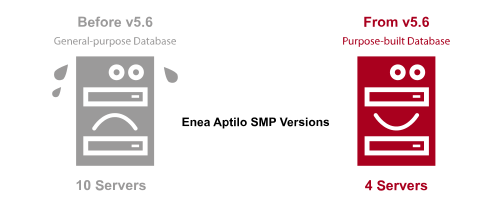
We all know that it is the relatively small initiatives that sum up to deliver a significant positive environmental impact. One of those initiatives is our new purpose-built database, released in Enea Aptilo SMP 5.6, which we have optimized for our platform. As we celebrate World Wi-Fi Day, we have received reports from some of our customers showing the extreme efficiency gains when going from a general-purpose database to our new database, which we have purpose-built for the telecom use case.

Less than half the number of Enea Aptilo SMP servers needed to perform the same job

The efficiency of Enea Aptilo SMP


One of our customers has reduced the number of server nodes from 10 to 4 while still performing the same job. Furthermore, each node also has significantly less memory and CPU utilization. This correlates well with stress tests in our labs, where we have simulated 16 million accounts with heavy database activity. The CPU utilization was down by a factor of ten going from 300% to 30% (Three cores running at 100% to one running at 30%).

It is fantastic and surprising how a few skilled software engineers can fundamentally impact energy consumption. And this is just in the daily operation of the machines. Add to this the energy and overall environmental cost of manufacturing and distributing twice as many servers.

We challenge our industry and all other industries to make the same effort. Together, we can help save our environment bit by bit, day by day, leaving a better world for our children.


Is the green agenda another reason for the sudden surge in interest in Wi-Fi offload?

The Technology – All Stars Are Finally Aligned for Convergence

In our recent blog post – Wi-Fi Offload 2.0 – Why a Surge in Interest Right Now? – we attributed the reason for operators’ increasing interest in Wi-Fi to the paradigm shifts in Wi-Fi technology and the urgent need for additional capacity and indoor coverage. But maybe there is also a green agenda behind this interest. With offloading, operators are saving costs on equipment and energy consumption. This means they can better fulfill their commitments to their Environmental, social, and corporate governance (ESG) agendas.

We are committed to ensuring that Wi-Fi and Cellular coexist to bring the best user experience and save the environment any way we can.

Monetizing through Wi-Fi Advertising banners on the captive portal or through messages sent via email or SMS is an obvious alternative to offset the cost of a free Wi-Fi service. But it may not be that simple. This blog post addresses the challenges with Wi-Fi advertising, and what service providers must do to compete effectively with online media and get their fair share of advertisers’ budgets.

Wi-Fi Advertising Challenges

To a large extent, online advertising is a volume game with just a few USD cents per click. Some of Enea’s service provider customers have millions of users passing the captive portal daily. Those operators can compete with the number of eyeballs offered by major online media, but how about smaller installations with just a few thousand daily Wi-Fi users?
The need for sufficient volume is the biggest challenge for making enough money on Wi-Fi advertising.

Another challenge is that the venue owners may need to approve external advertising campaigns paid by third-party advertisers in a business-to-business (B2B) Wi-Fi context, which makes the administration more complex. Conversely, suppose the venue owner wants to display their own advert. In that case, even a low volume of advertising can be valuable for them if they can handle the administration of their adverts.

A third challenge with Wi-Fi advertising is that users may find adverts intrusive if they must see information that does not interest them before gaining access to the internet.

Finally, there is a technical challenge. When the user is at the captive portal, they have no access to the internet, as this is the primary purpose of a captive portal. Thus, the Wi-Fi service management system must ensure that the addresses of any advertising assets, such as videos, are allowed and accessible if located on the public internet.

With the right tools, service providers can address all these challenges. So let’s start with the two most important ones. First, how can we make Wi-Fi advertising worthwhile for service providers with lower audience volume? Second, how make advertising acceptable from a user experience point of view?

Make Wi-Fi Advertising Hyper-Targeted

Hyper-targeted Wi-Fi advertisingAs discussed, in a B2B context, it can be valuable for venue owners to handle their internal adverts, and this could be a premium service that the service provider charge for.
But, to monetize from third-party advertisers and compete with online media, Wi-Fi service providers must be able to offer hyper-targeted high-value advertising.

Targeted Wi-Fi advertising is more valuable for advertisers and users because it allows for more efficient and effective marketing strategies. By using data and analytics to understand a user’s preferences, interests, and behaviors, advertisers can create highly personalized and relevant ads that are more likely to resonate with the individual.

Targeted advertising means higher conversion rates and a better return on investment for advertisers. By targeting specific demographics or individuals, they can reduce wasted advertising spend and focus their efforts on reaching the right people at the right time. They can also increase brand loyalty and customer engagement, as users are more likely to respond positively to ads tailored to their interests.

The bottom line is this. Advertisers are more likely to pay a premium price for adverts they know will hit their target group than paying pennies for adverts spread over a vast audience, where only a fraction of them are of interest to the advertiser.

Using hyper-targeted Wi-Fi advertising is also very beneficial for the service provider. They can monetize more by charging a premium price for the advert and by being able to fit more advertisers on the same advertising space at the captive portal.

For users, targeted Wi-Fi advertising can be seen as a more positive experience because it provides them with more relevant and useful ads. Instead of being bombarded with irrelevant ads, they can receive ads tailored to their needs and interests, which can help them discover new products and services they may be interested in.

Overall, targeted advertising allows for a more personalized and effective approach to marketing, benefiting both advertisers and users. However, it is essential to note that there are concerns about data privacy and the ethical use of user data in targeted advertising. This brings us to the next subject, compliance with regulations and ethical principles.

Data Privacy and Consent Management

Most users of free Wi-Fi services understand the fundamental truth that has been cited many times; “if you’re not paying for the product, you are the product.”

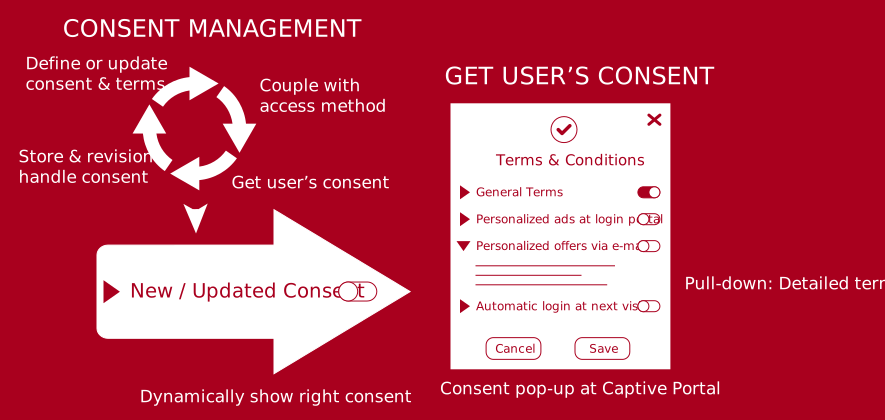
We realised early on that consent, and personal data management is about more than just following regulations such as the European General Data Protection Regulation (GDPR) to avoid heavy fines. It is also about protecting your brand as a service provider. To gain the user’s trust and be known as a fair player. You need to transparently show what data you have collected and let the end-user handle their consent to use that data.

Enea Aptilo SMP award-winning consent management

We have your back covered. Learn more about the Enea Aptilo SMP award-winning consent and personal data management functionality.

Now you have advertising space, the captive portal, and privacy protection complying with users’ expectations and government regulations. So how do you collect enough detailed data to fulfill the ‘hyper’ in hyper-targeted Wi-Fi advertising?

Fulfilling the ‘hyper’ in hyper-targeted Wi-Fi Advertising

A popular method of gaining user data is to offer login to the Wi-Fi service using social media credentials. But that method will not give much more details beyond email and the person’s name.

So how do you gather data to create hyper-targeted profiles such as:
  • Men between 25-55 in age, using iPhones, flying between Madrid and Barcelona twice a month or more.
  • Women under 60 in age, living in a single-family detached home, driving BMW or Volvo.
  • Single men 20-40 in age interested in Golf.

There is only one way. Ask them! This is where using surveys as a login method to the Wi-Fi service comes in.

COLLECT USER PROFILE DATA WITH

Next-Generation Surveys

We have designed our next-generation surveys with the mobile user experience in mind.

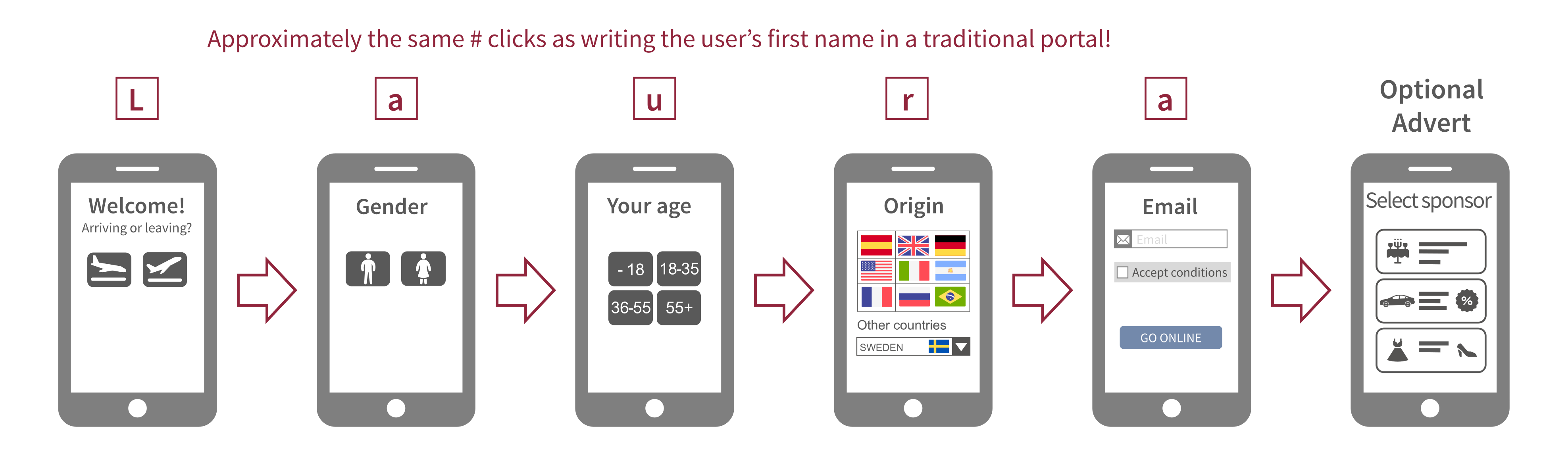
Survey functionality a Wi-Fi captive portal design for a mobile user experience

Instead of the traditional single captive portal page with form fields asking for information, we have designed the user onboarding experience with several pages. Each page asks for information using clickable icons. It is a much better mobile user experience. In the example above, the user can swiftly navigate through the pages, using one hand and clicking on the icons. It may even be the same amount of clicks or less as it typically takes to enter the user’s first name. The user’s browser will normally auto-complete the email address, so there are no additional clicks.

It is also possible to add an optional advert screen at the end, where the user needs to view a message from the advertiser. For example, one of our service provider customers had 15% more users completing the login process when moving to the survey user experience rather than the old-school captive portal. For them, it also meant a 15% increase in revenues as they monetized through the sponsor adverts at the end.

So, using our survey functionality will improve the mobile user experience for onboarding users to the Wi-Fi service. But the primary purpose is to ask more detailed questions to build up the user profile over time. Over time is the keyword here. The administrator can arrange multiple surveys in a ‘carousel’ to be shown in order when the user returns, so don’t ask more than a few questions in each survey. The conversion rate, i.e., users completing the Wi-Fi service onboarding, will go down for every question added to the survey. A good practice is keeping the number of questions for each survey to 5 or below.

Think hard about how intrusive a question is. It is never worth discouraging a user from using the Wi-Fi service because the question challenges their integrity.

Connecting the Dots With SmartAds

Service providers can make the most out of the consent-based user profile data gained through the Wi-Fi service. They can do that through Enea’s SmartAds concept:

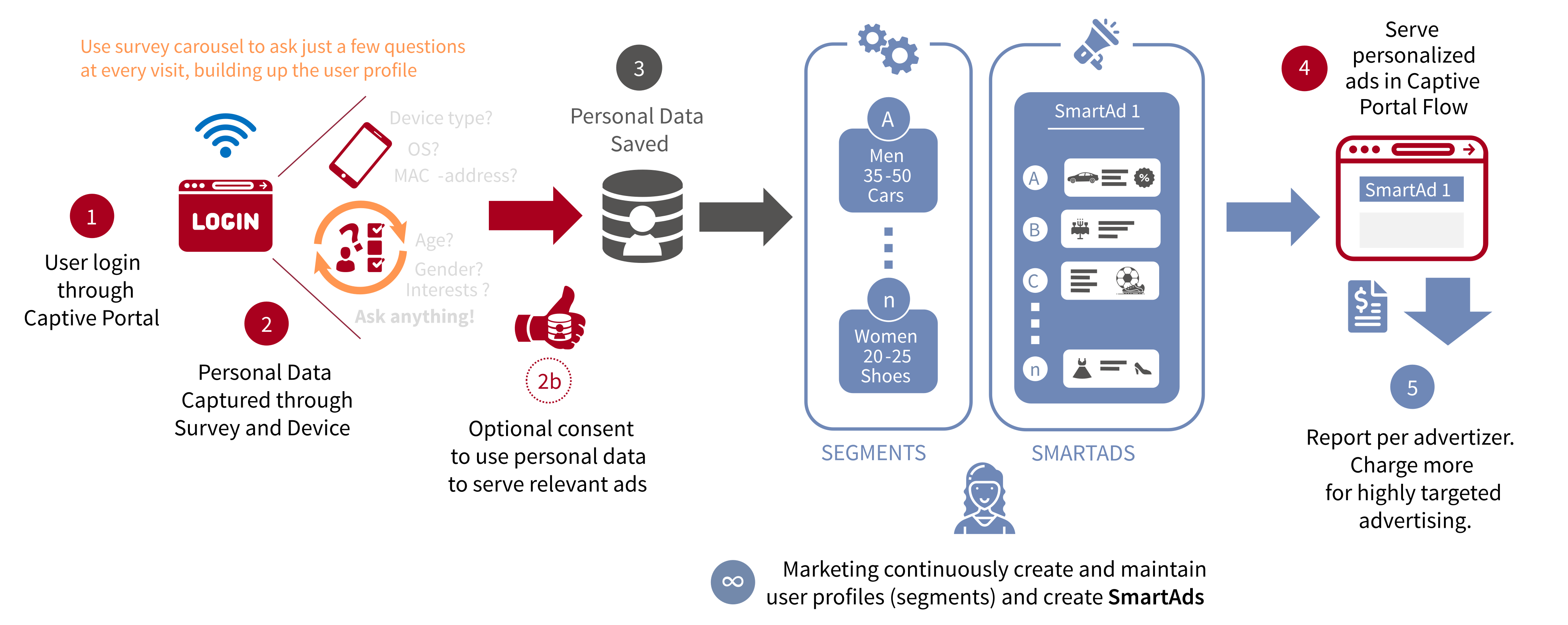
Enea Aptilo SMP SmartAd concept

  1. The user login through the captive portal
  2. We capture personal profile data through next-generation surveys and device information. Using only a few questions will keep the user motivated to connect. Therefore, we recommend asking additional questions on the next visits using the survey carousel. 2b: Optionally you may use our consent and personal data management functionality to get users’ consent for using their personal data. This is beneficial for them as well, as they will only see relevant adverts. We say optionally, as it may not be legally required in some countries, but it is always a good idea to have it enabled.
  3. We save the personal profile data.
  4. The captive portal administrator adds the SmartAd asset to the right banner advertising space. Users will see adverts tailored to their user profile (segment). If there is no matching adverts, the user will see a default advert.
  5. The service provider can produce reports per advertiser to charge a premium price for the hyper-targeted ads.

It is an ever-ongoing process for marketing to define campaigns, segments, and SmartAds.

SmartAds Behind the Scenes

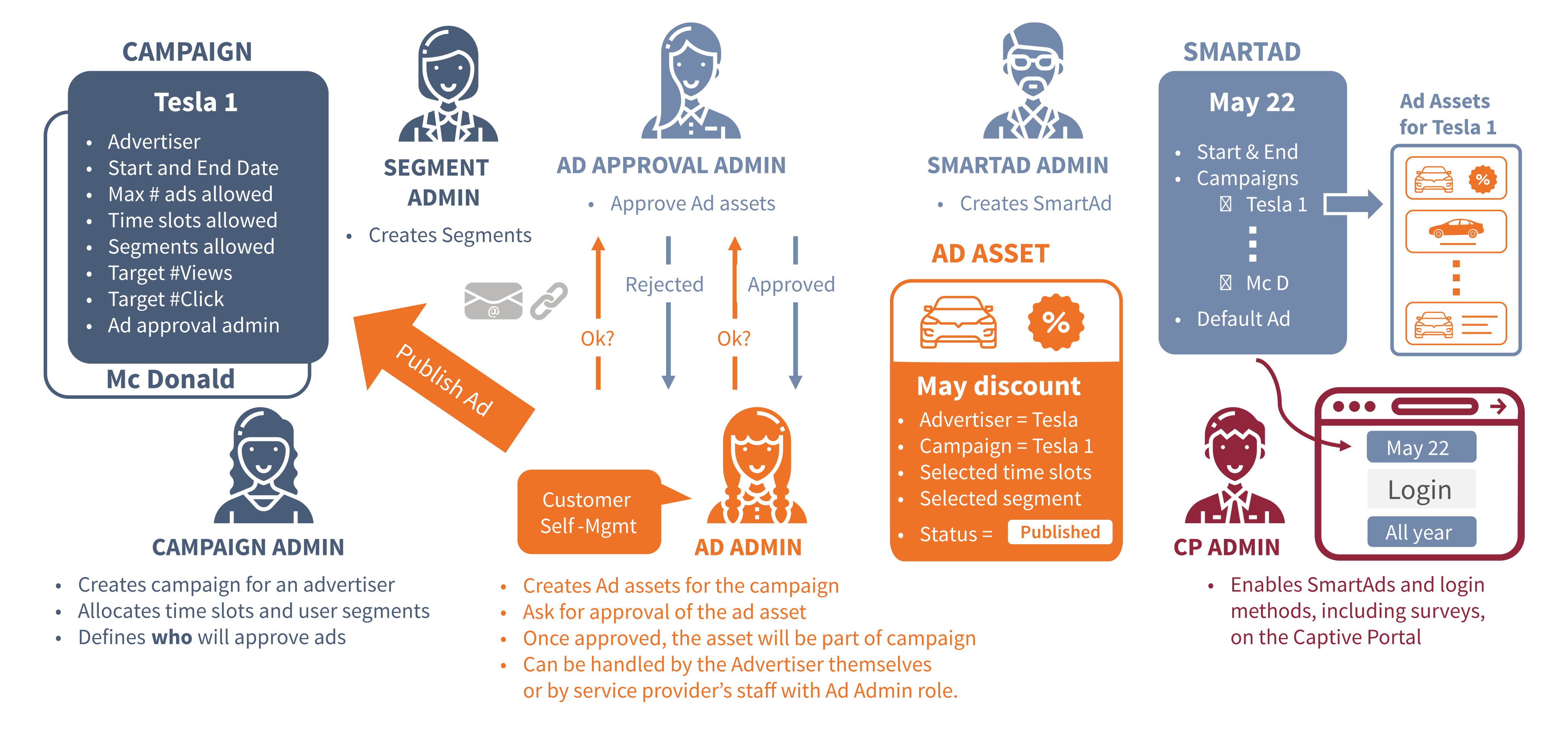
Different administrators with different roles are handling various aspects of the SmartAds concept. Note that the same administrator could have multiple roles.

Enea Aptilo SMP SmartAds Behind-the-scene.

Campaign Admin

The campaign admin creates the campaign for the advertiser and allocates duration and allowed time slots and segments for the campaign. The campaign admin also defines which Ad approval administrator should approve the advert.

Segment Admin

The segment administrator creates and maintains segments based on the user profile data.
These segments can be as complex as allowed by the depth of details available.

Ad Admin

The ad admins creates advertising assets such as banners, videos, or text messages for the campaign. They can choose time slots and segment for each advert based on what is allowed in the selected campaign. It is also possible to set ‘any’ for the time slot and segment for an ad asset, within the limitations set by the campaign, in which case any allowed time slot and segment will match the ad asset.

The ad admin can be one of the service provider’s staff. Still, we generally anticipate that the most effective process will be to let the advertiser handle this as a self-management service. Once the asset is ready, it is sent to the ad approval admin for approval. Once it is approved, it will be added to the selected campaign.

Ad Approval Admin

The ad approval admins approves the ad assets created by the ad admins. They can also reject already approved ad assets if needed.

SmartAd Admin

The SmartAd admin creates the SmartAd assets. A SmartAd will contain several campaigns that, in turn, include several ad assets tied to different segments. If multiple ad assets match the same segment, they will be picked randomly at the captive portal for an even distribution among advertisers. The SmartAd admin must also define a default advert to show if there is no match for the individual user. This default advert could, for instance, be the service provider’s advert or the venue owner’s advert.

Captive Portal (CP) Admin

The complexity and logic around which ad will be shown for which user at a particular time is entirely hidden in the SmartAd. The captive portal admin selects the right SmartAd asset from a drop-down menu and puts it in the suitable banner advertising space at the right captive portal (location).

There is currently a hype around cellular IoT, especially with the new opportunities that 5G will bring. And it is not without cause; 5G will bring new real-time critical communication opportunities in industries such as automotive and remote surgery.

But a lesser-known fact is that around 70% of all IoT devices are connected through short-range technologies such as Bluetooth, Wi-Fi, Zigbee, and Z-wave. And at least one-third of all IoT devices connect through Wi-Fi.


THE CHALLENGES OF

Connecting Billions of Wi-Fi IoT Devices

IoT Analytics growth in IoT devices until 2025

The opportunity for operators to deliver connectivity services for IoT devices has long been touted as one of the most important growth segments in telecom. And the number of wireless IoT devices in need of connectivity is indeed growing at an impressive rate. As shown in the figure, IoT Analytics forecasts growth of the installed base from 10.0 billion in 2019 to 30.9 billion in 2025.  Ericsson’s slightly more conservative estimate predicts growth from 12.6 billion units in 2020 to a whopping 26.9 billion in 2026.

But here is a perhaps lesser-known fact: By far the largest proportion of IoT devices – approximately 7.5 billion out of a total of 11.7 billion units as of 2020, to be exact, see the figure above – are short-range, non-cellular devices.  And as mentioned, according to IoT Analytics, Wi-Fi-based IoT devices represent a third of all IoT devices in 2020 and are one of the fastest-growing tech product segments.

The number of Wi-Fi-based IoT devices is expected to increase to more than 7 billion by 2025. This number, of course, includes devices for the smart home, devices operated by businesses, and even machinery and automation-type devices for industrial applications.

Connecting billions of IoT devices with secure and reliable carrier-grade Wi-Fi services is clearly a big business opportunity. But it is also a significant challenge for any service provider because the IoT device market is notoriously fragmented and dominated by proprietary solutions.

Onboarding Must Be As Seamless and Secure As Cellular IoT

The secure and automatic onboarding of masses of IoT Wi-Fi devices – many of which are ‘headless’ without a user interface – has proven less than easy.

Thankfully there are new initiatives that allow service providers to achieve effective automatic onboarding. Enea’s Zero-Touch Wi-Fi IoT Connectivity concepts use certificates (x.509) that already exist in devices to auto-connect Wi-Fi IoT devices to Wi-Fi right out of the box.  We have partnered with Amazon Web Services (AWS) IoT Core to deliver an end-to-end, massively scalable Wi-Fi IoT onboarding proof of concept.

There is only one important puzzle piece missing for a mass market. The device must from factory try to connect to a “ZeroTouch” Hotspot 2.0 service or legacy ZeroTouch SSID.

The Zero-touch concept also lends itself well to the WBA OpenRoaming, described in a recent insights post. In this case, the OpenRoaming mechanisms could also be used for the Zero-touch concept. Different players could act as an ‘identity provider’ for IoT devices, allowing any enterprise, IoT solution provider, or operator to sign up for the service. The end result would be the onboarding and auto-connection of IoT devices not only within their own network but also within the extended coverage footprint enabled by the OpenRoaming federation.

Because we encourage the industry to participate in this initiative, we have chosen not to patent the Zero-Touch innovation. We believe that the time is now for operators to invest in massively scalable and standardized onboarding for Wi-Fi IoT.

What is clear, is that the seamless and secure onboarding of IoT Wi-Fi devices must be solved, one way or another.


CELLULAR AND IOT

Unified IoT Connectivity Control

With the Enea Aptilo IoT Connectivity Control Service™ (IoT CCS), mobile operators get a hyperscale programmable layer for cellular IoT connectivity control, security, and automation. The IoT CCS service features next-generation firewalls from Fortinet so operators can offer managed security with individual settings for each IoT customer. Nothing technically stops us from adding support for other radio technologies, such as Wi-Fi, to the IoT CCS service. This would enable service providers to offer a unified IoT connectivity service with the same policy control and security level over both cellular and Wi-Fi. In this Wi-Fi Now article, our Jonas Björklund further elaborates on the vision of a unified connectivity control delivered from the Cloud.