


Breaking News

GLOBAL Wi-Fi NEWS bulletin

EAP and Seamless Access with SIM Authentication

Seamless Access with SIM Based Authentication

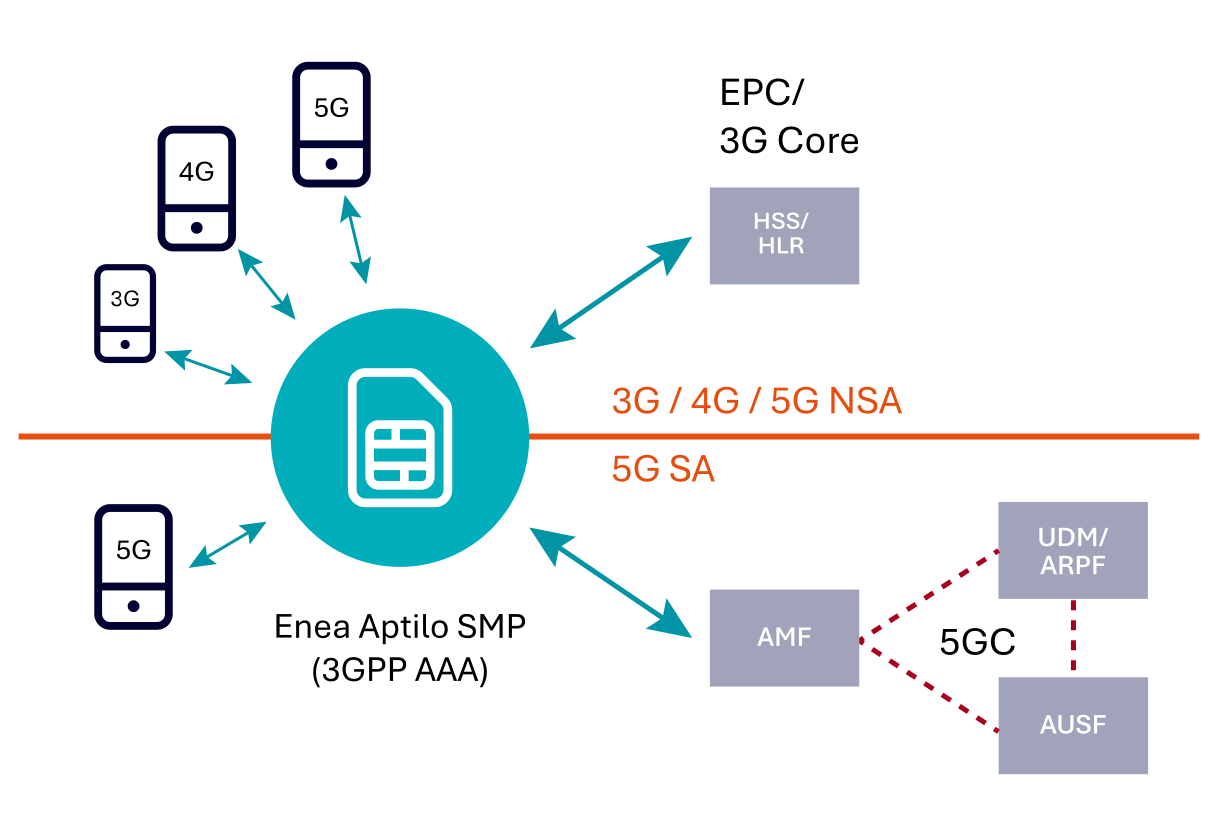
A key component of Wi-Fi offloading is SIM-based authentication, which provides a seamless, secure Wi-Fi experience comparable to cellular networks. This section will examine the mechanics of SIM authentication from a standards perspective. The 3GPP AAA server plays a central role in SIM authentication for 3G, 4G, and 5G networks using the 5G non-standalone architecture (5G NSA), which relies on the existing Evolved Packet Core (EPC) from 4G. However, as we will discuss later, real-world implementations often require capabilities beyond the standard 3GPP AAA function.

The 5G standalone architecture (5G SA) introduced some changes to how SIM-based authentication works for Wi-Fi access (untrusted and trusted non-3GPP Access) compared to previous generations. In 5G SA, no 3GPP AAA server is specified. Instead, the authentication process for Wi-Fi access using SIM credentials is more tightly integrated with the 5G core network and distributed across multiple core network components. Looking ahead, the 3GPP AAA may evolve into a comprehensive bridging function, providing unified management for Wi-Fi access across all generations of cellular networks. SIM Authentication for Wi-Fi Access in 3G, 4G and 5G NSA

The 3GPP AAA server, exemplified here by the Enea Aptilo SMP, plays a crucial role in SIM authentication for 3G, 4G, and 5G NSA networks. It securely manages the authentication process by integrating with the mobile core to verify the device’s credentials. Free Wi-Fi at restaurant SIM Authentication for Untrusted Wi-Fi Access in 3G, 4G and 5G NSA Networks

Untrusted non-3GPP Access is used for Wi-Fi networks that the mobile operator does not trust. This is why this is the access method of choice for Wi-Fi Calling, which must be available wherever there is a Wi-Fi network. Note that the 5G non-standalone (5G NSA) networks use the same mobile core (EPC) as 4G.

The user device is already assumed to be onboarded to the Wi-Fi network, for instance in a home, office or public hotspots. So, SIM authentication has nothing to do with security or login to the Wi-Fi network. Instead, SIM authentication is used to authenticate and authorize the user device to access the mobile core through an IPsec tunnel. The keys for setting up the IPsec tunnel are derived from the SIM authentication process.


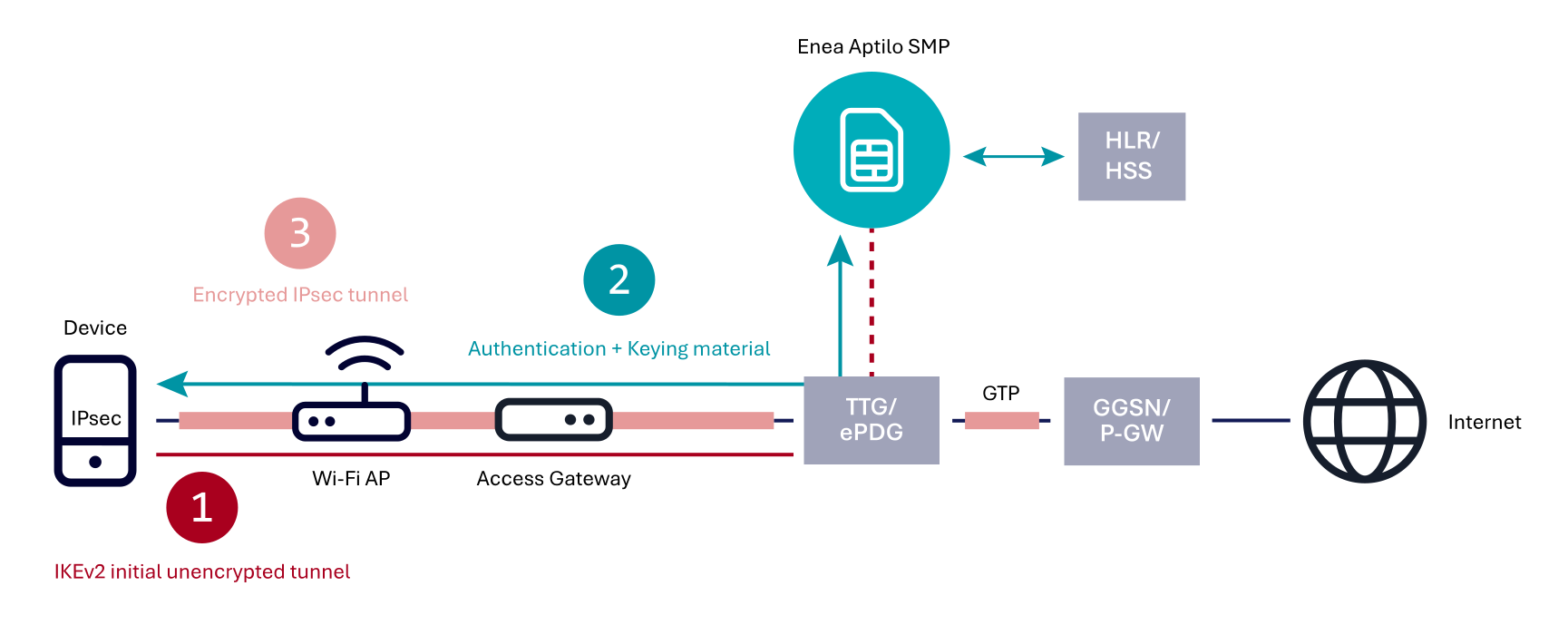
EAP SIM-AKA in 3G/4G/5G NSA untrusted 3GPP access (Wi-Fi)

EAP SIM-AKA in 3G/4G/5G NSA untrusted 3GPP access (Wi-Fi)

The device initiates an Internet Key Exchange version 2 (IKEv2) connection to the evolved Packet Data Gateway (ePDG) in 4G/5G NSA or Tunnel Termination Gateway (TTG) in 3G, located in the mobile core. This creates an initial, unauthenticated tunnel.
The device sends an IKE_AUTH request containing its identity through this initial tunnel. The ePDG/TTG forwards this request to the Enea Aptilo SMP (SMP) acting as a 3GPP AAA server to initiate the EAP-AKA authentication process. The SMP communicates with the Home Subscriber Server (HSS) or Home Location Register (HLR) to retrieve the user’s authentication vector. Based on the authentication vector, the SMP generates an EAP challenge (EAP-SIM/AKA/AKA’). This challenge is sent back through the ePDG/TTG to the device. The device processes the challenge using its SIM credentials and sends the response back to the SMP through the ePDG/TTG. The SMP verifies the device’s response and if successful, the SMP generates keying material for the IPsec tunnel and sends it to the ePDG/TTG. The SMP also sends an EAP Success message to the ePDG/TTG, which is forwarded to the device. The device independently derives keys for IPsec tunnel establishment based on the shared secret and parameters received in the EAP authentication process.
The ePDG/TTG and device complete the IKEv2 exchange, utilizing the generated keys to establish a fully authenticated and encrypted IPsec tunnel. Optionally, additional IPsec Security Associations (SAs) may be established for different traffic types or QoS levels. The ePDG/TTG then establishes a GTP connection to the Packet Gateway (P-GW/GGSN) to provide the device with access to the mobile network services and the Internet.

Trusted secure Wi-Fi. SIM Authentication for Trusted Wi-Fi Access in 3G, 4G and 5G NSA Networks

In Wi-Fi networks, the 3GPP AAA serves a dual purpose for trusted non-3GPP access.

It authenticates users through SIM-based authentication for Wi-Fi network access.
It enables WPA2/WPA3 encryption of the Wi-Fi network upon successful authentication. This encryption ensures secure, over-the-air communication within the Wi-Fi network.

The user gets internet access through the local gateway, as shown in the picture below (the most common scenario). The traffic can also be backhauled to the mobile core using the 3GPP-specified trusted WAG/TWAG gateway functionality with an optional local traffic breakout.


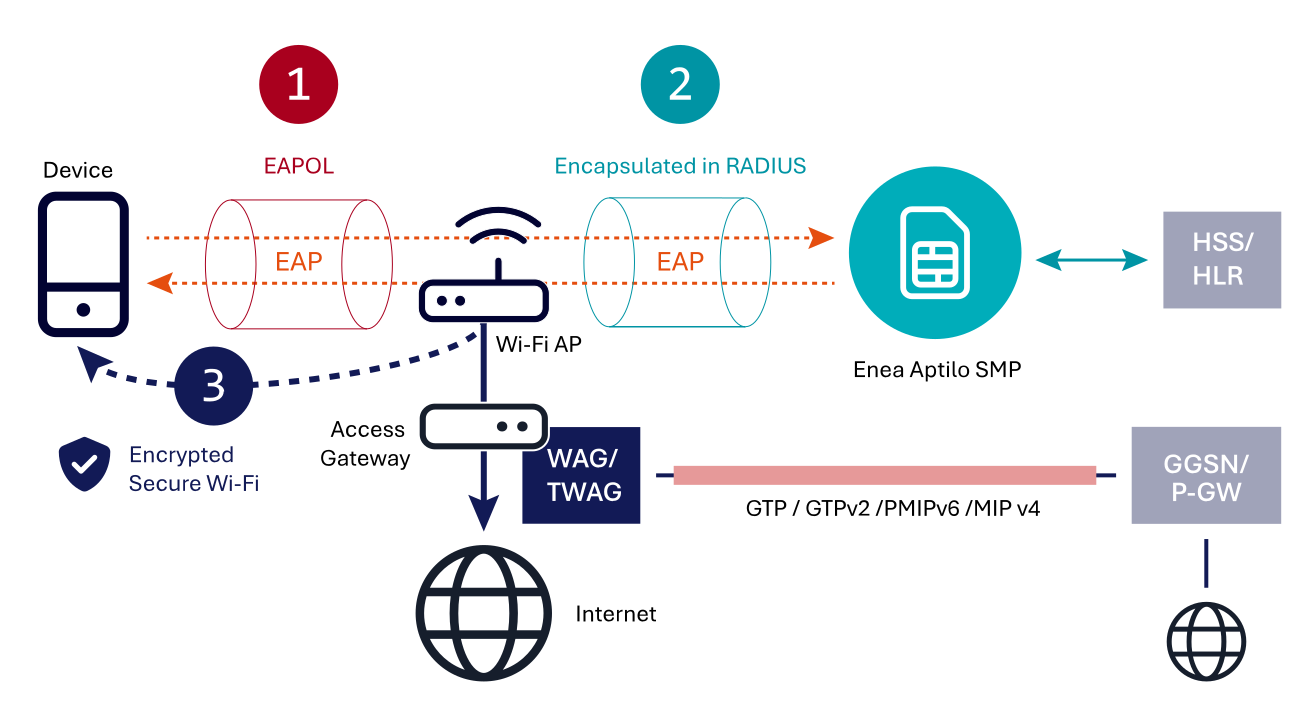
EAP SIM-AKA in 3G/4G/5G NS trusted non-3GPPP access (Wi-Fi)


EAP SIM-AKA in 3G/4G/5G NS trusted non-3GPPP access (Wi-Fi)

During initialization, only EAP over LAN (EAPOL) 802.1x traffic is permitted between the device and the Wi-Fi access point (AP). All other traffic, such as DHCP or HTTP, is blocked. Initially, the Wi-Fi AP sends an EAP identity request to the device (EAP-SIM/AKA/AKA’). From this point, a secure end-to-end communication channel is established between the device and the Enea Aptilo Service Management Platform (SMP), which acts as a 3GPP AAA server for SIM authentication. The Wi-Fi AP’s role is to forward EAP messages over EAPOL to the AAA by encapsulating them in RADIUS and vice versa.
In this multi-round trip EAP exchange, the device sends its identity to the SMP. The SMP contacts the HSS/HLR via the SS7/MAP or Diameter D’/Gr’ interface to retrieve the 3GPP authentication vectors needed to authenticate this identity. The SMP challenges the device for authentication based on these vectors. Note that it is not only the SMP that authenticates the device. The device also authenticates the network, i.e., the SMP and its connection to the mobile core.
Upon mutual successful authentication, the Enea Aptilo SMP sends the generated encryption keys to the access point over RADIUS. The encryption keys are used to secure the Wi-Fi radio network through WPA2-Enterprise or WPA3-Enterprise encryption. The client must generate the same encryption keys to gain network access and correctly validate the authentication vectors through the SIM card. The derived encryption keys are unique to the connection, ensuring the device has its own encrypted and secure Wi-Fi connection.

SIM Authentication for Wi-Fi Access in 5G SA

Today (November 2024), relatively few 5G networks (50-60 networks) are utilizing the 5G standalone (5G SA) architecture, but this architecture will grow in importance over time. The authentication process for non-3GPP access, such as Wi-Fi, is more unified with the cellular authentication process, which introduces new technical challenges. One of these is how to be able to use Non-Access Stratum (NAS) signaling over Wi-Fi. The EAP-5G protocol has been introduced to encapsulate NAS messages to go over Wi-Fi through an IKV2 connection. So, EAP-5G is not an authentication protocol, which can be a bit confusing at first look. SIM Authentication for untrusted Wi-Fi Access in 5G SA Networks

The principles are the same as for untrusted Wi-Fi access towards the Evolved Packet Core (4G/5G NSA). The user is assumed to be already onboarded to the Wi-Fi network, and security is enforced by having an IPsec tunnel between the device and the mobile core.

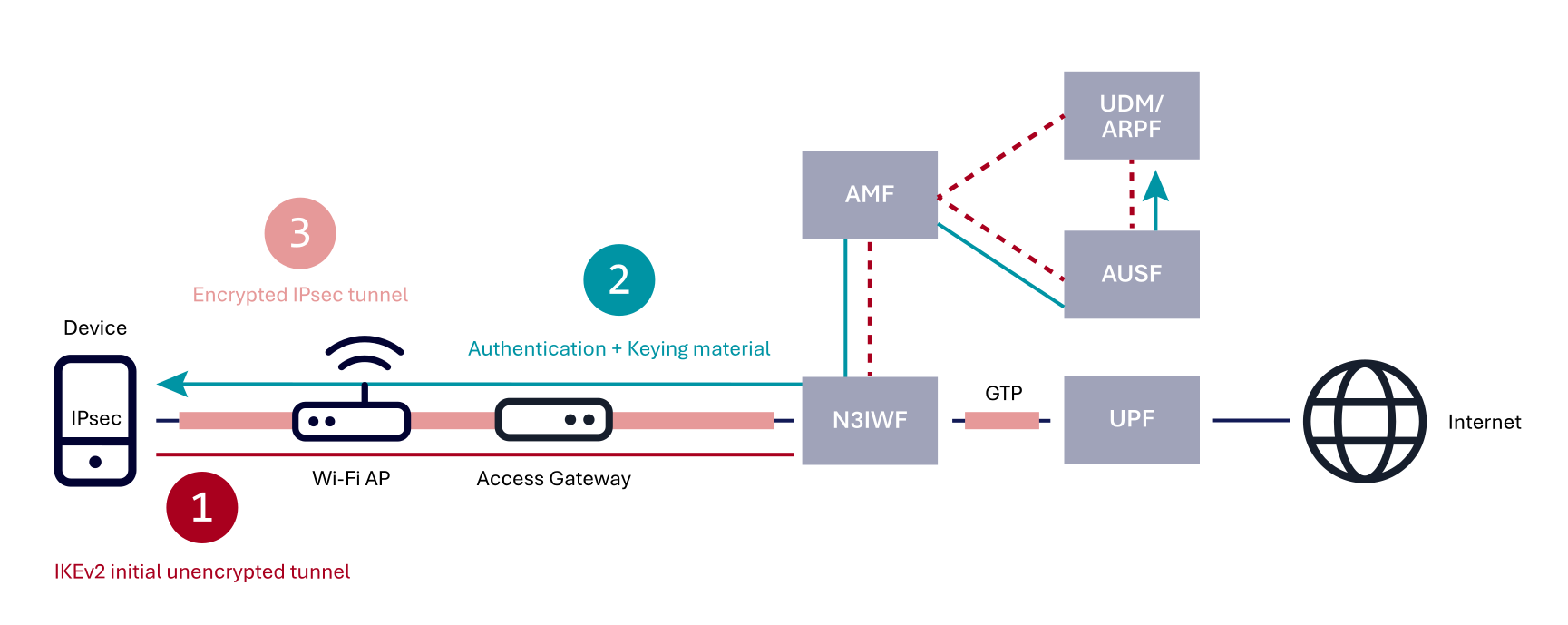
EAP-SIM in 5G standalone architecture for untrusted 3GPP access (Wi-Fi)

EAP-SIM in 5G standalone architecture for untrusted 3GPP access (Wi-Fi)

The device initiates an Internet Key Exchange version 2 (IKEv2) connection to the selected Non-3GPP Interworking Function (N3IWF) located in the mobile core. This creates an initial unauthenticated tunnel.
The device sends a NAS Registration Request message encapsulated in EAP-5G to the N3IWF over this initial tunnel. The N3IWF extracts and forwards the NAS message to the Access and Mobility Management Function (AMF). The NAS signaling between the device and AMF uses the N1 interface, similar to cellular access. The AMF initiates the authentication procedure by sending an authentication request to the Authentication Server Function (AUSF). The AUSF communicates with the Unified Data Management (UDM) to retrieve authentication data and the subscriber’s profile. The UDM, together with the Authentication credential Repository and Processing Function (ARPF), generates an authentication vector. The AUSF receives the authentication vector and initiates the EAP authentication procedure (EAP-AKA’ or 5G-AKA). The authentication challenge is returned to the device through the AMF and N3IWF. The device processes the challenge using its SIM credentials and sends the response back to the AUSF through the N3IWF and AMF. The AUSF verifies the device’s response. If successful, the AUSF generates keying material for the IPsec tunnel establishment and sends it to the AMF’s security anchor function. The AMF derives further keys for NAS security and N3IWF communication. The AMF initiates the NAS Security Mode Command procedure with the device to establish NAS security. The AUSF sends an EAP-Success message to the AMF, which in turn sends the EAP-Success message to the device through the N3IWF, utilizing the NAS security mode. The AMF also sends keying material to the N3IWF for IPsec tunnel establishment. The device independently derives keys for IPsec tunnel establishment based on the shared secret and parameters received in the EAP authentication process.
The N3IWF and device complete the IKEv2 exchange, utilizing the generated keys to establish a fully authenticated and encrypted IPsec tunnel. Optionally, additional IPsec Security Associations (SAs) may be established for different traffic types or QoS levels. The N3IWF then establishes a GTP tunnel to the User Plane Function (UPF) packet gateway to provide the device with access to the mobile network services and the Internet.

SIM Authentication for Trusted Wi-Fi Access in 5G SA Networks

The authentication process is very similar to the process for untrusted Wi-Fi access, with some important exceptions:

The device is authenticated for access to the Wi-Fi network, while with untrusted Wi-Fi access, the device is assumed to be already onboarded to the Wi-Fi network.
The initial unauthorized IKEv2 connection used for untrusted Wi-Fi access is not necessary as the underlying link layer can transfer NAS messages encapsulated in EAP-5G.
The IPsec tunnel is NULL encrypted to avoid duplicated encryption with the encrypted (WPA2/WPA3) Wi-Fi network connection created in the EAP authentication process.
The N3IWF is replaced by the Trusted Non-3GPP Gateway Function (TNGF) or the Trusted WLAN Interworking Function (TWIF) used for legacy devices that do not support 5G NAS signaling over trusted Wi-Fi access. Note that these are all functions, so all three functions could be incorporated in the same gateway.

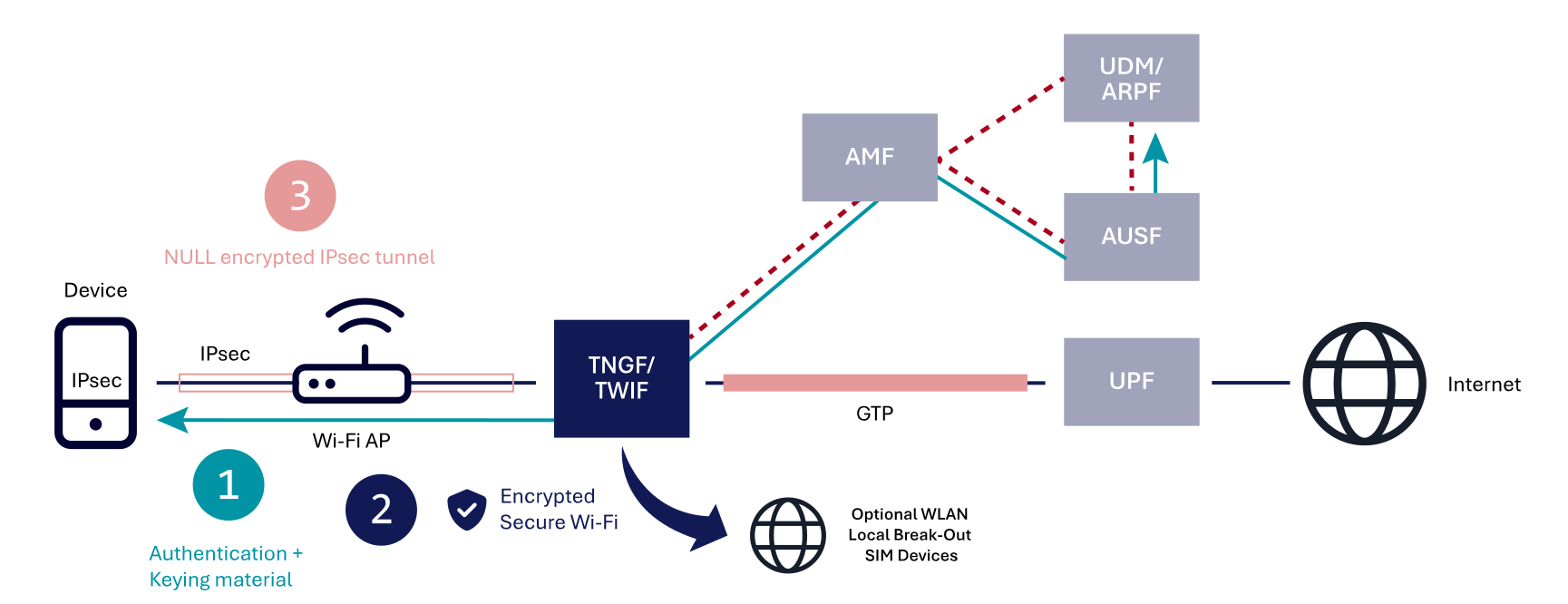
EAP-AKA in 5G-standalone architectures for trusted 3GPP access (Wi-Fi)


EAP-AKA in 5G-standalone architectures for trusted 3GPP access (Wi-Fi)

The device discovers a trusted Wi-Fi network (trusted non-3GPP) and initiates an EAP-based authentication procedure towards the selected public or private cellular network (PLMN/SNPN) by sending a NAS Registration Request message encapsulated in EAP-5G to the trusted Wi-Fi AP (TNAP), which forwards it to the TNGF/TWIF gateway function. The TNGF/TWIF extracts and forwards the NAS message to the Access and Mobility Management Function (AMF). The NAS signaling between the device and AMF uses the N1 interface, similar to cellular access. The AMF initiates the authentication procedure by sending an authentication request to the Authentication Server Function (AUSF). The AUSF communicates with the Unified Data Management (UDM) to retrieve authentication data and the subscriber’s profile. The UDM, with the often-co-located Authentication credential Repository and Processing Function (ARPF), generates an authentication vector. The AUSF receives the authentication vector and initiates the EAP authentication procedure (EAP-AKA’ or 5G-AKA). The authentication challenge is sent back to the device through the AMF and TNGF/TWIF. The device processes the challenge using its SIM credentials and sends the response back to the AUSF through the TNGF/TWIF and AMF. The AUSF verifies the device’s response. If successful, the AUSF generates keying material for the NULL encryption IPsec tunnel establishment and sends it to the AMF’s security anchor function. The AMF derives further keys for NAS security and TNGF/TWIF communication. The AMF initiates the NAS Security Mode Command procedure with the device to establish NAS security. The AUSF sends an EAP-Success message to the AMF, which in turn sends the EAP-Success message to the device through the TNGF/TWIF, utilizing the NAS security mode. The AMF also sends keying material to the TNGF/TWIF for the (WPA2/WPA3) encryption of the Wi-Fi network connection and the IPsec tunnel establishment. The device independently derives keys for IPsec tunnel establishment and secure Wi-Fi connection based on the shared secret and parameters received in the EAP authentication process.
Upon mutual successful authentication, the TNGF/TWIF sends the generated encryption keys to the access point over RADIUS. The encryption keys are used to secure the Wi-Fi radio network through WPA2-Enterprise or WPA3-Enterprise encryption. The device must generate the same encryption keys to gain network access and correctly validate the authentication vectors through the SIM card. The derived encryption keys are unique to the connection, ensuring the device has its own encrypted and secure Wi-Fi connection.
The TNGF/TWIF and the device use the generated keys to establish the NULL-encrypted IPsec tunnel using IKEv2 signaling. Optionally, additional IPsec Security Associations (SAs) may be established for different traffic types or QoS levels. The TNGF/TWIF then establishes a GTP tunnel to the User Plane Function (UPF) packet gateway to provide the device with access to the mobile network services and the Internet.

Bridging the 3GPP Standard with Real-World Solutions

While the outlined flows above reflect 3GPP standards for SIM authentication, practical network implementations often favor pragmatic, hybrid approaches due to existing network design, equipment and investments. In real-world deployments, the RADIUS protocol—widely used in Wi-Fi and various gateways—will likely continue to play a significant role alongside emerging 5G standards and protocols.

Historically, many 3GPP-specified interworking gateway functions for Wi-Fi (non-3GPP Access) have not seen widespread adoption for Wi-Fi offloading. For example, in 4G with the Evolved Packet Core (EPC), the tunnel-terminating ePDG gateway has primarily been used for Wi-Fi Calling rather than Wi-Fi offloading. Wi-Fi Offloading

Unified SIM-authentication for 3G, 4G,5G NSA and 5G SAFor Wi-Fi offloading in trusted Wi-Fi network environments, there has been limited demand for the WAG/TWAG to backhaul traffic to the EPC mobile core. In fact, the vast majority (around 90%) of Enea’s Wi-Fi offloading customer deployments opt to route traffic directly to the internet via a non-3GPP gateway, bypassing the mobile core. We foresee a similar trend in 5G SA, with a strong preference for local traffic breakout. Backhauling traffic through the mobile core only offloads the radio network (RAN), while local breakout delivers a more efficient solution by directly handling traffic at the edge.

Unified SIM-authentication for 3G, 4G,5G NSA and 5G SA

In this context, the 3GPP AAA is expected to evolve and take the role of SIM-based authentication (control plane only) also in 5G SA, effectively offering a unified SIM authentication function across all generations of cellular networks. This evolution would give mobile operators a streamlined and pragmatic architecture, capable of handling SIM authentication seamlessly across both 4G and 5G core networks. Wi-Fi Calling

For Wi-Fi Calling utilizing untrusted Wi-Fi access in 5G SA, the N3IWF function will still be required. One potential scenario is the adaptation of the 3GPP AAA function as a “bridging function” within the authentication flow for Wi-Fi Calling. Mobile Network Operators (MNOs) often prefer leveraging established, proven technologies over quickly adopting new standards when practical alternatives exist. It’s important to note that the N3IWF is only a reference in the 3GPP standard and not a specific gateway product. An adaptive authentication server (3GPP AAA), like Enea’s Aptilo SMP, could potentially evolve to integrate with the 5G SA core for control plane authentication while the existing ePDG gateways manage the N3IWF roles within the traffic plane. The same scenario could also happen for trusted access, with the existing WAG/TWAG gateways taking over the TNGF/TWIF functions in the traffic plane. These scenarios would require cooperation between the 3GPP AAA and gateway vendors.

[For figures/illustrations please refer to the original post HERE]

There’s a great deal of talk around the capability of Wi-Fi 7 (IEEE 802.11be) to revolutionize the wireless experience. It’s not hype. A key feature that delivers this transformative impact is multi-link operation (MLO). A mandatory and defining component of 802.11be, MLO enables a multi-link device (MLD) to simultaneously operate across multiple frequency bands, including 2.4 GHz, 5 GHz, and 6 GHz.

Access point (AP) and non-AP MLDs learn each other’s MLO parameters and capabilities through the multi-link information elements exchanged in frames like Beacons and Association Request/Response. In this blog, I’ll illustrate MLO’s impact on wireless connectivity and show you how it works in simultaneous transfer/receive (STR) mode.

How does multi-link operation (MLO) enhance wireless connectivity?

MLO introduces significant benefits for a variety of use cases. Key enhancements include:

  • Simultaneous use of multiple bands. MLDs can transmit (Tx) and receive (Rx) data over more than one band at the same time. This is useful in environments with heavy congestion, as it avoids interference on any single band.
  • Improved throughput. MLO leverages the combined capacity of multiple channels across different bands to enable higher aggregate throughput. This makes Wi-Fi 7 ideal for bandwidth-heavy applications like video streaming, virtual reality, and online gaming.
  • Reduced latency. By offloading traffic across multiple channels. This is particularly useful in gaming, video conferencing, or other apps that require real-time communication.
  • Better reliability and robustness. If one band (for example, 2.4 GHz) experiences congestion, then station (STA) MLDs can seamlessly switch to a less congested band (such as 6 GHz) without dropping the connection. This is extremely helpful in spaces with busy radio frequency (RF) traffic, such as stadiums, apartments, and offices.

Type of MLO operation modes

Wi-Fi 7 defines several single and multi-radio MLO modes, with stations able to support these modes based on their respective hardware capabilities. Various software thresholds—such as bandwidth requirements, band preferences, RF congestion, and QoS—will influence and guide a station’s choice of operating mode.

Figure 1 – MLO modes and attributes.

Among these modes, MLSR is required to be supported by all AP and non-AP MLDs. Support for EMLSR and STR modes is mandatory for AP MLDs, but optional for non-AP MLDs (stations). STR is currently incorporated by most vendors, making this mode an excellent starting place for dissection.

MLO’s STR mode in action

Figure 2 – Channel access of AP and Station over STR links.

In STR operation, each link can be used to Tx or Rx concurrent physical layer protocol data units (PPDUs) without any synchronization. Figure 2 illustrates an example where an AP MLD and a non-AP MLD are operating over an STR link pair. Both devices contend for access to the wireless medium and engage in subsequent frame exchanges on those links.

After the AP MLD and the non-AP MLD complete a multi-link setup to successfully establish link 1 and link 2, and with the links enabled, AP 2 can receive data frames from STA 2 on link 2. Meanwhile, AP 1 contends for the wireless medium and, upon securing a transmit opportunity (TXOP), transmits data frames to STA 1 on link 1.

Next, let’s conduct a lab test using Cisco’s CW9178I AP running on Catalyst 9800 Wireless LAN controller (WLC) to demonstrate STR in action.

Figure 3 – Topology of STR Test

The access point under test (APUT) is configured to operate on 2.4 GHz (20 MHz) and 5 GHz (40 MHz) bandwidths with a WPA3-SAE WLAN. In the first step of the test, Wi-Fi 7/802.11be/MLO is enabled on both bands. We are using a Qualcomm 7800-based STR/MLMR-capable station, while the CW9178I AP serves as the sniffer—capable of capturing data across multiple bands and decoding Wi-Fi 7 frames.

Next, let’s associate the STAUT and check the capability details in both the WLC and Wireshark. During the association process, multiple elements are exchanged: the MLO information elements for the 5 GHz Association link, as well as the “Per-STA Profiles” information elements containing details about the non-association link (2 GHz).

The WLC identifies the STA as STR capable if the “Maximum Number of Simultaneous Links” value in the ML information element of the association request is non-zero. This indicates the number of radios the station is using for its association. See Figure 4 below for the corresponding Wireshark capture.

Figure 4 – STR capability in Association Request

The Catalyst 9800 WLC provides a clear display of the STA’s 802.11be capabilities, including MLD links with Slot IDs and bands, MLO mode support (STR/eMLSR), and Tx/Rx RF and data statistics for each band. Equivalent CLI commands are also available, though not covered in this blog.

Figure 5 – WLC showcasing Client (MLD) capabilities.

Now that the STA has associated on the 5G band with an STR link to both the 5G and 2G bands, let’s initiate traffic for one minute to verify STR operation. Using the IxChariot server, we will begin full-bandwidth Downlink UDP traffic. Initially, traffic will flow only on the 5G band, as it is the only active association link. However, the STA will soon assess the need for a secondary link to achieve higher bandwidth. It will then send a QoS Null data frame over the secondary (2G) link. The AP acknowledges this request and enables simultaneous data transmission across both bands.

Figure 6 shows the sequence starting with data on channel 36, followed by a QoS Null data frame on channel 6, and concluding with simultaneous data transmission on both channel 6 and channel 36.

Figure 6 – Wireshark snapshot highlighting data on multiple links.

The Catalyst 9800 WLC offers a comprehensive view of the client’s performance on each MLO link, with monitors providing detailed Tx/Rx data along with RF statistics.

Figure 7 – WLC showing detailed statistics for MLD STA.

Following the one-minute traffic run, the average throughput measured is 747 Mbps, as shown in Figure 8.

Figure 8 – IxChariot capture displaying STR client throughput.

To provide a comparison, the test was repeated under the same conditions, but with 802.11be/MLO disabled, running in 802.11ax mode instead. The average throughput was 506 Mbps.

Figure 9 – IxChariot view showing throughput of the Wi-Fi 6 (802.11ax) client.

The table below summarizes the throughput comparison between clients. The impact is indeed transformative: Wi-Fi 7 with STR MLO significantly outperforms Wi-Fi 6, delivering a 47% throughput increase, along with more efficient spectrum utilization.

The CW9178I, CW9176I, and CW9176D1 APs, along with 9800 series wireless controllers, will fully support Wi-Fi 7 capabilities and features from IOS XE 17.15.2 onward.

Even in demanding, high-density environments, Wi-Fi 7 delivers speed, efficiency, and rock-solid reliability. At the crux of this breakthrough in wireless connectivity is the Multiple Resource Unit (MRU) feature and the way that Wi-Fi 7 integrates MRU to augment the Orthogonal Frequency Division Multiple Access (OFDMA) framework.

Originally introduced in Wi-Fi 6, OFDMA enables dynamic allocation and independent modulation of subcarriers across frequency resources, facilitating concurrent transmissions to multiple client devices. In this blog, we illustrate how MRU advances this methodology by implementing refined interference suppression mechanisms and optimizing multi-user scheduling.

https://storage.googleapis.com/blogs-images-new/ciscoblogs/1/2025/07/250617_wifi-MRU-Figure1.png
Figure 1: Wi-Fi 6 vs. Wi-Fi 7 RU support comparison

How does Multiple Resource Unit (MRU) impact efficiency in wireless connectivity?

By selectively excising interfered spectral segments, MRU ensures that transmissions are confined to interference-free subchannels, thereby maximizing effective throughput and link reliability in congested radio frequency (RF) environments. One way to visualize this is to imagine a busy freeway where each vehicle represents a data packet. OFDMA, as introduced in Wi-Fi 6, is like redesigning the highway with multiple lanes that allow many cars to travel side by side, each heading to its own destination. Now, with MRU in Wi-Fi 7, it’s as if the highway can intelligently guide vehicles into express lanes to further reduce congestion and ensure a smooth journey for all—even in heavy traffic.

This optimization is accomplished through punctured resource units (RUs), which are structured aggregations of 78.125 kHz-wide subcarriers. These individual RUs are assigned to different stations, allowing wireless access points to serve each of them simultaneously during uplink and downlink transmissions. MRU is in effect when many RUs are assigned to a single user. This allows for the aggregation of RUs of varying sizes to better match data transmission needs.

https://storage.googleapis.com/blogs-images-new/ciscoblogs/1/2025/07/250617_wifi-MRU-Figure2.png
Figure 2: Sample RU allocations per station in Wi-Fi 6 and Wi-Fi 7

MRU configurations are classified into small (< 242) and large (> 242). Small MRU configurations include 52+26-tone and 106+26-tone groupings, wherein “tone” denotes the subcarrier or small frequency segment into which the available spectrum is divided. Large MRU configurations comprise combinations such as 484+242-tone, 996+484-tone, 996+484+242-tone, 2×996+484-tone, 3×996-tone, and 2×996+484-tone.

This results in more efficient user allocation and bandwidth utilization. For instance, in 11ax with a 20 MHz channel (totaling 242 tones), when two clients each use 106 tones, the total utilization is (106×2)/242 = ~88%. In contrast with Wi-Fi 7, if one client is assigned RU106 and another is allocated MRU106+26, the total utilization increases to (106×2+26)/242 = ~98%.

https://storage.googleapis.com/blogs-images-new/ciscoblogs/1/2025/07/250617_wifi-MRU-Figure3.png
Figure 3: Allowed 106+26-tone MRUs in an OFDMA 20 MHz PPDU

Evaluating Wi-Fi 7’s MRU feature

To conduct this evaluation, we used a Cisco Wireless 9178I Access Point connected to a Cisco Catalyst 9800 Series Wireless LAN Controller (WLC) running firmware version 17.15.2. The 9800 Series provides centralized control and greater visibility over traffic segmentation, user access, and security. The test environment consists of 4x Wi-Fi 7 and 4x Wi-Fi 5 stations (STAs). This diverse mix allows us to assess how different wireless standards handle congestion and latency.

https://storage.googleapis.com/blogs-images-new/ciscoblogs/1/2025/07/250617_wifi-MRU-Figure4.png
Figure 4: System overview and test infrastructure

To put MRU to the test, we simulate a high-traffic scenario on each bandwidth.

We generate user datagram protocol (UDP) full buffer traffic, creating network congestion by continuously pushing data to the access point on Wi-Fi 5 STAs. This replicates a real-world environment where multiple devices compete for bandwidth, allowing us to analyze the impact of MRU on latency. We then generate 750 Kbps real-time transport protocol (RTP) downlink and uplink traffic streams, mimicking real-time applications like voice and video streaming.

Measuring latency: OFDMA vs. OFDMA+MRU performance

To quantify performance improvements, we measure latency in milliseconds (ms) across three different configurations or combinations of channel bandwidth:

  • Non-OFDMA mode: Traditional Wi-Fi scheduling without frequency partitioning
  • Wi-Fi 6 OFDMA: Optimizes resource allocation
  • Wi-Fi 7 OFDMA+MRU: Allows flexible frequency allocation
https://storage.googleapis.com/blogs-images-new/ciscoblogs/1/2025/07/250617_wifi-MRU-Figure5.png
Figure 5: Downlink latency (ms) for different bandwidths

Even with just four MRU-capable STAs, we consistently observe lower latency in both downlink and uplink directions. The improvements reach approximately 55% in downlink and 48% in uplink when using a 320 MHz channel.

https://storage.googleapis.com/blogs-images-new/ciscoblogs/1/2025/07/250617_wifi-MRU-Figure6.png

Figure 6: Uplink latency (ms) for different bandwidths

Enhancing connectivity and eliminating blind spots with MRU

MRU revolutionizes next-generation wireless connectivity by boosting efficiency, increasing speed, and ensuring enhanced reliability—even in high-density environments such as offices, airports, and stadiums, as well as IoT networks with cameras and sensors. By complementing 5G, it strengthens indoor wireless connectivity where 5G signals may be weaker. Additionally, MRU unlocks seamless experiences for applications requiring ultra-low latency, including augmented reality (AR), virtual reality (VR), and cloud gaming.

All Cisco Wi-Fi 7 access points, including CW9178I and CW9176I, along with Cisco Catalyst 9800 Series Wireless Controllers, fully support multi-RU functionality starting with the IOS XE 17.15.2 release—and provide centralized control for greater visibility, faster troubleshooting, and ease of management.

Austin, Texas – September 4, 2025 – Wi-Fi Alliance® today announced the launch of Wi-Fi® for Matter™, a new certification that ensures applicable Wi-Fi devices meet the Connectivity Standards Alliance requirements necessary for Matter certification. This new certification enables Wi-Fi Alliance members to more efficiently develop products supporting Matter functionality and bring them to market faster.

Wi-Fi CERTIFIED brings foundational benefits to the Matter ecosystem. The Wi-Fi for Matter certification focuses on access points (APs), supporting several Wi-Fi features – including Wi-Fi CERTIFIED 6® –  required by the Matter specification. Together, Wi-Fi CERTIFIED® and Matter certification provide consumers and manufacturers with confidence that Internet of Things (IoT) devices meet the highest standards for seamless connectivity, interoperability, and reliability in the smart home.

“Wi-Fi and Matter are two cornerstone technologies driving the next wave of IoT innovation,” said Kevin Robinson, president and CEO of Wi-Fi Alliance. “With Wi-Fi for Matter, we are helping our members accelerate deployment of products that deliver the scalability, simplicity, and interoperability that consumers expect in their connected homes.”

What is Wi-Fi for Matter?

Wi-Fi for Matter combines several existing Wi-Fi Alliance certifications and features that meet Connectivity Standard Alliance’s baseline Wi-Fi requirements for Matter certification of devices providing the Wi-Fi infrastructure.

The initial AP-focused certification includes:

  • Wi-Fi CERTIFIED 6®
  • Extended Sleep
  • IPv4 Proxy Address Resolution Protocol (ARP)
  • IPv6 Proxy Neighbor Discovery Protocol (NDP)

Wi-Fi CERTIFIED brings foundational benefits to Matter devices through Wi-Fi CERTIFIED 6, including strong WPA3™ security, proven interoperability, and power saving features to extend battery life of IoT devices. Extended sleep, ARP, and NDP features – mandatory for Matter’s Network Infrastructure Managers (NIMs) – enable low-power client devices to conserve energy while maintaining a reliable connection with the AP.

Why it Matters

Most Matter devices operate over Wi-Fi networks. As consumers increasingly adopt Matter to expand their smart homes, ensuring the readiness of Wi-Fi infrastructure becomes critical. The Wi-Fi for Matter certification ensures that APs support foundational feature sets required by Matter, particularly for battery-operated devices, thereby strengthening the scalability and reliability of the global IoT ecosystem.

“The Connectivity Standards Alliance and Wi-Fi Alliance share a vision for a global IoT ecosystem built on interoperability, security, and consumer trust,” said Tobin Richardson, President and CEO, Connectivity Standards Alliance. “Wi-Fi for Matter certification and the value of Wi-Fi CERTIFIED ensures that Wi-Fi devices deliver the foundational capabilities required by Matter, strengthening the ecosystem and helping companies bring high-quality smart home products to market faster.”

Unique Value

By aligning Wi-Fi CERTIFIED with Matter certification, Wi-Fi for Matter fosters a robust and interoperable IoT ecosystem. Certified APs will simplify the development process for Wi-Fi Alliance members and accelerate consumer adoption of Matter-enabled devices.

Learn more about Wi-Fi for Matter: https://www.wi-fi.org/file/wi-fi-matter-highlights

About Wi-Fi Alliance®  |  www.wi-fi.org
Wi-Fi Alliance® is the worldwide network of companies that brings you Wi-Fi®. Members of our collaboration forum come together from across the Wi-Fi ecosystem with the shared vision to connect everyone and everything, everywhere, while providing the best possible user experience. Since 2000, Wi-Fi Alliance has completed more than 85,000 Wi-Fi certifications. The Wi-Fi CERTIFIED™ seal of approval designates products with proven interoperability, backward compatibility, and the highest industry-standard security protections in place. Today, Wi-Fi carries more than half of the Internet’s traffic in an ever-expanding variety of applications. Wi-Fi Alliance continues to drive the adoption and evolution of Wi-Fi, which billions of people rely on every day.

MediaTek Filogic Series Explained: Wi-Fi 6, Wi-Fi 6E & Wi-Fi 7 Chipsets

MediaTek Filogic
is a family of high-performance, power-efficient, and reliable Wi-Fi solutions designed to deliver seamless connectivity for today’s always-connected world. Whether for enterprise networks, consumer electronics (CE), broadband, retail, or IoT devices, Filogic chipsets power a wide range of applications.

From routers, access points, and repeaters to mesh systems, notebooks, mobile devices, and add-in boards (AIBs), the MediaTek Filogic series supports end-to-end connectivity solutions.

MediaTek Filogic Chipset families

These chipsets integrate cutting-edge connectivity technologies that enhance speed, coverage, and efficiency. MediaTek is a key contributor to the Wi-Fi Alliance standards, and is often first to market with new features, providing reference platforms and white papers to support industry adoption of a next-generation standard.

Why opt for Wi-Fi 7 devices powered by MediaTek Filogic?

Wi-Fi 7 introduces Multi-Link Operation (MLO), which can aggregate data bandwidth between 2.4 GHz, 5 GHz and 6 GHz bands to achieve up to 80% greater throughput in a heavily loaded network compared to previous Wi-Fi generations. Smart Link-Dispatching efficiently organizes data among the available links according to each device’s traffic requirements.. It does this by intelligently analyzing the data rate available on each band, then it adopts adaptive dispatching to achieve higher channel efficiency.

Will there be a Wi-Fi 8?

MediaTek was first to market with Wi-Fi 7 devices in 2022, and continues to lead the industry with a strong foundation of Wi-Fi 8 technologies, ready for commercialization in the next few years.

Why Choose MediaTek Filogic?

Superb Performance & Leading Features

  • Multicore CPU designs and dedicated networking processors deliver faster throughput. Wi-Fi 7 with single MAC MLO uniquely manages multiple bands with lower latency and power use than alternative chipsets. MediaTek’s Smart Link Dispatching then goes even further to improve QoS, especially for applications that have strict latency requirements.

World-Class Support

  • MediaTek partners with customers from concept to mass production, enabling faster time to market with customizable designs.

Advanced Bluetooth Integration

  • Supports multiple Bluetooth signals, improving mesh airtime and simultaneous application performance.

Power Efficiency Focused Designs

  • Optimized for long battery life with small form factor designs, perfect for mobile and IoT devices.

Extended Range and Coverage

  • Proprietary hardware algorithms boost antenna reception and signal range for more reliable connections.

Built-In Security

  • Chipsets built with a dedicated security engine, Secure Boot, and TrustZone ensure device and data protection.

Ethernet Cable Types: How to Choose the Right Network Cable

Picture this: You’re staring at a rack full of colorful ethernet cable types, each one promising blazing speeds and rock-solid connectivity. The sales rep is throwing around terms like “Cat8 ultra-performance” while your budget screams.

Sound familiar?

Cable selection shouldn’t require an engineering degree, but somehow it often feels that way. Most networks fail not because someone chose Cat6 over Cat8, but because they skipped proper testing or ignored basic installation practices.

We’ll show you exactly which cables work for real-world applications – and how to test them so they actually deliver their promised performance.

Understanding Cable Types vs Categories

Let’s clear up some confusion right off the bat. Cable types and cable categories aren’t the same thing.

Cable types refer to the physical transmission medium. Think of them as the fundamental building blocks of your network connection. The three main cable types are coaxial, twisted pair, and fiber optic Ethernet cables. Cable categories are performance specifications that apply specifically to twisted pair cables. Think of Cat5e, Cat6, Cat6a, Cat7, and Cat8.

It’s like the difference between “vehicles” (types) and “sedan vs SUV” (categories within the car type).

Overview of Ethernet Cable Types

Before we dive into Cat5e vs Cat6 debates, you need to understand the three main cable types used in Ethernet networks:

Coaxial Ethernet Cables

Remember those thick yellow cables from the ’80s? That’s 10Base5 “Thicknet” coaxial cable. 10Base2 “Thinnet” was the thinner cousin. Both are essentially museum pieces now, but you might still find them lurking in really old installations.

Coaxial was great for its time. It had a simple concept: a single conductor surrounded by shielding. But it also had major limitations: shared collision domains, difficult troubleshooting, and maximum speeds that make dial-up look fast.

Twisted Pair Ethernet Cables

This is your bread and butter for modern networks. Four pairs of twisted copper wires in a plastic jacket. The twisting reduces electromagnetic interference – brilliant engineering from Alexander Graham Bell back in 1881 that still works today.

Twisted pair Ethernet cables come in two flavors:

  • Unshielded (UTP) – Standard for most office environments
  • Shielded (STP) – Extra protection against interference, essential in electrically noisy environments

H3: Fiber Optic Ethernet Cables

When copper hits its limits – because of distance, speed, or interference – fiber takes over. Light pulses through glass strands instead of electrical signals through copper.

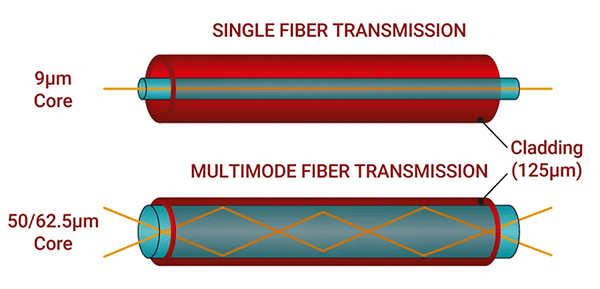
Single Mode Fiber uses one light path and reaches incredible distances. This is perfect for connecting buildings or campuses. Multimode Fiber uses multiple light paths, costs less than single mode, but works over shorter distances. Great for data center backbone connections.
Ethernet Cable Categories Explained

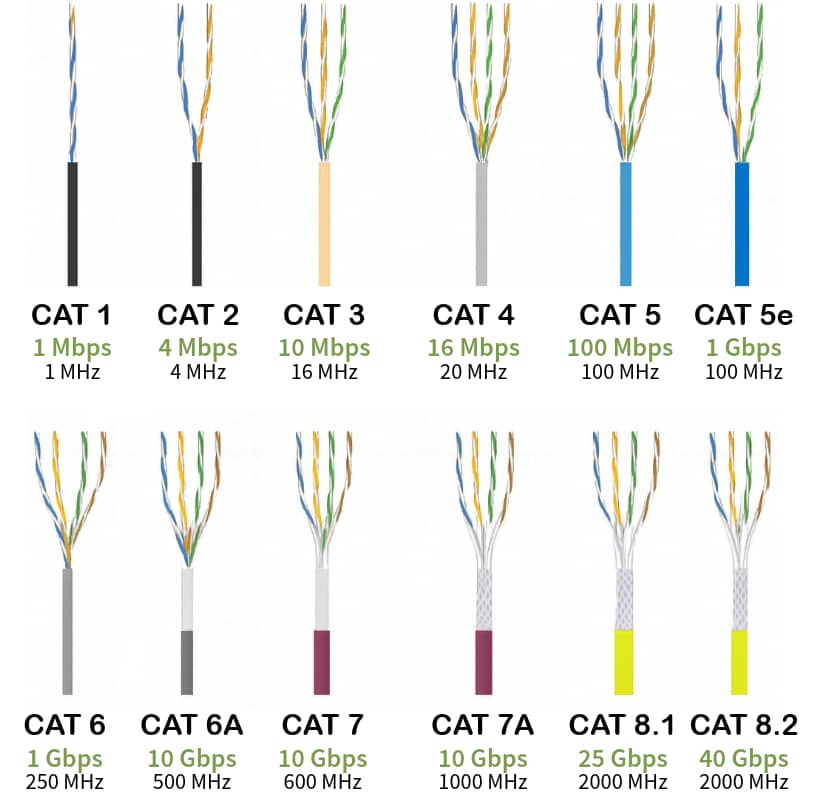
Since twisted pair dominates modern networks, let’s break down what those category numbers actually mean:

Cat5e (Category 5 Enhanced)

  • Speed: 1 Gbps
  • Bandwidth: 100 MHz
  • Distance: 100 meters

Cat5e has been around since the late ’90s, but don’t let that fool you. Cat5e still handles most office tasks without breaking a sweat. If your users aren’t complaining about slow network performance and you’re not pushing multi-gig applications, Cat5e gets the job done for a fraction of the cost of newer categories.

Cat6 (Category 6)

  • Speed: 10 Gbps up to 55 meters, 1 Gbps up to 100 meters
  • Bandwidth: 250 MHz
  • Distance: 100 meters (1G), 55 meters (10G)

Cat6 adds a plastic spline separator between wire pairs to reduce crosstalk. Perfect for WiFi 6 access points that need multi-gig backhaul connections. Just remember that 10G speed drops off after 55 meters, which becomes crucial for longer cable runs.

Cat6a (Augmented Category 6)

  • Speed: 10 Gbps
  • Bandwidth: 500 MHz
  • Distance: 100 meters

The enterprise sweet spot. Cat6a delivers full 10 Gbps performance over the complete 100-meter distance. Thicker and more expensive than Cat6, but it won’t leave you hanging when you need consistent high-speed performance over longer distances.

Cat7 (Category 7)

  • Speed: 10 Gbps
  • Bandwidth: 600 MHz
  • Only available shielded

Cat7 lives in standards limbo. ISO approved it, but TIA/EIA (the North American standards bodies) never blessed it. Some manufacturers developed proprietary connectors that aren’t compatible with standard RJ45 jacks. Unless you have very specific requirements, skip Cat7 and stick with Cat6a.

Cat8 (Category 8)

  • Speed: 40 Gbps
  • Bandwidth: 2 GHz
  • Distance: 30 meters

Cat8 is the data center speed demon. Built for 25G and 40G switch-to-switch connections where every millisecond counts. The cables are thick, expensive, and an overkill for typical enterprise deployments.
Pro Tip:

For enterprise WiFi deployments, Cat6a is your best friend. Modern WiFi 7 access points can push 2.5G or even 5G traffic back to your switch. Cat5e becomes the bottleneck, and Cat6’s distance limitations might bite you on longer runs. Cat6a gives you full 10G capability over 100 meters, providing plenty of headroom for current and future WiFi standards.

Cable Performance and Speed Capabilities

Cable specifications tell only part of the story. Real-world performance depends on installation quality, environmental conditions, and how well your equipment plays together.

For Enterprise Applications:

  • WiFi Access Points: Cat6a for multi-gig backhaul, future-proofing for WiFi 7
  • Switch Interconnects: Cat6a for 10G connections, Cat8 for 25G/40G in data centers
  • Server Connections: Fiber for backbone, Cat6a for 10G server NICs
  • Workstation Connections: Cat5e for basic office work, Cat6 for power users

Distance vs Performance Reality Check

Those maximum distance specs aren’t suggestions – they’re hard limits. A 105-meter Cat6 cable might link up, but you’ll get unpredictable performance. Network testing tools can identify these issues before they impact user experience.

Gaming Applications

Cat6 or Cat6a works great for gaming setups. The difference between Cat6 and Cat8 won’t turn you into a gaming god. Your internet connection speed and game server latency matter way more than cable category.

Pro Tip:

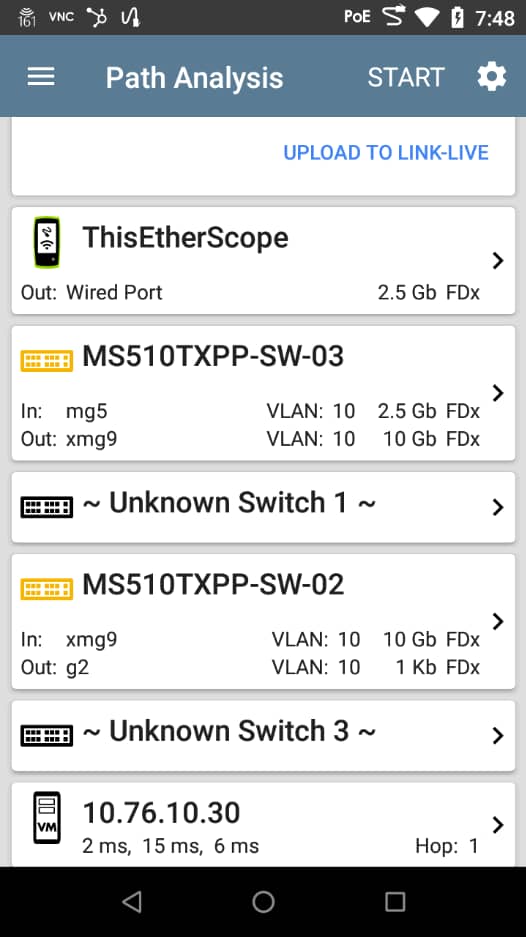
Don’t just chase maximum speeds – pay attention to your actual network bottlenecks. NetAlly’s Path Analysis feature in the EtherScope nXG can trace your connection from client to server, showing you exactly where performance drops off. You might discover that an expensive Cat8 cable isn’t fixing your real problem.
Choosing the Right Cable for Your Application

Enterprise Deployments:

Cat6a hits the sweet spot for most business networks. It supports current 10G equipment and leaves room for growth. The extra cost over Cat6 pays for itself when you don’t have to recable in three years.

Home Networks:

Cat5e handles typical home internet connections just fine. Even gigabit fiber connections won’t max out Cat5e capabilities. Spend your money on a better router instead.

Data Centers:

For data centers, use fiber for backbone connections and Cat6a or Cat8 for server connections depending on port speeds. The decision often comes down to equipment port density and power consumption.

Industrial Environments:

In industrial environments, shielded cables become essential around heavy machinery, motors, and electrical interference. The extra cost of the shielded twisted pair prevents mysterious connectivity issues that are a nightmare to troubleshoot.

Cable Compatibility and Performance

Good news – all Ethernet cable categories use standard RJ45 connectors, so newer cables work perfectly with older equipment from a physical connection standpoint.

That shiny Cat8 cable plugs right into your gigabit router without issues. But you’ll only get gigabit speeds because that’s what your router supports. The cable doesn’t magically boost your equipment’s capabilities beyond its design limits.

Cat7 compatibility gets tricky because of marketing confusion. The official Cat7 specification requires proprietary connectors (GG45 or TERA), but most cables labeled as “Cat7” in stores actually use standard RJ45 connectors. These RJ45-terminated cables perform somewhere between Cat6a and true Cat7 specs, but manufacturers market them as Cat7 anyway. It’s misleading, but that’s why you see “Cat7” cables that plug into regular Ethernet ports.

In mixed environments, your network runs at the speed of the slowest component. A Cat8 cable connected to Cat5e equipment still runs at Cat5e speeds. The weakest link in your chain determines overall performance.

Cable Length Limitations and Signal Quality

Cable length directly impacts network performance as signals weaken over distance. The magic number is 100 meters (328 feet) for twisted pair cables. Beyond that distance, signal strength drops below usable levels, causing packet loss, retransmissions, and connection failures.

Higher category cables don’t extend distance – they improve signal quality within that 100-meter limit. Cat7 and Cat6 both hit the same distance wall, though higher categories maintain better performance as you approach that limit.

Your internet speed isn’t determined by cable category if your current cable isn’t the bottleneck. Upgrading from Cat5e to Cat7 won’t boost gigabit internet – your service plan sets that limit.

Signal degradation follows basic physics. Higher frequency signals actually attenuate faster, which is why Cat6a and Cat8 need better construction to maintain performance over the full distance.

Cable Testing and Validation Methods

Professional cable testing catches problems that visual inspection misses. With NetAlly tools, you can save 60% of the time spent resolving network issues by identifying cable problems before they impact users.

Unterminated Testing uses Time Domain Reflectometry (TDR) – sending electrical pulses down the cable and measuring how long they take to bounce back. This reveals:

  • Cable length and distance to faults
  • Opens (broken wires)
  • Shorts between conductors
  • Split pairs (incorrect wiring standards)

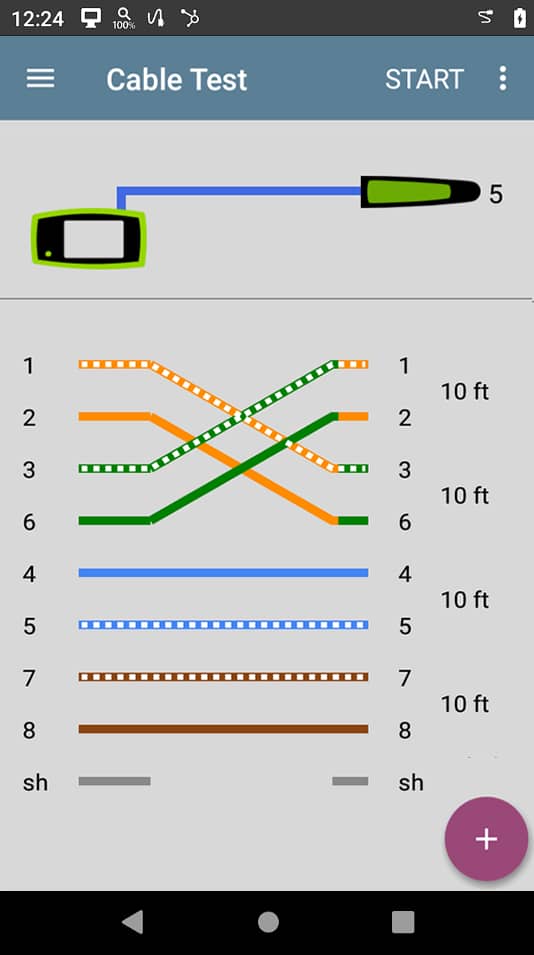
Terminated Testing requires wire view adapters at the far end but provides deeper validation:

  • End-to-end connectivity for every wire pair
  • Correct pin assignments (catching miswired connections)
  • Cable identification for documentation purposes
Performance Validation with LANBERT Media Qualification goes beyond basic connectivity by transmitting real network traffic at line rates. This tests whether your cable plant can handle the data speeds you’re paying for. It’s much more reliable than just checking electrical parameters against standards.

Troubleshooting Common Cable Issues

When your network starts acting up, knowing how to diagnose cable performance problems saves hours of headaches.

Split Pairs create one of the most frustrating problems. Your connectivity test passes, but performance is terrible. This happens when installers don’t follow T568A or T568B wiring standards properly, causing wire pairs to get “split” across different physical twisted pairs. The result? Crosstalk that destroys performance even though the cable technically “works.”

Downshifting occurs when your 10G-capable equipment stubbornly links at slower speeds due to marginal cable quality. The connection works, just not at the speed you’re paying for. Signal-to-noise ratio measurements help identify these problem cables before they impact users.

Length Problems sneak up on you because a 110-meter cable run might seem fine during initial testing. But it exceeds the 100-meter specification, causing performance to degrade gradually over time. These intermittent issues are particularly painful to diagnose because they don’t fail consistently.

Poor Connections at patch panels or jacks create the most unpredictable performance problems. A slightly loose connection might work fine under light load but fail when traffic increases. Cable testing with proper termination reveals these hidden troublemakers immediately.

Professional testing tools reduce problem escalations by 30% because they identify root causes instead of chasing symptoms. When you can prove the cable plant meets specifications, troubleshooting focuses on the real villains instead of endless cable swapping.

Advanced Cable Technologies and Future Considerations

Cat9 doesn’t officially exist yet, but the networking industry’s appetite for speed suggests it’s inevitable. If Cat9 emerges, it will likely push beyond Cat8’s 40 Gbps while staying within twisted pair’s 100-meter limit.

The real challenge isn’t speed – it’s physics. Higher frequencies mean more signal loss, requiring even better shielding and construction. Meanwhile, Power over Ethernet demands keep growing, data center speeds climb relentlessly, and edge computing needs reliable connections everywhere.

Market trends show fiber gaining ground for backbone connections while twisted pair evolves for end devices. The smart money isn’t on revolutionary changes but evolutionary improvements: better shielding, enhanced power delivery, and perhaps new connectors that maintain backward compatibility.

So, Which Cable Should You Choose?

Ethernet cable selection doesn’t have to be rocket science. Understand your application requirements, pick the right category for your performance needs, and test everything properly.

Cat5e still delivers solid performance for everyday connectivity tasks. Cat6a strikes the right balance for enterprise networks that need room to grow. Cat8 finds its home in data centers where massive bandwidth justifies the cost. Fiber steps in when copper simply can’t go the distance.

But remember – the best cable in the world won’t help if it’s installed poorly or never tested. That’s where professional testing equipment proves its worth by catching problems before they impact your users.

To validate your cable infrastructure like a pro, check out these NetAlly solutions:

  • LinkRunner AT 4000 – Smart network and cable tester for comprehensive diagnostics
  • LinkRunner 10G – Advanced multi-gig cable testing and performance validation
  • EtherScope nXG – Complete network analysis including cable testing and WiFi analysis

The sleekly designed WAX610W access point is purpose-built for hospitality, MDUs, and classrooms

September 3, 2025 – DENVER (CEDIA Expo 2025, Booth #3143) – NETGEAR® Inc. (NASDAQ: NTGR), a global leader in intelligent networking solutions designed to power extraordinary experiences, today announced the WAX610W, a compact, wall-mount Wi-Fi 6 access point designed to deliver high-performance, cost-effective connectivity for hospitality environments, multi-dwelling units (MDUs), and education settings. Created to simplify deployment and management while enhancing the guest and resident experience, the WAX610W combines enterprise-class performance with cloud-managed simplicity.

Delivering up to 1.8 Gbps of total throughput across dual bands, WAX610W helps to ensure fast, reliable wireless connectivity in high-density environments. It features one Gigabit PoE-In port for power and uplink, plus four Gigabit LAN ports to directly connect devices like IP phones, smart TVs, and projectors. With enterprise-grade security, seamless roaming, and remote management via NETGEAR Insight, it’s easy to scale and maintain and the optional Captive Portal enables a fully branded guest WiFi experience. The compact form factor and slim, elegant design fit easily into any interior while providing optimized omnidirectional coverage.

“Residential customers demand solutions that are reliable, yet unobtrusive,” said Nat Chidambaram, senior director, product management at NETGEAR. “The WAX610W access point–our smallest yet–blends seamlessly into its environment with an easily installed instant ceiling or wall mount. Managed by our Insight cloud platform, this AP is a quiet powerhouse.”

Reliable Coverage and Simple Installation

The WAX610W is compatible with client devices across Wi-Fi 4, Wi-Fi 5, Wi-Fi 6E, and Wi-Fi 7 on the 2.4 GHz and 5 GHz bands and supports mesh backhaul for flexible deployment. With NETGEAR’s Insight cloud management platform, IT teams can effectively segment traffic for administration, staff, guests, and IoT devices.

Purpose-built for modern hospitality and MDUs, the WAX610W connects to a Gigabit Ethernet switch to ensure maximum wired backhaul speed and features one PoE+ uplink port plus four additional Gigabit Ethernet ports for in-room connectivity. Bidirectional MU-MIMO and OFDMA enhance performance in dense client environments, enabling smooth streaming, rapid downloads, and responsive applications—key to improving guest satisfaction and reducing support tickets.

Compatibility and Security

The WAX610W is managed through NETGEAR Insight for enhanced security with centralized cloud and local control—no additional hardware controllers required. IT managers can deploy, monitor, and update networks remotely, standardize configurations across properties or campuses, and troubleshoot in real-time.  WPA2/WPA3 Enterprise and Personal security, OWE for open networks, and up to eight SSIDs per access point, ease the process of meeting compliance and segmentation requirements.

Compatible with other NETGEAR Insight Managed Access Points, the WAX610W integrates with both wired and wireless Instant Mesh networks to extend coverage quickly and cost-effectively. It works seamlessly with current and legacy client devices, ensuring wide compatibility and easing future upgrades.

WAX610W Technical Specifications

  • WiFi 6 Technology: Business class WiFi 6 performance (up to 1.8Gbps).
  • NETGEAR Insight Managed: For ease of centralized Cloud management, no additional hardware needed
  • Compatible with Insight Managed Access Points: Form a wired and/or wireless mesh network based on NETGEAR’s unique Instant Mesh technology
  • Multiple SSIDs: 8 separate wireless networks (SSIDs) can be used for administration, employees, guests, and IoT devices, including WiFi surveillance cameras, thermostats, door locks, and sensors
  • VLAN Support: Configure different VLANs on the LAN ports to prioritize the traffic like VoIP
  • Flexible Connections: One Gigabit Ethernet port with Power-over-Ethernet (PoE) for ease of deployment plus four Gigabit ports
  • Market-leading Support: 5-year warranty and next business day replacement 

Availability

The NETGEAR Insight Managed WiFi 6 Dual-band Gigabit PoE Access Point (WAX610W) is available now through NETGEAR’s authorized partners and resellers. For more information, visit https://www.netgear.com/business/wifi/access-points/wax610w/.

About NETGEAR, Inc.

Founded in 1996 and headquartered in the USA, NETGEAR® (NASDAQ: NTGR) is a global leader in innovative networking technologies for businesses, homes, and service providers. NETGEAR delivers a wide range of award-winning, intelligent solutions designed to unleash the full potential of connectivity and power extraordinary experiences. For businesses, NETGEAR offers reliable, easy-to-use, high-performance networking solutions, including switches, routers, access points, software, and AV over IP technologies, tailored to meet the diverse needs of small and medium enterprises. NETGEAR’s consumer products deliver advanced connectivity, powerful performance, and enhanced security features right out of the box, designed to help keep families safe online, whether at home or on the go. More information is available from the NETGEAR Press Room or by calling (408) 907-8000. Connect with NETGEAR: Facebook, Instagram and the NETGEAR blog at NETGEAR.com.


©2025 NETGEAR, Inc. NETGEAR and the NETGEAR logo are trademarks and/or registered trademarks of NETGEAR, Inc. and/or its affiliates in the United States and/or other countries. Other brand and product names are for identification purposes only and may be trademarks or registered trademarks of their respective holder(s). The information contained herein is subject to change without notice. NETGEAR shall not be liable for technical or editorial errors or omissions contained herein. All rights reserved.

The Silicon Labs SiWx917 ultra-low-power Wi-Fi 6 product family has reached general availability (GA) for its AI/ML hardware accelerator. Accompanied with a guided machine learning (ML) development journey and other tools, the SiWx917 makes artificial intelligence (AI) on IoT (AIoT) accessible for everyone and speeds up edge AI transformation for Wi-Fi IoT device makers.

Edge AI Transformation

The world has become AI-driven. With smarter algorithms that go far beyond what traditional rule-based programming can ever achieve, AI improves accuracy, enhances functionalities, and enables new use-cases on almost any imaginable thing, function, and system. Anything that benefits from the advantages of AI is being enhanced with that capability as we speak. However, behind the scenes of this profound technological revolution, a significant transformation is taking place. While cloud computing has dominated the AI/ML landscape for years, the centralized model is now challenged with a distributed architecture that also operates at the network edges as well as on the IoT devices. Edge AI is a fundamental transformation driven by clear, quantifiable benefits.

The Benefits of Edge AI

While cloud computing has proven effective in making AI ubiquitous, it has faced significant challenges. The latency of sending data to the cloud and back does not scale for real-time applications. Processing and storing sensitive data on cloud servers raises privacy and security concerns. Vast amounts of data are causing constant network congestion, flooding cloud storage, and increasing energy consumption and CO2 emissions.

Edge AI distributes computing to billions of nodes. ML models run directly on IoT devices, close to where the data is generated, avoiding the need to send every bit of data to the cloud. The proliferation of IoT connectivity, rapid advancements in AI/ML hardware acceleration on wireless microcontrollers like the SiWx917, combined with easy ML development tools have made it possible to perform sophisticated ML computations directly on compact, resource-constrained devices.

With on-device AI/ML execution, billions of smart home appliances, IoT sensors, smart cameras, industrial equipment, and many other smart devices can now process data and make decisions autonomously, without relying on the cloud. The result is faster processing, real-time response, resilient applications, and reduced load on networks and data storage. Data stays where it was generated, improving privacy and security.

SiWG917 AI/ML Accelerator and Development Tools

The SiWG917 (part of the SiWx917 product family) is an ultra-low-power Wi-Fi 6 and Bluetooth Low Energy wireless MCU for energy-efficient and battery-powered IoT devices. The comprehensive Edge AI-capable system features Matter protocol support, a dual-processor architecture with a powerful application microcontroller, network wireless processor (NWP), and large SRAM, PSRAM, and flash memory capacity. Its rich set of peripherals and high GPIO count make SiWG917 a versatile wireless MCU solution for any smart IoT application.

The dedicated AI/ML hardware accelerator on SiWG917 is optimized for energy-efficient ML inference, offloading the Arm Cortex-M4 application MCU. The on-device optimized AI/ML inference capabilities include executing time series data processing ML models such as predictive maintenance, environmental monitoring, anomaly detection, voice and audio detection, and low-resolution vision use-cases.

The dedicated AI/ML hardware block on the SiWG917 is optimized for energy-efficient TinyML workloads. It can perform 320 MOPs on the dedicated accelerator, offloading this load from the Cortex-M4 microcontroller, and allowing it to process the application. This makes the SiWG917 a game-changer for energy-efficient, battery-powered Edge AI devices.

Edge AI is Now Accessible to IoT Developers

To make AIoT accessible to every developer, the SiWG917 AI/ML accelerator comes with an AI/ML Extension for Simplicity SDK that ensures a seamless use of the accelerator through a standard CMSIS-NN interface. The ML SDK includes TensorFlow Lite Micro (LiteRT) optimization for microcontrollers, running compact, efficient ML models on the IoT device.

Our online AI/ML developer journey guides you through the end-to-end development flow with sample apps, tooling, and a partner list, further lowering the bar for Edge AI innovation. Whether you’re a seasoned embedded engineer or a data scientist exploring the edge, the SiWG917 offers a seamless path from ML model training to deployment.

Internet access is essential to the productivity of most organizations—but not everything on the Internet is work-appropriate or safe. From time-wasting sites to phishing domains, employees can unintentionally expose your company to productivity loss, legal risks, or cyber threats just by visiting the wrong webpage. And before you think it couldn’t happen to you or your team—even the most cybersecurity aware can be duped by emerging threats like fake CAPTCHAs or phony unsubscribe links.

That’s why blocking unwanted websites on your company network is a critical step in your cybersecurity strategy. But how can you do it without over-restricting employees or overloading your IT team?

Let’s explore the most effective and scalable ways to block unwanted websites—without the headaches.

Why Should You Block Websites on Your Company’s Network?

Blocking specific websites isn’t about micromanaging employees—it’s about managing risk. Here are just a few reasons to implement web filtering:

  • Security: Perhaps the most obvious reason, and undoubtedly one of the most important. Security-focused web filtering prevents access to suspicious domains, phishing sites, and malware-laden URLs.
  • Compliance: Web filtering helps to enforce Internet usage policies and meet regulatory requirements like HIPAA, CIPA, or ISO27001.
  • Productivity: Reduce distractions by filtering content like social media, video streaming, and gaming during work hours.
  • Bandwidth Control: Limit access to high-bandwidth sites that can slow down business-critical applications.

Steps to Block Unwanted Content on Your Network

1. Identify What You Want to Block

Not all “unwanted” sites are created equal. Whether you only want to block threats, or you want to have stricter restrictions on employee Internet access, it’s important to define which categories or URLs pose a risk to your organization. Commonly blocked content categories include:

  • Adult Content
  • Gambling
  • Streaming Media
  • Social Networking
  • Malware
  • Phishing
  • New Domains

The above is not a comprehensive list of content and threat categories to block, but a great place to start thinking about the types of content you’d like to limit access to. Find a more complete list of content category options on the DNSFilter Help Center.

2. Choose the Right Website Blocking Method

There are multiple ways to block websites on a company network. Here are the most common approaches:

DNS Filtering (Recommended)

DNS filtering blocks access to unwanted websites at the DNS level—before the connection is even established.

Benefits:

  • Lightweight and fast
  • Works across all devices on your network
  • On-device software is not required
  • Cloud-based and easy to scale

Firewall Rules (Limited Use Case)

Traditional firewalls can block domains or IP addresses, but they often lack the context or categorization needed for nuanced filtering.

Browser Extensions or Proxy Servers

These can offer site blocking on specific devices but require extensive setup and maintenance. They’re also easier for savvy users to bypass.

3. Create Flexible Policies

Web content filtering isn’t one-size-fits-all. Different departments might have different needs. For example, your marketing team might need access to social media while the accounting department doesn’t.

With DNSFilter, you can create custom filtering policies to block employee access to content by:

  • Group or department
  • Device or user
  • Time of day (e.g., block streaming during work hours only)
  • Network location

Beyond just filtering by content or threat category, Allow and Block lists allow you to create granular policies down to the domain, subdomain, or TLD.

This customization allows you to strike the perfect balance between security and productivity.

4. Monitor and Adjust

Blocking sites isn’t a “set it and forget it” task. Threats evolve, and so do your employees’ needs.

Use your content filter’s analytics and reporting tools to monitor:

  • Attempts to access blocked content
  • Emerging threats or high-risk domains
  • Bandwidth usage by category

With this insight, you can fine-tune your policies and stay one step ahead of risks.

See how easy it is to create content filtering policies in a few minutes using DNSFilter. Try the interactive product tour →

5. Communicate the Policy

It’s important that employees understand why certain sites are blocked. Transparency builds trust and helps prevent accidental policy violations. Additionally, it’s important to give your users a way to submit requests to access content that has been unnecessarily or incorrectly blocked.

Ensure that feedback is a two-way street between your Security team and the rest of the company’s users. Provide a clear Acceptable Use Policy and include messaging in customizable block pages to let users know when and why a site is restricted, and also how to submit their requests for a site to be unblocked or recategorized.

DNS Filtering is Key for Blocking Unwanted Websites

Blocking unwanted websites doesn’t have to mean locking down your network or frustrating your users. With intelligent, AI-powered DNS filtering, you can protect your business from threats, enforce policies, and ensure a more productive digital environment.

Ready to take control of your network? Try DNSFilter free for 14 days and see how easy it is to block the bad without breaking your business.

Staying ahead of the curve in the technology business is essential. With Wi-Fi 8 on our industry’s doorstep, its promise to dramatically advance connectivity as we know it—It’s time to make ready. This new standard promises not just faster internet speeds but also smarter, more efficient networking. To help us navigate the intricacies of Wi-Fi 8 and its implications for design engineers, we spoke with several experts, including Qorvo Connectivity Product Line Directors Kevin Gallagher and Wayne Polonio. Here, Kevin and Wayne share their expert insights on what engineers can expect from Wi-Fi 8 and how it will shape the future of wireless networking, including how key front-end innovations will support the next leap in wireless networking.

Q: What’s the real difference between Wi-Fi 7 and Wi-Fi 8?

Kevin Gallagher: At a glance, it might seem like Wi-Fi 8 offers only incremental changes over Wi-Fi 7—both support high data rates and similar throughput. But under the hood, Wi-Fi 8 introduces important enhancements focused not on raw speed but on efficiency, coordination, and futureproofing.

The most visible change is an increase in available spectrum. Wi-Fi 8 extends the upper band limit from 7.125 GHz to 7.25 GHz. This subtle shift enables the addition of one more 320 MHz channel and another 160 MHz channel—critical assets in reducing interference and enhancing performance in dense environments.

Q: So does Wi-Fi 8 just mean “faster Wi-Fi”?

Wayne Polonio: Not exactly. While faster data rates are always desirable, Wi-Fi 8 is about smarter Wi-Fi. It builds on the technologies introduced in Wi-Fi 7, like Multi-Link Operation (MLO), but adds features that enable better coordination between access points (APs) and client devices.

One standout feature is multi-AP coordination, which allows multiple routers or access points to work together to optimize coverage and reduce latency. This is a shift from the brute-force model of today’s home networks where devices cling to a weak signal until they drop, rather than seamlessly handing off to a better AP.

Q: How will these changes affect CPE and mobile design?

Kevin Gallagher: On the CPE (Customer Premises Equipment) side expect more emphasis on adaptive transmission modes. Historically, routers operated in a single, high-power mode to ensure coverage. But this isn’t always optimal, especially for nearby devices.

Wi-Fi 8 encourages a shift toward dynamic front-end modes, similar to mobile handsets. This means APs will intelligently select different transmit profiles based on range and throughput needs, improving efficiency and thermal performance.

In mobile, the requirements are diverging regionally. For example, some phone makers are demanding higher output power (up to 26 dBm) to enable unique use features, while others are focused on minimizing current draw thus extending the battery life per charge. This variability increases pressure on front-end module (FEM) designers to offer more flexibility—without compromising range or battery life.

Q: What challenges do engineers face when designing for Wi-Fi 8?

Wayne Polonio: There are several:

  • Thermal Management: Higher power demands and tighter packaging (especially in mobile) increase heat dissipation challenges.
  • Power Efficiency: Regulatory and environmental pressures—especially in the EU—are pushing for reduced power consumption in APs.
  • Filtering Requirements: More spectrum and more radios mean greater coexistence complexity, particularly for multi-band and multi-protocol systems.
  • System Complexity: Supporting multiple transmit and receive modes and mode-level optimization adds to design complexity.

Q: What solutions are emerging to meet these challenges?

Kevin Gallagher: Qorvo is focusing on three core pillars to enable Wi-Fi 8 system design:

  • Flexibility: Multi-mode FEMs allow for balancing power and performance based on range and traffic type.
  • Integration: Integrated front-end modules (iFEMs) reduce RF losses by eliminating component-level interconnects, leading to smaller footprints and improved thermal profiles.
  • Efficiency: Nonlinear design techniques, advanced filtering, and better materials reduce power consumption and support longer battery life or cooler operation.

Q: Will the shift to Wi-Fi 8 be as disruptive as 5G?

Wayne Polonio: No. Unlike the bumpy transition to 5G, Wi-Fi standards mandate backward compatibility. Consumers will be able to use Wi-Fi 8 routers with legacy devices, and infrastructure upgrades are more evolutionary than revolutionary.

That said, with emerging applications like VR/AR demanding ultra-low latency and consistent handovers, Wi-Fi 8’s system-level improvements will become critical to user experience.

Q: Final takeaway: What should design engineers prioritize?

Kevin Gallagher: Wi-Fi 8 won’t be defined by eye-popping data rates, but by intelligence and efficiency. To build systems that are ready for this shift, engineers should focus on:

  • Designing for power-aware performance across varied use cases
  • Leveraging integration to reduce size, heat, and loss
  • Preparing for greater spectral coordination across bands

Qorvo remains committed to supporting both CPE and mobile solutions across the ecosystem—enabling our partners to deliver robust, efficient, and future-ready Wi-Fi 8 experiences. Learn more about Qorvo’s Wi-Fi technology and innovations.