Breaking News

GLOBAL Wi-Fi NEWS bulletin

The Finals brings a fresh twist to the team-based FPS genre, offering dynamic virtual arenas and innovative gameplay mechanics. With so many ways to play, no two matches ever feel the same — whether you’re running and gunning, demolishing entire sections of the map, or sneaking through with a katana.

But no matter how you play, one thing never changes: connection issues suck. It doesn’t matter how skilful or mechanical you are as a player, lag, high ping or packet loss can completely ruin your gameplay experience and lead to you and your team unnecessarily losing games.

This is where we come, the Netduma team have created this blog to help fix your connection issues in The Finals. In this blog we’ll cover a range of tips and show you how to completely eliminate lag, high ping and packet loss in The Finals.

The Finals Server Status

Before we start changing your network setup or settings, the first thing to check if you suddenly start to lag is the server status. If The Finals game servers are experiencing issues or underperforming it may negatively affect your gameplay.

Unfortuntely, there’s no official way to check if The Finals servers are down or experiencing issue. The best places we’ve found to check are The Finals Reddit, X account or Discord server.

ss_d37be3e97f1dcddbd4db38ffe6eebd0fc724eec4.1920x1080.jpg

If the servers are experiencing issues, there’s no direct fix for it. It’ll be down to the game developers to fix or update them for connections to return to normal.

If the servers are running normally and you’re still lagging, then keep reading this blog to fix all connection issues in the Finals.

In-Game Settings

The Finals has a useful setting called Preferred Region which can be found under Gameplay and then General. This setting allows you to choose a region of servers across the world to play on.

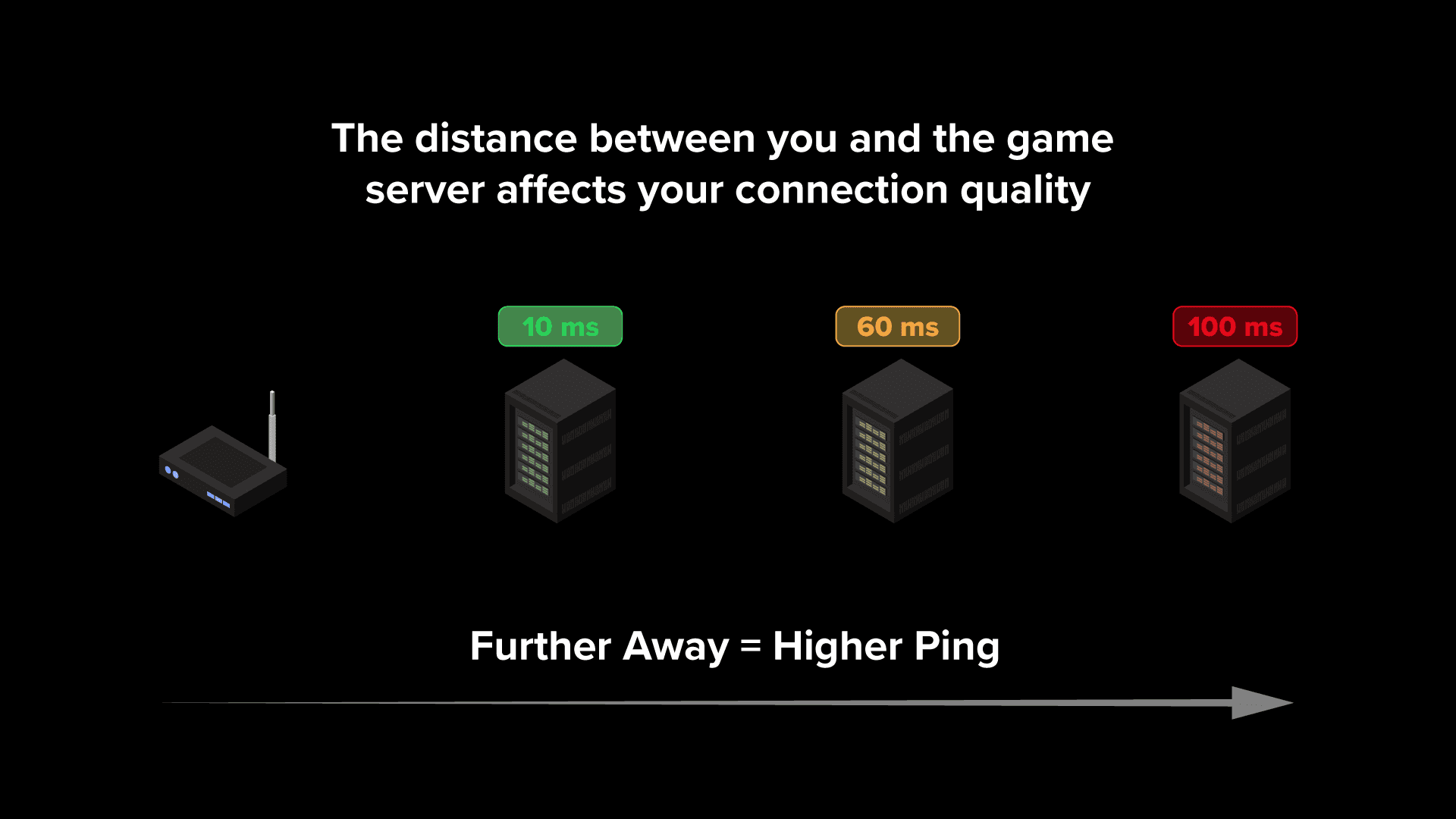
This is an important setting as your in-game ping is calculated based on the game server your connect to. The greater the physical distance between you and the game server you connect to, the higher your ping will be.

GF_1.png

This should be set to Automatic by default, which should allocate you to the best region for your location, but its worth checking if you are experiencing high ping in The Finals.

Its worth mentioning some regions will have multiple servers within them, so depending on where you live in a region you may still experience high ping when connecting to a far away server within the region. We have the ultimate solution to connecting to the best The Finals servers later on in this blog.

Use a Wired Connection

The quickest and easiest change you can make to drastically improve your connection in The Finals, or any online game, is switching to a wired ethernet connection.

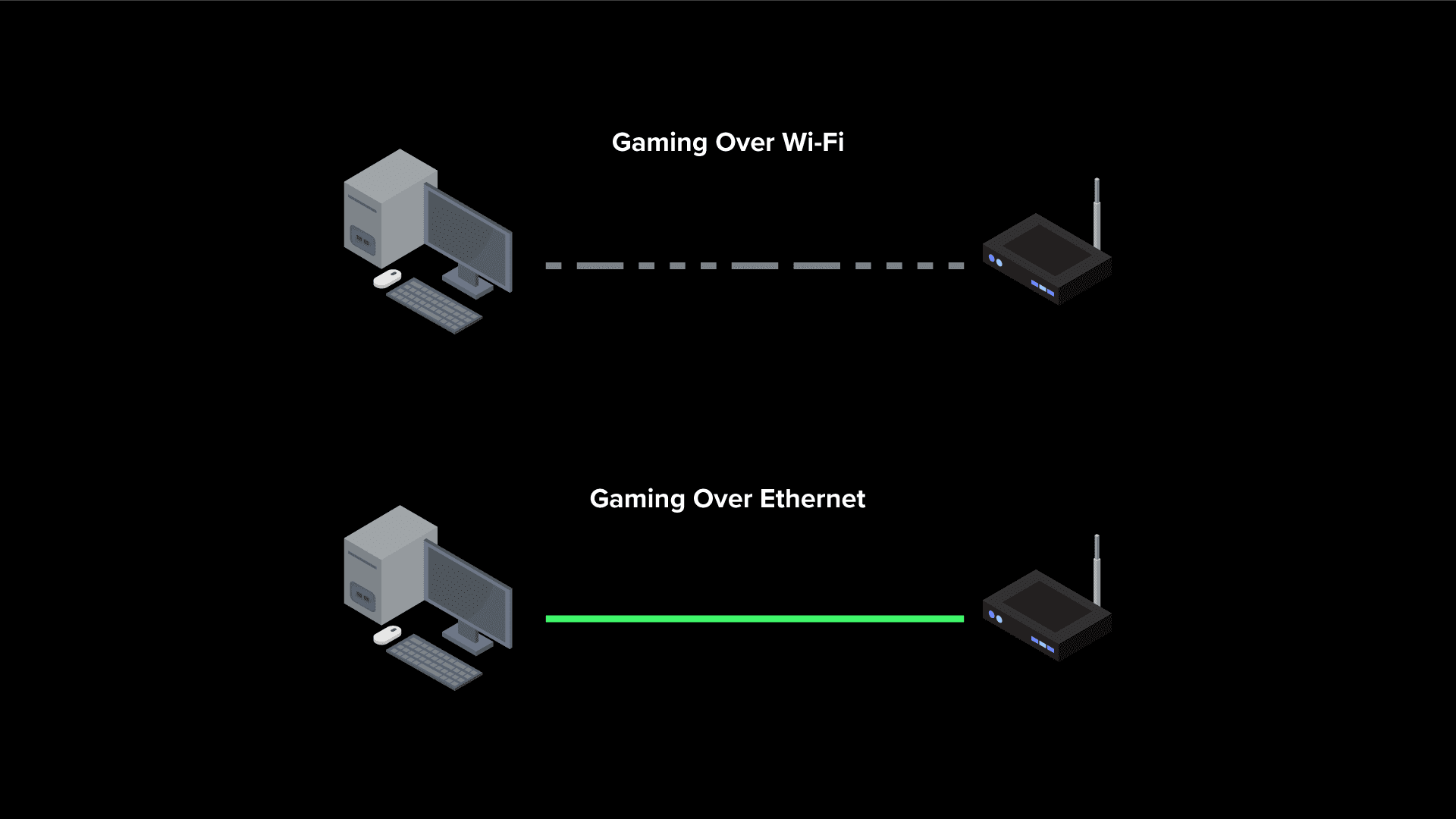
Wi-Fi is incredibly convenient to get devices connected to your router, but its not ideal for a gaming connection. This is because Wi-Fi can suffer from interference and reduced signal strength, especially if it has to travel through walls or doors to reach your gaming device.

These Wi-Fi issues will cause ping spikes and packet loss in online games which can completely ruin your gameplay. A ethernet cable on the other hand provides a faster and more importantly stable connection between your router and gaming device.

Running a long cable across your home might not be possible, so you could look into Powerline Adapters which use your home electrical wiring to carry a wired connection, providing a stable connection without a wire.

Ethernet-v-WiFi.png

How to get the Best Connection in The Finals

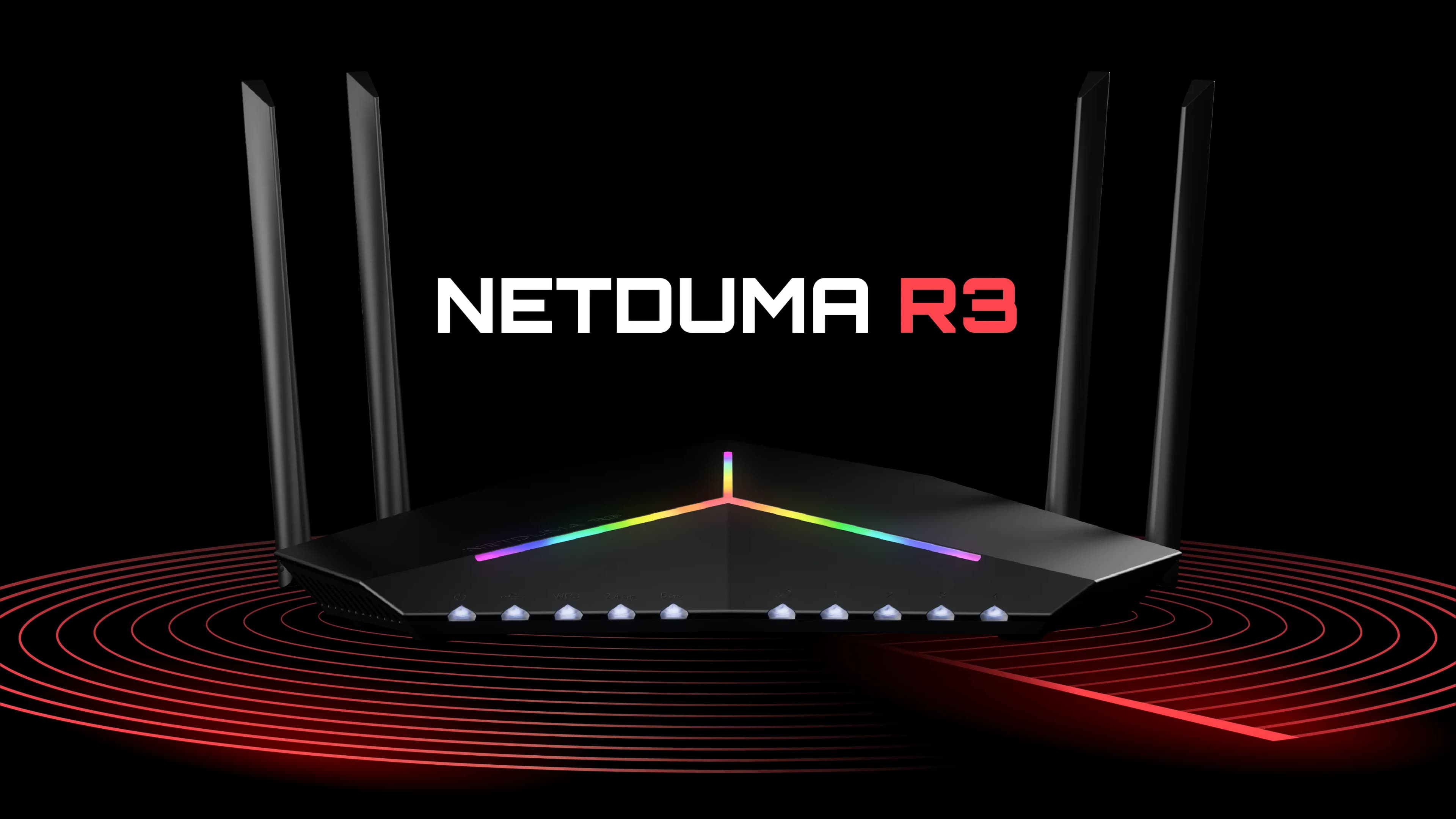
If the servers aren’t experiencing issues and you’re playing over a wired connection but still experiencing lag in The Finals, it might be time for a more serious solution. Introducing the Netduma R3 gaming router, the ultimate tool to optimising your connection in The Finals. Its powerful features can resolve high ping, packet loss and an unstable connection.

Website_R3_Preview_Image.webp

Fix High Ping in The Finals

Its quite hard to know what your ping is in The Finals as there’s no way to display this statistic in game unfortunately. You’ll definitely feel it when playing on a high ping though, your movement and inputs will feel sluggish and you’ll be at a huge disadvantage.

The Geo-Filter feature on the Netduma R3 eliminates high ping in The Finals. It works by creating a customisable filter radius around your location that blocks connection to servers outside of it.

You can use another R3 feature – Ping Heatmap, to find the locations and connection quality of The Finals servers. Then with this information you can adjust your Geo-Filter to only include the best servers.

The side menu of the Geo-Filter will also show you your ping in real time when playing The Finals, so you won’t need to guess anymore.

If you want to learn more about the Geo-Filter, or see the feature in action check out the video below:

Fix Ping Spikes in The Finals

With all of the chaos in The Finals, an unstable connection can make it hard to keep up. Constant changes in your ping, otherwise know as jitter can make you out of sync with the game server and cause your gameplay to feel unresponsive.

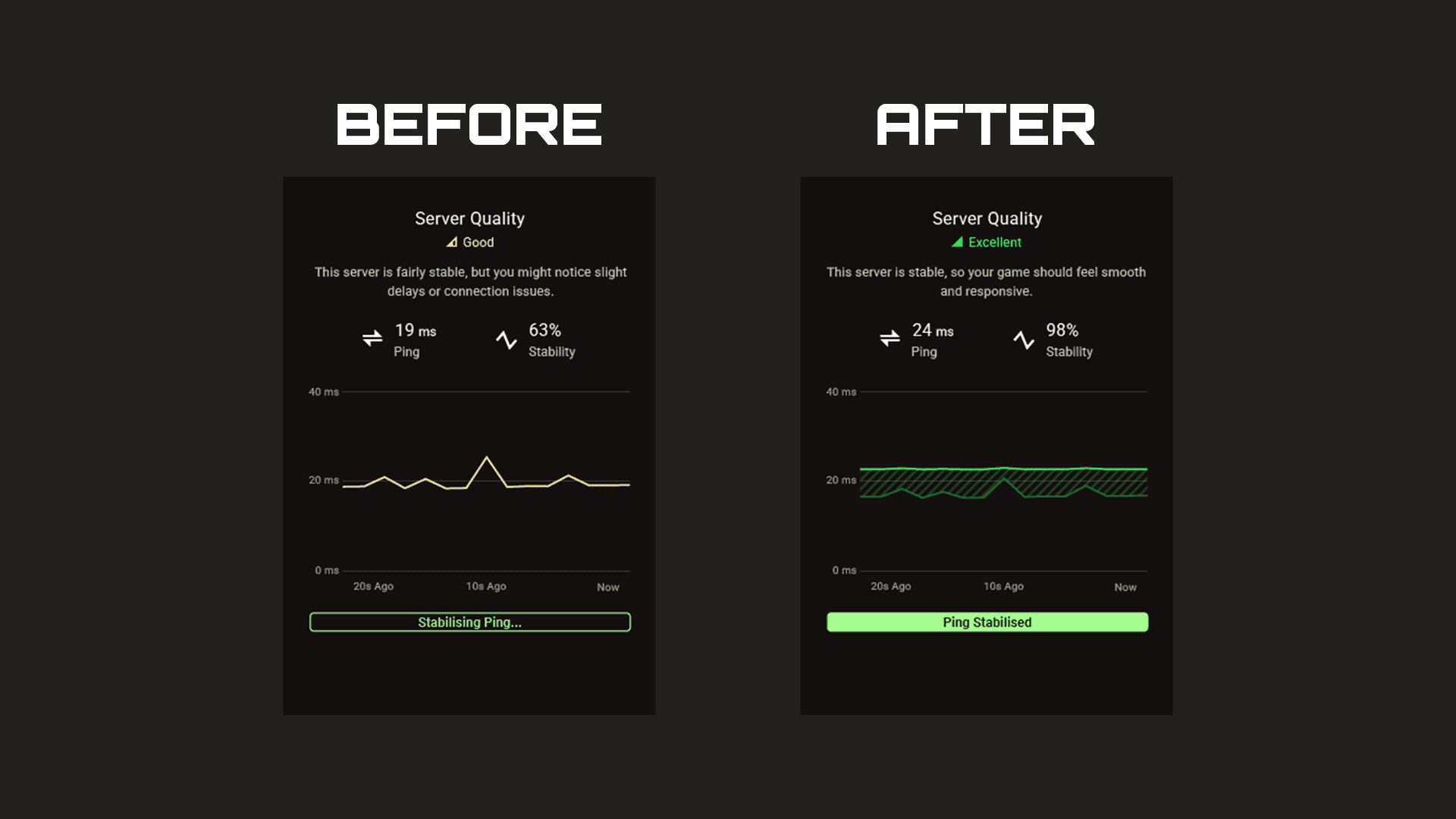
The Steady Ping feature on the R3 removes jitter from your connection and stabilises your ping for more fluid gameplay. Steady Ping automatically stabilises your ping when using the Geo-Filter so you’ll be able to enjoy a low ping and stable connection.

The default Simple Mode does all of the work for you, but if you want to tinker with settings to find the sweet spot for your connection you can try Expert Mode.

Steady Ping Results.png

Fix Packet Loss in The Finals

Last but not least, congestion on your network may be causing your connection issues. If you game on a busy network full of bandwidth heavy activity like streaming and downloading it can cause ping spikes and packet loss.

SmartBOOST on the Netduma R3 eliminates congestion across your whole network but managing your bandwidth between prioritised and non-prioritised traffic. This ensures important activities like gaming always get the optimal amount, but larger activities like streaming can’t take more than they need.

As every device and applications only receives the amount of bandwidth they need, this removes congestion and stops bufferbloat from occurring on your network. This means your gaming experience will always stay fast and stable, no matter how busy your network is.

If you want to see SmartBOOST in action, check out our live demonstration of a busy network being optimised below:


The World WLAN Application Alliance (WAA) and the SAMENA
Telecommunications Council signed a memorandum of understanding, officially
launching a comprehensive strategic partnership in the field of wireless local area
networks (WLAN). The collaboration aims to jointly promote international standard
setting and promotion, among other areas, to advance the global WLAN industry.
As a key platform for decision-makers in the information and communication
technology (ICT) industry, the SAMENA Telecommunications Council has been
committed to driving digital transformation in the South Asia-Middle East-North
Africa (SA-ME-NA) region, achieving remarkable results in policy formulation,
regulatory reform, knowledge sharing, and capacity building.
According to the MoU, the two parties will engage in in-depth collaboration across
several key areas, including focusing on the trends, challenges, and opportunities in
the WLAN field, collaborating with relevant stakeholders from regional and
international organizations to expand the scope and amplify the impact of their
initiatives and foster international cooperation in the WLAN industry. Meanwhile, the
two parties will establish a regular communication and coordination mechanism to
ensure the efficient progress of the cooperation.

Yang Tao, Secretary General of the WAA, stated: “The collaboration with SAMENA
holds significant meaning. By integrating resources and strengths from both sides, we
will jointly promote the establishment of international standards for the WLAN
industry, the promotion of industry norms, the application of technological
innovations, and market expansion, thereby contributing more substantially to the
prosperous development of the global WLAN industry.”
Bocar BA, CEO of the SAMENA Council and Board Member, stated: “This
collaboration agreement with the WAA is a part of the SAMENA Council’s broader
strategy to support digital transformation by enabling better connectivity, enhanced
end-user experience, and more inclusive broadband access across the SA-ME-NA
countries. The SAMENA Council is committed to supporting the private-sector as
well as growing digital economies as they strive to achieve new digital transformation
milestones. For this, quality broadband access is fundamental.”

As the world’s first international industry and standards organization focused on
WLAN application experience, WAA has brought together over 90 global industry
chain partners since its establishment in September 2022. It has built a mature WLAN
product performance testing and certification system, released multiple white papers
and application experience standards, and completed certifications for numerous
products, injecting strong momentum into the healthy development of the global
WLAN industry.

The powerful combination of Aprecomm’s CPE management and customer experience software, with VECTOR’s expertise in network integration and operational support, offers broadband service providers a pathway to fully automated, self-healing networks.


Gdynia, Poland – September 24, 2025: Today, VECTOR, a leading provider of managed services to telecommunications companies (telcos), and Aprecomm, the provider of an intuitive, self-healing network and customer experience platform, are excited to announce a new strategic partnership. The collaboration will see Aprecomm’s award-winning customer experience software integrated into VECTOR’s managed services offering for European-based service providers seeking to provide seamless in-home connectivity experiences.

The partnership will enable VECTOR to offer Aprecomm’s full range of AI-powered solutions, including WiFi optimization software, to broadband providers across Europe. This includes the ability to upgrade existing devices via a cloud-based system remotely.

“This collaboration strengthens our managed service offering by enabling service providers to enhance user experience and boost support efficiency through the latest AI technology,” said Jakub Bukowski, Chief Operating Officer at VECTOR. “With its extensive experience in highly competitive telecommunications markets, we believe Aprecomm understands the challenges faced by providers. Their solution offers a quick time-to-market and adheres to an open standards approach. We are excited to include their solution in our portfolio.”

By leveraging advanced AI and patented quality of experience algorithms, Aprecomm is helping service providers chart a path to fully automated zero-touch networks. Its solution adopts a self-healing approach to managed WiFi, adjusting the network to accommodate the unique needs of each user and the performance of every application. Advanced analytics and automated support tools provide access to invaluable customer insight and data, enabling service providers to monitor end-to-end network performance in real-time. Aprecomm’s CX suite is field proven[1] to enhance subscriber satisfaction and reduce operational costs, and recently secured Frost & Sullivan’s Best Practices Award for Innovation. Learn more here.

“We’re excited to partner with VECTOR and offer our powerful CX software to service providers throughout Europe,” said Pramod Gummaraj, Founder & CEO of Aprecomm. “We believe that every service provider should have access to affordable AI-powered tools to automate network management and reduce operational costs. With its extensive industry experience, large distribution network, and focus to satisfy the growing demand for new and customized products and services, VECTOR is the ideal partner to help us garner widespread adoption of our solution and help service providers bring better online experiences to consumers.”


About VECTOR

VECTOR is a technology consulting and managed services provider focused exclusively on the telecommunications market. For over three decades, we have been a trusted partner to some of the world’s leading telecom operators, digital and multi-service providers, and hyperscalers.

We specialise in network services that accelerate digital transformation for our clients. Our comprehensive portfolio includes consulting, application development, and systems integration, all designed to help telecom businesses build future-proof, software-intensive networks and enhance customer experiences.

Across the Middle East, hotel guests expect to stay connected as easily as they do at home. The region hosts a mix of business and leisure travellers, including a fast-growing segment of bleisure guests who expect to work and relax effortlessly while staying at a hotel. In this context, connectivity is no longer an add-on but a baseline expectation; thus, providing great hotel guest Wi-Fi in the Middle East is crucial.

Throughout this region, the hospitality industry continues to experience rapid growth, with fierce competition. Guests reward properties that deliver seamless connectivity and penalize those that don’t. Hotels that invest in modern, well-managed Wi-Fi are better positioned to drive positive reviews, repeat bookings, and long-term loyalty.

WorldVue helps hotels in the region achieve these goals for hotel guest Wi-Fi in the Middle East. With decades of expertise, advanced GIA solutions, and guest-facing platforms built on reliable networks, we empower properties to exceed expectations and deliver measurable ROI.

https://www.worldvue.com/wp-content/uploads/2025/09/9.30_HotelWiFiME-Whitepaper.pdf

With wireless connectivity evolving at breakneck speed, I recently had an opportunity to hit the pause button and take stock of 5G open radio access network (O-RAN) technology and what the future holds for O-RAN radio unit (O-RU) testing.

In my musings, I was joined by RCR Wireless News magazine editor-in-chief, Sean Kinney, who led a panel discussion on the evolution of O-RAN open innovation. Sean set the stage with a reminder that O-RAN is a movement founded by wireless operators seeking to diversify suppliers, increase flexibility, reduce costs and effectively “break apart” the RAN to expand its reach and appeal. In the past several years, that’s led to the release of more than 100 specifications covering everything from interfaces to platform orchestration.

O-RAN Trends to Watch

More recently, the O-RAN Alliance – and the industry at large – has championed cloud-based radio access as a means to conserve energy and enhance spectral efficiency. The ability to tie into the cloud is also spurring efforts to leverage AI to support shared O-RAN compute resources and edge-based services.

With 6G on the horizon, O-RAN is evolving beyond enhanced mobile broadband. Features like “mini-slot” scheduling allow for unencumbered data movement, because data no longer has to wait for the entire time slot to elapse before transmission can begin. This is important for time-sensitive technology like ultra-reliable low-latency communication (URLLC) in applications ranging from industrial automation to autonomous vehicles.


2025 is also shaping up to be a busy year on the integration front. O-RU designs are moving away from bulky FPGAs toward system-on-chip solutions as a means to significantly reduce power consumption and lower BOM costs. The bar is high in terms of cost cutting, but the goal is to make O-RUs as cost-effective as enterprise access points, which is critical for O-RAN to thrive in a competitive marketplace.

Interoperability Testing Ensures O-RAN Adoption at Scale

These exciting radio initiatives have a common trait: they depend heavily on smarter testing and integration. The O-RAN community has spent years promoting O-RU interoperability, for example, but it’s time to move past paper conformance and lean into real-world feedback to better manage vendor test strategies.

At LitePoint, RU testing is no longer just about verifying boxes on a checklist – it’s value is best appreciated when validating performance under pressure. For years, we focused on meeting front-haul and 3GPP conformance requirements, but now, with real carrier deployments underway, network operators are pushing testing into four key areas:

  • Real-world scenarios that simulate traffic slicing, bursty data and mixed-service types
  • Stress testing with full-bandwidth utilization, high modulation rates and peak-to-average power challenges to push the front-end modules to their limit.
  • Multi-vendor compatibility that ensures radios adapt seamlessly to different distributed units.
  • Proprietary features unique to specific carrier deployments.

MIMO Migrates to Parallel Antenna Testing 

Another area ripe for innovation is MIMO antenna testing. Traditional antenna-by-antenna (or chain-by-chain) testing offers only a narrow view of performance by focusing mainly on power measurements. More complete MIMO testing reveals how an entire system performs under real-world conditions.

A case in point is error vector magnitude (EVM) – a key metric that quantifies the difference between an ideal transmitted signal and the actual received signal. In real-world tests, MIMO measurements can uncover performance degradation that single-chain tests completely miss. Problems like crosstalk, PCB layout errors, front-end module limitations and potential issues with power supply bypass capacitors are uncovered only when multiple antennas operate in parallel, as they would in live deployments.

By measuring all chains simultaneously, parallel MIMO antenna chain testing can reduce costs by doubling test throughput and unit-per-hour test rates. As manufacturers prepare for large-scale production, MIMO testing is becoming the gold standard, not just for performance validation but for enabling scalable, cost-effective manufacturing.

Automation Is the Key to Scale

Automation is where O-RAN testing gets truly exciting. One of the beautiful things about O-RAN is the ability to take advantage of the M-plane, or fronthaul interface, that physically connects the O-RU and the distributed unit (O-DU).


Thanks to the O-RAN M-plane interface, we can now create a relatively generic automation framework that allows any vendor to simply drop in their specific M-plane XML file for the radio control. This makes it easy to automate radio testing from different vendors to validate performance, optimize through calibration and quickly scale to high-volume manufacturing.

O-RAN Reality Check

Despite the gloomy headlines about O-RAN’s commercial struggles, innovation hasn’t stopped. If anything, the push for lower costs, better interoperability and smarter test solutions is accelerating. The ecosystem remains vibrant, but success will depend on whether we can keep driving performance up and costs down while ensuring reliability in every real-world deployment.

To that end, every step of O-RAN radio development – from raw silicon to finished goods – relies on product-level testing. Isolated testing of RUs is no longer only practical; it’s the only way to capture and optimize key performance metrics while identifying failures early. As someone who’s deeply invested in RU testing, I can say this: the work we’re doing today is laying the groundwork for O-RAN’s next big leap.

Ever had your wireless network choke when 30 executives connect simultaneously during a board meeting? Or watched clients stubbornly cling to a congested 2.4 GHz band instead of switching to your pristine 6 GHz spectrum?

These frustrations stem from a fundamental Wi-Fi limitation: devices could only connect to one frequency band at a time. Even with 2.4 GHz band, 5 GHz band, and 6 GHz band spectrum available, clients had to pick just one.

Multi-Link Operation (MLO) changes everything. This core feature included in the IEEE 802.11be (Wi-Fi 7) standard allows a single device to simultaneously send and receive data across different frequency bands and channels to a single access point. Instead of choosing between bands, devices can now use them together through simultaneous connections.

This fundamental shift from traditional single-link Wi-Fi delivers higher throughput, lower latency, and improved reliability. For network engineers, MLO solves connection problems we’ve battled for decades.

How Does Multi-Link Operation Boost Your Network’s Speed and Reliability?

MLO delivers multiple benefits for network performance:

  • Higher Throughput Through Link Aggregation – MLO combines bandwidth from multiple bands rather than forcing devices to use just one. Testing shows this can potentially double throughput for compatible clients, boosting performance.
  • Lower Latency Via Link Selection – MLO automatically routes time-sensitive packets like VoIP over the fastest path. This happens instantly without dropping connections.
  • Improved Reliability Through Link Redundancy – If one link experiences interference, traffic automatically shifts to other available links without dropping the connection. This keeps devices connected even when RF conditions change suddenly.
  • Connection Stability in Congested Networks – MLO distributes traffic across multiple bands, reducing interference impact on any single connection. This maintains better performance even when individual bands experience heavy usage.

MLO vs. Traditional Single-Link Operation

Feature Single Link Operation (all legacy versions of Wi-FI) Multi-Link Operation (Wi-Fi 7)
Bands Use Simultaneously 1 2 (2.4/5/6 GHz)
Maximum Throughput Limited by one band Aggregated across bands
Latency Higher, prone to congestion Lower, less congestion
Reliability Susceptible to interference Stable, dynamic switching
Suitability for Dense Environments Limited Excellent

Pro Tip:

While MLO helps mitigate interference, proper channel planning remains essential.
Co-channel interference is still a concern, especially in the 2.4 GHz band.

What Are the Different Types of Multi-Link Operation Modes?

MLO operates in several modes designed for different device capabilities and use cases.

Multi-Link Single Radio (MLSR)

MLSR uses one radio that switches between multiple bands.

Benefits:

  • Dynamic band switching with one radio
  • Lower power consumption
  • AP Support is optional

Enhanced Multi-Link Single Radio (eMLSR)

eMLSR uses one radio that switches between multiple bands but can listen on multiple bands while transmitting on one.

Benefits:

  • Dynamic band switching with one radio
  • Lower power consumption
  • Compatible with most client devices
  • Supported by all APs

Multi-Link Multi-Radio (MLMR)

MLMR uses multiple dedicated radios for simultaneous operation across bands.

Benefits:

  • True parallel transmission
  • High throughput
  • Higher power consumption
  • AP Support is optional (not commonly supported)

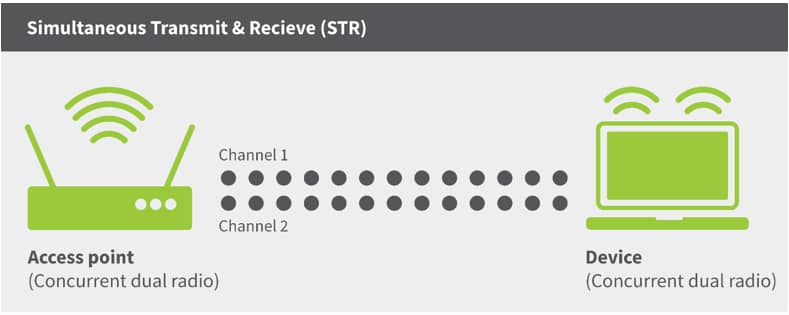
STR (Simultaneous Transmit and Receive) Mode

STR allows transmitting on one band while receiving on another simultaneously.

Benefits:

  • Lower latency
  • Most noticeable gains in throughput and latency
  • Supported by all APs
  • Higher power consumption

When to Use Each Mode

  • MLSR: Most simple version of MLO, good for mobile devices with a single radio and only one antenna
  • eMLSR: Best for mobile devices, IoT endpoints, and battery-powered equipment that need efficiency
  • MLMR: Great for devices that require higher throughput, but works best on low utilization and interference environments
  • STR: Ideal for access points, high-performance laptops, and fixed equipment that prioritize speed and low latency

ML Operation Modes

Mode Name Simultaneous Use Frequency Flexibility Typical Hardware Requirement Key Benefit
STR Yes High Multi-radio Maximum throughput, low latency
eMLSR Yes (dynamic) Very High Single radio Efficient setup, dynamic switching
MLSR Yes (dynamic) High Single radio Dynamic switching
MLMR Yes (static) Low Multi-radio High Throughput

Pro Tip:

Most client devices will use eMLSR mode due to power and cost constraints. Plan your network to optimize for eMLSR performance while supporting STR capabilities in access points.

Which Applications Benefit Most from Multi-Link Operation?

MLO delivers the biggest performance improvements for applications requiring high bandwidth, low latency, or both:

VR/AR Applications and Wireless VR Headsets

VR/AR gaming needs massive bandwidth and instant response times. MLO sends control signals over the fastest connection while streaming visuals through high-capacity links, preventing the motion sickness caused by delayed visual feedback.

Cloud Gaming and Online Gaming

Cloud gaming depends on consistent, low-latency connections for smooth gameplay. MLO sends gaming data through the clearest channels while background downloads use separate links, stopping lag spikes at crucial moments.

8K Video Streaming

8K video streaming requires more bandwidth than single connections can reliably provide. MLO combines capacity from multiple bands, delivering smooth playback without constant buffering interruptions.

Video Conferencing and Virtual Collaborations

Video conferencing requires stable connections for clear communication. MLO’s backup links prevent interference from disrupting calls by automatically switching traffic to cleaner frequencies when needed.

Emerging Metaverse Applications

Metaverse platforms need both VR/AR performance and support for multiple users interacting simultaneously. MLO delivers the combined bandwidth and low latency routing these complex environments demand.

Real-Time Latency-Sensitive Applications

Industrial control systems, financial trading platforms, and medical monitoring equipment need instant data transmission with reliable backup options. MLO routes critical information through optimal paths while maintaining redundant connections for safety.

Application Bandwidth and Latency Requirements

Application Bandwidth Required Latency Class MLO Benefit
VR/AR Headsets 25+ Mbps Real-time (L2) High bandwidth + ultra-low latency
Gaming >4 Mbps Real-time (L2) Consistent low latency
8K Video Streaming 100 Mbps Real-time (L2) High bandwidth aggregation
Video Conferencing 1 Mbps Real-time (L2) Connection reliability
VoIP <0.5 Mbps Real-time (L2) Ultra-reliable, low latency
Industrial Control <0.5 Mbps Non-real time (L1) Ultra-reliable connections

Test your network’s readiness for these applications and validate that your infrastructure can support next-generation wireless demands.

What Do You Need to Implement Multi-Link Operation?

Implementing MLO requires specific hardware and careful planning across your network infrastructure.

Hardware Requirements

MLO needs hardware specifically designed for Wi-Fi 7 (802.11be). Unlike previous Wi-Fi improvements, MLO requires fundamental architectural changes to both access points and client devices rather than simple firmware updates.

Compatible Devices and Access Points

Both access points and client devices must support Wi-Fi 7 and MLO.

Firmware Version Requirements

All devices need current firmware to properly negotiate MLO connections. WLAN controllers also require software updates to support MLO configuration and management features.

Network Configuration Considerations

Key planning factors include:

  • Spectrum availability: Some versions of MLO work best with clean spectrum across multiple bands (2.4/5/6 GHz)
  • Power requirements: Wi-Fi 7 APs may need PoE+ or PoE++ due to multiple active radios
  • Mixed environments: Plan for both MLO-capable and legacy clients during transition periods

Setup Process Overview

Implementation involves updating infrastructure components, planning channel allocation across bands, configuring SSIDs for different client types, and testing with actual Wi-Fi 7 devices before full deployment.

Summary Table: MLO Implementation Requirements

Requirement Details
Router/Access Point Must support Wi-Fi 7 and MLO, multiple radios for 2.4/5/6 GHz bands
Client Device Must support Wi-Fi 7 and MLO
Firmware/Software Latest updates required on both router and client
Operating System Windows 11 24H2+ for PCs, latest OS for other devices
Bands Required At least two of 2.4 GHz, 5 GHz, or 6 GHz (6 GHz not strictly required)

Pro Tip:

Start with a phased deployment in high-value areas like conference rooms. This validates MLO benefits in your environment before wider rollout.

How Do You Validate Multi-Link Operation Performance in Real Networks?

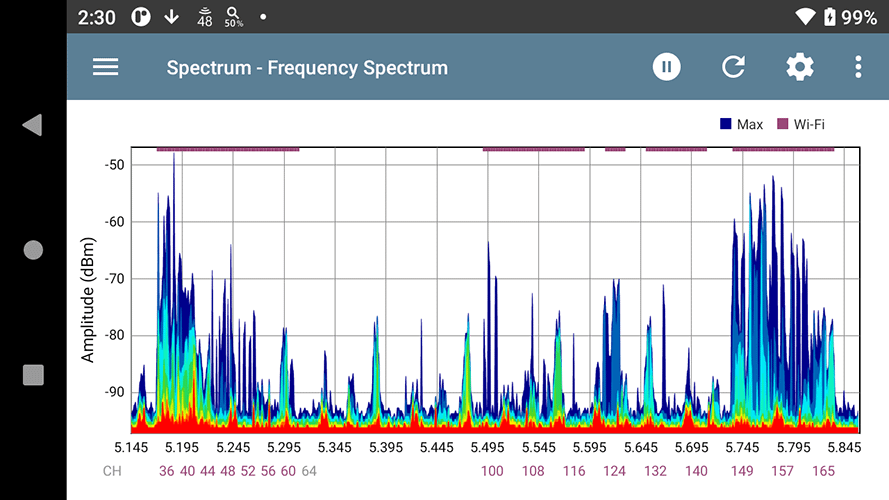
Deploying MLO is just the first step. You need to verify it’s delivering the promised benefits. Professional network testing tools help validate performance and troubleshoot issues.

Key Performance Metrics for MLO Networks

MLO validation focuses on measuring core benefits:

  • Throughput testing: Compare MLO vs single-link performance using iPerf tests
  • Latency validation: Measure round-trip time and jitter improvements under load
  • Performance bottlenecks: Identify interference or configuration issues limiting MLO gains

Using NetAlly Tools for MLO Validation

NetAlly’s professional testing tools provide MLO performance validation capabilities:

Professional Testing Requirements vs Consumer Tools

Professional validation requires tools that can measure line-rate performance, isolate MLO-specific gains, and provide reliable baseline comparisons. Consumer tools typically lack the precision needed for enterprise deployment validation.

Pro Tip:

Conduct A/B testing by temporarily disabling MLO on specific APs. This controlled approach provides clear evidence of MLO’s impact on your environment.

Ready to Implement and Optimize Multi-Link Operation?

MLO marks a turning point in wireless networking. After years of managing band steering complexities and client roaming issues, network engineers finally have a technology that addresses these core challenges at the protocol level.

Key implementation considerations:

  • MLO enables true multi-band connectivity for compatible Wi-Fi 7 devices
  • EMLSR and STR modes serve different hardware capabilities and performance needs
  • Real-time applications see the biggest performance improvements
  • Successful deployment requires updated infrastructure and careful planning

Validating MLO performance through professional testing tools ensures your investment delivers measurable improvements. From conference rooms to industrial facilities, MLO’s bandwidth aggregation and connection reliability capabilities can reshape how wireless networks handle demanding applications.

Get started with NetAlly’s MLO testing solutions to validate your Wi-Fi 7 network’s performance:

  • AirCheck G3 Pro – Wireless Tester for validating Wi-Fi performance
  • EtherScope nXG – All-in-one network analyzer for comprehensive testing
  • Test Accessory – Pocket-sized iPerf server for throughput measurements

WASHINGTON, D.C. – Sept. 30 2025 – DNSFilter is celebrating its 10th anniversary, just in time for Cybersecurity Awareness Month. Trusted by over 43,000 organizations, the company has seen significant growth and industry recognition, underscoring the strength of its vision and the successful execution of its protective DNS platform.

DNSFilter was founded after its CEO and co-founder, Ken Carnesi, became frustrated with existing protective DNS solutions. He set out to build one he could trust for himself and his MSP clients. From just three employees and an idea, DNSFilter has grown to a leader in the protective DNS space, expanding its headcount by 4800% and maintaining consistent growth.

Over the past decade, DNSFilter has continued to build on the vision of Carnesi and co-founder Brian Gillis: to create the most effective threat-blocking solution that’s also easy to use and comes with world-class support. In a testament to those efforts, DNSFilter’s recent milestones and successes include:

  • Increased sales growth by roughly 800% over the past five years.
  • Extended its ability to process larger volumes of queries to today’s rate of 180 billion queries processed daily, a 180x increase from just five years ago.
  • CEO Ken Carnesi was named a Washingtonian Tech Titan for the second year in a row
  • Recognized as Best Network Security Solution by the Tech Ascension Awards, which recognize the most groundbreaking technologies advancing cybersecurity.
  • Acquired three companies, the most recent being Zorus, a provider of endpoint-based web filtering and user behavior analytics. DNSFilter previously acquired Guardian and Web Shrinker to further the company’s offerings.

DNSFilter protects every click, leveraging AI-driven content filtering and threat protection to stop threats quickly, even as bad actors develop more sophisticated threats at a faster rate. DNSFilter secures users everywhere they work and prevents threats before they reach end-users.

Ken Carnesi, CEO and co-founder, DNSFilter, said: “It’s been an amazing decade of providing the proactive first and last layer of protection to customers, preventing threats before connections are made. Our platform delivers a better, safer internet experience by protecting anyone, anywhere, across diverse environments, with the confidence of a trusted partner. I’m proud of all our team has achieved: Going from zero to over 35 million protected users. Here’s to the next 10 years of growth and innovation.”

About the company:

DNSFilter is a cybersecurity company that protects every click, leveraging AI-driven content filtering and threat protection to block threats 10 days earlier than competitors. DNSFilter’s solution secures workers anywhere they are, helping to boost productivity, minimize compliance risk, and protect corporate brands on public Wi-Fi networks. Unlike traditional filtering solutions, DNSFilter deploys in minutes instead of days and is trusted by more than 43,000 organizations worldwide. Learn more about how DNSFilter is the first and last line of defense for corporate and hybrid networks at dnsfilter.com.

Imagine needing to connect a new building, parking lot, or sports field to your network. The vision is clear—but the reality of running fiber? That’s a whole different story. For IT leaders, the cost and complexity of digging, trenching, and laying cables can put projects on indefinite hold – imagine this challenge for cities and school districts working to close the digital divide in underserved and rural communities.

While fiber-optic cable is often considered the gold standard for connectivity, there are a few important factors to consider:

  • Time: Projects can be delayed and stretch on for months, as they often require trenching, environmental clearances, and can cause disruption to people in the surrounding area.
  • Obstacles: Highways, rivers, graveyards, and historic sites can make traditional cabling nearly impossible.
  • Cost: Expenses can range from $1 to $6 per foot. Urban projects may reach $40,000–$80,000 per mile, while rural deployments often higher due to difficult terrain and lengthy permitting.

Wireless backhaul provides a compelling alternative to physical cabling, using high-capacity wireless links to connect access points and extend network reach where fiber or copper would be too costly or time-consuming. Unlike traditional wired infrastructure, wireless backhaul can be deployed rapidly with minimal disruption, making it ideal for expanding connectivity to parking lots, adjacent building areas, or even entire communities and rural regions.

By addressing common cabling challenges—such as high costs, lengthy installation times, and geographic obstacles—wireless backhaul enables agile, scalable network expansion for everything from smart cities and industrial automation to community internet access. The result is connectivity that is faster, more affordable, and far more inclusive.

Cisco’s access points make it easy for you to use URWB as a backhaul technology to extend your network and Wi-Fi for end-user access simultaneously. This means when you need to extend Wi-Fi to a new location, a single remote access point is all you need—simplifying installation, reducing hardware costs, and accelerating deployment.

Did you know? Cisco’s access points can simultaneously extend your network with URWB and deliver Wi-Fi access simultaneously—so extending your network is now even easier.

Let’s explore three practical use cases URWB helps you connect farther, faster, and smarter.

  1. Bring Wi-Fi Where You Never Thought Possible. Whether you’re overseeing a university campus, healthcare complex, or corporate HQ, your network often needs to reach places fiber just can’t go—at least not easily or affordably. Think parking lots, outdoor event spaces, or new temporary structures. With Cisco access points, you can quickly bridge these gaps— extending your network with URWB and enabling seamless Wi-Fi for students, employees, or guests wherever they need it. Deployment is fast and flexible, with access points installed on rooftops, light poles, or existing infrastructure—no digging required.
  1. Extend Physical Security Beyond the Building. Modern security requires eyes everywhere. But placing cameras at the perimeter of a facility, near parking areas, or covering outdoor assets can be cost-prohibitive if you rely on trenching cable. With URWB, you can connect cameras and sensors across your property—delivering the bandwidth and reliability you’d expect from fiber, without the cost or delay. This is ideal for campus perimeters, athletic fields, or remote storage areas within your grounds.
  1. Quickly Connect Communities, New or Temporary Buildings. Need to bring connectivity to a modular classroom, event tent, or a newly built annex? Or maybe extend connectivity to under connected neighborhoods? Running fiber might not be practical—or possible on short notice. URWB lets you set up high-performance links in days, not weeks, helping you adapt to changing needs. Cisco URWB empowers communities to bridge these gaps—connecting city buildings, libraries, or distant school campuses with robust, scalable wireless links, Wi-Fi can be enabled in the access point to provide access to end-user devices. This flexibility makes it ideal for temporary classrooms, construction trailers, or pop-up health clinics on your property.

Real-world solutions

Organizations are putting these ideas to work—right now:

Canutillo Independent School District, Texas

“We needed to extend reliable connectivity to our athletic fields and remote campus buildings, and traditional fiber just wasn’t feasible. With Cisco’s wireless backhaul, we connected every corner of our district—quickly and cost-effectively.”
— Gary Gomez, Executive Director of Technology, Canutillo ISD

City of Fort Worth

“We saved substantial time and money by deploying Cisco’s wireless backhaul instead of running new fiber. The reliability and performance exceeded our expectations, even in challenging urban environments.”
— Kevin Gunn, Chief Technology Officer, City of Fort Worth

Break Connectivity Barriers—No Cables Required

Cisco’s URWB isn’t about replacing every fiber run—it’s about giving IT leaders the flexibility to extend networks where it matters most, when it matters most. With enterprise-grade reliability, simple deployment, and the ability to scale as your needs grow, Cisco URWB helps you rapidly extend your network wherever you need.

Cisco access points supporting both Wi-Fi and URWB simultaneously offer:

  • Rapid deployment: No cabling, no delays—just a clear path and power at each access point
  • Rock-solid reliability: Backhaul technology engineered for mission-critical applications.
  • Flexible coverage: Extend your network exactly where you need it within your property.
  • Cost savings and simplified operations: One access point delivers both wireless backhaul and Wi-Fi, streamlining deployment and management.

If you’re ready to expand your network faster, more affordably, and with greater flexibility—learn more about Cisco URWB.

Automated Guided Vehicles (AGVs) and Autonomous Mobile Robots (AMRs) are transforming how goods move through modern warehouses, factories, and distribution centers. They’re faster, smarter, and more efficient than ever but only when they have the wireless connectivity they need to function without interruption.

At 7SIGNAL, we help organizations ensure that their AGVs and AMRs stay connected, operational, and efficient because a robot without Wi-Fi is just expensive cargo.

What Are AGVs and AMRs?

AGVs: Automated Guided Vehicles

AGVs are mobile robots that follow fixed routes or markers such as magnetic tape, QR codes, or wires to transport materials. They’re widely used in logistics and manufacturing for tasks like:

  • Pallet transport
  • Towing trailers
  • Assembly line delivery

They rely on centralized control systems and require consistent Wi-Fi to receive instructions and report status.

AMRs: Autonomous Mobile Robots

AMRs take things further. They use onboard sensors, LiDAR, SLAM (simultaneous localization and mapping), and AI to dynamically navigate their environment. Unlike AGVs, they don’t need fixed paths they adapt in real-time.

They require constant access to cloud-based maps, navigation intelligence, and fleet orchestration platforms, all of which depend on strong, stable wireless networks.

Why Connectivity Is Critical

Whether it’s an AGV awaiting new routing commands or an AMR recalculating a path around an obstacle, any Wi-Fi degradation means downtime, delays, or damage. Common problems include:

  • Roaming failure: Robots drop off the network when moving between APs
  • High latency: Impacts command-and-control responsiveness
  • Packet loss: Affects telemetry and location accuracy
  • Coverage gaps: Cause navigation blind spots or system halts

How We Help: 7SIGNAL and Digital Experience Monitoring

7SIGNAL & EYERIS AI provides independent, infrastructure-agnostic monitoring that helps you maintain a high-performance wireless environment for AGVs and AMRs. Here’s how:

1. Continuous Monitoring from the Client Perspective

Our mobile Wi-Fi sensors monitor:

  • Signal strength (RSSI)
  • Packet loss
  • Roaming performance
  • Channel interference
  • And over 600 more KPIs

This allows you to catch connectivity issues before your robots do.

2. Proactive Alerting & Troubleshooting

When roaming failures or latency spikes occur, 7SIGNAL provides:

  • Real-time alerts
  • Historical correlation with robot telemetry
  • Location-specific performance visibility

So your ops teams can fix the issue before it stops the floor.

3. Data-Driven Optimization

We help you fine-tune:

  • AP placement and handoff thresholds
  • Channel and band utilization
  • QoS policies for mission-critical devices

All based on actual robot connectivity performance, not guesswork.

Smart Robots Deserve Smart Wi-Fi

Your AGVs and AMRs are only as smart as the network they depend on. At 7SIGNAL, we make sure that wireless isn’t the weak link in your automation strategy. With full visibility and actionable insights, we help you:

  • Reduce AGV and AMR downtime
  • Avoid productivity losses
  • Scale your fleet with confidence

Want to learn how 7SIGNAL can optimize your warehouse for mobile automation?
Let’s talk. We’ll show you how to support your fleet—and the future of work.

Wi-Fi Offloading and the Device

The device is King

Let’s face it. The network selection, which cellular or Wi-Fi network to connect to, is entirely in the hands of the device and, ultimately, the user.

Apple is clear about this:

“When auto-joining networks, macOS, iOS, and iPadOS start with the most preferred network, followed by private networks, then public networks.”

The Apple device tries to connect to networks in this order:

  1. The user’s “most preferred” network
    Known networks are scored based on the user’s actions. If the user manually switches to a network, its score increases. If the user manually disconnects from a network, its score decreases. The “most preferred” network is the one with the highest score.
  2. A private network
    Private networks are those set up in homes and offices and can include the Personal Hotspot on the user’s iOS or iPadOS device. Devices with macOS, iOS, or iPadOS reconnect to known private networks in order of most recently joined.
  3. A public network
    Public networks are designed for general access in public places like hotels, airports, and coffee shops. Other examples include Passpoint (Hotspot 2.0) and EAP-SIM/AKA/AKA′ in Wi-Fi connections provided by cellular carriers and network access providers.

Android and other devices use similar algorithms to ensure a great user experience. While it’s natural for mobile operators to initially feel concerned about not having control over Wi-Fi network selection, is “the device is king” necessarily a negative development?

From a Wi-Fi offloading and happy user standpoint, prioritizing the user’s preferred Wi-Fi network makes sense, followed by their home or workplace network, and last in priority, the public service provider networks. Furthermore, modern mobile devices use sophisticated algorithms to select the Wi-Fi network that offers the best user experience when multiple networks are available at the same location. For further details, refer to the Wi-Fi network selection section.

In other words, leave the Wi-Fi network selection decision to the device!

Mobile operators often seek greater control over the decision to remain on the cellular network or switch to Wi-Fi. Enea, positioned at the intersection of the 3GPP ecosystem and Wi-Fi technology, is uniquely suited to develop a solution for this challenge. In an upcoming post More Intelligent Network Selection, we will share our vision on this topic.

Wi-Fi Connection Profiles

Wi-Fi connection profiles are collections of settings that allow devices to identify and connect to specific wireless networks. They are supported across various platforms, including iOS/iPadOS, Android, Windows, and macOS. Each platform (OS) may have specific features or limitations regarding Wi-Fi profile management.

Wi-Fi connection profiles contain essential information needed to connect to a Wi-Fi network. The information varies depending on the connection type but can include:

  • SSID (network name).
  • Network Access Identifier (NAI) Realm, used for user authentication.
  • Fully Qualified Domain Name (FQDN), which is used to specify the hostname of the authentication server.
  • Security type (e.g. WPA2-Personal, WPA2/WPA3-Enterprise).
  • Encryption method.
  • Settings for SIM authentication, such as the International mobile subscriber identity (IMSI).
  • Trust certificate for EAP-TTLS and EAP-TLS.
  • Username/Password for EAP-TTLS.
  • Digital device certificate and security key for EAP-TLS.
  • Passpoint-specific settings such as Roaming Consortium Organization Identifiers (RCOIs). More about this is below.
  • Authentication settings, including the EAP method.
  • Connection preferences.

These profiles can allow devices to automatically connect to known networks without requiring users to manually enter credentials each time. A typical example is SIM authentication for automatic authentication of users.

To support Wi-Fi offloading, the Wi-Fi connection profile can be provisioned from the factory or added over the air through Apple’s carrier settings and similar mechanisms for Android phones.

For other types of devices and Wi-Fi-only devices, the Wi-Fi connection profile can be provisioned through an app. The recommended approach is to integrate a Software Development Kit (SDK) into existing applications, such as a service provider’s loyalty app, to implement this provisioning mechanism effectively.

Settings for Wi-Fi Offloading

Wi-Fi offloading using SIM authentication has always been secure, and the user’s automatic connection to the Wi-Fi network is seamless. To support this, there are some important settings in the Wi-Fi connection profile related to Wi-Fi offloading.

IMSI

The International Mobile Subscriber Identity (IMSI) is a numeric value composed of two parts <PLMN Id><MSIN>:

  1. Public Land Mobile Network Identifier (PLMN ID): Uniquely identifies the individual mobile operator by their Mobile Network Code (MNC) and Mobile Country Code (MCC). The PLMN ID is of the format <MCC><MNC>; for instance, the PLMN ID for Swisscom with MNC 001 and MCC 228 is 228001.
  2. Mobile Subscription Identification Number (MSIN): A unique identifier for the subscriber, such as 123123123.

The subscriber’s IMSI in the above example would then be 228001123123123. Mobile operators normally use wild cards in the Wi-Fi connection profile, such as 228001*, because it is enough to identify the PLMN ID in the Wi-Fi network selection process.

Realm

An NAI realm is the domain portion of a Network Access Identifier (NAI), which follows the standard syntax of “user@realm.” The realm specifies the domain or organization to which the user belongs, for instance, “enea.com.” The NAI realm is normally the same as FQDN and is used to find the authentication server.

The NAI realm field, when used for Wi-Fi offloading, has a specific format for 3GPP interworking. In this case, mobile operators use NAI realms that end with 3gppnetwork.org. For the interworking with Wi-Fi networks and the use of EAP-SIM/AKA/AKA’ and 5G-AKA authentication methods, the (NAI) realm field is of the format:

wlan.mnc<MNC>.mcc<MCC>.3gppnetwork.org

The individual mobile operator is uniquely identified by their Mobile Network Code (MNC) and Mobile Country Code (MCC). For instance, the NAI realm for Swisscom with MNC 001 and MCC 228 is:

wlan.mnc001.mcc228.3gppnetwork.org

For Wi-Fi offloading on their own Wi-Fi network, which does not require interworking with others, the operator may use another NAI realm format with a domain name they own.

SIM

This field is required for SIM based authentication (EAP-SIM/AKA/AKA′). The EAPType field must be set to the appropriate EAP type.

Settings for Passpoint

There might be some confusion about the terms Wi-Fi connection profile and Passpoint profile, but they are closely related. A Passpoint profile is the wire format of the device-specific Wi-Fi connection profile. When a Passpoint profile is received by a device, it is turned into a Wi-Fi connection profile specific to that device. Wi-Fi connection profiles can also be created through other means, for example manually configured or deployed using an app installed on the device. While Passpoint Release 1 defines the content of the profile, Passpoint Release 2 also standardizes the formatting of the profile with the intention to ensure interoperability across different devices and networks. Devices only supporting Release 1 have the same functionality, but uses a vendor-specific format.

Passpoint enables seamless and secure connectivity, just as SIM authentication does, and SIM authentication can also be used with Passpoint. Further more, Passpoint also enables seamless roaming as the device connects to a Wi-Fi service rather than a specific Wi-Fi SSID. Learn more in the upcoming post about Passpoint.

In a Passpoint profile, there are other parameters than SSID in play for the device to automatically identify and select the Passpoint-enabled Wi-Fi network. Once a device tries to connect, the NAI realm is used for finding the authentication server. As discussed, the NAI realm for Wi-Fi offloading is normally in the format wlan. mnc<MNC>.mcc<MCC>.3gppnetwork.org, especially for 3GPP interworking.

Network Selection for Wi-Fi Offloading in a Non-Roaming Scenario

  • For SIM-based devices using EAP-SIM, EAP-AKA, or EAP-AKA′, the primary identifier is the IMSI. To streamline network identification, mobile operators often use a wildcard IMSI, such as 228001* for Swisscom, which denotes the operator’s unique identifier (PLMN ID) without including the full subscriber-specific IMSI. During network selection, the device compares the PLMN IDs provided by the Wi-Fi access point via the Access Network Query Protocol (ANQP) with its stored wildcard IMSI (PLMN ID) associated with its SIM/USIM credentials. If a match is identified, the device proceeds with SIM-based authentication to establish a secure connection.
  • For non-SIM devices using EAP-TLS or EAP-TTLS, the Fully Qualified Domain Name (FQDN) serves as the primary identifier for specific networks or service providers. To determine whether to connect, the device compares the FQDN stored in its Passpoint profile with the domain name list provided by the Passpoint Wi-Fi access point through the Access Network Query Protocol (ANQP). Service providers may advertise multiple domain names; for instance, a single provider might use names such as wlan.mnc410. mcc310.3gppnetwork.org, att.com, and attwireless.com. In addition to FQDNs, the device can utilize other identifiers, such as the NAI Realm or Roaming Consortium Organization Identifier (RCOI), to ensure accurate network matching.

Network Selection for Wi-Fi Offloading in a Roaming Scenario

The Roaming Consortium Organization Identifiers (RCOIs) in the Passpoint profile are used for devices to recognize and automatically connect to compatible networks for roaming.

One of the key advantages of Passpoint is that it doesn’t require all connectivity parameters to be embedded directly in the Wi-Fi access point beacon. Instead, the Access Network Query Protocol (ANQP) operates in the background, enabling devices to silently communicate and negotiate network details. For example, the shorter 24-bit base RCOI can be included in the beacon frames, allowing devices to quickly assess potential network compatibility before proceeding with a more detailed ANQP query that includes the full 36-bit RCOI list. Additionally, information like the Venue Info URL introduced in Passpoint R3 is also exchanged via ANQP, enhancing the user experience without overwhelming the beacon frames.

Another important Passpoint-specific parameter, introduced in Passpoint R1, is the Operator Friendly Name. It provides a human-readable name for the service provider, which helps users identify the network they are connecting to.

Wi-Fi Offloading Settings for OpenRoaming

With the OpenRoaming Passpoint service, identity providers (IdP) can roam with any access network provider (ANP) in the OpenRoaming federation.

An “OpenRoaming profile” is just a Wi-Fi connection profile with Passpoint and OpenRoaming settings.

Since OpenRoaming is a Passpoint service, all that is needed from a profile point of view is to add the required Roaming Consortium Organization Identifiers (RCOIs) for OpenRoaming to an existing Wi-Fi connection profile which has been adapted for Passpoint.

In the case of Wi-Fi Offloading with OpenRoaming Access Network Providers (ANP), must make some more adaptations outside the scope of the Wi-Fi connection profile. Learn more about this in the upcoming post about Wi-Fi offloading and OpenRoaming.

Wi-Fi Network Selection

The device’s ability to select the right network is critical for optimizing Wi-Fi offloading. The good news is that modern devices, such as iPhones and Android phones, employ sophisticated algorithms to determine whether to connect to a Wi-Fi network or remain on the cellular network, balancing factors such as signal strength, network performance, and user preferences. It is no longer the case that devices blindly prefer Wi-Fi over cellular networks. If the cellular connection performs well, the device is less likely to switch to Wi-Fi unless the user has indicated that they prefer Wi-Fi, e.g., by selecting Wi-Fi manually.

It should be noted that while iOS has a consistent behavior, Android devices may have smaller differences in behavior across different OEM vendors.

Wi-Fi Network Discovery and Evaluation

When a device detects available Wi-Fi networks, it initiates a multi-stage process to evaluate and select the most suitable network:

  1. Network Discovery: The device scans for available Wi-Fi networks within range.
  2. Attribute Collection: For each detected network, the device collects key attributes such as signal strength (RSSI), supported Wi-Fi standards, frequency band, and security type.
  3. Network Filtering: The device filters out networks that don’t meet minimum requirements, such as those with signal strength below a certain threshold.

Wi-Fi Network Selection Criteria

Devices consider multiple factors when selecting a Wi-Fi network:

  • Signal Strength: Networks with stronger signals are enerally preferred.
  • User Preferences: Networks manually selected by users receive a higher score in future selection processes. Manually disconnected networks get a lower score.
  • Frequency Band: Due to their higher performance capabilities, 6 GHz and 5 GHz networks are typically prioritized over 2.4 GHz networks.
  • Security: WPA Enterprise has the highest priority, and WPA Personal networks are favored over less secure options.
  • Previous Connections: Networks that the device has successfully connected to in the past are given higher priority.

If multiple Passpoint Identity Providers (IdPs), responsible for authenticating the user for Wi-Fi access, are configured in the Wi-Fi connection profile, the Home Service Provider will be prioritized.