

Breaking News

GLOBAL Wi-Fi NEWS bulletin

Every IT team knows employees are using AI tools nobody approved. Most have accepted it as a cost of doing business. Our new research shows that cost is already being paid in security incidents.

In June 2026, DNSFilter and CensusWide surveyed 400 IT and cybersecurity professionals across the US and Canada for The Visibility Deficit: The 2026 AI Cybersecurity Report. AI adoption is effectively universal: 99.75% of respondents say someone in their organization uses AI tools at work, and 55% run three to five of them. Nearly half of organizations (46%) have had an employee connect an unauthorized AI tool directly to corporate systems. For one in five (20.1%), that connection caused a security incident. Another 14.8% suspect it happened but can’t confirm it.

The incidents are already here. The bigger problem is how few organizations see them coming.

What Is Shadow AI?

Shadow AI is any AI tool, model, browser extension, or agent that employees use or connect to corporate systems without IT’s approval or knowledge. It includes chatbots used through personal accounts, AI features inside approved SaaS apps that were never reviewed, and AI tools granted OAuth or API access to company email, files, or code repositories.

This increased risk comes from access. Once a tool holds a token to corporate data, it can read, store, and move that data without anyone reviewing each step. An employee pasting text into a chatbot exposes what they paste. An AI tool connected through OAuth can reach everything the employee can.

A Visibility Problem, Not a Policy Problem

Most organizations already have rules for AI. 81% have a formal AI tool policy in place, and 55.75% say it’s consistently enforced. The gap is that a policy only works when someone can see it being broken.

When a new AI tool requests OAuth or API access to corporate systems, 43% of organizations let employees grant it themselves. IT either hears about it after the fact or, for 6.5% of organizations, never hears about it at all. Leadership and practitioners also disagree on how tight that gate is: 73.9% of executives surveyed believe new AI tools require admin approval, while only 58% to 60% of practitioners say that approval actually happens.

Detection leans on the same weak link. Asked how they identify incidents involving third-party SaaS or AI tools, 41.5% of respondents rely on user reporting, nearly the same share that use CASB or SaaS security tools (41.75%). In other words, a large share of shadow AI surfaces only when someone happens to mention it. Yet 91.5% are confident they would detect a breach within six hours.

The 20.1% incident rate is also likely an undercount. 37.75% of respondents say their organization has had a security incident that was never formally reported, and 43.5% say their organization has, at times, downplayed the severity of an incident because it lacked the resources to fix it.

Company size also doesn’t solve it. The largest organizations surveyed (2,500 to 5,000 employees) that have the most mature AI governance in the study still report the highest shadow AI incident rate: 32.5% say an unauthorized AI tool caused a security incident. At the smallest organizations (150 to 499 employees), half have already had unauthorized AI tool connections, and 24% say those connections have caused an incident.

Where Shadow AI Hides

Shadow AI rarely looks like a new, unknown application. It usually arrives through one of three routes:

  • OAuth and API grants. An employee clicks “Allow,” and a tool gets standing access to email, files, or code before IT knows it exists.
  • Tool sprawl. Most organizations already run three or more AI tools, and 47.5% of the largest run six to 10, so one more blends into an already crowded inventory.
  • Spend outside procurement. 54% of respondents are concerned about AI costs accruing outside normal procurement visibility, which means tools are being bought and expensed where security never reviews them.

Each route has the same starting point: A tool connects before anyone checks it.

How to Detect Shadow AI

Every AI tool, sanctioned or not, has to resolve a domain before it can do anything. That makes the DNS layer the earliest place to see shadow AI, at the moment a tool arrives instead of the moment it causes a problem. DNSFilter provides DNS-level visibility into the AI tools and agents communicating from your network, secure access for the AI your teams have sanctioned, and governance for the autonomous agents arriving next.

With that visibility, your team can answer three questions that most organizations in our survey can’t:

  • What AI tools are communicating from our network right now?
  • Which of them hold access we never explicitly granted?
  • When the next one shows up, will we know before or after the OAuth screen?

For existing DNSFilter customers, this visibility lives in the dashboard you already use. For MSPs, shadow AI is a client conversation worth having now, especially with SMB clients that carry the heaviest exposure and the least governance. “We have an AI policy” is a different conversation than “we can show you every AI tool talking to your network.”

Get the Full Report

The Visibility Deficit: The 2026 AI Cybersecurity Report covers the complete findings, including the gap between what executives believe and what practitioners see, and how autonomous AI agents raise the stakes. Download the report, or start a free trial to see what’s running on your network today.

Frequently Asked Questions

What is shadow AI?

Shadow AI is any AI tool, model, extension, or agent used or connected to corporate systems without IT’s approval or knowledge. The biggest risk comes from unapproved AI tools granted OAuth or API access to corporate data.

How common is shadow AI?

Very common. In DNSFilter’s 2026 survey of 400 IT and cybersecurity professionals, 46% said an employee had connected an unauthorized AI tool to corporate systems, and another 14.8% suspected it had happened but couldn’t confirm it.

Can shadow AI cause a security incident?

Yes. 20.1% of respondents said an unauthorized AI tool connection caused a security incident at their organization. Among the largest organizations surveyed, that figure rose to 32.5%.

How do organizations detect shadow AI?

Most organizations combine SIEM, CASB or SaaS security tools, audits, and user reporting, and 41.5% of respondents in DNSFilter’s 2026 survey rely on user reporting. Monitoring at the DNS layer shows AI tools when they first connect, before they are granted access to data. DNS filtering is an optimal way to detect unauthorized AI usage on the corporate network, while also providing a way to control that AI usage.

Does an AI policy prevent shadow AI?

Not on its own. 81% of organizations surveyed have a formal AI tool policy, yet 43% still let employees grant AI tools OAuth or API access without prior approval. A policy needs visibility behind it to be enforced. DNSFilter gives you the ability to create an enforceable policy, allowing sanctioned AI tooling and blocking tools that you do not want your employees to access.

Where does this data come from?

Between June 15 and 26, 2026, DNSFilter partnered with CensusWide to survey 400 IT and cybersecurity professionals across the US and Canada. Respondents were manager-level and above at companies with 150 to 5,000 employees, across all industries.

Perfectly good projects are going off the rails and missing their ship dates, because of worldwide chip shortages, as the world’s FABs focus on pumping out AI chips.

As of mid-2026, 32-bit industrial MCUs and power management ICs are running lead times as long as 52 weeks, driven by AI infrastructure eating into the mature foundry capacity that IoT parts depend on. Automotive-grade MCUs are still sitting at 26 to 40 week lead times through Q2 2026. That’s down from the 52+ week peaks of the prior shortage cycle, but still long enough to force a mid-program part change on most connected products.

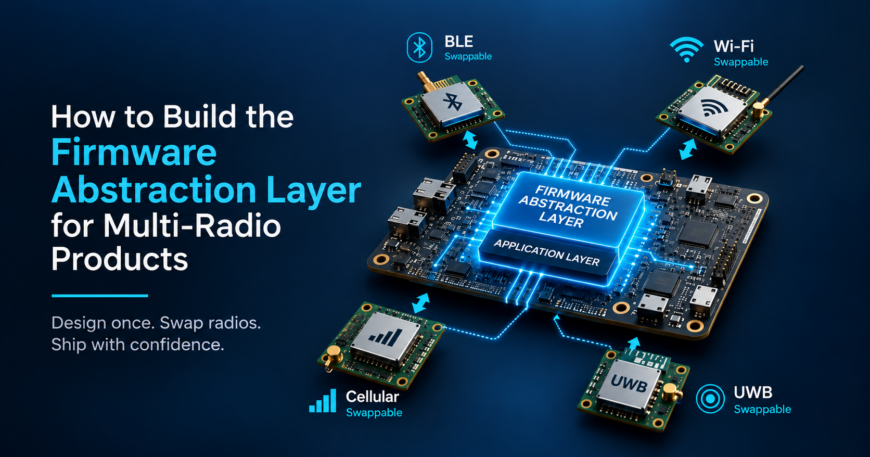
That number is the actual argument for a Firmware Abstraction Layer (FAL). Not portability as a design virtue. A parts shortage that arrives mid-program and forces a chip swap on a schedule you don’t control.

When that swap happens, the cost depends entirely on how the firmware was written. If power management calls, event loop timers, and socket buffers are wired straight into the original vendor’s SDK, a driver swap turns into a rewrite. That’s especially true when application code up the stack had no business knowing which chip was underneath it. If none of that is wired in, it’s just a new driver behind an interface that hasn’t changed.

The Industry is Moving, But Not Fast Enough To Save You

Silicon vendors know this pain point exists, and 2026 has brought real movement. Silicon Labs launched Simplicity SDK for Zephyr at CES 2026, a QA-tested Zephyr distribution built for its wireless chips. The SDK is MCU-agnostic and lets developers mix MCU vendors inside one project, which is a genuine step toward portability rather than a new flavor of lock-in.

Nordic moved in a similar direction with the nRF93M1, announced at MWC 2026, which ships with built-in coexistence control for Wi-Fi and cellular radios sharing one module.

Both of these solve coexistence within a single vendor’s silicon. Coexistence across vendors is a different problem, and it’s still an open problem at the RTOS layer. Zephyr’s Bluetooth stack currently binds to a single controller, so a product can’t natively run Bluetooth radios from two different vendors at once. A proposal to fix that has been open since July 2025, still not shipped.

So vendors are getting better at owning coexistence on their own chips. Managing radios across vendors is still on the OEM to solve, and that’s exactly what a FAL is for.

Step 1. Identify Every Radio and Every Place They Can Collide

List every radio in the product, whether that’s BLE, Wi-Fi, cellular, or UWB. For each one, write down the vendor, the SDK version, and the frequency band it operates in.

Then map where they can interfere with each other. A Wi-Fi transmission can wipe out an incoming BLE advertising packet on the same band. A cellular modem waking up for a paging window can starve a UWB ranging session of power budget. These collisions come from physics, not software architecture, and a single vendor’s SDK has no idea another radio even exists on the board.

This inventory is the spec for everything that follows. Skip it and you’ll end up designing an abstraction layer for radios that don’t actually fight each other, while missing the pair that does.

Step 2. Design the Power State Machine Before Writing Driver Code

Vendor SDKs manage power per radio. BLE connection intervals, cellular eDRX timers, and Wi-Fi power-save modes each get handled separately, by their own SDK, with no visibility into what the other radios are doing at the same moment.

Replace that with one system-level state machine that every radio driver reports into. Two states cover most products, System_Sleep() and System_Active(). Before switching states, the FAL checks every active radio and picks the lowest power level that all of them can safely handle.

Work out the timing rules on paper first. Decide which radio’s constraints are allowed to hold up a sleep transition and which aren’t. If you get this wrong, you’ll spend the second half of the project chasing power bugs that only show up once two radios are active together.

Step 3. Build One Error Taxonomy Across Every Vendor Stack

A cellular modem times out silently over several seconds. A BLE driver drops the connection instantly with a stack-specific status code that means nothing outside that SDK. If you leave this alone, the application layer will fill up with chip-specific if/else branches for every vendor you’ve ever integrated.

Translate every vendor error into a small set of system-level states instead, things like LINK_TEMPORARY_LOSS or HARDWARE_UNRESPONSIVE. The application layer reacts to these states and never has to know what a specific vendor’s error code means.

This step tends to have the biggest payoff for the smallest amount of code, which is also why teams skip it first under deadline pressure. It doesn’t block a demo. It blocks the fifth product revision, when nobody on the team remembers which vendor’s error code meant what.

Step 4. Put One Component in Charge of Arbitration

Antenna sharing, board-level power rails, shared bus access. When two radios need the same physical resource at the same moment, something has to decide who goes first, and that decision can’t be left to whichever driver happened to initialize last.

Build a single arbitration component that owns every shared resource on the board, and routes every radio driver’s requests through it. Don’t let a driver talk to a shared antenna switch or a shared power rail directly, even when the vendor SDK makes that shortcut tempting.

Most of your real RF debugging time during bring-up ends up here anyway. A clean arbitration boundary keeps those bugs in one file instead of scattered across three different vendor codebases.

Step 5. Wall Off OTA Updates and Certification Scope

Radio firmware updates need their own execution pipe, separate from application code. A failed radio firmware update shouldn’t be able to take down the rest of the product. And when only a wireless component changes, keeping the update isolated means regulatory recertification stays scoped to the radio abstraction module instead of pulling your whole application layer back into scope.

The cost difference here is real. A pre-certified wireless module cuts FCC certification cost by 60 to 80 percent and roughly halves the timeline compared with a custom RF design. Keep the split clean and a wireless-only change stays a wireless-only filing. Mix it with application code, and the whole product can get pulled back into certification scope.

If your OTA pipeline currently pushes application code and radio firmware through the same mechanism, split them now, while it’s a small job, rather than during a hardware revision, when it isn’t a small job anymore.

Where This is Playing Out Right Now

There’s a live example of this on the Zephyr project. A team building on an NXP 88W8987 Wi-Fi combo module wants to add Bluetooth, and the open issue confirms there’s no upstream Bluetooth HCI driver for that chip, even though the Wi-Fi side already works.

The thread lays out three options. Add a second Bluetooth chip from a different vendor. Work from an unofficial vendor driver outside the mainline Zephyr tree. Or redesign the hardware around a different combo chip entirely, which the thread notes isn’t always possible once BOM, supply chain, and certification decisions are already locked in.

Every one of those options costs something, and the reason the team is stuck choosing between them is that nobody drew the FAL boundary early enough. A team that already has a power state machine, an error taxonomy, and an arbitration layer in place can absorb a second radio vendor as a driver-level change. A team without one ends up making this decision in a GitHub comment thread, mid-project, instead of in a design review months earlier. Our previous post goes more into this – Architecting Multi-Radio Embedded Devices with BLE, Wi-Fi, LTE, and UWB.

Decide Ownership Subsystem by Subsystem

You don’t need to own every layer for every product. What matters is deciding, for each of the four systems above, whether you build it yourself or lean on the vendor SDK.

If you’re shipping on a single vendor’s chip for a short product life, with no planned cost-down or radio swap, take the vendor’s SDK as it comes, coexistence tools included. The speed advantage is real, and there’s no multi-vendor problem to solve.

If you’re running radios from more than one silicon supplier, this applies to you. It also applies if you’re building a product line meant to last three to seven years through component shortages and cost-downs. Build the power state machine, error taxonomy, arbitration layer, and OTA isolation yourself. Leave everything else on the vendor SDK.

Most teams don’t need to build a FAL from scratch. They need these boundaries drawn correctly before the second radio vendor shows up as a surprise instead of a plan.

Final Word

Multi-radio products get harder to maintain when the boundaries between vendor firmware and system firmware are unclear. Defining those boundaries early gives your team more options when hardware, suppliers, or product requirements change.

embedUR brings 20 years of experience building wireless stacks, controller firmware, and cross-vendor abstractions for connected products. If you’re planning a multi-radio product or preparing for a hardware refresh, our engineering team can help you define the right firmware boundaries.

Schedule a Firmware Architecture Review with our experts and protect your product roadmap against silicon delays, unexpected chip swaps, and costly recertification cycles.

Manufacturers of wireless devices are always looking to design products that deliver valuable and differentiated experiences to customers. While developing any wireless product involves complexity, building a Z-Wave hub or gateway brings a distinct set of controller responsibilities. The gateway must securely onboard and manage devices from different manufacturers, understand their capabilities through Z-Wave Command Classes, maintain network and device state, manage security and network operations, and support devices with different behaviors and capabilities. Implementing and maintaining this host-side controller functionality can require significant engineering effort before developers can focus on the features and experiences that differentiate their products.

Manufacturers of wireless devices are always looking to design products that deliver valuable experiences to customers. But for developers building Z-Wave hubs and gateways, significant engineering effort is required before creating that differentiated experience.

Network management, secure device onboarding, device discovery, firmware management, application integration, and support for diverse Z-Wave device capabilities all need to work together reliably.

The new Z-Wave Protocol Controller (ZPC) from Silicon Labs is designed to simplify that foundation, helping developers accelerate Z-Wave controller development and focus more of their engineering resources on the applications and experiences that differentiate their products.

A Modern Foundation for Z-Wave Controller Development

ZPC provides the host-side functionality needed to control and manage a Z-Wave network using a Silicon Labs Z-Wave Network Co-Processor (NCP). It operates as a central static controller and provides network management, device control, and state synchronization capabilities through an MQTT-based communication interface.

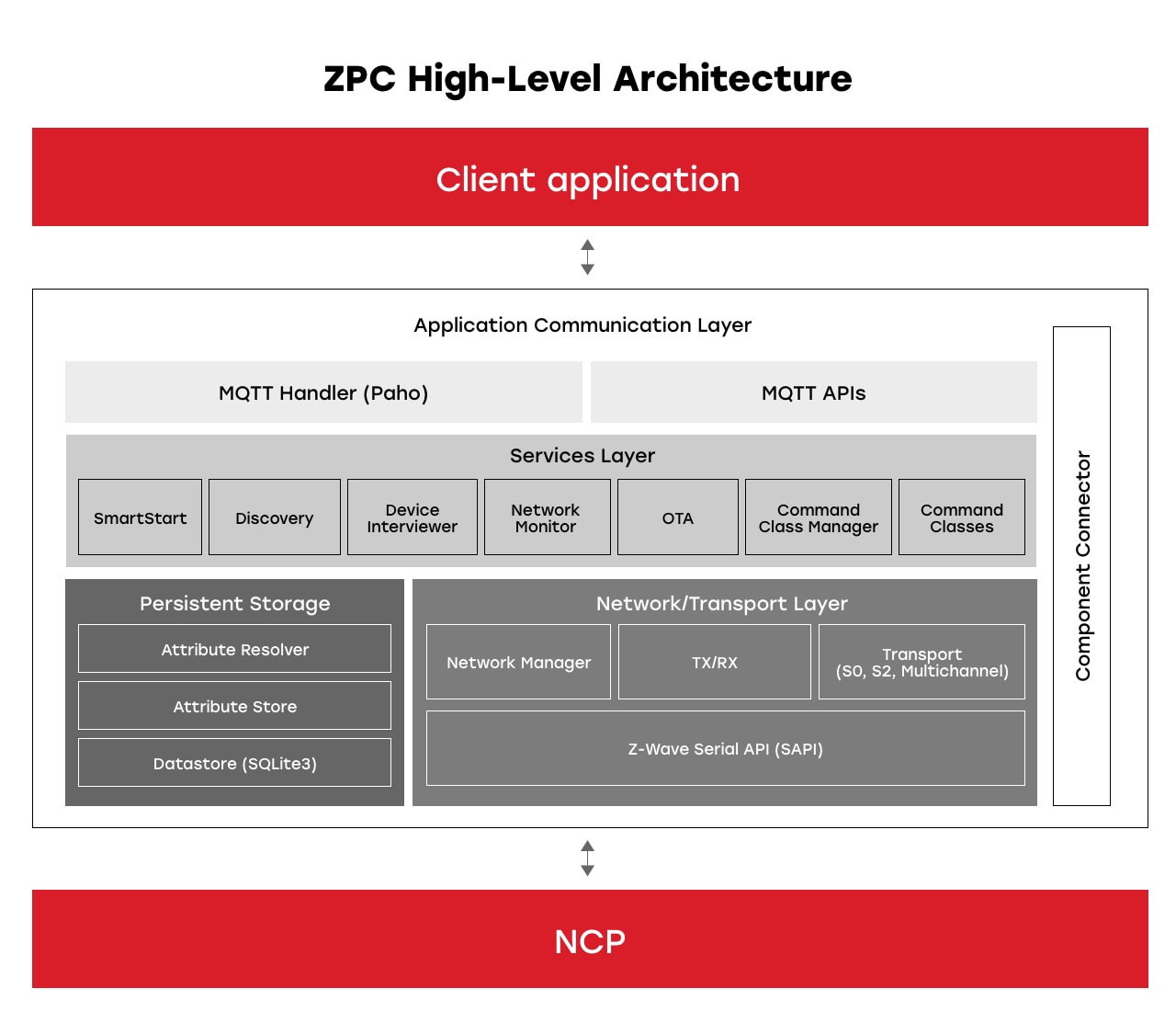
Z-Wave Protocol Controller Architecture Diagram

The ZPC architecture creates a clear separation between the customer application and the underlying Z-Wave network.


ZPC works with Silicon Labs’ Z-Wave NCP on the EFR32ZG23 and EFR32ZG28 SoCs, creating a complete host-to-network development path. The NCP provides the Z-Wave connectivity and communicates with ZPC through the Serial API, while ZPC manages the host-side controller functionality and application integration.

For developers, this means the application can focus on product functionality while ZPC provides the foundational controller capabilities needed to interact with the Z-Wave network.

The MQTT-based interface also provides a flexible integration point for customer applications, GUIs, cloud services, and bridges to other protocols or services.

Bringing Essential Z-Wave Controller Capabilities Together

A Z-Wave controller must support much more than simply sending commands to devices, and ZPC brings a broad set of controller services together within one solution. Its MQTT-based APIs support network management, Z-Wave SmartStart, device discovery and interviewing, network status, over-the-air updates, firmware updates, and Z-Wave Command Class control. ZPC also maintains a persistent attribute store with reported and desired value synchronization for Z-Wave device states.

Together, these capabilities help simplify key stages of the device lifecycle, like adding and discovering devices to monitoring network status and maintaining deployed products through firmware updates.

ZPC Makes Application Integration Simpler

As products evolve, gateways need to be able to interact with multiple applications and services.

ZPC uses MQTT as its application-facing communication interface, providing APIs that abstract Z-Wave controller operations from the customer application. This enables applications to interact with Z-Wave devices and network services without directly implementing the underlying Z-Wave protocol behavior.

This separation also makes it easier to build different experiences on top of the same controller foundation.

ZPC Enables Extensible Development

Product requirements continue to evolve after the initial controller implementation. ZPC is designed with extensible development in mind, giving developers the resources and flexibility to build on the controller foundation as their requirements grow.

Silicon Labs provides comprehensive documentation, API references, release information, and development resources to support integration and customization. For developers adding Z-Wave functionality, an automated code-generation solution streamlines new Command Class implementation, thereby reducing repetitive development effort and provides a structured approach to extending controller capabilities.

Extending the Opportunity with Z-Wave Long Range

Z-Wave applications are increasingly moving beyond devices located within the traditional boundaries of the home. Z-Wave Long Range expands the opportunity to reach devices across larger properties and commercial applications.

ZPC works with Silicon Labs Z-Wave NCP to provide a controller foundation capable of supporting both Z-Wave and Z-Wave Long Range deployments with compatible hardware and software configurations.

For customers, this provides a path to address evolving Z-Wave use cases without changing the fundamental host-controller model.

Z-Wave Protocol Controller is Progressing Toward Certification

ZPC is now generally available (GA) and ready for certification, providing customers with a platform to develop commercial Z-Wave controller products.

Z-Wave certification is targeted for completion by the end of Q4 2026, marking a key milestone toward certified commercial deployments.

Focus Engineering Where It Matters

Developers shouldn’t have to recreate foundational connectivity functionality every time they build a new gateway or controller product.

By bringing together network management, SmartStart, device discovery, monitoring, OTA firmware management, Command Class control, MQTT-based application integration, and extensible development, ZPC provides a modern foundation for developing the next generation of Z-Wave controller solutions.

Combined with the development tools, documentation, and deep Z-Wave expertise, ZPC will help developers spend less time building the controller foundation and more time creating the products and experiences that make their solutions different.


This isn’t a test. There’s no score, no grade, and no judgment attached to any answer. It’s a diagnostic. Each question points at something specific and tells you whether it’s worth a closer look.

Work through it with whoever handles IT or security at your organization. Give honest answers. “We think so” and “we haven’t checked recently” are both useful pieces of information. The questions that make you pause are the ones worth following up on first.

This assessment focuses on the areas that show up most consistently in post-breach analysis: credential security, patch management, access control, backup integrity, incident preparedness, and network visibility. It covers the fundamentals, not the advanced. If any of these ten questions get an uncertain answer, that’s a good place to start.

10 checks worth making today

  1. Is MFA enabled on every account that supports it, not just email?

What good looks like: MFA is on email, cloud storage, financial accounts, your domain registrar, any admin panel, and any SaaS tool with sensitive data. Your password manager has MFA. Exceptions are documented, intentional, and reviewed regularly.

What most businesses find: MFA on email, sometimes on cloud storage, rarely on the domain registrar or financial platforms. The domain registrar is worth checking specifically. An attacker who controls your domain controls your email, which gives them a path to almost everything else.

  1. When did someone last update the firmware on your routers and network devices?

What good looks like: Firmware is on a patch schedule, same as operating systems. Someone knows where to check for updates and roughly how old the current version is.

What most businesses find: The firmware hasn’t been updated since the device was installed, sometimes years ago. The default admin credentials haven’t been changed either. Both are worth fixing this week. Many routers include a built-in update check, although the process and time required vary by device.

  1. Do you know everyone who currently has admin access to your critical systems?

What good looks like: Backups run automatically, include everything that matters, and are offline, immutable, or otherwise isolated from the systems they protect. You’ve successfully restored from the backup at least once in the last twelve months.

What most businesses find: At least one account belonging to someone who left the company, and at least one service account whose origin nobody can explain. Both are low-effort to clean up once they’re visible.

  1. Do you have a backup, and have you actually tested restoring from it?

What good looks like: Backups run automatically, include everything that matters, and are stored somewhere ransomware can’t reach them. You’ve successfully restored from the backup at least once in the last twelve months.

What most businesses find: No central list, several vendors with access that hasn’t been reviewed, and at least one vendor relationship that ended without the access being removed. The review is often straightforward once you know what you’re looking for.

  1. Do you have a written incident response plan, even a basic one?

What good looks like: A document exists that covers, at minimum, who gets called first, what gets isolated immediately, who communicates externally, and where your cyber insurance policy lives. It doesn’t need to be long, but it does need to exist before the incident.

What most businesses find: No written plan, or a plan that was created once and never reviewed. The most common gap in the plan, when it exists: nobody knows where the insurance policy is or what the notification requirements are.

  1. When did you last review vendor and third-party access?

What good looks like: Every vendor with access to your systems is on a list. Their access level is documented. You’ve reviewed it in the last six months. You’ve revoked access for vendors whose engagement has ended.

What most businesses find: No central list, several vendors with access that hasn’t been reviewed, and at least one vendor relationship that ended without the access being removed. This is a half-hour task once you know what you’re looking for.

  1. Are your employees getting security awareness updates more than once a year?

What good looks like: Your team encounters current, relevant threat examples more than once annually. This doesn’t have to be formal training. Sharing a recent phishing example in a team meeting counts. What doesn’t count: the annual compliance module everyone watches while eating lunch and scrolling TikToks on their phone.

What most businesses find: One compliance module is completed per year because it’s required; the content is retained briefly, then forgotten. The teams that catch things have regular exposure to what attacks look like, not a general module about why security matters.

  1. Do you know what devices are on your network right now?

What good looks like: You have a current inventory of devices connected to your network. New or unrecognized devices are reviewed promptly. Personal devices are either managed or isolated to a guest segment.

What most businesses find: More devices than expected. Smart TVs in conference rooms, personal phones on the main network, a printer that’s been there so long the only person who knows it exists is the one who orders the dot matrix paper. All of these are worth knowing about, but that doesn’t automatically make them threats. The greatest risk is not knowing what’s in your inventory at all.

  1. Do you have visibility into what’s leaving your network?

What good looks like: You have some view into outbound traffic. You can see which devices and applications are connecting externally, where traffic is going, and whether anything looks unusual. A converged network and security platform like NETGEAR Exium makes this visible without requiring a dedicated analyst to interpret it.

What most businesses find: No outbound visibility at all. The organization may have basic firewall protection but no practical way to review outbound connections or see where applications are sending data. This gap separates organizations that catch things early from those that find out months later. “We trust the firewall” is a partial answer at best.

  1. Do you have cyber insurance, and do you know what it covers?

What good looks like: You have a policy. You’ve read the coverage summary in the last twelve months. You know the incident notification window, because policies may require reporting within a specific timeframe. You know whether it covers ransomware, business interruption, and third-party liability.

What most businesses find: A policy exists, but nobody has read the coverage terms since they bought it. Notification requirements vary by policy, and failing to meet them can jeopardize coverage for an incident. “We have it” and “we know what it covers” are different.

Turn your answers into action

Pick the two questions where your answer was least confident. Start there.

Security improvements compound when you make them. Many of the issues this assessment surfaces can be addressed quickly, while others will require a longer-term plan. Restore testing, firmware updates, and access reviews are not abstract security projects. They are concrete tasks that need an owner and a deadline. Put them on the calendar, assign responsibility, and follow up.

The value of doing this in October specifically is that it creates a natural checkpoint. Set a date in December to review what you’ve fixed, what remains open, and who owns the next step. That puts your business in a meaningfully better position heading into the new year.

Catch up on the earlier blogs in this series:

And join us for a live webinar on October 20 (8 a.m. PT | 11 a.m. ET): The moat is full of phish: how modern security protects a business without walls. I’ll lead a discussion about what SASE and Zero Trust are, and what they look like on an ordinary working day, plus how NETGEAR Exium delivers both through NETGEAR Insight. Save your seat.

The Wi-Fi access point (AP) has had a distinguished career performing a singular task: shuttling data between our devices and networks – quickly, accurately and reliably. That deceptively simple function transformed the Wi-Fi AP into a data network connecting our smartphones, televisions, appliances, sensors and other smart electronics to the cloud and each other.

Like much of today’s computing infrastructure, the advent of artificial intelligence is pushing Wi-Fi AP technology to expand its scope as residential gateways and enterprise appliances are called upon to do more than simply relay data.

Designers are pondering a new class of Wi-Fi APs equipped with neural processing units (NPUs) that execute AI inference locally. In this model, APs operate as small processing centers that allow connected devices to move compute-intensive workloads to the network edge instead of performing them on the client or sending them to a remote cloud server. Here, the AP begins to blur the line between networking and computing by functioning both as the pathway to AI and the AI coprocessor itself.

In this blog, we examine why AI compute is moving into the Wi-Fi network and what an AI-capable AP could mean for connected devices and edge computing.

The Benefits of Shared Access

Conceptually, the expanding role of the Wi-Fi AP reflects a broad trend toward greater local autonomy and less cloud dependency by shifting AI closer to the edge of the network.

Edge AI Architecture

By owning both the wireless connection and some of the AI execution, APs would evolve from “access points” to data “distribution hubs” imbued with contextual reasoning for deciding which workloads receive airtime, bandwidth and compute priority through traffic profiling and dynamic resource scheduling. The upside is less internet congestion and fewer routing interruptions by making signal latency more predictable and manageable.

The implications don’t end there. Manufacturers could design lighter weight endpoints by tapping AI-enhanced APs as a shared resource for executing inference, rather than packing dedicated AI processors into every watch, sensor and phone.

Bringing AI Closer to the User

The impetus for expanding the role and purpose of Wi-Fi access points is driven, in part, by the limitations of today’s AI architecture.

When a smartphone sends a request to an AI application, it can perform some processing locally or send the request through an AP to a cloud server. Cloud AI provides enormous computing resources, but the farther data travels, the greater the potential for latency and variability that are outside the user’s control.

The latency issue can be addressed by running more AI directly on client devices, but that creates other challenges. Smartphones, smart glasses and other small battery-powered devices have limited power, thermal and compute budgets. AI inference consumes battery power, generates heat and must be designed into already tight form factors.

AI-capable Wi-Fi APs present an attractive middle ground. APs are generally plugged into an external power source and have fewer space restrictions. This would allow inference to remain at the network edge without consuming precious client compute resources while also easing dependence on the backhaul connection between the AP and cloud.

Emerging applications such as augmented and virtual reality, smart glasses and home robotics could benefit from this model. The timing is important, too. Wi-Fi 7, emerging Wi-Fi 8 capabilities and the broad availability of NPUs are creating the technological foundation needed to make distributed AI architectures practical.

But putting AI compute into the access point is more than a design integration decision. It also changes what engineers need to know about Wi-Fi performance.

As connectivity and compute begin to converge at the network edge, familiar RF measurements take on a new context. Engineers must increasingly understand not only whether the wireless link performed as intended, but whether its performance enabled the AI application to deliver the expected outcome. Stay tuned for my next blog, where I will examine how that shift could change Wi-Fi testing – from evaluating graceful degradation and increasingly demanding uplink traffic to recreating multi-client AI workloads and connecting application behavior back to the physical layer.

Powering the Future of Transportation and Fleet Management

Transportation connects the communities around us. Without it, supply chains and global economies come to a halt. With it, the world becomes smaller, streamlining the delivery of crucial resources that fuel our daily lives, improving urban mobility and redefining how far we can go.

As a technology-driven industry, transportation is a core element of smart cities. MediaTek powers intelligent vehicles, fleet management, and infrastructure with advanced IoT solutions. These solutions enhance safety and security, enable easier mobility and promote greater sustainability by reducing the industry’s environmental impact. Explore how MediaTek powers smart transportation across several use cases.

Smarter Fleet Management

Smarter fleet management starts with MediaTek, as we bring together telematics, IoT sensors, edge AI, and connectivity. Our IoT chipsets feature advanced multi-core AI processors that provide real-time logistics across entire fleets. This allows fleets to make better decisions, optimize routes, reduce operating costs, and increase productivity, while communicating critical vehicle performance data to help keep drivers and nearby vehicles safe.

We also bring innovative compute to fleet management, with our silicon unlocking edge performance. This reduces system vulnerabilities, keeps data secure, and delivers low latency for time-sensitive performance features like facial/object detection and predictive maintenance. This real-time performance is especially valuable in pollution monitoring and air quality detection systems, which can flag discrepancies immediately, enabling fleet managers to reduce the environmental footprint of their operations.

Rich multimedia is another key benefit of MediaTek’s IoT chipsets. Our integrated ISP and GPU support multiple AI cameras and displays, delivering live video and enhanced safety monitoring.

EV Charging Stations Start with Connected Infrastructure

EV charging stations have changed the environmental impact of traditional transportation modes and fleets, enabling drivers to go longer and further and reducing our reliance on less eco-friendly fuel. With MediaTek, our IoT modem and SoC solutions take EV charging a step further by building smart infrastructure.

Our IoT modems and Genio SoCs with RedCap deliver fast, reliable, carrier-grade 5G/4G connectivity, Wi-Fi, Bluetooth, and GNSS capabilities, optimized for performance, power efficiency, and security in long-life IoT applications such as EV charging stations. MediaTek delivers robust connectivity at scale, providing a foundation for OEMs developing sustainable charging networks.

Beyond connectivity, our solutions support real-time data processing through AI-powered analytics and integration, helping reduce charging overloads, balance power distribution and enabling predictive maintenance to keep stations active when vehicles need to recharge.

Revolutionizing the Electric 2-Wheeler Market

The emergence of electric 2-wheelers transforms urban mobility, offering a compact, efficient, and more environmentally friendly mode of transportation compared to traditional vehicles. MediaTek’s IoT solutions power smart instrument clusters, high-resolution displays and real-time data analytics to improve the riding experience.

Our solutions meet the hardware needs of modern 2-wheelers, enhancing vehicle functionality for greater rider safety, but we deliver more. With versatile I/O and interfaces, we enable easier integration of performance-enhancing tools like sensors and GPS and support a broad range of applications to improve the rider experience.

Smarter Transportation Experiences

As the world demands more from the transportation sector and communities become more connected, the solutions powering key infrastructure need to advance.

MediaTek’s IoT solutions bring the latest compute and connectivity capabilities to a broad range of applications, including fleet management, EV charging stations, and electric 2-wheelers, promoting greater safety and sustainability.

Stay up to date with our IoT portfolio to learn more about how we transform transportation and smart mobility.

A busier store can sell more and still convert a smaller share of its visitors.

Your store is busy, but the sales report leaves you with questions. Did the promotion bring buyers or browsers? Did the extra demand overwhelm checkout? A traffic increase alone cannot answer either question.

Your retail conversion rate gives those conversations a starting point. GoZone adds visibility into traffic and shopper journeys, helping you investigate what happens before checkout rather than treating every visit as an equivalent sales opportunity.

This article explains the conversion formula, common friction points, and a practical way to test changes. You will also see why dwell time needs context and why WiFi activity should not be substituted for a complete visitor count.

THE ESSENTIALS

Key Takeaways: Retail Conversion Rate

  • Traffic growth can accompany weaker conversion, so review visitor counts, transaction totals, revenue, and average transaction value together.
  • Calculate transaction-based conversion with matched time periods and a visitor-counting method whose limitations your team understands and documents.
  • Investigate checkout queues, overlooked product displays, and staffing gaps as possible explanations rather than assuming one cause from a dashboard.
  • GoZone provides traffic and shopper-journey visibility that can help you choose which store experience improvements to investigate and test.
  • Compare similar trading periods, change one variable at a time, and avoid treating correlation as proof of incremental sales.
01 · TRAFFIC VS. PERFORMANCE

Why can higher traffic hide weaker retail conversion?

Higher traffic can hide weaker conversion when transactions grow more slowly than visits. You may record more purchases overall while a smaller share of the people entering your store complete a transaction.

That difference matters when you evaluate a campaign. Compare the visitor increase with total sales and margin before deciding that the additional traffic was profitable. A lower conversion rate alone does not prove revenue or profit declined.

Use retail insights to investigate the journey behind the numbers. Changes in traffic timing or shopper mix can suggest questions worth exploring alongside your sales records.

02 · THE MEASUREMENT

How do you calculate retail conversion rate?

A common transaction-based retail conversion rate divides completed transactions by store visits during the same period, then multiplies the result by 100. Document what counts as a visit and transaction before comparing results.

Transactions ÷ Store Visits × 100

HYPOTHETICAL BASELINE

800 visits · 160 transactions

20% conversion

HYPOTHETICAL PROMOTION

1,600 visits · 240 transactions

15% conversion

These are invented teaching figures, not a GoZone customer result. Transactions increased by 50%, while visits doubled. Conversion fell by five percentage points. You would still need transaction values, costs, and margin to judge the promotion’s financial outcome.

Count repeat entries, staff movements, and group visits consistently. Transactions divided by visits is a useful ratio, but it does not necessarily equal the percentage of unique people who purchased.

03 · FIND THE FRICTION

Which in-store friction points should you investigate?

Checkout queues, product visibility, and staff availability are practical places to investigate when conversion changes. Treat each as a hypothesis, then check what your floor team and records reveal.

CHECKOUT

Queue congestion

Observe when lines form, whether shoppers abandon items, and how quickly staff can respond. Crowding signals need on-floor confirmation.

MERCHANDISING

Overlooked displays

Review low-traffic areas alongside availability, signage, and category sales. A quiet zone does not automatically mean the products are unwanted.

SERVICE

Staffing gaps

Compare traffic peaks with coverage and customer requests. Test a shift adjustment before changing staffing across the entire week.

GoZone’s retail solutions describe visibility into traffic, shopper journeys, and checkout crowding. Those signals help you prioritize an investigation; they do not establish the reason a particular shopper left.

04 · INTERPRET WITH CARE

What does longer shopper dwell time tell you?

Longer dwell time indicates more time in a measured area, not a confirmed motive. A visitor may be comparing products, waiting for help, queuing, or browsing without a purchase plan.

Review location and timing alongside the duration. Compare queue observations, staffing, product availability, and aggregate sales. Department transactions divided by whole-store visits should not be presented as a department conversion rate.

Measure the visit. Investigate the experience. Test the explanation.

GoZone’s retail analytics materials describe traffic flows, heat maps, and dwell-time insights. Use that context to decide where to observe, rather than treating a longer stay as an automatic success.

05 · TEST A CHANGE

How should you test layout or staffing improvements?

Test one defined change using comparable trading periods and a stable counting method. Write down the adjustment and success metric before launch so the result is not judged by whichever number looks favorable.

For a staffing test, compare similar hours on the same weekday. Record promotions, stockouts, holidays, and other differences. A single before-and-after comparison can suggest a result without isolating its cause.

Keep traffic, transactions, average transaction value, and margin visible together. Where feasible, compare with an unchanged period or location. Repeat the test before treating an apparent improvement as a reliable operating rule.

06 · USE VISIBILITY RESPONSIBLY

Where does GoZone add retail traffic visibility?

GoZone provides traffic and shopper-journey visibility to support retail decisions. Its published materials describe peak-time analysis, movement patterns, dwell times, and crowding signals that help you investigate the store experience.

Presence4WiFi is GoZone’s presence-intelligence offering. Marketing4WiFi supports a different part of the journey: guest engagement, campaigns, and guest feedback
that can complement observations about shopper friction.

WiFi connections and detected devices are not automatically a complete count of people entering your store. Coverage, device behavior, and the measurement setup matter. Do not use login totals as the denominator for a storewide conversion claim.

Keep sales measurement separate unless you have a verified integration and matching method. The traffic capabilities described here do not establish individual WiFi-session-to-receipt attribution or a guaranteed conversion improvement.

IN CONCLUSION

Improve retail conversion before chasing more store traffic

Improve your retail conversion strategy by examining how existing visitors experience your store. Start with a consistent baseline, identify one friction hypothesis, and test a focused improvement before investing in more traffic.

GoZone helps you bring store activity into that discussion. Combine its traffic visibility with sales records and staff observations so your next decision reflects what you can measure, not just how busy the store appears.

FAQs

FAQs About Retail Conversion Rate

What is a good retail conversion rate?

A useful target depends on your store format, visitor intent, counting method, and trading conditions. Start with your own comparable-period baseline rather than a universal benchmark. GoZone traffic insights can add context, but they do not replace consistent sales and visit measurement.

Can GoZone traffic insights explain falling conversion?

GoZone traffic insights can help you investigate possible causes, such as peak-time crowding or uneven movement through your store. Pair those signals with staff observations and sales records. They do not establish an individual shopper’s motive or prove that a particular change caused lost sales.

Does longer dwell time prove stronger shopper engagement?

No. Longer dwell time can reflect browsing, waiting, or difficulty finding products. GoZone’s presence insights help you examine where and when activity occurs. Use that context with observation and sales measures before deciding whether the additional time represents a better shopping experience.

Can WiFi logins replace store visitor counts?

No. WiFi logins represent connecting devices or sessions, not necessarily every shopper or a unique person count. For transaction-based conversion, use a defined visitor measure and document its exclusions. Evaluate WiFi trends as a separate signal unless a validated counting method supports another interpretation.

What if spectrum policy could see the future?

At the Wi-Fi Alliance® and Dynamic Spectrum Alliance Innovation Exhibit in London on October 20, policymakers and industry leaders will have an opportunity to see how Wi-Fi® is evolving and consider the decisions that will help bring its benefits to more people.

Held during the Wi-Fi Alliance Europe Member Meeting and DSA Global Summit, the exhibit will bring together member companies to demonstrate advances in Wi-Fi 8, Passpoint® roaming, convergence, and spectrum access. These demonstrations will show how Wi-Fi innovation is meeting evolving connectivity needs and how spectrum policy can help extend those benefits to consumers, businesses, and communities.

The exhibit reflects a record of Wi-Fi industry stewardship. Over the years, regulators have made license-exempt spectrum available, creating a foundation for Wi-Fi innovation. The industry has built on that foundation through sustained investment and collaboration, developing technologies that use shared spectrum more efficiently and support the connectivity consumers and businesses rely on every day.

That work continues as expectations change. People increasingly need connections that remain responsive in crowded workplaces, across busy public venues, and while moving between networks. Businesses need consistent performance for applications where an interruption can affect productivity or disrupt operations. Emerging applications add to these requirements, making reliability and capacity central to the next stage of wireless innovation.

During the Innovation Exhibit, attendees will see:

Wi-Fi 8: demonstrations that focus on making wireless connectivity more consistently available and dependable, approaching the experience people expect from a wired connection while retaining the flexibility of wireless. Member demonstrations will illustrate approaches to improving performance in challenging conditions and making more effective use of available spectrum.

Passpoint: demonstrations will highlight another dimension of connectivity: services that move with people. By enabling seamless, secure Wi-Fi access, Passpoint supports more continuous experiences and closer convergence between Wi-Fi and cellular networks.

Spectrum access: demonstrations will illustrate approaches for putting spectrum to productive use while addressing the requirements of shared operation, and other demonstrations will showcase how 6 GHz Wi-Fi capacity with cellular coverage delivers more dependable connectivity.

A central message connects these demonstrations: greater efficiency and sufficient spectrum capacity both matter. Technologies that help devices operate in the presence of interference are valuable, but access to clear channels allows stronger performance. Innovation improves how the industry uses spectrum. Sufficient capacity enables that progress to serve growing demand.

For Wi-Fi Alliance, bringing these demonstrations together creates an opportunity to connect individual member innovation with the direction of the broader ecosystem. For policymakers, it offers tangible evidence to inform decisions whose effects will extend well beyond today’s deployments.

Continued, predictable access to license-exempt spectrum gives the industry a foundation to keep investing and improving connectivity. The London Innovation Exhibit invites attendees to see that progress firsthand, ask questions, and consider how spectrum policy can help turn future possibilities into everyday benefits.

Across the exhibit, participating companies will explain the challenges they are solving, the capabilities they are developing, and the conditions needed to deliver those benefits more widely.

The statements and opinions by each Wi-Fi Alliance member and those providing comments are theirs alone, and do not reflect the opinions or views of Wi-Fi Alliance or any other member. Wi-Fi Alliance is not responsible for the accuracy of any of the information provided by any member in posting to or commenting on this blog. Concerns should be directed to [email protected].

New partnership expands access to SPARK’s Low Energy UWB (LE-UWB™) technology and local support across China 

Montreal, Canada, October 14, 2026  – SPARK Microsystems, a Canadian fabless semiconductor company specializing in next-generation short-range wireless communications, today announced the expansion of its distribution network, welcoming Beijing Yuanda Innovation Technology to SPARK’s partner network.

Through the partnership, Beijing Yuanda will distribute SPARK products and provide a local point of contact for customers evaluating SPARK’s LE-UWB™ technology. The collaboration strengthens SPARK’s ability to serve companies developing high-performance wireless products in one of the world’s largest electronics markets.

“China is an important market for SPARK, with a strong ecosystem of companies developing advanced consumer, industrial and IoT products,” said Bruce Lin, Senior Director of Sales, APAC at SPARK Microsystems. “Beijing Yuanda’s established customer relationships and local market expertise will help us expand access to SPARK technology and strengthen our support for customers across the region.”

“We see growing demand for wireless connectivity that can deliver greater responsiveness and energy efficiency without compromising performance,” said Xu Tao, General Manager at Beijing Yuanda Innovation Technology. “SPARK’s LE-UWB technology brings a differentiated solution to our portfolio, and we look forward to introducing it to customers developing demanding wireless applications.”

SPARK’s LE-UWB™ technology combines ultra-low power consumption, ultra-low latency and high data throughput to address the requirements of increasingly demanding short-range wireless applications. The technology is designed for markets including gaming peripherals, audio systems, IoT devices, AI wearables, robotics and industrial applications, where reliable performance and power efficiency are critical.

For more information about Beijing Yuanda Innovation Technology, visit B1B.com.

About SPARK Microsystems

SPARK Microsystems is building next-generation short-range wireless communication devices for consumer, industrial and medical applications. Leveraging patented LE-UWB™ technology, SPARK delivers ultra-low-power, high-speed wireless connectivity with unmatched interference robustness and exceptionally low latency. LE-UWB™ technology is ideally suited for wearables, peripherals, tags, sensors, and other IoT-connected devices that require reliable, high-performance data communication, as well as ranging and positioning capabilities. SPARK makes it possible to minimize and ultimately eliminate wires and batteries across a wide range of AI and IoT applications. For more information, visit sparkmicro.com.

###

SPARK MICROSYSTEMS, LE-UWB and DETERMINISTIC WIRELESS are trademarks or registered trademarks of SPARK Microsystems International Inc. in Canada and/or other countries. All other trademarks are the property of their respective owners.

We’re a long way from simple greasepaint and limelights. In today’s world of live entertainment, precision is everything. A spotlight that arrives a fraction too late, a sound cue that doesn’t quite match the performer’s position or a camera angle that misses the emotional beat can pull audiences out of an otherwise magical experience. For Vienna-based zactrack, the mission is simple but ambitious. Make those distractions disappear.

Powered by Ultra-Wideband technology from Qorvo, zactrack enables real-time performer tracking through wearable trackers that capture highly precise positional data on stage. This data is calculated and seamlessly transmitted to lighting, audio, video and camera systems, transforming how they work together in real time. The result is seamless, immersive performances that feel effortless to audiences and empowering to creative teams.

From Data to Drama

“We are now coming from the entertainment industry,” said Chief Technical Officer Christoph Rosenberg. “The core of zactrack has always been processing data. You’re getting some data input, you process it and you control different protocols or fixtures.”

That “core math,” as Rosenberg describes it, is the brain of the system. It predicts motion, calculates positioning and distributes precise tracking data across lighting consoles, audio systems, media servers and cameras. Early systems relied on complex fiber-based solutions. Over time, zactrack embraced Ultra-Wideband as the ideal input technology for real-time performer tracking.

Today, zactrack builds its own Ultra-Wideband hardware using Qorvo DWM modules, combining accurate positioning with low latency and high reliability. The tracking data feeds directly into Zactrack’s software engine, enabling automated control across an entire production.

The technology has evolved far beyond its original purpose. What began primarily as a lighting tool is now a creative and strategic platform used across multiple disciplines.

A Creative Connector

zactrack Marketing Manager Yvonne Bolhar-Nordenkampf has seen firsthand how the technology brings people together.

“At the very beginning, people implemented it as a technical solution,” she explained. “They had an issue, and it solved that issue. But then it became so much more.”

On London’s West End alone, zactrack systems are currently used in more than 10 productions. Designers who initially adopted the system for automated follow-spot functionality are now leveraging it for immersive audio and media effects, all synchronized to performer movement.

Traditionally, lighting, audio and video departments worked in parallel but rarely in close collaboration. Tracking data is changing that dynamic. With a single, reliable source of positional information, multiple departments can build from the same creative foundation.

“It has become a creative tool, but also a connective tool,” Bolhar-Nordenkampf said. “Hardware and software that were just technical systems are now connecting people in productions.”

That sense of community extends beyond the stage, as zactrack has expanded its online presence by launching a dedicated Discord channel and sharing designer interviews on Instagram, creating spaces where users can connect, exchange ideas and learn from one another. By encouraging long-time users to share their expertise with newcomers, these platforms foster collaboration, knowledge-sharing and a global network of designers and technicians united by shared creative experiences.

Transforming the Audience Experience

For audiences, the impact is immediate and emotional.

Rosenberg describes a simple example: in a traditional theater setup, when a performer walks across the stage, their voice still appears to come from the front. With Ultra-Wideband-based tracking, immersive audio systems can shift the sound in real time to match the performer’s position. Even with eyes closed, the audience senses exactly where the actor stands.

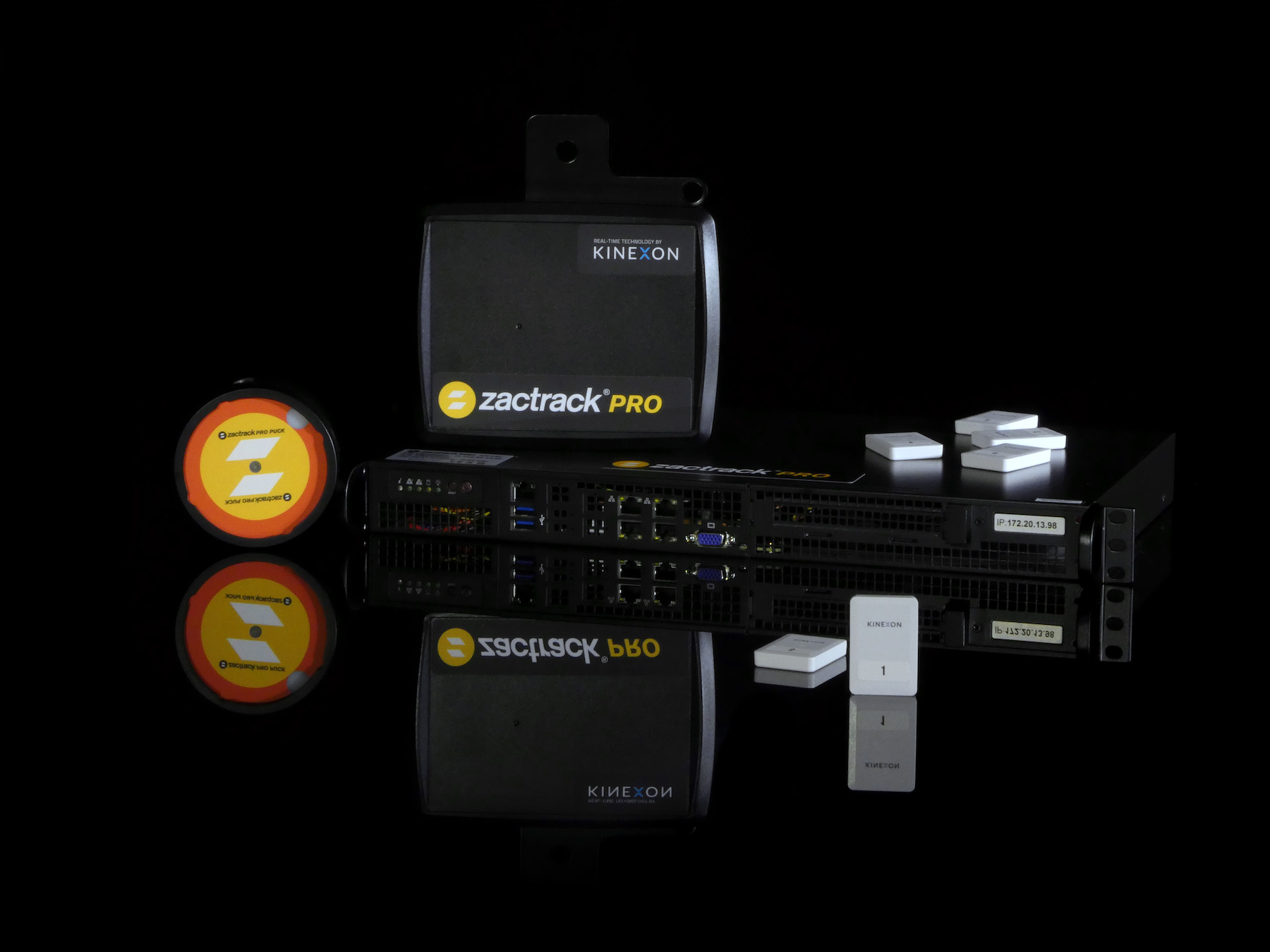
Photo_1_zactrack_Pro_System_Setup-Reflection_15012026_copy.jpg

zactrack PRO is an automated follow-system to fulfill all requirements for big projects. People and objects in motion are tracked with high accuracy and represented in a 3D model. High-precision mathematics automatically control moving lights, video and sound devices.

Lighting has undergone a similar evolution. Instead of a single static white follow-spot, any moving head fixture in the rig can dynamically track a performer from multiple angles, eliminating harsh shadows and opening new creative possibilities.

“You are not limited anymore to fixed positions,” Rosenberg said. “When people get these ideas, they start to think more creatively.”

That creativity was on full display at the world premiere of “House of Dancing Water” by Dragone in Macau, one of the world’s most technically ambitious productions. Sitting in the audience after months of development, Rosenberg felt the emotional payoff.

“When you put so much effort and work into a project and then feel how smoothly it goes. Without this technology, the production wouldn’t work. That feeling is really special,” he said.

A Global Stage

Now celebrating its 17-year anniversary, zactrack operates in more than 30 countries and is trusted by global brands and productions, from Maria Theresia – Das Musical in Vienna over The Hunger Games: On Stage in London to AVATAR’s In the Airwaves World Tour.

Behind the spectacle is a powerful partnership built on precision positioning. As productions demand greater accuracy, new frequencies and ever-higher reliability, Ultra-Wideband technology continues to unlock new creative frontiers.

“We’re always looking into new technologies to move forward,” Rosenberg said. “And we hope Qorvo is the right brand to go into the future with us; with new ideas, new frequencies, new accuracy.”

For performers, designers and audiences alike, that future looks brilliantly in sync.

Want the backstories about RF technology? Explore our blog.

Ready to look under the hood? Discover our robust library of technical articles.