

Breaking News

GLOBAL Wi-Fi NEWS bulletin

The GSMA argues that the mobile ecosystem is ready to deploy in the upper 6 GHz band (6.425–7.125 GHz) and that policymakers should make the spectrum available now for future 6G deployments.1

But ecosystem readiness is only one part of the equation. The fact that mobile can use more spectrum does not, by itself, establish that dedicating another swath of scarce spectrum to mobile makes economic sense.

The fundamental problem facing the mobile operators is clear: Traffic growth is slowing. Operator costs are growing. Revenue is not keeping pace.

Spectrum-related costs have increased from roughly 3% of operator revenues in 2014 to 8% in 2024, with approximately €104 billion associated with existing spectrum costs between 2025 and 2035.2 At the same time, the GSMA estimates that Europe needs approximately €475 billion in mobile-network investment between 2026 and 2036, while only about €270 billion is expected under current conditions. The GSMA itself concludes that operators cannot currently build a business case to justify the required investment.3

The revenue picture is equally challenging. Connect Europe reports that GDP-adjusted mobile ARPU was €14.90 in 2024, compared with €15.30 in 2015. European operators have already paid more than €30 billion for 5G spectrum, while annualized spectrum costs exceed €8 billion.4 Adding another major spectrum acquisition and network investment cycle therefore does not, by itself, address the underlying economics. It adds spectrum costs and capital requirements to a market already struggling to generate sufficient returns.

Exclusive allocation of the upper 6 GHz to mobile operators means: More spectrum costs. More capex. The same revenue constraints.

The 6 GHz opportunity is bigger than 6G

None of this diminishes the importance of 6G. Europe needs advanced, high-capacity wireless connectivity, and the upper 6 GHz band could play an important role.

But 6 GHz is not exclusively a mobile story.

Europe is also trying to build an AI economy. AI workloads are driving higher network traffic, while enterprises deploy connected devices, machine vision, robotics, digital twins and other data-intensive applications. Much of this activity takes place indoors, where Wi-Fi provides the critical local connectivity layer.

AI does not care whether connectivity is called “mobile” or “Wi-Fi.” It needs capacity, low latency, reliability and enough spectrum to connect large numbers of devices.

That makes Wi-Fi spectrum policy part of AI infrastructure policy.

The real-world evidence is already emerging. Ookla reports that 6 GHz represents approximately 13.8% of Wi-Fi samples in North America, compared with only 1.6% in Europe.5

New research from the University of Notre Dame’s Ghosh Lab, based on more than 3.5 million real-world 6 GHz Wi-Fi observations, further demonstrates the importance of access to wider, usable channels for actual network deployment and performance.6

The implication is straightforward: Europe’s connectivity strategy should not be built around a single network architecture.

Fibre, Wi-Fi and mobile each provide different capabilities and increasingly work together as parts of the same connectivity ecosystem.

The upper 6 GHz band is one of the few remaining opportunities to strengthen that ecosystem.

A better economic framework

The 6 GHz debate should therefore move beyond a simple question of which industry gets the spectrum.

The relevant measure is the incremental connectivity, productivity and economic value created by different uses of the band.

More spectrum can be valuable. But spectrum alone cannot create customers, increase ARPU or repair the economics of network investment.

You cannot fix a flawed economic model with more spectrum.

Europe should make sure that every additional megahertz contributes to the broader connectivity and economic objectives it is trying to achieve.


1GSMA, “Mobile ecosystem ready to maximise use of 6 GHz as GSMA urges policymakers to unlock spectrum for mobile,” September 7, 2026

2GSMA Intelligence, Mobile Investment Needs in Europe, 2026, p. 39

3GSMA Intelligence, The Mobile Economy Europe 2026, 2026, p. 13

4Connect Europe, State of Digital Communications 2026, 2026, p. 33

5Ookla, Global State of Wi-Fi 2026, 2026

6University of Notre Dame, Ghosh Lab, “New Technical Report Released: Real-World 6 GHz Spectrum Wi-Fi Deployment Analysis,” August 31, 2026.

The statements and opinions by each Wi-Fi Alliance member and those providing comments are theirs alone, and do not reflect the opinions or views of Wi-Fi Alliance or any other member. Wi-Fi Alliance is not responsible for the accuracy of any of the information provided by any member in posting to or commenting on this blog. Concerns should be directed to [email protected].

The network should never be the bottleneck: Lessons from Butler University

As user expectations and connectivity demands continue to grow, Butler University shares lessons learned on wireless design, operational visibility, and building a network foundation ready for what’s next.

Butler University’s lessons on preparing campus infrastructure for the future

Campus networks are under more pressure than ever. Universities are supporting video collaboration, cloud applications, AI-driven tools, and thousands of connected devices, often with infrastructure that was never designed for those demands.

As institutions plan for the future, simply replacing aging equipment is no longer enough. We spoke with Nick Northcutt, Network and Security Engineer at Butler University, about lessons learned from Butler’s network modernization journey and what higher education IT teams should consider when building a future-ready campus network.

Many universities are grappling with aging infrastructure and growing technology demands. What prompted Butler University to think beyond simply replacing existing equipment and take a more strategic approach to network modernization?

The video meeting boom during the pandemic dramatically raised expectations for our wireless network. Suddenly, people were noticing roaming issues, poor signal quality, and other performance challenges that weren’t as obvious when most users were simply using email and web browsing. We had a clear problem to solve, so we started by identifying our biggest trouble spots and understanding where the wireless design was falling short.

We found outdated designs in residential and academic buildings, including access points placed in hallways instead of the spaces where people live, study, and gather. We also identified dead spots and density issues in classrooms.

By redesigning these environments, increasing access point coverage, and improving support for high-density spaces, we saw a significant drop in support cases. That work marked the beginning of a broader effort to re-evaluate wireless across campus.

It also prompted us to look ahead at how emerging wireless technologies could further improve the campus experience. We applied the same thinking to Hinkle Fieldhouse’s basketball arena, where a new wireless design is helping lay the foundation for future fan engagement initiatives.

When you think about a “future-ready” campus network, what does that look like, and what capabilities are most important for supporting the university’s long-term needs?

To me, a future-ready campus network is one that can scale to meet growing traffic demands, move beyond an over-reliance on wired connections, and deliver highly reliable wireless connectivity while still protecting users and data. Ideally, it should accomplish all of this while operating invisibly in the background, so the experience feels seamless for teaching staff, students, etc.

Looking back on Butler’s network modernization journey, what lessons or insights were most valuable, and were there any outcomes that surprised the team?

The sudden, exponential increase in video calls over Wi-Fi during the pandemic caught us by surprise. Knowing what we know now, being able to respond to that new demand right at the onset would have been very beneficial. We’ve also learned that Wi-Fi design is never a one-time exercise; it is an iterative process because there are so many variables, including the campus environment, changing user behavior, and budget constraints. Even today, we’re continually looking for ways to improve performance and deliver better experience for teaching staff, students and others.

I think making Wi-Fi design and troubleshooting professional development a priority for staff would be high on the list—and something to do sooner rather than later. It would help take a lot of the guesswork out of Wi-Fi troubleshooting and support.

On the operational side, I was pleasantly surprised by how seamless the access point (AP) replacement process proved to be. Our facilities team began installations at 3:00 a.m. and could finish an entire building before classes started. We repeated this process across campus, replacing more than 1,700 access points with virtually no disruption to students, faculty, or staff before the 8:00am classes start. The ability to deploy at that scale with virtually no user disruption was extremely impressive.

Butler Mascot 07_21_2021_blue.jpg

For higher education IT teams planning a similar transformation, what advice would you offer based on your experience?

The best Wi-Fi hardware in the world won’t fix poor AP placement and design. Find the problem areas on your campus and invest in industry best-practice standards. Survey and build simulations using wireless planning and design tools to support redesigns and new builds. Invest in wireless professional development for your staff (CWNA, ECSE, etc.).

A great way to improve Wi-Fi case resolution is to invest in historical wireless troubleshooting and analytics tools, and establish a standard process for the Help Desk to gather useful information for escalation, such as the date and time of the incident, the device’s Wi-Fi MAC address, room location, and a brief description of the issue.

When it is time to consider your AP replacement cycle, think holistically about what your campus will need to support in the future. Consider technologies such as 6 GHz, WPA3 device compatibility, and emerging Wi-Fi 7 capabilities. Also think about AI-assisted operational tools and flexible network access designs that can accommodate the growing number of IoT and consumer devices connecting to campus networks, particularly in residential environments. Finally, evaluate how different vendors approach performance, manageability, security, and future scalability when making long-term infrastructure decisions.

How can universities balance meeting current needs while ensuring their network infrastructure remains adaptable for future technologies and demands?

I think the key is making sure your network can support increased traffic over the next five years. Beyond that, it’s about designing the network with enough flexibility to handle the things we can’t predict yet. That means investing in products that support multi-gigabit switching, automation, AI workflows, cloud integration, and strong analytics.

How do you see the technology requirements of higher education institutions evolving over the next five years?

I expect network throughput requirements to keep climbing, especially as AI, streaming, video conferencing, gaming, and research demands continue to grow. Wi-Fi is now the primary way most users connect, so expectations for wireless performance will only increase. At the same time, the growth of wireless IoT on campus means we have to keep finding ways to make these devices work as easily as they do at home, while still keeping them secure. Ultimately, the network should never be the bottleneck.

Butler_20211108_Health_and_Recreation_Center_006.jpg

As universities prepare for AI-enabled applications and other emerging technologies, what infrastructure investments and foundational capabilities should institutions prioritize today to support innovation over the next decade?

As adoption grows, universities should focus on building a network infrastructure that can support significantly higher data volumes, lower latency requirements, and increasingly distributed workloads. Security should also be a major consideration.

I would prioritize connectivity, security, and visibility. That means investing in infrastructure that can support future wireless and multi-gig needs, along with strong monitoring, analytics, and security capabilities. As cloud services continue to grow, universities need networks that can scale, adapt, and support a Zero Trust mindset while enabling long-term growth, flexibility, and innovation.

Based on Butler University’s modernization journey, what’s the single most important piece of advice you’d share with university IT leaders looking to build a future-ready campus network?

My advice would be to think beyond simply replacing aging equipment. Understand where your problem areas are, invest in good design, and make sure the infrastructure you choose can grow with the needs of your institution. Technology will continue to change, but a strong foundation, skilled staff, and a clear understanding of your users’ needs will always matter.

If you’re attending EDUCAUSE, I’d welcome the opportunity to continue the conversation and share more details during our poster session.

The data center industry is transforming faster than at any point in its history. For decades, the story of the data center was a story of steady, predictable growth with more racks, more servers, and more power each year. That era is over. Artificial intelligence (AI) workloads are driving infrastructure demands to unprecedented levels.

Behind that surge lies an equally urgent challenge: the unseen supporting infrastructure that connects, secures, and keeps the AI systems operational. It is not glamorous, yet it quietly determines whether an AI data center stays online, efficient, and secure.

Anatomy of the Modern AI Data Center

The modern AI data center is composed of two distinct but deeply connected worlds: the white space and the gray space.

The white space is what most people imagine when they think of a data center: servers, network gear, and the high-speed IT fabric that stitches them together into a single compute core. It is the domain where AI models are trained and served, and as such, draws the most attention and investments.

Conversely, the gray space is easy to overlook precisely because it is designed to be invisible. This domain includes the industrial facilities that surround and sustain the compute engine. There are four groups that make up the gray space:

  1. Power and distribution
    The lifeblood of the AI data center, these systems manage and deliver electricity to the entire data center. Here, resilient and redundant connectivity is everything. It keeps power telemetry flowing continuously and allows subtle warning signs, like abnormal power surges, to surface before they become emergencies.
  2. Cooling and thermal management
    Systems like cooling towers where the network must be redundant and fast converging to ensure vital telemetry data is transmitted to control systems in real-time to prevent thermal runaway which can hamper uptime and create safety incidents.
  3. Building management
    Building Management Systems (BMS) are responsible for monitoring and coordinating HVAC, environmental sensors, lighting, alarms, and other facility systems. It gives operators centralized visibility and control to maintain safe conditions, respond quickly to issues, and operate the data center efficiently.
  4. Physical security and access controls
    Since AI data centers concentrate high-value compute, sensitive data, and critical digital services, unauthorized access or security disruption are especially consequential. Perimeter cameras and access control systems require reliable PoE and high-bandwidth connectivity to maintain continuous surveillance and protect the facility and the people in it.

The discipline of tying these industrial subsystems together (e.g. networking, monitoring, and security on a single observable, standards-based system) is referred to as ‘gray space automation’. It is the practice of taking dozens of independent operational technology (OT) systems that historically ran in isolation and connecting them into one coherent whole. In the AI era, that connective tissue is as critical as the compute core it powers.

The criticality of gray space automation

The gray space brings together the physical systems that determine whether AI infrastructure stays available, secure, and efficient. Four interconnected challenges must be addressed together as weakness in any one facility can reduce compute capacity or take critical systems offline.

Continuous operations in demanding environments: Gray space systems extend into electrical rooms, pump areas, rooftops, and outdoor locations where heat, moisture, vibration, and electrical noise can challenge conventional networking. As AI densities rise, even a brief communication failure can create operational blind spots or interrupt critical coordination. Uptime Institute reports that one in ten data center outages still cause serious or severe disruption.

Growing, interconnected attack surface: Every connected controller, sensor, camera, and vendor-access pathway creates operational value, but it also creates new risk. Limited network visibility, flat communications, and fragmented security policies can allow a compromised device to threaten adjacent systems. Operators need to identify assets, restrict unnecessary communications, and detect threats without disrupting critical processes.

Complexity compounded by skills shortages: Gray-space domains are often built by different vendors and managed through separate tools, creating inconsistent architectures and heavy manual workloads. Nearly two-thirds of operators report difficulty finding or retaining qualified staff. Scaling requires familiar tools, repeatable designs, automation, and shared visibility across IT, security, and facilities teams.

Growing pressure to operate efficiently: Rising power and cooling demands make static operating models increasingly costly and unsustainable. Reliable telemetry from gray space systems is essential for preventive maintenance, capacity planning, and improvements in PUE and WUE. Without it, emerging failures go unnoticed and efficiency opportunities remain out of reach.

One Cisco foundation for the entire AI data center

Cisco brings the entire AI data center on one foundation, bridging the white space where AI workloads run and the gray space systems that continuously power, cool, monitor, and protect them. By extending one trusted networking and security foundation across both environments, Cisco helps operators reduce silos, apply consistent policies, and oversee the entire infrastructure supporting AI capacity.

It starts with Cisco Cloud Control, the AI native operations layer that brings inventory, topology, alerts, identity, and workflows from supported domains into one governed experience. It preserves the depth of specialized domain tools while connecting operations at the management layer: AI Canvas to bring teams and insights together, Nexus Dashboard and Intersight for deep control of white space networking, and Catalyst Center and Meraki Dashboard from Cisco Cloud Control to extend familiar operations into gray space. Together, they turn separate domains into one coordinated operating model, helping teams see more and do more in a collective effort to protect uptime, capacity, and efficiency.

Extending the Cisco foundation into the gray space domain
Cisco IIoT extends the one foundation from the compute core into the operational backbone of gray space systems that keep AI infrastructure running. Cisco Industrial Ethernet (IE) switches pair rugged, low power, fanless designs with lossless industrial resiliency protocols that keep critical systems connected even when something goes wrong. With Cisco Cyber Vision embedded directly into the switches, the network becomes the defense layer passively discovering every connected asset and creating segmentation policies that IE switches then enforce to isolate gray space systems from one another and from IT. And because IE switches integrate with the Meraki Dashboard or Catalyst Center, IT teams can comfortably deploy, onboard, and manage gray space facilities using tools and skills they already possess.

  • Industrial-grade resilience for continuous AI through ruggedized networking engineered to thrive where standard networking fails to ensure constant, reliable connectivity
  • Security embedded into the network that turns the network itself into the defense layer and establishes a security checkpoint at every connection across the gray space facilities
  • Industrial networking simplified for IT ensures IT expertise transfers directly into the OT world to streamline onboarding, management, and maintenance of gray space facilities.
  • Engineered for efficiency at every connection to help achieve new benchmarks in sustainability metrics and optimizing every system for peak performance.

Where a multi-category vendor stitches together disparate products, Cisco treats the network itself as both the connectivity layer and an embedded security sensor. Cisco offers a single, battle-tested networking architecture that’s backed by a technology ecosystem that spans design, deployment, support, and lifecycle guidance for every data center.

Built the foundation for continuous AI

For over 20 years, Cisco has helped connect and secure industrial environments where downtime carries serious operational and safety consequences, from manufacturing floors and energy grids to transportation systems. Combined with decades of data center networking leadership, Cisco is positioned to unite the white space where AI runs with the gray space systems that keep it running. The result is a proven foundation that strengthens resilience, embeds security, simplifies operations, and improves efficiency across the entire AI data center.

Cisco is already helping some of the biggest names in AI bring their data center facilities onto a unified architecture. Connect with a Cisco Networking expert to learn about how we’re helping to unlock the future of AI data centers.

Aprecomm cover

Your subscriber runs a speed test. The result shows a not-too-bad 300 Mbps. A few moments later, their video call freezes mid-conversation. The user does the usual troubleshooting: refreshes the browser, restarts the router, curses you, the ISP, and, caving in, opens a support ticket. The technician gets to work and checks the account. Everything looks fine. The bandwidth is provisioned, speed is delivered, and all boxes are ticked.

So, what just happened?

This is the gap every ISP faces. The number on the speed test and the experience at home are two different stories, and the industry has spent a decade treating them as one.

The Cornerstone That Buckled

For a long time, speed was the definitive yardstick for WiFi performance. Even just a decade ago, bandwidth was scarce and expensive. Households had one or two connected devices, streaming was a luxury, and a faster connection genuinely meant a better experience. Speed and satisfaction moved together. Measuring one told you something real about the other.

That correlation does not hold in 2026.

Most homes today have more bandwidth than they actually use. Fifty, sixty, sometimes a hundred connected devices sit on a single network, from smart home devices like thermostats to gaming consoles, to three or more people simultaneously making video calls. Yet complaint volumes have not fallen. If anything, they have grown more specific, more frequent, and more frustrating to resolve. Subscribers are not asking for more speed or Mbps. They are asking why the connection they already pay for keeps failing them at the worst possible moment.

Here is the uncomfortable truth: speed has become a vestigial metric. It measures capacity, with no bearing on subscriber experience. An ISP optimizing for speed alone is solving a problem subscribers stopped having years ago.

Where Quality of Experience Sees What Speed Cannot

Quality of Experience, or QoE, does not ask, “How fast is the internet?” It asks, “How did this household actually experience the internet today?” That distinction changes everything about what we measure and what we fix.

QoE tracks latency, the delay before a signal responds. It tracks jitter, the inconsistency in that delay, which turns a video call into a slideshow! It tracks packet loss during peak hours, when every device in the neighborhood competes for the same bandwidth at 8 p.m. on a weeknight. None of these show up on a speed test, because a speed test measures a single moment of ideal, uncontested throughput. It is a specious snapshot dressed up as a diagnosis.

QoE also breaks performance down by application rather than aggregating it into one single number. A household might have flawless throughput for downloads and still suffer visible lag on a video call, because gaming, streaming, and conferencing all stress the network differently. Where aggregate speed hides this, application-aware QoE reveals it.

Most importantly, QoE is ongoing. It does not wait for a subscriber to run a test. It watches the network in real time, catching degradation as it happens well before a ticket lands in the queue. That shift defines the distinction between reactive support and proactive care.

The Real Signal Behind Churn

What most churn models get wrong is the assumption that subscribers leave because of a technical number mismatch. The real reason they leave is the accumulation of bad moments they remember. From the call that dropped during a job interview to the stream that buffered during a crucial championship game to the classroom video that froze while their child was presenting, none of these register on a speed test. All of them register in a subscriber’s decision to switch providers.

An unquestioning belief in aggregate speed as the health metric leaves ISPs often oblivious to the exact moments that erode loyalty. QoE captures those moments as they happen, allowing an ISP to intervene and fix the issue before the subscriber even opens a ticket or considers a competitor’s website. That is not a technical upgrade. That is a retention strategy hiding in network data.

The ISPs that treat QoE as a support tool are missing the bigger opportunity. QoE is a business intelligence layer. It tells you which households are at risk, which applications are underperforming, and which interventions actually move the needle on satisfaction. Speed tests cannot do any of that. They were never built to.

What We Need To Do

It is time to retire the misnomer that Mbps is the definitive measure of a good network. Speed still matters as infrastructure. It stops mattering as a measure of experience the moment your subscriber’s reality diverges from your dashboard.

The ISPs that win the next decade will not be discussing speed. They will be the ones who can see, in real time, exactly how their network feels to the person using it, and who act on that visibility before it becomes a cancellation.

ISPs must ring out the old obsession with throughput. Bring in a genuine measure of customer experience. Your subscribers already know the difference between fast and good. The only question is whether your network does too.

Webinar From Gaming and Audio to Real-Time IoT Devices

Fourth session in SPARK’s wireless technology webinar series will examine deterministic timing, ultra-low latency, ultra-low power consumption and high data throughput across demanding real-time applications

MONTREAL, Canada, September 1, 2026 – SPARK Microsystems, a Canadian fabless semiconductor company specializing in next-generation short-range wireless communications, will host the fourth session in its wireless technology webinar series on September 15, 2026, titled “From Gaming and Audio to Real-Time IoT Devices: Designing High-Performance Wireless with LE-UWB™.”

Wireless performance requirements are becoming increasingly demanding as connected devices move toward real-time operation. Gaming peripherals and high-quality audio systems require highly responsive wireless connectivity, low power consumption and increasing data performance, while emerging applications such as robotics and industrial IoT are pushing the limits of wireless communication in latency, power efficiency and reliable real-time communication.

During the webinar, SPARK Microsystems experts will examine how LE-UWB™ combines deterministic packet timing, ultra-low latency, ultra-low power consumption and high data throughput to support high-performance short-range wireless connectivity. The session will explore where the wireless requirements of gaming and audio are converging with those of a new generation of real-time IoT devices.

Attendees will also learn why low latency alone does not define real-time wireless performance, and how predictable timing can help maintain consistent operation in increasingly congested wireless environments. The presentation will conclude with a live Q&A with SPARK experts.

Webinar: From Gaming and Audio to Real-Time IoT Devices: Designing High-Performance Wireless with LE-UWB™
Date: September 15, 2026
Time: 11:00 a.m. ET
Registration: Register for the webinar

Building on SPARK’s Wireless Technology Webinar Series

The September session builds on three previous SPARK webinars examining the evolving requirements of short-range wireless connectivity.

The most recent session, “From Ranging to Real-Time IoT: Building Low-Power Location-Aware Systems with UWB,” presented in collaboration with Softgent, is available on demand. The webinar explores how LE-UWB can combine wireless communication with time-of-flight ranging and proximity sensing for low-power, location-aware IoT systems.

Earlier sessions examined how LE-UWB differs from Bluetooth, Wi-Fi and conventional UWB, as well as the wireless requirements emerging from Physical AI and always-on IoT devices.

Watch previous webinars: sparkmicro.com/webinars

About SPARK Microsystems

SPARK Microsystems is building next-generation short-range wireless communication devices for consumer, industrial and medical applications. Leveraging patented LE-UWB™ technology, SPARK delivers ultra-low-power, high-speed wireless connectivity with unmatched interference robustness and exceptionally low latency. LE-UWB™ technology is ideally suited for wearables, peripherals, tags, sensors, and other IoT-connected devices that require reliable, high-performance data communication, as well as ranging and positioning capabilities. SPARK makes it possible to minimize and ultimately eliminate wires and batteries across a wide range of AI and IoT applications. For more information, visit sparkmicro.com.

###

SPARK MICROSYSTEMS, LE-UWB and DETERMINISTIC WIRELESS are trademarks or registered trademarks of SPARK Microsystems International Inc. in Canada and/or other countries. All other trademarks are the property of their respective owners.

Identifying and closing gaps in Wi-Fi design and deployments

A conversation with Dennis Holmes, senior advisor for Mobility at Presidio. Presidio is a global digital solutions and services provider delivering software-defined cloud, collaboration and security solutions to customers of all sizes. Presidio designs modern networks for industries ranging from healthcare to manufacturing and retail to sports.

What makes 7SIGNAL’s sensors, agents and AI useful for pinpointing gaps in the design of enterprise networks?

I’ve been in the wireless business since the 1990s, and many vendors claim to do what 7SIGNAL does. But they don’t tie into an agent on the end user’s device. With 7SIGNAL, you get visibility into the end device and device drivers along with a huge database showing which driver works best. That’s the secret sauce. 7SIGNAL shows what devices (and users) experience on the network: roaming behavior, latency, RF interference, and connectivity failures.

Our SAs, or pre-sales guys, help design networks and work with our sales team. 7SIGNAL gives SAs the information they need to develop a better technical strategy and proposal.

What sort of customers or industries benefit from 7SIGNAL’s technology?

At a recent conference, dozens of my customers watched a demo showing how to pick the right device driver. But 7SIGNAL already delivers that very information. From professional sports teams with stadium POS to warehousing companies with handheld devices, customers want to know if the network is operating optimally or quickly pinpoint the problem. 7SIGNAL’s data saves hundreds of thousands of dollars when designing or troubleshooting an enterprise network. That’s the ROI.

Think about an automotive parts maker, which might have a dozen plants. Let’s say one of them makes brake pads and rotors, employs 6,000 people, and its network goes down. They may lose $20,000 per hour while they try to find the problem, fix it, and prevent it from happening again. With 7SIGNAL, as an SA, I can eliminate 90 percent of a customer’s perceived Wi-Fi problems.

I know a couple of warehousing companies that had problems controlling AGVs. They spent hundreds of thousands of dollars trying to figure out the issue. With 7SIGNAL, we figured out there was a radio problem with their AGVs. To fix it, we retrofitted each AGV with a ruggedized wireless access point with an external antenna. That solved the problem on day one with a roaming algorithm.

For sporting venues, 7SIGNAL’s sensors are important in areas that aren’t easily accessible for monitoring such as VIP suites and other revenue-generating areas. 7SIGNAL provides a detailed state of Wi-Fi in case there is an issue with lobbies, merchandise stores, or F&B areas. 7SIGNAL helps show that Wi-Fi is functioning, which is critical for the guest and revenue.

For a hospital or healthcare network, 7SIGNAL’s agents are important because nurses carry devices and use mobile workstations. Infusion pumps and clinical workstations depend on a well-designed and operating network. When Wi-Fi goes down, that interrupts caring for patients. Dropped connections mean healthcare providers have to stop what they’re doing. With 7SIGNAL’s agents, IT staff quickly figure out from the client side what’s going on with the devices or network.

How does 7SIGNAL help a solution architect?

To create and sell a network design to a manufacturing facility, an SA might engage with a plant manager. At a hospital, the SA is selling the chief nursing officer. Neither of these folks care about things like packet loss. So, the SA’s most valuable conversation is about ROI and uptime. To make sure the recommended solution delivers both those things for enterprise clients, the SA wants to know how the design will perform. That’s where 7SIGNAL comes in; it shows the architect what the client experience will be, something the infrastructure dashboard can’t do.

Any final thoughts?

7SIGNAL’s technology has been easy to use. Integrating 7SIGNAL’s solution with AI has made it a lot easier for our team and customers to ask questions in plain language. Network monitoring tools typically show the infrastructure, not what devices experience. Reconciling the two is how an SA can deliver a better proposal for a network design, one that achieves the most uptime. The customer gets a network that requires fewer support tickets and offers a better experience for users.

The massive ecosystem of IoT Edge devices brings along with it the most diverse sources of data, delivered across modalities ranging from text, vision, and voice to time series and touch. These data streams now power AI-accelerated device functions such as person detection, speech recognition, voice biometrics, adaptive noise reduction, echo cancellation, machine translation, text summarization, robotic gripping and a host of other multimodal applications. A transformation at this scale can only be enabled through advances in Edge AI silicon architecture and associated software – a combination necessary to unlock ambient intelligence at or near the source of sensor data that extend cloud-based experiences to devices, while delivering privacy and latency benefits.

More efficient AI models and open development tools are helping developers move from concept to deployment faster, turning on-device inference from an interesting possibility into a practical development path.

Edge AI is Enabling a New Innovation Frontier

Conversations about Edge AI often begin with three key considerations: latency, data privacy, and cloud costs. Bringing intelligence to the Edge can reduce round trips to the cloud, improve responsiveness, enhance privacy, and lower dependence on upstream bandwidth. But the bigger opportunity lies in what those advantages make possible.

A device that can see, hear, interpret, and respond locally is not just faster. It is more independent. It can keep functioning when connectivity is poor, reduce the need to send sensitive raw data to the cloud, and deliver experiences that feel natural because decisions are made closer to where the data is created.

Always-On Experiences

Edge device categories like wearables, hearables, smart appliances, automation hubs, and industrial endpoints are often constrained by battery life, thermal limits, size, or some combination of these factors. The right tools can lower the barrier to building ultra-low-power, always-on applications that use ambient sensing to deliver richer AI-enabled experiences that are practical, resilient, and sustainable in daily use.

Product teams need confidence that the systems they build today can adapt and remain relevant even as AI models evolve. The right platform should make experimentation less risky, not more.

Multimodal Systems

Consider what becomes possible when intelligence moves closer to where data is created:

  • A smart home hub can process audio and vision locally to detect events and trigger responses.
  • A wearable or hearable device can combine voice, motion, and environmental awareness while reducing cloud dependence.
  • An industrial cobot can process camera feeds and other sensor data locally so it can respond quickly to activity in a workspace shared with people.

For Edge AI applications to reach their full potential, developers need platforms that support multimodal processing across vision, audio, sensor, and language data, allowing devices to interpret real-world context more fully. Moving from isolated Edge inference to integrated systems that combine compute, connectivity, sensing, and AI into cohesive, intelligent platforms is a shift that will expand what developers can build.

Creating a System that Reduces Edge AI Developer Friction

Fragmented ecosystems, closed toolchains, and difficulty integrating advanced AI into resource-constrained devices can all prevent developers from taking advantage of on-device AI. As AI models, optimization techniques, and frameworks evolve quickly, proprietary stacks can slow broad adoption, creating too much distance between a promising prototype and a production-ready system. If Edge AI remains hard to access, hard to optimize, or locked into fragmented workflows, only a narrow set of teams can use it well.

That is why the real opportunity is not just more capable Edge AI hardware. It is about coming together to establish an ecosystem built on open, standards-based, developer-friendly hardware, software and tooling. Reference platforms with native support for lightweight open models make Edge AI more accessible, lowering barriers to on-device AI innovation and accelerating time to product.

This is the philosophy behind Google Research and Synaptics’ collaboration that has resulted in the Synaptics Coralboard™: a development board designed to enable a new class of intelligent, always-on Edge AI applications where performance, power efficiency, and on-device intelligence define the user experience. Powered by the Synaptics Astra® SL2619 processor, the Coralboard combines a 1 TOPS Torq™ NPU with the industry’s first implementation of the Coral NPU™ from Google Research. Based on a RISC-V architecture, the Coral NPU presents a lightweight, C-programmable frontend designed to handle compute tasks and control flows. Put together, it provides a compact, standards-based developer-ready platform with the interfaces needed for real-world prototyping. The MLIR-based Torq open-source toolchain supports popular machine learning frameworks and models, providing a unified path from experimentation and optimization to deployment. When coupled with native support for Gemma, Google’s family of open models for the Edge, the combined hardware and software stack offers a foundation for building private, efficient and multimodal Edge AI applications.

As AI capabilities expand across everyday devices, the Synaptics Coralboard gives developers a quicker way to build production-grade Edge AI solutions efficiently.

Seizing the Potential of Edge AI

The Edge can become both an extension of experiences that originate in the cloud, as well as a source of enriched ambient context-aware intelligence, securely delivered through low-power devices. With the right mix of open models and open-source tools, scalable future-ready NPU architectures, and developer friendly platforms such as the Coralboard, more teams can start building innovative multimodal experiences on-device. It is a chance to build Edge AI systems that are efficient and private, and more human in the way they respond to the world.

The real opportunity for developers is about having the right toolkits, and true freedom to extend intelligence to where it works best.

When we talk about cybersecurity, we often default to averages.

The average number of threats blocked.
The average number of attacks per household.
The average level of risk.

Averages help us understand the scale of a problem. They’re much less useful for understanding where action is needed.

That’s one of the biggest takeaways from my latest byline in The Fast Mode, where I explore new research from Plume showing that a remarkably small percentage of connected homes account for most cybersecurity threat activity. Rather than being evenly distributed, risk is highly concentrated, with a tiny fraction of households experiencing persistent, repeated attacks. That finding has implications far beyond cybersecurity.

Read the full article on The Fast Mode

The Average Home Isn’t the Whole Story

For years, broadband providers have relied on aggregate metrics to understand network health and subscriber experience.

But connected homes don’t behave like averages.

Some households rarely encounter security threats. Others experience them every day. Treating those homes as statistically equivalent masks the very subscribers who need the most protection.

This isn’t unique to security. It’s increasingly true across the connected home.

Some households stream occasionally. Others run multiple simultaneous video calls while gaming and interacting with AI assistants. Some homes have a handful of devices. Others have dozens.

The challenge for providers isn’t understanding the “average” subscriber; it’s recognizing that every connected home is different.

Intelligence Changes the Equation

This is where AI and global intelligence become essential.

Identifying concentrated patterns of risk requires more than visibility into a single network. It requires learning across millions of homes, hundreds of operators, and billions of real-world interactions to distinguish isolated events from meaningful trends.

At Plume, our platform continuously learns across more than 600 million connected devices, over 50 million homes, 450+ ISP partners, and 58 countries. That global perspective allows us to identify patterns that would remain invisible within any individual network.

One example is the concentration of cybersecurity threats.

Tomorrow, those same capabilities will help providers anticipate entirely different kinds of subscriber challenges, from AI-driven application behavior to emerging device ecosystems and new network demands.

From Reactive Protection to Proactive Subscriber Confidence

Perhaps the most important implication of this research is that cybersecurity shouldn’t simply be measured by the number of threats blocked.

Its value lies in protecting subscribers before they ever realize they’re under attack.

The same philosophy increasingly applies across the connected home.

Subscribers don’t think about packet loss, roaming algorithms, or DNS filtering. They simply expect their connected home to work reliably and securely.

That’s why the conversation is shifting from reacting to incidents toward proactively delivering better outcomes.

The providers that can identify problems early, personalize protection, and continuously optimize each subscriber’s experience won’t just operate more efficiently. They’ll build something far more valuable: confidence.

Looking Beyond the Numbers

One statistic from the research still stands out: A tiny fraction of homes drives most observed threat activity.

It’s a reminder that the most important insights often aren’t found in the average. They’re found in the outliers.

As AI continues to reshape broadband, providers will need to lean into it to move beyond one-size-fits-all approaches and deliver experiences tailored to the realities of each connected home.

That begins with understanding where risk truly exists.

For a deeper look at the research and what it means for broadband providers, you can read my full article in The Fast Mode.

Read it here: A Tiny Fraction of Homes Drives the Majority of Threat Volume

Firmware is one of the most valuable assets in a connected product. It contains the algorithms that differentiate a device, the logic that connects it to an ecosystem, and often the security controls that determine whether it can be trusted. Firmware exposure has always carried risk, but today, AI is changing the economics of that risk.

Skilled analysts have used tools like Ghidra for years to reconstruct source code and behavior from compiled binaries. But it’s getting more accessible: AI-assisted tools can now help explain unfamiliar code, identify common structures, and organize findings across a firmware image faster than before, lowering the specialized expertise historically required for that work. AI can’t automatically defeat properly implemented device security, and it doesn’t eliminate the need for physical access or an exposed firmware image. But where firmware is available in readable form, AI can meaningfully speed up analysis for defenders and attackers alike. That shift isn’t theoretical. In one internal test, Silicon Labs Staff FAE Mark Umina fed the compiled firmware binary from one of his own projects into a widely available AI assistant with no other context. It correctly inferred the underlying hardware design and device behavior, then outlined a path to building a functionally equivalent prototype.

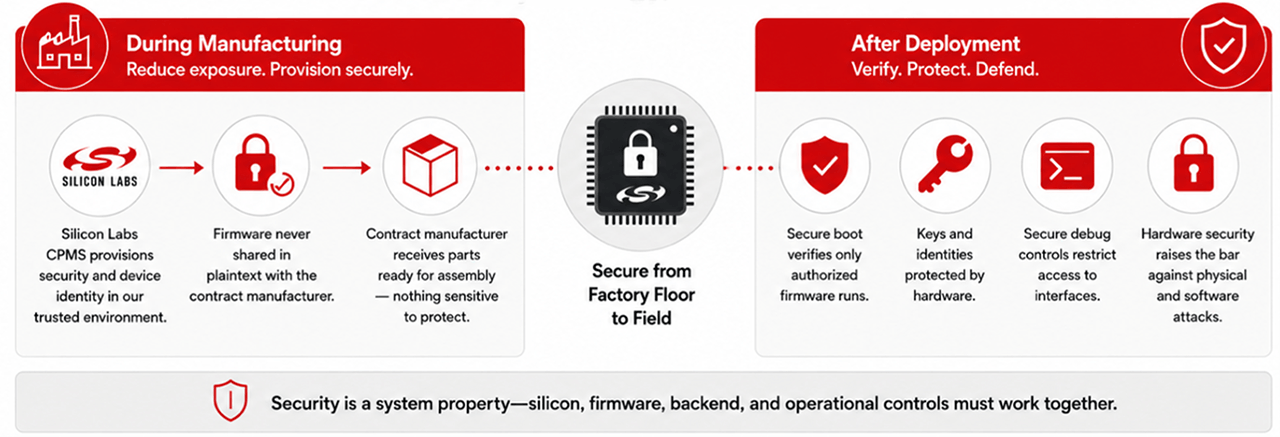
For IoT manufacturers, firmware protection can’t stop once a device is deployed. Protection needs to begin before firmware ever reaches the manufacturing line and continue throughout the product’s operational life.

The Manufacturing Environment Is Part of the Attack Surface

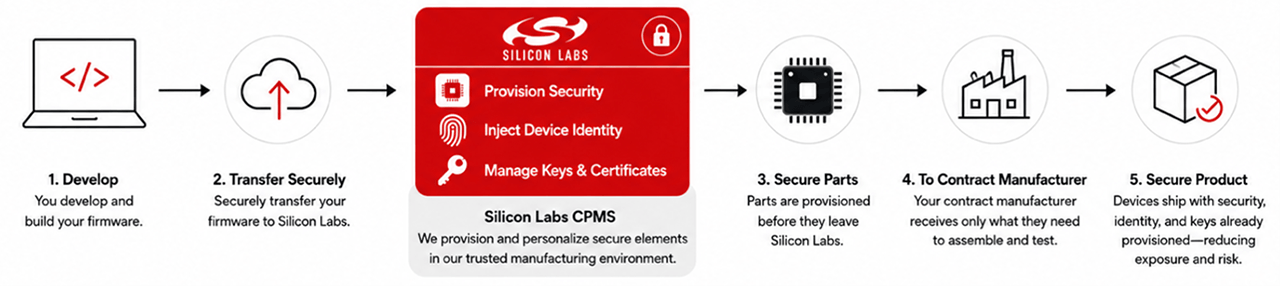
Most IoT manufacturers rely on contract manufacturers (CMs) to program, assemble, test, and package their products. This model offers real advantages in cost, capacity, and geographic flexibility. It also creates a security dependency: a conventional programming workflow can require handing a CM a plaintext firmware image, production credentials, device certificates, or security configuration instructions.

Even when a CM is acting in good faith, that exposure can create real business risk, including unauthorized firmware copying, product cloning or counterfeiting, production beyond authorized quantities, and leaked provisioning keys or certificates. The goal isn’t to assume every manufacturing partner is a threat, but to minimize how much sensitive material the process requires in the first place.

Protecting IoT Firmware Before it Reaches the Contract Manufacturer

Silicon Labs Custom Part Manufacturing Service (CPMS) moves critical programming and security provisioning into the Silicon Labs manufacturing environment. Instead of handing a CM an unprotected firmware image, a device maker can use CPMS to provision security controls before parts ever leave Silicon Labs, so the CM receives only what it needs to assemble the product, not the sensitive material behind it.

CPMS can also help reduce cloning and unauthorized production. Customer-specific part numbers and provisioned device identities give manufacturers more visibility into what’s shipped and can help a cloud service distinguish an authentic, provisioned product from a clone that merely copies application firmware.

Extending Protection After IoT Device Deployment With Secure Vault

Once a device leaves the factory, the threat model changes. Physical access, exposed interfaces, and firmware modification all become possible. Silicon Labs Secure Vault™ is an integrated collection of hardware and software security features, including secure boot, secure debug, hardware cryptographic acceleration, and device identity, that help ensure only authorized firmware runs, restrict access to sensitive interfaces, and protect key material even under physical attack.

In 2025, Series 3 Secure Vault on the SiXG301 became the first product reported to achieve PSA Certified Level 4, a certification focused on resistance to sophisticated physical and side-channel attacks.

One Firmware Protection Strategy, Two Critical Stages

CPMS and Secure Vault address different parts of the product lifecycle. Together, they enable a more continuous approach to firmware protection.

During manufacturing: reduce firmware exposure, provision device identity, and limit dependence on the contract manufacturer’s security infrastructure.

After deployment: verify authorized code, protect key material, control debug access, and raise the difficulty of device-level attacks.

Neither technology replaces secure software development, threat modeling, or supply-chain governance. Security is a system property, and the final protection level depends on how silicon, firmware, backend, and operational controls work together.

Designing Secure Firmware for a Lower-Trust World

AI will continue to improve both defensive and offensive engineering. Device makers can’t rely on firmware obscurity, or on the assumption that reverse engineering is too costly to be practical. The stronger approach is to ensure that valuable firmware is not unnecessarily exposed, that devices only execute authorized software, and that keys and identities are protected by hardware-backed controls appropriate to the product’s threat model.

With CPMS and Secure Vault, Silicon Labs helps customers build security into two of the most important stages of an IoT product’s lifecycle: when the device is manufactured, and when it is operating in the field. In an era of faster, more accessible analysis, that end-to-end view is becoming essential. For a deeper technical look at configuring these protections, including how secure boot and secure debug work together to protect firmware during programming, see the CPMS documentation on docs.silabs.com.

If you’ve been following along with our 100G Ethernet series, you’ve run into a lot of vocabulary that gets used correctly but rarely explained: NRZ, PAM4, insertion loss, Type A versus Type B polarity, and a half-dozen acronyms that all seem to start with a letter that stands for “fiber.” This post is the answer key.

Nothing here is exotic. Most of it is old physics and older standards wearing new urgency, because the same conditions that a 10G link shrugged off for a decade will take down a 25G lane without warning. Bookmark this one — we’ll link back to it instead of re-explaining the same term in every post.

ASIC (Switch ASIC)
The dedicated chip inside a switch that actually moves traffic. Its design and the module you plug in decide which combinations of port speeds a switch can run at once.

BER (Bit Error Rate)
What fraction of bits arrive wrong, written in scientific shorthand: 1e-12 is one bad bit per trillion and healthy; 4e-5 is one per 25,000 and a lane about to become a ticket.

Cassette, Trunk, Patch Cord
The three pieces of a fiber channel. A trunk is the permanent multi-fiber cable running between rooms; a cassette is the panel-mounted box that breaks the trunk out into connectors; a patch cord is the short jumper from panel to equipment. Polarity has to be right across all three, and swapping one can break a channel that worked yesterday.

Clause 82 / Clause 91
Two sections of the IEEE 802.3 standard: one covers how a 100G stream is encoded and split across lanes, the other covers how its errors are corrected. You don’t need the internals — the operationally relevant fact is that on links using this encoding, FEC is a setting a human turns on at each end, and nothing in the protocol reconciles the two ends if they disagree.

CRC / FCS Errors and Discards
Three things your switch counts, and none of them mean quite what they sound like at 100G. A CRC error — which is what most switch CLIs print, though the more precise term is FCS (Frame Check Sequence), and an FCS is a type of CRC — means bit errors exceeded what FEC could correct, and the frame arrived bad. A discard means a frame was dropped on purpose, usually for congestion. FEC repairs damage before either counter is ever checked, so a lane can be bleeding errors quietly while both read zero.

CWDM (Coarse Wavelength Division Multiplexing)
Putting several signals on one fiber by giving each its own color of light. “Coarse” means the colors are spaced far enough apart to keep the optics cheap.

DAC (Direct Attach Copper)
A copper cable with a transceiver permanently attached at each end — no separate optic, no fiber required. Cheap and low-latency over short runs (typically a few meters), but heavier and less flexible than fiber, which is why you’ll find it inside a rack and rarely between racks.

FEC and RS-FEC
Forward Error Correction is extra data sent alongside the real data so the receiver can repair damaged bits itself, with no retransmission. RS-FEC is the specific Reed-Solomon scheme used at 25G and 100G, and it’s strong enough that a badly degraded lane gets repaired completely — which is exactly why the switch’s counters can read zero on a link that’s actually in trouble.

HCL (Hardware Compatibility List)
Your vendor’s official list of exactly which modules, cables, and configurations are supported together. Skipping it doesn’t always break something — but when it does, you’ll be troubleshooting alone instead of with a support contract behind you.

Insertion Loss
How much signal strength is lost end to end across a channel, measured in decibels. Every connector and splice costs a little; the question is whether the total stays inside the budget for the speed you’re running.

Margin
How much abuse a link can absorb and still work — the gap between the signal quality you have and the minimum you need. A 10G lane had enough margin to swallow a dirty connector without anyone noticing; a 25G lane doesn’t, so the same connector now causes errors. Margin is invisible on a healthy-looking link, which is the whole problem: it has to be measured rather than inferred.

MPO / MTP Connector
One connector housing many strands of fiber at once — typically 12, of which a 100GBASE-SR4 link only uses 8. MPO is the generic push-on interface; MTP is a trademarked, higher-performance version of it made by US Conec. It’s what makes parallel-fiber links practical, and it means one reseating mistake can affect several lanes at once.

Multimode and Single-Mode Fiber (MMF / SMF)
Multimode has a wide glass core and is used for short runs inside a building; single-mode has a narrow core and carries a signal much further. OM4, for example, is a multimode grade rated for 100G to about 100 meters — a rating on the glass, not on the current condition of your connectors.

NIC (Network Interface Card)
The network adapter inside a server. A 100G NIC only delivers 100G if everything behind it in the server — the PCIe slot included — can keep up.

NRZ (Non-Return-to-Zero)
The simplest way to send bits over light: on for a one, off for a zero, one bit at a time. Both 10G and 25G lanes use it, but the 10G lanes inside a 40G link run it with far more headroom than the 25G lanes inside a 100G link do.

OTDR (Optical Time-Domain Reflectometer)
An instrument that fires a pulse of light down a fiber and times what comes back, mapping every connector, splice, bend, and break by distance. It rules the cable plant in or out — necessary but not sufficient evidence that a link will actually carry 25G per lane.

PAM4 (Pulse Amplitude Modulation 4)
A way of encoding two bits per symbol instead of one, using four signal levels instead of two. It doubles the data rate over the same signaling rate as NRZ — which is how 25G electrical lanes become 50G and 100G optical links — but it also shrinks the margin between one signal level and the next. That shrinking margin is exactly why FEC becomes mandatory at these speeds instead of optional.

PCIe Gen3 x8
The server slot a network card sits in, described by generation and lane count. That combination tops out near 63 Gbps of real throughput — so a 100G NIC in one of these slots cannot actually reach 100G, no matter how healthy the network on the other end of the cable is.

Polarity, Type A / Type B
Polarity is making sure each transmitting strand lands on a receiving strand at the far end. Type A and Type B are standardized wiring methods that differ in how fiber positions are arranged inside the cable; neither is “correct” on its own, but the cassettes, trunks, and patch cords in a single channel all have to agree, or the link simply won’t come up.

Spine-Leaf
A network design where every access (leaf) switch connects to every core (spine) switch, and leaf switches don’t connect to each other. The leaf-to-spine uplinks are shared paths, so one degraded lane on one uplink can affect a lot of applications at once.

Strand
One individual fiber: a single thread of glass carrying light in one direction — except when using a BiDi (bidirectional) transceiver, which, despite what your instincts about light might tell you, sends signals in both directions over the very same strand at once. An SR4 link uses eight strands, and any single one of them can degrade without the link ever going down.

WDM / DWDM (Wavelength Division Multiplexing)
The general technique behind CWDM: stacking multiple signals on one fiber using different wavelengths of light. DWDM (Dense WDM) packs those wavelengths much closer together than CWDM does, which means more channels per fiber, pricier optics, and typically long-haul or carrier use rather than inside a data center.

Most of these terms only matter the moment something goes wrong — which is exactly when nobody wants to be looking them up for the first time. Keep this page handy.