Processor selection shapes everything that follows in smart device development. Performance, power consumption, connectivity, security and scalability all trace back to decisions made early in the design process.
Modern Internet of Things (IoT) and Edge computing devices keep raising the bar. Capabilities that once defined premium products, such as artificial intelligence (AI) inference and wireless connectivity, now appear across entire product categories.
Engineering teams know the technical requirements. Where things get complicated is balancing those requirements against business realities. So how do you make the right choice?
The first step is to have a structured evaluation framework that aligns processor capabilities with the application’s needs. With this embedded processor selection guide, it’s easier to make the right choice from the start and set products up for success.
Choosing the right embedded processor begins with understanding the differences between microcontrollers (MCU), microprocessors (MPU) and system-on-chip (SoC). Each architecture supports different performance levels, power requirements, software environments and integration capabilities that influence how devices function, develop and scale.
Microcontrollers integrate processing, memory and peripherals into a single chip. Design engineers choose MCUs when applications require deterministic, real-time control that performs specific functions over and over.
Key characteristics of MCUs are:
Advantages of using MCUs include:
MCUs are found in devices like smart thermostats, environmental sensors, health monitoring wearables, smart home automation devices and industrial monitoring systems.
Applications requiring advanced operating systems, multimedia processing or large-scale AI workloads push beyond MCU capabilities. For these use cases, teams need more computational headroom and software flexibility.

Complex operations work better with microprocessors as they prioritize computational flexibility and software sophistication. Unlike MCUs, these microprocessors support full operating systems such as Linux and Android, enabling rich software ecosystems and complex multitasking environments.
MPUs feature:
Typical applications include:
Software requirements often determine architectural suitability before hardware specifications are considered. Operating system compatibility constraints can narrow down processor options early, as teams must consider not only current software needs but also future application requirements.
SoC combines multiple system functions into a single platform. Engineers choose SoC architectures when design objectives favor consolidation over discrete component architectures.
The benefits of SoC integration include:
Common integrated subsystems include:
Smart home devices, industrial equipment, connected displays and advanced IoT products often benefit from strong integration. But not every application needs maximum consolidation.
Engineering teams should evaluate integration levels against specific application requirements rather than assuming that more integration always delivers better outcomes. Some designs perform better with discrete components that allow independent optimization of subsystems.
After identifying the appropriate processor category, engineering teams face the challenge of evaluating the factors that determine real-world performance and product success. Selection criteria should address application requirements, power budgets, AI workloads, connectivity needs, security posture and future expansion plans.
GREENSBORO, NC – July 13, 2026 – Qorvo® (Nasdaq:QRVO), a leading global provider of connectivity and power solutions, today announced it has been recognized by Northrop Grumman Corporation with a 2026 Supplier Excellence Award for Strategic Excellence.
Northrop Grumman acknowledged Qorvo for Strategic Excellence, underscoring the vital role suppliers play in delivering next-generation capabilities across defense systems, including aircraft, missile defense and space platforms.
“Northrop Grumman has a legacy of fostering strong partnerships, a network of hardworking innovators and collaborators striving toward a mutual goal of protecting the United States and its allies,” said Ken Brown, vice president and chief supply chain officer, Northrop Grumman. “From putting the first humans on the moon to introducing stealth technology that revolutionized defense, Northrop Grumman and our partners have continually pushed the boundaries of what is possible.”
“This recognition reflects the strength of our strategic partnership with Northrop Grumman and our shared commitment to advancing next-generation defense technologies,” said Philip Chesley, president of Qorvo’s High Performance Analog business. “We are proud to support mission-critical applications with high-performance RF solutions that help enable global security.”
Qorvo’s contributions include delivering high-performance RF solutions and services supporting mission-critical applications across radar, communications and electronic warfare systems, helping enable advanced capabilities that strengthen the defense industrial base.
Northrop Grumman’s Supplier Excellence Awards highlight the critical role suppliers play in supporting more than 100,000 jobs and generating significant economic impact across the United States.
About Qorvo
Qorvo (Nasdaq: QRVO) supplies innovative semiconductor solutions that make a better world possible. We combine product and technology leadership, systems-level expertise and global manufacturing scale to quickly solve our customers’ most complex technical challenges. Qorvo serves diverse high-growth segments of large global markets, including automotive, consumer, defense & aerospace, industrial & enterprise, infrastructure and mobile. Visit www.qorvo.com to learn how our diverse and innovative team is helping connect, protect and power our planet.
TL;DR
I pay for 1.0 gigabit broadband at home. Like many consumers, I assumed that meant my laptop should be able to enjoy near-gigabit speeds throughout the house.
I was wrong.
During a weekend of real-world Wi-Fi testing in my family’s Scottsdale, Arizona home, I discovered that the broadband speed you pay for and the Wi-Fi performance you actually experience can be two very different things. Near the router, most modern Wi-Fi solutions performed well. But as I moved farther away – through walls, across bedrooms, onto the patio, and eventually behind a suspicious built-in wine closet – the differences became dramatic.
The biggest takeaway of the testing was clear: PCs equipped with premium Intel Wi-Fi 7 solutions that support the 6 GHz band and 320 MHz channels delivered the strongest performance across the home and provided the headroom needed to help users get more of the broadband speed they already pay for.
And yes, in one room, the villain may have been Cabernet Sauvignon.
If I have 1.0 gigabit broadband service at home, why should I choose a laptop PC with a premium Intel Wi-Fi 7 card capable of 5 Gig speeds instead of a PC with a legacy or value Wi-Fi solution that also supports data rates greater than 1,000 Mbps?
On paper, it is a fair question.
If the broadband connection coming into the home is capped at around 1,000 Mbps, and the data rates of several Wi-Fi options can exceed that number, shouldn’t they all deliver roughly the same real-world experience?
That was exactly what I wanted to find out.
The short answer: when you are very close to the router, many solutions can look similar. But as distance, walls, layout, interference, and real home conditions enter the picture, performance starts to separate quickly.
The longer answer became a weekend-long experiment involving eight test locations, multiple Intel Wi-Fi cards, dozens of Ookla SpeedTest runs, one irritated family, one vindicated teenage gamer, and one very suspicious wine closet.
In 2025, the Wireless Broadband Alliance, CableLabs, and Intel collaborated on an extensive Wi-Fi 7 residential performance trial. The trial used commercially available consumer Wi-Fi routers and an Intel processor-based laptop PC equipped with Intel Wi-Fi solutions in a real single-family test house. The results were impressive: Wi-Fi 7 delivered higher throughput across the home, including approximately 3.7 Gbps in the home office and roughly 1.5 Gbps in the basement – a location where other legacy Wi-Fi options had no connectivity at all.
WBA Wi-Fi 7 residential trial results
As someone in the connectivity industry, I thought the results were exciting.
As a consumer, I had a different reaction: That is impressive – but what would happen in my house?
The WBA trial was performed by professional wireless experts using sophisticated tools in a controlled and isolated environment. Most consumers do not live in test houses. Most people I know are not running unconstrained multi-gigabit networks. And while speeds like 3.7 Gbps and 1.5 Gbps are technically exciting, many households today still subscribe to broadband plans closer to 1.0 Gbps.
So, I decided to run my own experiment. Not in a lab. Not on an isolated lot. Not with specialized enterprise-grade test tools. I wanted to test Wi-Fi the way a real family experiences it: in our actual home, with neighbors nearby, using our personal Wi-Fi network, public tools, and our 1.0 Gbps broadband service.
Gigabit broadband is no longer a luxury reserved for early adopters. Across the U.S., faster residential broadband has become more accessible and more affordable. At the same time, household connectivity demand continues to climb. Families are working, learning, streaming, gaming, videoconferencing, sharing media, backing up files, and connecting more devices than ever before.
According to the National Cable & Telecommunications Association, the average U.S. home has about 25 connected devices today, and that number is expected to grow to 44 by 2030. In my own family’s case, with three active children, our home Wi-Fi network already has about 50 connected devices – including computers, tablets, phones, watches, smart TVs, appliances, thermostats, cameras, and even our dog, Gaucho.
Gaucho, our connected dog
Omdia has also projected that nearly 60% of residential households will subscribe to gigabit-or-higher service by 2030, up from roughly one-third in 2025. In other words, more families will soon be paying for gigabit broadband – and expecting that speed to show up where they actually use their devices.
That is where the real question begins. Because buying gigabit broadband is only step one. The bigger question is: how much of that speed actually reaches your laptop in the places where you work, stream, game, and live?
For my test, I compared several PC Wi-Fi options that all support peak data rates above 1,000 Mbps on paper:
| Technology | Band / Channel | Peak Data Rate |
| Wi-Fi 6 | 5 GHz / 80 MHz | 1,201 Mbps |
| Wi-Fi 7 | 5 GHz / 80 MHz | 1,441 Mbps |
| Wi-Fi 6E | 6 GHz / 160 MHz | 2,402 Mbps |
| Wi-Fi 7 | 6 GHz / 160 MHz | 2,882 Mbps |
| Wi-Fi 7 | 6 GHz / 320 MHz | 5,765 Mbps |
At first glance, every one of these should be fast enough for a 1.0 Gbps broadband connection.
But Wi-Fi does not happen on paper.
Wi-Fi happens through walls. Around furniture. Across hallways. Outside on patios. Near appliances. Inside homes full of people, devices, and unexpected obstacles.
So I wanted to answer the question in the most practical way possible: when the broadband pipe is capped at 1.0 Gbps, does a premium Intel Wi-Fi 7 solution still make a meaningful difference in the real world?
Our home is a roughly 5,000-square-foot, single-level house in Scottsdale, Arizona. The main Wi-Fi 7 router sits in the kitchen pantry, where the home’s wiring is concentrated. For the test, I used the publicly available Ookla SpeedTest application and installed Intel Wi-Fi cards from multiple generations in the same laptop PC so I could compare relative performance under similar conditions.
I tested Wi-Fi 6, Wi-Fi 6E, and Wi-Fi 7 technologies across 5 GHz and 6 GHz bands, using 80 MHz, 160 MHz, and 320 MHz channel configurations. I selected eight locations around the house, including an outdoor patio, and averaged the top five download speed results for each test case.
What began as a simple curiosity quickly turned into a full weekend project. After repeated speed tests, Wi-Fi card swaps, and requests that nobody in the family use the network until I was finished, I became – briefly – the least popular person in the house. But the results were worth it.
Aguirre home test floor plan
The floor plan shows the eight test locations. It also highlights the kitchen pantry where the router sits, the outdoor patio, and the built-in wine closet in the family room. At the beginning of the experiment, the wine closet seemed like an irrelevant architectural detail. By the end, it had become a prime suspect.
The first test location was in the kitchen, only about six feet from the Wi-Fi router in the pantry, with the pantry door closed. This was the easiest possible scenario: very short distance, line of sight, and minimal obstruction.
As expected, all PC Wi-Fi options performed well here. Each delivered speeds close to the maximum practical limit of our 1.0 Gbps broadband service. None exceeded roughly 950 Mbps because of normal networking overhead, but the 6 GHz solutions were slightly faster overall.
Kitchen speed test results
The second location was my home office, where I spend a lot of time on video calls, cloud tools, file transfers, and day-to-day work. This was also the room that originally made me question whether I was getting the broadband performance I was paying for.
In this room, the benefits of Wi-Fi 7 at 6 GHz with 320 MHz channels started to show. The 6 GHz / 320 MHz Wi-Fi 7 solution reached 937 Mbps – very close to the 950 Mbps maximum measured in the kitchen. Other 6 GHz solutions also performed better than the 5 GHz / 80 MHz options, but the 6 GHz / 320 MHz Wi-Fi 7 result was nearly twice as fast as the older Wi-Fi 6 configuration.
Office speed test results
The third test location was my daughter Isabella’s room, about 51 feet away from the router and separated by three walls. Here, the home started to behave less like a spec sheet and more like a real-world Wi-Fi environment.
Most Wi-Fi options struggled, delivering roughly 200 to 300 Mbps – far below the 950 Mbps maximum observed near the router. But the 6 GHz / 320 MHz Wi-Fi 7 solution delivered more than 600 Mbps, roughly two to three times faster than the alternatives.
Bedroom 2 speed test results
The fourth test location was the primary bedroom, which sits closer to the router and has fewer obstructions. Here, the results improved significantly.
The 6 GHz / 160 MHz Wi-Fi 6E and Wi-Fi 7 solutions delivered speeds close to 900 Mbps, outperforming the 5 GHz / 80 MHz options, which landed in the 600 to 700 Mbps range. The 6 GHz / 320 MHz Wi-Fi 7 card reached 946 Mbps – essentially the same practical maximum observed in the kitchen.
Primary bedroom speed test results
Next, I stepped outside to the patio. This location matters because outdoor connectivity has become part of the modern home experience: music by the pool, video calls from the backyard, sports outside, and sometimes work from the patio – although in Scottsdale, that last use case depends heavily on the season.
The 5 GHz / 80 MHz Wi-Fi options delivered about 300 to 400 Mbps. The 6 GHz / 160 MHz solutions improved that to roughly 500 to 600 Mbps. But the 6 GHz / 320 MHz Wi-Fi 7 card delivered more than 800 Mbps, about two to two-and-a-half times faster than the 5 GHz / 80 MHz options.
Patio speed test results
After testing outside, I moved back indoors to the family room. This location was 48 feet from the router, but with a relatively open line of sight.
The results were strong. The 6 GHz / 160 MHz solutions nearly reached 900 Mbps, outperforming the 5 GHz / 80 MHz options. Once again, the 6 GHz / 320 MHz Wi-Fi 7 card delivered the best result, reaching 943 Mbps – nearly identical to the maximum measured near the router.
Family room speed test results
The seventh test location was my son Frankie’s room, 66 feet from the kitchen router and behind two walls. Given the distance, I had modest expectations.
Instead, the results were surprisingly good. Most options delivered between 500 and 700 Mbps. But the 6 GHz / 320 MHz Wi-Fi 7 card exceeded 900 Mbps, coming impressively close to the 950 Mbps practical maximum measured next to the router.
Bedroom 3 speed test results
The eighth and final test location was my son Carlos Jr.’s room. It was the farthest location from the router – 78 feet away – and had the most obstructions, with four walls in the signal path.
After seeing more than 900 Mbps in the neighboring bedroom, I expected decent performance. Instead, the results were shocking. No Wi-Fi solution exceeded 200 Mbps. The 6 GHz / 320 MHz Wi-Fi 7 card still delivered the best result at 194 Mbps, but the overall performance was far below every other room tested. Something was different here. And that something needed an explanation.
Bedroom 4 speed test results
When all eight locations were combined, the pattern was clear. In nearly every test location, the 6 GHz Wi-Fi options outperformed the 5 GHz alternatives. The 6 GHz / 320 MHz Wi-Fi 7 solution delivered the best overall performance across the home and often did so by a considerable margin.
The only exception was the farthest and most challenging location, where newer Wi-Fi 6E and Wi-Fi 7 cards operating in 5 GHz / 80 MHz mode outperformed their 6 GHz / 160 MHz configurations. My assumption is that, in that extreme location, the propagation advantage of 5 GHz began to outweigh the channel-width advantage of 6 GHz / 160 MHz. However, the 6 GHz / 320 MHz Wi-Fi 7 solution still performed best overall because its much larger channel size provided a significant data advantage.
Phase 1 combined results
So, returning to the original question: If I have 1.0 gigabit broadband, why should I choose a PC with a premium Intel Wi-Fi 7 solution?
Because near the router, many Wi-Fi solutions may look good enough. But real homes are not built around routers.
As distance and obstacles increase, the ability to maintain speeds close to the broadband maximum becomes much more difficult. My testing showed that the Intel Wi-Fi 7 solution supporting 6 GHz and 320 MHz channels provided the performance headroom needed to help deliver more of the broadband speed I was already paying for across more of my home.
But the story was not over. There was still one mystery left to solve.
The main technical question had been answered, but I could not stop thinking about the final test location. Why was Carlos Jr.’s room so much worse than the bedroom right next to it?
This mattered because Carlos Jr. is an avid online PC gamer. For years, he had complained about poor Wi-Fi performance in his room. Like many parents, I was skeptical. “The Wi-Fi is fine,” I would tell him. After all, I was paying for gigabit broadband. As it turns out, he may have been right all along.
The timing of my test project happened to coincide with his birthday, so I promised to finally investigate. Looking back at the floor plan, one detail suddenly stood out. Directly between the kitchen pantry router and Carlos Jr.’s room sits our built-in wine closet.
At first, the idea sounded ridiculous. Could a collection of glass bottles filled with liquid really be sabotaging Wi-Fi performance?
After a quick online search, I confirmed that in fact, liquids can interfere with Wi-Fi signals because radio waves are electromagnetic energy, and water molecules can absorb that energy. Wine, inconveniently for my son’s gaming performance, is mostly water.
My son’s greatest online gaming enemy may not have been lag. It may have been Cabernet Sauvignon.
At this point, I had three options:
For his birthday, I chose option three. I purchased a second high-end Wi-Fi 7 gaming router to use as a satellite extender. My son and I placed it in an adjacent room with a clearer path back to the main router, avoiding the direct signal path through the wine closet.
Wi-Fi 7 extender setup
The next question was which wireless backhaul link to use between the satellite and the main router.
My initial instinct was to use a 6 GHz / 320 MHz backhaul link because that seemed like the fastest and most obvious choice. Initial testing showed a major improvement: all PC client Wi-Fi types jumped to roughly 700 to 800 Mbps, compared with less than 200 Mbps before the satellite.
That was already a big win. But in our house, apparently, big win was not enough. Carlos Jr. could not accept that his younger brother Frankie, in the bedroom next door, was still getting more than 900 Mbps.
So the optimization continued. We theorized that the satellite may have been spending too much 6 GHz airtime communicating with both the PC client and the main router over the same radio. To test that theory, we changed the backhaul link to 6 GHz / 160 MHz. Unfortunately, that made 6 GHz PC client performance worse, with speeds around 500 Mbps, because the same 6 GHz radio was still sharing airtime between client and backhaul – now with narrower channels.
Finally, we changed the backhaul to a 5 GHz / 80 MHz link. This caused 5 GHz PC client speeds to drop to around 400 Mbps, which was still nearly three times better than the pre-satellite performance. But the biggest benefit was that 6 GHz PC client connections were now freed up. With the satellite using 5 GHz for backhaul, the 6 GHz / 160 MHz and 6 GHz / 320 MHz PC client speeds exceeded 920 Mbps – very close to the maximum gigabit broadband speeds measured near the router.
The final configuration delivered exactly what we wanted. Carlos Jr. got the gaming-room Wi-Fi performance he had been asking for. Frankie’s room still performed well. And I did not have to move several cases of wine.
The second phase of testing confirmed that a PC with a premium Intel Wi-Fi 7 solution can make a major difference – and that a Wi-Fi 7 extender can help solve difficult home-layout challenges when needed.
Phase 2 extender results
In the original problem room, performance improved from below 200 Mbps to more than 920 Mbps for 6 GHz client connections after adding the satellite extender and selecting the right backhaul configuration.
That is the difference between “Why is the Wi-Fi so bad?” and “Everyone can finally stop complaining.” At least about Wi-Fi.
Before this project, I understood intellectually that Wi-Fi performance depends on more than broadband speed. After this project, I experienced it in most of the rooms of my house.
Near the router, most modern PC Wi-Fi solutions were able to approach the practical limit of my 1.0 Gbps broadband service. But as I moved farther away – through walls, across bedrooms, outside to the patio, and around unexpected obstacles – the performance gap widened.
The Intel Wi-Fi 7 solution supporting 6 GHz and 320 MHz channels consistently delivered the strongest overall results and often maintained speeds much closer to the maximum broadband performance available in my home. In the most challenging room, adding a Wi-Fi 7 extender and optimizing the backhaul created a dramatic improvement.
So, if you are paying for gigabit broadband, the question is not just whether your router or internet plan is fast enough. The question is whether your PC can actually take advantage of that speed where you use it.
The broadband speed you pay for enters your home at one location. However, your actual Wi-Fi experience must follow you everywhere else.
And in my house, that journey went through eight rooms, three Intel Wi-Fi cards, one impatient family, one very happy teenage gamer, and one wine closet that will forever be viewed with suspicion.
In the end, everyone won. My work setup improved. My kids got better Wi-Fi. My son’s gaming room was finally redeemed. And after an entire weekend of testing, troubleshooting, and chasing megabits across the house, I was finally able to retire from my role as amateur network engineer, pour a well-earned glass of wine, and enjoy it.
by DNSFilter Team on Jul 8, 2026 8:00:02 AM
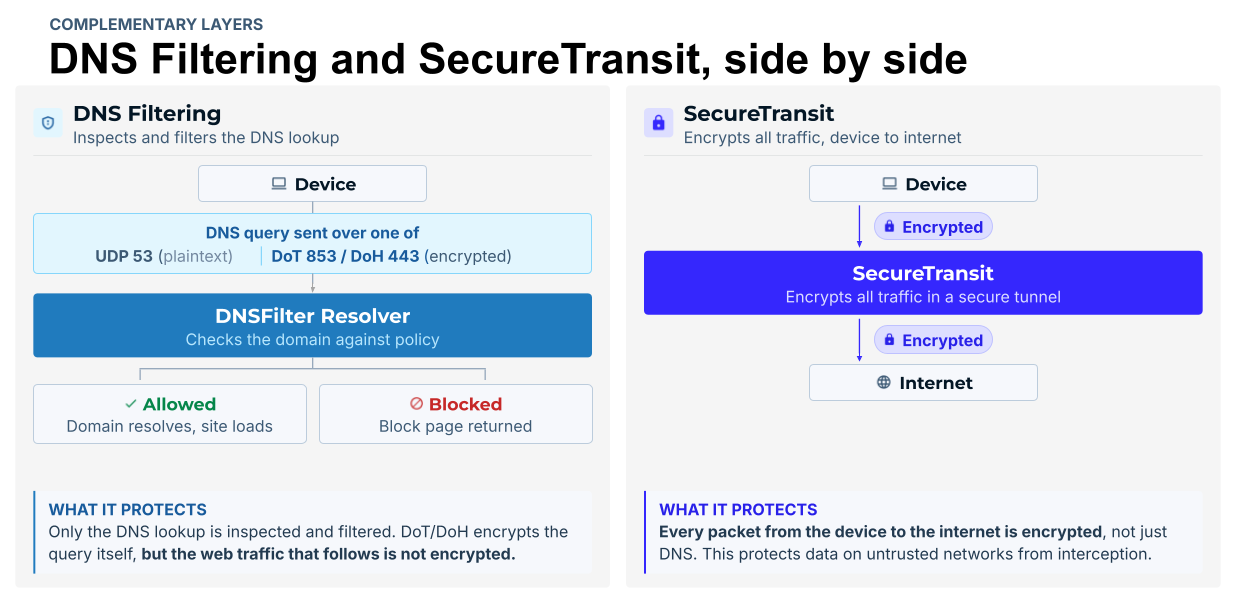
WASHINGTON, D.C. July 08 2026 — DNSFilter, the global leader in AI-powered protective DNS and content filtering, today launched an Original Equipment Manufacturing (OEM) program that lets external ISPs, cybersecurity firms, device makers, and other consumer app developers to embed their best-in-class DNS threat protection, domain analysis, and privacy solutions into their own platforms and solutions. Partners can choose between two product paths: DNSFilter Protective DNS, for DNS-layer filtering and threat blocking, and/or DNSFilter Guardian Firewall and VPN services, for full-device traffic encryption and privacy or bundle both.
The program offers partners three commercial models: resell and bundle, embedded (headless), or white-label co-brand for ISPs and MSSPs. There is no platform lock-in, and integrations block threats from day one. The program is already being used by some of the world’s largest partners today and is now being made publicly available.
“ISPs, device makers, and security vendors have been quietly looking for a DNS protection layer they can trust and build on. We are opening up the same global network that already blocks threats for over 60 million users every day, backed by threat intelligence that catches attacks up to ten days before anyone else. Partners do not have to build any of it, they plug into infrastructure proven at a scale most companies will never touch and ship protection from day one,” said Ken Carnesi, CEO and Co-Founder of DNSFilter.
DNSFilters’ Guardian Firewall and VPN is already running at consumer scale, powering privacy and threat blocking on Amazon’s eero home and small business networks. Today, DNSFilter’s existing OEM integrations support upwards of 65 million users daily.
The move marks a significant expansion of DNSFilter’s reach. Today, the company’s platform processes 200 billion DNS queries per day across a global dual anycast network spanning more than 225 servers in over 85 countries, blocks more than 235 million threats per day, scans 2 million domains per second, and protects over 45,000 organizations. With the OEM program, that same protection, running at production scale across millions of devices, is now available to power the next generation of security products built by partners, wherever their customers are.
To better facilitate developers who need to map out, configure and model their systems prior to initiating an OEM partnership with DNSFilter, a dedicated developer Software Developer Kit (SDK) has been created to compress the time from interest to integration and is currently deployed on over 2 million devices at scale. Rather than navigating a lengthy procurement process, developers can access a sandbox environment, run their first privacy block in minutes, and build from there. The SDK supports integration across iOS, macOS, tvOS, Android, FireOS and Windows.
“Partners told us the fastest way to earn their trust was to put the platform in their developers’ hands and get out of the way. That insight drove everything about how we created our OEM program. When a developer can spin up a sandbox, write a policy, and see a real threat blocked, that’s when trust moves from the sales team to the engineering team,” said Kate Trojanowski, VP of Product and Engineering, DNSFilter. “The OEM program now formalizes that path for the next wave of partners.
“The window to get ahead on embedded DNS protection is now and the organizations moving early will have a real advantage as built-in security becomes the expectation. DNSFilter has proven this model at scale across thousands of organizations. This program gives partners the infrastructure and support to grow with it,” said Warren Small, Founder and CEO, Castle Ventures.
The OEM and Embed Partner Program is open now. Partners can explore partnership options and request SDK access at dnsfilter.com/oem or emailing OEM@dnsfilter.com.
With the Q2 release of Simplicity SDK for Zephyr, support for the SiWx917 is expanding. This is a meaningful step forward and provides developers a more mature Zephyr path for building with the SiWG917, supported by continued validation with a focus on product development.
This release offers an opportunity to take a fresh look at the SiW917 and what it represents for manufactures of energy-sensitive IoT devices. A key feature is that the SiWx917 brings together ultra-low-power Wi-Fi, Bluetooth Low Energy (LE), and application processing integrated on one device. In this blog, we’re going to take a closer look at what the SiWx917 + Zephyr means for developers.
The quality levels associated with Simplicity SDK for Zephyr map to concrete commitments and provides insight into a fully tested development tool. These levels include:
If you’re unfamiliar with the SiWx917, or haven’t looked closely at it lately, here’s why this is interesting. The SiWx917 is an ultra-low-power Wi-Fi 6 + Bluetooth LE 5.4 wireless SoC with an integrated Arm Cortex-M4F application processor (up to 180 MHz), radio, and security — all in a single 7×7 mm package. It’s available with as much as 8 MB of in-package Flash and includes a full complement of digital and analog peripherals.
It’s built for the kind of devices where battery life and board space are at a premium, including smart home sensors, wearables, connected health, asset tracking, and industrial IoT devices. On Zephyr, the SiWx917 is supported as a wireless SoC, giving developers a flexible path for building connected applications on a single device. Now all of that is available with the flexibility of Simplicity SDK for Zephyr.
Bringing the SiWx917 to GA brings much of its Wi-Fi capability into production-ready Zephyr environments. On Zephyr, the SiWx917’s Wi-Fi feature set covers the core requirements real products depend on, including reliable connectivity, security, power-aware operation, and the flexibility needed to support connected devices across a range of IoT use cases.
These features have been through additional levels of testing and a few capabilities continue to mature at earlier quality levels, so the Quality Levels page remains the authoritative, feature-by-feature reference — always worth checking against your specific design.
The SiWx917 isn’t just a Wi-Fi part, and its Bluetooth LE support moves to GA in this release as well. The Bluetooth LE feature set on Zephyr is genuinely broad and includes:
That’s enough to build modern, secure Bluetooth LE applications, from simple peripherals to more sophisticated multi-role designs, on the same chip handling your Wi-Fi.
The appeal of the SiWx917 has always been the combination of capabilities: Wi-Fi 6, Bluetooth LE, and an application MCU. What the Q2 release changes is the foundation you build that combination on. A GA-quality Zephyr target means a complete feature set, full verification against the test plan, and a real support path — the things you need to take a design from prototype to production with confidence.
The full, feature-by-feature breakdown of quality levels for Wi-Fi, Bluetooth, drivers, security, and bootloaders lives here: Quality Levels — Simplicity SDK for Zephyr.
WiFi 8 isn’t about more speed — it’s about disappearing entirely, creating a network so steady you’ll stop thinking about it even as more devices join in. The technology to power today’s connected home already exists, and it’ll only keep improving — but if you need performance now, waiting isn’t the answer.
Today, the average home supports about 17 connected devices. These devices aren’t bandwidth-heavy laptops or TVs – they’re AI voice assistants, always-on smart locks, light bulbs, thermostats, sensors, and appliances that depend on reliable, uninterrupted connectivity rather than raw speed. As more connected devices enter the home, networks must deliver a seamless connectivity experience now more than ever.
For years, each new WiFi generation arrived with a familiar promise: more speed, more bandwidth, more capability. Wi-Fi 7 brought multi-gigabit performance, and the level of responsiveness modern homes need. But the next chapter of WiFi is not just about going faster.
That is where WiFi 8 comes in. Rather than focusing primarily on speed, it represents a shift toward greater stability, consistency, and intelligent connectivity, building on what WiFi 7 already made possible. The next generation of wireless technology goes beyond faster data speeds by improving how networks handle more connected devices.
NETGEAR has navigated every major WiFi transition — WiFi 5, 6, 6E, and 7 — and that experience shapes how we think about what comes next. And while we work toward bringing WiFi 8 to our products, the standard isn’t ready yet. Let’s look at what’s in front of us right now with WiFi 7.
WiFi 7 is the most capable wireless technology widely available today, and for most homes, it already delivers more than enough performance. It is built on the progress made by WiFi 6 and WiFi 6E, which introduced faster speeds, lower latency, and better support for crowded environments. WiFi 7 takes that foundation further, giving households the performance needed for 4K and 8K streaming, cloud gaming, video calls, smart home devices, and connected work and entertainment.
WiFi 7 isn’t the end of its story. It’s the foundation for the next wave of connected experiences, providing the performance today’s households need while paving the way for the innovations WiFi 8 will help unlock.

Each WiFi generation has solved a different challenge. WiFi 6E expanded capacity by opening a new spectrum, much like adding an express lane to a busy highway. WiFi 7 raised the speed limit, allowing more devices to move data faster than ever before. WiFi 8 will take a different approach. Rather than simply increasing speed, it will focus on managing traffic more intelligently, so everything flows more smoothly, even when the network is busy.
In other words, WiFi 7 made WiFi faster, while WiFi 8 will make WiFi feel smarter. With WiFi 8, connectivity will feel so natural that you will rarely think about your WiFi at all. The next generation of homes will include more devices competing for reliable, always-on connectivity. Although many of those devices transmit very little data, they can’t afford interruptions. By improving how networks handle congestion, interference, and simultaneous connections, WiFi 8 is being designed to deliver greater consistency as connected homes continue to evolve.
The WiFi standard matters, but the experience built on top of it matters just as much. That’s where NETGEAR stands out – and it’s the lens through which we’re approaching WiFi 8. A new WiFi generation isn’t defined by when a router first reaches the market. It depends on the entire ecosystem evolving together. When those pieces mature cohesively, consumers experience the full benefits of a new wireless standard. That’s the approach NETGEAR has taken across every WiFi generation, and it continues to guide how we’re preparing for WiFi 8.
AI is reshaping real-world Wi-Fi usage as devices increasingly send data for image, text, and video processing.
James Chen, VP of Technical Product Marketing at MediaTek, highlights how Wi-Fi 7 improves uplink efficiency to support this shift, while Wi-Fi 8 further enhances connectivity through lower latency and seamless roaming for a more stable and consistent experience across devices and environments.

The 2026 World Cup isn’t just a global event, it’s a full-scale stress test for networks under real-world pressure. Hotels across North America are seeing surges in occupancy, with many properties operating at or near capacity. Every room is occupied. Every screen is on. Guests are streaming matches, posting highlights, and connecting multiple devices at once.
What used to be predictable peaks in network usage has shifted into something far more demanding, constant, high-density connectivity throughout the day. And in this moment, one thing becomes clear: when connectivity struggles, the entire guest experience feels it.
During moments like this, demand doesn’t just grow, it concentrates, spikes, and never slows down. A single room can now generate more data traffic than entire floors did just a few years ago, and it’s happening everywhere, all at once. Lobbies are packed, viewing areas are full, and operational systems are running nonstop in the background.
Many networks don’t fail because they lack bandwidth, they fail because they can’t adapt. They react too slowly, rely on manual intervention, and struggle to balance guest traffic with critical hotel operations. That reactive model simply doesn’t hold up when thousands of devices are online simultaneously.
Guests don’t think about connectivity – until it breaks at exactly the wrong moment. Buffering in the middle of a decisive goal. Dropped connections in a crowded lobby. Digital services like kiosks, hotel apps and mobile check-in slow exactly when guests need them the most. Inconsistent performance from one area of the hotel to another.
During a high-profile event like the World Cup, these experiences don’t stay private. They surface immediately in reviews, social posts, and real-time feedback. The impact to hotel owners is direct and measurable: lower guest satisfaction, operational strain, and missed revenue opportunities. When the network fails, the guest experience fails with it.
The challenge doesn’t stop with guest Wi‑Fi. Behind the scenes, hotel operations rely on the same infrastructure, supporting smart locks, IPTV, security systems, property management platforms, and staff communications. During peak demand, these systems must perform flawlessly, even as guest traffic surges. That creates a balancing act. Connectivity is no longer just a guest amenity; it’s the foundation for both the guest experience and the hotel’s ability to operate efficiently.
Handling this level of demand isn’t about adding more capacity, it’s about adapting in real time. Modern hospitality environments require infrastructure that can continuously optimize performance, intelligently distribute connections, and maintain consistency across every space on the property. In high-density areas, adaptability becomes the difference between stability and disruption.
This is where purpose-built solutions like RUCKUS access points and AI‑driven network management platform such as RUCKUS One® make a difference, helping manage interference, balance client loads, and delivering reliable performance even at peak occupancy. The goal isn’t just to keep up. It’s to stay ahead of demand as it grows.
World Cup is not a one-time anomaly. It’s a preview of where hospitality is heading. Device density will continue to rise. Guest expectations will continue to grow. Digital services will continue to expand across the hotel experience. Networks must evolve alongside these shifts, delivering consistent performance, faster responsiveness, and greater operational simplicity through automation. Adaptive, resilient networks are no longer optional. They’re becoming the standard for how connectivity supports modern environments.
At moments of peak demand, the difference between properties becomes obvious. Where networks perform, everything else follows. Guests stay connected without frustration. Services remain responsive, staff operate efficiently and operations continue without disruption. It’s not just better performance – it’s a better experience. And it’s one guests remember.
The World Cup will come to an end – but the elevated demand it exposes will continue long after the final match. Hotels that use this moment to evaluate and improve their network infrastructure will be better prepared for what’s ahead. Those that don’t will continue to feel the strain as expectations rise with every major event. The question isn’t whether demand will increase -it already has. The question is whether your network is ready to keep up. Your guest experience deserves a winning game plan. Talk to a RUCKUS specialist about your property’s network readiness.
*FIFA World Cup 2026™ is a trademark of FIFA. RUCKUS Networks is not affiliated with, endorsed by, or sponsored by FIFA.