If your infrastructure predates 2016, you built it around a simple mental model: more speed means a bigger, faster version of the same thing. That model breaks completely once you cross into 25G-and-up territory. The lane architecture changes, the optics change, the error-correction requirements change, and the failure modes change. None of it is a firmware update away.
This is the first post in a series on high-speed Ethernet. Before we get into transceivers, polarity, and FEC in detail, here’s the architecture you need to understand first.
A lane is a single electrical or optical path running at a fixed signaling rate. Everything above 10G is built by bundling lanes, not by cranking up a dial.
This is where a lot of confusion starts, because “four lanes” doesn’t mean the same physical thing across every variant. 40GBASE-LR4 and 100GBASE-LR4/ER4 genuinely do run multiple wavelengths over a single strand of single-mode fiber using CWDM (Coarse Wavelength Division Multiplexing – several wavelengths spaced far enough apart that the lasers don’t need precise temperature control, combined and split inside the transceiver itself) , that’s true WDM. But the short-reach variants most data centers actually deploy, 40GBASE-SR4 and 100GBASE-SR4, use parallel fiber: four separate transmit/receive fiber pairs inside one MPO/MTP connector, each carrying its own lane on multimode fiber. No wavelength multiplexing involved. Mixing these two models up is one of the most common misunderstandings people carry into their first 100G deployment, and it matters the moment you’re troubleshooting a link and trying to figure out whether you’re chasing a wavelength problem or a fiber-pair problem. In short, SR4 and LR4 both say “4,” but one means four fibers and the other means four colors , which is exactly what determines whether a bad link is a fiber-pair problem or a wavelength problem.
And for anyone about to ask “what about 50G” , 50G doesn’t scale the way 40G and 100G do. Those two bundle more lanes at a fixed per-lane rate , four 10G lanes and four 25G lanes respectively. Single-lane 50G (802.3cd) keeps one lane and changes the modulation instead, using PAM4 signaling (four amplitude levels per symbol, carrying two bits per signaling interval) on one lane to hit 50 Gbps, versus four lanes of NRZ signaling (the older two-level scheme that carries one bit per interval) for 100GBASE-SR4. Different modulation, different lane count, different electrical characteristics. It’s architecturally its own thing, not a stepping stone between 25G and 100G.
Speed adoption moves from the core outward , financial trading floors and hyperscalers push 100G first, everyone else follows on a slower curve. Right now 40G and 25G are sitting in the price/performance sweet spot for campus aggregation, hospital networks pushing real-time imaging and patient data, and on-prem data centers that don’t have hyperscaler budgets or hyperscaler traffic volumes.
Two practical reasons 40G survives:
25G per lane became the industry’s building block because the math scales cleanly , 4x25G gets you 100G, 4x100G gets you 400G. It’s also economically attractive: 25G optics have come down in price enough that they’re now routinely deployed at scale in leaf-spine fabrics, commonly in a 48x25G-server / 6x100G-uplink rack layout, all running the same underlying lane technology.
The catch is signal tolerance. A 25G lane is far less forgiving of loss and reflection than a 10G lane running over the same physical plant.
Pro tip: OM4 multimode fiber that’s carried 10G cleanly for years is not automatically ready for 25G or 100G-SR4. A connector that’s slightly dirty or has minor end-face damage will barely register as a problem at 10G and will cause consistent packet loss at 25G. Clean and inspect your connectors, and test the actual link before cutover , don’t assume a fiber plant “passes” just because it’s been quiet at a lower speed.
Because 100G-SR4 is four independent 25G lanes, any marginal condition that a single 25G lane tolerates gets multiplied across the link. A cabling plant that was “good enough” for 40G (4x10G, NRZ, more forgiving) can fail outright at 100G with random packet loss and flapping links , not because anything changed, but because the margin for error that existed at 10G-per-lane never existed at 25G-per-lane.
Two specifics worth knowing before you deploy:
FEC often has to be configured manually, not negotiated. For optical modules using clause 82/91 encoding, FEC is typically a manual setting on both ends of the link , mismatched FEC settings between two devices is a classic cause of a link that “should work” but doesn’t. (Backplane/copper links using clause 73 autonegotiation are the exception , FEC there can be negotiated automatically.) Check both ends explicitly; don’t assume. (Note these clause numbers are section numbers within IEEE 802.3, not vendor settings.)
There’s no auto-MDIX equivalent on fiber. Auto-MDIX is a copper concept. On fiber, TX/RX polarity has to be managed correctly across the MPO cassette, trunk, and patch cords, and getting it wrong doesn’t throw an obvious error , it just doesn’t link, or links with faults that look unrelated to polarity. We’ll dedicate a full post in this series to sorting this out.
The IEEE standard is the floor, not the ceiling , vendors regularly build proprietary features on top of it. BiDi optics are a good example: early proprietary BiDi implementations locked you into a single vendor’s transceivers, though standards-based BiDi from multiple transceiver vendors is now interoperable in many cases. Worth confirming compatibility explicitly rather than assuming either way, since it varies by vendor and product line.
Where mixed-vendor risk is still very real is troubleshooting: if you’re running third-party optics and a link fails, vendor support will often point at the module first, whether or not it’s the actual cause. That’s the practical case for vendor-neutral test equipment , something that lets you validate the physical layer, confirm FEC settings on both ends, read pre-FEC bit error rate per lane, and verify end-to-end performance with the actual modules you’re deploying, before anything touches production. The pre-FEC number is the one worth insisting on. FEC will mask a marginal lane completely: the link looks flawless after correction while error correction is quietly running near its limit, and then it falls over the first time anything on the plant shifts , a patch cord reseated, a temperature swing, a connector that picks up dust. Post-FEC clean tells you the link works today. Pre-FEC tells you how much margin you have left, which is the whole question at 25G per lane. We’ll come back to this later in the series. It turns “swap parts and see if it goes away” into an actual diagnosis.
Ready to get into the technical details? Follow along with our complete series to make sure your next network upgrade actually works the way you expect it to:


Fast, reliable connectivity is essential for high-performance IoT devices, particularly those running AI applications that need to process information in real time to make decisions. To meet this growing need, we unveiled the MediaTek MT8875, our next-generation Modem-Based IoT 5G platform for mobile enterprise, industrial, and smart retail IoT applications.
Building on the success of MT8873, MT8875 integrates several new connectivity enhancements for higher speeds, better coverage, and greater power efficiency. MT8875 supports 3GPP Rel. 17 for improved reach and greater energy efficiency. Other upgrades include 3CC up to 220 MHz, enabling peak data rates of 5.14 Gbps for a notable improvement in data flow, download capacity, and speed. MT8875 also supports optional satellite NTN, keeping devices connected no matter the location.
By supporting both Wi-Fi 6E and Wi-Fi 7, MT8875 gives designers the flexibility to select the connectivity solution that best fits their performance, power, and cost requirements. For more demanding applications, its Wi-Fi 7 capabilities include tri-band multi-link operation for greater throughput, more reliable connections, and lower latency.
MT8875 delivers over 12.8 TOPS of generative AI acceleration and supports the latest LLMs, more than doubling the TOPS of its predecessor. This AI performance is essential for enterprise, industrial, and smart retail applications that require real-time responsiveness and automated system monitoring. In smart retail, MT8875’s AI capabilities improve user experiences for self-service kiosks and interactive digital signage and menu boards. Additionally, in automatic identification and data capture (AIDC) applications, these AI capabilities help save workers’ time with quick product identification and data input.
Based on TSMC’s advanced, low-power 4nm process, MT8875 features an enhanced, octa-core CPU architecture with four performance and four efficiency cores to deliver breakthrough performance. This balance of performance and power efficiency is especially important for function-specific industrial HMI applications that must respond quickly while minimizing power consumption. The chipset comes in a compact form factor, freeing valuable space for power- and size-constrained IoT devices.
Vision-based systems, screens, and digital displays are common form factors for devices in enterprise, industrial, and smart retail. MT8875 supports 32MP or dual 16MP camera configurations at up to 30 frames per second. These multimedia features are critical for advanced industrial HMI displays, which rely on smooth, responsive graphics performance. In retail settings, these features make self-service kiosks, digital signage, and POS terminals more intuitive to use.
As AI redefines what’s possible in the IoT, MT8875 brings together advanced 5G, Wi-Fi 6E and Wi-Fi 7, satellite NTN connectivity, and powerful on-device generative AI acceleration. Combined with its compact, power-efficient design, these capabilities give OEMs the flexibility to create a new generation of intelligent, always-connected enterprise, industrial, and smart retail devices.
In addition, MT8875 integrates high‑speed USB 3.2 dual‑mode, PCIe Gen 3, I2C, I3C, UART, and I2S interfaces that allow flexible peripheral expansion and function extension for diversified IoT applications.
Check out more details about MT8875 and read more about MediaTek’s IoT portfolio.
Restaurant marketers spend a lot of time trying to grow their customer database through website forms, loyalty programs, social media campaigns, email sign-ups, and mobile apps. While these channels can be effective, they all rely on one thing: getting customers to take an extra action.
Guest WiFi is different.
Every day, guests walk into your restaurant and connect to WiFi while they dine, work, browse social media, or communicate with friends and family. Unlike most marketing channels, guest WiFi engages customers during an actual visit, creating a natural opportunity to collect permission-based first-party data while they’re already on-site.
For many restaurants, guest WiFi becomes one of the largest sources of new customer records. A typical restaurant with two WiFi access points may collect around 700 new guest records per month, often far exceeding the number of contacts generated through website forms, social campaigns, loyalty enrollments, or email sign-ups.
The value goes beyond simply collecting email addresses. Modern guest WiFi platforms help businesses understand visit frequency, identify returning guests, recognize customer preferences, and build richer guest profiles based on real-world behavior. This allows marketing teams to create more personalized campaigns that drive repeat visits and strengthen customer loyalty.
As privacy regulations continue to shift the marketing landscape toward first-party data, businesses that own direct customer relationships gain a significant advantage. Rather than relying solely on advertising platforms and third-party audiences, restaurants can build and grow a database made up of actual guests who have visited their locations.
The most successful restaurant marketers understand that the goal isn’t simply collecting data. It’s creating stronger guest relationships, increasing visit frequency, and driving long-term customer value. Guest WiFi helps make that possible by turning anonymous visitors into known guests and creating new opportunities for engagement after every visit.
The next time you think about guest WiFi, don’t think of it as just an amenity. Think of it as one of the most powerful guest acquisition and marketing tools already operating inside your restaurant.
GoZone Guest WiFi helps restaurants capture, identify, engage, and grow by turning everyday guest visits into lasting customer relationships. Grow Every Visit™.
Modernizing a military network takes more than upgrading access points. To get the full value from Wi-Fi 7, military installations also need the right cabling, switching, power, uplinks, and security architecture in place. This blog looks at how a coordinated approach to network modernization can help support mission-critical applications, mobility, and future technologies across the base.
What happens if a military base deploys Wi-Fi 7 access points (APs) but keeps the existing cabling and switches? The APs are ready for multigigabit speeds. The network underneath isn’t. Legacy cabling, one-gigabit switch ports, limited uplinks, or an insufficient PoE budget can create bottlenecks before traffic ever leaves the wiring closet. New hardware goes on the wall, yet the performance gain stops halfway. Fixing that requires coordinated upgrades across the entire access layer, not just the APs.
A military base functions much like a small city, combining residential and recreational areas with operational and support facilities. Each area’s purpose determines how the network must operate.
For example, barracks and recreation areas place different demands on Wi-Fi than command facilities. Hospitals and specialized agency facilities may rely on the base transport infrastructure while retaining control of their local networks and access policies. Location also affects network design, with outdoor training ranges, flight lines, and other open spaces require wireless coverage where extending fiber is impractical.
To account for variations in coverage and network requirements, network planners must design an edge architecture that matches wired and wireless infrastructure to each location’s operational, security, and performance needs. The architecture must also support Zero Trust access controls and segmentation across the installation’s security domains.
The network architecture must also accommodate changing usage patterns. Military personnel increasingly rely on laptops, tablets, and wearables. Training programs now use virtual reality (VR) headsets, augmented reality (AR) systems, and high-resolution video, creating data-intensive workloads inside training facilities.
Beyond training, drones, smart-building sensors, and AI-enabled applications generate additional traffic at the network edge. Their performance depends on reliable coverage, sufficient capacity, and application-appropriate latency across the wired and wireless path. When edge infrastructure can’t keep pace, operational tasks stall, mission-critical communications degrade, and mobile workflows break down.
Meeting these demands requires an access-layer design based on mission needs. Planners first identify the applications and security domain associated with each environment. Zero Trust planning defines how the network onboards and authenticates users and devices, applies role-based access controls, and segments traffic across security domains. Device density and mobility patterns then inform targets for capacity, latency, and availability.
An infrastructure assessment covers cabling type and condition, switch throughput, port speeds, and uplink utilization. It also verifies the available PoE budget and evaluates AP placement, coverage, and interference.
The same assessment guides the modernization schedule. APs, cabling, and switches often follow different budget and replacement cycles even though they operate as one service path. Managing those cycles separately can limit new equipment’s performance or leave available capacity unused. Although installations may modernize in phases, each phase should include the necessary cabling, switch, and AP upgrades. The design and schedule then establish criteria for selecting wired and wireless components across the complete service path.
For example, RUCKUS Wi-Fi 7 APs connect through multigigabit Ethernet interfaces, while RUCKUS ICX switch configurations pair multigigabit ports with high-power PoE and high-speed uplinks. Within a Zero Trust architecture, RUCKUS APs can enforce role-based access and dynamic VLAN assignment when users and devices connect, while ICX switches extend the same segmentation policies to wired endpoints.
For federal deployments, the RUCKUS portfolio includes FIPS validated products. Planners can combine these components in a common access-layer architecture while addressing mission-specific operational and security requirements across the installation.
Military network modernization is only as strong as the entire access layer. When switching, cabling, power, and wireless infrastructure evolve together, bases can support today’s missions and tomorrow’s technologies with confidence.
Request a RUCKUS Network Assessment to evaluate wireless connectivity, switching infrastructure, capacity, coverage, and uplink utilization across each security domain on your campus.
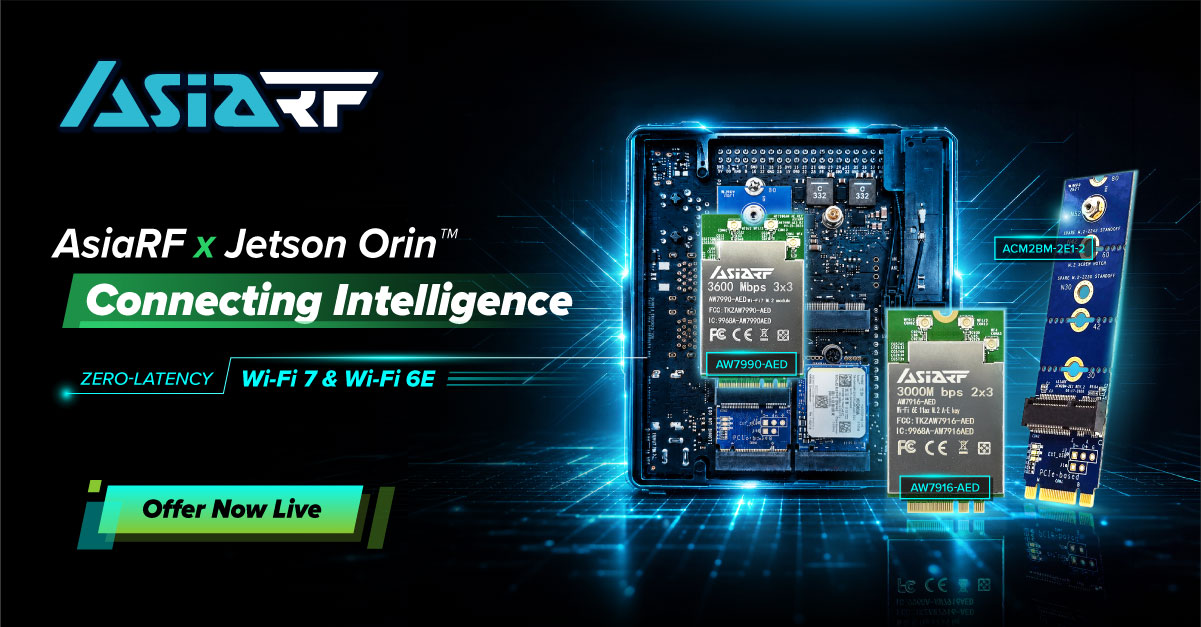
While the NVIDIA Jetson Orin series offers unprecedented compute performance for edge AI—scaling up to 275 TOPS—the efficacy of these deployments is inherently tied to the reliability of the underlying wireless infrastructure. At AsiaRF, we specialize in high-performance wireless backbones engineered to eliminate connectivity bottlenecks, ensuring that your compute resources are fully leveraged in demanding industrial environments.
Complex industrial AI projects often falter during system integration, where developers struggle to balance throughput, redundancy, and network stability. AsiaRF provides a specialized suite of industrial-grade modules that function as a reliable wireless backbone, allowing engineering teams to reallocate critical development resources toward core AI algorithm refinement and application-specific logic.
High-Throughput Wi-Fi 7 Integration: The AW7990-AED module utilizes Multi-Link Operation (MLO) to provide low-latency, high-bandwidth connections essential for real-time 4K video inference, minimizing data transmission lag for high-precision autonomous surveillance.
Long-Range Sub-1GHz Connectivity (Wi-Fi HaLow): Engineered for expansive facilities, our Wi-Fi HaLow solutions provide robust penetration and coverage up to 10 kilometers, operating independently of cellular data costs to ensure long-term operational efficiency.
On-Premises Data Sovereignty: By integrating with our industrial-grade edge server solutions, enterprises can deploy localized LLMs and RAG frameworks, guaranteeing that sensitive operational data remains secure within your internal network.
Robust Mesh Handover Protocols: Optimized for fast, seamless roaming between access points, AsiaRF Mesh technology eliminates packet loss during mobile transitions, ensuring consistent communication stability for Autonomous Mobile Robots (AMRs).
While Wi-Fi 7 represents the cutting edge, Wi-Fi 6E (AW7916-AED) remains a mission-critical choice for industrial applications that require high-density stability and mature ecosystem support. The key benefits include:
Exclusive 6GHz Spectrum Access: Wi-Fi 6E extends the 802.11ax capabilities into the 6GHz band, providing up to 1,200 MHz of additional spectrum. This allows for massive, congestion-free bandwidth—a crucial requirement for factories where dozens of AI-enabled sensors and cameras operate simultaneously.
Deterministic Latency for AI Inference: By operating in the uncluttered 6GHz spectrum, Wi-Fi 6E effectively eliminates interference from legacy devices (2.4GHz/5GHz) that often plague traditional Wi-Fi networks. This provides the “deterministic latency” required for real-time robotic control and precision AI inference.
High-Density Device Orchestration: Utilizing Orthogonal Frequency Division Multiple Access (OFDMA), Wi-Fi 6E manages multiple device data streams with surgical precision. For industrial IoT deployments, this ensures that a high volume of simultaneous data transmissions from Jetson Orin modules do not result in signal collision or degradation.
Battle-Tested Reliability: Unlike the latest standards, Wi-Fi 6E has reached a high level of maturity in driver support, kernel stability, and regulatory compliance worldwide. For production-line deployments where “zero downtime” is the primary mandate, Wi-Fi 6E offers a predictable, proven framework for long-term industrial cycles.
Explore our NVIDIA Jetson-compatible wireless solutions and discover how AsiaRF can accelerate your next Edge AI project.
Learn More & Contact Us: [email protected]
Browse Wi-Fi 7 Solutions: https://reurl.cc/LeM2qL
Browse Wi-Fi 6E Solutions: https://reurl.cc/LeM2gL

For years, the broadband industry competed on speed.
Faster tiers, faster downloads, faster networks.
Then the conversation shifted to Quality of Experience (QoE), recognizing that subscribers care about how their connection performs, not just how fast it is.
The AI era demands another evolution: Quality of Outcome (QoO).
Increasingly, subscribers don’t judge broadband by speed or even connection quality. They judge it by whether they can successfully accomplish what they set out to do. Can they complete the video call? Finish the AI-assisted task? Stream the match without interruption? Secure their connected home without thinking about it?
At the same time, AI is reshaping how people use their home networks. From intelligent assistants and connected security to emerging agentic workflows, the connected home is becoming more dynamic, more personalized, and more dependent on reliable connectivity than ever before.
Plume’s latest research, developed with Parks Associates, explores how AI is redefining what subscribers value most and where providers can create lasting competitive advantage. Our joint whitepaper, Owning the Broadband Subscriber Experience in the AI Era, explores these trends in depth; five ideas stand out to me as particularly important for ISP leaders.
Consumers rarely judge their provider based on a speed test alone.
They judge it by whether video calls stay connected, gaming sessions remain responsive, smart home devices work reliably, and support is given before frustration sets in.
Research from Plume and Parks Associates reinforces this shift, showing that service quality, including Wi-Fi performance and customer experience, has a direct impact on satisfaction, Net Promoter Score, and churn. As performance deltas between providers continue to narrow, not just experience but Quality of Outcome becomes the defining competitive advantage.
AI has quickly become central to conversations across every industry.
But in broadband, intelligence doesn’t come from algorithms alone. It comes from the quality, diversity, and scale of the data used to train them.
This is where platform scale matters.
Every day, Plume’s AI-native platform learns from more than 500 million connected devices, 50 million homes, 450+ ISP partners, and deployments spanning 58 countries. That global intelligence enables pattern recognition no individual operator could develop in isolation.
The value isn’t simply having more data. It’s learning across millions of real-world environments to continuously improve the subscriber experience for every ISP we serve.
Collecting insights is only the beginning.
The real opportunity lies in turning intelligence into action.
That means identifying problems before subscribers notice them. Optimizing performance automatically. Personalizing support based on what’s happening inside the connected home. Helping subscribers stay protected without requiring them to become network experts.
This orchestration layer is becoming one of the most important strategic assets for ISPs. It connects network intelligence, customer care, cybersecurity, and automation into a single, continuously improving experience.
Ultimately, subscribers don’t evaluate each of those capabilities separately.
They simply ask whether their internet works, or, more so, whether they can easily complete all of the tasks they rely on their internet for.
Consumers no longer compare broadband providers solely against other broadband providers.
They compare every digital experience against the best experiences they have anywhere.
Streaming platforms anticipate what they’ll watch next. Navigation apps reroute around traffic automatically. AI assistants increasingly complete tasks with little human intervention.
Broadband is moving in the same direction.
Subscribers will increasingly expect their provider to anticipate issues, resolve problems proactively, and deliver personalized experiences without requiring them to call support.
The future belongs to providers that make complexity invisible.
The most successful providers won’t simply deploy AI.
They’ll use AI to strengthen trust.
That means understanding each household more deeply, reducing friction throughout the subscriber lifecycle, protecting increasingly connected homes, and delivering experiences that feel effortless.
AI isn’t replacing the relationship between ISPs and subscribers.
It’s creating an opportunity to make that relationship stronger than ever.
One idea surfaced repeatedly throughout our joint research:
The next phase of broadband competition won’t be won by delivering more connectivity. It will be won by delivering better outcomes.
For ISPs, that means moving beyond reactive support and embracing intelligent orchestration across the entire subscriber experience.
It also means recognizing that data becomes a competitive advantage only when it’s translated into action.
That’s where AI, global intelligence, and orchestration come together, not simply to optimize networks, but to help providers build stronger customer relationships, improve operational efficiency, and create subscriber experiences that stand apart.
If you’d like to explore these ideas further, I invite you to read the full whitepaper, Owning the Broadband Subscriber Experience in the AI Era, developed in partnership with Parks Associates.
There’s no Ethernet port on tablets. It sounds like a simple, annoying fact, but for Mark Rodrigue, Senior Network Engineer at Room & Board, that simple fact was the spark that changed everything. His team of three manage IT for about 1100 employees across 34 branch locations, split between retail environments, delivery centers, and warehouses. They used to rely on cables for everything because they didn’t trust wireless to be consistent.
But showrooms change often, furniture moves, and displays frequently shift. Chasing those layout changes with a tablet—the primary selling tool for Room & Board design associates—is a massive chore; and since you can’t plug a cable into a tablet, it’s a non-starter.
Mark joined the Heavy Wireless podcast with Keith Parsons and Cisco’s Dan Davis to discuss how they are now using wireless as the primary way to connect. They’re keeping performance high with a lean team—and you can steal from their playbook to enhance your own.
“We don’t really have time and resources to spend managing management tools,” Mark said. That’s the rule. If your tools require a full-time babysitter, you’ve already lost.
By using cloud-based management, the team stopped worrying about the daily care and feeding of the network. They wanted a system that did the heavy lifting. As Mark put it, “The wireless fabric at the location is tracking, monitoring, and validating itself.”
They use the platform’s AgenticOps capabilities to set the guardrails, then step back. Whether it’s letting AI-Enhanced Radio Resource Management (AI-RRM) balance channel distribution or using the Cisco AI Assistant to interpret complex logs, the network stays in its own lane. It’s not about ignoring the gear, it’s about trusting the tech to handle the noise so you can focus on work that actually moves the business forward.
Wireless engineers know the drill. A user complains about slow Wi-Fi. Suddenly, it’s your fault and you spend days chasing ghosts in the logs. Mark calls it getting to “mean time to innocence.” How do you prove the network isn’t the problem? You need proof—now. The team at Room & Board uses the Meraki dashboard to grab proactive packet captures the second a device trips up, providing a perfect snapshot of the failure.
“One of the things that we’ve gotten additional benefit from the platform is the proactive packet capture piece,” Mark explained. “So when there is a failure, the environment has a snapshot at that point in time.”
They don’t guess. They show the data. “It’s not me, it’s you,” is a lot easier to say when you have a packet trace to back it up. It saves days of back-and-forth. It stops the blame game before it starts. By pulling packets from both the air and the wired side of the access point, they get the full story instantly, providing similar level of insight as the network protocol analyzer Wireshark directly within the dashboard.
This shift toward data-driven validation also changed how they handle deployment. Mark’s team no longer performs manual post-deployment site surveys at every location. Instead, they rely on the cloud-managed dashboard to confirm the network is performing as expected. By monitoring roaming times, handoffs, and response times, they can identify sticky or troublesome clients in real time. The roaming analysis in the dashboard has become a core strength, allowing their lean team to validate the network’s health without ever stepping foot on the floor.
“Cisco Cloud Control has allowed us to focus less on navigating management platforms and more on the infrastructure we support. A single platform makes us more efficient, gives us a centralized view of our entire environment, and helps us quickly identify areas that need attention.”
— Mark Rodrigue, Senior Engineer, Room & Board
Tuning channels in a crowded store is a nightmare. Before, the team spent hours tweaking settings for dense spots like Chelsea or San Francisco. Now? The Meraki dashboard handles it. The Room & Board team started using AI-RRM about six months ago. It balances power and channel distribution without a human in the loop. Mark noted, “We’ve been able to free up some capacity on the access points. We’ve also seen a much better balancing in power and channel distribution by letting the platform start to make those decisions on its own.”
It takes a few weeks for the network to fall into a rhythm. Once it settles, its rock solid. They even let the platform learn their busy hours automatically. Now there’s no sudden, disruptive changes while customers are shopping for furniture. It just works.
At the heart of this transformation is Cisco Cloud Control, a unified platform that brings network management into one intuitive, cloud-based dashboard. By centralizing management, the team moved away from the fragmented, manual tasks that used to consume their day. As Mark noted, “Cisco Cloud Control has allowed us to focus less on navigating management platforms and more on the infrastructure we support. A single platform makes us more efficient, gives us a centralized view of our entire environment, and helps us quickly identify areas that need attention.”
Sometimes, AI can’t fix a wall of mattresses. In the warehouses, high-density storage was jamming the signal—a literal wall the team had to solve for. Instead of just increasing the power, they swapped to directional access points, aimed at a 50-degree angle, shooting right down the aisles. Proof that the best fix isn’t always more tech. Sometimes it’s just pointing the antenna the right way.
You don’t need a massive team to run a massive network. You just need to stop letting manual processes keep you so busy that you don’t have time for the bigger-picture stuff. Trust the platform to handle the day-to-day noise so you can focus on what matters for your business.
Mark’s team isn’t just “doing wireless.” They’re building a foundation that the rest of the company trusts. That’s the goal, right? When the business stops thinking about the network, you’ve done your job.
Want the full breakdown? Check out the latest episode of Heavy Wireless to hear the whole conversation.
By Ken Carnesi, CEO & Co-Founder, DNSFilter
I’ve been going to Black Hat for years, and I can tell you plainly: This year was different.
Shadow AI and AI governance are top of mind now, an evolution from what we were hearing at RSA earlier this year. In an AI era, taking a DNS First approach to cybersecurity isn’t optional, and we’re built to solve exactly that problem.
We have a team focused entirely on DNS First security, backed by real solutions, and the momentum around DNSFilter this year was obvious: We were flooded with meeting requests and demand for a sneak peek at our new platform.
The biggest news of the week was ours: LUMINATE by DNSFilter™, upcoming platform launch that will include controls for Shadow AI and AI Governance. It drove more interest than anything else on the floor, and it’s not close.
Security leaders already know their employees are using AI tools nobody sanctioned. What they don’t have is visibility: Which ones, what data is leaving through them, or when a new one shows up unannounced. LUMINATE by DNSFilter is our answer to that, and the AI Governance conversations we had this week were some of the longest and most detailed of the show.
We’ll have a full GA offer ready in just a few weeks. Thank you to every Beta tester who’s given us the feedback that got us here.
Walk any expo floor this year and you’ll hear the same handful of words from booth after booth: Agentic AI. Autonomous response. Identity security. Those problems are real. The trouble is almost every vendor on the floor is pitching a version of the same story, and buyers have gotten very good at tuning that out.
We competed differently with something real to show, and a point of view most of the floor doesn’t share. A DNS First approach to security is the only control point that sees everything, from managed laptops to AI agents making requests on a user’s behalf. That point of view, backed by real solutions, is what made people stop at our booth instead of walking past it.
We hosted an enterprise dinner at Gordon Ramsay Steak and an MSP and channel partner dinner at the Bellagio this week. Time off the show floor like that matters because it’s where we get to hear what’s actually on your mind, not just pitch across a booth.
On the floor itself, our team ran thousands of demos under the banner “Protect Every Click.” Want the full, unfiltered, booth-level version of the week? Our Sr. Director of Product & Content Marketing, Serena Raymond, wrote it up here.
Room after room, customers, prospects, and partners described the same pain points: Remote and hybrid users nobody can see, AI tools nobody approved, and point solutions that don’t share signals with each other. Then, unprompted, they told us they see DNSFilter as uniquely positioned to solve it. We’re not making that claim ourselves. The rooms made it for us, all week.
To everyone who stopped by, asked hard questions, raced our slot cars, or sat down with us for a meal this week: Thank you. So many of you already consider us one of your leading partners, and weeks like this are exactly why.
We have some big announcements still coming. This was just the preview. Stay tuned.
Want to understand why DNSFilter is a market leader, and why a DNS First approach to cybersecurity is the right call in an AI era? We’re happy to show you. Schedule a personalized demo today.
– Ken
Your child’s classroom now runs through your home router. Homework, grades, occasional live classes, teacher updates, and assigned resources all depend on a stable internet connection.
Before the first school day, check that WiFi reaches the study space, your plan can support the household’s online activity, basic protections are in place, and you have a backup for outages. A few checks now can prevent dropped calls, stalled uploads, and last-minute searches for another connection.
The best WiFi setup for students at home needs four things:
Most homes were never set up with school in mind. The router sits wherever the installer left it, and nobody has tested the signal in the bedroom. The rest of this guide covers each one.
Save big on award-winning WiFi with Back to School deals!

List what your child needs to reach online, then check if your home can handle it. Most K-12 students use a small set of tools, each asking something different of your home network.
| Resource type | Common examples | What it needs from your network |
|---|---|---|
| School platforms | Assignment portals, grades, teacher updates | A stable connection and current browser |
| Live online classes | Video calls, tutoring, group projects | Consistent upload speed and low latency |
| Homework resources | Articles, educational videos, digital textbooks | Enough bandwidth for pages and videos to load without delays |
| School devices | Chromebook, laptop, or tablet | Strong WiFi in the study space |
| Communication | School email and messaging apps | Reliable access throughout the day |
Check that each device connects, charges, and opens the required school portals. Bookmark key pages and install updates before classes begin.
A single student doing schoolwork needs less speed than most parents expect. Pressure comes from everyone else in the house using the connection at once.
The FCC defines high-speed internet as 100 Mbps download and 20 Mbps upload. Treat that as the floor rather than a target for a busy household.
| Household | Activity at once | Plan guidance |
|---|---|---|
| One student, quiet house | A class, homework, some streaming | Around 100 to 200 Mbps |
| Family of four | A class, a work call, streaming, a console | Roughly 300 to 500 Mbps |
| Several kids at once | Two classes, two screens, gaming | 500 Mbps to 1 Gbps, fiber internet if available |
These ranges are planning guides. Actual results depend on your WiFi equipment, your modem, and what Internet service providers (ISPs) deliver at peak hours.
Bandwidth is the amount of data your connection can carry at one time. Latency is the delay between your device and an online service. Low and steady latency helps conversations during live classes feel natural.
Use the FCC National Broadband Map to compare ISPs at your address. It lists the ISPs that report service, the connection type, and the maximum advertised upload and download speeds available at a location.
A fiber service may suit a household that runs several video calls or uploads large files. Fiber internet often offers stronger upload capacity, but availability depends on your address.
Some plans advertise ‘unlimited’ data but throttle speeds once you exceed a monthly threshold. Confirm whether high-speed data is truly uncapped — or just capped at a level that sounds unlimited until a heavy-use month hits.
Outages do not check the school calendar. A mobile hotspot or phone tethering can keep schoolwork moving during an outage. Test the connection before you need it, check the data allowance, and confirm how much data the plan includes. Many plans include unlimited data, but the speed may drastically reduce once the high-speed data allowance runs out.
Older students hit the same problem for different reasons. Campus and rental WiFi is shared and outside their control, and most ISPs will not run a new line into a dorm. A hotspot gives them a private connection that moves with them at the end of the lease.

Reliable schoolwork needs a strong signal in the exact room where your child studies, not just near the router.
Distance, thick walls, metal, and multiple floors can weaken a signal. Moving a router into an open, central position may help. However, one router may still leave dead zones in a larger home. A “dead zone” refers to the spot or space where the WiFi barely reaches, like the basement and back bedroom.
Mesh WiFi fixes that. A mesh system, like the NETGEAR Orbi series, uses a main unit plus satellites placed around the house, forming one network under a single name. Devices connect to whichever unit is closest. This extends the coverage beyond the room containing your modem, so your child can connect in the study space they use each day.
Our guides on what mesh WiFi is and how to fix WiFi dead zones can help you assess the weak areas in your home.
The most durable online safety sits at the network level, because it protects every device your child uses without installing anything on each one.
Start with a strong WiFi password, automatic router updates, and current software on school devices. Set parental controls that match your child’s age and explain why each rule exists.
For NETGEAR routers and mesh systems, you can also add NETGEAR Armor, a network security system powered by Bitdefender. It helps block malware, ransomware, phishing, and harmful sites at the network level. It also scans for risks such as weak passwords, old firmware, and unsafe device settings.
Be realistic, though. No security product catches everything, and none replaces a conversation about what to do when something online feels wrong.
Once the network is secure, the question shifts from how they connect to how they learn. AI tools are now a standard part of the homework experience — used well, they reinforce understanding; used poorly, they replace it.
AI can help a student understand a topic, but it should not do the thinking or final work for them.
A student might ask AI to explain a math method, define unfamiliar vocabulary, or create practice questions. But they should still check every claim against class materials and reputable sources. If you’re helping a child with homework and you find yourself a bit rusty on a topic, AI tools can quickly get you up to speed so you’re ready with the assist.
Many schools and districts encourage responsible AI use and expect parents to be part of the conversation — check your school’s current policy for what is and is not permitted.

Your role changes as your child does, and the network should change with them. A seven-year-old benefits from tight filtering and a device that stays in the living room. A fifteen-year-old on a research project needs fewer blocks and more trust, plus an understanding of why the rules exist.
Loosen controls deliberately rather than all at once. Review device placement, access rules, and security settings at the start of each school year. Then give your child more control as they show sound judgment.
Getting this right takes an afternoon. Start with the speed test and the signal check in your child’s room, because those two results tell you if anything else needs to change.
A live online class uses around 3 to 5 Mbps on its own. Budget 25 Mbps or more for a student running a video call, loading homework resources, and streaming at the same time — and more if others in the home are online too.
Test the signal in that room and place the router in a central, open position. A mesh system can extend one network into rooms that a single router cannot reach well.
Use network security, current software, and age-appropriate rules. Talk about unsafe links, private information, and source checking so your child understands each boundary.
A mobile hotspot is the simplest option, since it runs on a cellular network and works during a home outage. Phone tethering can also cover short gaps, and public libraries are an option for longer ones.
Yes for understanding a topic, no for producing work they submit as their own. Check your school’s policy first, because rules differ by district and by teacher. Do not use it to produce work a student plans to submit as their own.
You need a suitable service plan, a modem, a router or mesh system, strong coverage in the study area, basic network security, and a tested backup connection.
The Lifeline program still runs and takes up to $9.25 a month off a phone or internet bill. Households qualify through Medicaid, Supplemental Security Income, the Supplemental Nutrition Assistance Program (SNAP), Federal Public Housing Assistance, or income at or below 135% of the federal poverty guidelines. Some ISPs also offer low-cost plans under the National School Lunch Program, including schools covered by the Community Eligibility Provision. Check each provider’s current speed, equipment, contract, and installation terms before applying.

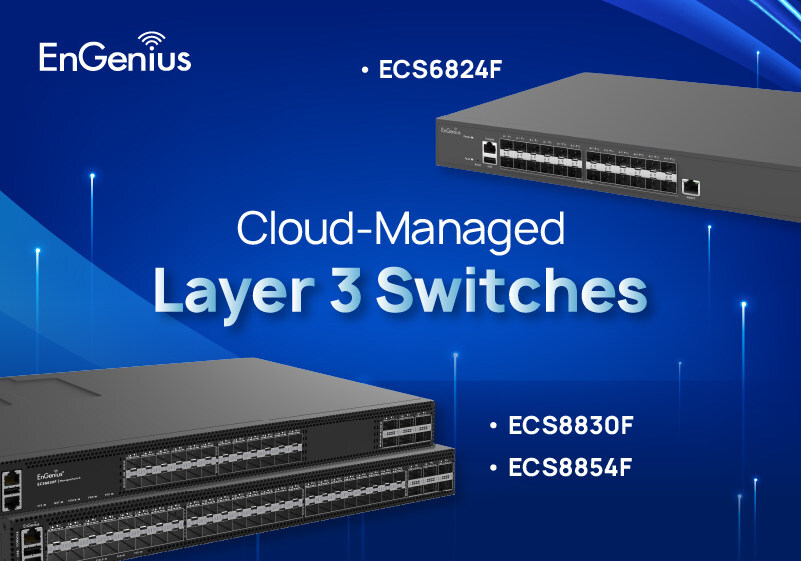
The ECS8830F and ECS8854F are built for enterprise core and aggregation networks that require advanced Layer 3 routing, high availability, and scalable network operations.
The ECS8830F provides 24 × 10G SFP+ ports and 6 × 100G QSFP28 uplinks with up to 1.68 Tbps switching capacity, while the ECS8854F expands scale with 48 × 10G SFP+ ports and 6 × 100G QSFP28 uplinks with up to 2.16 Tbps switching capacity. Both platforms support up to 600 Mpps forwarding performance and wire-speed throughput to support high-performance enterprise network environments.
To support scalable network architectures, the platforms combine advanced Layer 3 routing and network virtualization capabilities, including OSPFv2/v3, BGP/BGP4+, IS-IS, ECMP, VRRP, Policy-Based Routing (PBR), BFD, and VXLAN EVPN. These capabilities enable resilient traffic forwarding, network segmentation, high-availability designs, and scalable multi-site connectivity while supporting interoperability across existing infrastructure investments. The result is simplified network operations, improved resiliency, and the flexibility to scale enterprise networks as business requirements evolve.
For maximum network resiliency and business continuity, the platforms support MC-LAG and VSF, along with 1+1 redundant hot-swappable power supplies and 3+1 redundant hot-swappable fan modules. This architecture eliminates single points of failure, enables seamless failover, and maintains service continuity, reducing service disruption and simplifying maintenance for enterprise network environments.
The series also supports a hybrid operational model. IT teams can use EnGenius Cloud for centralized visibility and monitoring while retaining local access through Web UI, CLI, SNMP, NETCONF, syslog, and related operational tools for configuration, troubleshooting, and day-to-day administration.
Right-Sized 10G Layer 3 Core for SMB and MSP Networks: ECS6824F
The ECS6824F delivers a high-performance 10G Layer 3 fiber core to growing SMBs, branch networks, and MSP-managed environments seeking greater scalability, security, and network control without the complexity of enterprise-class core platforms.
The 1U switch provides 24 × 10G SFP+ ports and 480 Gbps switching capacity, with Static Routing, RIP, and OSPFv2/v3 to help organizations segment departments, applications, surveillance systems, guest networks, and server zones more effectively.
For video-centric and multicast environments, the ECS6824F includes IGMP and MLD support to improve multicast traffic efficiency for IPTV and IP surveillance deployments. It also integrates core-layer security controls, including 802.1X authentication, ACLs, DHCP Snooping, IP Source Guard, ARP protection, Port Security, Storm Control, and DoS protection.
Dual internal power supplies add hardware resiliency, while EnGenius Cloud delivers centralized visibility, monitoring, and management for IT teams and MSPs.
Extending the EnGenius Portfolio from Access to Core
“This launch represents a significant expansion of the EnGenius networking portfolio and marks an important step in extending our cloud-managed platform from access to core,” said Roger Liu, CEO of EnGenius. “As enterprise networks continue to evolve, organizations need switching solutions that deliver greater scalability, resiliency, and operational simplicity. With this new series, we are providing a stronger foundation to support modern enterprise and managed network deployments.”
With the introduction of the new series, EnGenius extends its cloud-managed switching portfolio to address enterprise core, aggregation, and SMB core deployments. Together with EnGenius Cloud, the new switches combine cloud visibility with local control, enabling organizations, system integrators, VARs, and MSPs to deploy and manage networks through a consistent operational experience as their infrastructure grows.

