
Breaking News

GLOBAL Wi-Fi NEWS bulletin

From manufacturing to health care facilities, edge computing is a powerful technology reshaping how industries handle data and streamline operations. This is made possible through Internet of Things (IoT) devices, such as sensors, cameras and specialized processors embedded at the edge. The market value of IoT-enabled devices is projected to increase to $6.5 billion in 2030, which is a growth of over $4 billion compared to 2020.

This guide explores the key benefits of edge computing and IoT technology.

What Is Edge Computing in IoT? 

Edge computing with IoT technology involves processing data closer to where it’s generated, which is at the network’s edge. Instead of sending every bit of information online to a distant cloud server, IoT edge devices analyze and process the data locally. This localized processing helps minimize delays, improves responsiveness and reduces the burden on bandwidth, which is crucial as IoT deployments continue to scale.

IoT devices such as sensors and smart appliances gather data in real time. With edge computing capabilities, IoT devices function as nearby edge gateways that filter, analyze and respond to data instantly.

For example, when an industrial sensor detects component damage or overheating, it prompts equipment to shut down without waiting for instructions from the cloud. Edge computing improves how IoT systems operate by enabling faster, smarter and secure device interactions while keeping critical processing close to where the computing happens.

Edge Computing and Cloud Computing in IoT 

Edge-enabled IoT devices also sync with the cloud for long-term storage and coordination across systems. This hybrid approach ensures fast local action while keeping the broader IoT ecosystem connected and intelligent.

Cloud computing centralizes data processing in large-scale data centers, which is ideal for massive data storage, analytics and long-term decision-making. In contrast, edge computing processes time-sensitive data near the device itself, enabling more real-time responses. Edge computing in IoT devices complements the cloud by reducing lag, preserving bandwidth and enhancing local autonomy.

Traditional cloud-first models struggle with latency, network instability and data overload. By shifting some computing power to the edge, businesses can overcome these limitations and enhance efficiency, reliability and data security. For example, sensitive health data in hospitals can be processed locally with less risk of cyber threat than data that is routinely transmitted over networks.

How Is Artificial Intelligence Used With IoT in Edge Technology?

Artificial intelligence (AI) and machine learning (ML) have a critical role in how IoT devices process data at the edge. While traditional cloud computing relies on centralized servers for data processing, edge computing also performs AI and ML tasks directly on IoT-enabled local devices.

This decentralized approach enables real-time analysis and faster decision-making, even without internet connectivity. From security cameras to wearable health trackers, edge AI allows data to be processed where it’s generated for more immediate insights. As more industries demand timely insights, AI, ML and IoT are driving innovation in many functional and efficient ways. For example, smart traffic lights with IoT sensors or cameras analyze data and adjust traffic signals according to vehicular flow.

The Benefits of IoT Edge Computing

Edge computing offers a wealth of advantages for IoT technology, improving how businesses operate while enabling richer interactions with connected devices. The following are key benefits of employing edge-based IoT technology:

  • Reduces latency: Edge computing significantly minimizes processing delays by computing data close to IoT devices. Local data handling eliminates latency that occurs when information has to travel to and from an online cloud server. This is especially important for applications like smart surveillance systems and automated industrial equipment. With edge computing and IoT, immediate decision-making becomes possible and practical, allowing systems to respond to environmental inputs and operational changes in a timely manner.
  • Lowers energy costs: When data is processed and filtered locally, it reduces the need for constant, high-volume transmission to the cloud. It also decreases reliance on a centralized IT infrastructure and costly cloud service charges. The result is lower bandwidth consumption and less power usage across the network. Edge devices also optimize power through such techniques as sleep modes, adaptive processing and task prioritization, which are beneficial for battery-powered IoT sensors in remote areas.
  • Enables real-time tracking and analytics: Edge computing and IoT enable immediate data monitoring, making it suitable for time-sensitive applications such as predictive maintenance, asset tracking and remote monitoring. Whether it’s identifying early signs of equipment failure or adjusting environmental controls for smart buildings, decisions can be made the moment data is collected. This improves a company’s operational efficiency, safety and responsiveness.
  • Enhances data security: One of the core benefits of edge computing with IoT devices is its ability to boost data security. By processing regulated data locally, businesses reduce the risk of exposing data during cloud transmission. Edge devices also implement built-in encryption, authentication protocols and access control at the source. This layered security approach makes edge computing with IoT valuable in industries such as finance, healthcare and critical infrastructure, where data breaches can result in serious damage and regulatory penalties.
  • Leverages IoT machine learning: By integrating IoT with ML and AI, edge computing allows intelligent algorithms to operate directly at the source of the data. From smart homes that learn user preferences to industrial sensors that detect equipment defects, edge-based AI and ML process raw data and provide actionable steps. This is essential for time-sensitive smart data analysis and predictive modeling without cloud dependency.


  • Provides scalability solutions: As IoT networks expand, centralized processing can quickly become a bottleneck for cloud data transfers. Edge computing distributes the processing workload across multiple local nodes, making it easier to manage and scale infrastructure. This architecture allows organizations to add more devices and handle more data without compromising performance or overwhelming core systems, which is beneficial for growing edge computing capability with IoT ecosystems.
  • Boosts network reliability: Since most data processing occurs locally, the network becomes more resilient with IoT edge computing technology. This means computer systems continue to function even if cloud connectivity is lost or delayed. Network reliability is essential for mission-critical operations in industries like manufacturing, transportation and agriculture, where downtime is costly and continuous operations are a priority.


Eight Use Cases for Edge Computing in IoT

Edge computing with IoT technology is revolutionizing the way we interact with the world around us. Here are eight examples of how it’s being used in real-world applications:


1. Predictive Maintenance

Edge computing enables industrial IoT devices to continuously monitor equipment conditions at any time. By analyzing data like temperature, vibration and energy consumption at the source, businesses detect early signs of heavy equipment failure. This allows companies to schedule maintenance before breakdowns occur, reducing downtime and extending the machinery’s lifespan while streamlining operations.

2. Remote Monitoring for Jobsites

Edge computing enhances remote monitoring by enabling IoT devices to process and act on data locally. This is essential in hard-to-reach jobsites, such as oil rigs, rural cell towers and distant wind farms. Edge-enabled sensors flag discrepancies or safety risks immediately without waiting for cloud-based analysis, ensuring quicker response times and operational reliability.

3. Smart Grids

IoT in edge computing helps connect and modernize smart grids, which include power plants and substations. Smart grids enhance traditional electricity networks through the integration of digital technologies, sensors and software. This innovative approach enables precise and time-sensitive management of electricity supply and demand, resulting in reduced costs and improved grid reliability.

Edge-enabled smart meters and sensors placed throughout the grid collect real-time data, such as energy consumption, load balancing and equipment status. The data is processed locally, enabling improved decision-making for efficient energy distribution, fault detection and reduced utility costs.

4. Connected and Autonomous Vehicles

A standout application of edge computing in IoT is autonomous vehicles. Self-driving cars rely on local data processing to respond instantly to road conditions, traffic and obstacles. By analyzing input from onboard sensors such as cameras and light detection and ranging scanners, these vehicles make split-second decisions without depending on external networks. This enables efficient route optimization, improved fuel usage and enhanced safety, making edge computing instrumental in the development of smart transportation.

5. Health Care

Edge computing is transforming health care experiences through smart IoT devices. Wearables and remote monitoring systems gather data to track vital signs such as heart rate and transmit it securely for immediate analysis. Critical alerts can be generated locally on the device, allowing medical professionals to intervene right away. This setup supports telehealth services, chronic disease management and personalized care, even in clinics with limited bandwidth and connectivity.


6. Supply Chain Management

Edge computing in IoT delivers end-to-end visibility across supply chains. Radio frequency identification (RFID) tags, global positioning system (GPS) trackers and environmental sensors placed on goods and transport vehicles provide location and condition data. For example, it helps supply chains reroute shipments during delays or prompt alerts for temperature breaches, enabling more agile logistics and improved quality control.

7. Farming and Environmental Monitoring

IoT sensors deployed in agriculture and environmental science collect data on soil conditions, air and water quality and weather patterns. Real-time monitoring is possible without the need for constant connectivity. This leads to more efficient farming practices and proactive environmental management. Edge computing with IoT devices enables sensors to analyze areas locally and act instantly, such as activating irrigation systems or prompting air quality warnings.

8. Augmented Reality and Virtual Reality

IoT in edge computing significantly enhances augmented reality (AR) and virtual reality (VR) experiences by reducing latency and bandwidth strain. Improved responsiveness allows AR and VR tools to adapt instantly to the user’s physical environment and even function offline, providing more powerful applications that were once limited by cloud-based delays. Applications such as virtual product demos, AR-based maintenance instructions or immersive training simulations benefit from timely responsiveness when data is processed close to the user.

Five Types of Edge IoT Devices

Edge computing enhances a wide range of IoT devices for different purposes. Let’s take a closer look at some of these IoT devices:


1. Sensors

Depending on the operation, IoT sensors capture on-the-spot data such as temperature, pressure, humidity and motion. These devices gather localized data and process it at nearby edge nodes, enabling rapid decision-making without relying on a central cloud. For example, in manufacturing, vibration and thermal sensors detect early signs of equipment failure, prompting repair notifications to prevent breakdowns.

IoT-ready wireless connectivity solutions are also improving the performance and responsiveness of edge IoT devices with sensors. In smart homes, motion sensors adjust lighting dynamically, enhancing comfort and energy efficiency. This boosts applications that require timely data processing and control, including security systems and home automation.

2. Cameras

Smart cameras are evolving beyond capturing images. With edge computing in IoT, cameras process and analyze footage directly where it’s captured. This reduces latency, offloads network traffic and enables immediate action. For example, in a smart city, edge-enabled cameras detect unusual activity and trigger alerts without sending large video data to a central cloud.

In retail, cameras analyze shopping movements to optimize store layouts. At industrial sites, cameras use edge intelligence to monitor production lines and flag possible issues the moment they occur. Integrated with AI, smart cameras support facial recognition, license plate reading and crowd analytics, all with minimized data transfer.

3. Monitors

Edge-enabled IoT monitors are used to track key markers such as energy usage, air quality, fluid levels and machine performance. Whether it’s optimizing heating and cooling systems or flagging irregularities in water treatment plants, IoT monitors provide a critical layer of operational visibility.

In industrial settings, these devices combine sensor data with edge processing to deliver responsive insights that drive efficiency. For example, they enable predictive maintenance by identifying subtle signs of wear and tear. IoT monitors are also used in smart energy systems to identify consumption peaks and automatically adjust settings to minimize costs.

4. Drones

Drones integrated with edge IoT capabilities are transforming industries that require inspections, surveillance and deliveries in hard-to-reach areas. These airborne edge devices use cameras, sensors and onboard processors to collect and analyze data during flight without relying on cloud uploads.

In energy and utility sectors, drones inspect remote equipment like wind turbines or oil pipelines, relaying condition updates to technicians. In warehouses, drones assist in inventory checks and maintenance inspections. They also enable ultra-fast deliveries, bypassing traffic and reaching remote locations in emergencies.

5. Controllers

At the core of IoT in edge computing are controllers, which are smart systems that manage, automate and secure networks of connected devices. These controllers integrate sensor inputs, camera feeds and actuator outputs to make intelligent, localized decisions.

For example, a smart controller reads room temperatures from multiple sensors and instantly adjusts airflows. In industrial factories, energy management controllers monitor equipment and optimize power usage. Their ability to automate workflows and coordinate diverse devices makes them essential devices in homes, offices and industrial environments. With built-in security features and local processing power, IoT edge controllers help ensure reliability and minimize operational downtimes.


Connect With Synaptics Today for IoT Edge Device Design

Edge computing in IoT addresses the limitations of cloud-based IoT, enabling devices to overcome bandwidth, latency and security challenges. Partner with Synaptics for the latest IoT edge device design solutions, such as Synaptics Astra™ AI-native IoT processors powered by open software and outstanding wireless connectivity for a secure, multi-modal device edge.

Synaptics is a trusted leader in AI and edge technology, delivering reliable, high-performance solutions that make connected devices smarter and more efficient. We help industries create secure, intuitive digital experiences that transform how users engage with intelligent connected devices. We also provide customized multimedia compute solutions with a unified AI framework that rapidly deploys to edge devices. From smart homes to workplaces, we specialize in engineering exceptional experiences that drive the next wave of digital transformation.

Take advantage of the latest IoT edge computing technology. Contact us today to discover how our IoT edge device design solutions enhance your business.

Linearity of a receiver plays an important role in the overall performance of the system. It affects system-level parameters like link budget and receiver sensitivity. Designing high-performance RF receivers involves navigating the classic tug-of-war between two critical specifications: Noise Figure (NF) and input linearity, typically expressed as input third-order intercept point (IIP3). Lower NF improves sensitivity but often requires higher Gain. Conversely, high IIP3 supports better tolerance to interference but usually comes at the cost of reducing Gain.

This article explores the interaction between these specifications and how receiver linearity performance is critical to the overall system performance. We’ll also cover key concepts in intermodulation distortion, the difference in linearity optimization for transmitters versus receivers, and how tools like Error Vector Magnitude (EVM) can simplify the overall system-level trade-offs.

A Brief Review of Linearity

Linearity is the ability of the amplifier to produce an output signal that is a linear representation of the input signal. Having a good linear signal helps maintain signal integrity. Non-linearity can lead to distortion, intermodulation products and spectral regrowth – all of which can lead to a degraded signal quality in the system. Linearity performance is measured at medium signal levels, i.e., the system is not driven into compression, but intermodulation distortion is generated.

Second- and Third-Order Intercept & IMD Products

The second and third-order intercept-point (IP2 and IP3) products are widely used to benchmark the linear performance of an RF system. IIP3 refers to the hypothetical input power level where the power of third-order intermodulation products (IMD) equals the power of the fundamental output signal. To fully understand IP3, it’s important to know the difference between Input IP3 (IIP3) and Output IP3 (OIP3).

IIP3 is the signal power going into the device at the intercept point, while OIP3 is the signal power coming out of the device at that same point. Both values help us understand how an RF device performs when dealing with different input signal levels. Understanding the relationship between Input IP3 (IIP3) and Output IP3 (OIP3) can provide invaluable insights into the behavior of RF devices and systems. OIP3 can be calculated using the formula:


OIP3(dBm) = Gain(dB) + IIP3(dBm)
 

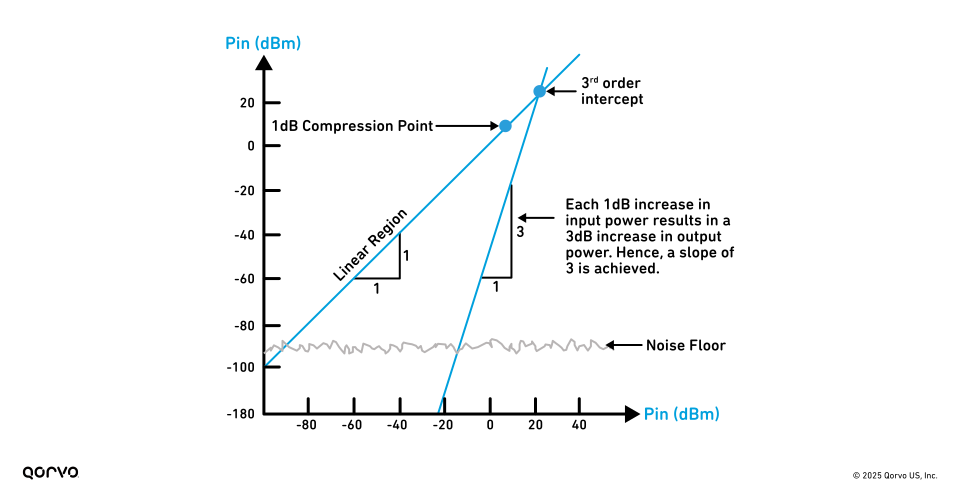
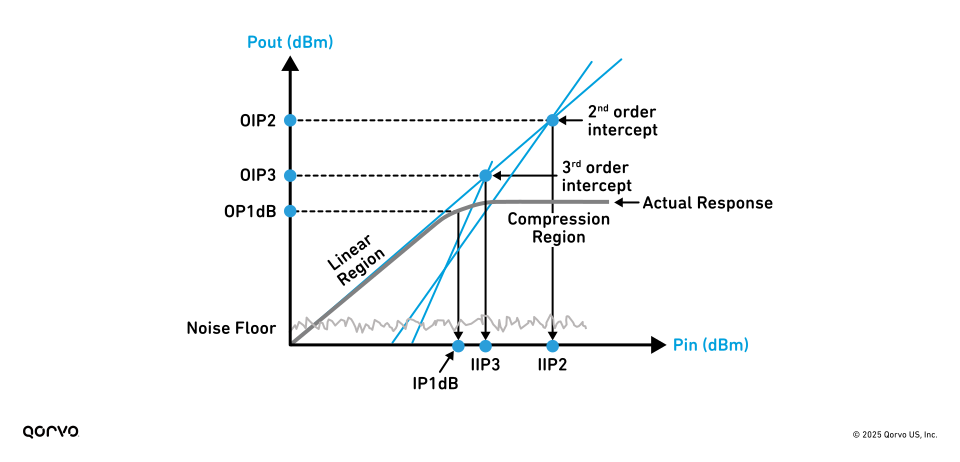
Before the IP3 point is reached, the device usually hits saturation. This means it can’t increase its output power in a straight linear line anymore, no matter how much you raise the input. The result is signal compression and distortion. See Figure 1.


Figure 1: IP2, IP3 and P1dB
 

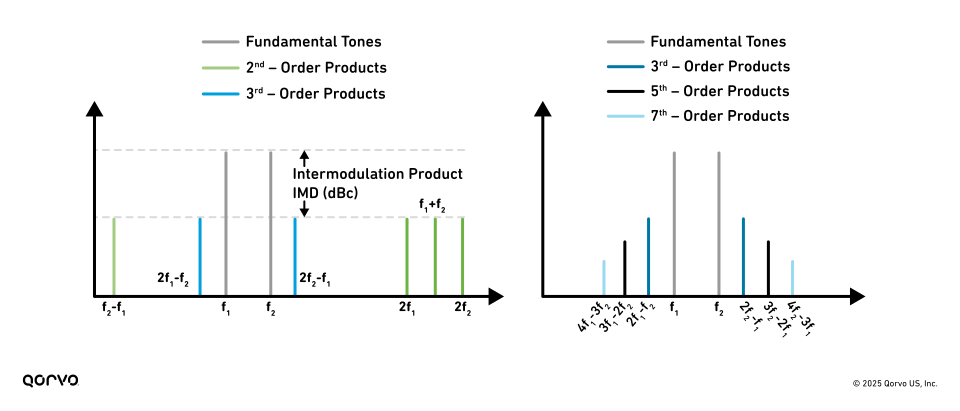
Two-tone tests shown in Figure 2 can be performed to measure IP2 and IP3. Two closely spaced sinusoidal signals (Fundamental Tones) with equal power level input power (Pin) at frequencies f1 and f2 are applied, and the level of the second order IMD (IM2) at frequencies |f2 – f1|, 2f1 and 2f2 is then observed as Pin increases. For third-order intermodulation products, the two-tone frequencies are chosen such that the IM products fall inside the received signal band. For IP3, the IM3 components at |2f1−f2| and |2f2−f1| are observed as Pin increases.


Figure 2: Fundamental, IMD products.
 

The IP3 is a result of third-order IMD products, specifically |2f1 – f2| and |2f2 – f1| as shown above. The third-order intercept is a figure of merit that characterizes an RF receiver’s tolerance when subjected to multiple RF signals within the desired passband. These IMD products apply to both transmit and receive sides of the RF system. But optimizing each end of the system requires slightly different approaches.

As shown in Figure 3 below, the graph illustrates two distinct slopes that represent different regions of amplifier behavior. In the initial linear region, the output power increases proportionally with input power at a 1:1 slope, reflecting the ideal, distortion-free operation of the device where the fundamental signal dominates. This region indicates that the amplifier operates within its linear dynamic range, preserving signal integrity.

However, as the input power continues to rise, the device transitions into a non-linear region where intermodulation distortion products, particularly third-order (IMD3), begin to emerge. In this region, these distortion components increase at a much faster rate than the fundamental, with a characteristic slope of 3:1. This means that for every 1 dB increase in input power, the IMD3 components grow by 3 dB, quickly surpassing the desired signal and degrading overall performance. Understanding these two regions and their respective slopes is essential for accurately characterizing the linearity of RF components and for predicting how they will perform under real-world signal conditions.


Figure 3: IP3 with input power versus output power slopes.


Optimizing the Receiver via IIP3


Designing RF receivers with a focus on output linearity can be misleading, as it often focuses on Gain that ultimately compromises receiver performance.

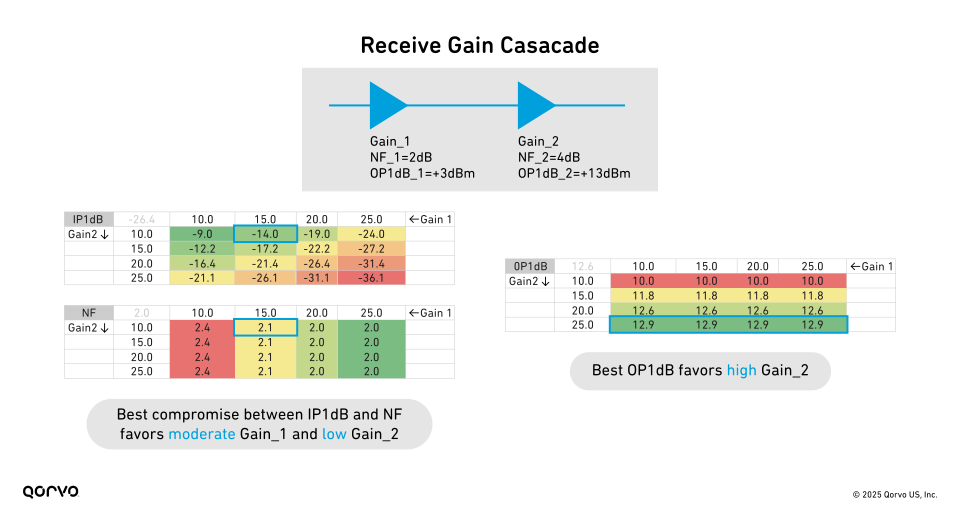
While higher output Gain helps maximize output linearity (like one would do for a transmitter), it simultaneously degrades input linearity by making the system more susceptible to compression from smaller input signals, as shown in Figure 4. The data shows that optimal receiver performance requires a careful balance between input-referenced linearity and NF. Lower NF is achieved with higher front-end Gain, but this comes at the cost of reduced input linearity. Conversely, maximizing input linearity calls for lower overall Gain, which can raise the NF. Therefore, effective receiver design demands trade-offs between these parameters, so neither parameter is sacrificed excessively. Designers must avoid the transmitter-oriented mindset that more Gain is inherently better and instead select a Gain profile that optimally balances NF and IIP3 for the intended application.


Figure 4: Cascaded RF receiver parameter data comparison.
 

But why is the receiver linearity IIP3 so important? It is because it directly impacts the receiver’s ability to handle multiple signals and prevent IMD. A high IIP3 in a receiver design indicates the receiver is more linear and therefore can better separate designed signals from unwanted IMD products.

It is important for system designers to understand the influencing factors such as Gain, NF, OIP3 and IIP3. Balancing the trade-offs between these parameters is critical to ensuring the overall system is optimized.

EVM and the Bathtub Curve Explained

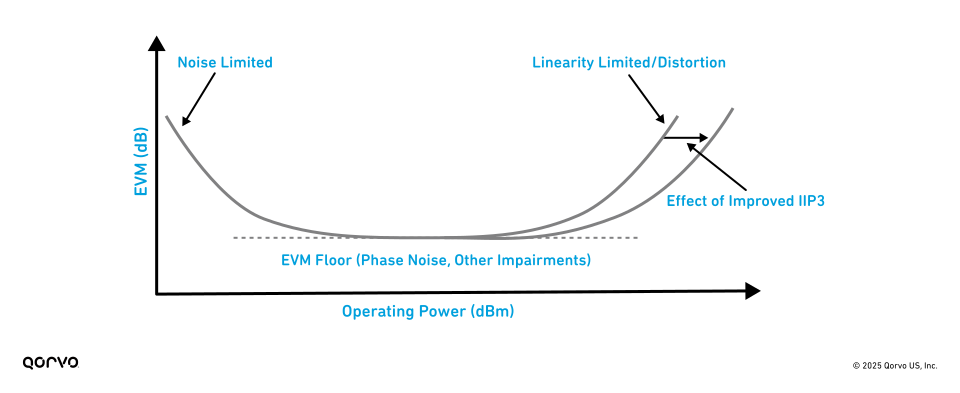
 The manifestation of Error Vector Magnitude (EVM) (a measure of the difference between an ideal signal and the actual received signal in digital communication systems) can come from many different sources. The EVM figure of merit is typically a combination of noise and distortion. As shown in Figure 5, at lower power levels, noise tends to dominate, and the EVM increases as we lower the power. At high power levels, distortion tends to dominate, and we observe increased EVM as we increase power levels. In the middle, we often see the minimum EVM, and so the overall shape resembles a bathtub curve. As such, the EVM bathtub curve becomes an essential visualization tool for system-level optimization, offering a comprehensive view of how different impairments jointly impact overall performance.

And yes, we’re keeping an eye on the next wave, too. AI-powered radar? Ultra-wideband-enabled machine vision? BAW and SAW filters that are smaller, faster and even smarter than the systems they serve? That’s all in our wheelhouse.


Figure 5: Bathtub EVM curve (EVM vs. Operating Power).
 

While most frequency devices exhibit low phase noise below 2 GHz, this advantage diminishes at higher frequencies and wider signal bandwidths, where integrated phase noise can increase substantially and degrade system performance. This challenge is particularly acute in millimeter wave (mmWave) systems operating above 20 GHz, where elevated phase noise directly contributes to higher EVM.

To address this, system-level design often begins with cascade analysis, using low-level performance metrics of individual components to estimate overall system behavior. In these situations, EVM serves as a highly practical system-level performance metric, enabling engineers to consolidate the effects of multiple impairments, such as noise, non-linearities and phase noise, into a single optimization target. Rather than tuning several individual parameters, designers can focus on minimizing the root-mean-square (rms) EVM value for an efficient and effective design process. This optimization is visually aided by the EVM bathtub curve.

The System Advantages of Optimized Receiver Linearity

High linearity in an RF receiver is critical for maintaining robust system performance in the presence of strong or closely spaced signals. One of the primary benefits of high receiver linearity is an expanded spurious-free dynamic range (SFDR), which quantifies the usable signal range before intermodulation products rise above the noise floor. SFDR is directly proportional to the IIP3 and inversely proportional to the noise floor (No), with the relationship defined by this formula.

SFDR = (2/3) × (IIP3 − No)
A higher IIP3 indicates better tolerance to interference, as third-order intermodulation (3IM) spurs decrease by approximately 2 dB for every 1 dB increase in IIP3. However, achieving high linearity often comes at the expense of a higher NF, presenting a well-known design trade-off. Systems that support adjustable receiver input linearity—based on real-time assessment of incoming signal strength—offer the most flexibility. In RF environments with low interference, higher receiver Gain can be used to minimize NF, even though this reduces input linearity. Conversely, in high-interference scenarios, reducing Gain improves input linearity, allowing the receiver to better tolerate strong unwanted signals. For receivers, it’s important to focus on input linearity rather than output metrics like OIP3, as high OIP3 can misleadingly suggest good receiver performance while input signal handling capability may be poor.

Conclusion

In summary, optimizing RF receiver performance demands a careful balancing act between input linearity and NF, as both parameters critically influence system sensitivity, interference tolerance and overall signal fidelity. While conventional design approaches may prioritize output metrics like OIP3 or default to maximizing Gain, this can lead to suboptimal trade-offs, particularly in dynamic RF environments. A focus on IIP3, supported by tools like EVM analysis and cascade modeling, enables more accurate predictions of receiver system behavior and better-informed design choices. Whether operating in low-interference conditions that favor higher Gain and lower NF or in high-interference scenarios that require improved linearity through Gain reduction, adaptive receiver architectures that dynamically adjust to their signal environment offer the greatest design flexibility. By embracing a system-level perspective that accounts for all impairments, including intermodulation, compression, noise and phase distortion, engineers can achieve receiver designs that are both robust and efficient across a wide range of use cases.

Additionally, you can find more interesting collateral on this subject by visiting our Qorvo Design Hub for a rich assortment of videos, technical articles, white papers, tools and more.

For technical support, please visit Qorvo.com or reach out to Technical Support.

About the Authors

Our authors bring a wealth of technical expertise in developing and optimizing high-performance RF receiver solutions and systems. With a deep understanding of customer needs and industry trends, they collaborate closely with our design teams to drive innovation and deliver cutting-edge solutions that support industry-leading products.

Thank you to our main contributors of this article: David Corman (Chief Systems Architect) and David Schnaufer (Corporate, Technical Marketing Manager) for their contributions to this blog post, ensuring our readers stay informed with expert knowledge and industry trends.

Dave’s Thoughts: Those Left Behind: Living in an Apartment Building Shouldn’t Mean Second-Rate Broadband.

Apartment complexes, large and small, are still falling behind when it comes to modern broadband connectivity. Many buildings haven’t had an Ethernet upgrade since they were first constructed. While there has been an emphasis on higher speeds to the single-family home, MDUs haven’t received the same attention.
Given the average broadband speed has exploded from a few Mbps to over 100Mbps in just the last ten years, it is safe to say most buildings are not meeting today’s demands.
This is compounded by legacy cable deployments. Today’s tenants expect connectivity in places like the laundry room, by the pool, in common areas, and throughout the property. Yet many of these locations have no infrastructure at all.

So, what are your options?

  • Squeeze more bandwidth out of your existing cable plant
    If it’s twisted pair, maybe more advanced modems can help, but they are hugely impacted by the quality of the copper and any taps, splitters or combiners on a given strand.
  • Re-wire your entire building
    Clearly this involves time, money and massive tenant disruption. And what if your floor-to-floor riser is full, or not in the right place? Drill baby drill through that cement. That means more time, more money and more permitting.
  • Deploy a wireless ethernet backbone to quickly and easily upgrade your infrastructure
    No construction. No drilling. No permits. No asbestos headaches. Just quick deployment and scalable, reliable connectivity to meet today’s demands

After Covid everyone was confronted with how much we all rely on ubiquitous high-speed connectivity and the integration of IoT into our daily lives. For single-family homes, the market responded with urgency and innovation. But in MDUs, tenants are still at the mercy of the property owner.

Now is the time for building owners and management companies to seize the opportunity to modernize their properties with wireless Ethernet backbone systems—without the cost, disruption, or delays of traditional rewiring. This is more than just an upgrade; it’s a competitive edge. Fast, reliable broadband is no longer a perk—it’s a priority. Invest in your infrastructure today to retain residents, attract new ones, and future-proof your property.

Staying Ahead with Smarter Web Filtering

Across every industry and network environment, content filtering isn’t just a matter of productivity, it’s a front line of defense. From malware and phishing to compliance risks and productivity drains, the threats are real, and the stakes are high.

That’s why choosing the best content filtering software for your environment is such an important decision. The right tool helps protect your users without slowing them down, and it should work seamlessly across all your networks, from remote offices to school campuses to distributed client environments.

More organizations are turning to DNS-level filtering for its unique blend of speed, simplicity, and scalability. Unlike traditional firewall or endpoint-based solutions, DNS filtering blocks unwanted content before the connection even happens.

What is Content Filtering & Why DNS-Level is Superior

Content filtering is the practice of blocking access to dangerous, inappropriate, or non-compliant content on the internet. Whether you’re protecting students, employees, or guest Wi-Fi users, the goal is to reduce exposure to risk while maintaining a productive online environment.

Common targets for filtering include:

  • Malware and ransomware
  • Adult or explicit content
  • Hate speech and extremist sites
  • Proxy and VPN services
  • Bandwidth hogs like video streaming and gaming platforms

There are several ways to implement content filtering:

  • Client-based filtering: Installed locally on each device
  • Gateway/firewall filtering: Operates at the network edge
  • Server-based filtering: Centralized on internal infrastructure
  • DNS-level filtering: Works at the DNS resolution layer before a connection is made

So why is DNS filtering becoming the preferred choice?

  • It blocks threats before the connection is even established
  • It’s lightweight and doesn’t slow down devices or networks
  • It can be agentless, meaning no software install is needed
  • It’s ideal for remote, hybrid, or distributed environments

What to Look for in the Best Content Filtering Software?

If you’re in the market for a content filtering solution, you probably have no shortage of options. But not all content filtering software is created equal and some may lack the intelligence, speed, or usability you actually need.

Here are the essential features and capabilities that define top-tier content filtering software today:

✔️ Real-Time Threat Detection

Modern threats evolve quickly. Your content filter should detect and block threats using AI and machine learning in real time—even if the domain hasn’t been classified before.

  • DNSFilter’s approach to real-time threat detection is rooted in intelligent automation. Our AI is continuously trained to identify deceptive sites before they can cause harm, ensuring that threats are neutralized before they even reach your network.

Learn how AI is transforming modern cybersecurity in our deep dive on artificial intelligence in threat detection.

✔️ Broad and Customizable Category Controls

Effective filtering goes beyond just adult content. You should be able to block categories like social media, cryptocurrency mining, and phishing, and customize policies for your unique risk profile.

  • DNSFilter has 50+ threat and content categories with customizable rules.

✔️ Granular Policy Management

Granularity matters. Can you apply different filtering policies to different user groups, departments, or IP ranges?

  • DNSFilter gives organizations precise control over what to block and how, informed by evolving best practices and real-world examples shared in our live policy-building webinar.

✔️ Flexible Deployment Options

Whether you want to deploy at the network level, on individual devices, or through a hybrid model, your software should be flexible enough to match your setup.

  • DNSFilter offers agentless network protection as well as device and user-level filtering.

✔️ Low Latency Performance

Content filtering shouldn’t slow down your users or affect DNS resolution speed.

  • DNSFilter is powered by our global dual anycast network for fast, seamless resolution.

✔️ Auto-Updates and Intelligence Feeds

The threat landscape changes fast. Be sure to choose a platform that stays updated without manual intervention.

  • DNSFilter leverages advanced AI and diverse threat intelligence sources to dynamically update its models, delivering real-time protection against constantly evolving threats.

✔️ Support for Multiple Languages

If you operate globally or in multilingual environments, your filtering engine should recognize and block malicious content in many languages.

  • DNSFilter supports domain categorization in 20 major world languages, includes localized block pages for end users, and allows management of internationalized domain names (IDNs) using Punycode,  ensuring a consistent and effective filtering experience no matter the language.

✔️ Clear Reporting and Insightful Dashboards

Visibility into filtering activity, block rates, and user behavior is critical.

  • DNSFilter offers real-time dashboards and exportable reports for compliance and visibility.

✔️ Industry Compliance Support

If you’re in a regulated industry (like education or healthcare), your filter should help you stay compliant.

  • DNSFilter provides tailored solutions for healthcare, education, and MSPs to help them meet regulations such as CIPA compliance and HIPPA regulations.

✔️ White Label Options and Responsive Support

For MSPs or distributed teams, look for flexible branding and access to real-time support.

  • DNSFilter goes beyond basic support with a comprehensive MSP Partner Program that includes co-branded marketing resources, multitenant management, custom pricing, and flexible deployment options. Combined with 24/7 technical support and white label functionality, it’s a purpose-built solution for MSPs that want to grow their service offerings without increasing overhead.

Explore these core DNSFilter features and more →

Matching Architecture to Your Needs

Choosing the right content filtering architecture is just as important as choosing the right features, it affects how easily your solution can scale, how much oversight it requires, and how well it fits into your existing infrastructure.

There are different ways to deliver content filtering, and your organization’s size, infrastructure, and technical maturity will help determine the best fit:

  • Client-based: Installed locally on endpoints. Great for individual control and for remote organizations.
  • Server-based: Centralized, but requires hardware and on-prem management.
  • Gateway-based: Hardware-heavy; good for traditional networks.

Cost is About More than Licensing

Pricing is often the first point of comparison, but cost alone rarely tells the full story. When evaluating content filtering solutions, organizations should consider the total cost of ownership (TCO)—a broader picture that accounts for every factor impacting long-term value and efficiency.

TCO includes not only your subscription or licensing fees, but also:

  • How long it takes to deploy across your organization
  • The level of IT resources needed for ongoing management
  • The cost of missed threats or delayed responses
  • Hidden expenses tied to updates, training, or hardware maintenance

A solution that looks inexpensive upfront may end up costing more in staff hours or operational overhead. Conversely, software that streamlines setup, automates updates, and offers reliable support can generate savings far beyond the initial quote.

DNSFilter was designed with these efficiencies in mind, offering fast, hardware-free deployment, automatic intelligence updates, and intuitive dashboards that reduce time spent on administration.

Choose Software That Works for You

The best content filtering software doesn’t just block harmful content. It works the way your organization works.

Look for a solution that:

DNSFilter was built to be the modern standard for web filtering. Whether you’re protecting ten users or ten thousand, it checks all the boxes.

Want a quick-reference checklist for your buying process? Download our free PDF: The DNS Content Filtering Software Buyer’s Checklist

Let’s be honest, the average IoT device today knows more about you than your coworkers do — and probably listens better, too. But if that device isn’t properly secured, it could leave your sensitive data vulnerable. Enter Silicon Labs Secure Vault — the digital security system your smart devices deserve (and really need).

What Is Secure Vault IoT Security Framework?

Secure Vault is Silicon Labs’ built-in security framework for our wireless chips and MCUs. It’s a collection of hardware and software features designed to keep your connected devices safe from tampering, snooping, and other forms of digital troublemaking. Certified to PSA Level 3, Secure Vault provides locked-down protection at the silicon level so security isn’t just an afterthought.

Key Features of Secure Vault Technology (A.K.A. Why Hackers Will Hate You)

  • Secure Boot with Root of Trust
    Secure Boot is the firmware version of “no ID, no entry.” Your code must be signed and verified before the device allows it to run. If something looks fishy, it shuts down before it even starts.
  • Secure Debug
    Secure Debug is helpful when developing, but it’s also one of the easiest ways to poke around inside a device. Secure Vault lets you lock that door — and only unlock it under very specific (and secure) conditions.
  • Tamper Detection
    If someone physically tampers with the chip, Secure Vault’s Anti-Tamper feature notices and reacts. It can wipe sensitive data, shut down access, or basically throw up its hands and say, “Not today!”
  • Hardware-Accelerated Crypto
    Need secure communication, encrypted storage, or random number generation? Secure Vault handles all of that with built-in hardware support. It’s fast and efficient for doing your math.
  • Secure Key Storage and Management
    Secure Vault’s Secure Key Management stores your cryptographic keys in a locked-down, isolated area of the chip. The keys are stored, wrapped in a flash, and never leave the vault unprotected. Think of it as a digital safe that doesn’t lose the combination.
  • Unique Device Identity and Attestation
    Each chip comes with a unique, unforgeable identity. With Secure Attestation you can trust it’s your device and not a clever fake trying to sneak onto your network.

Who Is IoT Device Security For?

If you’re building any kind of connected IoT device — whether it’s in a smart home, factory, hospital, or just something people carry in their pockets — Secure Vault is for you. It’s especially useful in:

  • Home automation and consumer electronics
  • Industrial IoT and remote monitoring
  • Smart meters and infrastructure
  • Medical devices and wearables

Basically, if the device handles data, controls anything important, or connects to the internet, it needs real security. And Secure Vault delivers that in a way that’s efficient, scalable, and standards-compliant.

Build Trustworthy IoT Devices with Secure Vault

In a world full of connected gadgets, it’s not enough to just work — IoT devices also need to be trustworthy. Secure Vault makes that possible by protecting your data, your firmware, and your device’s identity right at the hardware level. It’s proactive protection, not reactive damage control.

So if you’re developing an IoT device, don’t wait until the last minute to bolt on security. With Secure Vault, you get it baked right into the chip — and that’s a much smarter way to build trust in the connected future.

Wi-Fi 7 vs Wi-Fi 8 - what's the difference?

Wi-Fi 7 is currently the best specification available as of 2025, although Wi-Fi 8 is already in development and is expected to launch officially in 2028. While several years of research and development are still ahead, and the exact specification has not yet been finalized, we do know that Wi-Fi 8 will prioritize ultra-high reliability (UHR).

Why is this important?
Wi-Fi has become the most viable alternative to traditional wireline connectivity solutions such as Ethernet and coaxial cables. It offers users the convenience of cable-free flexibility for many devices, such as laptops and televisions, without the limitations of physical connections. Although the peak throughput of Wi-Fi often exceeds the requirements of many applications, users may occasionally experience intermittent jitter during streaming or video conferencing.

This suggests that Wi-Fi is still susceptible to environmental factors that affect signal quality and consistency. In many residential environments, achieving cable-equivalent reliability remains a significant challenge for Wi-Fi technology.

The wireless spectrum is becoming increasingly congested, and Wi-Fi 8 must be designed to integrate more effectively with cellular networks for internet access. A 2022 Cisco study estimated that over 50% of global mobile data traffic was offloaded to Wi-Fi networks, highlighting the important role Wi-Fi plays in the broader cellular ecosystem.

The same three frequency ranges—2.4 GHz, 5 GHz, and 6 GHz—will be available in Wi-Fi 8, so it must continue to improve spectrum utilization to deliver greater network throughput and lower latency. This is especially critical as the number of wireless devices and their data demands continue to grow rapidly.

More complex networks also require better management. Mesh networks that cover large areas in homes, businesses, and public spaces are becoming increasingly common. Wi-Fi 8 must improve the coordination of multiple Access Points (APs), optimize how they handle all connected devices within their coverage areas, and enhance the way overlapping networks manage interference.

As you can see in the table below, despite Wi-Fi 7 and Wi-Fi 8 sharing many high-level similarities, digging in further unveils many new technologies being proposed to improve the use of wireless spectrum already available, enhancing connection efficiency and reliability, especially in congested network environments that frequently exist in everyday life.

Read our two Wi-Fi 8 white papers to learn more about the new technologies listed below, and the specific scenarios they benefit:

Technology Wi-Fi 7 Wi-Fi 8
Availability Now ~2028
Top Speed Up to 36Gbps >36Gbps
Bands 2.4GHz, 5GHz, 6GHz 2.4GHz, 5GHz, 6GHz
Channel BW/Modulation Up to 320MHz, 4096 QAM Under investigation
MLO Improved with
MediaTek Smart-Link Dispatching
Improved for further

spectral efficiency

AI-enhanced Networking No Potentially real-time network optimizations based on user connectivity habits
MIMO Standard Improvements in spatial streams, beamforming, and multi-user support
Mesh Networking Standard Improved with multi-AP co-ordination
Power Efficiency Standard Improved
Connectivity Range Standard Improved
Dynamic Sub-channel Operation (DSO) / Non-Primary Channel Access (NPCA) No Yes
Distributed Resource Units (dRU) No Yes
Coordinated Spatial Reuse (Co-SR) No Yes
Coordinated Beamforming (Co-BF) No Yes
Dynamic Sub-channel Operation (DSO) No Yes
Modulation and Coding Schemes (MCS) Standard Improved (better data-rate)
Non-Primary Channel Access (NPCA) No Yes
In-Device Coexistence (IDC) No Yes
TXOP Preemption No Yes
High Priority EDCA (HIP EDCA) No Yes

In today’s experience-driven marketplace, understanding guest sentiment isn’t just an advantage—it’s a necessity. With GoZone WiFi’s new Survey Builder, businesses can now capture actionable feedback directly from their WiFi captive portal or website, delivering insights when they matter most.

Why Real-Time Feedback via Guest WiFi Matters

Offering guest WiFi is no longer just a perk—it’s a powerful channel for engaging customers and gathering valuable data. By integrating surveys into your captive portal or splash page, you can:
  • Capture feedback at the moment of experience
  • Address guest concerns instantly
  • Uncover trends in satisfaction and loyalty
  • Make informed improvements to your services

Key Features of GoZone WiFi’s Survey Builder

1. Easy-to-Use Customization

With a drag-and-drop interface, you can create branded surveys tailored to your venue’s needs. Choose from multiple question types—ratings, rankings, open-ended responses—and update your surveys anytime, no technical expertise required.

2. Seamless Integration with Splash Pages and Captive Portals

Deploy surveys directly on your WiFi splash page or captive portal, ensuring every guest sees your questions before connecting. Show different surveys to new versus returning guests for more targeted feedback.

3. Smart Conditional Logic

Guide guests through dynamic question flows based on their answers. This means you can dig deeper into specific issues or opportunities, gathering more meaningful insights.

4. Multi-Language Support

Reach a diverse audience by offering surveys in multiple languages, making your guest WiFi experience inclusive and welcoming.

5. Embed Surveys Anywhere

Besides the captive portal, you can embed surveys on your website, landing pages, or share them via email and SMS campaigns—maximizing your response rates and WiFi marketing reach.

6. Actionable Reporting and Analytics

Visualize guest feedback with real-time charts and graphs. Filter results by date or location, and export data for deeper analysis—helping you spot trends and act fast.

Practical Applications for a Survey Builder in Your Business

  • Event Feedback: Gather opinions from guests during or after events hosted at your venue.
  • Menu or Service Testing: Poll guests on new menu items or services right from the WiFi splash page.
  • Compliance & Safety Checks: Assess perceptions of cleanliness and safety via the captive portal as guests log in.
  • Loyalty Program Insights: Learn what rewards or perks matter most to your regulars.
  • Staff Recognition: Identify standout team members through direct guest feedback.

Supercharge Your WiFi Marketing Strategy

GoZone WiFi’s Survey Builder isn’t just about collecting feedback—it’s a vital part of your WiFi marketing toolkit. By connecting with guests through your splash page and captive portal, you turn every WiFi login into an opportunity to build loyalty, improve services, and drive revenue.
Ready to take your guest WiFi to the next level? Start using the Survey Builder to transform your splash page and captive portal into powerful feedback and marketing engines.
Learn more or request a demo here: GoZone WiFi Survey Builder

Austin, TX and Washington, D.C. – June 17, 2025 – Wi-Fi Alliance® extends its sincere congratulations to Olivia Trusty on her confirmation by the United States Senate to serve as a Commissioner of the Federal Communications Commission (FCC).

“Olivia Trusty brings a wealth of experience and a deep understanding of the communications landscape to the FCC at a pivotal time,” said Kevin Robinson, President and CEO of Wi-Fi Alliance. “We are confident that her leadership will help advance innovative, spectrum-forward policies that enable technologies like Wi-Fi® to continue delivering essential connectivity for consumers, businesses, and communities across the United States.”

Wi-Fi Alliance looks forward to working with Commissioner Trusty and the full Commission to ensure the continued success of the unlicensed ecosystem. Together, we can empower digital inclusion, drive U.S. technology leadership, and unlock new opportunities for connectivity and innovation.


About Wi-Fi Alliance®  |  www.wi-fi.org
Wi-Fi Alliance® is the worldwide network of companies that brings you Wi-Fi®. Members of our collaboration forum come together from across the Wi-Fi ecosystem with the shared vision to connect everyone and everything, everywhere, while providing the best possible user experience. Since 2000, Wi-Fi Alliance has completed more than 80,000 Wi-Fi certifications. The Wi-Fi CERTIFIED™ seal of approval designates products with proven interoperability, backward compatibility, and the highest industry-standard security protections in place. Today, Wi-Fi carries more than half of the Internet’s traffic in an ever-expanding variety of applications. Wi-Fi Alliance continues to drive the adoption and evolution of Wi-Fi, which billions of people rely on every day.

Here are three crucial factors that make Wi-Fi 7 essential for a superior guest experience:  1. It’s a mobile-first world, and business travelers are upgrading every 24-30 months; 2. New wearable devices like XR glasses need a snappy and nimble Wi-Fi® network; and 3. Wi-Fi 7 delivers a real-world 4x performance gain over Wi-Fi 6.

Person in a hotel bed with VR headset on

Business travelers are already upgrading to Wi-Fi 7-ready devices

The world is mobile-first, and business travelers are consistently at the forefront of technology adoption. While the general smartphone refresh cycle has slowed, business travelers continue to upgrade their phones every 24-30 months. This is due to:

  • Higher discretionary income: They have the means to invest in the latest technology.
  • Professional necessity: Sales professionals and others often rely on cutting-edge devices for their work.
  • Demanding applications: Business applications and heavy usage necessitate faster, more capable devices.

This rapid refresh cycle means a significant portion of your guests are already carrying Wi-Fi 7 with their mobile devices. While Wi-Fi is backward compatible, newer phones are optimized for the latest Wi-Fi protocol and many traveling executives’ devices already support 6 GHz Wi-Fi, a key component of Wi-Fi 7. Projections indicate that over 50% of hotel guest devices will support Wi-Fi 7 by early 2027. Your network needs to be ready for this shift now.

New wearable devices demand a high-performance Wi-Fi network

The rise of wearable technology, such as XR (extended reality) and spatial computing glasses, is transforming how people interact with digital content. While these devices are often tethered to a smartphone or a compute puck, they require a low-latency and error-resilient Wi-Fi network.

Devices like Ray-Ban Meta glasses are leading a strong trend toward hands-free content creation and AI-assisted interaction with the physical world. Leading tech firms and numerous startups are rapidly developing “what’s next” in wearable technology, and each relies on a constant, reliable network connection that older Wi-Fi standards simply aren’t designed to deliver.

Wi-Fi 7 addresses these demands with advanced technologies like Multi-Link Operation (MLO), preamble puncturing, Multiple Resource Units (MRU), and deterministic Quality of Service (QoS) enhancements. These innovations create an invisible backbone that adapts to changes so that data flows without delay, providing the “snappy and nimble” experience required by these new devices.

Wi-Fi 7 delivers a real-world 4x performance gain over Wi-Fi 6

Previous Wi-Fi generations offered incremental speed increases. Wi-Fi 7, however, represents a generational leap in performance over previous generations. This significant improvement is based on several key advancements:

  • Expanded frequency spectrum: Wi-Fi 7 utilizes up to 1200 MHz of expanded frequency, including 480 MHz in Europe, supporting wide channels. The wider channels and clean spectrum allow real-world Wi-Fi 7 network designs to achieve 4x performance gains.
  • Seamless channel utilization: It eliminates channel gaps across the entire allocated spectrum and provides consistent power and access rules on every channel.  The channel gaps in Wi-Fi 6 prevent network architects from fully using all the spectrum.  With Wi-Fi 7, every guest room and every meeting room will have the same consistently high performance and experience.
  • Optimized for modern protocols: Only 802.11ax and 802.11be protocols are allowed to use the new radio frequency space. This significantly reduces contention and unlocks faster speeds.  With Wi-Fi 7, the network doesn’t have to slow down to let older Wi-Fi merge onto the highway.

To fully utilize these advantages, Wi-Fi 7 adds MLO, MRU, preamble puncturing and deterministic QoS.  Collectively, Wi-Fi 7 delivers faster speed and lower latency.

Partner with RUCKUS to deliver an exceptional guest experience where guests can effortlessly open their door with their phone, instantly stream 4K movies, join crystal-clear video calls with family, and update work files in seconds. This isn’t a futuristic dream; it’s the reality Wi-Fi 7 is poised to deliver for your hotel.

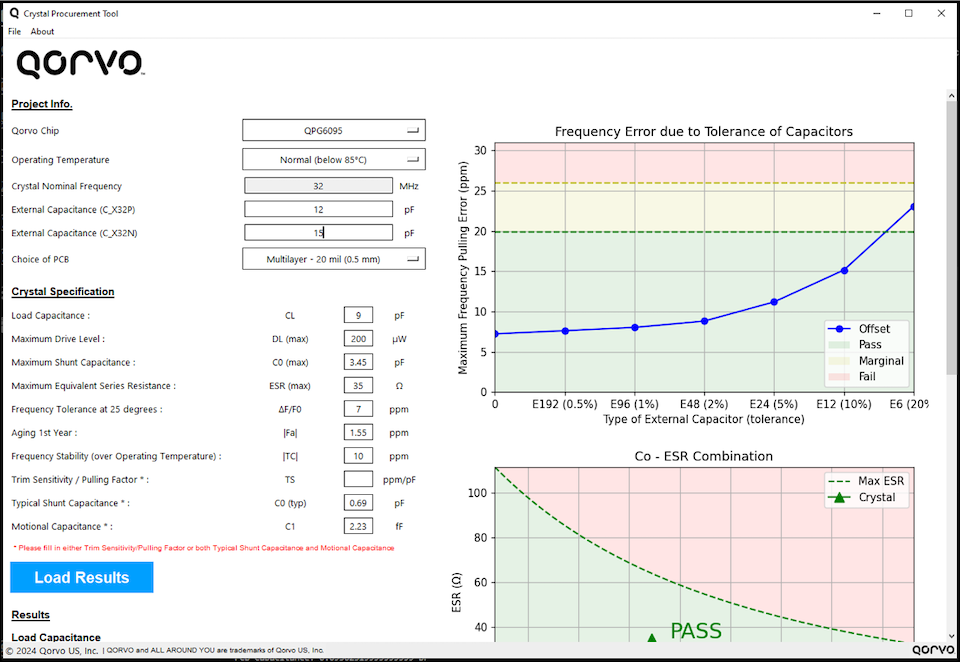
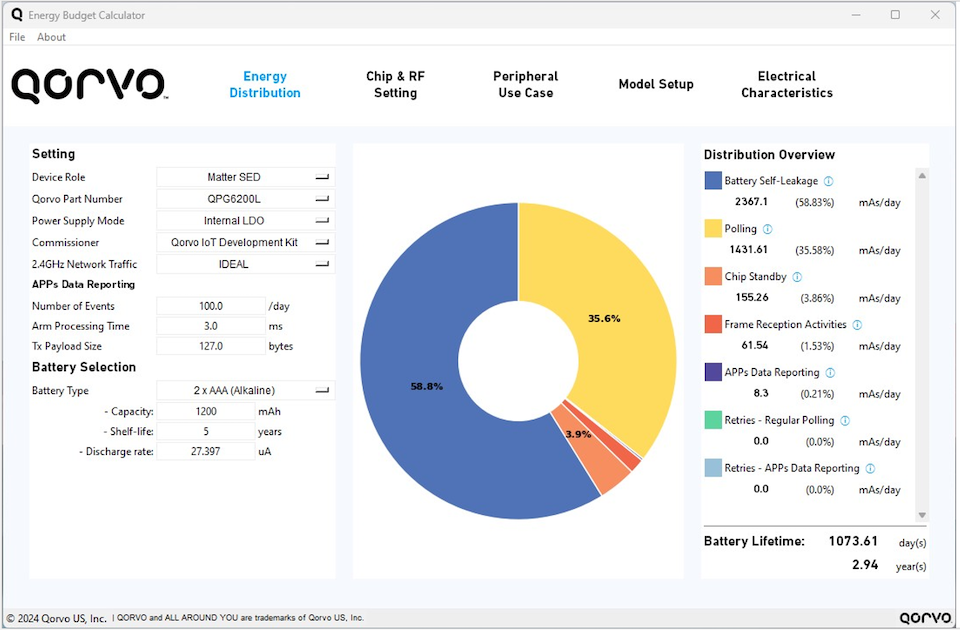
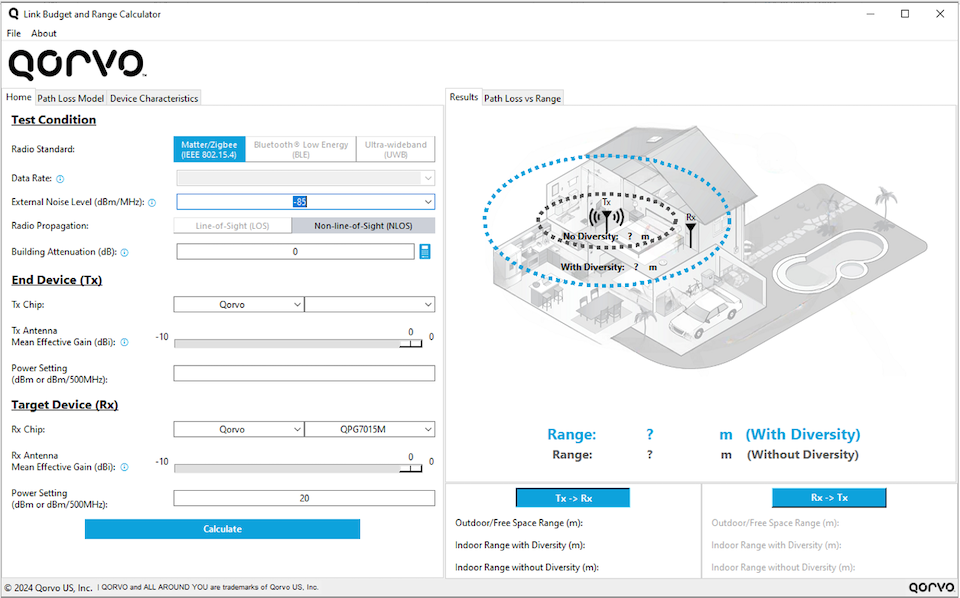
Designing a reliable and energy-efficient IoT product requires deep RF understanding, communication protocol knowledge, careful component selection and rigorous performance validation. To streamline this process and empower engineers at every stage of development, Qorvo released three powerful PC-based calculators in early spring 2025. These tools—Crystal Procurement Tool, Energy Budget Calculator and Link Budget & Range Calculator—make it easier than ever to optimize crystal selection, predict battery life and evaluate RF link performance.

Let’s dive into what each calculator does and how it can enhance your next IoT design.

1. Crystal Procurement Tool: Ensure Stable Oscillation and Precise Frequency Offset

Selecting the right 32 MHz crystal is critical for ensuring your wireless device performs within specification. This tool checks if the crystal electrical parameters, as specified in the datasheet, can meet Qorvo procurement requirements. It calculates the (external) load capacitors and the test limits for finished goods production tests and, if needed, generates a frequency correction look-up table for up to 125°C applications. This tool saves design engineers time by helping them pick the optimum crystal for their design.

Key Benefits:

    • Validates crystal specs against Qorvo’s requirements.
    • Recommends optimal external load capacitors or internal switch settings.
    • Generates test limits for frequency offset verification.
    • Supports high-temperature correction for applications up to +125 °C.

With this tool, hardware designers can confidently select crystals that will maintain stability and accuracy across all operating conditions, including lifetime temperature variations.


2. Energy Budget Calculator: Estimate and Optimize Battery Life

Battery life is one of the most critical metrics for IoT devices. The Energy Budget Calculator helps you forecast energy usage and lifetime under various wireless use cases, from Matter (over Thread)/Zigbee Sleepy End Devices to BLE peripherals and UWB initiators.

Key Benefits:

        • Supports multiple wireless protocols (IEEE802.15.4, BLE, UWB).
        • Calculates average current and battery drain over time.
        • Identifies the most power-hungry system events.
        • Helps engineers design for longer battery life by modeling real-world usage.

By visualizing current profiles and total power consumption, developers can make smarter design tradeoffs and avoid premature battery failures.

3. Link Budget & Range Calculator: Model Your RF Link and Maximize Performance

Understanding the limits of your wireless RF range and how to optimize them is crucial for reliable operation in diverse environments. This Link Budget & Range Calculator gives you an easy way to estimate RF range and link margin under various propagation models.

Key Benefits:

        • Supports Matter (over Thread)/Zigbee, BLE and UWB link budget calculations.
        • Estimates RF range for both Line-of-Sight (LOS) and Non-Line-of-Sight (NLOS) scenarios.
        • Demonstrates the benefits of Antenna Diversity and UWB Low Noise Amplifiers.
        • Allows advanced tweaking of path loss parameters for custom scenarios.

Whether you’re designing for indoor, urban or long-range outdoor conditions, this tool helps you design with confidence.


Get Started Today

All three calculators are free downloadable PC applications designed to give Qorvo IoT developers an edge. They are located on Qorvo’s Design Hub on the Interactive Tools & Calculators webpage. Whether you’re optimizing RF performance, estimating energy usage or selecting components that meet our strict specs, these tools can help you bring robust, efficient devices to market faster.

Need help or want to learn more? Reach out to Applications Support for expert assistance.

For more information on this and other Qorvo designs, please visit Qorvo.com or reach out to Technical Support.

About the Authors

Our authors bring a wealth of technical expertise in developing and optimizing wireless solutions for advanced technologies. With a deep understanding of customer needs and industry trends, they collaborate closely with our design teams to drive innovation and deliver cutting-edge solutions that support industry-leading products.

Thank you to our main contributors to this article, David Schnaufer (Technical Marketing Manager) and Roy Lau (Sr. Manager, Applications Hardware Engineering).

Have another topic that you would like Qorvo experts to cover? Email your suggestions to the Qorvo Blog team and it could be featured in an upcoming post. Please include your contact information in the body of the email.