







Breaking News

GLOBAL Wi-Fi NEWS bulletin

Three Zyxel products have been selected as 2025 CR5 CRN Tech Innovators Awards finalists in the SMB networking, wireless networking, and network security categories.

ANAHEIM, CA, UNITED STATES, July 14, 2025 /EINPresswire.com/ — Zyxel Networks, a leader in delivering secure, AI- and cloud-powered business and home networking solutions, announced today that CRN®, a brand of The Channel Company, has selected three Zyxel products as 2025 CR5 CRN Tech Innovators Awards finalists in the SMB networking, wireless networking, and network security categories.

These annual CRN awards spotlight innovative technology vendors in the IT channel. The finalists were selected in 33 distinct technology categories across areas such as cloud, storage, networking, and security by a panel of CRN editors after closely reviewing hundreds of vendor entries and solution provider testimonials. They select finalists based on multiple criteria, including key capabilities, uniqueness, technological ingenuity, and ability to address customer and partner technology needs.

Selected as a finalist in the SMB Networking category, CX4800-56F 48-port 10G/25G L3 Aggregation Fiber Switch with 8 100G Uplinks is a high-density 48-port Layer 3 managed switch that features upgradable SFP28 ports to support current 10GbE requirements and enables users to upgrade to 25GbE as network demands increase. Incorporating sophisticated firmware to support both on-premises and cloud-managed network requirements, CX4800-56F brings Zyxel partners forward to the next iteration of speed beyond 10G by offering 25G and 100G for aggregation and core switch needs.

WBE630S BE12300 WiFi 7 Tri-Band Dual-Radio NebulaFlex Pro Access Point, a finalist in the Wireless Networking category, offers speeds up to 12.3Gbps and delivers low latency for fast, reliable connectivity in high-traffic environments. The affordable access point features a BandFlex radio that enables it to support 2.4GHz and 5GHz or 6GHz by configuration, making it an ideal solution that can extend an existing 5GHz network while providing the flexibility to add or upgrade the network to 6GHz. Smart Antenna technology uses dual-optimized antennas that automatically adapt its antenna patterns to achieve peak performance and ensure optimal WiFi connectivity in diverse environments.

A finalist in the Network Security category, USG LITE 60AX AX6000 WiFi 6 Security Router is a high-performance, all-in-one cloud-managed router that combines blazing-fast speeds and best-in-class threat management to provide an easy-to-manage, high-speed, secure networking solution for small businesses, teleworkers, and managed service providers. Using the intuitive Zyxel Nebula Cloud Center, businesses can easily establish secure site-to-site or remote access VPN connections to provide remote workers, such as work-from-home staff or teleworkers, secure access to the main office network to increase productivity and efficiencies.

“Each of the 2025 CRN Tech Innovators Awards finalists is a standout offering that reimagines what’s possible in the IT channel,” said Jennifer Follett, VP, U.S. Content, and Executive Editor, CRN, The Channel Company. “Each creates the opportunity to build bold solutions that solve real-world challenges for end users and drive success for channel partners. We congratulate our finalists for their commitment to innovation, partner success, and customer impact, and we can’t wait to see how they continue to push technology boundaries forward.”

“We are honored to again be recognized by CRN as one of the networking industry’s innovative vendors and are particularly excited to see Zyxel solutions representing three of our core product categories,” explained David Soares, Zyxel Networks Vice President Channel Sales and Marketing North America. “This annual awards program validates Zyxel’s efforts to deliver networking solutions that deliver a critical combination of performance, versatility, ease-of-use and management, and value, that is critical to the operations and growth of small businesses, VARs, and solution providers.”

The Tech Innovators Awards finalists will be spotlighted online at crn.com/techinnovators starting July 14. Winners will be announced online on August 6 and will be featured in the August issue of CRN.

For more information about Zyxel and its connectivity solutions, visit www.zyxel.com/us and follow us on Facebook, Twitter and LinkedIn.

About Zyxel:

Zyxel Networks is a technology provider with over 30 years of experience, specializing in delivering solutions for small to medium-sized businesses and the enterprise-edge in partnership with VARs, MSPs and System Integrators. We enable network professionals to connect and protect organizations with greater ease by bringing together intuitive, scalable and secure cloud management with a complete portfolio of network devices.

About The Channel Company:

The Channel Company enables breakthrough IT channel performance with our dominant media, engaging events, expert consulting and education, and innovative marketing services and platforms. As the channel catalyst, we connect and empower technology suppliers, solution providers, and end users. Backed by more than 40 years of unequalled channel experience, we draw from our deep knowledge to envision innovative new solutions for ever-evolving challenges in the technology marketplace.

As 5G networks expand, connecting a wider variety of devices is becoming essential. Our video series, 3 for 3, provides 3 answers for 3 pressing questions about trends in wireless test. In today’s video, LitePoint’s Khushboo Kalyani focuses on a critical evolution in the world of 5G that’s set to transform the Internet of Things: 5G Reduced Capability, known as RedCap, and its evolution, eRedCap. Kalyani discusses what 5G RedCap and eRedCap are, where they fit in the IoT landscape, and their primary use cases.


WATCH VIDEO HERE

Reliable Wi-Fi® has become a must-have in senior living communities—not just for entertainment, but for residents’ safety as well as their physical and mental health. More of today’s residents are tech-savvy and expect reliable, high-speed internet like they had in their own homes. Below are the five most common Wi-Fi challenges in senior living and how RUCKUS Networks provides easy-to-deploy solutions to keep your residents and staff connected, secure, and satisfied.


Reliable Wi-Fi® has become a must-have in senior living communities—not just for entertainment, but for residents’ safety as well as their physical and mental health.

RUCKUS MDU Care - Banner Image 1200 x 1200

More of today’s residents are tech-savvy and expect reliable, high-speed internet like they had in their own homes. Below are the five most common Wi-Fi challenges in senior living and how RUCKUS Networks provides easy-to-deploy solutions to keep your residents and staff connected, secure, and satisfied.

Inconsistent coverage in resident rooms and common areas  

Senior living facilities situated in older buildings may have thick walls or outdated infrastructure that affects Wi-Fi coverage. This can lead to frustrating buffering, frozen video or dropped connections for online access or streaming services.

Fix it with: High-performance access points (APs) that are purpose-built for dense, complex environments. RUCKUS® APs offer our BeamFlex+® adaptive antenna system capabilities that deliver property-wide reliable, seamless coverage that can even extend to outdoor areas.

Congested networks   

Today’s seniors are more connected than ever: 68% of baby boomers own smartphones[1], while adults 50-plus possess an average of seven tech devices, which they use daily[2]. Unfortunately, traditional legacy networks can’t intelligently prioritize traffic or manage bandwidth effectively across hundreds of connected devices. This is especially concerning when residents are conducting a telehealth Zoom call or losing signal to their smart watch that’s monitoring them for AFib.

Fix it with: Smart traffic management and QoS controls designed for high-density environments. RUCKUS solutions support high device density and smart traffic management so networks can automatically prioritize critical applications while offering fair bandwidth distribution to all users.

Complex onboarding and access management  

Providing access for residents, guests, and staff can become a logistical headache, especially when it requires manual setup or IT intervention. What’s worse is that, when private passwords are shared, revoking permission later causes a whole new basket of issues.

Fix it with: Cloud-managed networking and self-service onboarding portals. RUCKUS offers several options such as the Cloudpath® Enrollment System that enables secure, easy logins and that separate user groups to simplify administration.

Privacy and data security  

In senior living environments, privacy matters. But weak Wi-Fi security, such as outdated encryption or unsecured devices, puts sensitive medical data at risk, making it vulnerable to breaches. Legacy guest devices, staff tablets, IoT sensors and facility medical systems often coexist on the same network, exposing all of them if one is compromised.

Fix it with: Our Dynamic PSK™ (pre-shared keys) and role-based access control that isolates traffic based on user type—residents, guests, staff, and IoT. Built-in security features like network segmentation, policy enforcement, and configurations help keep data secure across devices and users. This helps reduce risk and give your staff peace of mind.

Limited IT resources

Many senior living properties don’t have a dedicated IT team on-site—which means troubleshooting, setup, and updates can overwhelm staff time or cause delays.

Fix it with: Simple, centralized network management with zero touch provisioning. RUCKUS offers several cloud-based solutions that allow for remote oversight, automation, and AI-driven troubleshooting that can identify and fix issues, often before residents even notice, so your team can focus on care and not connectivity.

Smarter Wi-Fi = happier residents

Wi-Fi isn’t just about connectivity; it’s about the quality of life it offers. It not only impacts resident happiness but also staff performance, operational efficiency and even safety. Modern senior living facilities need connectivity partners who understand these unique challenges and can deliver solutions that transform Wi-Fi from a source of complaints into a competitive advantage. RUCKUS delivers a smarter, stronger, and more secure solution tailored to the unique needs of multi-dwelling senior communities.

To learn more, download our Senior Living Network Checklist or visit our Senior Living Network page.

The Internet of Things (IoT)is in the midst of a quiet revolution, and at the center of this shift is Matter. Developed by the Connectivity Standards Alliance (CSA) to streamline smart home integration, Matter has been one of the most rapidly evolving technologies in the IoT space.

What is Matter, and Why Does it Matter?

Matter is a unified application layer that abstracts the underlying transport technologies—like Wi-Fi, Thread, and Ethernet— so smart devices can communicate reliably, regardless of their network protocol. With it, developers and device makers can now build secure, interoperable products that work seamlessly across ecosystems.

In its short, lifespan, Matter has evolved from 1.0 to Matter 1.4, which now works with 54 device types including energy management devices, enhanced entertainment controls, and solar EV chargers.

Historically, HANs (home area networks) used proprietary or utility-specific protocols. But with Matter’s broad industry support and open standard approach, it’s positioned to become the default protocol for future HAN deployments, allowing energy devices to talk natively to the meter and each other.

Matter is designed to solve the biggest problem in smart homes: devices that don’t talk to each other.

With Matter:

  • Your thermostat can work with any assistant you like.
  • Your EV charger can coordinate with your energy usage automatically.
  • Your HVAC, lights, plugs, and solar inverter can finally act like a team.
  • Your smart meter becomes a real energy orchestrator—not just a reader.

And it’s all local, secure, and fast. No cloud dependencies. No silos. Just devices that understand each other—no matter who made them.

Think of Matter as a USB for smart homes. You plug it in, and it just works. Now imagine every energy device in your home—the EV charger, heat pump, solar inverter, and your smart meter—are all speaking Matter. They don’t just coexist, but can collaborate to save you money, shift energy usage, and make your home smarter without lifting a finger.

The Evolving Role of Smart Meters

Smart meters are no longer just energy monitors. They’re evolving into interactive nodes in the energy ecosystem, capable of:

  • Reporting time-of-use (TOU) energy prices
  • Communicating real-time consumption data to smart devices
  • Acting as a HAN controller for Matter devices
  • Enabling demand response by controlling or signaling to HVACs, EV chargers, and more

In the near future, a smart meter will not just passively measure usage—it will coordinate with local energy-consuming and generating devices to optimize for both cost and sustainability.

Imagine an EV charger seeing a high peak price signal from your meter and delaying charging by 30 minutes to save you money—or your solar inverter exporting more power because the meter detected a TOU bonus. With more responsibility on smart meters comes the need for better communication across devices.

Ecosystems are Rallying Around Matter

If your device doesn’t support Matter, it can’t communicate or operate with other Matter-enabled devices. It’s sidelined while everything else coordinates in real time—EV chargers, HVAC systems, solar inverters, and more. You could try retrofitting it later, but that would be like trying to learn a new language after you’ve already moved abroad — you’re starting at a disadvantage.

Why Wi-Fi Is the Right Call for Smart Meters

Thread is great for things like motion sensors and door locks—low power, short bursts of communication. But smart meters are plugged in, always on, and live outside your house.

Here’s why Wi-Fi wins:

  • Always connected: Meters need reliable, IP-based, 24/7 communication.
  • No extra gear: Virtually every home already has Wi-Fi. Thread requires a border router, necessitating another box and more setup.
  • Range matters: 2.4 GHz Wi-Fi can reach the side of the house, backyard, or wherever the meter lives.
  • Save money: Today, some meters have $5–10 app processors to detect devices like EV chargers. But soon, all those devices will announce themselves with Matter and will not require heavy processing inside the meter.

Future-Proof Your Meters with Matter Over Wi-Fi or Risk Falling Behind

We all agree that retrofitting meters in the field is a nightmare. It’s expensive, slow, and not always possible. Waiting until Matter over Wi-Fi is the new standard means you risk deploying devices that can’t speak the dominant smart home language. You’ll be stuck with meters that can’t connect to anything, and users who are stuck paying more for energy.

Silicon Labs’ SiWG917 Wi-Fi Modules are engineered specifically to deliver strong, industrial-grade, single-band 2.4 GHz Wi-Fi that is perfect for outdoor meters and built for Matter. Known for its ultra-low power performance, built-in AI/ML accelerator, robust security, and flexible architecture, the SiWG917 is the ideal choice. To learn more about the power saving features of the SiWx917, read our whitepaper, Achieve Ultimate Energy Efficiency for Low-Power Wi-Fi.

Don’t let your meter be an outsider.

Build it with Wi-Fi.

Build it with Matter.

Build it ready for the world it’s about to enter.

Smart meters need to join in, not just watch from the sidelines. Wi-Fi gives them a seat at the table, and Matter makes sure they can talk to everyone.

So don’t play catch-up in two years. Get started today by visiting our Matter Developer Journey.

The electric grid is the backbone of our modern society here in North America. Ensuring its reliability and security is paramount, which is where the North American Electric Reliability Corporation (NERC) Critical Infrastructure Protection (CIP) standards come in. These standards provide a framework for securing the Bulk Electric System (BES) against cyber threats.

However, with the grid undergoing significant modernization and increased connectivity, meeting these stringent cybersecurity requirements presents a complex challenge for power utilities. More connected devices mean a larger attack surface, demanding a robust and phased approach to security.

Cisco’s Phased Approach to Industrial Threat Defense

Cisco recognizes that enhancing your security posture is a journey. We advocate for a phased approach, building foundational security elements that support subsequent steps, allowing utilities to improve security at their own pace while demonstrating value. The Cisco Industrial Threat Defense solution offers a modular and comprehensive set of capabilities designed to address the unique challenges of securing operational technology (OT) environments and achieving NERC CIP compliance.

How Cisco Solutions Help Address Key NERC CIP Requirements:

Cisco just published a solution brief describing the key NERC CIP requirements and how our portfolio can help utilities to comply. Here is a quick summary:

  1. Visibility and Categorization (CIP-002, CIP-015):
    • Cisco Cyber Vision: Provides deep packet inspection embedded in the industrial network to automatically discover and inventory all grid assets, their communication patterns, and vulnerabilities. This visibility is fundamental for categorizing BES Cyber Systems (CIP-002) and is a core component of Internal Network Security Monitoring (INSM) (CIP-015). It helps identify risks and deviations from expected behavior.
    • Splunk OT Security Add-On: Aggregates data from various sources, including Cyber Vision, to provide asset classification visibility (CIP-002) and supports monitoring for INSM (CIP-015).
  2. Electronic Security Perimeters (ESPs) and Access Control (CIP-005, CIP-007):
    • Cisco Industrial Routers and Secure Firewalls: Serve as the backbone for defining and enforcing ESPs. They offer comprehensive Next-Generation Firewall (NGFW) features, stateful inspection, application control, and integrated intrusion prevention (IDS/IPS) to manage electronic access and block threats at the perimeter (CIP-005, CIP-007). They can enforce unified security policies across distributed sites.
    • Cisco Secure Equipment Access (SEA): Provides a Zero-Trust Network Access (ZTNA) solution for secure remote access, crucial for managing vendor and remote user access to BES Cyber Systems. It enforces least privilege, just in time access and supports multi-factor authentication (MFA) as well as session monitoring/recording (CIP-005).
    • Cisco Catalyst Center and Identity Services Engine (ISE): Help manage security policies centrally across switching infrastructure, control physical port usage, and enforce access controls via IP ACLs or Security Group ACLs (CIP-007).
    • Splunk OT Security Add-On: Collects logs from firewalls, routers, switches, and access systems to monitor activity crossing the ESP boundary (CIP-005) and track ports, services, and system access control events (CIP-007).
  3. System Security Management & Vulnerability Assessment (CIP-007, CIP-010):
    • Cisco Catalyst SD-WAN Manager and Catalyst Center: Enable centralized management of network device configurations, helping prevent unauthorized changes and facilitating the deployment of ‘golden’ configurations (CIP-010). They also support security event monitoring on network infrastructure (CIP-007).
    • Cisco Cyber Vision: Identifies vulnerabilities in discovered assets and highlights those actively exploited by bad actors to help prioritize patching. Also monitors deviations from network communication baselines (CIP-010).
    • Splunk OT Security Add-On: Aggregates logs from various sources (firewalls, endpoints, etc.) to track ports/services, security events, malware alerts, and supports baselining efforts (CIP-007, CIP-010). It also helps track compliance with log retention requirements (CIP-007).
  4. Incident Reporting, Response, and Recovery (CIP-008, CIP-009):
    • Splunk: Acts as a central SIEM for collecting, correlating, and analyzing security events from across the network and security tools. It supports incident detection, investigation, and reporting, helping utilities meet the requirements for identifying and responding to cyber incidents (CIP-008).
    • Cisco Catalyst Center and Catalyst SD-WAN Manager: Provide monitoring and recovery capabilities for network equipment, supporting the restoration of network infrastructure in case of failure or attack (CIP-009).
    • Splunk OT Security Add-On: Provides dashboards to monitor notable security alerts (CIP-008) and brings in data from backup logs and Splunk environment status to support recovery plan requirements (CIP-009).
  5. Information Protection & Supply Chain Risk (CIP-011, CIP-013):
    • Cisco Network Infrastructure & Security Policies: Enforce network segmentation and access controls to protect BES Cyber System Information (BCSI) from unauthorized access (CIP-011).
    • Cisco Security and Trust Organization: Cisco’s commitment to security is embedded in its Secure Development Lifecycle (SDL), certified for IEC 62443-4-1. Trustworthy technologies like image signing and secure boot ensure product integrity. The Cisco Product Security Incident Response Team (PSIRT) handles vendor-identified incidents and provides vulnerability information, patches, and mitigation advice (CIP-013). Cisco is also an active contributor to relevant industrial security standards.

A Unified Approach for Enhanced Security

Navigating NERC CIP compliance requires a strategic, solutions-based approach. Cisco provides the building blocks and integrated solutions to help power utilities secure their critical infrastructure, enhance visibility, and meet regulatory requirements effectively. Have a look at our NERC CIP Compliance Solution Brief to better understand the requirements and see how Cisco can help.

I will be presenting a webinar on July17th together with experts from Burns & McDonnell to discuss the new Internal Network Security Monitoring (INSM) CIP-015 standard and solutions available to help Utilities comply. Save the date and register now.

New partnership delivers simple and easy WireGuard VPN service to USG FLEX H Series firewall customers at no additional cost

ANAHEIM, California (June 26, 2025) Zyxel Networks, a leader in delivering secure, AI- and cloud-powered business and home networking solutions, today announced a new partnership with Tailscale, the leading identity-native connectivity platform. This integration brings simplified, scalable, and secure VPN connectivity to Zyxel Networks’ USG FLEX H Series firewalls, empowering small businesses and advanced users to build private, peer-to-peer networks with ease and at no additional cost.

Now available on Zyxel Networks USG FLEX H Series firewalls running uOS v1.32 and above, Tailscale’s WireGuard-based mesh VPN network is fully integrated into the firewall’s management interface. Once enabled, users can set up secure remote access in minutes without the need for complex configurations.

Streamlined VPN experience

The USG FLEX H Series firewalls now support a full suite of VPN protocols, including IPSec, SSL and WireGuard, to secure a wider range of use cases and endpoints. The Tailscale integration allows users to take advantage of a streamlined setup experience, which requires no server configuration or port forwarding. Devices automatically connect to the private network upon a few simple clicks, making the process accessible even to those with minimal networking experience.

Protected access control

With the Tailscale integration, firewall users can now create a peer-to-peer mesh network where devices communicate directly with each other via encrypted tunnels, instead of routing through a central server. This architecture reduces latency, boosts performance and scales efficiently as businesses grow. Furthermore, the service supports a wide range of operating systems, including Windows, macOS, Linux, iOS and Android, as well as embedded devices, and cloud services directly, allowing firewall users to extend VPN protection across all major endpoints–including mobile devices and BYOD environments.

For added convenience and security, users can log in to Tailscale using their existing identity providers such as Google Workspace, Microsoft Entra ID (Azure AD), Okta, OneLogin, or JumpCloud. Multi-Factor Authentication (MFA) can also be implemented through these accounts, providing an extra layer of protection while simplifying access control and user management.

“VPNs are essential for protecting data and supporting hybrid workforces, but they have often been too complex for smaller organizations with limited IT resources,” said Ken Tsai, President of Zyxel Networks. “This integration is the answer our customers have been asking for a simpler, faster and smarter way to enable secure connections across all their devices, wherever they are.”

“VPNs have a reputation for being slow, painful to set up, and impossible to manage. We started Tailscale to fix that, and now we’re excited to bring that simplicity to more people through our partnership with Zyxel Networks,” said Avery Pennarun, co-founder and CEO of Tailscale. “Zyxel’s reach in the SMB market means we can help a lot more teams skip the ‘VPN headache and just get back to work—securely.”

As part of the partnership’s launch, Zyxel Networks is offering eligible USG FLEX H Series customers free access to Tailscale’s Starter Plan. For more information, please visit https://community.zyxel.com/en/discussion/29583

For more information about Zyxel, its connectivity solutions, and the Zyxel Authorized Partner Program, visit www.zyxel.com/us and follow us on Facebook, X(formerly Twitter) and LinkedIn.

About Zyxel Networks

Zyxel Networks is a leading provider of secure, AI-powered cloud networking solutions for SMBs and the enterprise edge. We deliver seamless connectivity and flexible scalability through subscription services, all backed by robust security. With a reputation built on decades of unlocking potential and helping people adapt to the changing workplace, Zyxel Networks has earned the trust of over 1 million businesses across 150 markets.

Is your WiFi painfully slow when it should be blazing fast? WiFi channel overlap is likely the issue. It’s like trying to have a conversation at a rock concert – everyone’s shouting, but nobody can understand a word.

For network professionals, understanding and addressing WiFi channel overlap can make the difference between a high-performing network and one that constantly disappoints users. Poor channel planning can cut network capacity in half. For businesses, this directly impacts operations through slower connections, dropped calls, and frustrated users.

In this blog, we’ll explore what channel overlap is, how it affects performance across different frequency bands, and provide practical solutions to identify and fix these issues.

WiFi Channels Explained: 2.4GHz vs 5GHz vs 6GHz

WiFi channels function like highway lanes. When too many devices use overlapping frequencies, performance suffers dramatically. Regional regulations affect which channels are available in different countries across all frequency bands.

2.4GHz Band

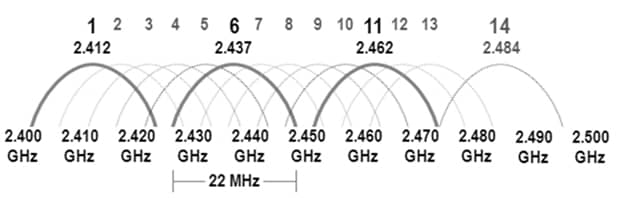
  • Only channels 1, 6, and 11 are WiFi non-overlapping channels
  • Offers better range but suffers from significant congestion
  • In North America, channels 1-11 are available, while some regions permit up to channel 13 (Japan exclusively allows channel 14

The WiFi channel overlap chart above shows why channels 1, 6, and 11 are preferred – they don’t overlap with each other.

Pro Tip:

Channel 14 remains illegal everywhere except Japan. Stick with WiFi non-overlapping channels 1, 6, and 11 unless you’re keen on having a friendly chat with regulatory authorities.

5GHz Band

  • Provides 25 non-overlapping channels (quantity varies by country)
  • Less crowded but doesn’t reach as far
  • Supports multiple channel widths: 20/40/80/160MHz
  • Many 5GHz channels are labeled as “DFS” (Dynamic Frequency Selection). These channels share the same frequencies that weather and military radar systems use. WiFi devices must monitor for radar signals and switch channels if detected. Regulations for these channels vary by country.

6GHz Band (WiFi 6E and WiFi 7)

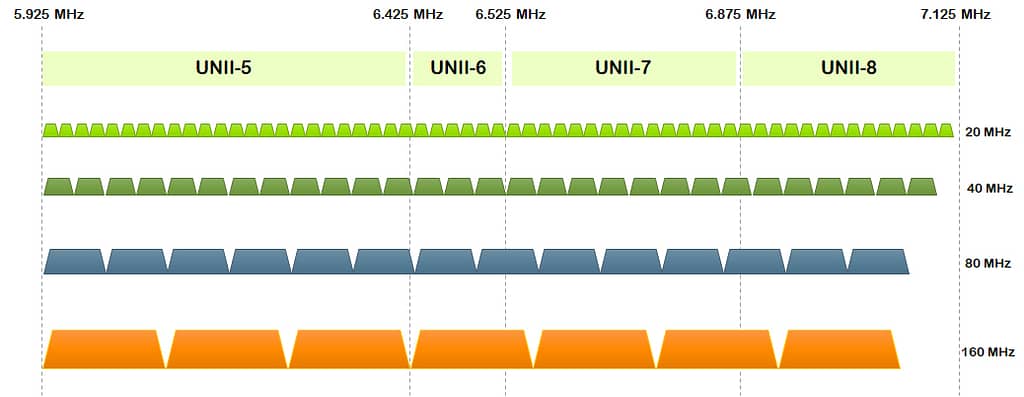
  • Delivers 59 non-overlapping channels in the US
  • Offers clean, uncluttered spectrum without legacy device interference
  • Supports channels up to 320MHz wide with WiFi 7
  • Not all countries have approved 6GHz for WiFi use, with varying amounts of spectrum allocated in different regions

Pro Tip:

Channel width impacts performance significantly. Think of it as road lanes – more lanes (wider channels) move more data but consume more of the limited frequency space.

How WiFi Channel Overlap Causes Interference

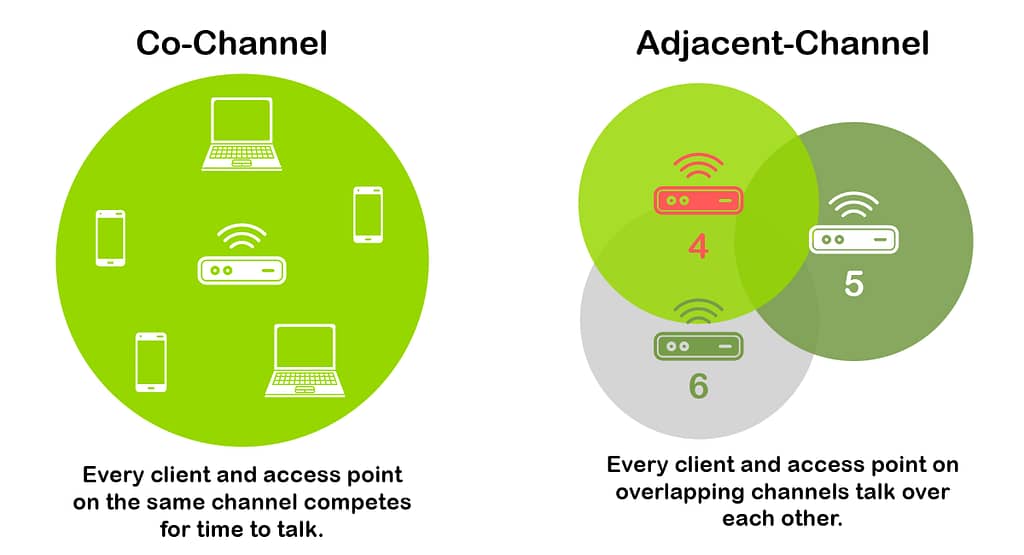
Two types of interference result from WiFi channel overlap.

Co-Channel vs. Adjacent Channel Interference

Type What Happens Impact
Co-Channel (CCI Access points on same channel coordinate transmissions Slower but remains functional
Adjacent-Channel (ACI) Overlapping signals corrupt each other Data loss and constant retransmissions

Older WiFi standards use CSMA/CA (Carrier Sense Multiple Access with Collision Avoidance), which works like a polite conversation. Before transmitting, devices first listen to see if the channel is clear. If they detect another transmission, they wait a random period before trying again.

Here’s why CSMA/CA works well with co-channel interference but fails with partial overlap:

  • With co-channel interference (same channel): Devices can properly “hear” each other and politely take turns. Performance slows as more devices join, but the system remains functional.
  • With adjacent channel interference (overlapping channels): Devices can’t properly detect transmissions on partially overlapping channels. They incorrectly think the channel is clear and transmit anyway, causing signal corruption when the transmissions collide. This leads to data loss and constant retransmissions.

Newer WiFi 6/6E/7 standards use OFDMA (Orthogonal Frequency Division Multiple Access), which divides the channel into smaller resource units that can be assigned to different devices simultaneously. This is like converting a single-lane road into multiple lanes, allowing more efficient handling of traffic. While OFDMA reduces co-channel interference significantly, it still cannot fully solve adjacent channel interference problems.


Pro Tip:

Adjacent channel interference creates far more problems than co-channel interference. When choosing between a busy non-overlapping channel or an empty overlapping channel, always select the busy non-overlapping option.


How to Check WiFi Channel Overlap

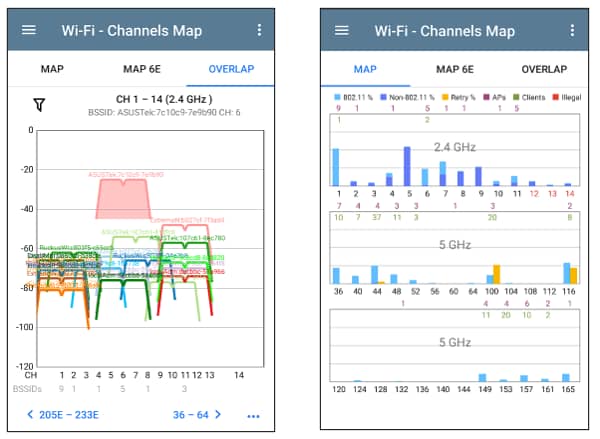
How to check if your WiFi has channel overlap issues, requires specialized tools. NetAlly’s solutions reveal what’s actually happening in your wireless environment:

  • AirCheck G3 PRO – Handheld analyzer that immediately displays channel usage patterns and identifies WiFi channel overlap
  • EtherScope nXG – Provides comprehensive analysis of both WiFi and wired networks

How to check WiFi channel overlap symptoms: Watch for fluctuating performance, unexpected disconnections, and the frustrating combination of strong signal but poor throughput.

Pro Tip:

Channel interference problems can also be caused by non-WiFi interferers. In this case you should use a spectrum analyzer like the NXT-2000 from NetAlly, which allows you to identify non-WiFi interference sources that standard analyzers completely miss and measures both channel occupancy and noise floor levels.

Best Practices for WiFi Channel Planning

Quick Channel Selection Guide

Band Best Practice Channel Width
2.4GHz Use exclusively WiFi non-overlapping channels 1, 6, 11 Stick to 20MHz for all setups
5GHz Start with non-DFS channels 40MHz works well in many cases
6GHz Spread usage across available channels 80MHz can be used in many instances

Effective channel planning means configuring access points, so they don’t interfere with each other. For 2.4GHz, always use channels 1, 6, and 11 because they don’t overlap. For 5GHz, start with channels that don’t require radar detection (36-48 and 149-165) before using DFS channels.

The 6GHz band works with both WiFi 6E and WiFi 7 devices and offers much more space for wider channels. For outdoor deployments, 6GHz requires checking a database (AFC) before transmitting to protect existing users.

Choose channel widths based on how many access points you have:

  • Home/Small Office: Wider channels (40/80/160/320MHz) give faster speeds when you have fewer access points
  • Medium Business: Mix of 40MHz on 5GHz and 80MHz on 6GHz balances speed and capacity
  • High-Density Environment: Narrower channels (20/40MHz) allow more non-overlapping channels to be used

For networks with multiple access points, plan their placement and channel assignments carefully to minimize overlap. A channel overlap chart like that available on NetAlly tools helps you see which channels will conflict with each other.

How to Fix WiFi Channel Overlap Problems

  1. Assess – Determine which channels your network and neighbors currently use with a WiFi channel overlap chart
  2. Implement – Switch to WiFi non-overlapping channels (e.g. 1, 6, 11 on 2.4GHz)
  3. Adjust Power – Lower power settings to prevent signals from access points using the same channel to overlap with each other
  4. Verify – Measure throughput in previously problematic areas

If forced to choose, even when it’s busier, go with the crowded channels instead of the overlapping ones.

To effectively resolve WiFi channel overlap issues and boost network performance, explore NetAlly’s purpose-built tools: the AirCheck G3, AirMagnet Survey PRO, EtherScope nXG, and CyberScope Air.

Wireless connectivity has become a pillar of modern vehicle design. But as OEMs and Tier 1 suppliers integrate more consumer-grade wireless technology into their vehicle platforms, they are faced with the same set of challenges confronting many electronics producers: how to create and manage efficient, repeatable, scalable and cost-effective testing procedures from the early stages of R&D through high-volume manufacturing.

The primary focus of automotive design teams is to enable innovation. However, without adequate test protocols at key points along the design chain, test engineering runs the risk of lagging behind, which can affect product quality, time to market and the user experience.

Wireless Connectivity Is in the DNA of Automotive Design 

As a mainstay for enhancing safety, convenience and the overall driving experience, the most prevalent wireless connectivity technologies include Bluetooth®, Wi-Fi and cellular networks that enable functions like hands-free calling, real-time navigation, over-the-air (OTA) software updates and remote diagnostics. These advancements have transformed vehicles into connected hubs, meeting consumer expectations for seamless digital integration.


The global market for automotive connectivity is projected to grow from $33.4 billion in 2024 to $190.3 billion by 2033, with a compound annual growth rate of 19 percent. This growth underscores the increasing demand for vehicles equipped with advanced connectivity features.

Looking ahead, wireless connectivity is poised to enable more sophisticated applications in future vehicle models. These include support for autonomous driving technologies as well as vehicle-to-everything (V2X) communication, which allows cars to interact with each other and with infrastructure to improve traffic flow and safety. As these innovations become more prevalent, the role of robust and reliable in-vehicle wireless connectivity will only become more critical.

In-Vehicle Wireless Design: A Fragmented Ecosystem 

Within the automotive design ecosystem, the different subsystems in the car will have different needs. The requirements for secure keyless entry are not the same as infotainment or embedded telematic control units (TCUs) that wirelessly connects the vehicle to the cloud.

Different wireless applications exist on their own using different technologies for connectivity, each with unique test needs. The consequence is clear: a one-size-fits-all approach to automotive testing is fraught with risk due to the number and diversity of wireless integration vectors.

Wireless Weaves a Tapestry of Innovation

Wireless technologies like Wi-Fi, Bluetooth and cellular networks were initially developed for consumer applications — smartphones, laptops, smart home devices — where rapid innovation, large production volumes and price competition have driven fast iteration and falling costs. When these same technologies are integrated into vehicles, the test and deployment landscape changes dramatically.


Automotive environments are far more demanding. OEMs in this space are risk-averse and often late adopters of new technologies, prioritizing safety, security and long-term reliability over cutting-edge features. Unlike consumer devices, which may be replaced every two to three years, automotive systems must function flawlessly over much longer product lifecycles and under harsher operating conditions. This means more rigorous test requirements — especially in RF performance, environmental durability and functional safety.

Let’s look at the key points and test challenges for several of the most important technologies:

  • Wi-Fi is widely used in vehicles for infotainment systems, enabling media streaming, OTA updates and real-time diagnostics. In-vehicle Wi-Fi testing poses unique challenges. Dense RF environments filled with Bluetooth, cellular and even radar signals can cause interference. Coexistence testing is critical to ensure robust, uninterrupted connectivity. With Wi-Fi 7 introducing technologies like 4096-QAM and Multi-Link Operation, the test complexity increases further due to tighter Error Vector Magnitude (EVM) requirements and the need to validate operation across multiple frequency bands.


  • Bluetooth has evolved from a convenience feature to a core connectivity technology for hands-free calling and voice control, in-cabin device syncing and tire pressure monitoring systems (TPMS). New capabilities like Bluetooth channel sounding enhance secure access by precisely measuring proximity, which is crucial for digital keys and anti-theft systems. But testing Bluetooth in automotive applications demands attention to low-latency performance, interoperability with various mobile devices, and challenging antenna design constraints exacerbated by the vehicle’s limited space.


  • Digital keyless entry often combines ultra-wideband (UWB), Bluetooth and near field communication (NFC) to enable secure, seamless vehicle access. Testing must account for complex factors like precise location accuracy (to avoid relay attacks), secure cryptographic protocols and sensitivity to physical placement and interference. NFC’s short range makes testing particularly sensitive to repeatability and precision in real-world conditions.


  • Cellular connectivity via 4G, and increasingly 5G, is the backbone for telematics, emergency services and vehicle-to-cloud functions. Automotive test strategies must account for whether connected modules are pre-certified or chip-on-board, with the latter requiring significantly more complex and expensive RF validation.


Overall, while consumer adoption helps reduce the cost of wireless components, automotive applications demand far more robust and specialized test strategies to meet the industry’s stringent requirements for safety, reliability and performance.

Why Car Makers Need a Wireless Test Partner

Unlike the consumer electronics industry, cost-sensitive and risk-averse automotive manufacturers are slower to invest in leading-edge wireless testbeds. As a result, some OEMs and Tier 1 suppliers rely on outdated methods due to limited internal RF test knowledge.

To close the gap, a wireless test partner such as LitePoint can simplify wireless test for labs and factories and provide the capability to test the latest wireless products with innovative test methodologies.

As a trusted wireless test company, LitePoint provides high-quality, efficient and reliable test solutions. LitePoint is also the only test company to cover all three critical technologies in the Car Connected Consortium (CCC) digital key 3.0 specification – UWB, Bluetooth and NFC.

Driving Performance with Trusted Test Partnerships

As vehicles incorporate more software-defined technologies, wireless testing is no longer optional; it’s a strategic imperative.

With turnkey systems for both R&D and high-volume production, LitePoint enables automotive customers to implement scalable test processes that align with design complexity and compliance requirements. LitePoint brings deep domain expertise, strong chipset vendor relationships and leading-edge test automation. By standardizing and simplifying wireless test across design and production workflows, LitePoint helps automotive manufacturers close the gap between wireless ambition and real-world performance.

Connected vehicles require wireless systems that just work. LitePoint helps ensure they do.

Your guests judge your hotel within minutes of arrival. They expect lightning-fast WiFi, seamless entertainment systems, and flawless connectivity throughout their stay. But behind every five-star digital experience lies something most hoteliers never think about: the cables hidden in your walls.

In this white paper, we discuss structured cabling, which takes a standardized approach to network infrastructure. Instead of chaotic point-to-point connections, it creates an organized foundation that supports multiple technologies through a single, unified system.

Learn about the benefits of structured cabling versus traditional piecemeal approaches, how you can implement structured cabling in your hotel, and how WorldVue and our partner Cabling Solutions LLC can help with comprehensive structured cabling solutions for both new construction and retrofit projects.


Download Full White Paper

Simplify Network Operations Without Sacrificing Scalability: Smarter Network Design Starts Here. RUCKUS offers a free Design My Network session where you’ll connect with an expert, talk through what’s working (and what’s not), and walk away with a personalized plan that makes sense for your environment.

If you’re responsible for keeping your organization connected—whether it’s across a campus, a hospital system, a stadium, or multiple offices—you’re likely being asked to do more with less. More users. More devices. More expectations. Meanwhile, resources and headcount aren’t exactly scaling at the same pace.

And let’s be honest – Most networks weren’t built for this kind of pressure.

If your infrastructure feels like a patchwork of short-term fixes and aging equipment, now might be the time to rethink your network design. Not by starting from scratch, but by building something smarter, more scalable, and easier to manage.

When the Network Becomes the Bottleneck

It’s easy for networks to grow in pieces—one vendor here, a new platform there—until suddenly you’re juggling more tools than time. The result? Slower performance, inconsistent coverage, and troubleshooting that eats up half your day.

Simplifying how your network is built and managed frees up your team to focus on actual priorities—not putting out fires or dealing with user complaints. And the right design doesn’t just solve problems now. It gives you a solid foundation for what’s coming next.

Why Automation Isn’t Optional Anymore

If your team is constantly buried in manual tasks, configuring access, onboarding devices, managing security — you’re not alone. But you also don’t have to live that way.

When automation is baked into the network from day one, things just work better. Devices get online faster. Policies stay consistent. Problems get flagged before they become support tickets.

Done right, automation isn’t about replacing people;, it’s about giving them back time and control. And when your team has space to be strategic instead of reactive, everything runs smoother.

Build It for How You Actually Work

There’s no one-size-fits-all when it comes to networks. What works for a hospital won’t work for a convention center. What works for your HQ might not work for your branch offices.

That’s why design matters. It should reflect how your people work, how your spaces are used, and where performance matters most. A smart design makes it easier to scale, maintain, and support without overcomplicating things.

When changes occur, as they inevitably do, you are prepared to adapt without needing to start from scratch.

See What’s Possible 

Take Dr Pepper Ballpark. RUCKUS helped them rethink their network to handle packed stadium crowds, on-site vendors, and day-to-day operations—without adding complexity for their IT team.

Better coverage, smoother performance, less stress. That’s what smart design looks like.
Read the full story if you’re curious.

Let’s Make Your Network Easier to Run

If your current setup feels clunky or like it’s barely holding on, this is a chance to reset. RUCKUS offers a free Design My Network session where you’ll connect with an expert, talk through what’s working (and what’s not), and walk away with a personalized plan that makes sense for your environment.

No pressure. Just a chance to figure out what “smarter” could look like for you.