Breaking News

GLOBAL Wi-Fi NEWS bulletin

As digital connectivity becomes essential in every aspect of daily life, the demand for seamless internet access has expanded well beyond indoor spaces. Outdoor access points now play a critical role in delivering reliable wireless coverage across parks, city centers, hospitality destinations, and sports venues—supporting everything from casual browsing to high-demand applications.

Paycom-Center-Case-Study-Hero-Image


RUCKUS is excited to announce the expansion of its Wi-Fi 7 outdoor portfolio with the addition of the RUCKUS® T670sn, the first AI-driven outdoor Wi-Fi® solution, to combine the advanced capabilities of Wi-Fi 7 with a software-defined sector antenna technology, offering unmatched performance and adaptability in complex and high-density environments.

RUCKUS T670sn unique programmable sector antenna enables software defined coverage

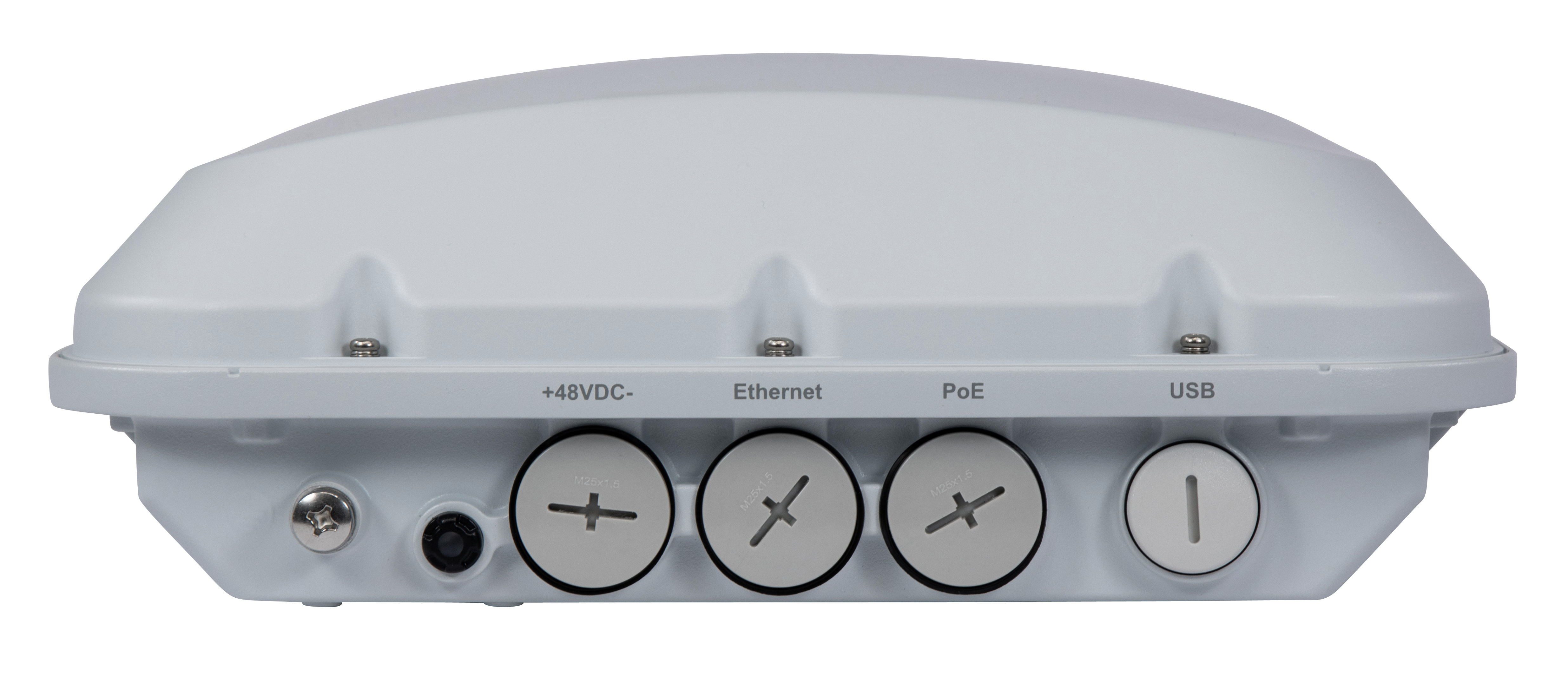
The RUCKUS® T670sn is a high-end Wi-Fi 7, tri-band outdoor AP with a unique programmable directional antenna array that is software-configurable for either narrow-angle or wide-angle coverage, allowing for unmatched precision and range, and enabling deployment models that were not possible before.

T670sn Programmable Software Defined Coverage

This dynamic control minimizes interference while maximizing signal strength and data rates, leading to better connectivity and performance in targeted areas. Additionally, the ability to modify coverage patterns remotely eliminates the need for physical adjustments, making it ideal for scenarios with changing network demands, such as seasonal events or infrastructure expansions.

Key benefits of software defined coverage include:

  • Deployment Flexibility: Software-defined sector coverage allows easy adaptation to changing network needs.
  • Optimized Performance & Signal Control: Reduces interference and enhances connectivity in high-demand areas. Enables the use of wider channels up to 160MHz and 4K QAM, resulting in significantly higher throughput and lower latency.
  • Simplified Network Planning: Eliminates the need for multiple AP types, reducing costs.
  • Dynamic Adaptation: Antenna patterns can be remotely adjusted to suit different crowd conditions.
  • Enhanced Spectral Efficiency: Improves spectrum utilization, reducing co-channel interference.
  • Cost-Effective and Scalable: Enables fewer AP deployments with optimal coverage and performance.

“Ruckus technology has been instrumental in driving our growth across multiple industries. Now, with the launch of the software-configurable antennas, sectorized Wi-Fi 7 Access Points, we’re unlocking smarter, high-capacity network designs tailored to your environment. By optimizing signal patterns for specific density deployments and tapping into the power of both 5GHz and 6GHz frequencies, we can deliver an unmatched Wi-Fi experience—built for performance, reliability, and seamless WLAN service for all connected clients,” says Tim Parkes-Rolfe, Technical Operations Manager at Performance Networks.

RUCKUS T670sn key capabilities

RUCKUS T670SN - 0L5A2647

Tri-band capability and high data rates 

The RUCKUS T670sn supports two radio configurations to support different regulatory domains:

  • Tri-band (2.4GHz + 5GHz + 6GHz) for the US and Canada*: This configuration supports Wi-Fi 7 simultaneously on 2.4GHz, 5GHz, and 6GHz frequency bands, with a maximum physical data rate of 9.336 Gbps.
  • Dual-band (2.4GHz + 5GHz) for global use: This setup offers Wi-Fi 7 simultaneously on both 2.4GHz and 5GHz frequency bands, with a maximum physical data rate of 6.454 Gbps.

Both configurations enable users to experience cutting-edge Wi-Fi 7 features, offering fast and reliable connections regardless of the number of devices or the spectrum they operate on.

Standard power mode in 6 GHz with automatic frequency coordination (AFC) support

Standard Power mode with AFC enables the use of the 6GHz band in the US and Canada for Wi-Fi without interfering with incumbent devices. Integrated with Comsearch® AFC system which leverages nearly five decades of experience in microwave frequency coordination and expertise with cloud-enabled, data-centric dynamic spectrum management systems, T670 dramatically increases range and performance in the 6GHz band while minimizing interference to incumbent devices.

MLO uses multiple bands to simultaneously connect the AP and the user device. Aggregating these discrete links significantly increases throughput, reduces latency, and improves connection reliability, delivering:

  • Link redundancy
  • Link aggregation
  • Link selection

By addressing the unique challenges of crowded environments, Wi-Fi 7 and its MLO feature could substantially enhance both operational efficiencies and user experiences in applications like sports stadiums, providing robust, low latency, and high-speed connectivity.

The T670sn rounds out the RUCKUS Wi-Fi 7 outdoor portfolio for large venues, complementing RUCKUS under-seat deployments with the T670 and its mounting bracket, by adding overhead narrow-angle and wide-angle AP placement options. This end-to-end solution is purpose-built to deliver exceptional wireless performance in stadiums, arenas, and other high-density environments—maximizing speed, capacity, and reliability for both attendees and venue operations.

Flexible management options to fit any IT strategy

While advanced access point (AP) technology is essential for providing reliable outdoor connectivity, the management and assurance platform is critical to delivering a complete, high-performing solution.

The RUCKUS T670sn offers versatile deployment flexibility with support for multiple management platforms, empowering IT teams to choose the model that best aligns with their operational needs, scalability goals, and security policies:

RUCKUS One® AI-driven management and assurance platform 

The RUCKUS One AI-driven, cloud-based converged network management and assurance platform is designed for ease of use and scalability.  The RUCKUS One solution enables centralized management of Wi-Fi, wired, and IoT networks from a single intuitive dashboard. It offers key benefits, including:

  • Efficient network management: RUCKUS One platform provides centralized control and real-time monitoring, streamlining network operations.
  • AI-driven performance optimization: RUCKUS AI™ solution uses machine learning to predict network demand and automatically adjust to dynamic conditions, providing consistent high-speed connectivity, even during peak moments.
  • Scalability: The solution easily scales to meet growing demands as more devices connect.
  • Improved user experience: AI-driven traffic prioritization provides seamless Wi-Fi for streaming, social media, and mobile services by minimizing congestion.
  • Proactive issue resolution: AI insights identify potential issues before they affect performance, allowing for dynamic adjustments and reducing downtime.
  • Lower operational costs: Proactive AI-driven optimization reduces maintenance and manual interventions, saving time and resources.

RUCKUS SmartZone™

For organizations that prefer on-premises control, RUCKUS SmartZone controllers deliver robust, scalable network management with deep visibility and automation. Whether deployed on a physical appliance or virtual machine, RUCKUS SmartZone controllers offer:

  • Centralized management of thousands of APs and switches.
  • Advanced security, policy enforcement, and user control.
  • Seamless support for multi-tenancy and high-availability configurations.
  • Granular control over RF tuning, traffic prioritization, and system updates.

For additional details, check the RUCKUS T670sn product page. 

Transformational spectrum decision catalyzed unprecedented innovation and connectivity advancements

Austin, Texas – April 23, 2025 – Wi-Fi Alliance® proudly marks the fifth anniversary of the U.S. Federal Communications Commission’s (FCC) landmark decision to open the 6 GHz band for unlicensed use, a pivotal milestone that continues to fuel innovation and connectivity through Wi-Fi®. This bold April 2020 decision unlocked billions of dollars in economic value, positioned the U.S. as a global leader in unlicensed spectrum policy, and catalyzed international momentum toward enabling a next-generation Wi-Fi® ecosystem worldwide.

The 6 GHz band has played a critical role in enabling next-generation Wi-Fi – driving the global rollout of Wi-Fi 7 – by relieving network congestion and expanding high-performance connectivity. Since the FCC’s ruling, billions of 6 GHz Wi-Fi devices have entered the market, underscoring the rapid adoption and far-reaching benefits of forward-looking spectrum policy.

“The FCC’s visionary action to open the full 6 GHz band was a pivotal moment for Wi-Fi connectivity and digital transformation globally,” said Kevin Robinson, President and CEO of Wi-Fi Alliance. “Five years on, that leadership continues to drive global spectrum policy, as regulators around the world empower consumers and enterprises with Wi-Fi innovation.” 

Wi-Fi Alliance is proud of the critical role we’ve played at the forefront of advancing 6 GHz Wi-Fi, working tirelessly to support policymakers and industry innovators. As we look ahead, we remain committed to driving further progress in spectrum policy and fostering global connectivity through continued leadership in Wi-Fi advancements.

To mark this milestone, Wi-Fi Alliance is sharing educational resources, a special episode of The Signal podcast, and member company testimonials on the tremendous impact of the full band.

As the demand for high-quality connectivity continues to grow, 6 GHz remains essential to delivering seamless, secure, and scalable Wi-Fi.

Wi-Fi Alliance member testimonials 

“The 6 GHz band for unlicensed use is advancing the wireless landscape, and Boingo is pioneering its real-world deployment across high-density venues with our Wi-Fi 6E and Wi-Fi 7 solutions. From airports and stadiums to hospitals, convention centers and military bases, Boingo helps venues unlock the full potential of the 6 GHz band to deliver faster speeds, greater capacity, and seamless, secure connected experiences—all through our converged network approach.” – Dr. Derek Peterson, CTO, Boingo Wireless

“Five years ago, the FCC’s bold move to open the 6 GHz band didn’t just transform U.S. wireless connectivity—it set a global precedent. Today, countries representing over 75% of the world’s GDP have followed suit, catalyzing a new era of Wi-Fi innovation. With over a billion 6 GHz Wi-Fi devices shipped, it’s quickly becoming the standard for smartphones and laptops. As Wi-Fi 7 proliferates, wireless performance is converging with AI—powering an immersive, intelligent edge. The momentum behind 6 GHz is unstoppable, and the next chapter of Wi-Fi is redefining how we connect, compute, and collaborate.” – Vijay Nagarajan, Vice President of Wireless Communications and Connectivity Division, Broadcom Inc. 

“The FCC’s decision to open the 6 GHz band removed the last performance barrier for the industry. We quickly integrated 6 GHz into the Calix Unlimited Subscriber systems portfolio, building a Wi-Fi CERTIFIED® line so providers can support higher performance and capacity applications for residential, MDUs, and small businesses. The 6 GHz spectrum and the latest Wi-Fi 7 standard are game changers for providers who compete on experience, enabling remote healthcare, smart manufacturing, real-time logistics, and much more. As a contributing member of Wi-Fi Alliance, Calix remains committed to open standards that ensure interoperability and help providers deliver secure, high-performance Wi-Fi 7 experiences at scale.” – Shane Eleniak, chief product officer at Calix 

“As we celebrate the 5-year anniversary of the FCC’s release of the full 6 GHz band for unlicensed use, Cisco acknowledges its transformative impact on wireless connectivity. The availability of 1200 MHz in the 6 GHz spectrum has been vital for advancing network solutions and fostering innovation. Cisco will continue to build innovative technologies that are 6 GHz enabled, reflecting our commitment to connecting the unconnected and driving a digital future for all.” – Matt MacPherson, Wireless CTO at Cisco

“Wi-Fi has become ingrained in our daily lives as the predominant and most ubiquitous wireless technology over the last 26 years. The 6 GHz decision five years ago wasn’t just a regulatory milestone—it marked the beginning of what I call the era of 6 GHz Wi-Fi connectivity and mobility. This newly available spectrum has unlocked unprecedented possibilities and will continue to drive the next wave of wireless innovation. As we celebrate this anniversary, we’re reminded that the real potential of 6 GHz is just starting to unfold. At Extreme, we’re harnessing this spectrum to deliver breakthrough performance—ultra-fast, ultra-reliable connectivity that enables seamless, secure, and high-quality user experiences in even the most demanding environments. For our customers, 6 GHz Wi-Fi isn’t just an upgrade—it’s a promise of fast, frictionless, and dependable wireless access, wherever and whenever it’s needed.” – David Coleman, Director of Wireless Networking, Office of the CTO, Extreme Networks

“Congratulations to the FCC and on the 5th anniversary of its historic decision to expand Wi-Fi into 6 GHz for increased capacity to support the growth of wireless devices and new innovative use cases. As a key advocate of the 6 GHz band, we’re seeing many customers take advantage of these capabilities in their products using our Wi-Fi chips with lower latency and better co-existence with other wireless technologies. As devices become more intelligent and the need for real-time device communication increases, Infineon will continue to work closely with Wi-Fi Alliance, regulatory bodies and partners to ensure our customers have solutions that meet their growing needs across automotive, industrial, enterprise and consumer IoT applications.” –Sivaram Trikutam, SVP of Wireless Connectivity, Infineon Technologies

“I can’t believe it’s been 5 years since the joint Intel-Broadcom demo at the FCC offices in Washington D.C., where we were the first to demonstrate the benefits of 6 GHz Wi-Fi. I remember Chairman Pai sharing our view that 6 GHz is a vital resource, enabling unparalleled Wi-Fi performance and multi-gigabit speeds throughout the home due to clean spectrum and up to 320 MHz channels. I am excited to say that 5 years later, we are seeing 6 GHz adoption exceeding expectations through broad industry collaboration supported by Wi-Fi Alliance certification.” – Eric A. McLaughlin, VP, Client Computing Group, GM, Connectivity Solutions Group, Intel Corporation

“The FCC’s historic 6 GHz decision has driven innovation and product investments, significantly improving connectivity for consumers across the U.S. On the 5th anniversary of this decision, MaxLinear congratulates the FCC and the industry on these advancements. Shortly after the decision, MaxLinear launched its first Wi-Fi 6E product, laying the foundation for our next-generation, industry-leading tri-band single-chip, which includes Wi-Fi 7 baseband and radio processing for all three bands. The high level of integration in MaxLinear’s Wi-Fi 7 single-chip lowers costs for consumers while fully unlocking the potential of the 6 GHz band by improving throughput and reducing latency. These tremendous advancements in Wi-Fi were made possible by the FCC’s decision. MaxLinear remains committed to driving innovation and delivering exceptional experiences for customers and service providers.” – Puneet Sethi, Vice President of MaxLinear’s Network Infrastructure and Carrier Business.

“Five years ago, the FCC’s historic decision to open the 6 GHz spectrum to Wi-Fi marked a transformative milestone in wireless connectivity. Qualcomm Technologies is proud to have been part of a group of industry visionaries who played a pivotal role in driving this change. As we celebrate this anniversary, we reflect on the profound impact this decision has had in unlocking Wi-Fi’s full potential with Wi-Fi 6E, Wi-Fi 7 and beyond, enabling unprecedented connectivity and performance for consumers, businesses, and industries. We look forward to continuing our journey of innovation, ensuring Wi-Fi remains a cornerstone of global connectivity.” – Rahul Patel, Group General Manager, Connectivity, Broadband & Networking (CBN), Qualcomm Technologies, Inc.

“Securing 6 GHz spectrum for the Wi-Fi market not only anchored massive improvements in throughput and latency for consumers/users but also catapulted the technology advancement in semiconductor process, design, and packaging. This additional spectrum supports the continued Wi-Fi standard evolution and ability to accelerate use-case applications fueled by edge compute and AI advancements. These advancements are not just about higher speeds; they are about creating smarter, more responsive environments that can support the growing diversity and density of today’s digital landscape.  As we celebrate this milestone anniversary, we recognize the profound impact these technologies have had on our ability to connect, communicate and innovate. The future of wireless is here and brighter than ever.” – Tony Testa, General Manager, Connectivity Components Business Unit, Qorvo, Inc.

“The action from the FCC was a game-changer, ushering in a new era of enterprise connectivity by paving the way for Wi-Fi 7, which delivers unprecedented levels of speed, reliability, and ultra-low latency for the modern digital enterprise. At RUCKUS Networks, CommScope, we recognized early on that the 6 GHz band would become the backbone of next-gen enterprise wireless. Since that historic 2020 ruling, we’ve been proud to introduce the most complete line of AI-Driven indoor and outdoor Wi-Fi 7 solutions capitalizing on the value of 6 GHz. Opening the band opened up a world of new possibilities and we’re excited to be a part of the revolution.” – Mittal Parekh, Senior Director, Products, RUCKUS Networks, CommScope

“The introduction of 6 GHz Wi-Fi five years ago paved the way for Skyworks to continue advancing our mission of connecting everyone and everything, all the time. As the market continues to evolve and new bandwidth-heavy applications are introduced, we’re proud to be driving and shaping the future for global Wi-Fi adoption through our participation in the Wi-Fi Alliance.” – Chung Liang Lee, director of product marketing for broad markets at Skyworks

“The FCC’s landmark decision to open the 6 GHz band five years ago transformed the Wi-Fi landscape, unlocking unprecedented capacity and paving the way for Wi-Fi 6E and now Wi-Fi 7. At Spirent, we recognized early on the potential of this spectrum to revolutionize connectivity and have been proud to support the industry with state-of-the-art testing and assurance solutions that accelerate innovation and ensure performance. As Wi-Fi continues to evolve, the 6 GHz band remains a cornerstone of next-generation wireless experiences—and Spirent remains at the forefront, helping to turn that potential into reality.” James Kimery, VP of Wireless Product Management at Spirent Communications

With the rise of 5G mobile data and improved network coverage, you might wonder why customers still connect to guest Wi-Fi when visiting businesses. Isn’t mobile data enough? The truth is, guest Wi-Fi remains a powerful tool for both customers and businesses, offering benefits that go beyond internet access. Let’s explore why customers still connect to Wi-Fi and how businesses can use this opportunity to enhance their marketing efforts with tools like captive portals, Wi-Fi Marketing, and other business marketing solutions.

1. Saving Mobile Data

Customers are often cautious about their mobile data usage, especially those on limited plans. Connecting to free Wi-Fi allows them to conserve data for other activities, such as streaming content or browsing apps, making guest Wi-Fi an attractive option.

2. Enhanced Connection Quality

In locations like large buildings, stadiums, or transportation hubs, Wi-Fi often provides a more reliable and faster connection than mobile data. Customers naturally opt for the stronger connection, particularly when they need seamless browsing or streaming.

3. Wi-Fi-Only Devices

Not all devices are equipped with mobile data capabilities. Laptops, tablets, and other Wi-Fi-only devices rely on available networks, especially in coworking spaces, coffee shops, hotels, or conventions. For these users, guest Wi-Fi is essential.

4. Captive Portals for Engagement

A captive portal is a key feature of modern Wi-Fi networks, offering businesses a strategic way to engage with customers. When users connect to a venue’s Wi-Fi, they’re directed to a branded login page where businesses can:

  • Collect customer information like email addresses.
  • Offer incentives such as discounts or loyalty rewards.
  • Promote new products, services, or events.

Captive portals not only enhance the user experience but also provide businesses with valuable data to fuel their Wi-Fi Marketing strategies.

5. Exclusive Perks and Incentives

Businesses can encourage customers to connect to Wi-Fi by offering exclusive perks, such as coupons, special offers, or loyalty points. Platforms like GoZone WiFi’s Marketing4WiFi make it easy for businesses to automate these campaigns and deliver personalized experiences. (Learn how)

6. Access to Premium Services

Guest Wi-Fi can serve as a gateway to premium experiences. For example, a retailer might provide access to exclusive deals, while a stadium could offer live game stats or instant replays. These added-value services create a compelling reason for customers to connect.

7. Convenience and Habit

For many users, connecting to Wi-Fi is second nature. Once they’ve logged in, they’re often automatically reconnected during future visits, creating a seamless and convenient experience.

8. Wi-Fi Marketing and Business Growth

Guest Wi-Fi isn’t just about providing internet access—it’s a cornerstone of effective business marketing solutions. Platforms like GoZone WiFi’s Ads4WiFi allow businesses to:

  • Deliver targeted ads to customers who connect to their network.
  • Promote app downloads or new services.
  • Monetize their Wi-Fi by connecting with advertisers through the Ads4WiFi Marketplace.

By integrating Wi-Fi Marketing into their strategies, businesses can engage customers in real-time, build loyalty, and drive revenue.

9. Real-Time Analytics for Smarter Decisions

Wi-Fi networks equipped with tools like Analytics4WiFi provide businesses with valuable insights into customer behavior. From demographics to visit frequency, these analytics empower businesses to make data-driven decisions and refine their marketing strategies.

10. Offsetting Costs with Ad Revenue

For businesses, offering guest Wi-Fi can be a revenue-generating opportunity. Platforms like GoZone WiFi’s Ads4WiFi help venues offset network costs by earning ad revenue through Wi-Fi connections. This creates a win-win scenario: customers get free internet, and businesses benefit financially.

The Bigger Picture: Beyond Free Internet

While mobile data has improved significantly, guest Wi-Fi offers unique advantages that mobile networks can’t replicate. It’s not just about free internet—it’s about creating opportunities for engagement, delivering personalized marketing, and driving revenue through tools like Wi-Fi Marketing and business marketing solutions.

With platforms like GoZone WiFi, businesses can turn their guest Wi-Fi networks into powerful assets that enhance the customer experience and foster growth. Whether it’s through captive portals, targeted advertising, or real-time analytics, guest Wi-Fi remains a critical tool for businesses looking to stay ahead in today’s competitive landscape.

Conclusion

In a world where mobile data is readily available, guest Wi-Fi continues to play a vital role in connecting businesses with their customers. By leveraging tools like captive portals, Wi-Fi Marketing, and advanced analytics, businesses can create meaningful interactions, drive loyalty, and achieve measurable results.

Ready to transform your guest Wi-Fi into a business growth engine? Explore how GoZone WiFi’s suite of solutions—Marketing4WiFi, Analytics4WiFi, and Ads4WiFi—can help your business thrive.

European broadband operators will be ramping up deployments of Wi-Fi 7-equipped gateways and other devices aggressively this year, explains MediaTek’s James Chen, VP Product & Technology Marketing. The adoption of the latest Wi-Fi standard is the most accelerated ever, as the benefits of Wi-Fi 7, plus a broad range of chipsets providing fast, reliable performance are now available for OEMs to use.

Talking to Wi-Fi NOW, Chen noted, “Nearly all Tier 1 as well as Tier 2 broadband service providers have adopted MediaTek Wi-Fi 7 for fibre gateways, 5G FWA CPEs, and home extenders. Interest is strong in Europe and USA – as well as other parts of the world – and deployments will accelerate into 2026 and 2027,” 

To monitor network performance and guarantee the customer experience for fixed and mobile networks in Brunei, the Government-linked company adopts Eyes’ON solution by SoftAtHome

PARIS, France – 24 April 2025 – SoftAtHome, an independent software company for broadband, video, and analytics, announced today that its Eyes’ON solution is deployed in Unified National Networks (UNN), a government-linked company operating the telecommunication network infrastructure in Brunei Darussalam. UNN adopted Eyes’ON Mobile and Eyes’ON Fixed Networks to monitor the performance of its networks from an end-to-end perspective to better improve the quality od experience for Brunei’s end-users.

Eyes/ON allows users to investigate any fixed or mobile network issue that impacts end-user experience. The solution was chosen for its efficiency to ensure the network’s performance and because, thanks to its mobile applications, the agent is close to the end-user. For the fixed network, Eyes’ON is embedded in a probe (also called whitebox), sent to the subscriber in case of a connectivity issue, or sent randomly to test the network proactively. Installation of the white box helps the work of field technicians.

Building upon a customized mobile application or embedded in a dedicated device in end-user’s homes, Eyes’ON provides extended resources beyond mere throughput testing thanks to flexible test procedures. It also delivers a complete diagnosis through specific test procedures, including network coverage, signal strength, throughput, streaming performance and app or web service availability. Immediately after installation and tests, UNN can get a detailed and easy-to-understand report on main performance metrics captured with a truly end-user perspective.

UNN Senior Vice President of Operations, Zulyada’in Hj Ibrahim Fisal said, “At UNN, we are committed to continuously improving network performance and ensuring the best possible connectivity experience for our customers. The deployment of Eyes’ON enables us to proactively monitor and enhance both mobile and fixed networks with greater efficiency. This initiative aligns with our vision to provide high-quality, reliable, and future-ready network services across Brunei.”

Arnaud Bellivier de Prin, CEO at SoftAtHome, said, “We are proud of the trust placed in us by UNN Brunei to ease their day-to-day missions and improve the Quality of Experience for Brunei’s very demanding end-users. Our Eyes’ON solution for Fixed and Mobile networks enables them to guarantee the best possible network performances, thanks to an end-to-end connected experience monitoring solution.”

###


About SoftAtHome

SoftAtHome is an independent software provider with seven critical solutions: broadband (Connect’ON), Wi-Fi (Wifi’ON), security (Secure’ON), smart home (Things’ON), video (Watch’ON), analytics and QoE monitoring (Eyes’ON), and a new gateway Appstore environment (Orchestr’ON). With its products deployed in over 30 million home networks and millions of mobile devices, SoftAtHome helps telecom and network operators deliver enhanced digital home experiences. The company’s 300+ employees, mainly software engineers, are committed to innovation and actively contribute to open-source communities like prpl. SoftAtHome’s hybrid solutions leverage cloud-based components and software embedded in multiple mobile and fixed devices.

For more information: www.softathome.com or [email protected]

CX4800-56F Aggregation Switch Features 48 10GbE/25GbE SFP28 and 8 100GbE QSFP28 Ports to Boost Productivity, Lower Latency, and Maximize Application Performance


ANAHEIM, California (April 29, 2025) Zyxel Networks, a leader in delivering secure, AI- and cloud-powered business and home networking solutions, today announced the launch of CX4800-56F 48-port 10G/25G L3 Aggregation Fiber Switch with 8 100G Uplinks, a high-performance Layer 3 managed switch that offers a future-proof network solution that supports today’s 10GbE network demands and future 25GbE network upgrades.

Ideal for supporting the growing bandwidth requirements of enterprise and campus aggregation network environments, the high-density CX4800-56F features upgradable 48 10GbE/25GbE SFP28 ports and incorporates eight 100GbE QSFP28 uplink ports that provide large uplinks to support cross-stack bandwidth delivery. In addition to a non-blocking architecture that delivers full 25GbE throughput on every port, even under heavy traffic conditions, the switch meets the requirements for advanced Layer 2 switching and static routing including VLAN, network access control list (ACL), port aggregation and mirroring, and security features that protect the daily operation of the network.

CX4800-56F provides high-performance switching capacity of up to 4.0Tbps with forwarding rates of up to 2.0Bpps, providing faster data transfer speeds that boost productivity in organizations with high data volumes such as video production companies and scientific research institutions. High bandwidth and low latency ensure top application performance for companies that rely on cloud-based services and real-time applications such as VoIP, video conferencing, and virtualized environments.

Benefits and Features of CX4800-56F Aggregation Fiber Switch include:


  • NebulaFlex Pro – NebulaFlex Pro enables the switch to be easily managed as a standalone device or as part of a cloud-managed network using the intuitive Nebula Control Center (NCC). A one-year professional pack license bundle provides users with features including advanced IGMP technology, comprehensive IPTV reports that provide insights to channel usage information, and network analytics alerts to optimize network performance.
  • Resiliency and Availability – Dual redundant, hot-swappable power supplies ensure there is no downtime in the event of a power supply outage. Hot-swappable fan trays safeguard against fan failures or rising temperatures. Ease of maintenance eliminates the need for scheduled system downtime if power supplies or fans need to be replaced.
  • Dedicated Networked AV Mode – The dedicated networked AV mode incorporates an intuitive wizard backed by AI intelligence to make the set-up of professional AVoIP systems easy and intuitive. In addition to a hardware design that delivers lossless and latency-free 4K video streaming over a 10GbE network, the intuitive graphical status overview of the key AV network elements, such as IGMP and IP information, helps users manage and monitor the system with ease.

“Organizations that process high volumes of data, like video production companies and scientific research institutions, are looking to next-generation networks that can deliver the faster speeds and lower latency that boost productivity and deliver the best user experience,” stated Tri Nguyen, Channel Sales and Product Manager at Zyxel Networks. “Zyxel’s CX4800-56F is a future-proof solution that supports 10GbE requirements today and is easily upgraded to support future 25GbE requirements, enabling the switch to meet the evolving bandwidth requirements of the network while protecting the wired network investment.”

Zyxel Networks CX4800-56F 48-port 10G/25G L3 Aggregation Fiber Switch carries a limited lifetime warranty and is available at a street price of $6899.99 through Amazon and Zyxel Store. The switch is also available through Zyxel Authorized Distributors: D&H, IngramMicro, TD Synnex, Target, and Wav, BlueStar, Zyxel Authorized VARs and MSPs, and online at other leading e-tailers.

For more information about Zyxel, its connectivity solutions, and the Zyxel Authorized Partner Program, visit www.zyxel.com/us and follow us on Facebook, X(formerly Twitter) and LinkedIn.

About Zyxel:

Zyxel Networks is a technology provider with over 30 years of experience, specializing in delivering solutions for small to medium-sized businesses and the enterprise-edge in partnership with VARs, MSPs and System Integrators. We enable network professionals to connect and protect organizations with greater ease by bringing together intuitive, scalable and secure cloud management with a complete portfolio of network devices.

Content filtering and threat blocking via DNS is the unsung hero of the cybersecurity stack, quietly doing its job while flashier tools grab the spotlight. Managed Service Providers (MSPs) often overlook this layer of protection, despite its simplicity and effectiveness. This oversight is a missed opportunity, as securing DNS can significantly reduce client risk without adding complexity or overhead.

At its core, protective DNS acts as a gatekeeper, scrutinizing every web request before it reaches the internet. This proactive approach means threats like phishing, malware, and command-and-control callbacks are stopped in their tracks. By blocking access to malicious domains, DNS filtering prevents potential threats from ever reaching the network, making it a crucial first line of defense.

The advantages for MSPs are clear. DNS filtering offers MSPs a straightforward way to enhance their cybersecurity offerings, providing clients with peace of mind. MSPs can reduce the likelihood of security incidents, protect sensitive data, and maintain client trust. In a world where cyber threats are constantly evolving, content filtering and threat blocking via DNS is a simple yet powerful tool that MSPs can’t afford to ignore.

How DNS Filtering Works

Protective DNS operates like a traffic cop, directing web traffic and ensuring only safe destinations are reached. At its core, the Domain Name System translates human-friendly domain names into IP addresses that computers use to identify each other on the network. When a user types a URL into their browser, a DNS query is sent to a DNS server, which responds with the corresponding IP address, allowing the connection to proceed.

Here’s where DNS filtering steps in. The queries are intercepted and checked against a list of known malicious domains. If a domain is flagged as harmful, DNSFilter blocks the request, preventing the user from accessing the site. This process happens in milliseconds, often without the user even realizing it. By stopping threats at the DNS level, harmful content is blocked before it can reach the network, reducing the risk of infection or data breach.

The beauty of protective DNS lies in its simplicity and efficiency. There’s no need for complex installations or heavy resource consumption. Instead, it leverages existing DNS infrastructure, making it a lightweight yet powerful addition to any cybersecurity stack.

DNSFilter’s content filtering and threat blocking is continuously updated with the latest threat intelligence, adapting to new threats as they emerge. This dynamic nature ensures that MSPs can offer their clients up-to-date protection against the ever-evolving landscape of cyber threats.

Protective DNS in a Layered Defense Strategy

In the grand scheme of cybersecurity, DNS receives less attention than it deserves. While firewalls, antivirus software, and intrusion detection systems play their parts, protective DNS is the first to engage, intercepting threats at the earliest stage. This proactive stance is crucial in a world where milliseconds can mean the difference between safety and breach.

DNS protection complements other security measures by acting as an early warning system. It identifies and blocks malicious domains before they can deliver their payloads, effectively neutralizing threats like phishing and malware. This preemptive action reduces the burden on downstream security tools, allowing them to focus on more sophisticated threats that slip through the initial net. By filtering out the noise, protective DNS ensures that other defenses operate more efficiently, reducing false positives and enhancing overall system performance.

Protective DNS is a critical player in defending against command-and-control callbacks. These insidious threats rely on compromised devices communicating with external servers to receive instructions. By blocking these communications at the DNS level, MSPs can disrupt the attack chain, preventing further damage and data exfiltration. This capability is particularly valuable in the fight against ransomware, where early detection and intervention can save clients from catastrophic losses.

Incorporating a DNS filtering solution into a broader cybersecurity framework is not just about adding another layer; it’s about creating a cohesive, multi-faceted defense strategy. By integrating a tool like DNSFilter with other security measures, MSPs can offer a comprehensive solution that addresses threats at every stage of the attack lifecycle. This holistic approach not only enhances protection but also builds client confidence, demonstrating a commitment to safeguarding their digital assets.

Misconceptions and Challenges

Despite its clear benefits, security at the DNS layer is still one of the most misunderstood aspects of a cybersecurity stack.

Myth #1: DNS filtering is redundant if you already have firewalls, endpoint protection, and threat detection systems.

This completely ignores DNS’s unique role as a front-line filter—stopping threats before they even resolve. Protective DNS doesn’t replace those layers; it shields them. In fact, it’s often the only layer that can block threats before a connection is made.

Myth #2: DNS filtering is ineffective at preventing attacks.

This couldn’t be further from the truth. Research shows that 78% of cyberattacks involve the DNS layer—which means if you’re not filtering DNS, you’re blind to the majority of threats targeting your network. Blocking malicious domains before a device can even reach them is one of the most efficient ways to stop command-and-control callbacks, phishing attempts, and drive-by downloads.

Myth #3: The “just throw a free blocklist at it” mindset.

While open-source blocklists might catch yesterday’s threats, they don’t adapt. Real protective DNS requires real-time domain intelligence—like the kind DNSFilter continuously gathers, analyzes, and refines using AI and threat researchers. It’s this dynamic threat detection, not a static list, that prevents breaches at scale.

Myth #4: Legitimate sites will be blocked and disrupt client operations due to false positives. 

While no system is infallible, modern protective DNS solutions like DNSFilter are highly accurate, continuously updated with threat intelligence to minimize such occurrences. Customizable policies allow MSPs to tailor the filtering to specific client needs, ensuring business continuity.

Myth #5: DNS security adds unnecessary expense.

The cost of implementing protective DNS is often outweighed by the savings from preventing breaches and reducing incident response efforts. By positioning content filtering as a cost-effective enhancement rather than an additional burden, MSPs can overcome this hurdle.

To address these challenges and myths, MSPs should focus on education and clear communication with clients. Demonstrating the tangible benefits and ease of integration can dispel myths and build confidence. By highlighting real-world success stories and providing transparent cost-benefit analyses, MSPs can effectively advocate for protective DNS as a vital component of a comprehensive cybersecurity strategy.

Integrating DNS Filtering: A Practical Roadmap

For MSPs ready to harness the power of a tool like DNSFilter, a strategic approach is key:

  1. Assess your current cybersecurity framework to identify where protective DNS can fill gaps. This initial evaluation helps tailor the integration process to your specific needs, ensuring a seamless fit with existing systems.
  2. Choose a content filtering solution, like DNSFIlter, that aligns with your service model. Look for providers offering robust threat intelligence, customizable settings, and easy integration with minimal disruption. Many solutions offer trial periods, like DNSFilter’s 14-day trial period, allowing you to test their effectiveness before full deployment.
  3. Once you’ve selected a solution, focus on implementation. Begin with a pilot program for a small group of clients to fine-tune settings and address any issues. This phased approach minimizes risk and provides valuable insights for broader rollout. During this stage, work closely with your DNS provider to leverage their expertise and support.
  4. Training is crucial. Educate your team on the nuances of protective DNS, ensuring they understand its role and functionality. This knowledge empowers them to effectively manage the system and address client queries. Additionally, provide clients with clear, concise information about the benefits to foster trust and transparency.
  5. To maximize impact, regularly review your policy configurations based on the latest threat intelligence. This proactive stance keeps your defenses sharp and responsive to emerging threats. Encourage clients to report any issues or false positives, using their feedback to refine your approach.
  6. Position content filtering as a key differentiator in your service offerings. Highlight its role in reducing incidents and protecting sensitive data, using real-world success stories to illustrate its value. By showcasing tangible results, you can enhance client trust and loyalty.
  7. Finally, continuously evaluate and adapt your security strategy. Cyber threats evolve rapidly, and staying ahead requires vigilance and flexibility. Regularly review your system’s performance, making adjustments as needed to maintain optimal protection.

The Easy Win for MSPs

For MSPs, DNS-layer security offers an uncomplicated path to significantly reduce client risk. Protective DNS intercepts threats before they can infiltrate networks, providing a proactive shield against phishing, malware, and command-and-control callbacks. This not only enhances the overall security posture but also alleviates the burden on other security measures, allowing them to operate more efficiently.

Integration is neither costly nor complex. With minimal disruption, MSPs can incorporate a DNS filtering solution into their existing frameworks, leveraging it as a cost-effective enhancement rather than an additional burden. By educating clients and dispelling common misconceptions, MSPs can position protective DNS as a vital component of a comprehensive cybersecurity strategy.

MSPs can no longer afford to ignore the overlooked gem that is DNS. It offers a low-overhead, high-impact solution that not only protects clients but also differentiates MSPs in a crowded marketplace. By embracing protective DNS, MSPs can deliver measurable results, enhance client trust, and solidify their role as leaders in proactive cyber defense.

Wi-Fi, Bluetooth, and Zigbee/Thread combo SoCs support high peak speed and low latency for gaming, AR/VR, entertainment, security, and automotive applications.

SAN JOSE, Calif., April 28, 2025 Synaptics® Incorporated (Nasdaq: SYNA) announced it has extended its Veros wireless portfolio with its first family of Wi-Fi® 7 systems-on-chips (SoCs) tailored for the Internet of Things (IoT). Comprising the SYN4390 and SYN4384, the scalable offering supports bandwidths up to 320 MHz to deliver 5.8 Gbps peak speed and low latency. The triple-combo SoCs integrate Wi-Fi 7 with Bluetooth® 6.0 and Zigbee/Thread, support Matter, and are designed to minimize system cost and power consumption. They target IoT applications requiring reliable performance-over-range for enhanced user experiences across use cases that include 8K video streaming, interactive gaming, security monitoring, immersive AR/VR, and home and automotive entertainment.

Wi-Fi 7’s multi-link operation (MLO) allows the devices to send and receive a data stream using multiple frequency bands (2.4 GHz, 5 GHz, 6 GHz) simultaneously in support of low latency, reliable connections, and high throughput for real-time applications like video calls and gaming. Synaptics’ architecture provides a power-efficient, cost-effective way to deliver the benefits of MLO.

“Growing adoption of Wi-Fi 7 in wireless networking infrastructure has created an opportunity to address a massive and diverse array of Wi-Fi 7-enabled IoT end-user devices by extending our Veros portfolio,” said Venkat Kodavati, SVP and GM of Wireless Products at Synaptics. “We are bringing the benefits of Wi-Fi 7 in a versatile solution for high-performance, low-power IoT devices. Combined with the ease of integration with our Astra AI-Native compute platform, we expect that developers will have an efficient solution for implementing next-generation connected and AI-enriched IoT products with features such as Wi-Fi Sensing.”

ABI Research forecasts annual shipments of Wi-Fi 7 chipsets to reach more than 2 billion by 2029, achieving a CAGR of 56% between 2024 and 2029.1

“Wi-Fi 7 is ushering in a new era of more enriching and sophisticated use cases for connected devices thanks to its channel bandwidth, throughput, and latency improvements,” said Andrew Zignani, Senior Research Director, ABI Research. “However, the requirements for implementation vary by product type, and edge IoT introduces challenges that differ from PCs or infrastructure applications. Synaptics’ diverse Wi-Fi 7 solutions are tailored to address these unique needs, including low power, support for multiple connectivity protocols, and AI. These will be critical in enabling Wi-Fi 7’s expansion across multiple IoT segments, reaching billions of annual device shipments over the next few years.”

Wi-Fi 7 family highlights
The Wi-Fi 7 IoT family’s support of Matter and its triple combo design provides the interoperability required to allow the devices to serve as versatile home hubs that can operate across Wi-Fi, Bluetooth, and Zigbee/Thread networks in heterogeneous wireless environments. Features support2 :

  • Peak speed of up to 5.8 Gbps, using 2×2 + 2×2 MLO, 320 MHz channel bandwidth, and 4K QAM
  • Integrated RF front-end and power management IC (PMIC) that contribute to reduced system cost and power consumption
  • Dual-core Bluetooth 6.0 for LE Audio, Channel Sounding, and LE Long Range
  • Matter and an integrated 802.15.4 radio capable of enabling Zigbee and Thread networking3
  • Integrated Arm cores and memory to enable offloading of networking functions from the host processor to help reduce system power consumption4

Availability
The SYN4390 is available now for sale, and the SYN4384 is available now in limited quantities for evaluation. For more:

Media Contact
Synaptics Incorporated
Patrick Mannion
Director of External PR and Technical Communications
[email protected]

____________________________
1Source: ABI Research Article: Wireless Connectivity Technology Segmentation and Addressable Markets by Andrew Zignani (published January 27, 2025) ©2025 Allied Business Intelligence, Inc.
2Actual performance may vary based on deployment environment and device configuration
3Certification status may vary by implementation
4Power savings may vary based on system design and workload

AI-powered self-optimizing and self-healing network intelligence enables ISPs to deliver exceptional user experiences, enhance operational efficiency, and reduce churn.

SAN ANTONIO, TX. – April 8, 2025 – Frost & Sullivan recently researched the smart home-as-a-service industry and, based on its findings, recognizes Aprecomm with the 2025 Global Transformational Innovation Leadership Award. The company is transforming how internet service providers (ISPs) approach online experience, thanks to its AI-powered network intelligence platform designed to optimize, self-heal, and proactively manage home networks in real-time. Read the award report here: https://www.frost.com/wp-content/uploads/2025/04/Aprecomm-Award-Write-Up.pdf

Aprecomm addresses a major gap in the market: the lack of visibility ISPs have into their networks. Rather than relying solely on signal strength or macro-level performance metrics, Aprecomm enables ISPs to gain deep, actionable insights into subscriber behavior, application usage, and Wi-Fi performance across the home or business. This innovation is particularly impactful in today’s environment, where remote work, entertainment streaming, and smart device adoption continue to rise, placing increased demand on home networks.

The company’s AI-driven platform consists of an integrated suite of tools tailored for ISPs. Vyom Config Service (VCS) allows remote configuration and management of broadband devices, while Virtual Wireless Expert (VWE) and Virtual Network Expert (VNE) provide real-time visibility, diagnostics, and automated network optimization. Aprecomm’s patented quality of experience (QoE) algorithm measures Wi-Fi performance per device and resolves issues proactively, significantly reducing customer support calls and technician visits.

In a deployment with ACT Fibernet, Aprecomm helped deliver up to 4x speed improvements for connected devices and steered over 70% of laptops and mobile devices to optimal Wi-Fi channels. In another case, Excitel Broadband reduced truck rolls by 62%, support call durations by 30%, and first-call resolution times by 35%, all while growing its subscriber base past one million.

Frost & Sullivan’s independent analysis also highlights Aprecomm’s evolving AI engine, Evolv®, which continuously improves by learning from real user data. With full application-level insights and an expanding library of capabilities, Evolv enables ISPs to deliver tailored experiences—especially crucial for bandwidth-intensive use cases like 4K streaming and online gaming. In partnership with Qualcomm and other leading OEMs, Aprecomm is prioritizing performance optimization directly at the hardware level for seamless, high-quality experiences.

Further strengthening its market position, Aprecomm has formed strategic global partnerships with companies such as Qualcomm, Nokia, Hitron Technologies Americas, Edgecore Networks, OpenGlobe, and ThinkTechnology. These collaborations have enabled the company to embed its AI-powered solutions into next-gen Wi-Fi 7 routers and gateways, accelerating time-to-market and enhancing ISP monetization opportunities globally.

“Aprecomm empowers ISPs with real-time, data-driven insights that transform network operations from reactive to proactive,” said Vivien Pua, Industry Analyst at Frost & Sullivan. “Its commitment to building subscriber-centric, self-evolving platforms is revolutionizing ISP business models and redefining customer satisfaction in the smart home ecosystem.”

Each year, Frost & Sullivan presents this award to the company that has leveraged competitive intelligence to successfully execute a strategy that results in stronger market share, competitive brand positioning, and customer satisfaction.

Frost & Sullivan Best Practices awards recognize companies in various regional and global markets for demonstrating outstanding achievement and superior performance in leadership, technological innovation, customer service, and strategic product development. Industry analysts compare market participants and measure performance through in-depth interviews, analyses, and extensive secondary research to identify best practices in the industry.


About Frost & Sullivan

For six decades, Frost & Sullivan has been world-renowned for its role in helping investors, corporate leaders, and governments navigate economic changes and identify disruptive technologies, Mega Trends, new business models, and companies to action, resulting in a continuous flow of growth opportunities to drive future success. Contact us: Start the discussion. Contact us: Start the discussion.

Contact:

Camila Tinajero
E:[email protected]

About Aprecomm

Aprecomm harnesses the power of AI to provide a unique applications suite that enables service providers to create self-optimizing and self-healing broadband networks.

Our quality-of-experience engine monitors and optimizes Wi-Fi performance to ensure consumers enjoy the best possible internet experience. At the same time, our cloud-based support applications leverage real-time data to predict and resolve customer service issues before they happen, saving providers time and money.

Aprecomm manages over 7 million home and business locations, partnering with more than 45 service providers worldwide.

We are making intuitive, self-healing networks a reality.

Follow Aprecomm on LinkedIn here.

How to Check WiFi Quality?

Introduction

We all depend on WiFi – whether it’s for streaming your favorite shows, having a video call, or just browsing cat videos. That’s why it is very important to have a good, solid, WiFi connection. Bad WiFi can lead to endless buffering, dropped calls, and overall frustration. But how do you actually check your WiFi signal quality? This tech tip will teach you everything you need to know.

What is WiFi Quality?

WiFi quality isn’t just about a strong signal. It’s about the overall performance of your wireless network – think of it as a report card for your WiFi. Several components must work together smoothly, just like all subjects in school need good grades to pass. Key components include:

  • Signal Strength: How strong is the signal?
  • Speed: How fast can you download and upload?
  • Latency: How long does data take to travel?
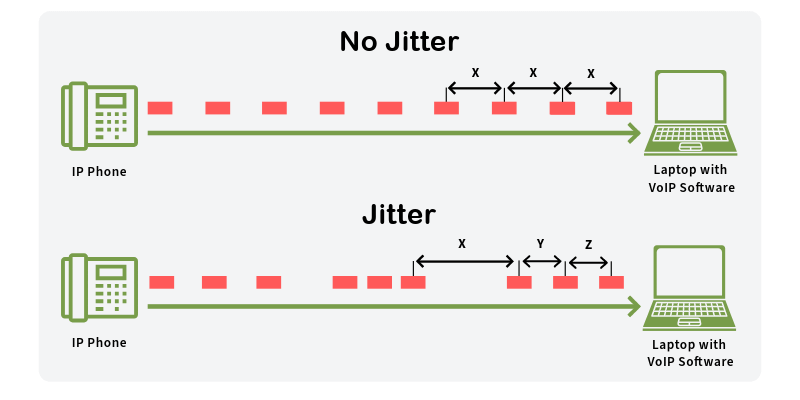
  • Jitter: How consistent is that travel time?
  • Loss: How much data is being lost and resent?

Regular checkups help you spot problems early.

Key WiFi Quality Metrics

Let’s dive a bit deeper into those key metrics. Think of them as the vital signs of your WiFi network:
Signal Strength (RSSI): Measured in decibels-milliwatts (dBm), this tells you how strong the signal is from your router or access point (AP). The closer to 0, the stronger the signal. So, -50 dBm is great, while -80 dBm is not so great.

  • Download/Upload Speeds: Measured in megabits per second (Mbps) or gigabits per second (Gbps). This is probably what you care about most – how quickly can you start binge-watching that new series?
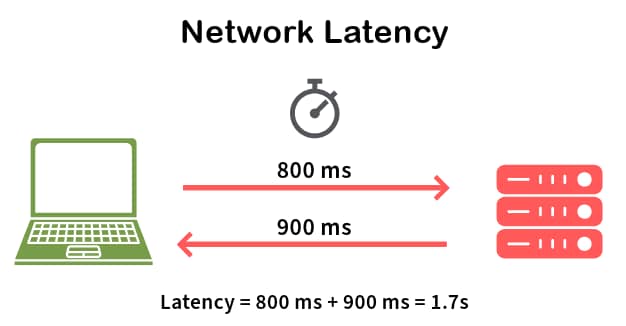
  • Latency: Measured in milliseconds (ms). This is the delay between when you send a request (like clicking a link) and when you get a response. High latency can make your internet feel sluggish, even if your speeds are good.
  • Jitter: Also measured in milliseconds (ms). It is all about consistency. High jitter means your latency is fluctuating a lot, which can cause problems with things like video calls and online games (imagine your character freezing every few seconds!).
  • Packet Loss: Measures the amount of data that fails to reach the receiver, indicating an unstable connection that can disrupt communication.
Metric Unit Description Ideal Range (Example)
Signal Strength dBm Strength of the WiFi signal -50 to -67 dBm
Download Speed Mbps/Gbps How fast data is received 25 Mbps
Upload Speed Mbps/Gbps How fast data is sent 3 Mbps
Latency ms Delay in data transfer <50 ms
Jitter ms Variability in latency <30 ms
Packet Loss % Percentage of data packets that are lost in transit <1%

Pro-Tip

The ideal range for most of the metrics provided above will depend on the type of applications you will be running and the number of devices that will be connecting to your network. For example, for 4K video streaming you will need Download speeds higher than 25 Mbps per stream. So, if you plan to stream two 4K videos at the same time your download speeds should be higher than 50 Mbps.

Common WiFi Quality Issues

Before talking about solutions, let’s look at some common WiFi problems:

  • Interference: Other devices using radio waves (microwaves, Bluetooth) can disrupt your WiFi.
  • Distance: The farther you are from the router or AP, the weaker the signal.
  • Channel Congestion: WiFi channels can get crowded, like a busy highway.
  • Hardware Limitations: An old device (router, AP, phone, tablet, etc.) might not support the latest WiFi standards.

How to Test and Improve WiFi Quality

Alright, time to put on your detective hat and start testing – and then, fixing! This section combines how to test with how to improve each metric, because knowing the problem is only half the battle. We also include common quality issues.

Signal Strength (RSSI)

  • Testing: Use a network analyzer tool like the EtherScope nXG, AirCheck G3, or CyberScope to measure the signal strength (RSSI) in different locations. These tools will give you precise readings, unlike basic phone apps. Common issues are environmental obstacles, distance and hardware limitations.
  • Improving: If your signal strength is weak (-70 dBm or lower), try these:
    • Move your router or AP: Put it in a central and open location, free from obstructions like walls and furniture.
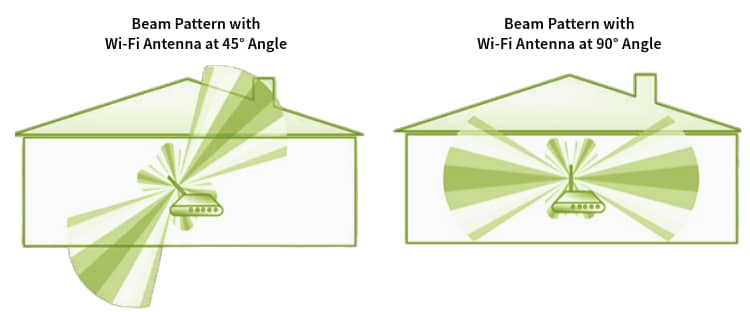
    • Adjust antennas: If your router or AP has external antennas, try repositioning them.
    • Add more access points: You could install more access points to increase the coverage, or use WiFi extenders.
    • Upgrade your router or AP: Consider a newer router or AP model that supports the latest WiFi standards (like WiFi 6E or WiFi 7) for better range and performance.
Pro-Tip
Many times, WiFi signals from a router or AP don’t propagate the same way in all directions (they are not completely omni-directional). Because of that, when installing a home Wi-Fi router, don’t mount it on a high place. It’s better to install it about 2-3 feet from the floor (table height). When it comes to enterprise APs make sure to check the device specifications as they could be designed to be mounted on roofs, walls, or even under the floor.

Download/Upload Speeds

  • Testing: You can use online speed test tools for a general idea. For more detailed analysis, NetAlly tools can run performance tests to show your actual local area network throughput. Common issues are interference, distance, channel congestion and hardware limitations.
  • Improving: Slow speeds?
    • Check for interference: Other electronic devices (microwaves, Bluetooth devices) can interfere with your WiFi signal. Try to minimize their use near your router or AP.
    • A stronger signal and lower noise: This will increase your signal to noise ratio (SNR). An SNR of 25 dBm or higher is recommended for the best performance.
    • Update your hardware: Because of technological limitations at the time they were made, older hardware won’t achieve higher speeds.
    • Check your channel: Use a network analyzer like those from NetAlly to see if the WiFi channels you are using are overcrowded. If so, switch to a less congested channel.
Activity Required Speed Recommended Speed
Email 1 Mbps 1 Mbps
Web Browsing 3-5 Mbps 5-10 Mbps
Social Media 3-5 Mbps 10 Mbps
Video Calls & Conferencing 3-5 Mbps 10-20 Mbps
HD Streaming 5-10 Mbps 10-20 Mbps
Online Gaming 3-6 Mbps 25-35 Mbps
4k Streaming 25 Mbps 35 Mbps
Internet Speed Recommendations

Pro-Tip

Online speed test tools are a great way to measure your internet access speeds, but when there is a problem, they won’t tell you if the problem is the internet access or your network.

Latency

  • Testing: Network analyzers like those from NetAlly can measure latency, often using a ping test. Common issues are interference and channel congestion.
  • Improving: High latency is often caused by network congestion.
    • Reduce network traffic: Limit the number of devices using the network simultaneously, especially for bandwidth-intensive activities.
    • Prioritize traffic: Use Quality of Service (QoS) settings on your router or AP (if available) to prioritize latency-sensitive applications like video conferencing or online gaming.
    • Check your channel: Overcrowded WiFi channels can increase your latency, too. If there are too many devices working on the same channel you are using, switch to a less congested one.

Jitter

  • Testing: Similar to latency, network analyzers like those from NetAlly mentioned before can measure jitter. Common issues are interference and channel congestion.
  • Improving: Jitter is also often related to network congestion and interference. The same steps to improve latency will often help with jitter, too.

Packet Loss

  • Testing: With a network analyzer like those from NetAlly, you can measure if any packets got lost and how many times data transmissions had to be retried. A common issue are environmental obstacles, distance, and interference.
  • Improving: Make sure your signal strength is stronger than -67 dBm and lower levels of interference.
    • Increase your signal strength: Put your router or AP in a central and open location, install more APs or extenders, or reposition the antennas (if using external ones).
    • Check for interference: Move sources of interference away from your router or AP. If that is not possible, try moving the router or AP away from the interferers.

Conclusion

Checking your WiFi quality is essential, and even more important: improving the quality. By understanding the key metrics, using the right tools and addressing common issues, you can identify problems and make sure your network is running smoothly. So don’t let bad WiFi ruin your day – take control and become the master of your wireless domain!

Ready to become a WiFi expert? Check out our network analyzer tools, like the EtherScope nXG, AirCheck G3, and CyberScope.