Breaking News

GLOBAL Wi-Fi NEWS bulletin

Wi-Fi, Bluetooth, and Zigbee/Thread combo SoCs support high peak speed and low latency for gaming, AR/VR, entertainment, security, and automotive applications.

SAN JOSE, Calif., April 28, 2025 Synaptics® Incorporated (Nasdaq: SYNA) announced it has extended its Veros wireless portfolio with its first family of Wi-Fi® 7 systems-on-chips (SoCs) tailored for the Internet of Things (IoT). Comprising the SYN4390 and SYN4384, the scalable offering supports bandwidths up to 320 MHz to deliver 5.8 Gbps peak speed and low latency. The triple-combo SoCs integrate Wi-Fi 7 with Bluetooth® 6.0 and Zigbee/Thread, support Matter, and are designed to minimize system cost and power consumption. They target IoT applications requiring reliable performance-over-range for enhanced user experiences across use cases that include 8K video streaming, interactive gaming, security monitoring, immersive AR/VR, and home and automotive entertainment.

Wi-Fi 7’s multi-link operation (MLO) allows the devices to send and receive a data stream using multiple frequency bands (2.4 GHz, 5 GHz, 6 GHz) simultaneously in support of low latency, reliable connections, and high throughput for real-time applications like video calls and gaming. Synaptics’ architecture provides a power-efficient, cost-effective way to deliver the benefits of MLO.

“Growing adoption of Wi-Fi 7 in wireless networking infrastructure has created an opportunity to address a massive and diverse array of Wi-Fi 7-enabled IoT end-user devices by extending our Veros portfolio,” said Venkat Kodavati, SVP and GM of Wireless Products at Synaptics. “We are bringing the benefits of Wi-Fi 7 in a versatile solution for high-performance, low-power IoT devices. Combined with the ease of integration with our Astra AI-Native compute platform, we expect that developers will have an efficient solution for implementing next-generation connected and AI-enriched IoT products with features such as Wi-Fi Sensing.”

ABI Research forecasts annual shipments of Wi-Fi 7 chipsets to reach more than 2 billion by 2029, achieving a CAGR of 56% between 2024 and 2029.1

“Wi-Fi 7 is ushering in a new era of more enriching and sophisticated use cases for connected devices thanks to its channel bandwidth, throughput, and latency improvements,” said Andrew Zignani, Senior Research Director, ABI Research. “However, the requirements for implementation vary by product type, and edge IoT introduces challenges that differ from PCs or infrastructure applications. Synaptics’ diverse Wi-Fi 7 solutions are tailored to address these unique needs, including low power, support for multiple connectivity protocols, and AI. These will be critical in enabling Wi-Fi 7’s expansion across multiple IoT segments, reaching billions of annual device shipments over the next few years.”

Wi-Fi 7 family highlights
The Wi-Fi 7 IoT family’s support of Matter and its triple combo design provides the interoperability required to allow the devices to serve as versatile home hubs that can operate across Wi-Fi, Bluetooth, and Zigbee/Thread networks in heterogeneous wireless environments. Features support2 :

  • Peak speed of up to 5.8 Gbps, using 2×2 + 2×2 MLO, 320 MHz channel bandwidth, and 4K QAM
  • Integrated RF front-end and power management IC (PMIC) that contribute to reduced system cost and power consumption
  • Dual-core Bluetooth 6.0 for LE Audio, Channel Sounding, and LE Long Range
  • Matter and an integrated 802.15.4 radio capable of enabling Zigbee and Thread networking3
  • Integrated Arm cores and memory to enable offloading of networking functions from the host processor to help reduce system power consumption4

Availability
The SYN4390 is available now for sale, and the SYN4384 is available now in limited quantities for evaluation. For more:

Media Contact
Synaptics Incorporated
Patrick Mannion
Director of External PR and Technical Communications
[email protected]

____________________________
1Source: ABI Research Article: Wireless Connectivity Technology Segmentation and Addressable Markets by Andrew Zignani (published January 27, 2025) ©2025 Allied Business Intelligence, Inc.
2Actual performance may vary based on deployment environment and device configuration
3Certification status may vary by implementation
4Power savings may vary based on system design and workload

AI-powered self-optimizing and self-healing network intelligence enables ISPs to deliver exceptional user experiences, enhance operational efficiency, and reduce churn.

SAN ANTONIO, TX. – April 8, 2025 – Frost & Sullivan recently researched the smart home-as-a-service industry and, based on its findings, recognizes Aprecomm with the 2025 Global Transformational Innovation Leadership Award. The company is transforming how internet service providers (ISPs) approach online experience, thanks to its AI-powered network intelligence platform designed to optimize, self-heal, and proactively manage home networks in real-time. Read the award report here: https://www.frost.com/wp-content/uploads/2025/04/Aprecomm-Award-Write-Up.pdf

Aprecomm addresses a major gap in the market: the lack of visibility ISPs have into their networks. Rather than relying solely on signal strength or macro-level performance metrics, Aprecomm enables ISPs to gain deep, actionable insights into subscriber behavior, application usage, and Wi-Fi performance across the home or business. This innovation is particularly impactful in today’s environment, where remote work, entertainment streaming, and smart device adoption continue to rise, placing increased demand on home networks.

The company’s AI-driven platform consists of an integrated suite of tools tailored for ISPs. Vyom Config Service (VCS) allows remote configuration and management of broadband devices, while Virtual Wireless Expert (VWE) and Virtual Network Expert (VNE) provide real-time visibility, diagnostics, and automated network optimization. Aprecomm’s patented quality of experience (QoE) algorithm measures Wi-Fi performance per device and resolves issues proactively, significantly reducing customer support calls and technician visits.

In a deployment with ACT Fibernet, Aprecomm helped deliver up to 4x speed improvements for connected devices and steered over 70% of laptops and mobile devices to optimal Wi-Fi channels. In another case, Excitel Broadband reduced truck rolls by 62%, support call durations by 30%, and first-call resolution times by 35%, all while growing its subscriber base past one million.

Frost & Sullivan’s independent analysis also highlights Aprecomm’s evolving AI engine, Evolv®, which continuously improves by learning from real user data. With full application-level insights and an expanding library of capabilities, Evolv enables ISPs to deliver tailored experiences—especially crucial for bandwidth-intensive use cases like 4K streaming and online gaming. In partnership with Qualcomm and other leading OEMs, Aprecomm is prioritizing performance optimization directly at the hardware level for seamless, high-quality experiences.

Further strengthening its market position, Aprecomm has formed strategic global partnerships with companies such as Qualcomm, Nokia, Hitron Technologies Americas, Edgecore Networks, OpenGlobe, and ThinkTechnology. These collaborations have enabled the company to embed its AI-powered solutions into next-gen Wi-Fi 7 routers and gateways, accelerating time-to-market and enhancing ISP monetization opportunities globally.

“Aprecomm empowers ISPs with real-time, data-driven insights that transform network operations from reactive to proactive,” said Vivien Pua, Industry Analyst at Frost & Sullivan. “Its commitment to building subscriber-centric, self-evolving platforms is revolutionizing ISP business models and redefining customer satisfaction in the smart home ecosystem.”

Each year, Frost & Sullivan presents this award to the company that has leveraged competitive intelligence to successfully execute a strategy that results in stronger market share, competitive brand positioning, and customer satisfaction.

Frost & Sullivan Best Practices awards recognize companies in various regional and global markets for demonstrating outstanding achievement and superior performance in leadership, technological innovation, customer service, and strategic product development. Industry analysts compare market participants and measure performance through in-depth interviews, analyses, and extensive secondary research to identify best practices in the industry.


About Frost & Sullivan

For six decades, Frost & Sullivan has been world-renowned for its role in helping investors, corporate leaders, and governments navigate economic changes and identify disruptive technologies, Mega Trends, new business models, and companies to action, resulting in a continuous flow of growth opportunities to drive future success. Contact us: Start the discussion. Contact us: Start the discussion.

Contact:

Camila Tinajero
E:[email protected]

About Aprecomm

Aprecomm harnesses the power of AI to provide a unique applications suite that enables service providers to create self-optimizing and self-healing broadband networks.

Our quality-of-experience engine monitors and optimizes Wi-Fi performance to ensure consumers enjoy the best possible internet experience. At the same time, our cloud-based support applications leverage real-time data to predict and resolve customer service issues before they happen, saving providers time and money.

Aprecomm manages over 7 million home and business locations, partnering with more than 45 service providers worldwide.

We are making intuitive, self-healing networks a reality.

Follow Aprecomm on LinkedIn here.

How to Check WiFi Quality?

Introduction

We all depend on WiFi – whether it’s for streaming your favorite shows, having a video call, or just browsing cat videos. That’s why it is very important to have a good, solid, WiFi connection. Bad WiFi can lead to endless buffering, dropped calls, and overall frustration. But how do you actually check your WiFi signal quality? This tech tip will teach you everything you need to know.

What is WiFi Quality?

WiFi quality isn’t just about a strong signal. It’s about the overall performance of your wireless network – think of it as a report card for your WiFi. Several components must work together smoothly, just like all subjects in school need good grades to pass. Key components include:

  • Signal Strength: How strong is the signal?
  • Speed: How fast can you download and upload?
  • Latency: How long does data take to travel?
  • Jitter: How consistent is that travel time?
  • Loss: How much data is being lost and resent?

Regular checkups help you spot problems early.

Key WiFi Quality Metrics

Let’s dive a bit deeper into those key metrics. Think of them as the vital signs of your WiFi network:
Signal Strength (RSSI): Measured in decibels-milliwatts (dBm), this tells you how strong the signal is from your router or access point (AP). The closer to 0, the stronger the signal. So, -50 dBm is great, while -80 dBm is not so great.

  • Download/Upload Speeds: Measured in megabits per second (Mbps) or gigabits per second (Gbps). This is probably what you care about most – how quickly can you start binge-watching that new series?
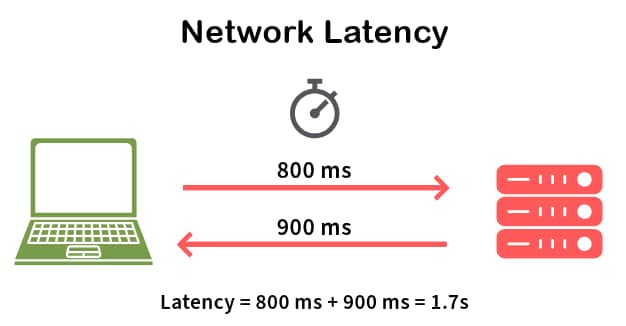
  • Latency: Measured in milliseconds (ms). This is the delay between when you send a request (like clicking a link) and when you get a response. High latency can make your internet feel sluggish, even if your speeds are good.
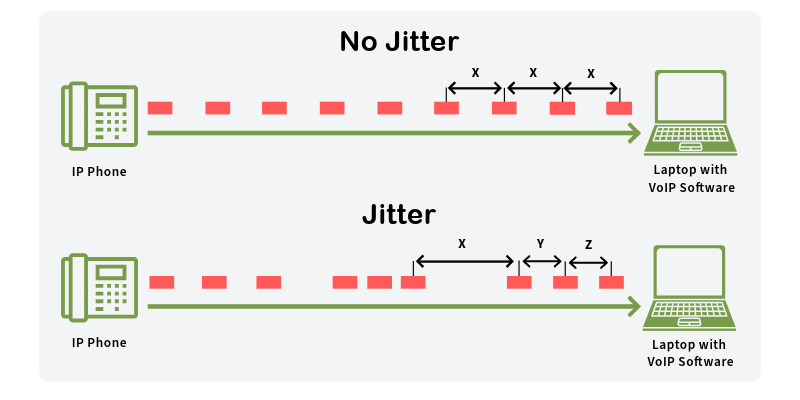
  • Jitter: Also measured in milliseconds (ms). It is all about consistency. High jitter means your latency is fluctuating a lot, which can cause problems with things like video calls and online games (imagine your character freezing every few seconds!).
  • Packet Loss: Measures the amount of data that fails to reach the receiver, indicating an unstable connection that can disrupt communication.
Metric Unit Description Ideal Range (Example)
Signal Strength dBm Strength of the WiFi signal -50 to -67 dBm
Download Speed Mbps/Gbps How fast data is received 25 Mbps
Upload Speed Mbps/Gbps How fast data is sent 3 Mbps
Latency ms Delay in data transfer <50 ms
Jitter ms Variability in latency <30 ms
Packet Loss % Percentage of data packets that are lost in transit <1%

Pro-Tip

The ideal range for most of the metrics provided above will depend on the type of applications you will be running and the number of devices that will be connecting to your network. For example, for 4K video streaming you will need Download speeds higher than 25 Mbps per stream. So, if you plan to stream two 4K videos at the same time your download speeds should be higher than 50 Mbps.

Common WiFi Quality Issues

Before talking about solutions, let’s look at some common WiFi problems:

  • Interference: Other devices using radio waves (microwaves, Bluetooth) can disrupt your WiFi.
  • Distance: The farther you are from the router or AP, the weaker the signal.
  • Channel Congestion: WiFi channels can get crowded, like a busy highway.
  • Hardware Limitations: An old device (router, AP, phone, tablet, etc.) might not support the latest WiFi standards.

How to Test and Improve WiFi Quality

Alright, time to put on your detective hat and start testing – and then, fixing! This section combines how to test with how to improve each metric, because knowing the problem is only half the battle. We also include common quality issues.

Signal Strength (RSSI)

  • Testing: Use a network analyzer tool like the EtherScope nXG, AirCheck G3, or CyberScope to measure the signal strength (RSSI) in different locations. These tools will give you precise readings, unlike basic phone apps. Common issues are environmental obstacles, distance and hardware limitations.
  • Improving: If your signal strength is weak (-70 dBm or lower), try these:
    • Move your router or AP: Put it in a central and open location, free from obstructions like walls and furniture.
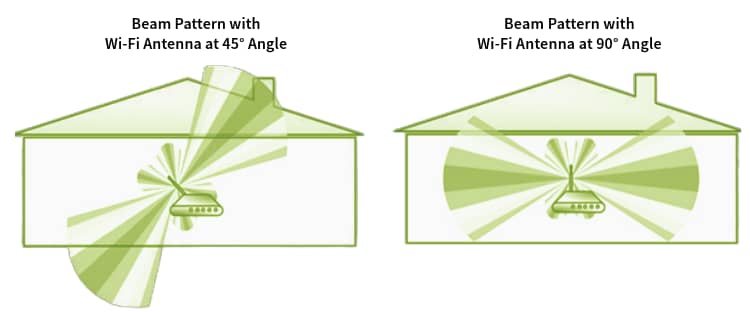
    • Adjust antennas: If your router or AP has external antennas, try repositioning them.
    • Add more access points: You could install more access points to increase the coverage, or use WiFi extenders.
    • Upgrade your router or AP: Consider a newer router or AP model that supports the latest WiFi standards (like WiFi 6E or WiFi 7) for better range and performance.
Pro-Tip
Many times, WiFi signals from a router or AP don’t propagate the same way in all directions (they are not completely omni-directional). Because of that, when installing a home Wi-Fi router, don’t mount it on a high place. It’s better to install it about 2-3 feet from the floor (table height). When it comes to enterprise APs make sure to check the device specifications as they could be designed to be mounted on roofs, walls, or even under the floor.

Download/Upload Speeds

  • Testing: You can use online speed test tools for a general idea. For more detailed analysis, NetAlly tools can run performance tests to show your actual local area network throughput. Common issues are interference, distance, channel congestion and hardware limitations.
  • Improving: Slow speeds?
    • Check for interference: Other electronic devices (microwaves, Bluetooth devices) can interfere with your WiFi signal. Try to minimize their use near your router or AP.
    • A stronger signal and lower noise: This will increase your signal to noise ratio (SNR). An SNR of 25 dBm or higher is recommended for the best performance.
    • Update your hardware: Because of technological limitations at the time they were made, older hardware won’t achieve higher speeds.
    • Check your channel: Use a network analyzer like those from NetAlly to see if the WiFi channels you are using are overcrowded. If so, switch to a less congested channel.
Activity Required Speed Recommended Speed
Email 1 Mbps 1 Mbps
Web Browsing 3-5 Mbps 5-10 Mbps
Social Media 3-5 Mbps 10 Mbps
Video Calls & Conferencing 3-5 Mbps 10-20 Mbps
HD Streaming 5-10 Mbps 10-20 Mbps
Online Gaming 3-6 Mbps 25-35 Mbps
4k Streaming 25 Mbps 35 Mbps
Internet Speed Recommendations

Pro-Tip

Online speed test tools are a great way to measure your internet access speeds, but when there is a problem, they won’t tell you if the problem is the internet access or your network.

Latency

  • Testing: Network analyzers like those from NetAlly can measure latency, often using a ping test. Common issues are interference and channel congestion.
  • Improving: High latency is often caused by network congestion.
    • Reduce network traffic: Limit the number of devices using the network simultaneously, especially for bandwidth-intensive activities.
    • Prioritize traffic: Use Quality of Service (QoS) settings on your router or AP (if available) to prioritize latency-sensitive applications like video conferencing or online gaming.
    • Check your channel: Overcrowded WiFi channels can increase your latency, too. If there are too many devices working on the same channel you are using, switch to a less congested one.

Jitter

  • Testing: Similar to latency, network analyzers like those from NetAlly mentioned before can measure jitter. Common issues are interference and channel congestion.
  • Improving: Jitter is also often related to network congestion and interference. The same steps to improve latency will often help with jitter, too.

Packet Loss

  • Testing: With a network analyzer like those from NetAlly, you can measure if any packets got lost and how many times data transmissions had to be retried. A common issue are environmental obstacles, distance, and interference.
  • Improving: Make sure your signal strength is stronger than -67 dBm and lower levels of interference.
    • Increase your signal strength: Put your router or AP in a central and open location, install more APs or extenders, or reposition the antennas (if using external ones).
    • Check for interference: Move sources of interference away from your router or AP. If that is not possible, try moving the router or AP away from the interferers.

Conclusion

Checking your WiFi quality is essential, and even more important: improving the quality. By understanding the key metrics, using the right tools and addressing common issues, you can identify problems and make sure your network is running smoothly. So don’t let bad WiFi ruin your day – take control and become the master of your wireless domain!

Ready to become a WiFi expert? Check out our network analyzer tools, like the EtherScope nXG, AirCheck G3, and CyberScope.

Safeguarding industrial control systems (ICS) from cyber threats is a critical priority, but transforming these intentions into effective actions can be challenging. Given the complexity of ICS and their networks, which often rely on outdated technologies and inadequate security measures, it can be difficult to determine the best starting point. Cisco Validated Designs (CVDs) are proven networking and security reference architectures that industrial organizations can use to build advanced capabilities and create a flexible foundation for the future.

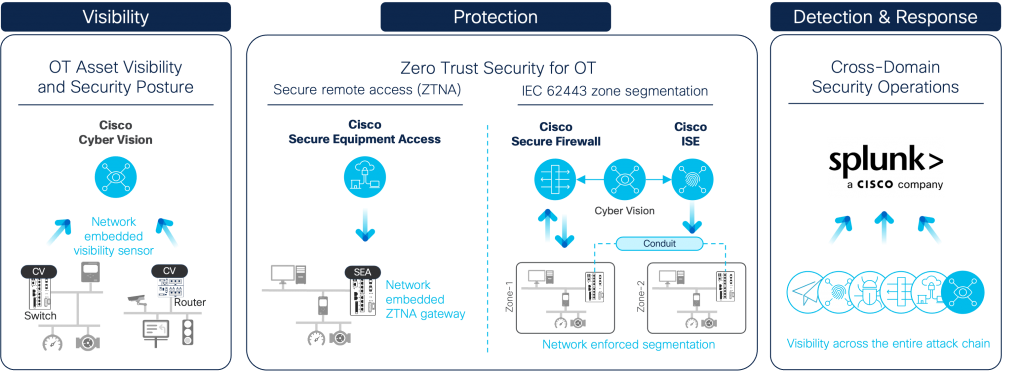
The Cisco Validated Design for Industrial Security has been updated to create additional blueprints for securing critical infrastructure. Taking a phased approach to secure the industrial network, the Cisco Industrial Threat Defense solution comprises of OT asset visibility, zero trust access and segmentation, and cross-domain detection, investigation and response.

Cisco Industrial Threat Defense comprehensive OT/ICS security capabilities

Comprehensive OT visibility driving network segmentation

The previous version of Cisco’s Industrial Security Validated Design described how the Cyber Vision sensor software embedded in Cisco switches and routers could help gain visibility into connected industrial assets without having to deploy dedicated appliances or SPAN collection networks. It explained how control engineers and network managers could use this comprehensive asset inventory to implement adaptive zone segmentation in the industrial network by having Cyber Vision and Cisco Identity Services Engine to seamlessly work together.

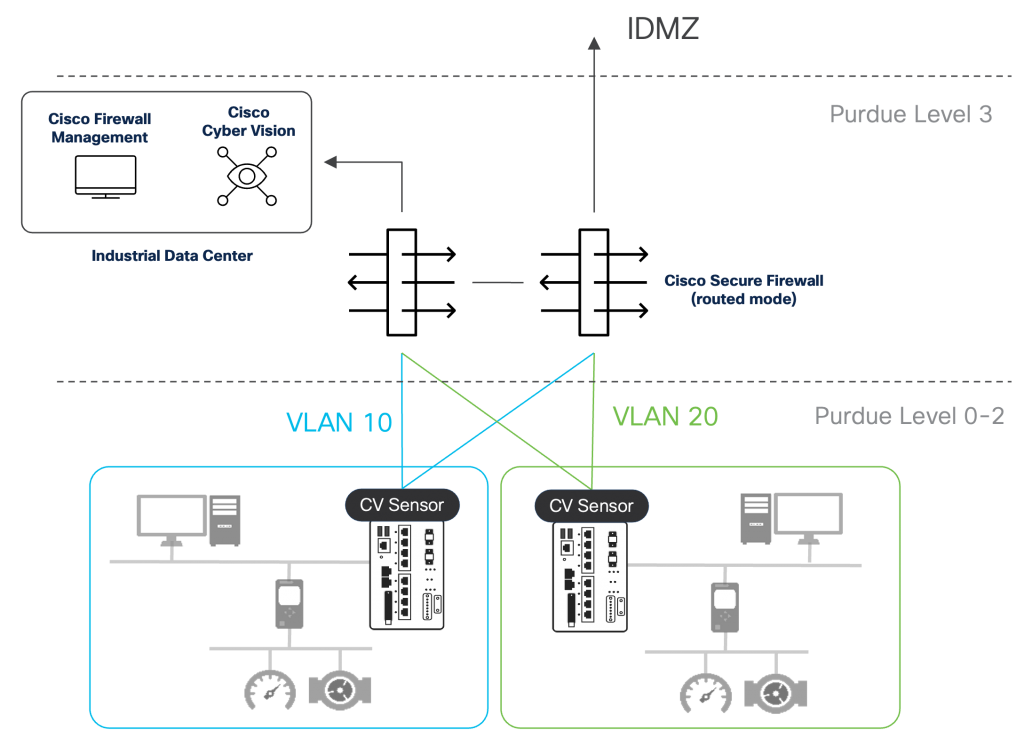
The updated CVD now includes using the Cisco Secure Firewall to secure plant networks. Rising investments into AI and the virtualization of the plant floor is resulting in the industrial data center (IDC) becoming a critical component of operational networks. Virtual PLCs are an example of this shift, where virtual controllers allow for a more flexible and modular design of production plants.

In a traditional Purdue model architecture, the IDC would reside in level 3, the industrial operations zone. But many operational networks who have implemented some levels of network traffic control have done so at the IDMZ, or level 3.5. As the IDC becomes more modern, it also becomes more connected, relying on cloud connectivity for services to run as intended. More connectivity expands the attack surface, so placing the IDC behind a firewall is needed to protect it if an attack was to breach the boundary firewall.

Cisco Secure Firewall for protecting the industrial data center and segmenting OT networks

The Cisco Secure Firewall, supplemented by an integration with Cisco Cyber Vision, can also be used to dynamically segment the industrial network and prevent cyber-attacks from spreading. The updated CVD explains how to use the Cisco Secure Dynamic Attributes Connector (CSDAC) to make OT asset groups created in Cyber Vision automatically available to the Firewall Management Center (FMC) as dynamic objects. Dynamic objects can easily be incorporated into access control policies to allow or deny communications based on source/destination, ports, protocols, and even Industrial Control System (ICS) commands using OpenAppID. Cisco Secure Firewalls installed in the industrial distribution frame, or Purdue level 3, will enforce these access policies, driving east-west and north-south segmentation with the need to deploy dedicated firewall appliances in each zone.

A blueprint for securing distributed industrial infrastructure

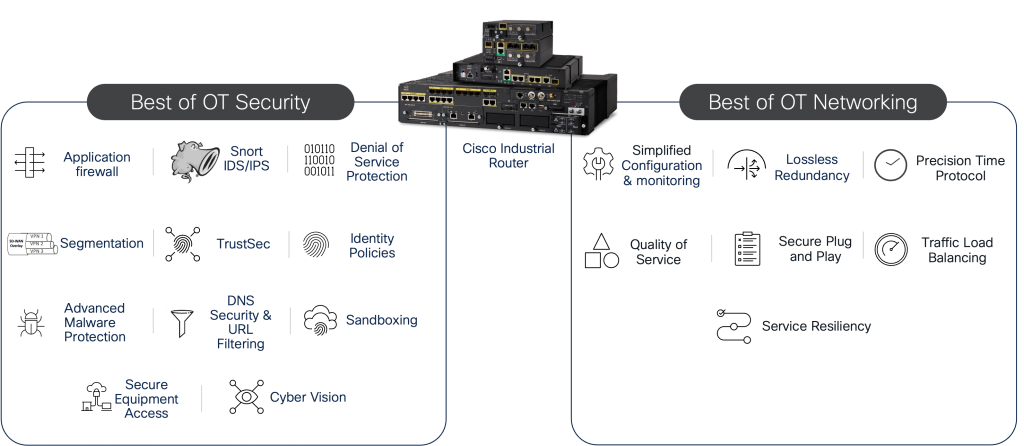
The second major update to the CVD provides design guidance for building a cyber resilient network for distributed field assets with Cisco Industrial Routers. While we often talk a lot about cybersecurity, which refers to the robust tools and policies implemented to prevent attacks from occurring in operational networks, we often overlook cyber resiliency. Cyber resiliency refers to an organizations ability to maintain its critical operations even in the face of cyber attacks.

Cybersecurity is of course part of a cyber resiliency architecture. Capabilities such as firewalls, segmentation, and the implementation of a zero-trust model means that if an attacker does get a foothold in the network, their reach is limited and both reconnaissance and lateral movement can be prevented. However, cybersecurity practitioners and networking teams often make the mistake of treating themselves as siloed entities in the organization. The network configuration is just as important as the security appliances deployed in the network. Quality of Service (QoS) ensures that critical traffic always has priority when the network is in a degraded state. Lossless redundancy protocols ensure that critical traffic meets latency metrics when network paths go down. Management plane security ensures only trusted users get access to the network infrastructure and cannot be taken down by malicious actors. Plug and play ensures that new network devices are onboarded with a secure configuration out of the box. While all these features are typically considered part of networking, it’s the combination of networking and security that results in a cyber resilient architecture.

Cisco Industrial Router provides the best of OT security and rugged industrial networking

Zero trust remote access made for OT

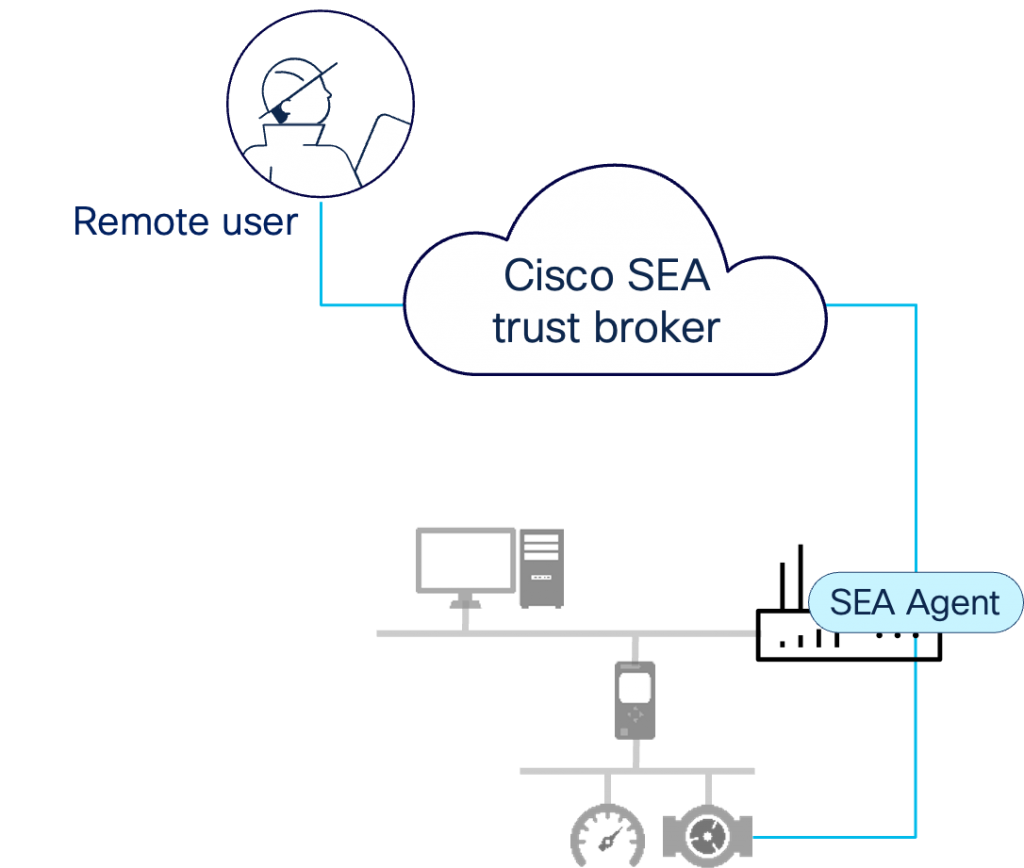
Last, but not least, the CVD explores the various options for securing remote access to industrial networks and describes how to deploy Cisco Secure Equipment Access to enable zero trust network access (ZTNA) to the plant floor. Remote access solutions come in many forms, and it can often be confusing to understand which one will meet business needs. The design guide compares virtual private networks, the remote desktop protocol, and the evolution towards zero trust network access, ultimately leading to the deployment of Cisco SEA within a Purdue model architecture.

Cisco Secure Equipment Access enables ZTNA remote access in industrial settings


Learn More

The new version of the Cisco Industrial Security Validated Design is available now. It’s free to help everyone involved in building and/or securing industrial networks to implement advanced capabilities without fear of integration complexities or performance surprises. For further help, browse through a library of our industrial CVDs, or schedule a free, no-obligation consultation with a Cisco industrial security expert, and we will reach out to you.

Unify SDK: A Major Step Forward in Z-Wave IoT Gateway Development

The latest Unify Software Development Kit (SDK) release introduces updates designed to bring significant enhancements to Z-Wave support, security, and protocol functionality. This release marks a shift as Unify now focuses solely on Z-Wave, removing support for Zigbee and Bluetooth protocol controllers. Key updates include expanded Z-Wave command class support, the introduction of Z-Wave S2V2 Alpha, and a refined scope for the Matter Bridge. These changes ensure a more streamlined, secure, and efficient development experience.

Key Updates in This Unify SDK Release

Expanded Z-Wave Command Class Support

Z-Wave command classes define the functionalities and capabilities of Z-Wave devices. To improve interoperability, we have added commonly used Z-Wave command classes for this release. This ensures that the core functionalities remain intact while simplifying development and certification.

A fully updated Z-Wave command class list is available, providing developers with a clear reference for supported features. Customers can add their own implementation of command classes if they are not found in the existing tool through the contributor license agreement (CLA).

Splitting of Repository: Sustainability and Modulatory

The latest release has significantly enhanced the user experience by refactoring and splitting the repository into three distinct repositories. Previously, all components were housed in a monorepository, or monorepo, which led to complicated dependencies and code management challenges. By dividing the repository into three separate repos, the codebase is now more accessible and easier for developers to understand and implement. This strategic move aims to simplify the development process, making it more efficient and developer friendly.

Introduction of Z-Wave S2V2 Alpha

Security is a major focus of this release, and we are excited to introduce Z-Wave S2V2 (Security Version 2) Alpha. This update strengthens encryption and authentication mechanisms for enhanced device protection.

The alpha version of S2V2 has already been supported on Z-Wave end devices.

The Unify SDK now integrates S2V2 support on the gateway side, ensuring end-to-end security between the controller and end devices. This enhancement strengthens encryption and authentication mechanisms, providing a more secure development environment. It’s important to note that the S2V2 security implementation is currently in its alpha stage on the Unify side, indicating that while the foundational security features are in place, further refinements and optimizations are expected in future updates.

Matter Bridge: Scope Adjustment

The Matter Bridge is a component that facilitates communication between Matter and non-Matter devices (in this case, Z-Wave devices). In this release, we are redefining the Matter Bridge as an example code. Example code provides developers with a functional starting point to speed their development. They can update and modify the code as needed for their specific implementation. The example code provided is designed to be a starting point for developer and is not maintained by Silicon Labs.

Need More Help? Get expert support and custom solutions at Silicon Labs Developer Services.

Unify SDK is Now Dedicated to Z-Wave Development

With these updates, Unify SDK marks a significant shift, dedicating itself solely to the Z-Wave protocol. By having a single focus, we are making Unify SDK more robust and streamlined for developers. Customers who are currently using Z/IP Gateway can now transition to the Unify Z-Wave Protocol Controller, ensuring continued support and updates. By enhancing Z-Wave command class support, improving security with S2V2, and refining the role of Matter Bridge, this release ensures:

✔ Better interoperability and feature parity with past gateway designs

✔ Stronger security and encryption for connected devices

HOW IS WIFI 7 DIFFERENT FROM WIFI 6/6E?

WiFi 7 offers benefits that are a quantum leap forward from WiFi 6 and WiFi 6E. With its faster speeds, lower latency, and significant capacity increases, WiFi 7 the new wireless standard is a major evolution of WiFi 6 and 6E, bears much in common with those earlier standards but with some significant improvements to meet our growing requirements. What has changed, what is still the same, and when should you upgrade? Let’s have a look.

What’s new in the WiFI 7 Standard?

  • 46Gbps – 4.8X FASTER SPEED
  • Up to 2.4x Faster for the same WiFi configuration
  • 320MHz – 2X BANDWIDTH
  • 4096 QAM – X DATA DENSITY

Faster speeds

Most exciting and noteworthy, WiFi 7 will be much faster than WiFi 6. For the same WiFi radio configuration, the speeds will be 2.4x faster. So, maximum speeds with a typical mobile phone with WiFi 7 can reach up to 5Gbps. As the Internet speed offered by internet service providers (ISPs) continues to grow, WiFi 7 helps to ensure your home is ready for 10 Gigabit internet speeds as they become available.

But what makes these incredible speeds possible? They’re due to the next two major upgrades.

Greater channel width

Each WiFi band operates in smaller bands of 20/40/80/160MHz MHz for connecting to individual devices. WiFi 7 doubles the bandwidth to 320MHz. Effectively, this doubles the WIFi speeds to individual devices and adds a lot more bandwidth to support more devices.

More data density

WiFi 7 increases not only speed and bandwidth but also the amount of data that can be encoded onto a radio signal. This is measured by a standard known as quadrature amplitude modulation (QAM). Where WiFi 6’s QAM limit was 1024, WiFi 7 offers an impressive 4096 (or 4K; the standard is also known as 4K QAM), boosting its peak rates to increase throughput. Each symbol transmitted can now carry 12 bits rather than 10 bits, meaning 20% higher theoretical transmission rates.

Both the greater channel bandwidth (320MHz) and more data density (4K QAM) account for the 2.4x improvement in WiFi speeds between WiFi 6 and WiFi 7.

Other significant Improvements in WiFi 7

Multi-Link Operation (MLO)

Currently routers can support multiple WiFi bands- 2.4, 5 & 6GHz, but WiFi clients connect using one of the WiFi bands. With WiFi 7, routers will be able to connect across two different bands to a client device.

Imagine two highways leading to your destination. MLO is similar to giving these highways the flexibility to either spread the traffic across both routes or to quickly move traffic from one highway to another if one gets congested.

Mesh systems would especially benefit from MLO as it would allow for a router and a satellite both capable of transmitting simultaneously across two different bands to get the best performance. This feature will also be very useful for switching from one band to another on your mobile device without losing the connection. If you are on a Zoom call and walk from the center of the house to the backyard, WiFi 7 will allow your device to switch from 6GHz to 5GHz to 2.4GHz without dropping the call or buffering.

Flexible channel utilization

One key limitation with WiFi is that any kind of interference impacts the entire channel. With “puncturing,” if a portion of a channel gets impacted due to interference, that portion alone can be blocked while continuing to use rest of the channel for data transfer. This makes WiFi more resistant to interference and ensures critical flow and latency are not impacted. Going back to our highway example, using WiFi 6 a pothole in a lane can make that lane unusable, but with WiFi 7 you can block the pothole and drive around and still use rest of the lane.

What hasn’t changed?

  • SAME THREE BANDS
  • LIGHTNING-FAST SPEEDS
  • MASSIVE BANDWIDTH
  • LIMITED DEVICE SUPPORT

With WiFi 7’s incredible specs, it’s easy to overlook the fact that it builds on WiFi 6 & 6E features and infrastructure. As noted above, WiFi 6 and WiFi 7 both offer the same three bands, including the lightning-fast 6GHz band. Both feature tremendous bandwidth. And both WiFi 6E and WiFi 7 have technology providers still playing catch-up, with new devices being introduced to unlock the full potential of either standard. Even in the shadow of the forthcoming WiFi 7, WiFi 6E should still be considered a cutting-edge technology.

Should you upgrade to a WiFi 7 Router?

WiFi 7 Router Specs Nighthawk RS700SWiFi 7 is definitely the future of wireless: at some point in the future, we will all be using WiFi 7 routers and devices. Until then, most users will still find their needs met by WiFi 6 and WiFi 6E networks, especially ones provided by proven, rock-solid routers and mesh systems such as our Orbi and Nighthawk devices.

One thing to consider is the kind of mobile device you carry. At present, Apple’s iPhone does not support WiFi 6E, so a WiFi 6 network will deliver peak performance to iPhone users. Those with the latest Windows laptop or Android phones, which support WiFi 6E, should consider upgrading to a WiFi 6E network if they haven’t already. Such a system will provide superb performance for years to come.

Buying a WiFi router is an investment in upgrading your home WiFi infrastructure so it’s ready not only for today’s devices but also for upcoming gear. If you’re planning to upgrade your phones or laptops in the next couple of years, these devices will most likely support the latest WiFi standard. So, it is highly recommended that to protect your investment and get a router or mesh system based on the latest WiFi technology.

As WiFi 7 begins to emerge in the next year, systems supporting its premium features will certainly start being introduced in the market. Demanding users who plan to future-proof their home network for the next couple of years should consider adopting WiFi 7 devices when they are available. Serious gamers will appreciate the standard’s low latency and quick responsiveness. Those who engage frequently in VR/AR for work or pleasure will benefit from WiFi 7’s incredible speeds and low latency. And those who always want the latest and greatest will enjoy knowing that their network will be ready to make the most of their future product purchases for quite a while.

Of course, the best experience on any of these WiFi 7 standards is with a NETGEAR router or mesh system. We have WiFi 7 offerings in both the Orbi and Nighthawk family designed with high standards for the best routers and mesh systems that offer unsurpassed speed, capacity and security in their categories.

ANAHEIM, California (April 15, 2025) Zyxel Networks, a leader in delivering secure, AI- and cloud-powered business and home networking solutions, today announced its USG FLEX H series firewalls have been upgraded to combine both cloud and on-premises network security into a single seamless solution for small- and medium-sized businesses and managed service providers.

Unlike most hybrid firewalls that treat cloud and on-premises security as separate entities, USG FLEX H series firewalls incorporate Smart Sync to provide synchronized security policies, network objects, and high availability settings across multiple devices. The integrated solution streamlines management, enhances efficiency, and delivers a unified, scalable, and future-proof network experience whether managed via Nebula or directly on the device interface, all settings are synchronized.

To provide SMBs with comprehensive, up-to-date defense against the latest security threats from day one, USG FLEX H series hardware-only firewalls now come equipped with Zyxel Networks’ new Entry Defense Pack (EDP) license, which includes Reputation Filter, SecuReporter analytics, and Priority Support. USG FLEX H Bundle models come equipped with complete network security Gold Security Pack, unlocking all security features the product is capable of, including Sandboxing, Ransomware protection, content web filtering, and more.


Benefits and Features of USG FLEX H Series Security Firewalls

  • Ultra-High Performance – Next-generation multi-core hardware and Fastpath technology minimize packet processing time, reduce latency, and accelerate traffic flows to provide ultra-high efficiency. User-definable ports that range from 2.5 to 10 Gbps can be configured as WAN or LAN to minimize effort when deploying complex wired and wireless networks.
  • AI-driven, Multi-layered Solution – USG FLEX H series firewalls deliver three times the firewall, VPN, and Unified Threat Management (UTM) performance compared to their predecessor. Zyxel’s AI-driven, multi-layered protection includes IKEv2/EAP and SSL VPN, sandboxing, anti-malware, DNS/IP/URL filtering, IPS, and application patrol to defend against emerging threats. Nebula cloud integration enforces two-factor authentication (2FA) on organization-level admin access, as well as Microsoft Entra ID sign-in to authenticate users accessing the Nebula wireless AP captive portal to prevent unauthorized access to critical resources.
  • Flexible, Hassle-free Management – USG FLEX H series firewalls are easily managed as standalone or centrally-managed devices through Zyxel’s Nebula Cloud Management. Using Nebula Cloud, network administrators can monitor device on/off status, initiate firmware upgrades, manage firewall licenses, access remote GUIs via a Nebula Secure connection, and backup and restore firewall configurations. Network administrators can quickly onboard devices using the Nebula app and seamlessly switch between the device GUI or Nebula Control Center to manage the network, ensuring secure connections and centralized management of the network devices from a single pane of glass. Nebula provides critical information needed to troubleshoot or audit security threats when used in conjunction with SecuReporter, which is included as part of the Entry Defense Pack or Gold Security Pack licenses.


Zyxel USG FLEX H Series Security Firewalls include:

  • USG FLEX 100H Firewall – Features eight GbE Ethernet ports – $299.99* (street)
  • USG FLEX 100H Firewall (Bundled) – Features eight GbE Ethernet ports + one year Gold Security License Pack – $399.99*
  • USG FLEX 100HP Firewall – Features eight GbE Ethernet ports with one as GbE/PoE (802.3at, 30W total) – $399.99*
  • USG FLEX 100HP Firewall (Bundled) – Features eight GbE Ethernet ports with one as GbE/PoE (802.3at, 30W total) + one year Gold Security License Pack – $499.99*
  • USG FLEX 200H Firewall – Features two 2.5 GbE and six GbE ports – $399.99*
  • USG FLEX 200H Firewall (Bundled) – Features two 2.5 GbE and six GbE ports + one year Gold Security License Pack – $549.99*
  • USG FLEX 200HP Firewall – Features two 2.5 GbE and six GbE ports with one as GbE/PoE (802.3at, 30W total) – $499.99*
  • USG FLEX 200HP Firewall (Bundled) – Features two 2.5 GbE and six GbE ports with one as GbE/PoE (802.3at, 30W total) + one year Gold Security License Pack – $649.99*
  • USG FLEX 500H Firewall – Features two 2.5 GbE, two 2.5 GbE/PoE (802.3at, 30W total), and eight GbE Ethernet ports – $799.99*
  • USG FLEX 500H Firewall (Bundled) – Features two 2.5 GbE, two 2.5 GbE/PoE (802.3at, 30W total), and eight GbE Ethernet ports + one year Gold Security License Pack – $1099.99*
  • USG FLEX 700H Firewall – Features two 2.5 GbE, two 10 GbE/PoE (802.3at, 30W total), and eight GbE Ethernet ports, and two 10GbE SFP+ ports – $1299.99*
  • USG FLEX 700H Firewall (Bundled) – Features two 2.5 GbE, two 10 GbE/PoE (802.3at, 30W total), and eight GbE Ethernet ports, and two 10GbE SFP+ ports + one year Gold Security License Pack – $1699.99*


* Prices subject to change without advance notice.

“The ever-increasing and changing threat environment requires robust network security solutions that provide businesses with the critical combination of strong, intelligent protection and ease of management,” stated Tri Nguyen, Channel Sales and Product Manager at Zyxel Networks. “The upgrade of our popular USG FLEX H series firewalls reflects Zyxel’s dedication to listening to the challenges faced by our SMB customers and providing a solution that addresses emerging requirements to boost security while reducing complexity.”

The new cloud and on-premises convergence features are available on USG FLEX H series firewalls running Nebula version 19.00 and firewall firmware version uOS v1.32.

Zyxel USG FLEX H Series Security Firewalls carry limited lifetime warranties and are available now through Amazon and Zyxel Store. USG FLEX H firewalls are also available through Zyxel Authorized Distributors: D&H, IngramMicro, TD Synnex, Target, and Wav, Zyxel Authorized VARs and MSPs, and other leading e-tailers.

For more information about Zyxel, its connectivity solutions, and the Zyxel Authorized Partner Program, visit www.zyxel.com/us and follow us on Facebook, X(formerly Twitter) and LinkedIn.

About Zyxel:

Zyxel Networks is a technology provider with over 30 years of experience, specializing in delivering solutions for small to medium-sized businesses and the enterprise-edge in partnership with VARs, MSPs and System Integrators. We enable network professionals to connect and protect organizations with greater ease by bringing together intuitive, scalable and secure cloud management with a complete portfolio of network devices.

For Wi-Fi 8 (802.11bn), Wi-Fi 7 (802.11be), Wi-Fi 6/6E (802.11ax)


Industry-First Wi-Fi 8 (802.11bn) and Leading Wi-Fi 7, Wi-Fi 6 and 6E Test Solution

Modern applications demand determinism and robustness, beyond just high throughput. The next-generation Wi-Fi 8 (IEEE 802.11bn) builds upon Wi-Fi 7 (IEEE 802.11be), introducing features for enhanced reliability and lower latency. Wireless devices like Access Points, VR/AR headsets and IoT devices require robust RF performance in challenging environments. This is achieved through enhanced modulation and coding schemes (MCS), distributed resource units (dRU), unequal modulation, and long-length LDPC codes for improved error correction, alongside existing Wi-Fi 7 features like tri-band operation (2.4/5/6 GHz), 320 MHz channels, 4096 QAM, up to 16 spatial streams, and multi-link operation (MLO). With the addition of Wi-Fi 8 support, LitePoint’s IQxel-MX solidifies its position as a long-standing dependable test solution you can trust for your critical testing needs.

Stay ahead of the curve with IQxel-MX as you advance your Wi-Fi 8 research and development and accelerate your high-volume production of today’s Wi-Fi 7 devices

The IQxel-MX signal generation and analysis combine high performance, simplicity of use and superior test economics to cover the test requirements during the whole product development cycle from R&D to high-volume production. The IQxel-MX family is available in three configurations: 2 ports (2 VSA/VSG), 8 ports (2 VSA/VSG), and 16 ports (4 VSA/VSG). These support up to 2×2 and 4×4 true MIMO testing (extensible for higher order MIMO) and high efficiency multi-DUT parallel testing.

Performance to Guarantee the Highest Wireless Device Accuracy

  • Industry-leading EVM ensures highest modulation accuracy
  • Superior power accuracy ensures device calibration precision
  • Expandable architecture supports high order true MIMO testing
  • Support for advanced Wi-Fi 8 physical layer features

Simplicity for Increased Test Efficiency

  • Fully-integrated signal generation, signal analysis, and RF front-end enable simple Wi-Fi 6E, Wi-Fi 7 and Wi-Fi 8 testing in the 2.4, 5 and 6 GHz bands
  • Architecture support for multi-link/multi-channel (MLO) and coexistence testing eliminates the need for external components, greatly simplifying test setup
  • Flexible and intuitive Graphical User Interface (GUI) enables both on-site and remote development

Economics for R&D, DVT and Manufacturing Test 

  • Wi-Fi 8 support ensures long term relevance and lowers CAPEX
  • Turnkey test software solutions with IQfact+ enable fast time to market and a seamless transition from product development to manufacturing
  • Multi-DUT software architecture reduces manufacturing cost by providing optimized test throughput

Designed for Wi-Fi 8, Wi-Fi 7, Wi-Fi 6E and Wi-Fi 6 Testing in the 2.4 GHz, 5 GHz and 6 GHz Bands

  • Continuous frequency range support from 400 MHz to 7300 MHz
  • Analysis bandwidth of over 320 MHz
  • Best-in-class residual Error Vector Magnitude (EVM) floor to ensure the highest measurement accuracy for 4096 QAM
  • Comprehensive testing capabilities for IEEE 802.11bn (Wi-Fi 8), 802.11be (Wi-Fi 7), IEEE 802.11ax (Wi-Fi 6/6E) and legacy Wi-Fi standards
  • Support for test and measurement of advanced Wi-Fi 8 physical layer features including enhanced long range PPDU (ELR-PPDU), new MCS rates, 2xLDPC codes, unequal modulation and distributed RU
  • Signal generation covers OFDMA RU and multi-RU (MRU) assignments
  • Signal analysis covers all EHT PHY standard measurements for transmitter (spectral mask, flatness, frequency error, constellation error and more) and receiver (sensitivity, ACR and more)

Wide Range of Connectivity Technologies (Bluetooth® and Bluetooth® Low Energy 5.x, Channel Sounding, HDT 802.15.4, DECT, LPWAN)

  • Tests all Bluetooth® device standards (1.x, 2.x, 3.0, 4.x), Bluetooth 5.x AoA and AoD, as well as the Bluetooth Channel Sounding (CS) and Higher Data Throughput (HDT) functionality
  • Connectivity standards DECT (ETSI EN 300 176-1), 802.15.4 PHY based standards including ZigBee, Z-Wave and WiSUN
  • Test support for LPWAN technologies LoRa and Sigfox

Turnkey Solutions for Leading WLAN and Bluetooth® Chipset Manufacturers

  • Start testing immediately with IQfact+™ software solutions for leading WLAN and Bluetooth® chipsets
  • Growing library of hundreds of chipset-specific test solutions save setup time and development costs
  • Fully backward compatible with existing LitePoint connectivity test systems

Available Technology Options for WLAN, Bluetooth®, IoT and LPWAN

  • Wi-Fi, 802.11bn (Wi-Fi 8)
  • Wi-Fi, 802.11be (Wi-Fi 7)
  • Wi-Fi, 802.11ax (Wi-Fi 6, Wi-Fi 6E)
  • Wi-Fi, 802.11ac (Wi-Fi 5)
  • Wi-Fi, 802.11a/b/g/j/n/p
  • Wi-Fi, 802.11af
  • Wi-Fi, 802.11ah (HaLow)
  • Wi-Fi, 802.11az Next Generation Positioning (NGP)
  • Wi-Fi, 802.11ba Wake Up Radio (WUR)
  • Bluetooth®, Classic/EDR (1-4.x), Low Energy (4.0, 4.1, 4.2), Bluetooth® (5.0, 5.1, 5.2, 5.3) and Bluetooth Channel Sounding (CS), Higher Data Throughput (HDT)
  • Zigbee, Z-Wave and Wi-SUN
  • DECT
  • LPWAN: Sigfox, LoRa

A little more than a year since it was certified by the Wi-Fi Alliance, Wi-Fi 7 is making inroads as the latest generation of communications technology to offer users ubiquitous wireless device connectivity. As each successive generation of Wi-Fi grows in signal complexity, companies incorporating hardware test into their Wi-Fi product tool chain are advised to give equal weight to test software to ensure optimal system performance.

Wi-Fi 7-enabled electronics, including smartphones, are already reaching store shelves. The Wi-Fi Alliance estimates that more than 233 million Wi-Fi 7 devices entered the market last year, with projections exceeding two billion by 2028.

Expectations for such rapid adoption are driven by the much higher data transfer speeds, larger network capacity and lower latency of Wi-Fi 7 compared to Wi-Fi 6/6E. As I noted in my recent blog on the state of Wi-Fi, Wi-Fi 7, also known as IEEE 802.11be, increases quadrature amplitude modulation by a factor of four to 4096 QAM, doubles channel density to 320 MHz and adds Multi-Link Operation (MLO), which enables devices to transmit on multiple frequencies simultaneously.

The significant performance leap dictates that automated test and measurement equipment generates and analyzes complex RF signals to ensure standard compliance, device interoperability and the functional co-existence of Wi-Fi 7 with other wireless technologies. This extends to test software, which, for better or worse, many companies traditionally have chosen to develop internally.

Wi-Fi 7 Stresses Conventional Testing Schemes

Without a comprehensive testing framework, Wi-Fi 7 is prone to performance issues such as latency, bandwidth and range limitations as well as interference from Bluetooth® and older-generation Wi-Fi devices.

At the physical layer, Wi-Fi 7 warrants more stringent Error Vector Magnitude (EVM) testing to evaluate RF transceiver performance. This is because the denser QAM modulation of Wi-Fi 7 accommodates more data bits per symbol, which requires a higher signal-to-noise ratio to maintain signal integrity within the given frequency band.


Tighter EVM tolerances combined with sophisticated signal processing, signal interference and device compatibility requirements mean that custom test software is no longer a practical option. Vendors of Wi-Fi chipsets and access points, burdened by engineering cost constraints and a general lack of in-house RF design expertise, are discovering that developing proprietary test automation software is a cumbersome and time-consuming process that drains resources and dilutes their time-to-market advantage.

These economic factors highlight the importance of an out-of-the box hardware-software test solution that is easily deployed, quickly integrated and fully optimized for multiple environments – from design, validation and testing (DVT) to high-volume manufacturing.

LitePoint Wi-Fi Test Software Reduces Customer Design Overhead

As the leading provider of Wi-Fi test solutions, LitePoint offers a fully integrated, non-signaling tool that measures the raw radio frequency performance of every Wi-Fi standard. LitePoint’s IQfact+ software test solution supports Wi-Fi 7 chipsets – and other wireless standards – with a user-friendly manufacturing test interface, tester control, device-under-test (DUT) control and data logging in one integrated solution.


IQfact+ Software


IQfact+ taps into LitePoint’s library of more than 350 chipset profiles, which is by far the largest in the industry. And as a turnkey test solution, it can be deployed in hours, compared to traditional test automation options, which take weeks or months to deploy and require intimate knowledge of tester and DUT control.

The software is supported by a dedicated team of LitePoint application engineers who are embedded within leading chipset companies to optimize performance of Wi-Fi 7 chipsets and ensure compatibility with legacy technologies.

Software Test Paves the Way for Wi-Fi Preparation

Wi-Fi 7 brings significant advantages to consumers but introduces rigorous test challenges for device vendors. LitePoint’s IQfact+ is a turnkey software solution that reduces test development time while enabling device makers to retain control over the test processes that optimize the performance of their products.

With the greatest breadth of Wi-Fi chipset support from DVT to high-volume test, LitePoint’s out-of-the box approach to test automation means that manufacturers can focus their time and resources on bringing innovative products to market, not on writing test software or integrating solutions from numerous vendors.

As a marketing team, utilizing Wi-Fi to engage guests and build loyalty is a key component to a comprehensive omni-channel data collection strategy. GoZone’s usage-based Wi-Fi marketing pricing model offers a unique solution tailored to meet the needs of venues with specific budgetary challenges. By charging licensing fees tied to the actual Wi-Fi usage and the data collected instead of per access point, this model turns Wi-Fi into a cost-effective tool to amplify your marketing efforts while only paying for data collected.

Why Usage-Based Pricing Stands Out

GoZone’s approach adapts perfectly to the characteristics of certain types of venues:

  1. Large Properties with Extensive Access Points: Many large venues, such as resorts or convention centers, have numerous Wi-Fi access points, but only some are actively used by guests. With usage-based pricing, you avoid overpaying for unused access point licenses while still gaining valuable data from active sessions. This ensures that every dollar invested contributes directly to actionable marketing insights.
  2. Seasonal Venues or Limited-Season Locations: For stadiums, arenas, or other venues with peak activity during specific seasons, usage-based pricing provides flexibility. You only pay for the data and sessions during your high-demand periods, eliminating unnecessary costs during off-seasons.

Turning Wi-Fi into a Marketing Asset

Instead of simply offering Wi-Fi as a guest convenience, GoZone’s model enhances your marketing capabilities:

  • Actionable Insights: Each guest session captures valuable data that you can use to develop highly targeted marketing campaigns, fuel loyalty programs, and send personalized offers.
  • Improved Guest Satisfaction: With no cost to patrons for access, guests enjoy free connectivity while your team gains tools to better engage, retain, and convert them.
  • Cost-Effective Strategy: Usage-based pricing ensures you only pay for the sessions and data you actually leverage, making it an efficient option for venues with fluctuating or selective Wi-Fi usage patterns.

By aligning your Wi-Fi infrastructure with your venue’s unique operational profile, GoZone’s model helps transform guest connectivity into a driver of loyalty and growth. Whether you’re managing a sprawling property with underutilized access points or a venue that thrives during limited seasons, usage-based pricing provides both flexibility and value.

Would you like to explore how this model could specifically benefit your venue’s marketing strategy? Talk to an Expert today!