

Remote working, or telecommuting, allows employees to work outside a traditional office. This approach, often conducted from home, is gaining importance, particularly due to the digital revolution and the recent pandemic. Companies recognize its cost, productivity, and satisfaction benefits. Thus, remote working is becoming a standard in many industries.
However, maintaining online privacy and security is a complex task due to numerous challenges. Users often face risks such as using public Wi-Fi networks, which cybercriminals can exploit, and many are unaware of these risks. Data snooping is another issue, where third parties observe a user’s data without consent, posing a significant privacy threat.
Thus, providing a secure and easy-to-use VPN has become more critical than ever for a growing business and its workforce.
What is a VPN?
A VPN, or Virtual Private Network, is a service that creates a secure, encrypted online connection. This secure connection offers an additional layer of protection, mainly when using public Wi-Fi networks or accessing company files remotely.
What is Client VPN
Client VPN allows individual devices (clients) to connect to a secure private network from anywhere. It encrypts the user’s connection, making it difficult for third parties to detect the user’s activities or steal data.
What is a Site-to-Site VPN
Site-to-site VPN, on the other hand, allows multiple networks in different locations to connect to a central network through the Internet. This is particularly useful for businesses with several office locations or employees working remotely.
How VPN Benefits to Remote Workers
VPN technology provides a secure and encrypted connection, ensuring that all data transmitted between the remote worker and their company network remains confidential. It also offers remote workers the ability to safely access their company’s network and its resources, which is particularly crucial when handling sensitive data. Moreover, VPNs provide access control, allowing organizations to restrict and monitor access to sensitive information.
Protect Data and Enhance Cybersecurity in Public Wi-Fi
Under Cybersecurity, VPNs act as a first line of defense against cyber threats by masking the user’s IP address and obscuring their online activities. This makes it more difficult for cybercriminals to target specific users or launch phishing attacks. Additionally, VPNs can help protect against malware and other forms of cyber threats that may compromise the user’s system.
Secure Remote System Access
Under Secure Remote Access, VPNs provide remote workers with a secure pathway to access company resources, regardless of their location. This secure connection protects sensitive data from potential eavesdropping or interception. Additionally, it allows for smooth, uninterrupted remote work, fostering productivity and efficiency.
Manage and Control Access for Extra Protection
Access Control with VPNs allows companies to specify which users and devices can access specific resources. This minimizes the risk of unauthorized access to sensitive data. Furthermore, it enables organizations to manage and monitor their network’s usage easily, enhancing overall security.
The Risk of VPN
Despite its numerous benefits, using a VPN is not without potential risks. These include the possibility of VPN service providers logging user activity, potential vulnerabilities in VPN software that could be exploited, and slower internet speeds due to encryption processes. Understanding these risks is vital to ensuring the safe and efficient use of VPNs.

How to Choose a Business VPN Solution
Choosing the correct Business VPN Solution can be complicated, but several factors can guide your decision. The security features are the first to consider, followed by these additional factors:
Interface and Ease of Use
The VPN solution should be user-friendly and intuitive, allowing your employees to integrate it into their workflow seamlessly. Given that employees use diverse devices dynamically in their day-to-day work, seamless VPN software that supports multiple platforms is also crucial for productivity.
Cost Effective
Cost is always a significant factor to consider. The VPN solution should provide excellent value for money and fit within your company’s budget. However, remember that the cheapest option may not always be the best, particularly with regard to security and reliability.
Flexibility and Scalability
As your business grows, your VPN needs may increase. Therefore, the chosen VPN solution should be flexible and scalable, capable of accommodating potential business growth and adapting to your changing requirements.
Privacy Policy
Moreover, the provider’s privacy policy should be transparent and robust, ensuring that sensitive data remains secure, confidential and comply with your company’s policy and standard.
EnGenius SecuPoint VPN – Seamlessly Connects Remote Workers
The EnGenius Cloud SecuePoint offers a seamless experience, and it stands apart with its tight integration with the EnGenius gateway, both the Cloud series and the Fit series. The unique per-user licensing model provides flexibility, sidestepping the limitations of per-device models, ofering a cost-effective VPN solution for enterprise and small business.
For IT Manager: Automatic Configuration
Once connected to the VPN server, the gateway immediately pushes the required configurations and certificates to SecuPoint. This ensures a seamless user experience and reduces the chance of errors that can arise from manual setups, which can cause connectivity issues or security vulnerabilities. 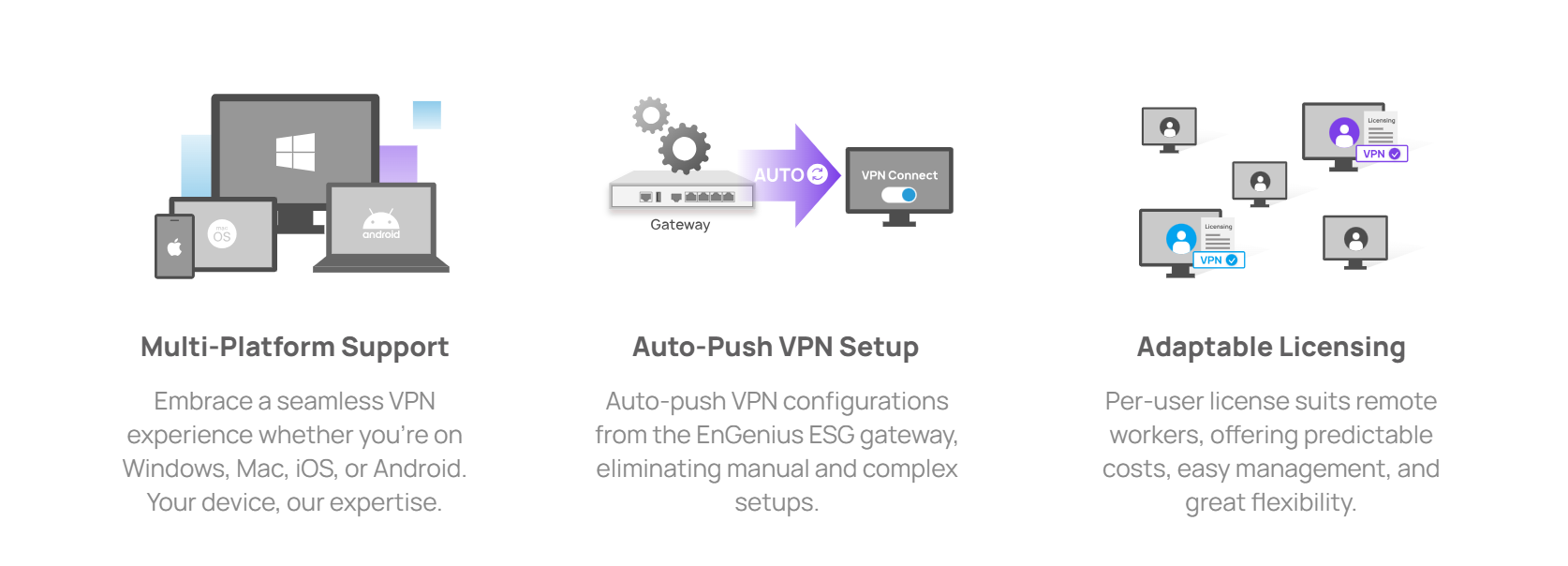
In addition, the automatic configuration allows for quick and easy scaling as businesses grow and onboard more employees, avoiding the need for manual VPN setups that can be overwhelming and strain IT resources. Furthermore, automatic configurations are self-reliant, reducing the need for specialized IT intervention and offering long-term cost savings.
For Remote Workers: Instant Cross-Platform Security
For remote workers, the log-in process was made easy by simply logging in to the SecuPoint app. It automatically configures the best security settings to keep your connection safe.
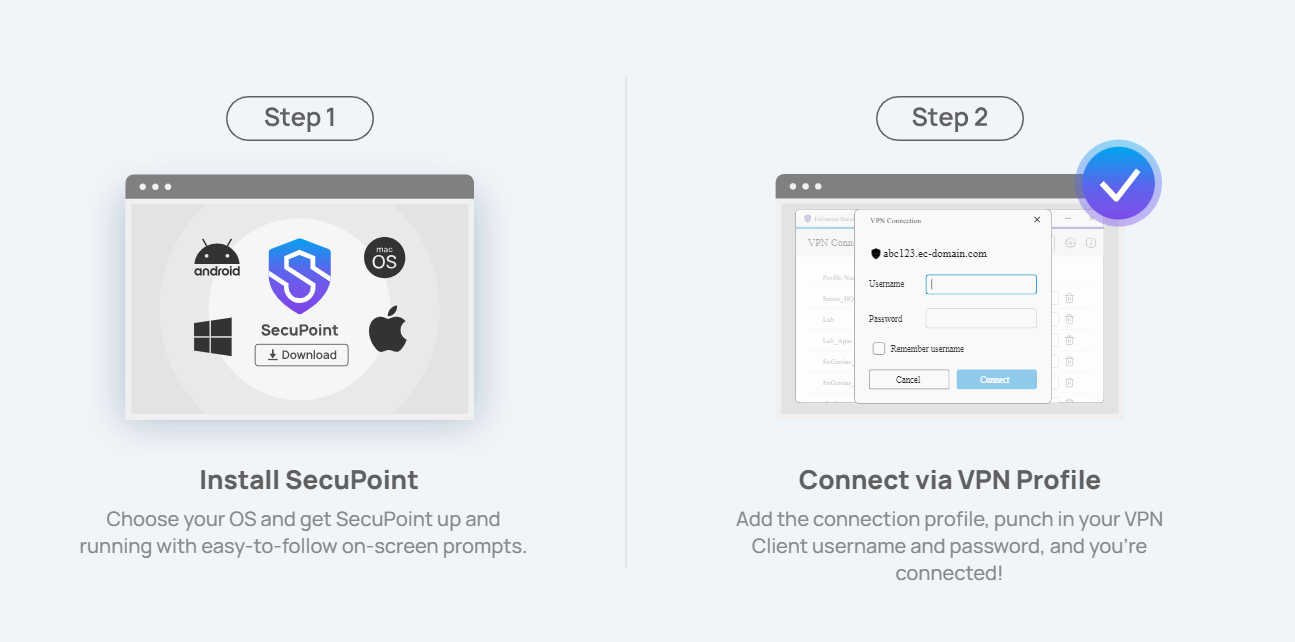
As work becomes more dynamic, employees need to switch between devices without losing their connection. The multi-platform feature ensures that you can stay connected and secure while transitioning between devices, whether the device is provided by the company or of their own.
Conclusion
As we embrace this new era of telecommuting, it’s clear that the right VPN solution is not just a luxury, but a necessity for safeguarding our digital interactions and fostering a productive, secure remote work environment.
The use of VPNs represents a significant stride in addressing these needs. By providing a secure, encrypted connection, VPNs ensure the confidentiality and integrity of data transmitted between remote workers and their company networks. The ease of use, cost-effectiveness, and scalability of such solutions are paramount for businesses adapting to the evolving landscape of digital workspaces. Furthermore, the integration of automatic configurations and cross-platform compatibility highlights a commitment to seamless and efficient remote work experiences.
Anaheim, California, November 27, 2025 – Zyxel Networks, a leader in delivering secure and AI-powered cloud networking solutions, today announced that its USG FLEX 50HP firewall has been honored with a prestigious Taiwan Excellence Award 2026. This latest accolade also brings the Zyxel Group’s total Taiwan Excellence Awards to over 100 wins, underscoring its long-standing commitment to innovation. The Taiwan Excellence Award, held on November 26 in Taipei, recognize products that create new value through innovation. Established by the Ministry of Economic Affairs in 1993, this year nearly 1,000 entries were judged on their achievements in R&D, design, quality, and marketing, with only 336 receiving the honor. This recognition validates the USG FLEX 50HP’s comprehensive strength as a top-tier product representing Taiwan’s innovative spirit.
Bridging the long-standing gap in network security management
Unlike most hybrid firewalls that treat cloud and on-premises security as separate entities, the USG FLEX 50HP firewall unifies them into one seamless solution. This is achieved through its industry-leading Smart Sync feature, which synchronizes security policies, network objects, and high availability settings across both platforms. This ensures consistent protection and streamlines management. Its rich set of security features provides comprehensive protection against ever-increasing cyber threats, while its friendly pricing empowers small and medium-sized businesses (SMBs) and managed service providers (MSPs) with enterprise-grade security without compromising budget, making advanced network protection attainable for a wider range of businesses.
Garnering recognitions from experts worldwide
Beyond this esteemed Taiwan Excellence Award, the USG FLEX 50HP has consistently earned accolades from experts globally. It was recently named Security Hardware of the Year in the UK’s PC Pro Excellence Awards 2025. In Germany, thousands of professional users rated Zyxel Networks as the Champion in both Network Firewall and VPN categories in the recent Techconsult Professional User Rating (PUR) survey 2026. Further cementing its reputation, the USG FLEX H series outperformed competitors in third-party evaluations conducted by the Tolly Group in the United States, underscoring the strong reputation of Zyxel Networks’ security firewalls among IT professionals.
“The USG FLEX 50HP firewall is a testament to our dedication to delivering advanced and accessible security solutions,” said Ken Tsai, President of Zyxel Networks. “This Taiwan Excellence Award, alongside other recent honors, validates our efforts to empower SMBs and MSPs globally with robust, user-friendly, and cost-effective protection against evolving cyber threats.
Further reinforcing its commitment to secure the global digital landscape, the Zyxel Group recently became the first in Taiwan’s networking industry to join the Forum of Incident Response and Security Teams (FIRST). This membership further strengthens Zyxel Networks’ focus on providing robust security solutions and its dedication to collaborating with the cybersecurity community to combat evolving threats.
For more information about the Zyxel Networks’ USG FLEX 50HP firewall, please visit https://www.zyxel.com/global/en/products/next-gen-firewall/usg-flex-firewall-usg-flex-50h
About Zyxel Networks
Zyxel Networks is a leading provider of secure, AI-powered cloud networking solutions for SMBs and the enterprise edge. We deliver seamless connectivity and flexible scalability through subscription services, all backed by robust security. With a reputation built on decades of unlocking potential and helping people adapt to the changing workplace, Zyxel Networks has earned the trust of over 1 million businesses across 150 markets

Calculus will offer Aprecomm’s award-winning software solutions—including Wi-Fi optimization and support automation tools—to its expanding base of ISP customers in developing markets spanning the Middle East & Africa, India & Mexico.
Dubai, UAE – November 19, 2025 – Calculus, a global leader in advanced network innovation, today announced a strategic partnership with Aprecomm, a leading provider of intuitive, self-healing network and customer experience solutions. The collaboration sees Calculus deliver Aprecomm’s full portfolio of AI-powered customer experience products and grow its managed and professional services offering across the Middle East and Africa (MEA), India, and Mexico. Aprecomm’s solution empowers Internet Service Providers (ISPs) and telecommunications operators to improve online consumer experience by improving network performance through a self-healing and self-optimizing approach.
This partnership combines Aprecomm’s industry-leading AI platform—renowned for enabling intelligent, intuitive, self-healing Wi-Fi networks—with Calculus’ deep expertise delivering omnichannel innovation, engineering excellence, and 360° of market penetration. Together, the companies will accelerate the adoption of automated network assurance, real-time analytics, and proactive service optimization for operators seeking to elevate customer experience and operational efficiency.
AIVRA™, Aprecomm’s most recently announced Agentic AI product, delivers simplified, personalized, and actionable insights across the entire ISP organization—from CEOs to network engineers to marketers—through a single, intelligent interface streamlining decision-making, reducing complexity, and driving new levels of efficiency.
With advanced analytics and automated support tools, Aprecomm’s customer experience (CX) suite gives providers unparalleled visibility into subscriber behavior and network health, thereby enhancing satisfaction and reducing operational costs. The platform recently earned Frost & Sullivan’s Best Practices
Award for Innovation, recognizing its impact on the telecom ecosystem. Learn more: here.
This partnership underscores a shared vision and commitment to accelerating digital transformation for service providers and powering more reliable, adaptive, and customer-centric connectivity across key global markets.

UWB is advancing with the 4ab amendment, bringing meaningful improvements in reliability, speed, and scalability. Unlike other wireless technologies focused on high data rates, UWB excels in real-time positioning and secure access. With growing adoption in mobile and automotive devices, the technology is evolving. Our video series, 3 for 3, provides 3 answers for 3 pressing questions about trends in wireless test. In our latest video, LitePoint’s Adam Smith dives into the latest enhancements in Ultra Wideband, or UWB, technology.


In a recent All About Circuits webinar, Sameer Sharma, AVP for IoT at MediaTek, spoke about how edge AI (on-device) is reshaping the Internet of Things, and why the MediaTek Genio platform is uniquely positioned to deliver that future. For OEMs and developers, it’s now time to embrace AI’s clear advantages and build devices that are powerful, efficient, and scalable. That’s exactly what MediaTek Genio was designed to do.
IoT Processors Built for Scale
IoT devices span everything from smart appliances to industrial systems, but they share a common need: a consistent, scalable foundation. The MediaTek Genio family delivers exactly that. The Genio 520 and Genio 720 platforms in particular are inter-compatible, giving OEMs flexibility so a simple chip swap allows a single hardware design to scale across different performance tiers. Similarly, the Genio 510 and 700 share the same design compatibility. This allows customers to accelerate development, reduce costs, and efficiently build “good / better / best” product lines to appeal to broad markets.
Scalability extends beyond performance. MediaTek Genio platforms include powerful NPUs in the chip, enabling on-device AI. They also support for advanced multimedia features and offer flexible connectivity options including Wi-Fi, Bluetooth, and cellular modem add-ons to fit diverse IoT applications, like mobile point-of-sale devices, to new markets like EV charging stations. Our unique expertise in multimedia, built on years of leadership in smartphones, smart homes, and smart TVs, brings these advanced capabilities into IoT from human machine interfaces (HMI), smart retail, to enterprise use, benefitting from multiple high-resolution displays, 4K video processing and rich audio capabilities for information and advertising – all from a single, highly power-efficient chip. And because IoT deployments demand long-term reliability, MediaTek Genio platforms are built with 10+ years of product longevity, multi-OS flexibility (Android, Linux, Ubuntu), and long-term OS and security support. Together, these features give product designers (OEMs) the confidence to scale solutions across markets and sustain them for the long term.
Optimized for Generative AI
Unlike platforms that have added AI on top an extra, MediaTek Genio was architected with AI at its core. The latest SoCs feature MediaTek’s 8th-generation NPUs, capable of up to 10 TOPS and optimized for both vision workloads, and emerging generative AI applications.
Customers increasingly want to run small language models for natural language interaction, personalization, and contextual decision-making all on-device, avoiding the cost and dependance on cloud services. MediaTek Genio enables this with:
This makes MediaTek Genio one of the first IoT platforms carefully optimized for GenAI at the edge, giving OEMs the ability to deliver next-generation AI experiences locally without depending on the cloud.
A Developer Ecosystem That Accelerates Time-to-Market
MediaTek understands that software is just as important as silicon. The MediaTek Genio Developer Portal provides SDKs, documentation, evaluation kits, and community resources to support developers at every stage.
Our partnership with NVIDIA adds even greater value; using the NVIDIA TAO Toolkit, developers can fine-tune pre-trained models on NVIDIA GPUs and seamlessly deploy them on MediaTek Genio NPUs. This integration bridges the training power of NVIDIA with the efficiency of MediaTek at the edge, giving developers a faster, more efficient path from prototype to deployment.
Edge AI is redefining IoT, and generative AI is accelerating that shift. To take advantage, OEMs need platforms that combine scalable design, AI performance, robust connectivity, and long lifecycle support.
Looking ahead, IoT adoption will be driven by AI-powered personalization, deeper integration of next-generation connectivity, and a growing focus on sustainability. MediaTek Genio is the platform built to deliver on these priorities, helping OEMs create devices that last longer, perform smarter, and reduce reliance on the cloud.
With MediaTek Genio, the edge is no longer an option, it’s a requirement. And it’s where the future of IoT is already being built. Learn more about MediaTek’s Genio Platforms.
Original release distributed by Congressional Wi-Fi Caucus
Washington, D.C. – Today, Senator Pete Ricketts, Senator Jacky Rosen, Congressman Bob Latta, and Congressman Troy A. Carter, Sr. announced that they will co-chair the relaunch of the bipartisan, bicameral Wi-Fi Caucus. Initially founded in 2018, the Wi-Fi Caucus is dedicated to assisting Members of Congress in better understanding how Wi-Fi benefits the American public, consumers, economy, and the larger geopolitical standing of the United States.
“Supporting American technologies is the best way to combat Communist China. We must strengthen domestic access to Wi-Fi to promote innovation and avoid reliance on foreign networks. The Wi-Fi Caucus will focus on smart spectrum policy that strengthens security and hardens data privacy for all Americans,” said Senator Pete Ricketts (R-NE).
“Affordable, reliable high-speed internet is no longer a luxury; it’s a critical tool that connects communities, supports businesses, and makes education and health care accessible,” said Senator Jacky Rosen (D-NV). “That’s why my colleagues and I are launching this bipartisan, bicameral Wi-Fi Caucus to increase connectivity and innovation through high speed, wireless internet. The Wi-Fi Caucus will highlight the importance of investing in American broadband technology, which will enhance security, boost our digital economy, and ensure that all Americans can benefit from this technology.”
“Wi-Fi is the backbone of how Americans connect today, whether they are accessing the Internet, working remotely, or managing smart devices at home or in their businesses. As this technology continues to shape our daily lives, Congress must have a clear understanding of its role in our modern economy. I look forward to the Wi-Fi Caucus working to inform our efforts in Congress to keep consumers connected and our country competitive,” said Congressman Bob Latta (OH-05).
“Now more than ever before, access to reliable internet is a necessity for Americans of all backgrounds for their education, health care, jobs, and essential public services. Bridging the digital divide is critical to ensure every community can fully participate in today’s economy and democratic society. As policymakers, we have an obligation to ensure every citizen has access to reliable, equitable, and affordable high-speed internet – and close the digital divide once and for all. By relaunching the Wi-Fi Caucus, we take a crucial step towards bipartisan policy solutions that ensure digital equality and access to the internet for all of our constituents,” said Congressman Troy A. Carter, Sr. (LA-02).
In addition to the co-chairs, relevant groups and organizations have applauded the formation of this new, bipartisan, bicameral caucus.
“WifiForward applauds the establishment of a bipartisan, bicameral Wi-Fi Caucus and thanks co-chairs Sen. Pete Ricketts, Sen. Jacky Rosen, Rep. Bob Latta, and Rep. Troy Carter for their leadership on an American innovation success story that impacts every single American, regardless of party, district, or state,” said Mary Brown, Executive Director, WifiForward. “We thank all the members for being champions of Wi-Fi and their commitment to uplifting its uniquely American success story. WifiForward looks forward to working with the Caucus on critical priorities, like unleashing more unlicensed spectrum, to expand fast, affordable connectivity for all Americans.”
“Robust, reliable Wi-Fi is the backbone of America’s digital economy and everyday life,” said Gary Shapiro, CEO and Vice Chair, Consumer Technology Association (CTA). “We thank Senators Pete Ricketts and Jacky Rosen, and Representatives Bob Latta and Troy Carter, for relaunching the bipartisan Wi-Fi Caucus and reaffirming their commitment to connecting every community. CTA looks forward to engaging with the Caucus to unlock additional unlicensed spectrum to support Wi-Fi driven innovation.”
“Wi-Fi Alliance applauds the bipartisan leadership of Senators Pete Ricketts and Jacky Rosen and Representatives Bob Latta and Troy Carter for reestablishing the Wi-Fi Caucus to advance policies that sustain U.S. leadership in wireless innovation,” said Kevin Robinson, President and CEO of Wi-Fi Alliance. “Wi-Fi is the primary way Americans connect to the internet, delivering hundreds of billions of dollars in annual economic value. Ensuring continued access to vital unlicensed spectrum, including the full 6 GHz band, and other innovation-enabling policies will empower Wi-Fi to meet the nation’s growing connectivity needs and extend digital opportunity to every community.”
“Congratulations to the co-leaders of the Wi-Fi Caucus. This caucus will play an essential role in helping Members of Congress and their staff understand the dynamic and rapidly evolving technologies that underpin the success of Wi-Fi. Since our founding, the WBA has been dedicated to resolving business challenges and fostering collaboration among service providers, enterprises, and cities so they can deliver outstanding and secure Wi-Fi experiences and fully realize the commercial opportunities emerging across the ecosystem. Through convening industry stakeholders and publishing technical reports and standards throughout the year, we work to advance innovation and best practices across the sectors. We look forward to working with the Wi-Fi Caucus to share insights, support its educational mission, and highlight the WBA’s role in driving progress for the entire wireless community,” said Tiago Rodrigues, President and CEO at the Wireless Broadband Alliance (WBA).
“Wi-Fi is the workhorse of the internet, carrying the majority of internet traffic — including nearly 90% of mobile data — and powering consumers and businesses in countless ways. Its impact on American ingenuity and innovation is massive, fueling broad-based economic growth and generating more than $2.1 trillion in value between 2025 and 2027. The creation of the bipartisan Congressional Wi-Fi Caucus recognizes Wi-Fi’s essential role in connecting lives, advancing this home-grown technology, and driving the growth of our digital economy. We thank Caucus co-chairs Senators Ricketts and Rosen and Representatives Latta and Carter for their leadership in promoting America’s Wi-Fi interests,” said Hon. Cory Gardner, President & CEO, NCTA – The Internet & Television Association.
“WISPA has long supported the advancement, maintenance, and growth of Wi-Fi and unlicensed spectrum by Congress. The recently launched Wi-Fi Caucus provides an excellent bipartisan forum for open and informed dialogue. We look forward to working with House Chairs Latta and Carter and Senate Chairs Ricketts and Rosen on this critical issue for our members and industry,” said WISPA President and CEO David Zumwalt.

HOUSTON, TX – NOVEMBER 20, 2025 – WorldVue, a leading global provider of turnkey hospitality technology solutions, today proudly announces the successful integration and certification of TigerTMS.
As part of our commitment to delivering seamless guest experiences, enhanced property operations and next-generation network services, the certified TigerTMS interface provides an integrated, scalable and globally supported solution. TigerTMS’s proven track record, trusted by over 10,000 hotels worldwide aligns perfectly with WorldVue’s mission to drive technology-driven innovation in the hospitality sector.
“This certification of TigerTMS marks a strategic leap forward for WorldVue and our hospitality clients. By incorporating TigerTMS’s robust middleware and interface capabilities into our global technology stack, we enable hotel brands and properties to unlock unparalleled connectivity, data insights and operational efficiency, all while maintaining the consistent world-class service our customers expect.” Said Mark Schaps, EVP and CIO, WorldVue.

Built on the AI-driven RUCKUS One platform, the new MDU 360 capability, RUCKUS DSE AI assistant, and Wi-Fi 7 access points work together to bring intelligent network management and integrated Wi-Fi solutions to MDU stakeholders
CommScope (NASDAQ: COMM), a global leader in network connectivity, today announced its new RUCKUS® MDU (Multi-Dwelling Unit) suite featuring innovative AI and Wi-Fi 7 solutions. This new suite of solutions meets stakeholder demands through its ability to combine enterprise-level Wi-Fi® analytics with cloud simplicity and automation; this enables more devices per unit, low latency and high reliability, and a reduction in manual troubleshooting. These outcomes will help drive improved resident satisfaction and optimize operating costs.
MDU operators can benefit from these advanced features:
“Our RUCKUS MDU suite showcases our leadership in AI innovation and our proven expertise in Wi-Fi 7 MDU networks—making it easier for our customers to build and manage high-quality networks and services for MDUs,” said Bart Giordano, SVP & president, RUCKUS Networks. “Our market-leading AI solutions represent a major breakthrough. Owners and MSPs can now drill down from a high-level view of network health to see the resident experience score and historical SLA performance for every property and unit. Furthermore, users can query the RUCKUS Digital System Engineer (DSE) AI assistant in simple language, instead of navigating menus or building reports. They’ll get data-driven answers, visualized through tables, charts or widgets that reveal actionable insights. This is the future of MDU network automation and management.”
RUCKUS Networks will be demonstrating the RUCKUS MDU Suite at OPTECH, booth 204, from November 17-19th in Las Vegas, NV, USA. For more information, please visit the RUCKUS website.
—END—
RUCKUS, RUCKUS One, RUCKUS SmartZone, RUCKUS Unleashed, CommScope and the CommScope logo are registered trademarks of CommScope and/or its affiliates in the U.S. and other countries. For additional trademark information see https://www.commscope.com/trademarks. Wi-Fi and Wi-Fi 7 are trademarks of the Wi-Fi Alliance. Bluetooth is a trademark of Bluetooth Sig, Inc. Zigbee is a trademark of the Connectivity Standards Alliance. All other product names, trademarks and registered trademarks are property of their respective owners.
About CommScope:
CommScope (NASDAQ: COMM) is pushing the boundaries of technology to create the world’s most advanced wired and wireless networks. Our global team of employees, innovators and technologists empower customers to anticipate what’s next and invent what’s possible. Discover more at www.commscope.com.
Follow us on LinkedIn and X. Sign up for our press releases and blog posts.
News Media Contact:
Luke Hamer
[email protected]
Financial Contact:
Massimo Disabato, CommScope
[email protected]
This press release includes forward-looking statements that are based on information currently available to management, management’s beliefs, as well as on a number of assumptions concerning future events. Forward-looking statements are not a guarantee of performance and are subject to a number of uncertainties and other factors, which could cause the actual results to differ materially from those currently expected. In providing forward-looking statements, the company does not intend, and is not undertaking any obligation or duty, to update these statements as a result of new information, future events or otherwise.
Source: CommScope

The 3GPP AAA server is located within the 3GPP Home Public Land Mobile Network (HPLMN). For 3GPP Wi-Fi access in 4G and 5G non-standalone (5G NSA) networks, the 3GPP AAA provides authentication, authorization, policy enforcement, and routing information to the packet gateways in both the Wi-Fi core and mobile core networks. It performs EAP-SIM/AKA/AKA′ authentication via the SIM card for automatic and secure authentication of Wi-Fi devices.
Below, we will explore the role of the standard 3GPP AAA for SIM authentication in various 4G and 5G NSA Wi-Fi access scenarios, including all 3GPP-specified options for 3GPP Wi-Fi access. To provide a comprehensive view, we include the Enea Aptilo SMP in the diagrams with an integrated 3GPP AAA and additional functions that may be essential for real-world deployments. We will cover the Enea Aptilo SMP in more depth in the upcoming Enea’s Wi-Fi Offloading Expertise chapter, download the full white paper to get access to it now.
The two first, local WLAN break-out and access through DPI, are not standardized by 3GPP but are extensively used and could also be used for 5G as long as SIM authentication can be carried out in the corresponding 5G architecture.
Local WLAN Break-Out
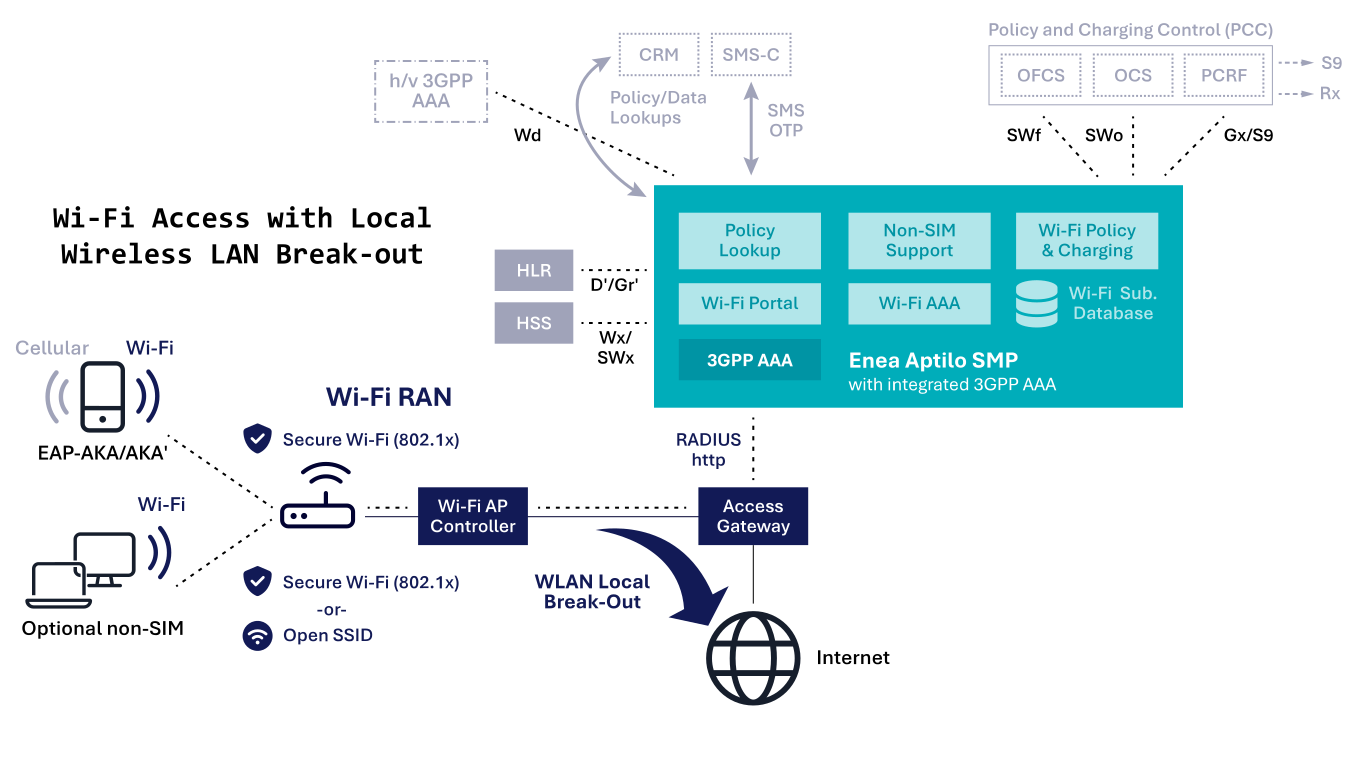
As discussed, this option can be used for any generation of cellular networks and is currently mobile operators’ most widely deployed architecture. It enables local traffic breakout for all clients at the Wi-Fi access gateway and utilizes standard RADIUS and EAP methods for authentication with the HSS/HLR. The Wi-Fi access point must support 802.1x authentication with EAP-SIM/AKA/AKA′. Integration with the HLR for SIM authentication is facilitated through the D′/Gr′ MAP interfaces or with the HSS via the Wx/SWx Diameter interfaces.
Access Through DPI
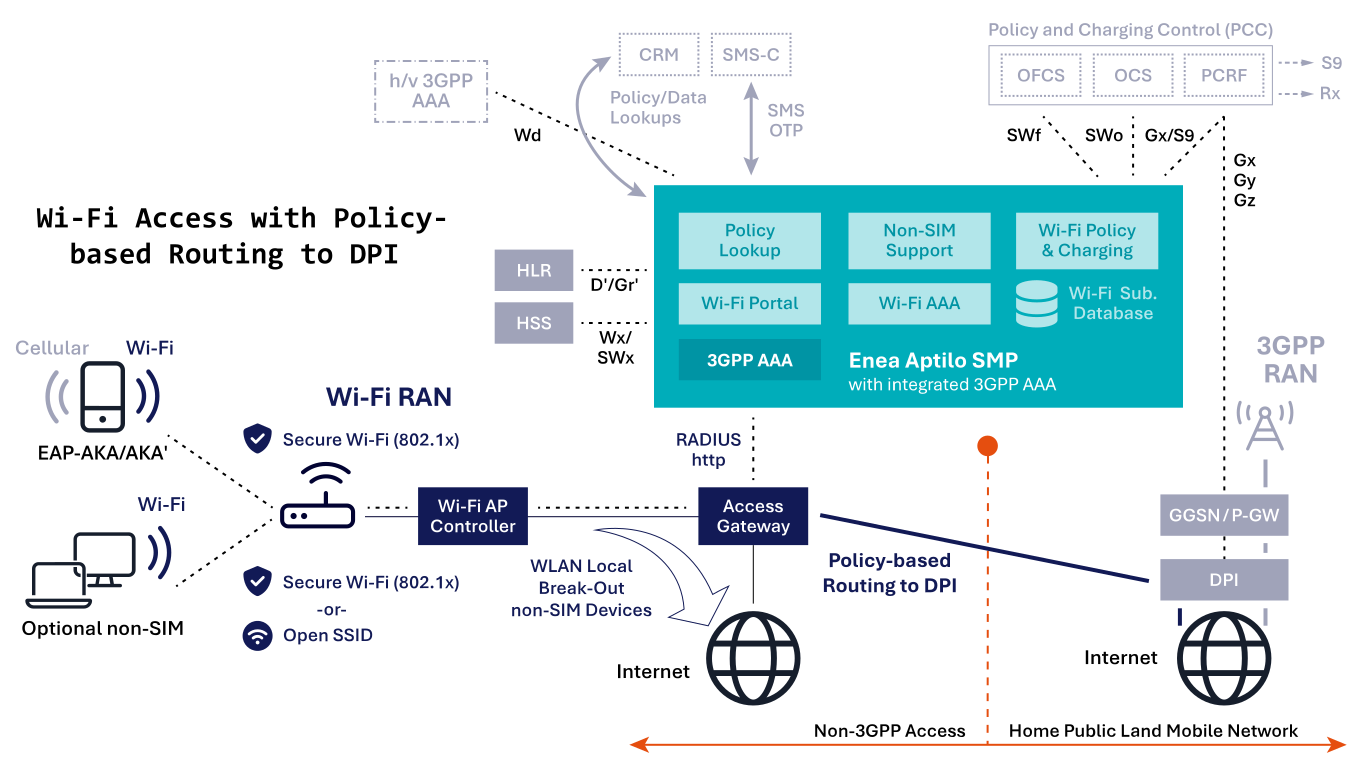
This option can be used for any generation of cellular networks. The mobile operator typically uses the DPI to inspect and enforce policies for SIM-enabled devices.
All traffic for devices with SIM authentication support is terminated at the Deep Packet Inspection (DPI) node in the mobile core. In contrast, traffic from non-SIM devices is directed to the Internet locally.
This option uses standard RADIUS and EAP methods for authentication with HLR/HSS. The Wi-Fi access point requires support for 802.1x authentication with EAP-SIM/AKA/AKA′. Integration with the HLR for SIM authentication is facilitated through the D′/Gr′ MAP interfaces or with the HSS via the Wx/SWx Diameter interfaces.
Policy-based routing is utilized to route the traffic from the Wi-Fi access gateway to the DPI.
Trusted Wi-Fi Access in EPC
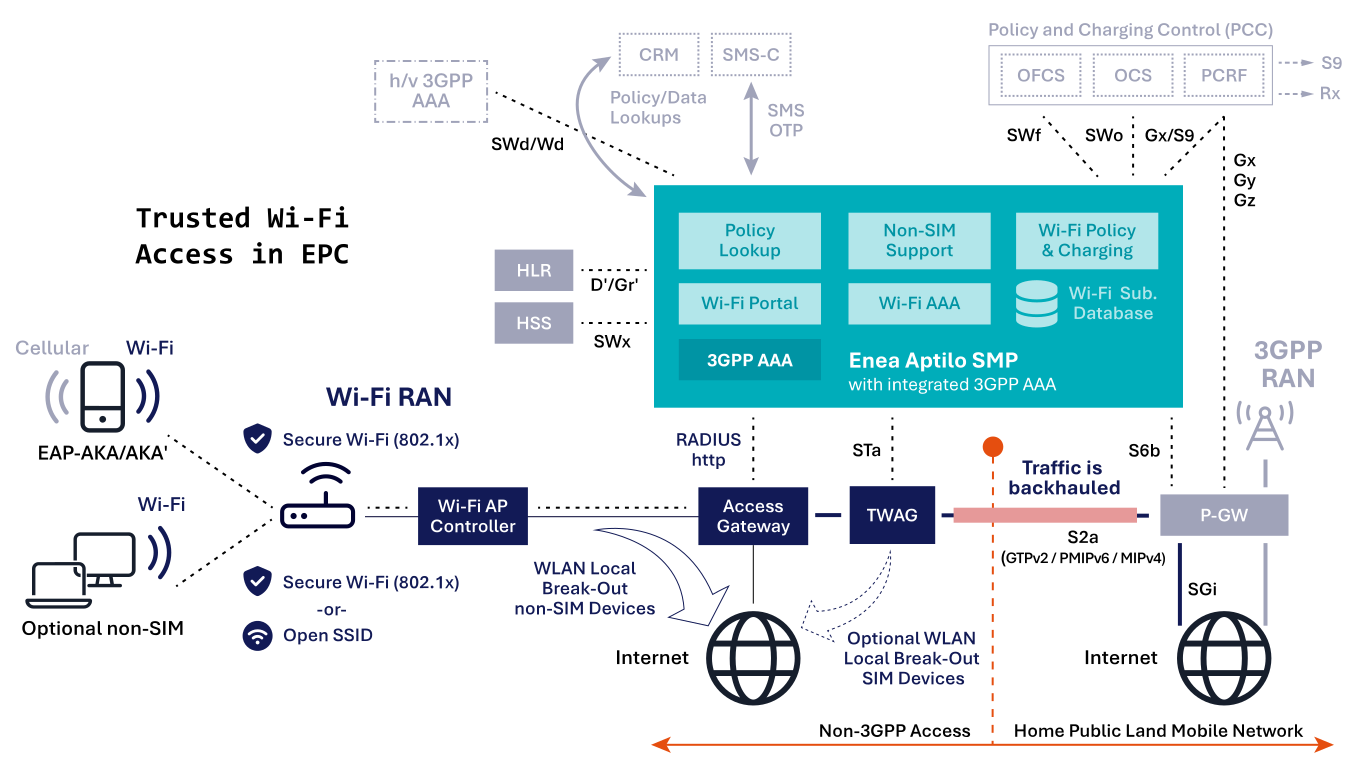
This option is for 4G and 5G non-standalone (5G NSA) and based on 3GPP specification TS23.402 with the introduction of the Trusted Wireless Access Gateway (TWAG) node. The TWAG establishes GTPv2, PMIP, or MIP tunnel (the S2a interface) to the P-GW in the EPC core for all trusted traffic.
“Trusted” traffic means an operator-controlled secure Wi-Fi environment with 802.1x. SIM authentication with the HLR is integrated through the D′/Gr′ MAP interfaces or with the HSS via the SWx Diameter interfaces. The Wi-Fi access point requires support for 802.1x and EAP-SIM/AKA/AKA′ authentication methods. This option also requires support for EAP in the device.
The STa interface is mainly used for EAP client authentication with HSS and S2a option selection of which tunnel type to use. The S6b interface between 3GPP AAA and P-GW is mainly used for tunnel authentication, static quality of service, and mobility (if applicable).
The 3GPP specification also allows for a full or partial local breakout of Wi-Fi traffic at the TWAG in the Wi-Fi core.
Untrusted Wi-Fi Access in EPC
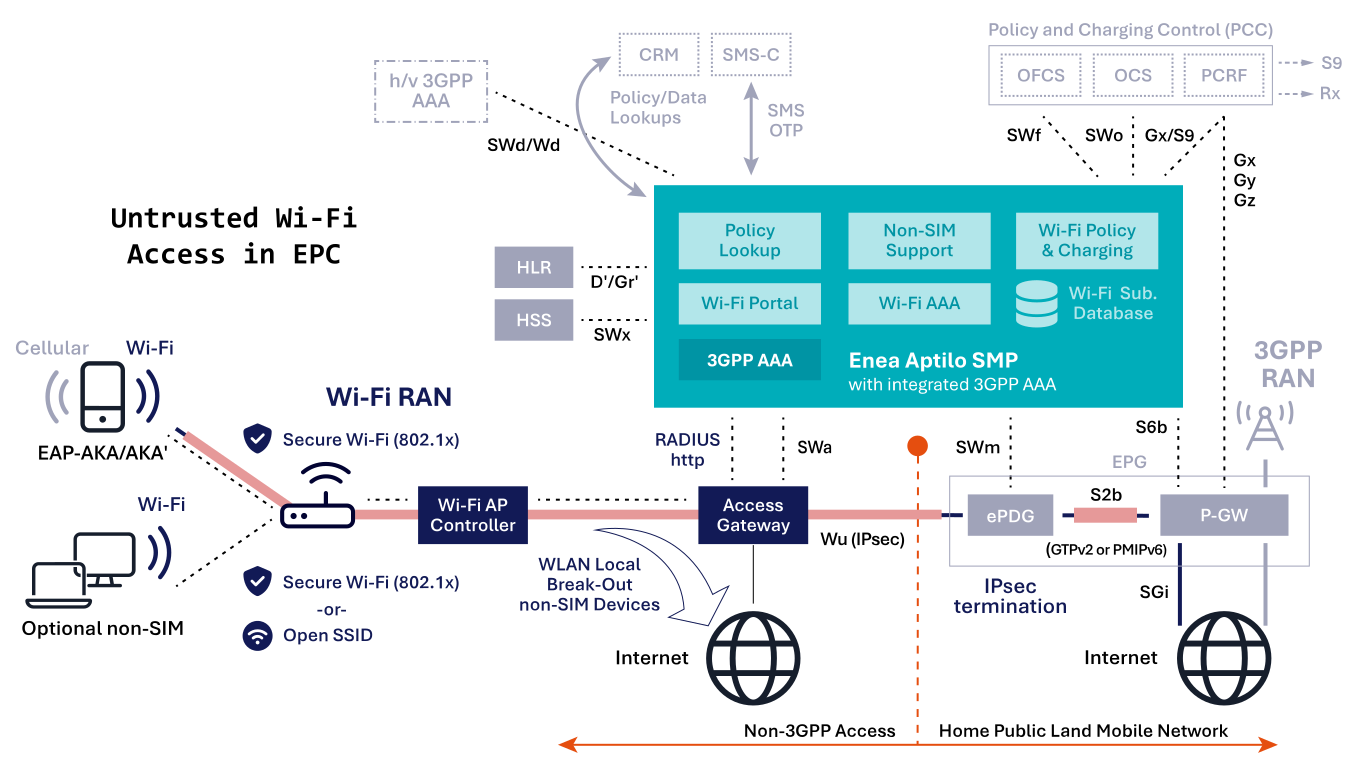
This option is for 4G and 5G non-standalone (5G NSA) and based on 3GPP spec TS23.402 with the introduction of the evolved Packet Data Gateway (ePDG) node. This option requires an EAP client in the device with IPsec support. There is no impact on the Wi-Fi core or Wi-Fi RAN; any Wi-Fi network will function seamlessly. IPsec tunnels are terminated in the ePDG, a mobile core node specifically
introduced for this purpose. The ePDG maps the IPsec tunnels into GTPv2 or PMIP tunnels, which are terminated in the P-GW. In practice, both ePDG and P-GW functions are typically integrated into the same Evolved Packet Gateway (EPG).
The SWa interface is mainly used for EAP client authentication with HSS through the SWx interface. The SWm interface is used for additional authentication parameters, including subscription profiles and S2b option selection of which tunnel type to use. The S6b interface is mainly used between 3GPP AAA and P-GW for tunnel authentication, static quality of service, and mobility (if applicable).

The last thing you want to see when pushing a team in Apex Legends is a connection issue icon flashing on your screen. Whether it’s high ping, packet loss, or congestion, connection issues will ruin your aim, movement, and gameplay in general.
In this blog, we’ll be giving you solutions to fix all connection issues in Apex Legends. If you follow every solution included in this blog, you’ll have a stable and low ping connection in every game of Apex Legends.
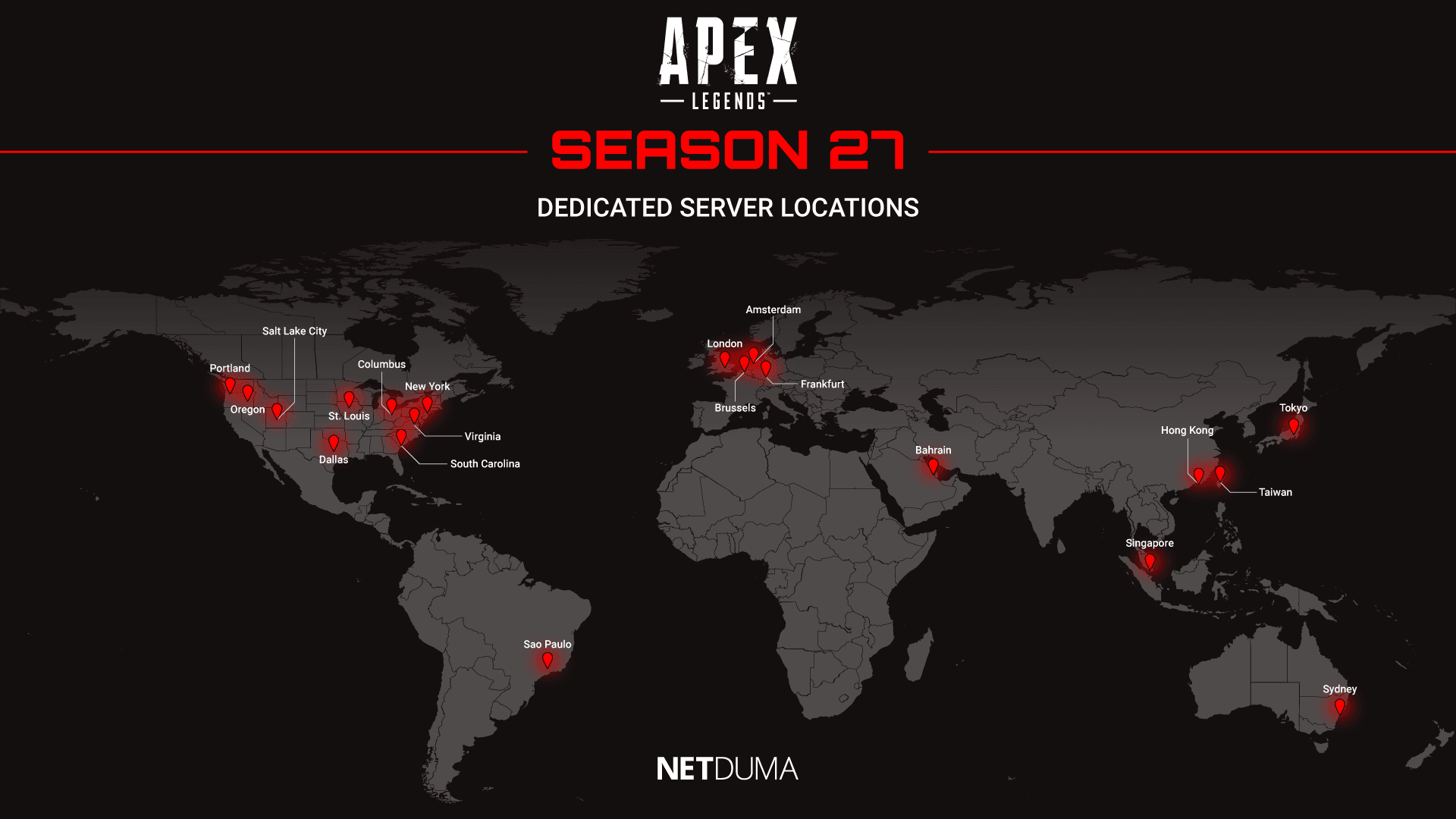
Apex Legends Server Status
The first thing to check when lagging in Apex Legends is the game’s server status. If you are lagging on a usually stable connection, it could be due to server issues or servers being under heavy load. This is common when a new update is released and a large influx of players come back to the game.
We will link some useful sites below that show the status of all Apex Legends data centres.
If your local server or data centre is experiencing issues, it’s just a waiting game for the game developers to issue a fix or update. The useful thing about knowing about server issues is you can be pretty sure your network issues are being caused by that, rather than an issue with your network.
In-game Settings
There’s some useful settings in Apex Legends that will give you more insights into the types of lag you are experiencing. These settings will also be useful with our last lag-fixing tip.
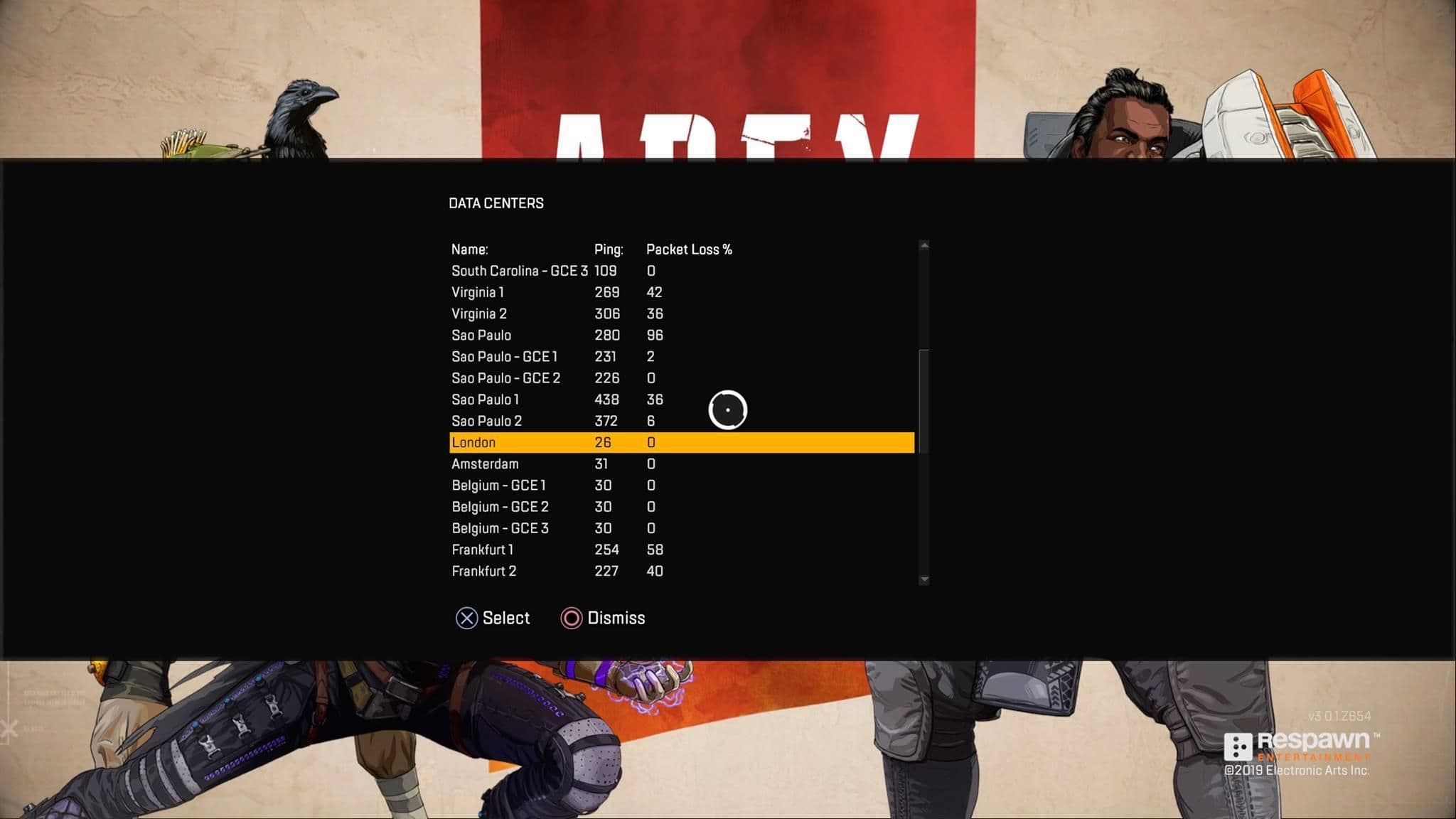
The first piece of useful information is available right when you start up the game. In the bottom left corner of the screen, there’s an option to view the data centres that you can connect to when searching for a game in Apex Legends. Depending on the platform you are playing on, the button to access this menu will differ.
You can select your preferred data centre on this menu to favour connecting to low ping servers. We can use this information later on in the blog, but you can see from this list the ping values and packet loss of the data centres. This is another way to see whether your local server/s are experiencing any issues before you start playing.
The other setting that’s worth mentioning is in the game settings menu. It’s called “Performance Display.” You’ll want to enable this to get in-game telemetry settings.
This shows your ping and packet loss values so you can see when you are experiencing network issues when playing. It can also be used to show your low ping and stable connection once you’ve followed our steps from this blog.
Use a Wired Connection
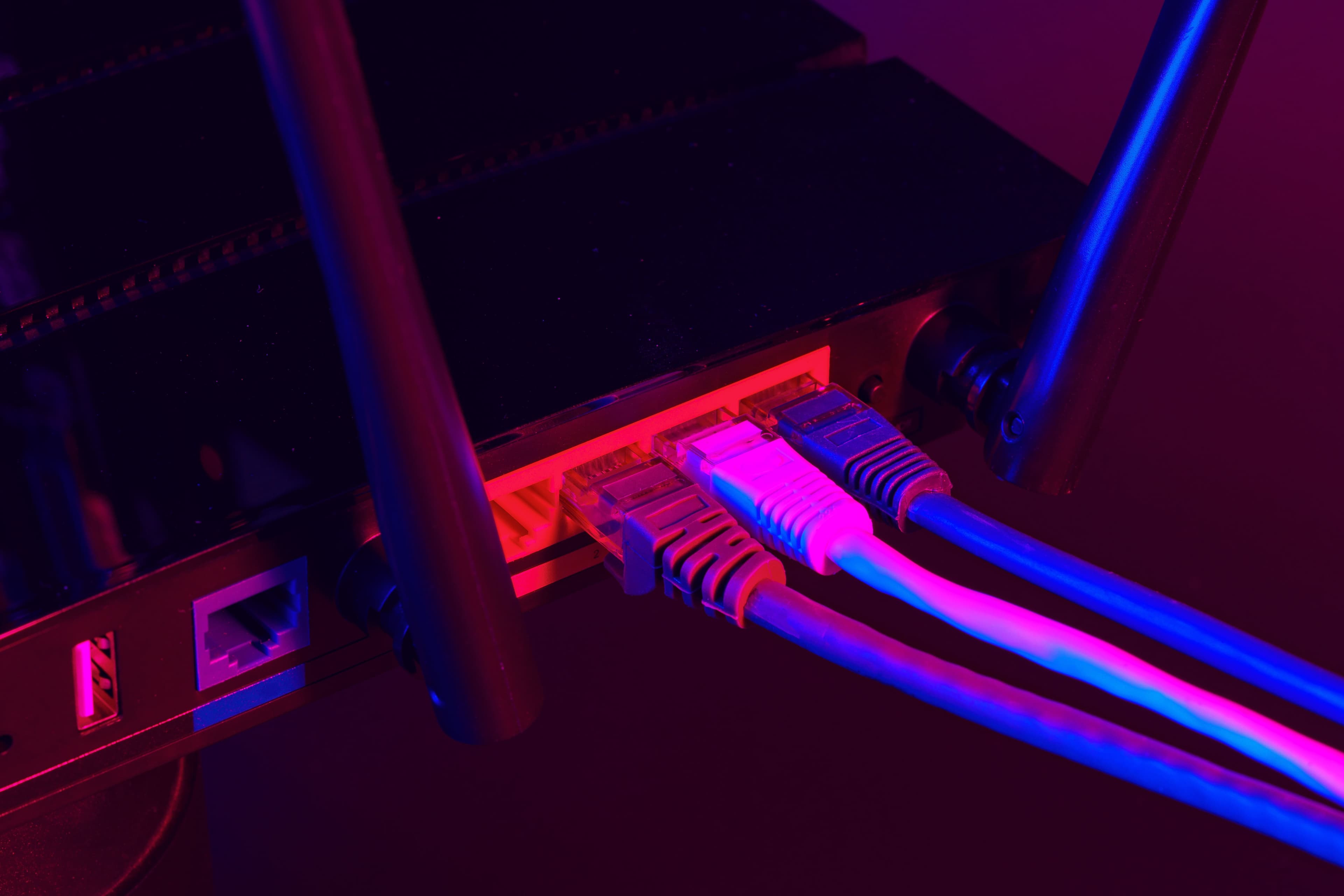
One of the most overlooked tips for improving your connection when gaming is using a wired (ethernet) connection. It provides a much stronger and stable connection than Wi-Fi, which is crucial for gaming.
Wi-Fi is extremely convenient, and is the reason most people end up using it, even when gaming. Especially if your PC or console is located far away from your router, using Wi-Fi is the quickest and easiest option. But if you take Apex Legends, or gaming online seriously, you need to be playing on a wired connection.
Stability is the number one factor for having a great connection in online gaming. It’s a common misconception that you need faster internet to get low ping or a stable connection, but it’s just not true. Gaming only requires a tiny amount of bandwidth for a great connection, but things like congestion and packet loss cause you to lag in-game.
Wi-Fi struggles when the signals need to travel a long distance or through walls/floors to reach your PC or console. This can lead to dropped packets, which then causes packet loss and stuttering in-game. An ethernet cable doesn’t have this issue, and it’s why it provides a better quality connection for online gaming.
If the distance between your router and PC/console is stopping you from using an ethernet cable, we have a best of both worlds solution. It’s a piece of tech called Powerline Adapters. They use your home’s existing electrical wiring to carry an ethernet connection to different rooms/floors of your home.
So this way you can still achieve a stable connection, even if your router is in another room from your gaming setup.
Netduma R3 Lag Fix Guide
If you’ve tried the tips we have already mentioned and you’re still experiencing network issues, our next solution is a must-have if you want the best connection in Apex Legends.
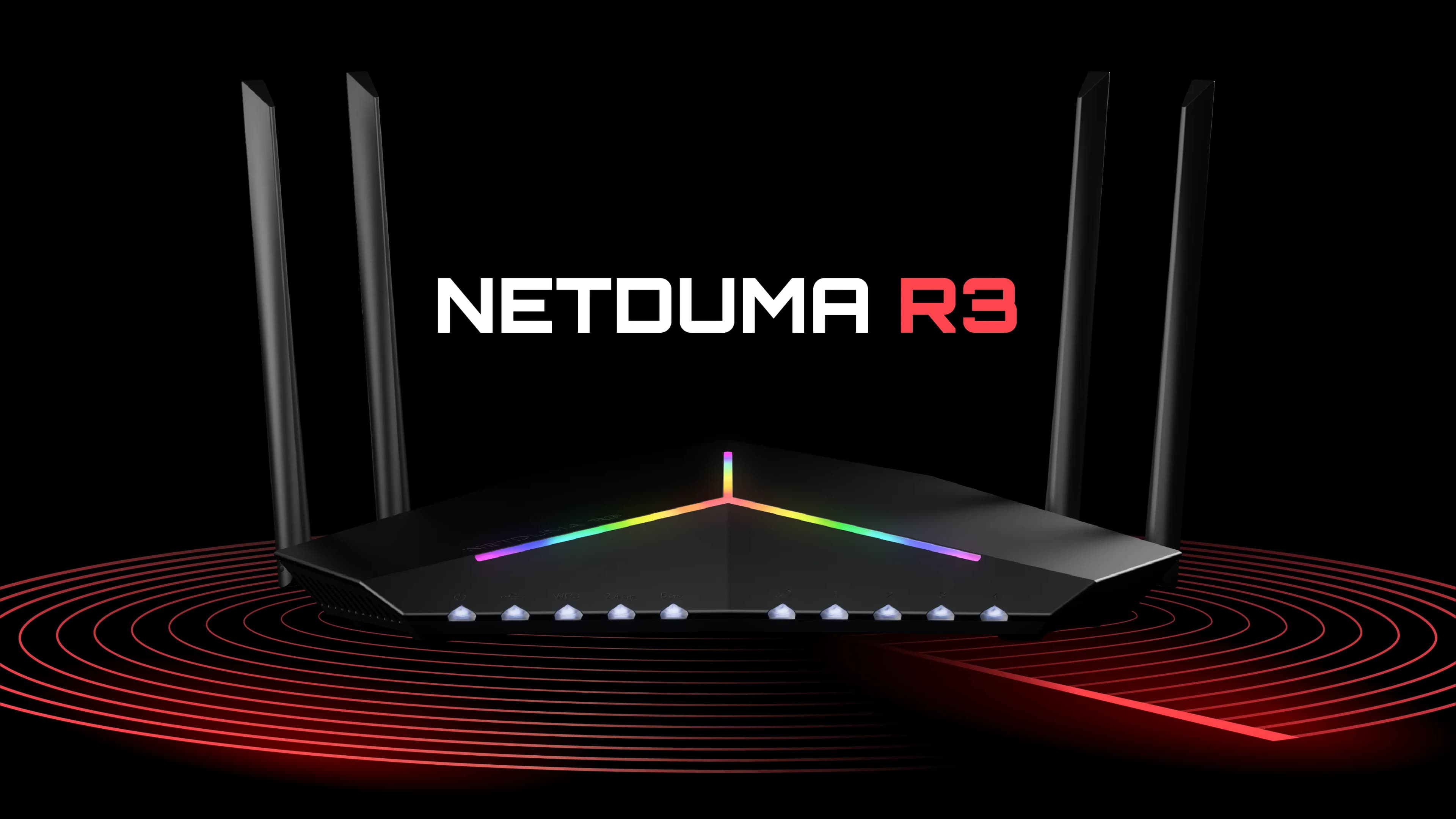
The Netduma R3 gaming router is a network optimisation Swiss army knife. Powered by a set of networking tools that will ensure you only play on low ping servers, stabilise your ping by removing jitter, and eliminate congestion on your network.
So, let’s take a look at the features that will optimise your connection.
Geo-Filter: Always Get Low Ping in Apex Legends
Geo-Filter can be used in conjunction with the data centre selector in Apex Legends to ensure you only play on low ping servers. If you are already using the data centre selection setting, Geo-Filter still serves a purpose by enabling another R3 feature, Steady Ping. We explain what this powerful feature does in the next section.
Adding your gaming device to Geo-Filter makes it so you can only connect to the servers within your filter radius. Another R3 feature, Ping Heatmap, shows you where the Apex Legends servers are located. It also shows you the ping you would have when connecting to them.
Now you know the best servers to connect to, you can adjust your Geo-Filter radius to only include these servers.
Steady Ping: Stabilise Your Connection in Apex Legends
Steady Ping is our newest gaming feature, exclusive to the Netduma R3. It completely stabilises your ping by removing jitter from your connection. This makes your inputs feel incredibly responsive, as the game server can process them better without jitter.
Jitter is the constant change in your ping that you are probably used to seeing in the telemetry settings of Apex Legends. By removing jitter, it means you will be playing on a stable ping, which is ideal for a fast-paced game like Apex.
In order to use Steady Ping, you must add your device to Geo-Filter. Steady Ping locks in a stable ping by adding a small buffer to your connection. This will slightly raise your ping, but it does this to account for any fluctuation you would normally experience.
You can learn more about how Steady Ping works, and how beneficial it is in the video below.
SmartBOOST: Fix Packet Loss in Apex Legends
So, now you are only playing on low ping servers with a stable connection; the only thing that will make you lag is congestion on your network.
You know what it’s like to game on a busy network. People are streaming 4K video, downloading files, and scrolling on social media. All of these activities use up your network’s bandwidth and make your gaming suffer.
SmartBOOST is the ultimate QoS (quality of service) solution. It automatically manages your bandwidth usage to prioritise gaming traffic and stops bandwidth-intensive applications from slowing you down.
We have a live demonstration of SmartBOOST optimising a busy network to prioritise gaming. Check out the video below to see SmartBOOST in action.
Thanks for Reading
If you’ve followed the steps in this blog, you should be enjoying a low ping and stable connection, perfect for beaming players in Apex Legends.
If you want to get your hands on the powerful features included in DumaOS 4, then check out our Netduma R3 Gaming Router. It’s our most powerful router yet and comes with DumaOS 4 pre-installed.
