Breaking News

GLOBAL Wi-Fi NEWS bulletin

Captive Portal Setup

What is a Captive Portal?

A captive portal is a web page that appears when users connect to your venue’s guest WiFi, prompting them to log in, accept terms, or provide information before accessing the internet. Think of it as a digital welcome mat and security gate, ensuring only authorized users gain access while allowing you to collect valuable data.

Why Use a Captive Portal?

  • Enhanced Security: Restricts access to approved guests only.
  • Data Collection: Capture emails, demographics, or feedback for remarketing.
  • Branding: Custom splash pages reinforce your brand.
  • Monetization: Display ads or offers to drive revenue.
  • Compliance: Meet legal or industry requirements for guest WiFi.

Step-by-Step: Setting Up a Captive Portal

1. Assess Your Network Hardware

Ensure your routers and access points support captive portal features. Most enterprise-grade WiFi hardware (e.g., Cisco Meraki, Ubiquiti, Ruckus) is compatible.

2. Update Firmware and Software

Keep your network devices updated for security and compatibility.

3. Access Router Settings

Log into your router or WiFi controller’s admin dashboard. Look for the “Guest Network” or “Captive Portal” section.

4. Choose a Captive Portal Solution

Select a cloud-based platform like GoZone WiFi’s Marketing4WiFi for easy setup, advanced integrations, and analytics. These solutions offer user-friendly builders for custom splash pages and flexible login options.

5. Configure the Captive Portal

  • Set your SSID (network name) for guest WiFi
  • Customize your splash/login page (logo, colors, messaging)
  • Decide what data to collect (email, phone, survey responses)
  • Set authentication methods (email, SMS, social login)

Splash Page Example

6. Test the Experience

Connect as a guest and walk through the login process. Ensure data collection and authentication are working smoothly.

7. Launch and Monitor

Go live! Use your captive portal’s analytics to track logins, engagement, and conversions. Adjust your splash page and offers as needed.

Final Thoughts

A well-designed captive portal does more than provide WiFi access—it’s a powerful tool for growing your marketing list, boosting revenue, and delivering a great guest experience. Choose a solution that fits your venue’s needs, and you’ll see measurable results in no time.

Ultra-wideband (UWB) is a short-range wireless communication technology that uses very wide frequency channels – typically 500 MHz wide – to enable secure, low-power communication. Its standout feature is fine ranging: the ability to precisely measure the distance between two devices by calculating signal travel time.

In automotive applications, UWB has become an essential technology, especially for enabling secure digital keys and passive entry systems. As UWB adoption in vehicles increases, challenges such as spectrum congestion and interference are becoming more pronounced.


UWB operates outside the normal rules of licensed and unlicensed spectrum under FCC Part 15, and shares airwaves with other wireless technologies, including Wi-Fi in the 6-GHz band. This makes it susceptible to signal interference as UWB adoption grows across automotive and Wi-Fi-dependent consumer devices.

The potential for signal congestion is driving a move to harmonize UWB channels to accommodate more devices, reduce interference and future-proof new deployments. Unusually, the effort is being led by carmakers and Tier 1 suppliers, with the typically slower-moving automotive sector setting the pace for phone vendors and other consumer electronics manufacturers.

Channel Expansion Frequencies

Although the IEEE 802.15.4 standard defines 16 UWB channels, regulatory and other restrictions effectively limit all UWB traffic to one channel (channel 9), which operates in the 8-GHz frequency band. Channel 9 is globally available and free from interference with other common technologies. But as deployments scale, relying on a single channel limits performance, increases the likelihood of device interference and impedes widescale UWB adoption.

To alleviate this, the industry is investigating a move to harmonize UWB support across additional channels, specifically channels 10 (~8.4 GHz) and 12 (~9 GHz). These offer wide global availability, relatively clean spectrum and are expected to dominate future expansion efforts. Other channels, including 13 through 15, have also been defined but are considered less suitable for low-power UWB technology due to effects such as increased path loss, which can degrade signal strength.

What UWB Channel Expansion Means for the Automotive Sector

For automakers and Tier 1 suppliers, access to additional channels would support greater redundancy and flexibility in safety applications. The most prominent of these is digital car keys, where UWB is used to securely access the vehicle. UWB’s fine ranging capability – accurate to within centimeters – helps prevent relay attacks by verifying that a key fob or smartphone is physically close to the vehicle.

Other automotive uses accelerating the need for additional UWB channels include:

  • Child presence detection, seatbelt reminders and automatic trunk access, all of which rely on UWB-based radar to detect and locate objects and people.
  • Autonomous charging alignment, which guides robotaxis and other electric vehicles to precisely dock with charging stations.
  • Battery management systems, where UWB can replace bulky wire harnesses by transmitting data, such as charge state and temperature, between battery cells.

Testing Requirements for UWB in Automotive

As the automotive industry increases its reliance on UWB, test complexity is increasing. Unlike many consumer devices that rely on pass/fail or “go/no-go” tests, automotive systems demand more rigorous examination – particularly at the RF physical layer.

Parametric testing is essential to ensure UWB devices meet quality, reliability and regulatory standards over their lifecycle – from R&D and validation to high-volume production. This includes metrics such as:

  • Signal quality across multiple frequencies.
  • Timing precision for fine ranging and radar use cases.
  • Robustness in multi-device and multi-channel environments.

As production volumes grow, multi-device test efficiency becomes critical. Test solutions must balance cost and throughput while maintaining tight tolerances, enabling OEMs to handle millions of devices per year and still meet the automotive sector’s quality standards.

The testing approach also depends on which integration model is being used. For instance, if a Tier 1 supplier integrates silicon from a chipset vendor with their own front-end and other components, additional testing may be required at the module or system level. In contrast, the use of fully integrated modules, which may only require the addition of an antenna, can reduce the test burden but still necessitates thorough verification during vehicle assembly.

With UWB in a state of flux, there’s also a need to future-proof test equipment. LitePoint’s systems already support all UWB channels to 10.6 GHz.

UWB Is Becoming a Fixture in Automotive Applications

UWB has already proven itself as a vital automotive technology thanks to its excellent security, precise location and measurement capabilities, and low power consumption. As the number of applications grows, channel expansion is both necessary and inevitable to maintain performance, minimize interference with other UWB and Wi-Fi devices, and enable deployments to meet anticipated demand.

For automotive OEMs and Tier 1 suppliers, this means not only preparing for more channels but establishing comprehensive test protocols capable of handling increasingly complex system integration. Getting this right will ensure UWB continues to enable secure, intelligent and feature-rich vehicles in the years ahead.

The state of business Wi-Fi right now

The business landscape isn’t just changing fast—it’s transforming at the speed of AI. Networking teams now face challenges their Wi-Fi isn’t built for. AI and IoT operations need continuous, often instant access to data. Device proliferation is clogging up networks. And unmanaged devices are increasing risk exposure.

Without the right approach, network bottlenecks become business bottlenecks. That means more support tickets, more security incidents, and less time spent focusing on business growth.

The solution is simple: enhanced performance, resilience, and security with Wi-Fi 7.

Why businesses need faster, more secure Wi-Fi

Wi-Fi 7 uses advancements like wider channels and multi-link operation (MLO) to dramatically transform network performance. If your business depends on high-speed connectivity (looking at you retail, manufacturing, and financial services), the outcomes are tangible: 

  • Drastically lower latency
  • Much higher bandwidth for data-intensive apps
  • Faster data transfer speeds
  • Enhanced network reliability

By implementing Wi-Fi 7 solutions, you’ll be able to support everything from 4K and 8K video streaming to data-hungry AI applications with ease.

Wi-Fi 7 also provides security enhancements by incorporating Wi-Fi Protected Access 3 (WPA3). As your network scales and your company grows, WPA3 enables more advanced encryption and authentication methods, ensuring more reliable connectivity for employees and customers.

Why companies of all sizes are moving to Wi-Fi 7

What do the most successful companies across industries consistently deliver? Experiences. And every experience in today’s digital-first world depends on the power of the network. Wi-Fi 7 unlocks new, bespoke experiences at scale, securely—no matter the retail location, event venue, or crowd size.

When you move to Wi-Fi 7, you can expect massive upgrades, like:

  • Ultra-high performance: 4x data transfer rates compared to Wi-Fi 6 and 6E, and 2x wider channels up to 320 MHz.
  • Built-in security: WPA3 certification with mandatory Protected Management Frames to protect against deauthentication attacks.
  • Simplified IT operations: Flexible management across cloud, on-premises, or hybrid environments.
  • AI-driven assurance: Predicts and resolves issues proactively, ensuring consistent, high-quality connectivity.

Now, let’s take a look at Cisco Wi-Fi 7 in action.

How a global retailer delivers bespoke experiences with Wi-Fi 7

Samsøe Samsøe is a retailer that puts innovative customer experiences first. With 69 locations in 19 countries, creating those differentiated experiences in every store is no easy feat.

Then they moved to a cloud-first, wireless-first model with Cisco. By deploying Wi-Fi 7 access points in stores, Samsøe Samsøe made in-store experiences unique and frictionless for customers.

Picture this:

  • Joining the loyalty program with one tap
  • Syncing instantly with POS and automatically connecting to Wi-Fi in every store
  • Using Wi-Fi 7 infrastructure to gain actionable insights into customer behavior
  • Experiencing innovations like smart dressing rooms that simplify try-before-you-buy

Advanced Wi-Fi 7 features like high throughput, location services, and OpenRoaming data make it all possible. Best of all, these outcomes are repeatable. With the Meraki dashboard, Samsøe Samsøe can use network templates to spin up new locations with 300% fewer IT resources.

But retail isn’t the only industry where Wi-Fi 7 use cases are changing the game.

Event experiences in the AI era: Live Nation and BottleRock

Live Nation Entertainment produces 40,000 shows and 100 festivals every year, and BottleRock Napa Valley continues to be a marquee event.

This year, Live Nation’s production team had clear goals:

  • Provide secure, high-performance connectivity for thousands of simultaneous users in a high-density environment
  • Support massive real-time data transfer volumes without hiccups
  • Ensure zero downtime during peak moments
  • Deliver comprehensive network and operational visibility to manage crowd flow, security, and vendor transactions

The math was daunting: 55,000 unique Wi-Fi users, more than 20,000 concurrent connections, 44 terabytes of data, and three days of unforgettable festival experiences.

Cisco and partner Clair Global delivered advanced wireless solutions to meet these goals. The new Cisco Wireless 9179F large public venue access point and Catalyst 9300 switches provided robust, low-latency, high-bandwidth connectivity. Thanks to OpenRoaming, festivalgoers enjoyed password-free, automatic, and secure Wi-Fi access for more convenient event experiences.

Live Nation also leveraged AI area occupancy and presence analytics directly on Cisco MV cameras to get real-time telemetry on crowd flow and security. Plus, Splunk dashboards aggregated data from network sensors, cameras, and applications to deliver comprehensive operational insights and help optimize future events.

Now, let’s move to our epic team-up with the USGA at the U.S. Open.

U.S. Open Golf: Connectivity from the tee to the clubhouse

How’s this for a challenge: powering secure network access for more than 225,000 attendees across four days, 900 screen displays, and 191 acres of ground at Oakmont Country Club.

The USGA deployed CW9179F Access Points—designed specifically for large-scale environments like the men’s U.S. Open—to deliver faster network speeds, lower latency, and reliable, high-density connectivity. Campus Gateways were also deployed, a cloud-based wireless solution purpose-built for seamless roaming at scale, so fan devices stay connected as they traverse the course.

The results speak for themselves:

  • 82 terabytes of data transferred over the USGA network (including 13 TB of fan data)
  • 40,195 unique devices supported
  • 4x faster upload and download speeds in high-density areas of the course

The ecosystem at the USGA also integrated Splunk observability to deliver real-time network visibility and insights, Cisco Spaces to understand crowd movement and hotspots, and Webex to make staff collaboration a breeze.

How Cisco Wi-Fi 7 enhances business connectivity

Cisco Wi-Fi 7 access points are designed to support growing businesses of all sizes. Our APs go beyond the standard with built-in Ultra-Reliable Wireless Backhaul (URWB) and Ultra-Wideband (UWB) technologies. These innovations deliver low-latency connectivity to support advanced applications and seamless mobility for users across diverse environments. And now, our Wi-Fi 7 access points are even simpler to purchase and deploy with unified licensing and a single support model.

Security is fused into the network with WPA3 and Cisco ISE, enabling dynamic segmentation and adaptive policy management. This empowers IT to protect every Wi-Fi 7 connection to devices, users, apps, and more.

To keep pace with AI advancements, we’ve infused AI-powered assurance across our entire Wi-Fi 7 portfolio:

  • Automated Root Cause Analysis (RCA): Quickly identifies and expedites issue resolution to reduce troubleshooting time.
  • Client Analytics: Provides real-time device identification and profiling to manage and troubleshoot unmanaged devices.
  • AI-Enhanced Radio Resource Management (AI-RRM): Uses machine learning to optimize wireless configurations proactively to improve connection quality.
  • Seamless integration with ThousandEyes: Enables predictive network optimization to ensure more efficient traffic flow.
  • Unified AI-powered platform: Supports continuous performance optimization to drastically reduce manual errors and ensure every user experience is flawless.

Why now is the time to upgrade

As the digital landscape changes at the pace of AI innovation, your business needs to keep up. More devices, higher data consumption, AI applications, and more demanding customer expectations require it.

With Cisco Wi-Fi 7 solutions you’ll be able to:

  • Fuel employee innovation and collaboration with reliable, high-speed wireless
  • Deliver bespoke experiences in any setting, from boutique retail locations to epic events
  • Power new levels of operational efficiency and IT agility, all while reducing costs
  • Lay a foundation for the future-proofed workplace, with a more secure, resilient network that scales at the speed of your growth

So, are you ready to see what Cisco Wi-Fi 7 solutions can do? Check out our latest offers now.

A practical integration guide with a full AsiaRF module overview.

AsiaRF provides a complete portfolio of industrial-grade Wi-Fi modules covering Wi-Fi 5 (802.11ac), Wi-Fi 6 (802.11ax), Wi-Fi 6E (ax + 6 GHz), and Wi-Fi 7 (802.11be). These modules are widely used in routers, gateways, industrial IoT, smart cities, robotics, and embedded Linux systems.

This guide explains how to select, install, configure, and deploy AsiaRF Wi-Fi modules, followed by a full comparison table of current Wi-Fi 5/6/6E/7 models.

1. Choosing the Right AsiaRF Wi-Fi Module

When selecting a module, consider:

  • Wi-Fi generation

    • Wi-Fi 5 → cost-effective, mature ecosystem

    • Wi-Fi 6 → higher efficiency, OFDMA, MU-MIMO

    • Wi-Fi 6E → access to clean 6 GHz spectrum

    • Wi-Fi 7 → ultra-low latency, multi-link operation (MLO)

  • Form factor

    • Mini-PCIe (industrial & networking equipment)

    • M.2 Key-A / Key-E (embedded systems & SBCs)

  • MIMO & throughput

    • 2×2 for compact/low-power designs

    • 4×4 for gateways, APs, and routers

2. Hardware Installation

Physical installation

  1. Insert the module into the Mini-PCIe or M.2 slot

  2. Secure with a screw

  3. Connect antennas using U.FL / MHF4 connectors

  4. Ensure antenna count matches RF chains (2×2 or 4×4)

Power & thermal

  • High-performance Wi-Fi 6/7 modules require:

    • Stable 3.3 V supply

    • Adequate ground plane

    • Optional heatsink or airflow for sustained throughput

3. Driver & OS Support

Linux / OpenWrt

AsiaRF Wi-Fi 6 / 6E / 7 modules are primarily based on MediaTek chipsets and are supported by:

Typical steps:

opkg update

opkg install kmod-mt76 hostapd iw

AP / STA configuration

  • Use hostapd for AP mode

  • Use wpa_supplicant for client mode

  • Configure regulatory domain:

iw reg set US # example

4. Antenna & RF Best Practices
  • Place antennas away from metal enclosures

  • Maintain proper antenna spacing for MIMO

  • Use low-loss coax for external antennas

  • Verify antenna tuning for 2.4 GHz / 5 GHz / 6 GHz

5. Regulatory & 6 GHz Considerations

For Wi-Fi 6E and Wi-Fi 7:

  • 6 GHz availability depends on country regulations

  • Ensure:

    • Correct country code

    • Proper EIRP limits

    • DFS compliance (5 GHz)

6. Validation & Testing

Recommended tests:

  • Throughput: iperf3

  • Stability: 24–72 hr stress test

  • Multi-client load test

  • Thermal monitoring under peak load

7. Full AsiaRF Wi-Fi Module Table (Wi-Fi 5 → Wi-Fi 7)
Model Wi-Fi Standard Bands Form Factor MIMO Chipset Family Typical Use Case
AW7615-NP1 Wi-Fi 5 (802.11ac) 2.4 / 5 GHz Mini-PCIe 4×4 MediaTek MT7615 Legacy routers, cost-optimized gateways
AW7915-NP1 Wi-Fi 6 2.4 / 5 GHz Mini-PCIe 4×4 MediaTek MT7915 Industrial APs, enterprise gateways
AW7915-NPD Wi-Fi 6 2.4 / 5 GHz Mini-PCIe 2×2 MediaTek MT7915 Embedded Linux platforms
AW7915-AE1 Wi-Fi 6 2.4 / 5 GHz M.2 Key-A 4×4 MediaTek MT7915 SBCs, edge computing
AW7915-AED Wi-Fi 6 2.4 / 5 GHz M.2 Key-E 2×2 MediaTek MT7915 Compact embedded designs
AW7916-NPD Wi-Fi 6E 2.4 / 5 / 6 GHz Mini-PCIe 2×3 MediaTek MT7916 6 GHz industrial gateways
✅ AW7916-AED Wi-Fi 6E 2.4 / 5 / 6 GHz M.2 Key-E 2×3 MediaTek MT7916 Compact Wi-Fi 6E embedded systems
AW7990-NPD Wi-Fi 7 (BE) 2.4 / 5 / 6 GHz Mini-PCIe 3×3 MediaTek MT7990 Wi-Fi 7 gateways & APs
✅ AW7990-AED Wi-Fi 7 (BE) 2.4 / 5 / 6 GHz M.2 Key-E 3×3 MediaTek MT7990 Next-gen embedded Wi-Fi 7 devices
✅ AW7991-AE2 Wi-Fi 7 (BE) 2.4 / 5 / 6 GHz M.2 Key-A/E 3×3 MediaTek MT7991 High-efficiency Wi-Fi 7 platforms
8. Typical Application Scenarios
  • Industrial IoT gateways

  • Smart city infrastructure

  • AIoT edge devices

  • Enterprise & carrier-grade routers

  • Wi-Fi 7 next-generation APs

  • OpenWrt-based networking products

Conclusion

AsiaRF Wi-Fi modules provide a clear upgrade path from Wi-Fi 5 to Wi-Fi 7, with consistent Linux/OpenWrt support, industrial-ready form factors, and scalable RF performance. By choosing the right module, following best practices for installation, and leveraging open-source drivers, system integrators can rapidly deploy reliable wireless solutions across diverse markets.

5G SA Wi-Fi Access

5G introduces new network architectural concepts for Wi-Fi integration with the 5G standalone mobile core (5G SA). The simplified diagram below shows Wi-Fi service integration with the new service-based 5G Core (5GC) introduced in 3GPP release 15 (untrusted Wi-Fi) and 16 (trusted Wi-Fi).
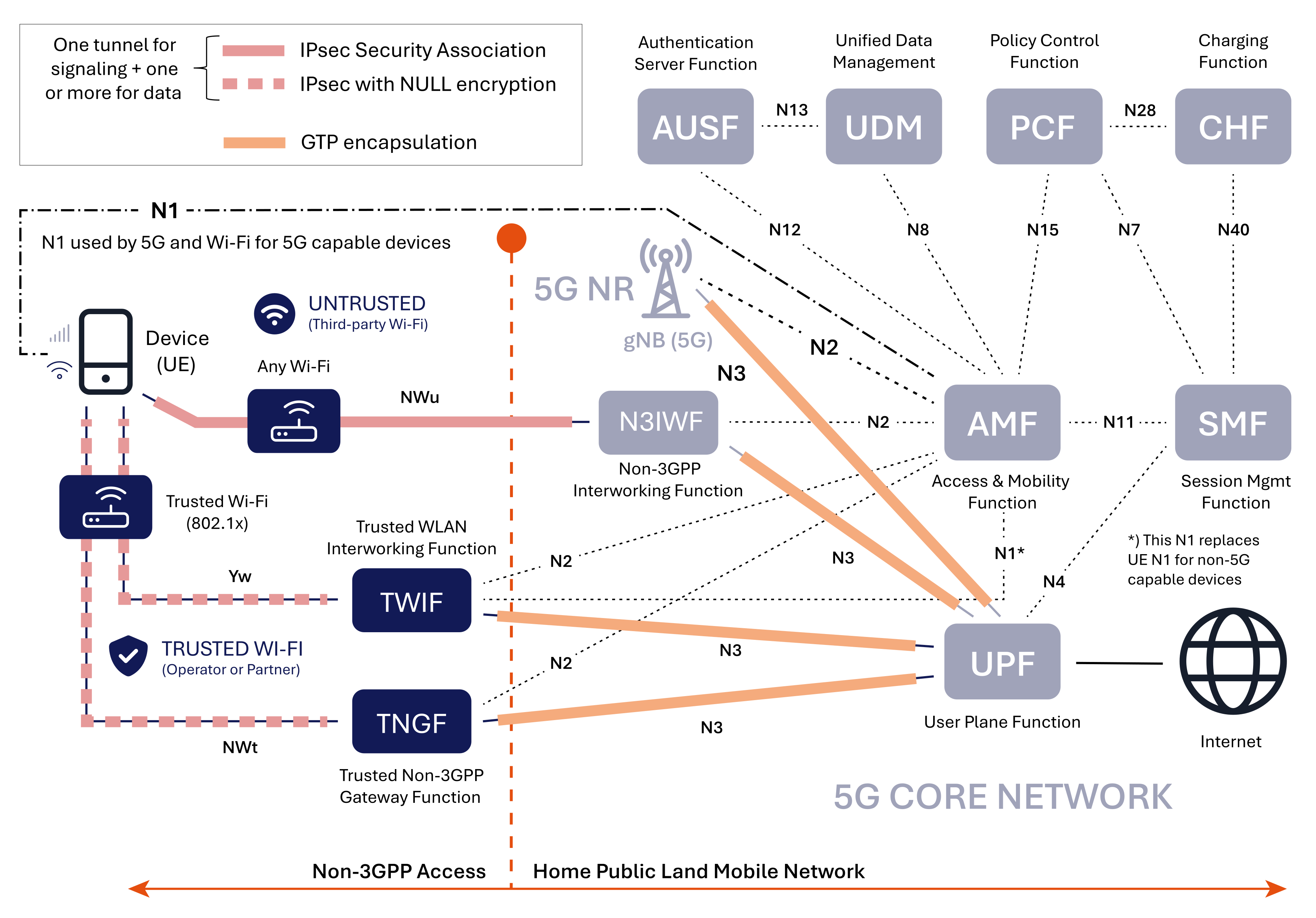
Trusted and untrusted Wi-Fi access to the 5G mobile core.


The first thing to observe is that this architecture is radio network (RAN) agnostic since both the Cellular and Wi-Fi access use the same interfaces (N1, N2, and N3).

Furthermore, 5G has adopted an EAP-based authentication framework (EAP-AKA’ or 5G-AKA), similar to Wi-Fi, for user equipment (UE) authentication with the 5G core.

The 5G signaling and user traffic are transported over IPsec tunnels established between the device, aka user equipment (UE), and the gateway functions (N3IWF, TWIF, and TNGF).

The GPRS Tunneling Protocol (GTP) encapsulation creates tunnels for traffic between the gateway functions and the user plane function (UPF), aka packet gateway.

Network Functions for Wi-Fi Access

Let’s now examine the new functions for Wi-Fi access (non-3GPP access). Please note that these functions are not the same as physical gateways. In practice, these functions could all reside in the same gateway.

Non-3GPP Interworking Function (N3IWF)

The Non-3GPP Interworking Function (N3IWF) is a crucial component in the 5G architecture that enables seamless connectivity between 5G networks and untrusted non-3GPP networks, such as a Wi-Fi network not trusted by the mobile operator.

The N3IWF is the IPsec tunnel terminating node for 5G, similar to the ePDG in 4G. It is located in the Mobile Core and communicates with the Access and Mobility Management Function (AMF) control plane over the N2 interface. For the data plane, it communicates with the User Plane Function (UPF) over the N3 interface.

Because it works transparently with any Wi-Fi network, it is the gateway of choice for Wi-Fi Calling but can also be used for all types of data traffic.

Key functions include:

  • Provides a secure gateway to the operator’s 5G
    network for non-3GPP access.
  • Establishes IPsec tunnels between the UE and
    N3IWF for secure communication.
  • Handles user equipment registration (UE) with the
    5G Core.
  • Manages the establishment of Protocol Data Unit
    (PDU) sessions.
  • Facilitates data transfer between the UE and the
    data network.

Trusted Non-3GPP Gateway Function (TNGF)

The trusted non-3GPP Gateway Function (TNGF) plays a crucial role in integrating trusted non-3GPP networks, such as a Wi-Fi network trusted by the mobile operator, with the 5G Core Network, providing a secure and standardized way to extend 5G services beyond the traditional cellular network.

The TNGF is, for 5G, the equivalent to the Wireless Access Gateway (WAG) used for trusted access to the 4G Core. The TNGF is located in a trusted environment, often the Wi-Fi network, and communicates with the AMF control plane over the N2 interface. For the data plane, it communicates with the User Plane Function (UPF) over the N3 interface.

The device and the TNGF are connected using an IPsec tunnel with null encryption, more about this later. After successful authentication, a TNGF key is established between TNGF and the device, aka user equipment (UE). Another key is derived from the TNGF key and sent to the Wi-Fi Access Point (AP) for Wi-Fi layer-2 security (WPA2/WPA3).

Trusted WLAN Interworking Function (TWIF)

The trusted WLAN Interworking Function (TWIF) is a 5G function for interoperability with legacy devices. This resolves the contingency that some devices may support 5G SIM authentication but do not support 5G NAS signaling over trusted Wi-Fi access. These devices lack the support for the EAP-5G and IKEv2 protocols, meaning they cannot directly communicate with the 5G core network using the N1 interface over Wi-Fi. 3GPP refers to such devices as non-5G-Capable over WLAN (N5CW). The TWIF contains the NAS protocol stack and exchanges NAS messages with the AMF on behalf of these types of devices.

The TWIF is located in a trusted environment, often the Wi-Fi Network, and communicates with the Access and Mobility Management Function (AMF) control plane over the N1 and N2 interface. For the data plane, it communicates with the User Plane Function (UPF) over the N3 interface. Just as in the case of TNGF, the device connects with the TWIF using an IPsec tunnel with NULL encryption.

Other 5G Network Functions

There are also other 5G network functions in play for Wi-Fi integration, we will mention them briefly here:

  • Access and Mobility Management Function (AMF): A control plane function acting as a central hub of the 5G core network. It primarily manages user access and mobility.
  • Session Management Function (SMF): A control plane function responsible for session
    management in the 5G core network.
  • Authentication Server Function (AUSF): Is responsible for authentication and security-related functions in the 5G core network.
  • Unified Data Management (UDM): A centralizedway to manage network user data in 5G. Policy Control Function (PCF): The PCF evolved from the Policy and Charging Rules Function (PCRF) in 4G networks. It is responsible for policy control and management in 5G networks.
  • Charging Function (CHF): This function generates charging data and billing information for 5G network usage.

Control- and User Plane Interfaces – How It is All Connected

For Cellular networks, the N2 and N3 interfaces connect the base station (gNB) with the AMF and UPF. For Wi-Fi, they use the non-3GPP interworking and gateway functions (N3IWF, TNGF, TWIF) to connect with the AMF and UPF.

5G introduces a new principle for non-3GPP access. Multiple non-access stratum (NAS) connections over the N1 interface make simultaneous connections via cellular and Wi-Fi possible. This is a prerequisite for the new ATSSS (Access Traffic Steering, Switching, and Splitting) specification. The same authentication procedures, EAP-AKA′ and 5G-AKA are used for both Cellular and Wi-Fi.

New EAP Protocol and Unusual Use of IPsec

A new protocol, EAP-5G, has been introduced to support NAS messages over Wi-Fi networks through the N1 interface. The IKEv2 protocol is utilized to establish an IPsec SA tunnel between the device and the gateway functions (N3IWF, TNGF, and TWIF). The EAP-5G protocol then encapsulates NAS messages over the IKEv2 protocol.

Another interesting new principle is the use of IPsec SA also for trusted Wi-Fi networks. Why would you want to use an IPsec connection in a secure Wi-Fi network? The IPsec tunnel, with NULL encryption to avoid duplicated encryption, primarily serves for integrity protection and as a consistent framework for both untrusted and trusted Wi-Fi access. Implementations in devices and gateways with dual support for both trusted and untrusted access will be easier to implement.

N1 Control Plane Interface

The N1 is a control plane interface between the device (User Equipment – UE) and the Access and Mobility Management Function (AMF). It handles Non-Access Stratum (NAS) signaling between the UE and the AMF in the 5G Core Network. The AMF is primarily used for authentication and mobility management.

The N1 interface is used both for Cellular and Wi-Fi for 5G-capable devices. Although the N1 signaling passes through the Radio Access Network (RAN), it is transparent to the RAN and is not processed by the intermediate network elements such as the N3IWF and the TNGF.
The N1 interface plays a crucial role in enabling UEs to communicate with the 5G Core Network for various control plane functions, ensuring proper connectivity, mobility, and service access.

These are the main functions N1 enables:

  • Registration management: The N1 interface is used for managing the process of registering and de-registering a UE with the 5G network.
  • Connection management: It manages the connection between the UE and the network, handling procedures for establishing and maintaining connectivity.
  • Session management: It handles messages and procedures related to session management, such as establishing and terminating PDU sessions.
  • Mobility management: The N1 interface supports mobility-related signaling to maintain knowledge of a UE’s location within the network.
  • Security procedures: It is used for securityrelated signaling, including authentication and key agreement procedures.

N2 Control Plane Interface

The N2 is the control plane interface between the cellular or Wi-Fi access networks and the 5G Core Network. It carries Next Generation Application Protocol (NGAP) messages between the RAN (cellular and Wi-Fi) and the AMF. NGAP handles the exchange of control information related to the establishment, modification, and release of connections between gNBs and the AMF for cellular and between the gateway functions (N3IWF, TWIF, and TNGF) and the AMF for Wi-Fi.

The N2 interface is crucial for enabling communication and coordination between the radio access network and the 5G core network. It supports a wide range of control plane functions necessary for network operation and management:

  • PDU session/resource management: The N2 interface handles procedures for managing PDU sessions and network resources.
  • UE context management: It supports procedures related to managing UE contexts in the network.
  • Mobility management: It facilitates mobilityrelated signaling, including handovers between base stations (gNB) in the 5G network.

N3 Data Plane Interface

The N3 is the data plane interface between the access network and the User Plane Function (UPF) in the 5G Core. The UPF is the packet gateway that transports data to the internet.

As discussed, traffic is delivered to the UPF through tunnels created by GTP encapsulation. Each subscriber will have one or more GTP tunnels, one for each active PDU session. The GTP tunnels are identified by a TEID (Tunnel Endpoint Identifier) in the GTP messages. The GTP tunnel is updated when a user moves between Wi-Fi and cellular networks to maintain session continuity.

Will 5G Operators Embrace Wi-Fi Offloading?

The answer is “yes likely,” and there are a few reasons why:

  1. Increased Need for Indoor Coverage: As highlighted in our white paper, Wi-Fi in the 5G Era, the demand for reliable indoor coverage is
    driving operators to lean more heavily on Wi-Fi as a complementary solution to 5G, particularly in challenging indoor environments.
  2. Emergence of Carrier-Grade Wi-Fi: A new generation of carrier-grade Wi-Fi (Wi-Fi 6, 6E, and 7) brings advanced features like OFDMA scheduling. With Wi-Fi 6E and Wi-Fi 7 operating in the 6 GHz band, the available spectrum for Wi-Fi has tripled. As a result, Wi-Fi is evolving from a “best-effort” solution to a more reliable, carrier-class option.

Will 5G Operators Backhaul the Wi-Fi Traffic to the Mobile Core?

The answer is “maybe,” largely depending on the adoption of the Access Traffic Steering, Switching & Splitting (ATSSS) standard by device manufacturers. Without ATSSS, there is limited incentive to backhaul Wi-Fi offloading traffic to the mobile core. Instead, the industry is expected to continue with local traffic breakout for Wi-Fi offloading and reserve backhauling primarily for Wi-Fi Calling.

However, if widely adopted, ATSSS could provide a compelling reason for operators to backhaul all traffic. Most web applications do not currently support multipath streaming (using both Wi-Fi and cellular connections simultaneously), requiring an aggregation point to merge these streams. The Packet Gateway in the Mobile Core (UPF) is well-positioned to serve this function. Nonetheless, history suggests that many promising 3GPP standards do not achieve widespread deployment. For a deeper dive, see our upcoming post on Will ATSSS Be the Future of Wi-Fi and Cellular Convergence?

Wi-Fi performance isn’t binary—it’s not just “up” or “down.” Most of the time, the network is technically online, but users are still struggling. Calls drop. Apps lag. Connections stall for a few minutes at a time. Those moments might seem minor, but across an organization, they quietly erode productivity, efficiency, and even revenue.

That’s exactly why 7SIGNAL created the Impact Report—a first-of-its-kind analysis that shows, in black and white, how much time your network fails to meet the performance standards you define.

The Only Platform That Counts the Minutes of Poor Performance

7SIGNAL is the only solution that literally counts the minutes when your wired and Wi-Fi networks don’t meet your defined service-level agreements (SLAs). Using data from 7SIGNAL’s sensors and agents, the Impact Report tabulates these “critical minutes”—real, measurable moments when employees or devices experience degraded performance.

These are the minutes when a nurse’s tablet can’t update a patient record, a warehouse scanner drops off the network, or a retail associate can’t process a mobile payment. Each of those moments translates directly into lost productivity and revenue.

In one recent analysis, 7SIGNAL identified 11,700 minutes of poor roaming performance caused by outdated drivers on company laptops. That’s nearly 200 hours of lost productivity over just 30 days—time that could have been fully recovered with a simple driver update, recommended and validated by millions of real-world performance samples from 7SIGNAL’s global adapter-driver database.

Turning Data into Actionable Intelligence

Every Impact Report highlights the locations and devices contributing most to performance loss. In one enterprise, 7SIGNAL pinpointed specific floors with as much as one hour per day of poor coverage, revealing clear targets for optimization.

This visibility allows IT teams to act strategically, prioritizing the spaces and endpoints that impact the most users. Help desk teams can identify affected devices, upgrade drivers, or adjust configurations, all with measurable outcomes.

The Real Cost of Lost Minutes

A few minutes of poor Wi-Fi or network connectivity might sound trivial, but across an enterprise, those minutes multiply fast.

  • In a hospital, even a brief delay in accessing digital charts or telemetry data can slow patient care, forcing clinicians to wait—and costing organizations thousands of dollars per incident.
  • In retail, when point-of-sale systems lag or handheld scanners lose connectivity, every minute equals fewer sales and frustrated customers.
  • In manufacturing and distribution, network disruptions can halt automation lines, delay shipments, and ripple through the supply chain.

If an organization experiences even three hours of poor Wi-Fi performance per day across its workforce, that’s the equivalent of losing multiple full workdays of productivity each week. Multiply this by the average labor cost per employee, and the resulting financial impact can reach several hundred thousand dollars each month.

The Bottom Line

The 7SIGNAL Impact Report goes beyond traditional network monitoring—it quantifies the business cost of poor network experiences and gives you the insights to fix it. By identifying where and when your service level targets are being missed, it empowers IT leaders to reclaim lost productivity, strengthen operational efficiency, and prove the tangible ROI of network improvements.

Because when every minute counts, eliminating critical minutes isn’t just about better Wi-Fi—it’s about better business.

Marvel Rivals has taken the team-based shooter genre by storm, and with the arrival of Season 5, its popularity shows no signs of slowing down. The game brings iconic heroes, unique abilities, and engaging gameplay to the table. However, one issue that can ruin the experience for players is high ping and lag.

Low Ping Server for Smooth Gameplay

Fortunately, NetEase has introduced a server selector feature to help players find the best connection. Whether you’re in quick matches or competitive mode, you can choose the lowest ping server to ensure a smoother gaming experience.

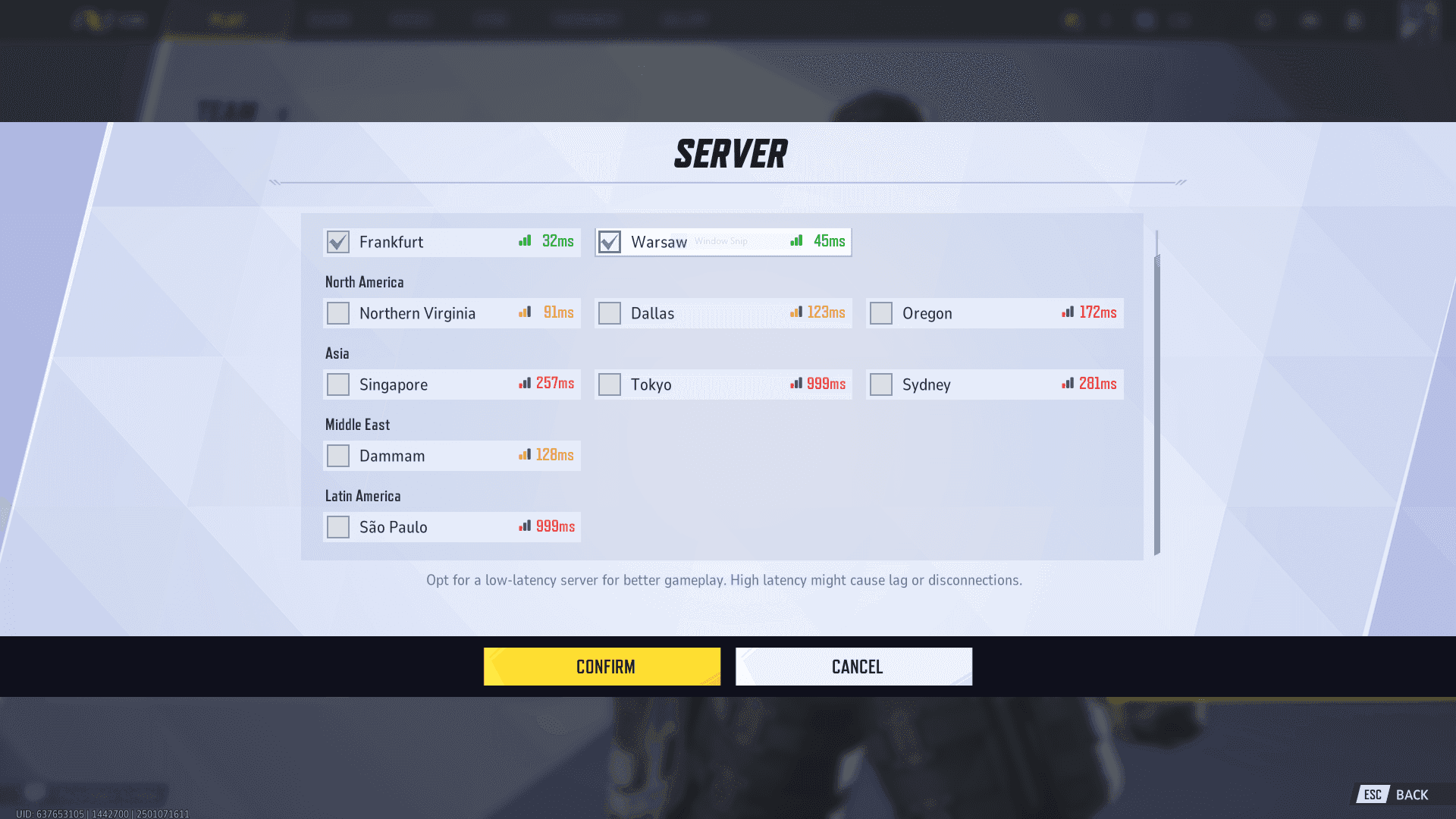
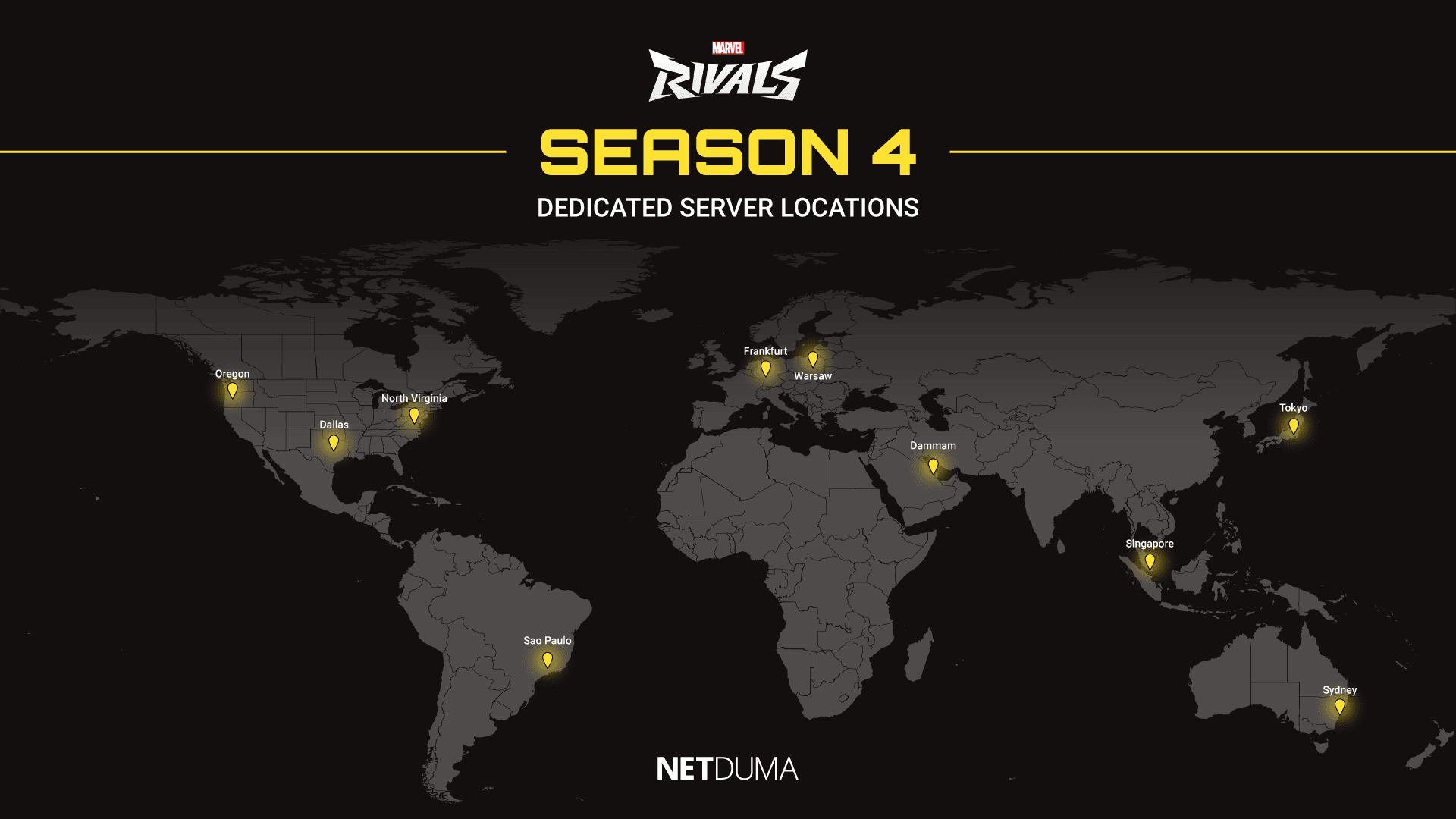
To help you out, we’ve included a list of Marvel Rivals’ dedicated server locations in this blog post. You can also view these servers in-game, complete with their ping values, from the lobby screen before searching for a match.

The ping values in the screenshot below are based on our location in the UK. The servers with the best connection will differ depending on where you live.

MR servers.PNG


Current Marvel Rivals Server Locations

Compared to other major shooters like Call of Duty or Fortnite, Marvel Rivals doesn’t yet boast an extensive network of servers. While the game’s immense success could lead to more server locations in the future, some players may currently face high ping due to limited options.

Your in-game ping depends on how far your game data needs to travel to reach the server. The farther the distance, the higher your ping will be. This is why the game recommends selecting a server close to your physical location for optimal performance.

Marvel-Rivals-Servers.png

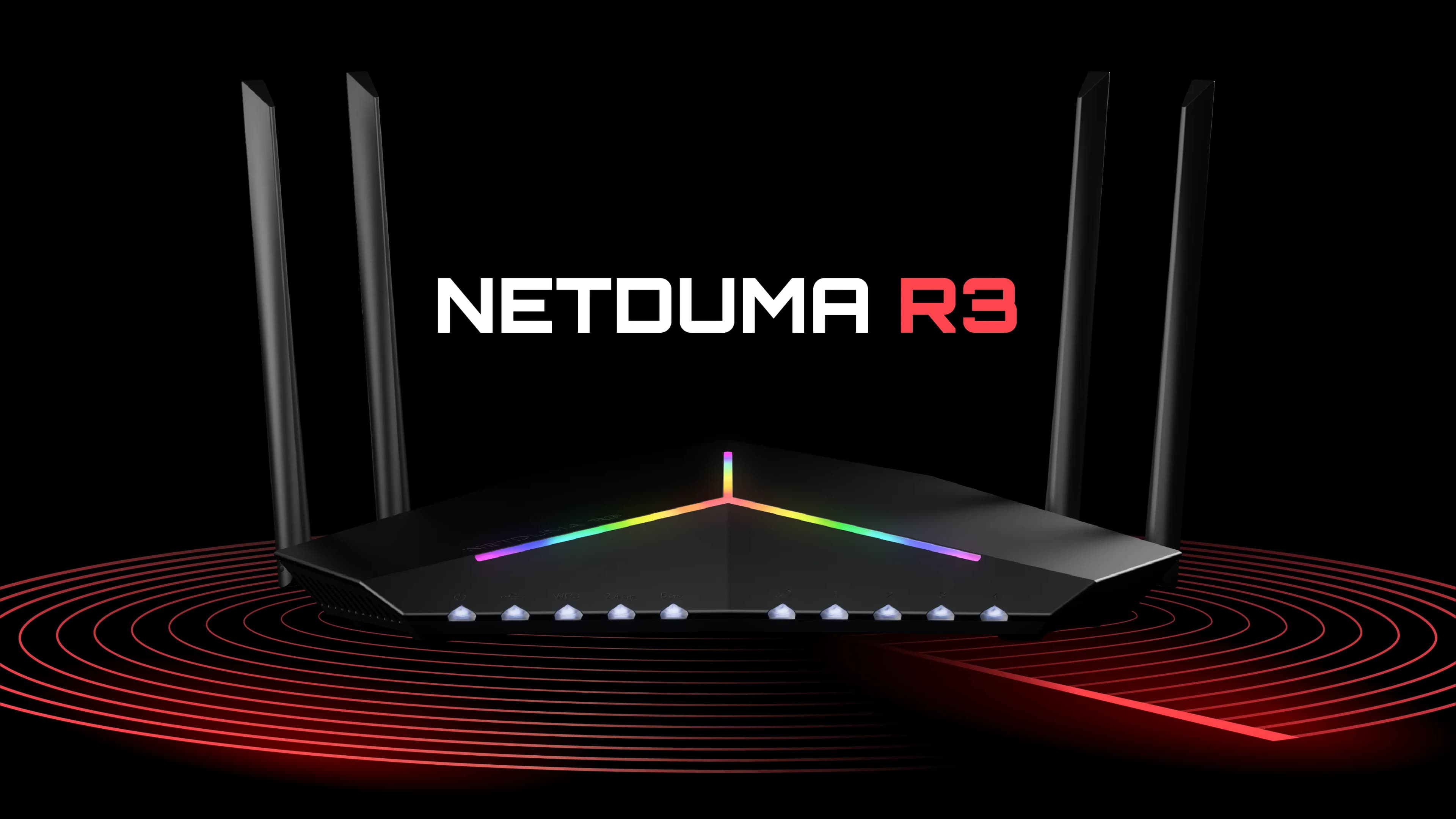
Improve your Connection With the Netduma R3

If you’re familiar with Netduma and our gaming routers, like the Netduma R3, you know we specialize in optimizing connections for online games. One standout feature is our Geo-Filter, which allows you to control the servers you connect to, bypassing matchmaking algorithms.

While Marvel Rivals already includes a server selector, you might wonder if the Netduma R3 can still improve your connection. The answer is a resounding yes. The R3 offers additional powerful features to minimize lag, reduce jitter, and stabilize your connection. For a detailed walkthrough, check out our Marvel Rivals lag fix guide here.

Website_R3_Preview_Image.webp

Maximize Your Marvel Rivals Experience

Playing on low-ping servers is critical for the best Marvel Rivals gameplay. By using the in-game server selector and tools like the Netduma R3, you can ensure a seamless, lag-free experience.

Explore our feature list and discover how the Netduma R3 can revolutionize your online gaming. Don’t let high ping hold you back from dominating in Marvel Rivals Season 5.

Wireless networks are the lifeblood of the modern workplace. They enable new levels of productivity and business growth, while offering phenomenal user experiences and provide a platform for innovation. But let’s be real—you don’t want to broadcast RF into the void and hope only the right people are listening. At Cisco, we know that wireless security isn’t just about slapping WPA3 on your SSIDs and calling it a day; it demands building a multilayered defense that adapts faster than threat actors can say “evil twin.”

Why the airwaves are a battlefield

Wi-Fi’s broadcast nature is both its superpower and its Achilles’ heel. While your users enjoy seamless roaming, attackers are out there with Python scripts, probing for misconfigurations and setting up rogue APs. Cisco’s two-decades-plus leadership in wireless networking means we’re constantly engineering solutions for high-density, high-stakes scenarios—think healthcare teams serving patients, classrooms streaming lectures, and manufacturing with massive IoT swarms.

The Cisco approach to defeating wireless threat vectors

Here’s how the modern wireless warrior outsmarts the enemy:

Zero-trust onboarding: Because MAC filters are so 2003

Basic MAC filtering isn’t cutting it anymore. It’s far too easy to spoof. Modern enterprise security demands a more holistic approach. It starts with using 802.1X authentication and TLS-based EAP methods that provide strong mutual authentication, where both client and network prove their identity with X.509 certificates.

For example, Cisco wireless LAN controllers paired with Cisco Identity Services Engine (ISE) create an 802.1X authentication pipeline with dynamic VLAN assignment, downloadable access control lists (dACLs), segmentation with security group tags (SGTs), and policy enforcement that shuts down attackers. No cert? No network. It’s that simple.

Encryption that actually matters: WPA3 and beyond

Our Wi-Fi 7 access points ship with the latest WPA3 security. Enhancements to WPA3 Personal, Enhanced Open, and WPA3-Enterprise provide the strongest encryption with AES-256-GCMP protecting your data over the air. And for those already thinking about the threat of quantum computers, we support WPA3-Enterprise-192, which offers the strongest encryption and authentication available while post-quantum cryptography wireless standards are being developed. A mandatory feature of WPA3 is Protected Management Frames (PMF/802.11w), which protects you from deauthentication and disassociation attacks.

Adaptive wireless intrusion prevention system (WIPS): The AI-powered spectrum sentinel

Cisco Adaptive Wireless IPS Software monitors every frame flying through your airspace. Fuzzed beacons? Detected. Evil twins? Quarantined. DDoS floods? Mitigated. Using network traffic analysis, network device and topology information, signature-based techniques, and anomaly detection, it learns your RF environment and automatically distinguishes between a well-behaved client and a sophisticated adversary. Add rogue and honey pot detection through managed SSID rules and start sending bad actors packing.

Mastering the patch cadence: Firmware updates and certificate hygiene

Firmware updates aren’t suggestions—they’re your first line of defense against threats. Cisco ships continuous firmware drops for its access points and controllers that squash vulnerabilities and boost stability. Stale firmware is an invitation for attackers. And those X.509 certificates powering your EAP-TLS authentication? They expire. Automate renewal workflows and leverage Cisco features to simplify patching. Certificate lifecycle management isn’t glamorous, but neither is explaining to the business why email went dark.

Real-time detection, assurance, and automated wireless operations

Cisco automatically baselines normal behavior, flags anomalies, and auto-triggers responses before your SOC even gets the alert. Detect rogue DHCP servers, identify suspicious client roaming patterns, and catch misconfigured SSIDs before they become incident reports. And use Cisco CleanAir on access points for event-driven radio resource management to automatically detect and remediate high levels of interference that could be a wireless jamming attack.

But we all know the network is not the end goal for attackers. They want to compromise clients and applications. Cisco brings native integrations with Apple, Intel, Samsung, and Zebra to deliver real-time granular insights into client behavior. Add to this Cisco ThousandEyes integrations and Cisco Application Visibility and Control (AVC), and you’ll have greater visibility so you can better protect every client and application on your network.

You get the kind of visibility that turns reactive firefighting into proactive threat hunting, because the best security incidents are the ones that never make it past your automated defenses.

Practitioner protocols: Your security runbook

  • Deploy 802.1X + EAP-TLS: It’s certificate-based auth or bust. Integrate with ISE for policy perfection.
  • Stateful segmentation: Dynamically group and isolate clients using Campus Fabric and SGTs—smart segmentation, zero hassle.
  • Mandate WPA3-Enterprise: No excuses. Use transition mode, if necessary, but set the sunset date now.
  • Weaponize ISE + Adaptive WIPS: Dynamic posture assessment + RF threat hunting = a beautiful security symphony.
  • Patch like your network depends on it: Firmware updates and certificate lifecycle management are not optional.
  • Embrace AI-driven analytics, insights, and operations: Cisco Wireless assurance including Cisco ThousandEyes = visibility superpowers.

Mission accomplished: Now lock it down

Securing enterprise wireless isn’t a checkbox—it’s an ongoing fight requiring intelligence, automation, and hardware that doesn’t fold under pressure. The Cisco Wi-Fi 7 ecosystem, battle-tested security frameworks, and Cisco ISE integrations give you the tools to build networks that are both high performance and hardened against modern threats. Craving more wireless security wisdom? Pick your format: Read more about what Wi-Fi security really means, or tune in to the Packet Pushers podcast to discover the Wi-Fi 7 secrets your competitors don’t want you to know. (Warning: both may cause sudden urges to audit your wireless security posture.)

Now, go forth and lock down those airwaves like the Wi-Fi warrior you are meant to be.

Students’ attempts to access restricted content using unsafe proxy services expose them and their schools to cyber risks

WASHINGTON, D.C. – Nov. 25, 2025 – New research from DNSFilter finds that school networks are becoming high-volume targets for proxy-borne threats, credential theft, malicious extensions and phishing ecosystems. Data from the company’s networks reveals the growing risks posed by misused web proxies and filter-avoidance tools in schools.

Due to cell phone bans in multiple states, students are more likely to use their school-issued devices for activities they’d normally attempt on their personal phones. As students increasingly try to bypass school security controls – often to access social media, gaming sites or blocked content – they’re unwittingly exposing themselves and school networks to risks like account compromise, malware, credential theft, blackmail scams, and broader system vulnerabilities.

Analysis of traffic on DNSFilter’s network found:

  • Traffic to proxy and filter avoidance categories spiked 83% on November 9, 2025, compared to the previous 12-month average. Proxy and filter-avoidance is defined as using methods and tools to bypass blocked or censored content on networks.
  • Overall, malicious gaming-related domains increased 462% on Sept. 22, 2025 compared to the previous 12-month average.
  • In relation to attempts to bypass security controls, the education industry ranked third highest in proxy/filter-avoidance requests in October 2025.
  • A 295% spike on Nov.8, 2025 in domains containing the term “roblox,” a popular online game that’s come under scrutiny for enabling adults to converse with children through the platform.

These findings underscore how schools are facing rapidly escalating cybersecurity risks, largely driven by students’ attempts to access restricted content using unsafe proxy services. These attempts are not harmless workarounds; they are now a major threat vector.

Traditional content filtering alone is no longer sufficient. Students are increasingly aware of circumvention methods, and attackers exploit this behavior to gain access to accounts and potentially entire school IT systems. Children and teens are uniquely vulnerable, making them prime targets for social engineering, scams, identity theft or harassment.

Awareness of the risks helps schools strengthen cybersecurity policies, improve filtering and reduce successful student circumvention attempts. Using the threat insights, schools can proactively block proxy/avoidance domains, detect suspicious patterns (e.g., unsafe gaming extensions), and protect student data and campus systems. Concrete data empowers IT teams to anticipate threat spikes, allocate resources and justify budgets for improved filtering and monitoring tools. Read more in our blog here.

Gregg Jones, intelligence analyst, DNSFilter, said: “Proxy misuse is emerging as a serious and growing attack vector inside school environments, and the industry must treat it like the frontline threat it has become. Cybersecurity strategies in K–12 and higher education must expand to focus on DNS filtering, proactive detection of proxy use, better student education, and more compassionate in-class device policies that reduce the incentive to circumvent controls.”

About the company:

DNSFilter is a cybersecurity company that protects every click, leveraging AI-driven content filtering and threat protection to block threats 10 days earlier than competitors. DNSFilter’s solution secures workers anywhere they are, helping to boost productivity, minimize compliance risk, and protect corporate brands on public Wi-Fi networks. Unlike traditional filtering solutions, DNSFilter deploys in minutes instead of days and is trusted by more than 43,000 organizations worldwide. Learn more about how DNSFilter is the first and last line of defense for corporate and hybrid networks at dnsfilter.com.

Media Contact

Shannon Van Every

Force4 Technology Communications

November 17, 2025, San Jose, Calif. – NETGEAR® Inc. (NASDAQ: NTGR), a global leader in intelligent networking solutions designed to power extraordinary experiences, today announced the launch of the Nighthawk 5G M7 Portable WiFi 7 Hotspot (MH7150) supported by a new mobile app (iOS and Android) and eSIM Marketplace. The innovative device combines reliable, portable connectivity with groundbreaking flexibility, allowing users to choose coverage that fits their needs, connecting instantly to high-speed internet in more than 140 countries.

The M7 is engineered for modern life, providing fast connections for travelers, remote workers, and families on the move. Its compact, lightweight design makes it an effortless travel companion, while the powerful battery delivers up to 10 hours of continuous connectivity for work, streaming, gaming, and staying in touch.

The newly designed travel hotspot is a portable powerhouse, delivering WiFi 7 speeds of up to 3.6 Gbps to up to 32 connected devices. For wired options, users can connect directly to the M7 via USB-C or Ethernet adapter (sold separately) for ultra-fast connectivity. ​

Powerful built-in security features including firewall, WPA3 encryption, automatic firmware updates and NETGEAR’s Advanced Router Protection help safeguard user data wherever they travel.

New NETGEAR eSIM Marketplace Offers Freedom and Flexibility

A standout feature of the M7 hotspot is the NETGEAR eSIM Marketplace, a new in-app platform that- provides affordable, high-quality global mobile data. Users can browse, purchase, and activate data plans in seconds, right from the new NETGEAR app, eliminating the need to search for local SIM cards or pay excessive international roaming fees. It delivers a simple, on-demand solution for staying connected in 140+ countries.

“We designed the M7 to solve the universal need for simple, encrypted, and reliable internet access anywhere,” said Graeme McLindin, Vice President of Mobile at NETGEAR. “By integrating an eSIM Marketplace, we are not just launching a hotspot; we’re delivering a complete connectivity solution that empowers users to connect with confidence and ease. This is the easiest way to get your hotspot online, either before you leave on your trip or when you arrive.”

Customers can choose data plans ranging from 3GB to 20GB and manage their usage in real time with transparent tracking. The NETGEAR eSIM platform makes it simple to find and activate competitive data plans that best match travel needs. For the M7 Product launch, NETGEAR has partnered with Gigs to deliver data plans in the eSIM Marketplace.

Built for maximum flexibility, the M7 is unlocked and supports both physical SIMs and third party eSIMs, giving users the freedom to select travel data directly from local carriers and travel data plan providers.

Technical Specifications:

  • 5G Powered WiFi 7: Speeds up to 3.6 Gbps for up to 32 devices for fast downloads, gaming, & streaming.
  • Powered by Qualcomm® Dragonwing® SDX72 Chipset ​: Qualcomm’s 5th Generation 5G modem-to-antenna solution designed with advanced capabilities such as more Sub6 carrier aggregation that can deliver multi-gig 5G speeds up to 4 Gbps​.
  • Connect More Devices with Confidence: Liberate your phone and connect up to 32 devices at once, reducing dropped calls and dead batteries.
  • Instant Coverage with eSIM​: Coverage 140+ countries using 5G or 4G without contracts. Purchase flexible data plans right from the NETGEAR app for seamless connectivity.
  • Built-in Security Features: Powerful built-in security including Advanced Router Protection, Firewall, WPA3 encryption, and automatic firmware updates.
  • Unlocked Potential: Accepts SIM cards and eSIMs from major 5G/4G network operators.​ Certified with AT&T, T-Mobile, and Verizon in the U.S.
  • Multi-Gig Wired Speeds: Connect directly to M7 via USB-C, or use an Ethernet Adapter (sold separately), for ultra-fast wired speed.
  • Long-Lasting Battery​: High-capacity battery lasts up to 10 hours on a single charge for all-day WiFi performance. M7 can also be used as a power bank to charge other devices while traveling.
  • Control It All Through the App: Easily set up and manage your network, monitor data usage, buy eSIM data plans, and more – all from one intuitive interface.

Availability

The M7 Portable WiFi Hotspot with eSIM marketplace will be available in January 2026 for $499.99 MSRP. Visit www.netgear.com for more information.

About NETGEAR, Inc.
Founded in 1996 and headquartered in the USA, NETGEAR® (NASDAQ: NTGR) is a global leader in innovative networking technologies for businesses, homes, and service providers. NETGEAR delivers a wide range of award-winning, intelligent solutions designed to unleash the full potential of connectivity and power extraordinary experiences. For businesses, NETGEAR offers reliable, easy-to-use, high-performance networking solutions, including switches, routers, access points, software, and AV over IP technologies, tailored to meet the diverse needs of small and medium enterprises. NETGEAR’s consumer products deliver advanced connectivity, powerful performance, and enhanced security features right out of the box, designed to help keep families safe online, whether at home or on the go. More information is available from the NETGEAR Press Room or by calling +1 (408) 907-8000. Connect with NETGEAR on LinkedIn, Facebook, Instagram and the NETGEAR blog at NETGEAR.com.

©2025 NETGEAR, Inc. NETGEAR, NETGEAR Insight and the NETGEAR logo are trademarks and/or registered trademarks of NETGEAR, Inc. and/or its affiliates in the United States and/or other countries. Other brand and product names are for identification purposes only and may be trademarks or registered trademarks of their respective holder(s). The information contained herein is subject to change without notice. NETGEAR shall not be liable for technical or editorial errors or omissions contained herein. All rights reserved.

Source: NETGEAR-G