




Breaking News

GLOBAL Wi-Fi NEWS bulletin

Is your Wi-Fi struggling to penetrate concrete floors or reach the basement? ???????? is the solution for the most challenging environments.

Our latest update features an integrated ????-???? ?????? ???????? ?????????, allowing users to monitor connectivity status across architectural levels directly via a web interface.

? ????? ??????????? ?????????:

• ??? ????? :  Strong, high-performance backbone for smart office and home automation.

• ???????? : Where traditional Wi-Fi fails, HaLowFly’s Sub-GHz (802.11ah) spectrum penetrates thick floor slabs effortlessly, ensuring IoT devices stay online.

? ??? ???????? ?? ? ???? ???????:

• ?????? ?????????? :  Identify optimal device placement via a web browser—no specialized RF equipment needed.

• ???????? ??????????? :  Engineered for complex structures where 2.4GHz/5GHz signals drop off.

• ????? ??? ??? : Long-range, low-power connectivity ideal for smart factories, underground parking, and large campuses.

Signal strength might be invisible, but HaLowFly makes it ??????? ??? ??????????.


#WiFiHaLow
#HaLowFly #IoT #WirelessConnectivity #SmartBuilding #80211ah #SubGHz #Industry40

應用

Qualcomm Completes Acquisition of Alphawave Semi

  • Alphawave Semi’s High-Speed Wired Connectivity Complements Qualcomm’s Next Generation Qualcomm Oryon CPU and Qualcomm Hexagon NPU Processors
  • The combination of Qualcomm and Alphawave Semi creates a leading player in AI compute and connectivity solutions for a wide array of high growth areas, including data center

Qualcomm Incorporated (NASDAQ: QCOM) today announced that it has completed its acquisition of Alphawave IP Group plc (AWE.L) (“Alphawave Semi”), approximately one quarter ahead of schedule. The acquisition of Alphawave Semi aims to further accelerate and provide key assets for Qualcomm’s expansion into the data center. Tony Pialis, CEO and co-founder of Alphawave Semi, will lead the Qualcomm data center business.

“Alphawave Semi’s expertise in high-speed connectivity technologies complements our Qualcomm Oryon CPU and Hexagon NPU processors,” said Cristiano Amon, President and CEO of Qualcomm Incorporated. “Qualcomm delivers high-performance, energy-efficient compute and AI solutions, and the addition of Alphawave’s technologies will strengthen our platforms and optimize performance for next-generation AI data centers.”

“Joining Qualcomm marks an exciting new chapter for Alphawave Semi,” Pialis said. “We’re ready to bring our leadership in high-speed connectivity and custom silicon to help shape the future of data center innovation.”

Alphawave Semi is a global leader in high-speed wired connectivity delivering custom silicon, connectivity products and chiplets that drive faster, more reliable data transfer with higher performance and lower power consumption. Alphawave Semi’s products form a part of the core infrastructure enabling next-generation services in a wide array of high growth areas, including data centers, AI, data networking and data storage.

The full announcement can be found on our website at: https://investor.qualcomm.com/update-details/update-details-offer.

About Qualcomm

Qualcomm relentlessly innovates to deliver intelligent computing everywhere, helping the world tackle some of its most important challenges. Building on our 40 years of technology leadership in creating era-defining breakthroughs, we deliver a broad portfolio of solutions built with our leading-edge AI, high-performance, low-power computing, and unrivaled connectivity. Our Snapdragon® platforms power extraordinary consumer experiences, and our Qualcomm Dragonwing™ products empower businesses and industries to scale to new heights. Together with our ecosystem partners, we enable next-generation digital transformation to enrich lives, improve businesses, and advance societies. At Qualcomm, we are engineering human progress.

Qualcomm Incorporated includes our licensing business, QTL, and the vast majority of our patent portfolio. Qualcomm Technologies, Inc., a subsidiary of Qualcomm Incorporated, operates, along with its subsidiaries, substantially all of our engineering and research and development functions and substantially all of our products and services businesses, including our QCT semiconductor business. Snapdragon and Qualcomm branded products are products of Qualcomm Technologies, Inc. and/or its subsidiaries. Qualcomm patents are licensed by Qualcomm Incorporated.

Qualcomm, Snapdragon, Qualcomm Dragonwing, Qualcomm Oryon, and Hexagon are trademarks or registered trademarks of Qualcomm Incorporated.

Across defense and aerospace programs, the expectations placed on RF power systems continue to intensify. Radar, SATCOM, electronic warfare (EW) and high-duty test environments demand various combinations of higher output power, wider bandwidth, improved linearity and increased operational reliability—often within shrinking size, weight and power consumption (SWaP) constraints.

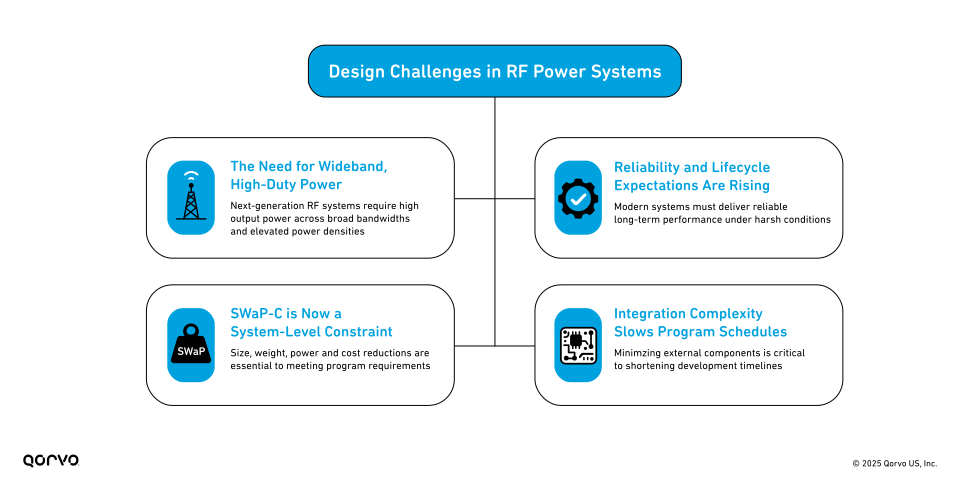
These pressures create a set of design challenges that legacy RF power architectures can no longer solve. As programs evolve and timelines compress, engineering teams must rethink how they generate and manage RF power at the system level. The challenges include:

    • The Need for Wideband, High-Duty Power
      Next-generation radar, SATCOM and EW systems increasingly operate across multiple frequency bands—S, C, X, Ku, K and Ka—and need to support both continuous-wave (CW) and high-duty-cycle pulsed operation. This shift places significant demands on RF power architectures, which must deliver high output power across broad bandwidths while maintaining stable performance under continuous or near-continuous operating conditions. At the same time, these systems must manage elevated power densities without compromising thermal efficiency. While traditional RF power combining architectures can generate the required power, they often struggle to provide the duty-cycle flexibility, efficiency and thermal robustness needed in modern wideband applications.
    • Reliability and Lifecycle Expectations Are Rising
      Across ground, airborne and shipborne platforms, reliability expectations continue to climb. Modern systems require amplifiers with high mean time between failures (MTBF), predictable long-term performance and the ability to operate reliably under harsh environmental and mission conditions. Reducing maintenance cycles and enabling easier field replacement are now essential to maintaining readiness and controlling lifecycle costs. However, systems built around aging traveling wave tube amplifiers (TWTAs) face increasing challenges, including supply-chain constraints, end-of-life component issues and rising sustainment risk as tube technologies become more difficult to source and support.
    • SWaP-C Is Now a System-Level Constraint
      System integrators are under pressure to reduce size, weight, power consumption and cost—collectively known as SWaP-C—across entire subsystems. Amplifiers that are physically large, thermally inefficient or dependent on multiple external components can have cascading impacts throughout the design. These inefficiencies often increase the size and complexity of power supplies, cooling systems and mechanical enclosures, while also extending qualification and certification timelines. As system architectures evolve, high-density, thermally optimized amplification solutions are becoming essential to meeting program-level SWaP-C requirements.
    • Integration Complexity Slows Program Schedules
      Many existing RF power solutions require multiple external elements, such as separate driver stages, bias control boards and protection circuitry. Each additional component increases design effort, introduces more potential failure points, adds new qualification steps and ultimately extends program schedules. As timelines compress and system architectures converge, engineering teams need amplification solutions that reduce the number of external modules and streamline system-level validation. Simplified, pre-integrated designs can meaningfully shorten development cycles and reduce overall program risk.

Design Challenges in RF Power Systems

What an Ideal Next-Generation Wideband SSPA Solution Should Deliver

To address these challenges, a next-generation RF power amplifier must provide a combination of efficiency, reliability, integration and long-term availability that aligns with modern program requirements.

    • High Efficiency at High Power
      An effective solution must offer robust output power across S–Ka bands, maintain consistent efficiency under both CW and high-duty-cycle operation and minimize heat generation to simplify thermal design. High efficiency directly reduces cooling requirements and enables smaller, lighter system architectures.
    • Proven Reliability in Harsh Conditions
      Next-generation systems require ruggedized packaging, robust thermal paths and amplifier architectures capable of achieving high MTBF with predictable end-of-life behavior. Solutions must withstand vibration, shock and environmental stressors to ensure consistent performance across diverse mission environments.
    • SWaP-C Optimization at the System Level
      Ideal architectures offer compact form factors, lower system weight and improved thermal performance that enables smaller cooling subsystems. By consuming less power and reducing thermal load, such solutions help decrease operating costs while streamlining overall subsystem design.
    • Integrated Functional Blocks
      Modern SSPAs should incorporate built-in bias control, integrated driver stages and a pre-aligned RF chain that simplifies system qualification. A one-module approach reduces design complexity, lowers integration risk and accelerates schedules by minimizing the number of separate components that must be sourced, tested and validated.
  • Supply Chain Stability and Long-Term Availability
    Finally, next-generation RF power solutions must be supported by stable manufacturing, minimized obsolescence risk and scalable production capacity suitable for full-rate defense and aerospace programs. Long-term availability is critical to ensuring sustainment, modernization and program continuity.

Next-Generation RF Power Amplifiers Must Provide
These performance, reliability and integration expectations are increasingly difficult to meet with vacuum-tube technologies or lower-efficiency planar SSPAs—driving an industry-wide shift toward more advanced, wideband solid-state architectures.

Wideband GaN-on-SiC SSPAs: Improving Power Density, Thermal Performance and System Reliability

Among the various solid-state approaches available today, Qorvo’s wideband GaN-based amplifier technologies—including implementations that use spatial combining techniques—provide a practical illustration of how modern SSPA architectures can address the performance, reliability and integration needs described above. These solutions demonstrate how wideband GaN devices, efficient power combining and integrated control functions can be applied to meet system-level requirements across radar, SATCOM, EW and test environments.

Qorvo’s approach brings several characteristics that directly map to the needs of today’s radar, SATCOM and EW systems:

    • Wideband, high-efficiency RF output across S-, C-, X-, Ku-, K- and Ka-bands
    • High reliability and long MTBF due to GaN-on-SiC technology and ruggedized module construction
    • Optimized SWaP-C at the total solution level, often replacing TWTA-based systems with smaller, lighter alternatives
    • Integrated bias control and driver stages for ease of system integration
    • Pre-tested, pre-aligned modules that shorten qualification timelines
  • A proven, scalable platform supported by vertically integrated manufacturing

These characteristics make Qorvo solutions suitable for replacing aging TWTAs, improving system reliability and meeting the performance and SWaP-C expectations of modern defense and aerospace programs.

Conclusion

Modern RF systems demand more than incremental improvements—they require amplifier architectures that are efficient, reliable, broadband and simple to integrate. As TWTAs face supply limitations and higher sustainment costs, solid-state technology provides a compelling path forward. Solutions that combine high power, broad bandwidth, integrated functionality and rugged reliability will define the next generation of radar, EW, SATCOM and test platforms.

Qorvo’s GaN-based amplifier solutions are engineered to meet these exact demands, providing a field-proven, scalable technology path for programs seeking to modernize their RF power infrastructure.

For more information, read our latest press release announcing Qorvo’s newest SSPAs enable up to 50 percent smaller and one-third lighter system-level solutions compared to legacy traveling wave tube amplifiers (TWTAs), supporting mission continuity and long-term reliability in demanding RF environments.

To learn more about Qorvo’s trusted RF solutions for defense and aerospace—including Spatium SSPAs and GaN-based front ends, visit www.qorvo.com/spatiumsspa.

Next week, hundreds of thousands of industry innovators will gather for CES 2026—the ultimate proving ground for breakthrough technologies. Devices are getting smarter, but we are excited to see just how visionary that intelligence has become at this year’s show.

Silicon Labs | CES

As the leading innovator in low-power wireless, Silicon Labs empowers these innovations to scale. We bring the breadth, depth, and focus necessary to help device makers build consumer products that are secure, intelligent, and ready for the real world.

We’ll be front and center in the action in our Silicon Labs Suite on the 3rd floor of the Venetian in Toscana 3710, and you can visit us at anytime during exhibition hours or request a meeting to reserve a time.

Silicon Labs Booth at CES

1. Silicon Labs Demos: Power and Precision for IoT Applications

We are featuring two demonstrations that showcase the full capabilities of our xG24 family of SoCs. Designed for the most demanding IoT applications, this platform combines high-performance processing, AI acceleration, and Secure Vault™ technology to handle complex workloads without compromise.

  • Motor Control Breakthrough with the MG24 SoC: Historically, driving a high-speed motor while maintaining a wireless connection required separate devices. We are challenging that architecture with a demo featuring our single MG24 SoC running a full closed-loop BLDC motor control system, controlled via a smartphone app, on a single chip.
  • Bluetooth® Channel Sounding: We are also demonstrating Bluetooth® Channel Sounding on the xG24, showing how this technology equips devices with “true distance awareness” to enable a new tier of secure, proximity-based applications.

See both demos live at the Silicon Labs Suite on Level 3 of the Venetian in Toscana 3710.


2. Customer Innovations Breaking the Mold

With thousands of Silicon Labs’ customers around the world, it’s no surprise that some of them would showcase at CES 2026. While there are too many to list, here are three you can’t miss:

  • Intelligent Sensing with Aizip (Booth #9021, LVCC North Hall) In partnership with Aizip, we are demonstrating how Edge AI can outperform traditional sensors by distinguishing between complex acoustic events in real time. Our AI-enabled glass break detection reference design addresses this by using a proprietary deep neural network to listen not just for the initial breaking of glass, but for the secondary impact of shards hitting surrounding surfaces.
  • Multi-factor Access Control with Durin, Inc (Booth #60462, Eureka Park): Check out the brand-new Durin Door Manager. Powered by the Silicon Labs MG24 SoC, this device moves beyond simple smart lock logs to provide true identity verification. By combining multi-factor confirmation with real-time entry snapshots, Durin eliminates the security gap of shared access codes and lets you know exactly who walked through the door, not just when it opened.
  • Battery-Free Sensors with Powercast (Booth #51716, Venetian Expo): Explore how battery-free innovation is redefining efficiency. Powercast is showcasing a battery-free RFID sensor powered by the Silicon Labs BB5 MCU, proving that extreme efficiency can eliminate the need for battery replacements in connected edge devices.

3. Leading the Conversation on Wireless Connectivity for the Smart Home

  • Parks Associates CONNECTIONS Summit at CES (Tuesday, January 6, 9:00 am PT, Lando 4304, Level 4, The Venetian): Colin Cureton, Product Line Manager at Silicon Labs, joins the opening panel of Parks Associates’ CONNECTIONS Summit at CES, “Beyond the Buzz: AI Impact and Revenues in the Smart Home,” to discuss how applications, business models, and revenue streams have been affected by AI.
  • Z-Wave @ CES (Tuesday, January 6, 4:00pm PT, Titian 2205, Level 2, The Venetian): Silicon Labs Senior Field Application Engineer Mark Umina will be participating in a fireside chat in the Z-Wave Alliance ballroom discussing how smart locks can use Z-Wave for user credential verification. He will also be showing how Z-Wave Long Range can complement Amazon Sidewalk to seamlessly communicate across both networks for an interoperable smart home using a single Silicon Labs SoC.
  • Tuya Developer Day (Wednesday, January 7, 3:10 pm PT, LVCC, Central Hall, Booth #16838): Colin Cureton, Product Line Vice President for the Home Business at Silicon Labs, takes the stage with during Tuya Developer Day to discuss how Silicon Labs’ hardware is enabling the next generation of interoperable, AI-ready applications.


We can’t wait to see everyone at CES 2026! Stop by our suite, Toscana 3710 on the third floor of the Venetian or request a meeting, and be sure to follow us on LinkedIn, Instagram, and Twitter for live updates from the show

What is Network Bandwidth?

“The network is slow!”

It’s the complaint that sends shivers down every network engineer’s spine. But here’s the thing – when users say “slow”, they’re usually talking about four different problems at once: bandwidth, speed, throughput, and latency. Understanding the difference between these concepts isn’t just technical nitpicking. It’s the key to actually fixing the problem instead of throwing money at bigger pipes that won’t solve anything.

This guide breaks down what network bandwidth really means, how it affects your infrastructure, and, most importantly, how to optimize it so you can stop playing at network firefighter.

What is Bandwidth in a Network?

If you’re looking for a clear bandwidth definition, here it is: network bandwidth is the maximum amount of data that can be transmitted over a network connection within a specific time period. When people ask ‘what is bandwidth,’ they’re referring to volume: think of it as the maximum number of cars that can pass through a highway section in a given time, rather than how fast a single car is moving.

Bandwidth is measured in bits per second (bps), though you’ll more commonly see Mbps (megabits per second) or Gbps (gigabits per second) in modern networks. A 1 Gbps connection can theoretically handle up to one billion bits of data per second. But here’s the catch: it’s a theoretical maximum. Your actual performance depends on cable quality, how many users are online, and dozens of other factors.

Think of a 10-lane highway (high bandwidth) versus a 2-lane road. More lanes mean more capacity, but construction or accidents still cause slowdowns regardless of how many lanes you have.

Key aspects of bandwidth

  • Maximum capacity, not actual performance
  • Time-based measurement (data per second)
  • Measured in bps, Mbps, or Gbps
  • Directly impacts how many simultaneous operations your network can handle
  • Can determine whether applications run smoothly or start lagging

What is Good Network Bandwidth for Different Activities?

So, how much bandwidth do you actually need? The answer depends entirely on what you’re doing with it. Here’s a breakdown of bandwidth requirements for different use cases:

Basic Internet Use (3-25 Mbps) Streaming & General Business Use (25-100 Mbps) Advanced Use (100+ Mbps)
Email and web browsing Cloud-based productivity tools High-density user environments
Standard definition video calls Standard file transfers Large file transfers and backups
Basic cloud application access Multiple simultaneous users Data-intensive applications
HD video conferencing    
4K video streaming  

Enterprise Considerations
For organizations, multiply these numbers by your user count, then add 20-30% overhead for peak usage. A company with 100 users running video conferencing, cloud apps, and regular file transfers needs multi-gigabit capacity – not because each individual user needs that much, but because they all hit the network simultaneously.

Understanding how much bandwidth your specific environment requires prevents both over-provisioning (wasting money) and under-provisioning (frustrating users). Tools like the EtherScope nXG and LinkRunner 10G help verify you’re actually getting the speeds you’re paying for with performance testing up to 10Gbps.

Pro Tip:

Don’t just calculate average bandwidth needs – monitor your peak usage patterns. I’ve seen networks with plenty of average capacity that crumble during the 9 AM “everyone logs in at once” rush. Understanding your peak demands prevents those morning fire drills.

Network Bandwidth vs Speed vs Throughput vs Latency

When comparing bandwidth vs. speed, throughput, or latency, here’s what you need to know:

Bandwidth is your maximum potential capacity – think of it as the maximum number of cars that could pass through a highway section in a specific timeframe under perfect conditions.

Speed is how fast data moves from point A to point B – like how fast individual cars can drive. In data transmission, signals travel at roughly the speed of light. What changes is how much data you can pack into those signals.

Throughput is the actual amount of data successfully transmitted – how many cars actually reach their destination per hour. It’s always lower than bandwidth due to congestion, packet loss, and protocol overhead.

Latency is the delay before data transfer begins – like sitting at a red light before entering the highway. High latency means long waits before anything happens.

Here’s the complete picture: Imagine a highway designed to handle thousands of cars per minute (high bandwidth) where cars can drive 80 mph (high speed potential). However, you have to sit at a red light for 5 minutes before entering (high latency), and road construction causes only half the possible cars to get through per hour (low throughput). The capacity exists, but delays and congestion kill actual performance.

How to Test and Measure Network Bandwidth

Wondering how to check network bandwidth or how to determine bandwidth on your network? Testing bandwidth properly means going beyond simple speed tests. Here’s how to run a proper bandwidth test:

Types of Bandwidth Tests
Speed tests measure peak data transfer rates at a specific moment. However, they aren’t reliable for Local Area Network (LAN) bandwidth, as results are capped by your ISP subscription rather than showing your network’s full internal capacity.

Capacity tests evaluate the maximum bandwidth your network can consistently handle under various conditions.

Stress tests push your network to its limits to see where it breaks and if your infrastructure can actually deliver what it promises.

Professional Tools for Measuring Network Bandwidth
NetAlly instruments like the EtherScope nXG and LinkRunner 10G feature Performance Test capabilities that go way beyond consumer-grade speed tests. These tools can:

  • Stress test critical network links with up to eight simultaneous data streams
  • Verify line-rate performance up to 10Gbps
  • Measure throughput, packet loss, latency, and jitter
  • Test compliance against service level agreements (SLAs)
  • Provide upstream and downstream analysis
Metric What It Measures Why It Matters
Download Speed Data from server to device User experience for file transfers and streaming
Upload Speed Data from device to server Video conferencing
Latency Delay before transfer begins Real-time application performance
Jitter Variability in packet delivery VoIP quality

What Uses the Most Bandwidth on Your Network?

Understanding bandwidth usage and identifying what uses most bandwidth is critical for network management. Let’s talk about bandwidth hogs – the applications and devices that consume excessive capacity.

The Big Offenders:

  • 4K/UHD video streaming (25+ Mbps per stream)
  • Video conferencing, especially with multiple participants
  • Large file downloads and cloud backups
  • Software updates pushed to multiple devices simultaneously

The Sneaky Culprits:

  • Background cloud sync services
  • Security camera feeds
  • Smart home devices
  • Malware or compromised devices participating in botnets

NetAlly’s EtherScope nXG provides a complete inventory of connected devices via its Discovery app. However, its true power lies in measuring maximum achievable bandwidth. Instead of guessing if your infrastructure can handle the load, you’ll have hard data proving the actual capacity available across your network.

Factors That Affect Network Performance

Even with plenty of bandwidth, network performance can suffer. Understanding what causes low network performance helps you troubleshoot faster.

Physical Infrastructure:

  • Transmission medium (fiber vs copper vs wireless)
  • Cable quality and electromagnetic interference (EMI) affecting copper – route cables away from power lines if you’re seeing issues
  • Distance to servers increasing latency

Network Configuration and Design:

  • Router and equipment limitations – monitor CPU and memory usage; if consistently high, upgrade your hardware
  • Number of connected devices sharing bandwidth – implement QoS policies to prioritize critical traffic
  • Network congestion during peak hours
  • Device performance and configuration issues

Environmental Factors:

  • Interference from neighbors’ Wi-Fi networks – use AirCheck G3 or EtherScope nXG to analyze channel utilization and switch to less congested channels
  • Physical obstacles affecting wireless signals

How to Increase and Optimize Network Bandwidth

Start with bandwidth optimization before upgrading.

Quick Wins:
Quality of Service (QoS) prioritizes critical traffic – give priority to video conferencing and business apps while deprioritizing streaming during business hours.

Traffic shaping and bandwidth limiting prevent applications or users from monopolizing resources.

Schedule bandwidth-intensive tasks like backups and updates during off-peak hours.

Router and Equipment Optimization:
Position routers centrally, switch to less congested WiFi channels, update firmware regularly, and verify your router can handle your internet speeds. Use wired connections for servers, workstations, Wi-Fi access points, and VoIP phones. Manage connected devices by disconnecting unused ones and limiting guest access.

Infrastructure Improvements:
Upgrade outdated equipment if it’s creating bottlenecks. Optimize network topology by reducing unnecessary hops. Use load balancing to distribute traffic across multiple connections.

When to Upgrade vs Optimize:
If you’re consistently hitting 80%+ utilization during business hours after implementing these strategies, upgrade your infrastructure. But if you’re maxing out because of streaming videos during work hours, fix the policy first.

Network Bandwidth Planning and Monitoring Best Practices

Effective bandwidth and network capacity planning prevent problems before they start.

Calculate Bandwidth Requirements
Identify applications your users need, determine each application’s bandwidth requirements, multiply by simultaneous users, then add 20-30% overhead.

Example: 100 users × 2 Mbps (video conferencing) + cloud apps (50 Mbps) + file transfers (100 Mbps) + 30% overhead = ~455 Mbps minimum capacity.

Capacity Planning Methodology

  1. Assess current usage with bandwidth monitoring tools to establish baselines
  2. Identify peak periods when your network hits maximum utilization
  3. Project growth based on planned headcount, new applications, and technology changes
  4. Plan for redundancy – keep capacity below 80% for performance buffers

Growth Planning
Plan ahead for new office locations, cloud migrations, increased video conferencing, IoT deployments, and remote worker VPN connections. Quarterly network assessments keep your bandwidth planning ahead of business needs.

Why is Higher Bandwidth Better? Understanding the Benefits

Is higher bandwidth better? It depends. Higher bandwidth brings real benefits, but it’s not always the solution.

Benefits of High Bandwidth
More bandwidth means more simultaneous operations without slowdowns. Multiple users can run video conferences, transfer files, and access cloud applications at the same time. Bandwidth benefits include faster file transfers, smoother video conferencing, better cloud app performance, and support for more devices.

Does Higher Bandwidth Mean Faster Internet?
Not exactly. Higher bandwidth increases capacity, but actual speed depends on multiple factors. More lanes help, but high latency or packet loss still slow you down.

When High Bandwidth Won‘t Help
More bandwidth won’t fix high latency, packet loss, poor WiFi coverage, slow servers, or outdated network adapters. Real-time applications like video conferencing need low latency more than high bandwidth. A 100 Mbps connection with 200ms latency performs worse than 50 Mbps with 20ms latency.

When You Actually Need More Bandwidth
Upgrade when you consistently hit 80%+ utilization during business hours, monitoring shows sustained high usage, or planned growth will exceed capacity. Before upgrading, use tools like EtherScope nXG to verify bandwidth is really your bottleneck – often, fixing configuration or WiFi issues solves “slow network” complaints without needing more capacity.

Troubleshooting Common Network Bandwidth Issues

Dealing with low bandwidth or slow network speeds? Here’s how to diagnose and fix bandwidth issues.

Signs of Low Bandwidth
Slow file transfers, buffering video, choppy conferencing, websites taking forever to load, and multiple users experiencing slowdowns simultaneously.

Common Causes
Too many devices consuming bandwidth, background applications, network congestion during peak hours, ISP throttling, outdated equipment, or malware.

Troubleshooting Guide

  • Network feels slow despite plenty of bandwidth: Check latency and packet loss first. Use EtherScope nXG‘s Path Analysis to trace where delays occur.
  • Performance degrades during specific times: Network congestion. Run tests during peak and off-peak periods, then implement QoS policies or schedule intensive operations for off-hours.
  • Specific applications performing poorly: Application-specific issues, not bandwidth. Video conferencing needs low latency – even 2% packet loss ruins calls.
  • WiFi slower than wired: Check for interference, channel congestion, or poor signal coverage. Use AirCheck G3 to analyze signal strength, channel utilization, and identify non-wifi interference sources.

When to Contact Your ISP vs Optimize Locally
Contact your internet provider (ISP) when speed tests consistently show speeds well below your plan, but local area network services are not impacted. Optimize locally when only certain devices are affected, when speeds slow down accessing local servers, or Wi-Fi performs poorly but wired works fine.

NetAlly’s EtherScope nXG and LinkRunner 10G measure actual throughput and identify whether bandwidth or other factors cause your problems.

Conclusion

Network bandwidth isn’t just about Mbps numbers. It’s about understanding the difference between capacity, speed, throughput, and latency – then using that knowledge to solve actual problems.

Smart network engineers monitor usage patterns, plan for growth, optimize traffic flow, and troubleshoot systematically. They know when to upgrade bandwidth and when to fix configuration issues instead.

With proper planning, monitoring tools, and professional testing equipment like EtherScope nXG and LinkRunner 10G, you’ll spend less time reacting to complaints and more time on strategic improvements.

Need professional-grade tools to test, monitor, and optimize your network bandwidth?

  • EtherScope nXG – Complete wired and wireless network analysis with Performance Testing up to 10Gbps
  • AirCheck G3 – Wi-Fi specific testing to identify interference, analyze channels, and troubleshoot wireless bandwidth issues
  • LinkRunner 10G – Multi-gigabit testing and LANBERT media qualification to verify your wired infrastructure can handle the bandwidth you need
  • Link-Live – Cloud platform for collaborating with remote team members

As a network engineer, you’re always looking to optimize network performance and provide the best user experience possible. One of the key metrics you need to understand and manage is network latency. High latency can wreck video calls, slow down critical business applications, and frustrate users.

In this post, we’ll explain what network latency is, what causes it, how to check it, and most importantly – how you can reduce it and keep your network running smoothly.

What is Network Latency?

Network latency is the time it takes for data to travel from its source to its destination across a network. Think of it like measuring how long it takes a car to drive between two cities – the journey time is the latency. Understanding the network latency meaning is fundamental to optimizing network performance.

Latency is typically measured in milliseconds (ms), with good latency being under 50ms for most applications. The network latency definition describes this as round-trip time (RTT) – the time it takes for a request to reach its destination and return with a response. High latency in computer networks creates delays and unresponsiveness. Low latency? Things feel snappy and responsive.

What’s the difference between ping and latency? Ping is the tool used to measure latency. Latency is the actual time delay itself – ping measures it, latency is what you’re measuring.

As more companies rely on cloud-based applications and real-time IoT data, latency creates inefficiencies that directly impact productivity. High latency reduces the benefits of expensive high-bandwidth infrastructure, affecting user experience and customer satisfaction.

What Causes High Network Latency?

Understanding what causes high latency helps you diagnose issues faster. Network latency causes range from physical infrastructure to software inefficiencies.

  1. Distance: Physical distance is a major factor. A website in Trenton, NJ responds to Farmingdale, NY users (100 miles) in 10-15 milliseconds, while Denver users (1,800 miles) face 50 milliseconds. Light travels through fiber at 4.9 microseconds per kilometer.
  2. Number of network hops and hardware: Multiple routers, switches, firewalls, and load balancers increase hops and latency. Each hop adds processing time for routing table lookups and packet forwarding, especially with outdated equipment.
  3. Network congestion and data volume: When high data volume clogs the network, it’s like a four-lane highway merging into a single lane. Devices have limited processing capacity, worsening during peak usage on shared infrastructure.
  4. Server performance: Sometimes what appears to be network latency is actually slow server response time. Servers taking too long to process requests create delays that seem like network issues.
  5. Transmission medium: Fiber optic cables have lower latency than copper, which has lower latency than wireless. Each medium switch adds milliseconds to transmission time.
  6. End-user issues and storage delays: Devices low on memory or CPU resources create perceived latency. Storage delays accessing data packets cause holdups at intermediate devices like switches and bridges.
  7. Website construction: Heavy content, large images, or multiple third-party resources cause congestion as browsers download larger files.

Pro Tip:

When troubleshooting latency, isolate whether the issue is network-related or server-related. Use ping tests to measure pure network latency, then compare with full application response times.

What is Good Network Latency?

What’s a good network latency? It depends on your application, but understanding network latency benchmarks helps you set the right expectations. Is 30ms latency good? Yes – 30ms falls in the optimal range for most applications.

Latency Range Performance Level Impact on Applications
Under 20ms Excellent No noticeable delay; ideal for all applications including competitive gaming
20-50ms Good Minimal delay; optimal for VoIP, video conferencing, and business use
50-100ms Acceptable Slight delay noticeable in real-time apps; fine for web browsing
100-150ms Fair Noticeable delay; VoIP quality degrades, gaming becomes difficult
Over 150ms Poor Significant delays; real-time applications severely impacted

Application-Specific Requirements:

  • VoIP and video conferencing: 20ms optimal, 150ms acceptable, 300ms+ unacceptable.
  • Online gaming: Under 50ms for competitive play. Over 100ms degrades experience.
  • Web browsing: Under 100ms is optimal. 200-300ms is acceptable.
  • Real-time applications: Streaming analytics and online auctions require the lowest latency because lag can have financial consequences.

What is normal Wi-Fi latency? Wi-Fi typically sees 2-20ms under good conditions, compared to 1-10ms for wired Ethernet. Wi-Fi latency can spike higher with interference.

Professional Network Standards: Enterprise environments should target under 50ms for critical business applications. Industries like telemedicine, financial services, and telerobotics require under 20ms because delays can have serious operational or safety consequences.

How to Test Network Latency

Knowing how to test network latency is essential for maintaining optimal performance. Regular network latency checks help you spot issues before they impact users.

Ping Tests: The most common network latency test uses the ping command. Type ping google.com in Command Prompt (Windows) or Terminal (Mac/Linux). The ping command sends ICMP echo request packets measuring the time for 32 bytes of data to reach its destination and return. Results show “time=15ms” – that’s your latency.

Traceroute: Shows latency at each network node. Use tracert google.com (Windows) or traceroute google.com (Mac/Linux) to identify which hops are problematic.

Online Speed Test Tools: Websites like Speedtest.net, Orb.net, and Cloudflare’s speed test provide quick network latency checks with bandwidth measurements. While convenient, they only test to specific servers and may not reflect latency to your actual business applications.

Path Analysis: The EtherScope nXG provides Path Analysis, identifying overloaded interfaces, device resources, and interface errors across your network infrastructure.

Key Measurement Metrics:

  • Round Trip Time (RTT): Complete time for data to travel from source to destination and back. RTT compounds when multiple requests are needed and is affected by both network latency and processing time.
  • Time to First Byte (TTFB): Time from when a client sends a request until the first byte of the server response arrives. TTFB measures both server processing time and network latency.

Continuous Monitoring Best Practices:

  • Deploy monitoring tools that track latency continuously
  • Set baseline expectations based on historical data
  • Configure alerts when latency exceeds thresholds (typically 20-30% above baseline)
  • Monitor at multiple network points to identify trends before they impact users

Network Latency vs Bandwidth vs Throughput

Understanding network latency vs speed is crucial for optimization. Many confuse latency vs bandwidth, but they measure different things.

Is latency more important than Bandwidth? It depends. Latency matters most for real-time applications like VoIP and gaming. Bandwidth matters most for large file transfers and streaming.

Does increasing bandwidth reduce latency? No. You can have a 1Gbps connection with terrible latency if the network has issues.

Metric Definition Measured In Highway Analogy
Latency Time delay for data to travel Milliseconds (ms) How fast cars travel
Bandwidth Maximum data capacity Mbps or Gbps Maximum number of cars in a highway
Throughput Actual data successfully transmitted Mbps or Gbps Cars reaching destination

When Each Matters Most:

  • Latency: VoIP, video conferencing, gaming, financial trading – applications where delays are immediately noticeable
  • Bandwidth: Video streaming, file downloads, backups, multiple users – applications moving large data volumes
  • Throughput: Overall network efficiency and real-world performance

Low latency with low bandwidth means data arrives quickly but not much can travel – throughput will be low. High bandwidth with high latency means lots of data flows but arrives slowly. The ideal network has both high bandwidth AND low latency for high throughput. Latency can reduce ROI in expensive high-bandwidth infrastructure.

How to Reduce Network Latency

Learning how to reduce and improve network latency requires different approaches for end users versus network professionals.

User-Side Fixes:

Switch to Ethernet for 1-10ms latency versus Wi-Fi’s 2-20ms. Check that others aren’t using excessive bandwidth. Close unnecessary background applications. Optimize DNS by switching to faster servers like Google DNS (8.8.8.8) or Cloudflare DNS (1.1.1.1) to reduce lookup delays. Update router firmware or replace outdated equipment.

Professional Network Optimization:

Use a CDN: Content Delivery Networks cache content on servers close to end users, delivering data from nearby servers instead of distant origins.

Optimize code and content: Streamline application code and database queries. Compress images using WebP and implement lazy loading. Load above-the-fold content first. Enable gzip or Brotli compression.

Upgrade infrastructure: Deploy higher-performance routers and switches. Upgrade to fiber optic connections for lower latency than copper.

Implement QoS: Prioritize time-sensitive traffic like VoIP or video conferencing to keep latency low during congestion.

Reduce distance and hops: Host servers geographically closer to end users. Use cloud solutions and direct connections instead of routing through the public internet. Implement subnetting to group endpoints that frequently communicate.

Optimize traffic management: Use load balancers to distribute traffic and prevent bottlenecks. Configure network buffers to match traffic patterns and avoid bufferbloat.

Pro Tip:

Don’t just focus on reducing latency – aim for consistent latency. Variable latency (jitter) is often worse for user experience than slightly higher but consistent latency.

Network Latency Troubleshooting Guide

How do I fix my network latency? Follow this systematic network latency troubleshooting approach:

Common Symptoms and Their Causes:

  • Slow page loads: High RTT, server issues, or DNS problems
  • Choppy VoIP/video: Latency over 150ms, jitter, or packet loss
  • Application timeouts: Excessive hops or congestion
  • Intermittent slowdowns: Peak usage or failing hardware

Step-by-Step Diagnostic Process:

  1. Establish baseline – Run ping and traceroute. Compare against historical baseline.
  2. Isolate the problem – Test pure network latency with ping, then compare with application response times.
  3. Check local devices – Disconnect devices one at a time. Verify adequate memory and CPU.
  4. Test wired vs wireless – Switch from Wi-Fi to Ethernet. If latency improves, wireless interference is the culprit.
  5. Analyze network path – Use traceroute to identify high-latency segments. The EtherScope nXG delivers detailed Path Analysis to quickly pinpoint latency sources.
  6. Check for congestion – Monitor bandwidth utilization for capacity issues.
  7. Review QoS – Verify policies are properly configured.
  8. Escalate when necessary – If issues persist after checking local infrastructure or appear on external traceroute hops, contact your ISP. Otherwise, resolve internally with hardware upgrades, configuration optimization, or QoS implementation.

VoIP and Real-Time Application Latency

Real-time applications require a low latency network to function properly. Understanding VoIP latency requirements is critical for maintaining call quality.

Latency Standards:

  • VoIP: 20ms is optimal, up to 150ms is acceptable, above 300ms is unacceptable
  • Video Conferencing: Target under 100ms for smooth calls
  • Enterprise/Professional: Target under 50ms for professional-grade communication
  • Critical Industries: Telemedicine, financial services, and telerobotics require under 20ms to avoid operational or safety consequences

Impact on Call Quality: High VoIP latency degrades audio and video quality with choppy audio, frozen video, and conversation delays. Combined with jitter and packet loss, it makes real-time communication nearly impossible.

QoS Implementation: Configure QoS policies specifically for VoIP and video traffic. These applications need guaranteed bandwidth and priority routing to maintain low latency during congestion. Mark voice and video packets for priority handling at every network hop.

The CyberScope Air validates wireless performance for VoIP deployments, ensuring your Wi-Fi network meets latency requirements for critical real-time applications.

Wi-Fi vs Ethernet Latency Differences

Does using Wi-Fi increase latency? Yes. Understanding Wi-Fi latency differences helps you make informed infrastructure decisions.

Will an Ethernet cable improve latency? Absolutely. Ethernet provides 1-10ms latency on local networks. Wi-Fi typically sees 2-20ms under good conditions but can spike much higher.

Why Wired Has Lower Latency: Ethernet provides dedicated pathways without interference. Data travels at consistent speeds without competing for airtime. Fiber-optic and Ethernet have less latency than wireless networks.

Wi-Fi Factors Increasing Latency:

  • Radio interference from other networks and devices
  • Distance from access point requiring retransmissions
  • Multiple devices sharing channels
  • Protocol overhead and collision avoidance
  • Channel switching

Wi-Fi 7 improves latency by introducing technologies like Multi-link Operations (MLO), but still can’t match wired performance.

When to Choose Each:

Ethernet: Latency-sensitive applications (VoIP, video conferencing, gaming), fixed devices, network infrastructure, high-bandwidth applications.

Wi-Fi: Mobile devices, impractical cabling areas, guest access, non-critical applications tolerating variable latency.

The AirCheck G3 conducts site surveys to identify Wi-Fi interference sources and optimize wireless performance.

Advanced Network Optimization for Professionals

Network professionals can implement advanced techniques to minimize latency and maximize performance.

Buffer Optimization and Network Tuning:

Configure buffers to match traffic patterns. Too-small buffers cause packet drops. Too-large buffers create bufferbloat that increases latency.

Best Practice: For 1Gbps links, use buffer sizes around 100-250ms of bandwidth (12-30 MB). For 10 Gbps links, use 5-10 ms (6-12 MB) to prevent buffer bloat. Monitor queue depths and adjust based on packet loss vs latency.

Advanced QoS Configuration:
Implement multi-tier QoS policies:

  • Priority 1: VoIP and video – guarantee 30% bandwidth, max 50ms latency
  • Priority 2: Business-critical apps – guarantee 40% bandwidth
  • Priority 3: General traffic – 20% bandwidth
  • Priority 4: Bulk transfers – 10% bandwidth, deprioritize during peaks

Use traffic shaping with weighted fair queuing or strict priority scheduling for time-sensitive traffic.

Monitoring and Alerting Setup:

Implement continuous monitoring to measure latency across multiple points. Establish baseline latency over 2-4 weeks. Configure alerts at 20-30% above baseline (warning) and 50% above (critical). Monitor both average and 95th percentile latency. Track to multiple destinations and correlate with bandwidth utilization and error rates.

Integration with NetAlly‘s Professional Testing Tools:

The EtherScope nXG combines Ethernet testing, Wi-Fi diagnostics, and performance validation with line-rate packet capture up to 10Gbps.

The LinkRunner 10G validates Multi-Gig and 10G connectivity, performs TruePower PoE testing, and conducts LANBERT Media Qualification to ensure cable plants support required speeds.

These tools help resolve latency issues faster by combining diagnostic functions and uploading results to Link-Live for team collaboration.

Black Ops 7 is the latest addition to the Call of Duty franchise, bringing even faster and more dynamic gunfights thanks to the new wall-jumping movement system. As the gameplay speeds up, your connection needs to keep up with it.

Playing with high ping, packet loss or an unstable connection will immediately put you at a massive disadvantage.

In this guide, we’ll show you how the Netduma R3 gaming router can optimise your connection to eliminate high ping, packet loss and instability in Black Ops 7. We’ve also included essential network tips to help you improve your connection even further.

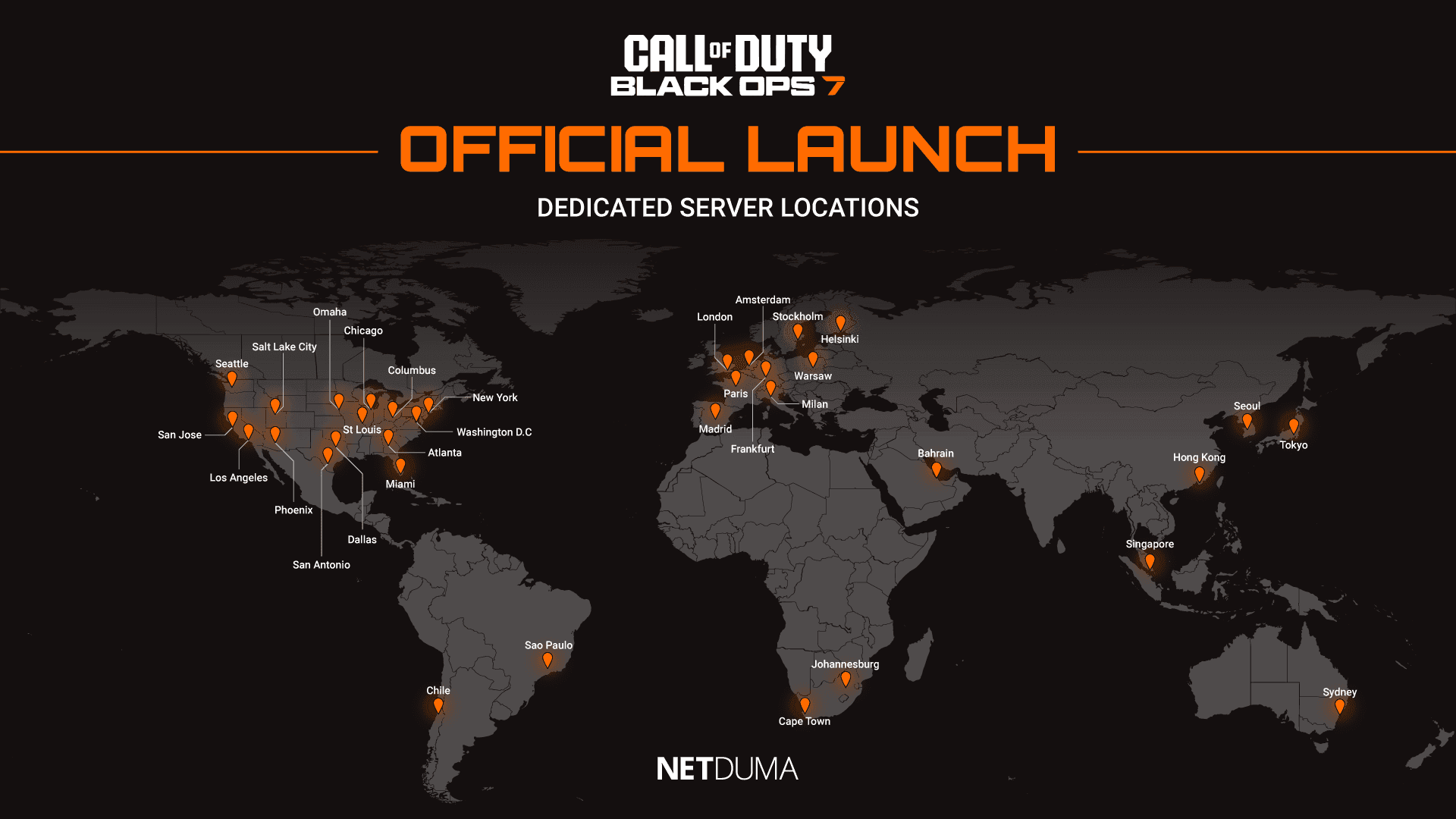
Check Black Ops 7 Server Status

If you’re suddenly experiencing lag, stuttering, or difficulty connecting, the first thing to check is the Black Ops 7 server status. During busy periods such as a new season or peak evening hours, servers can become overloaded or temporarily unstable, causing higher base ping, packet burst, or login issues.

Here are some useful links to check the current status of Black Ops 7’s servers:

If servers are experiencing problems, there is unfortunately no direct fix—you simply need to wait for the developers to resolve the issue. However, confirming that the servers are the cause can save you time troubleshooting your own equipment unnecessarily.

BO7-server-locations.png

Use a Wired Connection for Black Ops 7

One of the simplest and fastest ways to improve your connection in Black Ops 7 is to switch from Wi-Fi to a wired Ethernet connection.

While Wi-Fi is convenient, especially if your console or PC is in another room, it introduces a lot of variables that can weaken your connection. Interference, signal drop-off over distance and inconsistent signal strength are all common issues that can cause packet loss and latency spikes during intense matches.

A wired Ethernet connection provides a far more stable and consistent link to your router, which is crucial for a fast-paced shooter like Black Ops 7.

If running a cable isn’t practical, you may want to consider using powerline adapters. These allow you to achieve a stable wired-like connection across rooms without needing to run long cables through your home.

Black Ops 7 Connection Settings

To understand what type of connection issues are affecting your gameplay, you should enable Telemetry in the Settings menu. Setting this to Essentials provides the most important information without cluttering your screen.

Once enabled, you’ll see real-time ping and packet loss indicators, giving you immediate feedback on whether you’re experiencing high ping, jitter or packet burst.

Another setting worth adjusting is On-Demand Texture Streaming. Since the ability to disable this feature was removed, some players have reported it causing packet burst during gameplay. Setting it to Minimum may help reduce this issue, and adjusting the Allocated Texture Cache Size to Medium or Large through the Show More menu can further stabilise your connection quality.

Optimise Your Connection in Black Ops 7

If you want the best possible connection in Black Ops 7, the Netduma R3 gaming router is built specifically for gamers who want superior stability and responsiveness in their gameplay.

Its features are designed to eliminate high ping, packet loss, jitter and network congestion so that every match feels fast and consistent, even when your home network is under heavy load.

Below, we break down exactly how the R3 can fix the most common connection issues affecting Black Ops 7 players.

Fix High Ping in Black Ops 7 with Geo-Filter

High ping puts you at an immediate disadvantage, especially with Black Ops 7’s faster movement system and rapid gunfights. High ping is almost always caused by being placed on a distant or overloaded game server.

Even though Black Ops 7 has moved away from strict SBMM, the game may still connect you to a suboptimal server, resulting in sluggish, delayed gameplay.

Geo-Filter is the only tool that gives you full control over the servers you connect to. With the R3’s Geo-Filter enabled, you can force your game to only use the lowest-ping servers while blocking high-ping or unstable ones. This guarantees a consistently responsive experience match after match.

Simply add your device, select Black Ops 7 as your game, and adjust your filter radius to cover the best server locations. You can also use the R3’s Ping Heatmap feature to identify where the highest-performing servers are located.

If you want to learn more about the set up process and what the Geo-Filter can do, check out our blog on it here. Or if you want to see the feature in action, check out our ultimate Geo-Filter guide video below.

Fix Ping Spikes in Black Ops 7 with Steady Ping

Steady Ping is another powerful feature that will increase how responsive your inputs and gameplay feel. It does this by eliminating jitter – the micro changes in ping, from your connection. This allows you game to better sync to the game server, which should make your gameplay feel extremely smooth.

Once Steady Ping is enabled, you can see your ping automatically becoming stabilised in the ping graph section. If you want to experiement with settings to find the sweet spot for your network, you can switch Steady Ping to Expert Mode.

Fix Packet Loss in Black Ops 7 with SmartBOOST

The last connection issue to fix in Black Ops 7 is packet loss and packet burst, which is often caused by network congestion. If you’re gaming on a busy network filled with bandwidth intensive activities like video streaming and file downloads – it can cause your game to lag and stutter.

SmartBOOST is the ultimate network optimisation tool that eliminates congestion and bufferbloat so your gaming remains smooth and stable, no matter how busy your network is.

It ensures whatever applications you mark as high priority always get the amount of bandwidth they need for optimal performance. This means if gaming is the top priority on your network, intensive activities won’t be able to cause you any issues.

If you want to see SmartBOOST optimise a busy home network for gaming, check out our live demo video below.

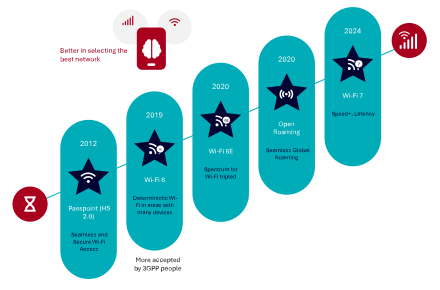
All technology stars are aligned for Wi-Fi offloading.

There has never been a better time for Wi-Fi offloading. In recent years, Wi-Fi technology developments have advanced more than in the previous decade, bringing improvements that enable mobile operators to deploy Wi-Fi offloading more effectively and provide a superior user experience. We have already covered Passpoint in a recent white paper excerpt. This time we will focus on the next-generation Wi-Fi radio technologies making Wi-Fi more carrier-class than ever before. In an upcoming post we will talk about the WBA OpenRoaming initiative, but we have plenty of information about OpenRoaming already here in Enea Insights.

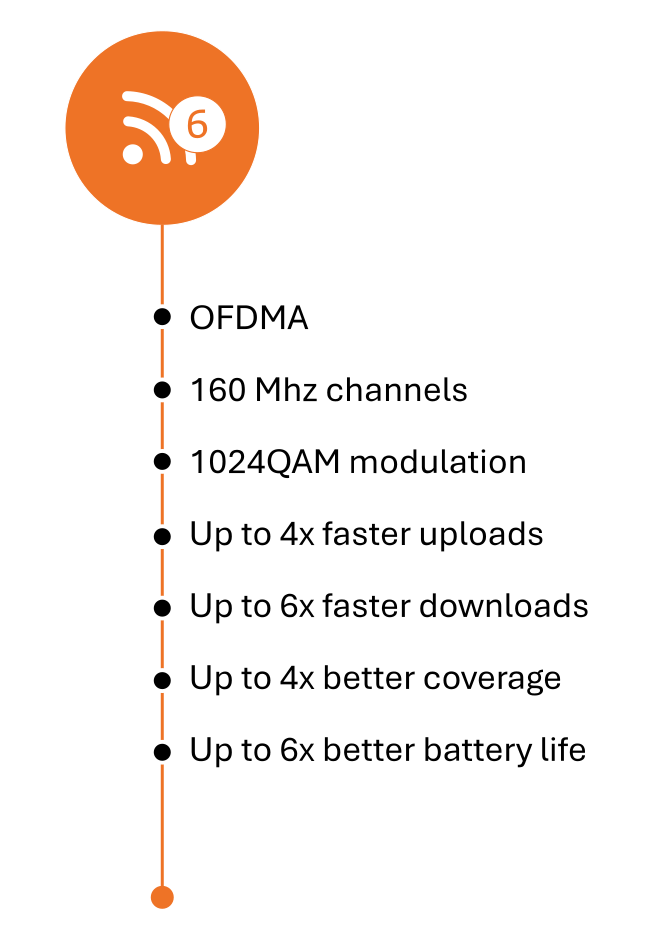
The introduction of Wi-Fi 6 marks a paradigm shift for Carrier Wi-Fi and Wi-Fi offloading, bringing a level of quality of service (QoS) comparable to that of cellular networks—an unprecedented achievement in the history of Wi-Fi technology. The cornerstone of Wi-Fi 6 is Orthogonal Frequency Division Multiple Access (OFDMA), which incorporates cellular-style scheduling to deliver deterministic performance, especially in high-density environments. With OFDMA and other technical advancements, Wi-Fi 6 can accommodate a significantly higher number of devices and offers up to four times the data transmission capacity of previous Wi-Fi generations.

We will cover more details about how Wi-Fi 6/6E and 7 Improve Quality of Experience (QoE) in an upcoming white paper excerpt. To get access to that chapter already now, download the full white paper.

Wi-Fi 6 also extends the range and reliability of Wi-Fi services, particularly through enhanced modulation techniques like 1024-QAM and improved beamforming, making it more effective in challenging environments. Additionally, it includes features like Target Wake Time (TWT), which is particularly advantageous for IoT applications. TWT allows access points to schedule specific times for IoT devices to access the network, resulting in up to six times better battery life—a critical improvement for battery-powered IoT deployments.

Wi-Fi 6 also offers other enhancements, such as UL (uplink) MU-MIMO, 160 MHz channels, and more. These improvements collectively deliver a substantial boost in high-density connectivity and performance quality. As a result, Wi-Fi service providers can offer a significantly enhanced Quality of Experience (QoE) to both consumers and professional users in venues like transportation hubs, stadiums, and shopping malls, as well as in enterprise environments, hospitality, and other high-traffic areas.

In short, wherever people gather, Wi-Fi will be there—elevated by Wi-Fi 6 to provide a much-improved user experience.

Up to 3X more spectrum

Wi-Fi 6 Features

Wi-Fi 6E

Wi-Fi 6E deployment status globallyWi-Fi 6E extends the capabilities of Wi-Fi 6 into the pristine 6 GHz spectrum, with its availability determined by regional or country-specific regulations.

April 23, 2020, is a landmark date in the history of wireless technology. On this day, the commissioners of the U.S. Federal Communications Commission (FCC) voted unanimously to release 1.2 GHz of 6 GHz spectrum for unlicensed Wi-Fi use. Since then, numerous other countries have followed suit, and it is widely anticipated that many more will allocate parts of the 6 GHz band for unlicensed spectrum over the coming years. In the U.S., the full 6 GHz band is now available for indoor Wi-Fi use under Low Power Indoor (LPI) regulations.

This new allocation significantly expands the Wi-Fi spectrum, more than tripling the available bandwidth in the U.S. and nearly doubling it in the European Union. In the U.S., Wi-Fi users can access a total of seven 160 MHz-wide channels, while in Europe, three such channels will be available. This additional spectrum allows Wi-Fi devices—such as smartphones, tablets, and laptops—to achieve multiple gigabits per second of throughput over Wi-Fi.

Wi-Fi 6 itself already represents a significant leap in quality and data rates compared to older standards, such as Wi-Fi 5 (802.11ac, 5 GHz) and Wi-Fi 4 (802.11n, 2.4 GHz). With the introduction of Wi-Fi 6E, these improvements are further amplified by the ability to operate in the interference-free 6 GHz band. The result is a connectivity experience that is substantially

faster and more reliable.

Free from Interference from Legacy Wi-Fi

A key advantage of Wi-Fi 6E and Wi-Fi 7 is their exclusive access to the 6 GHz band, free from interference from legacy Wi-Fi systems. Only these newer Wi-Fi generations are certified to operate in this spectrum, ensuring a cleaner, interference-free environment for communication.

Wi-Fi 6E and 7 also promise ultra-low latency. This capability will enable highly responsive and immersive connectivity experiences, initially benefiting applications like gaming, high-quality video conferencing, and AR/VR. Over time, it will pave the way for innovative new wireless enterprise applications.

Wi-Fi 6/6E on Steroids

Wi-Fi 7

As the world adjusts to widespread deployments of Wi-Fi 6 and 6E access points, Wi-Fi 7 has already begun making its debut. Consumer brands like TP-Link, Asus, Eero, Linksys, and Netgear have released Wi-Fi 7 access points even before the IEEE officially ratified the 802.11be standard (Wi-Fi 7) on September 26, 2024. With the standard now approved, other vendors focused on enterprise-grade access points are expected to follow suit.

It’s fair to describe Wi-Fi 7 as “Wi-Fi 6/6E on steroids,” marking another significant leap in capabilities that further positions Wi-Fi as a carrier-class solution. Like previous generations, Wi-Fi 7 is backward compatible. However, many Wi-Fi 7 routers may not support devices using anything less than WPA2 security. This could potentially limit the functionality of legacy Wi-Fi 4 devices, which may only connect in less secure open networks. But given the pace of Wi-Fi advancements, this is likely to be more of a theoretical issue than a practical one.

Why is Wi-Fi 7 Like Wi-Fi 6/6E on Steroids?

The following comparison highlights the theoretical improvements of Wi-Fi 7 over Wi-Fi 6, though real-world results depend on various implementation factors. (We have summarized the most important differences in the table below.)

Wi-Fi 7 offers speeds ranging from 30 to 46 Gbps—three to nearly five times faster than Wi-Fi 6. It also reduces latency significantly, promising performance below 5 milliseconds compared to Wi-Fi 6’s average of 20 milliseconds. With support for up to 16 spatial streams (double that of Wi-Fi 6) and a maximum channel bandwidth of 320 MHz, Wi-Fi 7 offers impressive improvements in speed and capacity. For context, the entire 2.4 GHz band is just 83 MHz wide.

Wi-Fi 7’s increased modulation, reaching 4096-QAM, allows for better performance over the same channel width compared to the 1024-QAM in Wi-Fi 6. This translates to more efficient data transmission and better throughput under ideal conditions.A Standout Feature: Multi-Link Operation (MLO)

What truly sets Wi-Fi 7 apart is its new multi-link operation (MLO) capability. For the first time, devices will be able to operate simultaneously on both the 5 GHz and 6 GHz bands. This ability to bond multiple bands brings several advantages, including improved reliability and increased bandwidth through load-balancing. It also enhances the likelihood of maintaining a stable connection over longer distances while utilizing maximum bandwidth.

However, realizing MLO’s full potential will require support from new devices, meaning it may take time before this feature becomes widely beneficial.

The Enea Aptilo Service Management Platform™ (SMP) is a comprehensive, vendor-neutral system designed to manage and monetize large-scale Wi-Fi services. Since 2001, SMP has been enhanced through over 100 deployments worldwide, demonstrating its proven expertise in delivering secure, scalable Wi-Fi solutions. Today, we highlight our latest innovation: QoE-based Traffic Steering Across Mobile and Wi-Fi Networks, strengthening our position as the leading provider of large-scale Wi-Fi service management solutions.

Enea Aptilo SMP remains one of the most widely deployed back-end systems for Wi-Fi offloading and service provider Wi-Fi. It is also available as a SaaS offering, with a dedicated instance for each customer on Amazon Web Services (AWS), providing the same robust functionality and flexibility. This allows customers to select and tailor the specific features they need—such as SIM authentication—and seamlessly integrate them with their existing systems.

Our Wi-Fi offloading solution, built on SMP, extends far beyond simple SIM-based authentication. It offers comprehensive support for a wide range of carrier-grade Wi-Fi features, including multitenancy B2B management—designed to expand Wi-Fi coverage for offloading—and OpenRoaming capabilities.

Innovation for Improved Operator Control in Wi-Fi Offloading

This innovation further solidifies Enea’s position as the world’s leading provider of Wi-Fi offloading solutions, enabling Mobile Network Operators (MNOs) and Mobile Virtual Network Operators (MVNOs) to proactively optimize user experience by dynamically offloading traffic between Wi-Fi and cellular networks.

Unlike traditional device-driven network selection, our QoE-based traffic steering utilizes real-time quality KPIs and/or historical data to ensure seamless, high-quality connectivity. This intelligent approach empowers operators to take control, unlocking new levels of network efficiency and enhancing user satisfaction by shifting the final decision-making in network selection from the device to the operator.

With one foot in the 3GPP ecosystem and the other in carrier Wi-Fi service management, Enea is currently the only vendor capable of providing this type of real-time QoE-based traffic steering across both mobile and Wi-Fi networks.

We retrieve session quality data from our Traffic Management solution and utilize the powerful policy engine within Enea Aptilo SMP to determine whether a specific user should be offloaded to Wi-Fi or kept on cellular. Furthermore, our traffic management solution ensures that operators can optimize the traffic remaining on the mobile network—such as reducing video traffic load by up to 20%.

As districts plan their 2026 Wi-Fi and switching refreshes, RUCKUS is committed to supporting the networks that keep classrooms connected and learning uninterrupted.

CITE in California brought clear momentum around modernizing school networks. Across conversations with district technology leaders, several priorities surfaced repeatedly:

  • Refreshing aging Wi-Fi® systems
  • Moving toward Wi-Fi 7
  • Upgrading to multigig switching
  • Preparing for higher device density
  • Reducing support tickets through better visibility
  • Strengthening safety and camera networks

With Year 1 of the E-Rate cycle underway, districts see this as a rare window to make foundational upgrades that can support the next 5–7 years of growth.

RUCKUS AI™ also generated strong interest, especially the Digital Systems Engineer (DSE). Being able to troubleshoot with natural-language commands resonated with teams that need faster ways to understand what’s happening across their networks.

What K-12 Networks Need from Switching Today

K-12 environments are among the most demanding. IT teams support:

  • Online testing
  • Classroom mobility
  • Smartboards and AV systems
  • Safety platforms
  • IoT devices
  • Building operations
  • Districtwide cameras
  • Student and teacher devices
  • After-school and stadium networks

When switching falters, classrooms slow down, testing is disrupted, and support teams get buried in urgent issues. When switching stays stable, everything runs smoothly.  RUCKUS ICX® was engineered specifically for these real-world school conditions.

Built for Real School Workloads

ICX switches include wire-speed forwarding, non-blocking architectures, fast failover, and flexible stacking. This helps schools stay steady during:

  • Testing surges
  • Video streaming across classrooms
  • Safety camera bursts
  • Arrival and dismissal spikes
  • STEM and CTE lab activity

These capabilities reflect the daily rhythm of K-12 networks and the pressure they face.

Stacking That Makes District Life Easier

School environments grow one project at a time. New wings open, portables get added, libraries modernize, or STEM labs expand. Logical chassis stacking in ICX switches helps IT teams:

  • Manage an entire stack with one IP
  • Scale without rearchitecting the network
  • Avoid performance bottlenecks
  • Add switches as funding becomes available

This approach aligns with phased E-Rate purchasing and refresh cycles.

Resiliency That Reduces Classroom Interruptions

Fabric-level redundancy, intelligent failover, and adaptable uplinks help maintain service during maintenance or unexpected outages. A dropped connection during testing or instruction can derail a classroom. These resiliency features minimize disruptions and reduce the number of urgent tickets that pull staff away from long-term responsibilities.

Long-Term Reliability for Education Budgets

Education budgets move in cycles, so switches often need to last several refresh windows. ICX switches are built for longevity, helping districts:

  • Extend refresh timelines
  • Reduce operational overhead
  • Maintain stable environments for years

It’s one reason ICX hardware often stays in service longer than competitive models.

What K-12 IT Teams Consistently Ask For

Across hundreds of conversations, the same needs appear again and again:

  • Stable performance during online testing
  • Switching that doesn’t require constant attention
  • The ability to add rooms or buildings without redesigning the network
  • Hardware that lasts multiple budget cycles
  • Clear visibility across every site

ICX was built to address these priorities directly.

Preparing for the Next Wave of K-12 Technology

Growth in student devices, IoT sensors, safety tools, cameras, smart classroom peripherals, esports, and STEM programs means switching remains the foundation that keeps everything steady. ICX supports today’s load and tomorrow’s expansion.

A Better Way to Manage K-12 Networks
When paired with RUCKUS One®, ICX becomes even easier to manage. IT teams get:

  • One cloud-based dashboard
  • Unified visibility across access points, switches, and clients
  • Reduced troubleshooting time
  • Faster root-cause analysis
  • Historical insights for high-demand days and testing weeks

For stretched-thin school technology teams, this level of visibility is a major advantage.