Breaking News

GLOBAL Wi-Fi NEWS bulletin

Our previous blog explored how RUCKUS® multi-dwelling unit (MDU) solutions let you provide reliable, high-speed internet access and innovative services to meet high resident expectations. But delivering a great user experience is just the beginning. RUCKUS also helps you elevate your operating income and property value and show off your commitment to sustainable practices.

MDU-blog-header--2100x900-02

With a single, property-wide RUCKUS Wi-Fi® network, you’ll gain the visibility, control, and intelligence you need to improve operational efficiency. RUCKUS offers a single, converged platform for managing IT as well as operations technology (OT) for internet of things (IoT) applications, delivering visibility and performance, while helping you minimize shadow networks.

Smarter buildings can also lead to smarter operations. According to a recent survey, properties report a 20% efficiency boost and 10% fewer maintenance requests after installing smart door locks and electronic access control systems.

In today’s changing threat landscape, security is top of mind, so we also offer built-in security features to reduce the risk of hacking and unauthorized access. Patented RUCKUS technologies such as Dynamic PSK™ (pre-shared keys) (DPSK) increase security for users and devices connecting to the network. It provides encryption key technology for secure access to the RUCKUS network.

Setting standards for sustainability

Sustainability is top-of-mind not only for property owners but also for the residents they serve. RUCKUS solutions are energy efficient and support IoT integration for smart building management and operations.

Sustainability is built deep into the RUCKUS supply chain, which employs sustainable materials and practices, as well as long product life cycles to help minimize waste and obsolescence. With RUCKUS MDU solutions, you can meet the most pressing needs of your residents and their guests, while reassuring them that your environmental practices are sound.

Solutions built for MDUs

The RUCKUS Managed Wi-Fi Network portfolio helps you deliver maximum value through a converged, manageable infrastructure. Our solutions are purpose-built for all MDU property stakeholders—from owners, operators, managed service providers (MSPs), and maintenance staff to residents and visitors.

RUCKUS One® is an AI-driven, converged network assurance and business intelligence platform tailored specifically for MDUs, delivering powerful data analytics and detailed insights into your property’s sustainability metrics

AI-driven RUCKUS Wi-Fi 7 solutions, including RUCKUS R770 and R670, ensure a high-performance, low-latency, secure, reliable resident Wi-Fi experience. Their built-in IoT radios can run Bluetooth® Low Energy or Zigbee® technologies to support greater IoT device diversity and connectivity.

RUCKUS AI™ delivers strong service assurance for IT and business intelligence to the entire value delivery chain in the MDU industry. It is built into RUCKUS One and is also available as a standalone offering.

RUCKUS WAN Gateway enables simple, affordable deployment of unified MDU services, including AI-driven chat bots for IT, property managers, and residents, plus virtual concierge features.

RUCKUS IoT Suite lets you create an IoT access network through the reuse of LAN and WLAN infrastructure. It helps property managers accelerate deployments, reduce costs, and maximize the benefits from IoT devices.

Unlocking value for every stakeholder

RUCKUS solutions position MDUs to deliver the innovative, unparalleled experiences residents expect—and unlock new opportunities in revenue, property value, and sustainability. The result is a positive outcome for every MDU stakeholder:

  • Ownership groups and management companies can realize higher resident satisfaction scores, reduced management costs, and automation to help manage high churn.
  • IT managers at the property can take advantage of AI-driven ease of deployment and troubleshooting, proactive management, and operational efficiencies.
  • Residents can enjoy a differentiated and personalized experience, backed by full security and privacy.

Seize the MDU Wi-Fi opportunity

Ready to elevate the value of your property? Explore how RUCKUS solutions enable exceptional connectivity experiences for MDUs.

© 2024 CommScope, LLC.  All rights reserved.  CommScope and the CommScope logo are registered trademarks of CommScope and/or its affiliates in the U.S. and other countries.  For additional trademark information, see https://www.commscope.com/trademarks. Wi-Fi is a trademark of the Wi-Fi Alliance.   Bluetooth is a trademark of Bluetooth SIG, Inc.  Zigbee is a trademark of the Connectivity Standards Alliance.   All product names, trademarks and registered trademarks are property of their respective owners.
Modern applications have transformed how the world conducts business — driving unprecedented agility and innovation that push the boundaries of what’s possible. However, as applications continue to extend beyond private data centers and spread across multiple cloud service providers and in edge devices, organizations have lost critical visibility into these distributed environments. This observability gap has made it increasingly difficult — if not impossible — for network teams to diagnose application availability issues across multicloud, hybrid environments. In words familiar to the CCIE, “How does one plug a packet sniffer into the cloud?”.

At Cisco, we believe that innovation doesn’t have to come at the expense of a resilient network, and we’re teaming up with like-minded technology partners who share this core value. I’m excited to announce new integrations between Cisco and Amazon Web Services (AWS) that give network teams the visibility they need to quickly and accurately troubleshoot application availability issues across today’s dynamic multicloud networks.

Kernel-level visibility delivers true network observability

Multicloud visibility starts with deep workload observability applied at the kernel level. Isovalent (recently acquired by Cisco) are the co-creators of eBPF, Cilium and Tetragon — technologies that are already the de facto standard for cloud-native networking and security. For Kubernetes users, including those running on AWS Elastic Kubernetes Service (Amazon EKS), eBPF-based Cilium delivers networking, security and observability natively within Kubernetes environments. Every time a process reads a file, spawns another process or opens a network connection, eBPF code embedded in Cilium executes in the kernel, allowing it to gather detailed telemetries — such as TCP and UDP protocol data, packet loss and latency. Cilium is an open-source community project supported by Cisco. In addition, Isovalent Enterprise is offered as a step-up with additional capabilities in networking, observability and security.

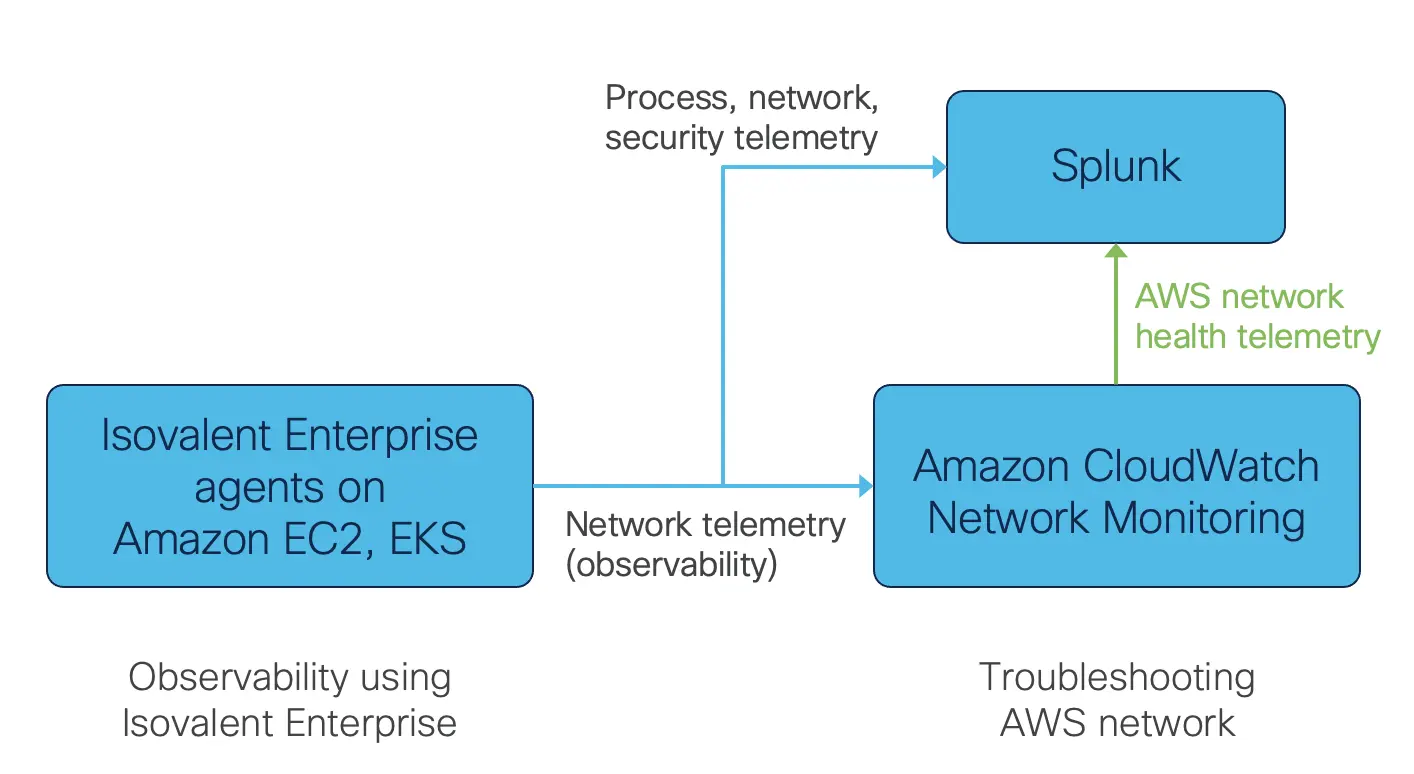
The new integration between Isovalent Enterprise and AWS pushes networking telemetry directly to Amazon CloudWatch Network Monitoring where workload data can be correlated to actual network performance metrics in AWS environments. These insights can also flow into Splunk, where network teams can create unified dashboards that combine metrics from on-premises networks, cloud networks and application performance, and security teams can leverage this data for threat detection and policy enforcement.  Enriching workload visibility data with AWS network performance and making it available to Splunk enables real-time visibility into the entire AWS network fabric, giving network teams the level of observability and control they need to build and optimize truly agile environments that run today’s modern applications.

Fig. 1: Observability and network troubleshooting with Isovalent Enterprise, Amazon CloudWatch Network Monitoring and Splunk

The deep integration in practice

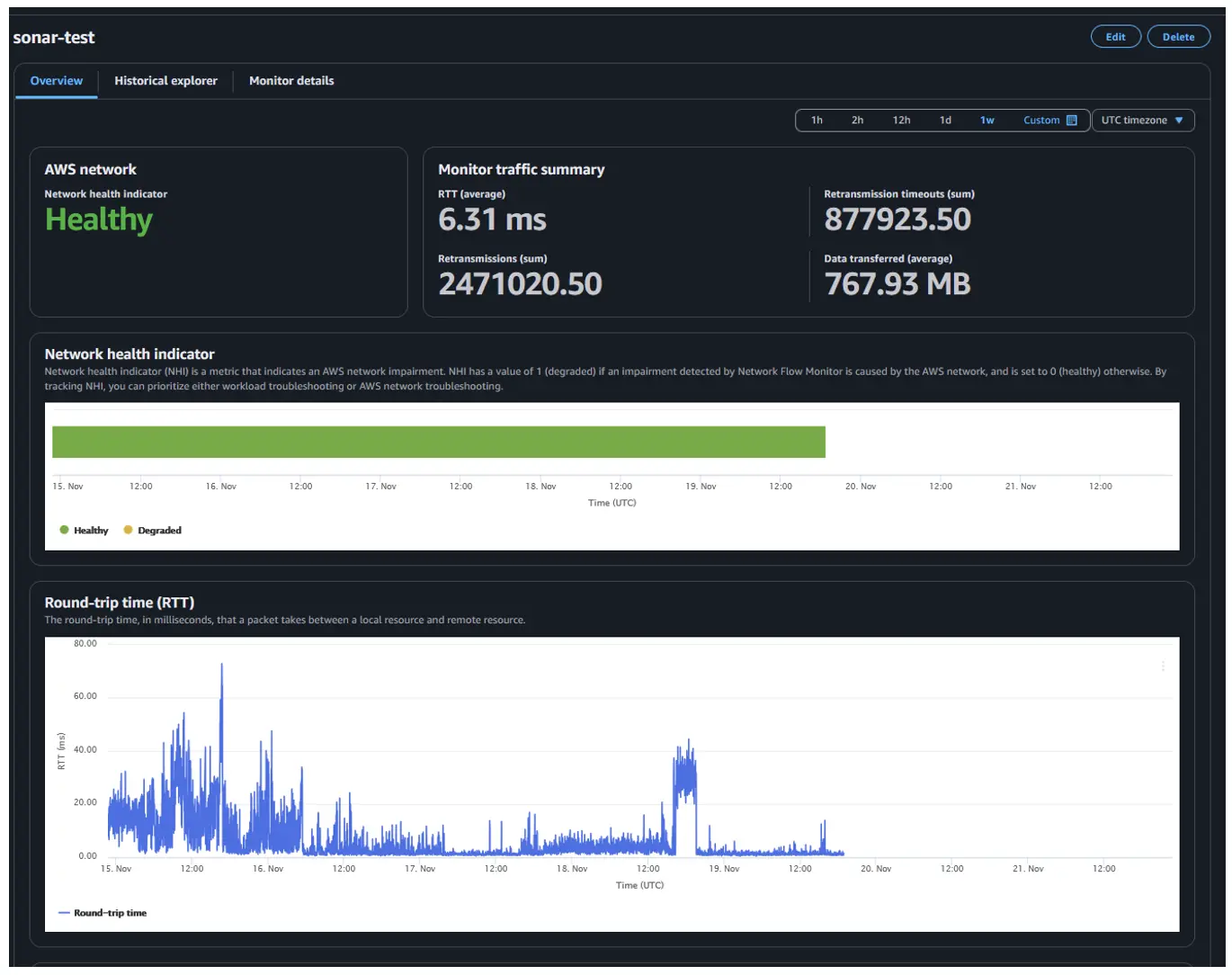
Let’s see how the Cisco and AWS integration would work in the real world. One of our financial services customers recently migrated a critical trading application to AWS. The application was written so that certain workloads run in the cloud for scalability while keeping sensitive data on-premises for compliance. Their network team had sophisticated tools for monitoring on-premises performance but found that they had gaps in their network visibility when traffic moved to the cloud. It became difficult to distinguish between application issues and underlying network problems. When users complained about performance, the network team couldn’t tell if the problem was their application, the AWS network or somewhere in between.  The new, deep integrations between Cisco and AWS give our customer’s networking team detailed insights into process-level activity within all workloads. This allows them to monitor network performance metrics, visualize the entire application path and correlate all the data for rapid troubleshooting — all in one central management plane. What used to take days of finger-pointing between teams now takes minutes to resolve.

Fig. 2: Amazon CloudWatch Network Monitoring dashboard”

“As the scale of customers’ networks on AWS and on-premises grows with modern distributed workloads, customers have told us that enforcing unified end-to-end security policies has been a significant challenge. Also, when network faults occur, customers require fast and accurate triangulation of the fault. To address this, we’ve worked with Cisco to unify end-to-end digital resilience by integrating Hypershield, Splunk, and Amazon CloudWatch Network Monitoring for hybrid workloads, enabling customers to accelerate cloud migration for such workloads.”

Robert Kennedy, VP, AWS Networking

Providing a breadth of assurance and security capabilities

In addition to the integration covered above, Cisco ThousandEyes is also announcing general availability of Cloud Insights, a new multicloud product aimed at extending cloud infrastructure discovery and configuration changes to application performance. This new solution extends ThousandEyes’ well known path visualization capabilities into the AWS network and also correlates how traffic flow impacts application performance. By combining this with ThousandEyes’ existing network and application synthetics, you get true end-to-end assurance — from your data center, across the internet or Direct Connect and deep into the AWS infrastructure.

Finally, Cisco Hypershield builds on top of Isovalent technology, delivers the visibility above, and provides security controls at the workload and network level across multi-cloud and hybrid environments. Hypershield uses enhanced telemetry, AI analysis and recommendations to simplify security via its first use cases: Autonomous Segmentation and Distributed Exploit Protection.

Our new approach

The Cisco and AWS integration is a radically new approach to ensuring the availability of modern applications in today’s multicloud, hybrid environments. Today’s announcement brings together deep workload visibility, network performance monitoring, and security in a way that’s never been possible before.

Are you at AWS re:Invent Dec 2–6,2024, Las Vegas, NV?  Please visit us at Cisco booth #1332 and Splunk booth #1342.

For more information:

Wi-Fi 8 – What’s new?

wi-fi-8-infographic cut

Wi-Fi 8 prioritizes connection reliability over increasing headline speeds, aiming to make more effective use of the same tri-band (2.4GHz, 5GHz, 6GHz) spectrum. It also introduces enhancements for popular mesh networking (multiple access points), more reliable connections in congested airspace, improved power efficiency for IoT devices, and greater signal reach—all of which enhance the user experience.

We’ve created a TL;DR alternative of our white paper in a new infographic that simplifies and guides you through the technologies expected to power the next Wi-Fi standard.

How we use computers has transformed dramatically. Today, they’re our primary tools for staying connected, managing finances, making payments, attending meetings, purchasing tickets, and researching complex issues. Given that some computers hold a lifetime of data, securing these powerful devices is essential. After all, identity theft, fraud, ransomware, and viruses are constant threats.

In honor of National Computer Security Day, we want to remind you to safeguard your network with advanced, evolving security measures.

Protecting Your Network from Emerging Threats:

AI & Sandboxing

Sandboxing enables rapid responses to newly identified threats, isolating them with the help of AI and cloud technologies.

Application Security & Control

Protects applications while offering detailed control over traffic optimization, including the ability to block undesirable applications.

Web Security & Reputation Filter

Features DNS Content Filtering and Reputation Filtering, with IP checking and categories synced to a constantly updated cloud database. This ensures even encrypted traffic remains visible and secure.

Malware & Ransomware Protection

Our anti-malware provides swift and effective protection against the latest malware threats, keeping your network safe from evolving risks.


What Zyxel Offers: A Comprehensive Network Security Solutions

Multi-Layered Network Security

Our network security solutions offer robust, multi-layered protection against internal and external threats. Utilizing industry-leading technologies, we eliminate blind spots—even in encrypted traffic—creating a safer access layer for every user.

Centralized Cloud Management with Nebula

Simplify and accelerate your network security deployment with Zyxel Nebula, our centralized cloud management platform. From synchronizing security profiles to managing user access, Nebula scales effortlessly to support your growing network needs.

Collaborative Detection & Response (CDR)

Contain compromised devices at the network edge before they can disrupt operations. Our CDR service enables Zyxel security firewalls to work in tandem with wireless access points, blocking or quarantining compromised client devices to prevent potential issues.

Protection Against Malware & Unauthorized Applications

Protect your business from external threats and unauthorized applications, ensuring smooth operations without costly downtime. Our unified management platform takes a collaborative approach to tackle complex security threats efficiently.

Zero Trust Security for Secure Remote Access

Built with Zero Trust principles, Zyxel Security Services provide secure remote access with a streamlined, user-centric management platform. This approach allows for flexible yet secure access control, safeguarding your network wherever users are—at headquarters, branch offices, on the go, or working from home.

Seamless Network Continuity Across Wired & Wireless Infrastructures

Operating with Zero Trust across wired and wireless networks is essential for modern business continuity. With Zyxel’s expanded network access services, your data remains safeguarded no matter where you are, ensuring safety and operational stability.


What we suggest:

  1. USGFLEX100BUN: 40 Users | 1YR License Bundle. Click here for detailed info.
  2. USGFLEX200BUN: 75 Users | 1YR License Bundle. Click here for detailed info.
  3. USGFLEX100AXBUN: 40 Users | 1YR License Bundle. Click here for detailed info.
  4. USGFLEX100HBUN: 50 Users | 1YR License Bundle. Click here for detailed info.
  5. USGFLEX100HPBUN: 50 Users | 1YR License Bundle. Click here for detailed info.
  6. USGFLEX200HBUN: 100 Users | 1YR License Bundle. Click here for detailed info.
  7. USGFLEX200HPBUN: 100 Users | 1YR License Bundle. Click here for detailed info.
  8. USGFLEX500BUN: 150 Users | 1YR License Bundle. Click here for detailed info.
  9. USGFLEX500HBUN: 300 Users | 1YR License Bundle. Click here for detailed info.
  10. USGFLEX700BUN: 250 Users | 1YR License Bundle. Click here for detailed info.
  11. USGFLEX700HBUN: 50 Users | 1YR License Bundle. Click here for more info.


Equip your network with Zyxel’s powerful, scalable security solutions to protect your data from evolving threats. For more info about Zyxel’s secure network connectivity, click here.

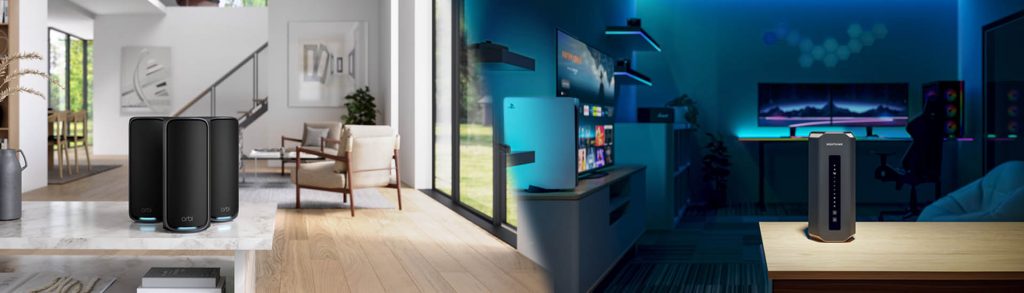
Choosing the right WiFi setup can be tricky, so before we dive in, lets go over some basics to make sure you understand what we’re talking about when we say, Traditional Router & Mesh System.

A traditional WiFi router connects to your modem and delivers internet to your devices by producing WiFi and is limited to its WiFi range. On the other hand, Mesh Systems use a combination of a Mesh Router that connects to one or more satellites or nodes to produce WiFi from each unit. This allows the system to expand WiFi coverage throughout your home, without negatively impacting WiFi performance. For more on this topic consider visiting Orbi Mesh Systems vs. Nighthawk Routers.

This guide will help you decide which option suits your needs best, ensuring you stay connected everywhere in your home.

Understanding WiFi Technology Options

Let’s dive into the basics of WiFi technologies to help you make an informed choice.

A single router connects to your modem and manages the internet connection provided by your ISP. This setup works well for many homes, especially smaller ones.

However, since around 2015, mesh routers have become increasingly popular. These systems include a main router and one or more satellites, or nodes, strategically placed around your home. Typically, you’ll start with at least two satellites, with the flexibility to add more for even greater coverage.

Unlike traditional WiFi extenders, mesh systems ensure consistent and reliable speeds, no matter how far you are from the main router. This means you can enjoy seamless internet access throughout your large or multi-story home, and even in your yard, without any slowdowns. Whether you’re streaming in the living room or working in a home office upstairs, a mesh system has you covered.

So a traditional WiFi router might be good for apartments and smaller homes. However, if you want reliable coverage throughout a large or multi-story home, and even your yard, a mesh system could be the way to go.


Introduction to Router Technology


A traditional router is a singular device that delivers a reliable WiFi signal within a limited range. Many WiFi routers are often integrated into an Internet Service Provider modem/router combo device. Many users choose to upgrade their ISP WiFi with an aftermarket Router. Routers signals can weaken over distance and face interference from your home’s layout, construction materials, or other electrical devices. This often leads to dead zones where the WiFi signal is poor or non-existent. A standalone router acts as a single source, so areas with low signal can only be covered from one direction with no overlap. While traditional ISP routers work well for small homes and apartments with only a few WiFi-connected devices, they have their limitations.

Routers + Extenders

To fill in these WiFi signal gaps, WiFi extenders are often used along with traditional routers. This setup can certainly help extend WiFi range, but it may occasionally lead to inconsistencies due to potential performance mismatches or interference between the router and extenders. This can result in buffering, lower streaming quality, or intermittent connections, especially when a device is connected to the extender instead of the main router.

If you’re looking for a more seamless and reliable WiFi experience, especially with high-speed internet plans, Mesh WiFi technology offers a robust solution. By integrating mesh routers and satellites that are designed to work together, you can maximize your ISP’s potential and enjoy consistent, high-quality WiFi throughout your home. For more on Mesh vs Extenders visit this comparison article.

Mesh WiFi Technology to the Rescue


Mesh WiFi systems, consisting of a main mesh router and one or more mesh satellites, provide the best WiFi solution for seamless coverage throughout your home. Unlike traditional routers paired to an extender, these systems use a single SSID (network name) and are designed to eliminate dead spots by ensuring strong, no-slowdown links between the router and satellites. This seamless WiFi allows devices like laptops, iPads, smartphones, and gaming consoles to automatically connect to the strongest signal as you move around.

For a detailed overview of “How Mesh WiFi Works?” visit our companion article.

Additionally, mesh systems can handle more total device connections, with satellites sharing the load during busy events like birthday parties or family gatherings. Mesh systems are also highly flexible and expandable, allowing for easy placement and future scalability. So – if you’re looking for a future-proofed internet solution with consistent and reliable coverage – a mesh WiFi system is your best bet.

Mesh WiFi vs Router Performance – How to Choose?

If you live in a small space, a traditional router can give you the WiFi coverage you need. But, if you live in a large home, a traditional router could struggle to provide the WiFi signal required. If your home (including outside grounds) is more than 3,000 square feet, or you live in a “Challenging WiFi Environment” consider Mesh WiFi with satellites so you can roam freely throughout your home and connect to the Internet without latency or WiFi dropout issues. Even if your home is less than 3,000 square feet a Mesh system is often a good choice as it can cover all rooms with a more reliable high-quality WiFi signal.

    • Top-Performance Routers and Mesh Systems:


Works With 2024 has come to an end, but you can catch every minute of this year’s Virtual event on-demand any time here.

It’s hard to believe that this was our fifth Works With event, which we created specifically to provide a platform for IoT developers and manufacturers to learn, network, and exchange ideas. For just a bit of perspective, the first Works With took place at the height of the pandemic, and the world was changing before our eyes. The way our industry – and the world – has adapted and evolved in that time is hard to describe, but the role connectivity has played in that transformation is everywhere you look.

Creating the Works With agenda and content is a long process of assessing customers’ technical market training needs and providing industry-leading content to satisfy this need. We take excruciating care to plan topics, sessions, and speakers that provide practical value for IoT developers, bring together the growing technology ecosystems, and foster collaboration and interoperability. This year’s programming carried that mission forward with technology-specific tracks focusing on Wi-Fi, Bluetooth, LPWAN, Matter, Compute, and IoT Trends. But one of the most significant changes this year was that we hosted four live, in-person events in Austin, San Jose, Hyderabad, and Shanghai. Taking Works With on the road gave us the opportunity to bring these topics to our customers and partners and connect with the global community of innovators who share our passion for connecting devices and improving lives.

We’re extremely proud that today, Works With is considered a can’t-miss industry event and is still the only place wireless developers can access this level of hands-on training from the best and brightest in the industry at no cost and without traveling. We’re also happy to provide every session and keynote from Works With 2024 on-demand. Check out the highlights:

Day 1 Keynote: Connecting the Future: How AI is Accelerating the Next Wave of IoT Evolution

Silicon Labs CEO Matt Johnson and CTO Daniel Cooley, along with David Niewolny, director of business development for healthcare/medical at NVIDIA, discuss the relationship between AI and IoT.

Day 2 Keynote: Works With 2024: IoT Challenges & Solutions Around the World

We announce the Matter Challenge winner, which was a joint program with Arduino and Mouser, followed by Adam Scraba, director of product marketing at NVIDIA, Niranjan Patil from Samsung Research India, and a panel with Jamie Gomez, the CEO of Habitat for Humanity of Metro Denver, about how IoT is delivering on its promise to transform lives by tackling pressing challenges around the world.

Bluetooth Developer Training Sessions

  • BLE201: Silicon Labs: Accelerating End Device Development
  • BLE203: Enable Accurate Distance Estimation Using Channel Sounding
  • BLE204: Harnessing Ambient IoT: A Leap Towards Sustainable Connectivity

LPWAN Developer Training Sessions

  • LPW101: Sub-GHz IoT: An overview of protocols, applications, and key considerations for long-range IoT
  • LPW102: In-Depth Analysis of LPWAN Protocols: Technical Comparison of Wi-SUN, Z-Wave, and Amazon Sidewalk for Smart City and IoT Applications
  • LPW103: Z-Wave Long Range: Bringing Beyond-the-Home Connectivity

Matter Developer Training Sessions

  • MAT101: Introduction to Matter: Why, What, and How
  • MAT102: Matter: Is it the Right Technology for my Products?
  • MAT103: Matter: Technology and Adoption from a User’s and Ecosystem Perspective

IoT Trends Sessions

  • IOT101: Biggest Security Trends and What to Expect
  • IOT102: Revolutionizing large scale IoT deployment with Open CSMP: A Cisco and Silicon Labs Partnership
  • IOT103: Wired to Wireless for the Industrial IoT
  • IOT104: Top Five Medical IoT Trends for Product Designers – Specialist Panel
  • IOT105: Simplifying IoT Development with an RTOS
  • IOT106: Bluetooth Trends of Today and Tomorrow

Wi-Fi Developer Training Sessions

  • WF101: Evolution of Wi-Fi 4 to Wi-Fi 6 and Wi-Fi 7 and How it Affects Your IoT Strategy and Roadmap
  • WF201: The Wi-Fi IoT Developer Journey to Achieve Ultra-Low-Power for your IoT Device
  • WF302: Build a Wi-Fi Tracking Platform with Silicon Labs SiWx917

IoT Partners and Ecosystems Sessions

  • PAR101: Hands-on with Arduino Nano Matter
  • PAR202: Edge Impulse Tutorial for Motion Classification and Anomaly Detection
  • PAR203: Transforming Smart Home Gateways From Wi-Fi to Multiprotocol IoT and Matter

IoT Edge Computing Sessions

  • CMP102: Introduction to Simplicity Studio 6
  • CMP101: Defining the Ideal MCU Platform for IoT Development
  • CMP103: Edge Intelligence: How to leverage Silicon Labs AI/ML to improve efficiency and performance

Now that Works With 2024 is in the books, it’s time to turn our attention to next year. We’ll never have more time to prepare than right now, and with the recent release of Matter 1.4, continued innovation in Bluetooth, Wi-Fi, and other foundational technologies that are driving our industry forward, we better get started.

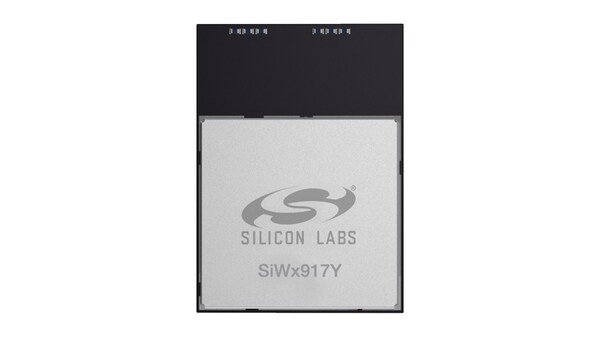
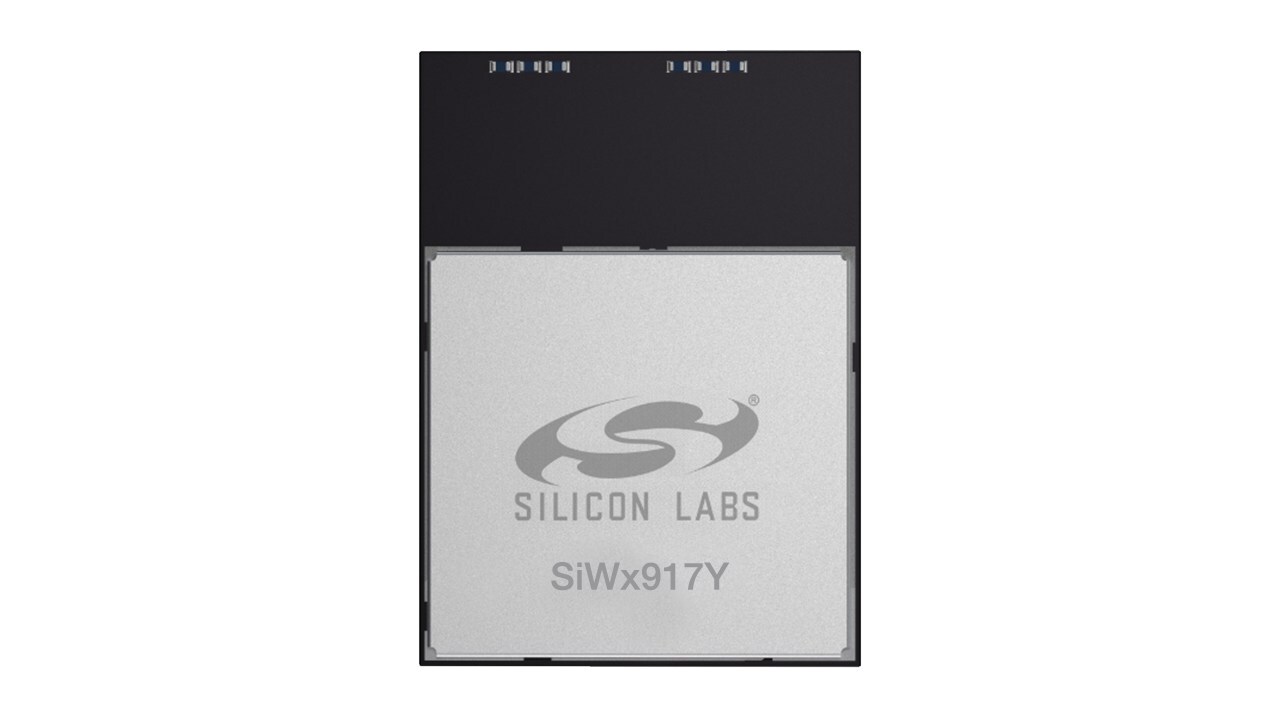
AUSTIN, Texas, Dec. 3, 2024 /PRNewswire/ — Today Silicon Labs (NASDAQ: SLAB), a leader in secure, intelligent wireless technology for a more connected world, announced the SiWx917Y ultra-low power Wi-Fi® 6 and Bluetooth® Low Energy (LE) 5.4 modules.

As an extension of the successful Series 2 platform, these modules are designed to help device makers streamline the complex development and certification process for Wi-Fi 6 devices. The new SiWx917Y modules deliver breakthrough power efficiency while providing robust wireless connectivity, advanced security, and a full-featured application processor, reducing design challenges, product size, costs, and time-to-revenue for device makers. Pre-certified for global regulatory standards and equipped with an optimized antenna, the SiWx917Y modules eliminate the need for lengthy RF optimization and certifications.

“Wi-Fi for IoT has evolved significantly, creating exciting opportunities for innovation. To help end device makers accelerate their full potential, we developed the SiWx917Y Wi-Fi 6 modules,” announced Irvind Ghai, Vice President of Wi-Fi Solutions at Silicon Labs. “These pre-certified modules offer a streamlined solution, enabling manufacturers to easily integrate cutting-edge connectivity into their devices and focus on actual solution differentiation while reducing development costs.”

The modules are ideal for low-power Wi-Fi applications across industries, including smart homes, building automation, healthcare devices, industrial sensors, and asset tracking.

Versatile and Efficient SiWx917Y Modules Deliver Cutting-Edge Wireless Capabilities

The SiWx917Y modules integrate Wi-Fi 6, Bluetooth LE 5.4, an ARM Cortex-M4 application processor, a wireless network processor, large memory, and a rich set of peripherals in a compact 16 x 21 x 2.3 mm package. Key features include:

  • Ultra-low power Wi-Fi 6 connectivity with intelligent power management
  • Dual-core architecture with dedicated application and wireless processors
  • Support for Matter protocol over Wi-Fi
  • Integrated antenna, RF pin and worldwide RF certifications
  • Multiple configurations and operational for design flexibility

The modules’ intelligent power management enables connected sleep mode with as low as 20μA current with Target Wake Time (TWT) and 60-second keep-alive interval. This allows IoT devices like smart locks, thermostats, smart cameras, video doorbells, and industrial sensors to achieve multi-year battery life. The integrated ARM Cortex-M4 processor, large memory, and peripherals also enable sophisticated edge processing capabilities.

The module supports two operational modes: SiWG917Y for SoC (Wireless MCU) mode so customers can execute all application code in the Module’s ARM Cortex-M4 core, and SiWN917Y for NCP mode (Network Co-processor) so customers can execute their application on a separate MCU while the Wi-Fi module manages communication functions.

Meeting the Growing Demands for IoT Connectivity

The explosive growth of IoT devices is driving the need for more efficient and secure Wi-Fi solutions. With Wi-Fi-enabled low-power IoT applications increasing by up to one billion units annually, device makers face the challenge of integrating robust connectivity while addressing concerns about energy efficiency, security, and ease of development.

Availability

The SiWx917Y modules are now generally available for purchase. For more information on Silicon Labs’ SiWG917Y and SiWN917Y Wi-Fi 6 and Bluetooth LE modules, click here.

About Silicon Labs
Silicon Labs is a trailblazer in wireless connectivity for the Internet of Things. Its integrated hardware and software platform, intuitive development tools, and unmatched ecosystem support make Silicon Labs the ideal long-term partner in building advanced industrial, commercial, and home and life applications. Silicon Labs leads the industry in high performance, low power, and security with support for the broadest set of multi-protocol solutions.

SOURCE Silicon Labs

A trip to any major cybersecurity conference reveals vendors promoting the latest, cutting-edge cybersecurity solutions, and many people willing to pay top dollar for them. But a closer look shows that the average user, and even some small businesses, are being left behind.

The majority of cybersecurity tools are created for the industry itself, which only exacerbates the cybersecurity skills shortage that’s been going on for years. Many of these solutions are so complex that a cybersecurity staff needs years of experience and expertise to operate them. Small businesses are at a significant disadvantage here, which only increases their security risk. The expertise required also creates a higher barrier to entry for cybersecurity jobs. It’s similar to a drugstore offering only prescription medications when most customers need over-the-counter (OTC) options.

From the devices we carry and the buildings where we work to the millions of terabytes transmitted around the world every day, our world runs on wireless technology. With the arrival of Wi-Fi 7, a new era of connectivity is upon us, promising unprecedented speed, reliability, and innovation. Choosing the right partner to navigate this new chapter is crucial. Here is where Cisco stands out as your ideal choice.

Key features of Wi-Fi 7 and solutions from Cisco

1. Increased speed and capacity

Cisco Wi-Fi 7 solutions deliver speeds up to 46 Gbps, nearly four times faster than Wi-Fi 6, ensuring seamless performance for bandwidth-heavy applications like augmented reality (AR) and virtual reality (VR). This capacity allows for rich, lag-free user experiences.

2. Smart, immersive spaces with Cisco Spaces

Included with every wireless license, Cisco Spaces turns Wi-Fi 7 into the foundation of intelligent, connected spaces. With AI-powered 3D mapping, IoT services, and real-time asset tracking, businesses can create immersive experiences—think hospitals tracking critical equipment or offices guiding employees to available meeting rooms.

3. A reimagined, simplified licensing model

Cisco Networking Subscription introduces a streamlined approach to deploying and managing Wi-Fi 7 networks. This new model unifies network management, simplifying operations and allowing organizations to adapt seamlessly as their network needs evolve.

4. Multi-link operation (MLO)

A standout feature of Wi-Fi 7, MLO allows devices to use multiple frequency bands simultaneously. This capability enhances reliability and reduces latency, providing a consistent, high-performance experience. Cisco Wi-Fi 7 solutions leverage MLO to set a new standard for wireless networks.

5. Enhanced security across all bands

Cisco Wi-Fi 7 enforces advanced security protocols, moving beyond outdated encryption standards to reduce vulnerabilities and ensure your network remains secure and resilient.

Unique innovations for Wi-Fi 7

Cisco Wi-Fi 7 access points are engineered with the future in mind, ensuring that your network infrastructure meets current demands while being adaptable for the coming years. Our unified subscription and hardware provide unmatched flexibility, enabling a seamless wireless management experience across cloud, on-premises, and hybrid environments.

Moreover, the integration of ultra-wideband (UWB) radio technology allows Cisco Wi-Fi 7 access points to offer high-speed data transfer and centimeter-level location precision. This feature supports critical applications in logistics, healthcare, and manufacturing, enabling precise asset tracking and advanced location analytics.

Transformative potential spanning industries

Cisco Wi-Fi 7 solutions can unlock myriad new possibilities, with potential for:

  • Enhanced social and meta experiences: Supporting immersive and interactive digital spaces.
  • Revolutionized gaming and entertainment: Enabling high-quality, lag-free virtual reality and cloud-based gameplay.
  • Empowered cloud computing: Providing greater efficiency for data-intensive processes.
  • Industrial IoT advancements: Facilitating smart factory operations and real-time monitoring.
  • Improved video conferencing: Elevating high-definition video quality and reliability to deliver seamless communication.

A vision for a more connected world

These innovations and features contribute to a larger vision that Wi-Fi 7 will help bring to life: a world that is more connected, secure, and capable of delivering enhanced digital experiences. Cisco’s commitment to staying ahead of the curve with advanced technology, simplified operations, and robust security makes it the trusted partner for businesses looking to embrace the future of wireless connectivity.

Liran_Klein_0-1732731491126.jpeg

 Intel’s corporate wireless local area network (WLAN) is crucial to employee productivity. If users experience poor radio frequency (RF) conditions, productivity can plummet while user frustration escalates. We have found that reliable WLAN service starts with good access point (AP) deployment—which, in turn, is the result of effective planning. But as you can read in our recent white paper, “Optimizing and Troubleshooting Wi-Fi Networks Using Client Analytics,” planning alone isn’t sufficient to achieve the network reliability we need.

Intel IT’s Best Practices for Avoiding Poor RF Issues

Intel IT has developed a few guidelines for ideal AP placement:

  • Place an AP every 45 feet.
  • Place an AP near all four corners of small conference rooms.
  • For larger conference rooms, install APs inside the conference room, one per every eight users.

We estimate that these guidelines prevent poor RF coverage about 80% of the time, but they don’t always meet our goal of 99.999% coverage. It’s difficult to simulate internal walls, which can vary from cubicle panels to concrete. Also, APs use a dynamic power level that can change depending on the users’ physical distribution around each AP. Another problem is that room layouts might change between planning AP placement and installation. Therefore, after a third-party firm installs APs based on the above guidelines, we go the extra mile to validate that the installed APs provide the necessary coverage.

Traditional RF Coverage Validation Is Time-consuming and Costly

RF coverage validation is traditionally performed in one of two ways:

  • Use a commercial software application to simulate coverage, which may not reflect the floor layout accurately unless we manually update it.
  • Physically walk the entire floor with a client device. However, this is time-consuming and not all campuses have on-site IT staff.

Not satisfied with either of these two options, a few years ago we developed an in-house alternative to walking the floor. Our customized software displays AP power levels and user counts per AP in a dashboard (see screenshot below). We can look for signs of low coverage—APs with a high power level and a high user count. In the following screenshot, a glance down the rows of data reveals that the AP named etb671y-aej76 (ninth row) meets these criteria. 

Liran_Klein_1-1732731491131.png

 However, our in-house software wasn’t completely ideal. Every five minutes, we had to manually collect the data from the WLAN controller across the entire company. We also needed to develop sophisticated algorithms to eliminate non-prime-time data, define interesting values, and accommodate geographic regions’ differences (for example, in some regions, Friday is a working day; in others, it is not). With hundreds of thousands of APs installed worldwide, such manual efforts are nearly impossible. 

This approach to network validation does not scale well and uses precious IT resources. 

A Faster, Better Approach to Validation

Intel® Connectivity Analytics, recently developed in collaboration with Cisco and Intel’s Client Computing group, is a cost-effective, highly scalable alternative approach to network validation.

Prior to using Intel Connectivity Analytics, we could gather only AP data—there was no visibility into the client side of things. AP data could tell us about the number of users and transmit (Tx) power level, but we merely used this information as markers for low coverage. It wasn’t possible to measure the coverage directly from the client perspective. 

In contrast, Intel Connectivity Analytics constantly gathers data from client devices themselves. The client data represents the actual client experience.

This solution provides granular driver-level wireless client insights for any client using Intel® Wi-Fi products while connected to a supported Cisco wireless network. The APs automatically collect the Wi-Fi telemetry sent from the clients and forward it securely to a Cisco Catalyst controller, Cisco Catalyst Center management platform, or a Cisco Meraki Cloud management platform. The solution then processes the data and presents network managers with intelligent reports and insights.


Intel Connectivity Analytics provides an efficient, targeted approach that identifies low received signal strength indicator (RSSI) events (see screenshot below) that pinpoint users who are experiencing poor RF. We can explore the issue directly by examining the specific AP power level history and deployment without needing to collect and analyze vast amounts of data.

Liran_Klein_2-1732731491136.png


By drilling down, we see that the same AP is the source of all the low RSSI events on a particular date (see screenshot below). Note: RSSI is measured in decibel milliwatts (dBm), where a larger negative number represents a lower signal strength. For example, an RSSI of -70 dBm is stronger than an RSSI of -85 dBm. An RSSI of -50 dBm is a strong signal, while -85 is very weak. 

Liran_Klein_3-1732731491139.png

 Further drill-down shows that this AP is transmitting at the highest power level, suggesting insufficient coverage in the specific area.

Liran_Klein_4-1732731491140.png

Finally, floor map analysis discovered a lack of AP neighbors close to this AP, resulting in poor signal strength for clients.

 Liran_Klein_5-1732731491144.png

 Conclusion

Intel Connectivity Analytics lets us quickly find low-coverage areas and pinpoint the cause. It eliminates the need to walk the floor or manually collect and analyze RF data from the entire company. We can now focus our efforts only where it matters.


The time savings are enormous. On the client side, troubleshooting a connectivity issue without Intel Connectivity Analytics could take 10–15 minutes, and the IT administrator could fix only one client at a time. Intel Connectivity Analytics has helped mean time to repair drop significantly to 10–15 seconds, and the solution can simultaneously identify numerous problematic connections. For network issues, it might take days to diagnose what is causing a rash of connectivity problems. With Intel Connectivity Analytics, we can now discover the root cause of a problem in a matter of seconds. In addition, we no longer need to support our in-house tool or create internal custom scripts and automation jobs for collecting and managing client data.


For information about how Intel IT uses Intel Connectivity Analytics to improve the Wi-Fi network user experience and network management efficiency, read the IT@Intel white paper, “Optimizing and Troubleshooting Wi-Fi Networks Using Client Analytics.”