

When you’re searching for a match in an online game, you probably don’t think about which server you’ll connect to. However, the game server you’re assigned plays a major role in your connection quality, affecting your ping, latency, and overall gameplay experience.
Unless a game includes an in-built server browser, information about server locations and which server you’ve been connected to is rarely available to players.
Over the years, the team at Netduma has become a leading source for game server location insights through our Geo-Filter and Ping Heatmap features, included with our gaming routers. Using these tools, we’ve created content across our social media channels and blogs so players can easily view server information for supported games.
This content has helped players understand where game servers are located and which servers provide the best connection quality. Along the way, it has also raised many important questions, which we’ll answer throughout this blog.
If you have connection quality metrics like ping and packet loss enabled in your game, you may have noticed that these values vary from match to match. This happens because connecting to different game servers can result in different connection quality depending on the server’s distance from your location.
In general, servers that are geographically closer to you will provide the lowest ping. This is because your game data has a shorter physical distance to travel between your device and the server, reducing delay and improving latency.
The opposite is also true. Connecting to servers that are further away increases delay, resulting in higher ping and worse connection quality. This becomes especially problematic in fast-paced competitive online games, where higher ping can put you at a significant disadvantage.
Server performance and server load can also impact your gameplay experience. During peak hours or after a major game launch or update, servers may experience increased stress, reducing performance and affecting your connection quality. Services such as online game server status trackers and Downdetector can be useful for checking whether your favourite game servers are currently experiencing issues or outages.
You might assume that online games would always prioritise your connection quality when assigning you a server. However, with modern matchmaking systems, that’s not always the case.
When searching for a match, games now factor in a huge range of variables, including your skill level, matchmaking rating, and queue time. These factors often take priority over connection quality because faster matchmaking and balanced lobbies help keep players engaged for longer.
Back in the day, matchmaking was much simpler, and the phrase “ping is king” accurately described the online gaming experience. But with the rise of complex matchmaking systems and engagement-based algorithms, your connection quality can now vary massively between matches.
This creates frustration for many players because performance can suffer when connected to a higher ping server, and overall gameplay quality becomes inconsistent from game to game.
This is exactly why we originally developed our range of gaming routers and advanced connection optimisation features. In the next section, we’ll explain how the Netduma R3’s powerful features can solve these issues.
The best way to consistently play on low ping servers is by using the Netduma Geo-Filter feature. Geo-Filter allows you to force connections to specific servers while blocking high ping or underperforming servers.
The Geo-Filter works by creating a fully customisable filter radius around your location. Using the server location information provided by Ping Heatmap, you can then configure your filter to include only the servers that provide the best connection quality and lowest ping.
Once configured, you’ll only connect to servers within your selected filter radius. You’ll also be able to see which server you’re connecting to and servers being blocked in real time within Geo-Filter interface. This creates a far more consistent online gaming experience, ensuring stable ping and reliable connection quality every match.
If you want to learn more about the setup process or functionality of Geo-Filter, we have full video guide and blog guide resources covering everything the feature can do.

SAN JOSE, Calif., Mar 10, 2026 — Synaptics Incorporated (Nasdaq: SYNA), today announced the SYN765x, an AI-native wireless solution that redefines Edge intelligence. As an industry-leading single-chip device combining AI-optimized compute with integrated Wi-Fi® 7, the SYN765x is designed to bring scalable, real-time intelligence directly to smart appliances, home automation systems, and Industrial IoT (IIoT) applications.
SYN765x integrates Wi-Fi 7, Bluetooth® LE 6.0, and Thread/Zigbee across 2.4, 5, and 6 GHz bands. Dedicated on-chip acceleration supports predefined AI-native control and signal-processing functions, reducing host processor load, while meeting strict latency and power requirements.
Built for high-performance wireless connectivity, the SYN765x pairs essential compute as a convenient, on-chip companion for smart devices at the Edge. Its single-chip integration significantly reduces system space requirements, simplifies design, and offers both engineering flexibility and cost savings.
By bringing advanced Wi-Fi 7 capabilities to low-power designs, SYN765x helps enable lower latency, seamless band switching, fast and secure reconnections, and access to the interference-free 6 GHz spectrum. Until now, power and cost constraints have limited adoption of the latest Wi-Fi standards in embedded systems. This solution meaningfully reduces these barriers, accelerating next-generation Wi-Fi adoption across Edge IoT devices.
The SYN765x also enables advanced wireless sensing, including presence detection, motion tracking, and proximity awareness using standard Wi-Fi and Bluetooth signals. For Wi-Fi sensing, it combines high-accuracy Channel State Information (CSI) extraction with on-device machine learning. This differentiated architecture is designed to deliver high accuracy and reliability, supporting a broader range of sensing use cases compared to other connectivity solutions in its class.
In addition, Bluetooth Channel Sounding enables accurate, power-efficient distance measurements under typical operating conditions — offering an alternative to more expensive technologies such as mmWave radar or ultra-wideband. Integrated logic, DSP, and NPU resources provide a high-performance platform for embedded Edge AI workloads, while AI-driven contextual awareness enhances power efficiency.
The SYN765x supports flexible deployment models. It can operate as a co-processor alongside a host application processor or MCU, or function in standalone and host-less configurations thanks to its generous on-chip memory and processing resources. By eliminating the need for a separate microcontroller in many designs, the SYN765x significantly reduces system complexity and cost—offering a new class of high-performance, battery-powered IoT devices.
“Intelligence at the Edge demands uncompromising wireless performance,” said Vikram Gupta, SVP & GM, Edge Compute & Connectivity Division, Synaptics. “SYN765x extends our leadership in wireless technology by integrating Wi-Fi® 7, BLE, Thread/Zigbee with AI-native processing. This simplifies system design, lowers power and cost barriers, and accelerates adoption of next-generation wireless across consumer, industrial, and enterprise IoT markets.”
SYN765x Features at a Glance:
Global customers and partners count on Synaptics to power the next generation of connected, AI-enabled IoT applications.
Gilles Drieu, Chief Technology Officer, ADT
“Connectivity is at the heart of everything we deliver to our customers. Our partnership with Synaptics enables us to build security solutions that are more reliable, intelligent, and responsive. Their portfolio of connectivity solutions gives us the flexibility and performance we need to design next-generation systems that protect homes more effectively, while remaining simple to deploy and manage.”
Janet Wei, CEO, Ampak
“Synaptics has been a trusted technology partner for many years, and our longstanding collaboration has been instrumental in advancing connectivity solutions across a wide range of applications. Together, we’ve consistently pushed the boundaries of performance, integration, and reliability, enabling customers worldwide to deploy robust, scalable wireless solutions and reinforcing our shared vision for the future of connected devices.”
Spencer Maid, President and CEO, Origin AI
“Synaptics brings world-class AI and connectivity capabilities that perfectly complement Origin’s AI Sensing platform. Together, we’re unlocking powerful new use cases that transform everyday environments into smarter, more adaptive spaces.”
Andrew Zignani, Senior Research Director, ABI Research, Strategic Technologies Team
“Artificial intelligence has been migrating out from data centers throughout the network, and now the Edge is truly ripe for local AI. From factory equipment, where reliability and security are key, to consumer electronics, where price sensitivity and privacy is acute, to wearables, where weight, size, and battery life are critical, Synaptics’ latest offering effectively balances and optimizes computing and reliable, future proof connectivity to better serve the evolving requirements and growing diversity of product types found at the network Edge.”
Mohit Agrawal, Global Practice Head for Edge AI and IoT, Counterpoint Research
“The shift from cloud-centric IoT architectures to real-time Edge intelligence is accelerating, particularly as latency, privacy, and bandwidth efficiency become critical design priorities. Integrating AI acceleration with Wi-Fi 7 on a single SoC represents an important step forward for the AIoT ecosystem. As Wi-Fi 7 adoption expands over the next several years, solutions that tightly couple on-device inference with high-performance connectivity will be well positioned to support next-generation smart home, industrial, and infrastructure applications.”
Availability
The Synaptics SYN765x solution is expected to begin sampling in the second calendar quarter of 2026, with production targeted at the last calendar quarter of 2026. Development kits are expected to be available for sampling in calendar Q2 2026.

GREENSBORO, N.C., May 18, 2026 – Qorvo® (Nasdaq: QRVO), a leading global provider of connectivity and power solutions, today announced a major step forward in making Ultra-Wideband (UWB) real-time location systems (RTLS) deployable at enterprise scale. By combining industry standards including FiRa and Omlox with integration into Wi-Fi enterprise access points (EAPs), Qorvo enables precise, real-time location services without the need for dedicated RTLS infrastructure.
Qorvo addresses key barriers to RTLS adoption, including fragmented systems and the cost and complexity of dedicated anchor networks. By embedding UWB into enterprise Wi-Fi infrastructure, Qorvo enables location services to scale using existing access points and workflows. With over a decade of UWB innovation, the company provides a proven RTLS foundation deployed across healthcare, mining, logistics and automotive manufacturing environments.
“Real-time location has long been limited by infrastructure cost and lack of interoperability,” said Alexis Bizalion, Director of Product Marketing & Enablement at Qorvo. “By bringing standards-based UWB into enterprise Wi-Fi access points, we’re making real-time location a native capability of the network. We’re excited to enable OEMs, system integrators and solution providers to build and deploy RTLS solutions with greater flexibility, lower cost and reduced integration risk.”
A key differentiator is Qorvo’s collaboration with leading enterprise Wi-Fi providers to integrate UWB into access points, transforming Wi-Fi infrastructure into a dual-purpose platform for both connectivity and location services while reducing deployment cost and time to market. The company has achieved multiple industry-first UWB milestones, including:
At the core of this ecosystem is Qorvo’s new QPK3000 module, designed for tags and end devices. It enables interoperable UWB functionality across EAPs, dedicated anchors and other UWB-enabled infrastructure, simplifying development while ensuring compatibility across FiRa- and Omlox-based systems.
Qorvo recently showcased the QPK3000 and its RTLS ecosystem approach at the Wi-Fi NOW UWB Global Summit in Mountain View, CA, highlighting how standards-based UWB is enabling scalable, interoperable RTLS deployments. For more information on UWB RTLS, visit Qorvo’s Real-Time Location Systems (RTLS) page.
About Qorvo
Qorvo (Nasdaq: QRVO) supplies innovative semiconductor solutions that make a better world possible. We combine product and technology leadership, systems-level expertise and global manufacturing scale to quickly solve our customers’ most complex technical challenges. Qorvo serves diverse high-growth segments of large global markets, including automotive, consumer, defense & aerospace, industrial & enterprise, infrastructure and mobile. Visit www.qorvo.com to learn how our diverse and innovative team is helping connect, protect and power our planet.


When streaming services like Netflix went mainstream, they didn’t just change how households consumed content. They redefined what “good broadband” actually meant. Networks that delivered Netflix flawlessly became the networks subscribers chose, recommended, and stayed loyal to. Netflix’s own ISP Speed Index became a public scoreboard, and ISP product teams optimized, quite literally, to climb it. Streaming wasn’t just a service riding on top of the network; it became a yardstick for the network itself.
Today, a new yardstick is emerging.
LLMs have been adopted faster than any consumer technology in modern history. ChatGPT became the fastest-growing consumer application ever, reaching 100 million users in two months, a pace UBS analysts called the steepest consumer-internet ramp they had seen in twenty years. And the data we see across Plume-enabled homes confirms the trend hasn’t peaked. It has accelerated. Subscribers aren’t just trying these tools; they are embedding them into how they work, how they think, and increasingly, how they protect their livelihood in a job market being reshaped by AI itself.
At Plume, we are studying how tools like ChatGPT, Claude and Perplexity, and the next wave of agentic assistants like Claude Code and Cowork, are showing up in real homes. What we see is striking.
As of April 2026, more than 1 in 5 active Plume-enabled locations, approximately 22%, show regular AI app traffic on their home Wi-Fi, up from 19% a year ago. That number is intentionally conservative: it captures only what we can see crossing the home network, on the home network. Independent research suggests the broader picture is far larger. Parks Associates reports that 58% of US internet households now use generative AI tools when self-reporting across all devices. In other words, AI in the home has plenty of runway left, and what is happening inside the homes already using it is anything but steady.
Among AI-using households, total data volume tied to AI apps has grown by roughly 2,000% year-on-year. Time spent connected to AI apps, what we measure as “online seconds”, has climbed 364% over the same period, and a further 80% since the start of 2026 alone. Median session length has lengthened by around 30% year-on-year.
The leader is unsurprising: ChatGPT now accounts for roughly 2x the time-on-app of any other AI tool in our footprint, with median sessions approaching 5 minutes. But the fastest movers may be more telling. Perplexity and Claude are the fastest-growing AI apps in both data volume and usage. Microsoft Copilot is currently the slowest-growing of the major players.
These are not quick lookups. Multi-minute, interactive, real-time sessions imply something networks rarely had to optimize for in the chatbot era: sensitivity to latency, jitter and micro-outages, not just peak bandwidth.
The most important signal in our data isn’t how much AI is being used. It is how it is being used. The first wave of consumer LLM adoption was conversational and human-prompted. The second wave, already visible, is agentic: AI tools that run multi-step tasks, call APIs, sync with mailboxes and storage, schedule, monitor, and act semi-autonomously on behalf of the subscriber.
For ISP networks, this is a different beast. Agentic AI introduces persistent background traffic as agents synchronise and monitor outside of active sessions; machine-to-machine and API-heavy patterns as multi-step workflows ripple across dozens of SaaS services; and bursty, recurring workloads triggered by a single user command. Reliability stops being a nice-to-have. When one micro-outage breaks a multi-step automation, the user doesn’t see a buffering icon. They see a failed task. And increasingly, that task is part of how they earn a living.
This is exactly the kind of shift Plume’s AI platform was built to absorb. Our Application Intelligence identifies the most popular LLMs across our global footprint and tracks how subscribers actually use them. Our Behavior Intelligence monitors how the nature of that usage is evolving, from chatbot to autonomous agent, so the network can adapt in real time, not in hindsight.We also make such insights available to our ISPs through API and our Operator Suite so they can also make better decisions on network planning. The AI landscape is moving faster than any consumer category before it. Plume will continue to study LLMs and their evolution into autonomous agents, and to ensure operators on our platform are ready to deliver Quality of Outcome, not just Quality of Experience, for the workflows their subscribers increasingly depend on.
The next Netflix moment isn’t coming. It’s already here.

When we launched CyberSight in March, the goal was clear: close the visibility gap between what DNS logs show and what users actually do. Activity logs, full URL tracking, application usage, device state—the data security teams need but haven’t had from their DNS provider.
With a strong foundation of user behavior data in place, we can now help our customers take visibility to the next level and empower them to make sense of this data faster than ever. Today we’re delivering two new CyberSight capabilities: Threat Trends and Timeline.
Activity logs give you depth but when you’re managing hundreds of users, you need a way to surface what matters without scrolling through individual events. Threat Trends provides that elevated view.
Threat Trends aggregates threat intelligence across your environment to show:
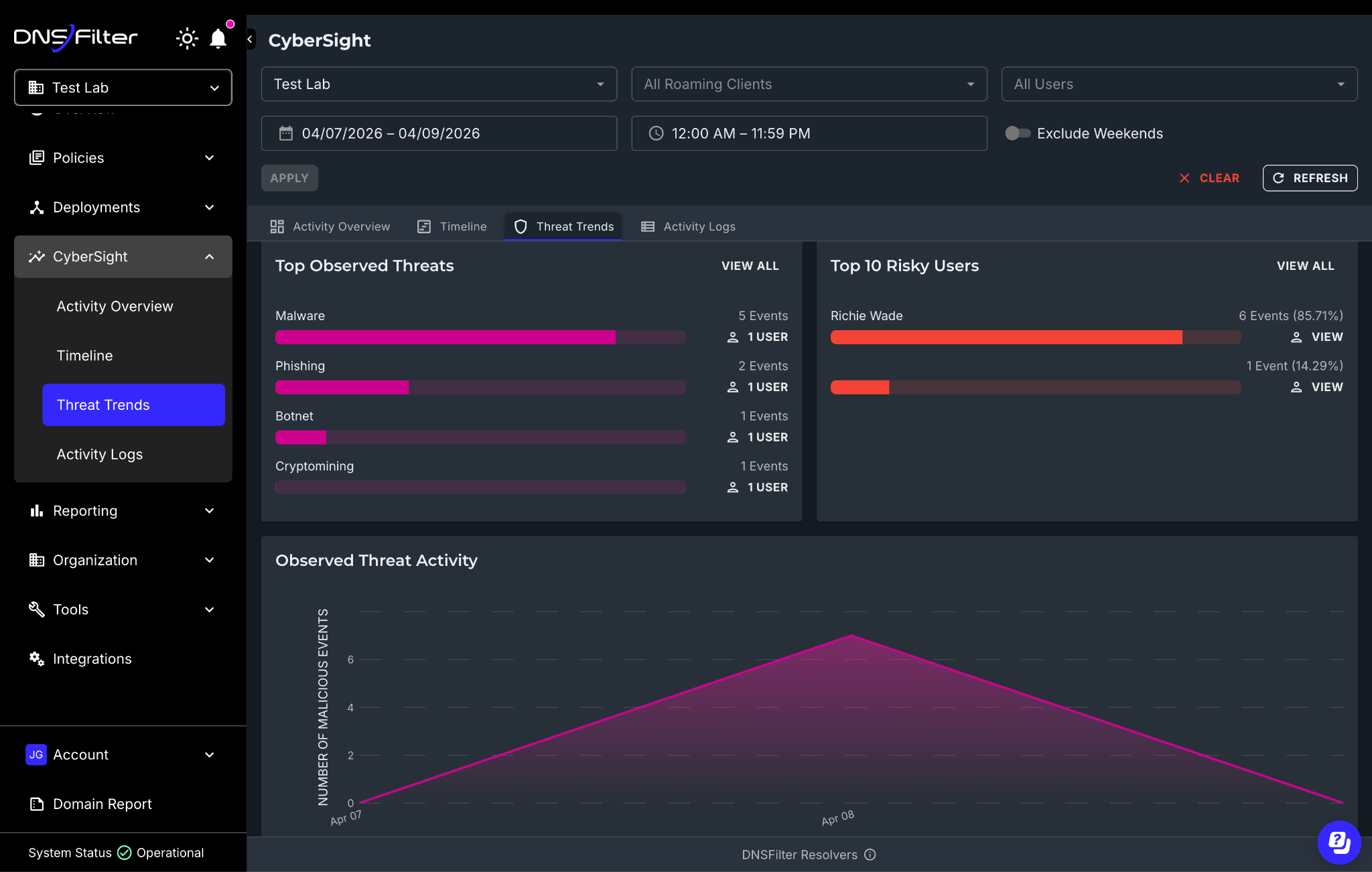
CyberSight Threat Trends dashboard showing top threats and riskiest users
All of this data is exportable via CSV through the API, so if you’re building QBR reports for clients or feeding data into your own workflows, you can pull in what you need.
Before Threat Trends, answering a question like “which threat categories are hitting us hardest this month?” meant manually filtering activity logs, user by user. Now you have a single view that surfaces the signal across your entire environment.
For MSPs, this is especially practical. You can pull up Threat Trends per-organization and immediately see which client environments have the highest concentration of observed threats without building custom reports or switching between tools.
If Threat Trends tells you where to look, Timeline tells you what happened.
Timeline provides an hour-by-hour, chronological reconstruction of user activity within any given time period. It’s built to support you during active investigations when you already know something is wrong and need to understand the sequence of events.
It’s designed to make patterns and anomalies visible at a glance by:
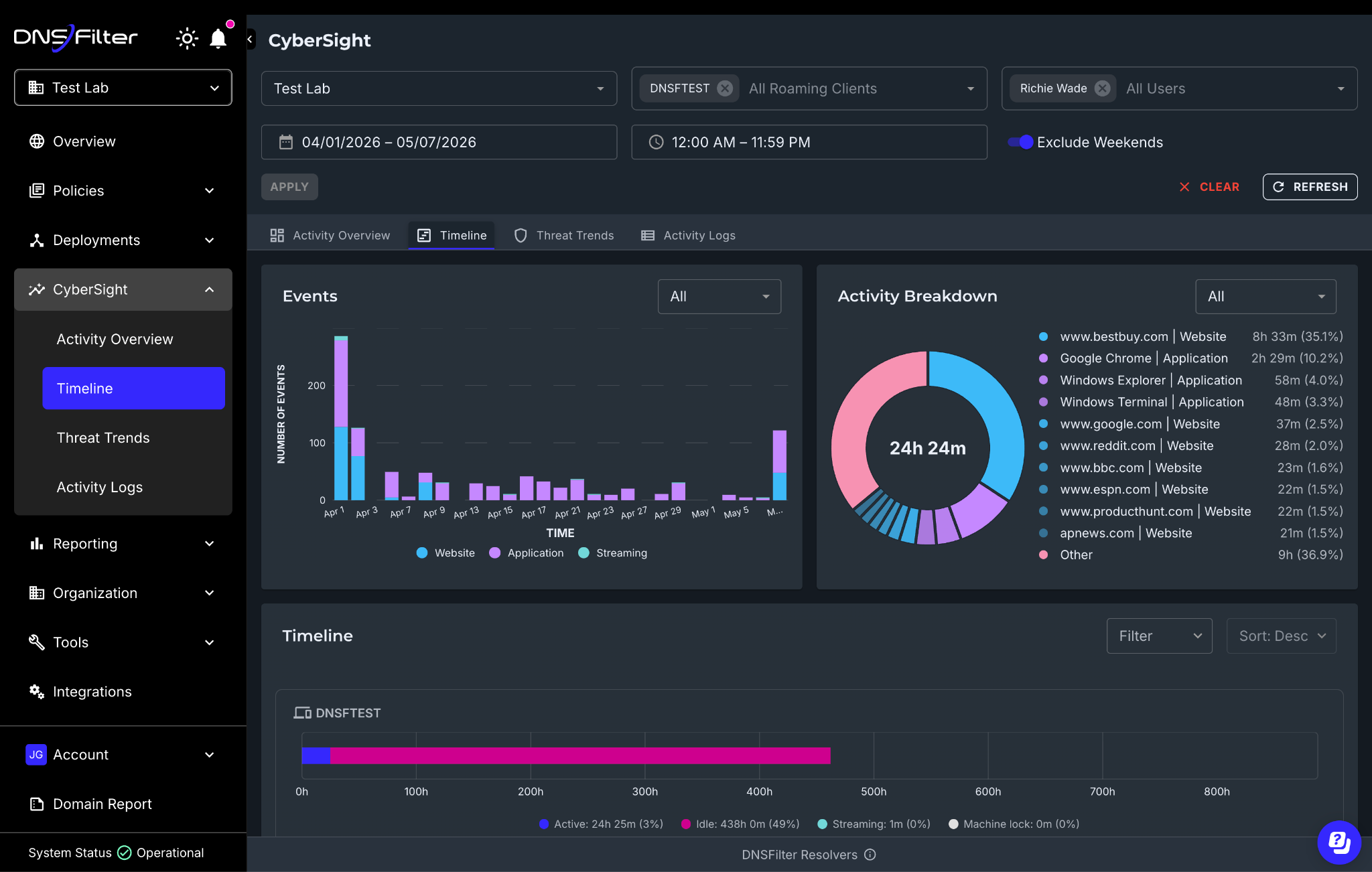
This is where CyberSight goes from a visibility tool to an investigation tool.
Consider the scenario we discussed in this article: A device starts a high-speed upload to cloud storage at 2:00 AM while the user is idle. CyberSight’s activity logs already capture that event. But with the Timeline, you can now reconstruct everything that user’s device was doing in the hours before and after—what applications were open, which websites were visited, when the machine was locked and unlocked, and whether the activity pattern looks like a compromised device or a legitimate process.
Understanding the context of what happened when an alert is triggered is critical for validating real threats. Timeline compresses what used to be a multi-tool, multi-day investigation into something you can walk through in a single view.
A few things worth reiterating since the launch:
Threat Trends and Timeline complete our initial suite of capabilities for CyberSight, all working together to give you a full picture from high-level trends down to granular event forensics.
But we’re not stopping here. Scheduled reports, deeper integration between CyberSight data and the DNS query log, and expanded export capabilities are all in the pipeline. We’ll share more as they ship.
If you’re already a customer, Threat Trends and Timeline are live in your CyberSight dashboard today. Log in and explore.
If you’re not yet using CyberSight, try it for free today.

Watching 4K streams stutter into buffering circles isn’t always because the Internet is slow—it could be your house “fighting” the signal. The good news is that with NETGEAR, it’s possible to conquer dead zones and WiFi obstacles to create whole-home wireless connectivity.
Concrete walls, a large house, or multiple floors? All of these factors can impact your WiFi routers performance. Find out how to solve these issues in the article below.
Even the WiFi frequency you choose can affect your WiFi range and penetration. See a summary of 5GHz vs 6GHz in the short video below:
It’s an irony that the sturdiest, most beautiful homes are often the worst for connectivity. Although it’s great to have a strong and well-built home, thick walls (brick, concrete, stucco, metal lath) absorb WiFi signals like a sponge.
Standard routers rely on a single point of broadcast that cannot penetrate multiple layers of density, resulting in slow internet connections with disrupted WiFi signals. In a small or medium-sized home, a standalone High-Performance NETGEAR Router may be all you need, but there are a number of ways your strong signal can be affected, such as:
Buying a cheap extender might seem like a quick fix, but it simply pushes a weak signal further rather than fixing the root cause.
WiFi signal absorption rates vary dramatically between different materials.
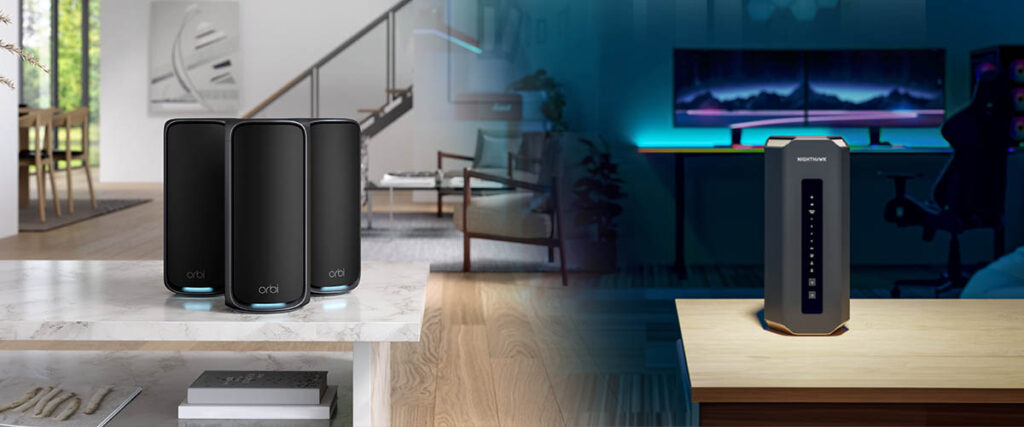
The average US smart home today includes dozens of WiFi devices and applications, making the need for robust and powerful WiFi connectivity essential. Knowing how to get WiFi through concrete walls is more important than ever.
Even the strongest standalone routers can struggle to transmit WiFi signals seamlessly around an expansive property or large, multi-story home.
Enter mesh WiFi, the convenient way to achieve better WiFi coverage and faster speeds for large homes with thick walls, without the need to renovate or rewire with Ethernet cable.
Leading NETGEAR mesh systems like the Orbi 970 WiFi 7 Quad-Band Mesh System can cover up to 10,000 sq. ft. with blazing-fast WiFi performance. The main router and satellites also include Ethernet ports for dedicated device connections.
The main Orbi WiFi 7 router and Orbi satellites communicate with each other, allowing your devices to connect with the strongest access point signal as you move from room to room, upstairs and downstairs, from the front door to the backyard.
The best mesh WiFi systems such as NETGEAR Orbi offer easy setup and management using the Orbi App, and great signal strength for all wireless and wired connections in larger homes.
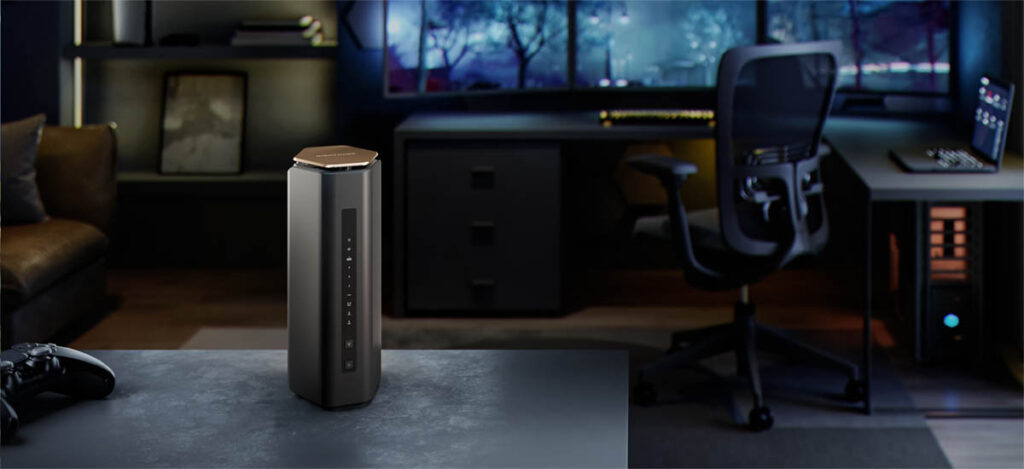
A single router shines when your home or office is:
If most of your devices sit near the router, a strong standalone router gives:
Routers are generally cheaper than mesh systems. If you don’t need expansive whole-home coverage, a NETGEAR Nighthawk router is the perfect addition.
Every setup is different, but here is a starting point. Also note that a powerful single router can handle more devices, but will still be limited to connecting all devices to a single WiFi source.
If you’re connecting:

Mesh is designed for:
Mesh nodes (satellites) help eliminate dead zones far better than range extenders or a single router.
If you have:
In these situations, mesh nodes strategically placed will outperform any single router.
Mesh systems distribute the load across the satellites, ideal for:
Mesh gives you:
Perfect for:
Mesh nodes can help extend WiFi to:
You don’t need louder WiFi; you need smarter distribution. The physics of radio waves means the signal must be routed around obstacles or daisy-chained through them using multiple high-powered satellite nodes.
Orbi satellites act as “relays” that navigate the signal around corners and through doorways, rather than trying to punch directly through thick structural elements.
There are big differences between Orbi satellites and WiFi range extenders. Orbi uses a dedicated lane for backhaul communication between units on Orbi 970, or a high-performance shared WiFi 7 MLO Backhaul on Dual and Tri-Band Orbi systems. This allows mesh systems in large homes to punch through density without losing half the speed to overhead like many WiFi extenders experience.
WiFi 7 (802.11be) is the latest WiFi standard introduced by the WiFi Alliance, following WiFi 5, WiFi 6, and WiFi 6E. Advantages of WiFi 7 Orbi 970 Mesh include:
All Orbi home WiFi mesh systems have an optional wired backhaul. If your home is wired for Ethernet, each satellite can connect directly to the router or another node, skipping the WiFi backhaul entirely. Ethernet backhaul is ideal for long runs between rooms or floors, or even to a detached garage or pool house.
NETGEAR is a leader in innovation, using dedicated backhaul and high-performance antenna designs to overcome physical obstacles better than generic extenders or standard routers.
The Payoff: A seamless home network where Orbi mesh coverage lets 8K streaming, VR gaming, and video calls happen effortlessly in every corner of the property — even the backyard.
TIP: Match your router or mesh WiFi system with a powerful modem and the right plan from your ISP.
NETGEAR’s WiFi 7 mesh router lineup, including the Orbi 970, 770, 870, and 370 Series, all leverage smart band steering and multi-link operation to deliver stable, high-speed throughput and backhaul connections everywhere. As a highly regarded WiFi innovator since the 1990s, NETGEAR continues to lead the way with a comprehensive range of mesh systems suitable for homes of all sizes.
Orbi 970 Series delivers coverage up to 10,000 sq ft, top-tier WiFi 7 performance, multi-gigabit speeds, and advanced security features such as NETGEAR Armor and parental controls. Its quad-band design, dedicated 5GHz backhaul, and 12-stream architecture maximize speed and reliability, even in ultra-dense environments.
Orbi 870 Series covers up to 9,000 sq ft, offering robust, high-capacity performance for modern homes that need strong WiFi 7 speed and reliability. Its quad-band WiFi design reduces interference for busy households filled with devices, making it a standout for families, streamers, and smart home users.
Orbi 770 Series covers up to 8,000 sq ft and features tri-band WiFi designed for families, streamers, and smart home users who expect seamless coverage through tough walls.
Orbi 370 Series covers up to 6,000 sq ft, delivering essential WiFi 7 mesh performance for medium-to-large spaces or users upgrading from traditional routers. Reliable and simple to set up, it features streamlined software for intuitive management and strong data protection.
Still unsure which NETGEAR system is right for you? Explore more about Nighthawk WiFi 7 Routers and Orbi Mesh Systems for Multi-Story Homes.
Here are the 10 key features and benefits of the NWA210AXv2 that help deliver faster, smarter and more reliable WiFi connectivity.
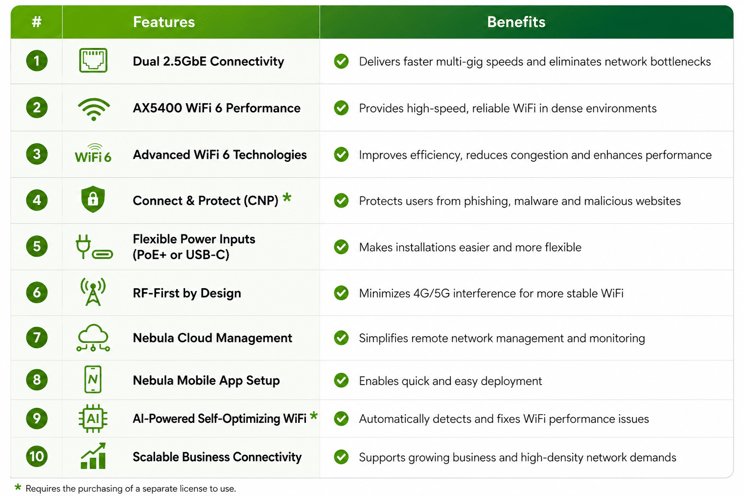
In today’s fast-paced and high-density network environments, businesses need more than just fast WiFi; they need reliable performance, simplified management and built-in security that can scale alongside growing demands. The Zyxel NWA210AXv2 delivers all of this through powerful AX5400 WiFi 6 performance, multi-gig connectivity, intelligent Nebula cloud management and advanced security features designed to keep users connected with confidence.
Whether supporting SMBs, education, hospitality or enterprise deployments, the NWA210AXv2 helps organizations reduce wireless bottlenecks, improve network reliability and simplify day-to-day operations through AI-powered optimization and centralized cloud control.
Ready to elevate your WiFi 6 network performance? Learn more about the Zyxel NWA210AXv2 WiFi 6 Access Point and discover how it can help deliver faster, smarter and more secure connectivity for your business.
*Requires the purchasing of a separate license to use
RIGHT TOOL. RIGHT JOB. EVERY TIME!
At NetAlly, we believe informed decisions start with complete transparency. This page presents accurate, verifiable information about LinkRunner and competitive solutions, highlighting both strengths and limitations. Your trust matters more than any sale, and we’re confident that when you have the facts, you’ll choose the right tool for your needs.
In this guide, you’ll learn:
Not every network tester is built for the same job. Choosing the right tool depends on what you’re solving for:
Ask yourself: Are you verifying cabling quality or solving live network issues?
Each type of test answers a different question:
Think of it this way:
Certification = “Does it follow the rules?”
Qualification = “Will it handle my speed?”
Troubleshooting = “Why isn’t it working right now?”
| Measurement Area | Certification | Qualification | Troubleshooting and PQ |
| Wiremap | ✔ Full wiremap with shield, DC resistance, pair-to-pair mapping | ✔ Opens, shorts, split pairs, mis-wires | ✔ Same as qualification |
| Length | ✔ Standards-accurate length, propagation delay, delay skew | ✔ Approximate TDR length | ✔ Same as qualification |
| Bandwidth / Speed Capability | ✖ Not measured (certifiers measure electrical parameters, not “speed”) | ✔ Determines supported speeds | ✔ Same as qualification, but validated under traffic load |
| Electrical Performance | ✔ Full standards suite: NEXT, PSNEXT, ACR-N/F, RL, IL, TCL, ELTCTL | △ Simplified NEXT/RL/IL (trend-level) | △ Same, sometimes with SNR margin |
| Alien Crosstalk | ✔ Required for Cat 6A and above | ✖ Not measured | ✖ Not measured |
| PoE Testing | ✖ Not part of TIA/ISO certification (optional vendor add-ons only) | ✔ PoE class, voltage under load | ✔ PoE class, voltage under load |
| Link Negotiation | ✖ Not measured (certifiers test cable only) | ✔ Switch speed, duplex, LLDP/CDP | ✔ Same, plus performance validation |
| Traffic Performance | ✖ Not measured (certifiers do not send Ethernet traffic) | △ Sometimes basic throughput | ✔ Full bidirectional traffic test: throughput, frame loss, BER, latency, jitter |
| Application Validation | ✖ Not measured | ✔ “1G capable,” “10G marginal,” etc. | ✔ “Sustains 1G,10G, etc. under load” |
| Fiber Testing | ✔ OLTS measurements, OTDR traces, reflectance, event maps | △ Light power-level checks (some tools) | ✔ Traffic-based fiber performance |
| Pass/Fail Criteria | Standards-based (TIA/ISO) | Application-based | Application-based under load |
| Result | Strict Pass/Fail vs standard | Qualified for a specific speed (e.g., “Good for 10G”) | Actual speed results under real traffic conditions |
| Typical Use Case | New installations, manufacturer warranty validation | Moves, Adds, Changes (MACs), checking upgrade readiness | MACs, Troubleshooting intermittent or persistent issues |
| Cost | High ($$$$) | Moderate ($$) | Low–Moderate ($–$$) |
We compared three popular handheld network testers (NetAlly LinkRunner AT 3000, Fluke Networks LinkIQ, and TREND Networks SignalTEK QT) to give you an honest, practical view of their strengths and limitations.
Each tester can quickly validate cable quality and confirm supported link speeds, but where they differ is how deep they go if something is wrong.
| Vendor | TREND Networks | Fluke Networks | NetAlly |
| Product | 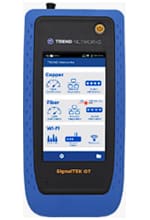 SignalTEK QT |
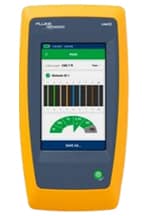 LinkIQ/LinkIQ Duo |
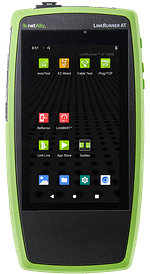 LinkRunner AT 3000 |
| Price (MSRP) | $3,425 USD | $2,956 – $4,052 USD | $2,595 USD |
| Capabilities | • Copper/ Fiber • Basic Cable Testing • Basic Wi-Fi Connectivity & Scanning • Cable Qualification • Basic Network Testing |
• Copper Only • Basic Cable Testing • Basic Wi-Fi Connectivity & Scanning (Duo model) • Cable Qualification • Basic Network Testing |
• Copper/ Fiber • Basic Cable Testing • Basic Wi-Fi Connectivity & Scanning* • Performance Qualification1 • Basic Network Testing • In-Depth Network Diagnostics |
| Weight (gr) | 1600 | 624 | 480 |
| Dimensions (cm) | 21.7 x 10.7 x 5 | 22 x 11 x 4.5 | 19.6 x 10.2 x 4.2 |
| Dimensions (in) | 8.54 x 4.21 x 1.97 | 8.5 x 4.5 x 1.77 | 7.72 x 4.02 x 1.65 |
| Strengths | • Supports copper and fiber qualification. • Offers basic Wi-Fi scanning and connectivity checks. • Supports cloud reporting. • Useful for technicians who need quick validation that a link can support a specific application. |
• Supports copper cable qualification. • Offers basic Wi-Fi scanning. • Useful for technicians who need quick validation that a link can support a specific application. |
• Supports copper and fiber performance qualification1. • Offers basic Wi-Fi scanning and connectivity*. • Provides comprehensive AutoTest verifying all aspects of copper/fiber network connectivity. • Supports cloud reporting and collaboration. • Useful for technicians who need to fix problems faster. |
| Limitations | • Focused mainly on proving link performance, not deep troubleshooting. • Limited insight into VLAN configuration and DHCP issues. • Advanced features like fiber and Wi-Fi make this a more expensive model. |
• Primarily focused on cable qualification, with relatively limited network diagnostics. • Wi-Fi testing (Duo model) is basic compared with dedicated analyzers. • Provides less visibility into end-to-end network behavior when troubleshooting. • Requires tethering to a laptop/PC to extract test data. |
• More feature-rich, which can make it more complex to use (includes an EZ mode for fast results). • Performance tests require the use of a far end device (enables bi-directional testing). • Designed more for fast network troubleshooting than strict cable qualification. |
Many testers list similar features. But the depth of information and ease-of-use can be dramatically different.
Here are a few real-world examples:

AI is rapidly moving into the physical world, giving rise to physical AI. This shift enables systems to perceive, decide, and act in real time, interacting directly with dynamic, unpredictable environments. Robotics and commercial drones are at the forefront of this evolution, driving new levels of automation and efficiency across healthcare, retail, transportation, and manufacturing.
In high-risk environments such as agriculture, warehouses, and industrial plants, robots and drones reduce human exposure to hazardous conditions. Ground-based robots handle repetitive or physically demanding tasks, while drones provide visibility across large or hard-to-reach areas, enabling real-time monitoring, inspection, and data collection.
In commercial settings, robots are reshaping the customer experience. For example, in retail stores, robots can answer questions, fetch products, and provide information. Drones extend these capabilities beyond the store, supporting inventory tracking, last-mile delivery, and site-to-site logistics with speed and efficiency. Together, these systems create a more responsive, intelligent operating environment, where physical tasks and real-time insights work in sync.
Bringing these intelligent, autonomous systems to life requires advanced hardware, a rich software ecosystem, and state-of-the-art AI models.
Hardware: Enabling real-time intelligence and durability
At the hardware level, robotics and drones demand powerful, efficient compute capable of handling real-time perception, decision-making, and multimodal processing. While many deployments will leverage a hybrid approach that combines edge and cloud, processing at the edge remains critical for delivering the speed, responsiveness, and low latency these systems require.
MediaTek’s Genio Pro 5100 is designed to meet these demands for physical AI applications. Based on TSMC’s 3nm process and featuring our 8th generation NPU, it delivers over 50 TOPS of system-level generative AI acceleration. This enables unrivaled acceleration for traditional AI tasks such as machine vision and object classification.
For generative AI applications, Genio Pro 5100 supports token generation rates of up to 23 tokens per second for large language models (LLMs) with up to 7B parameters. Genio Pro 5100 enables advanced camera sensor fusion for vision-based applications, supporting up to 16 cameras. It also delivers rich user interfaces, supporting up to three 4K displays.
Deploying physical AI in robotics and drones requires systems that can operate reliably under a variety of real-world conditions, from extreme temperatures to demanding industrial settings. Genio Pro 5100 is engineered to meet these requirements, with an industrial operating temperature range of -40°C to +105°C.
For improved manufacturability and system reliability, Genio Pro 5100 supports side-by-side LPDDR5x. Additionally, the platform offers flexible system expansion through PCIe Gen 4, USB, dual 2.5GbE, and a wide range of standard interfaces. Backed by a guaranteed 10-year supply commitment, the platform safeguards long-term product roadmaps and reduces supply chain risk for industrial and robotics deployments.
Software: Unlocking developer flexibility
Software is what enables developers to translate AI models into real-world, deployable physical AI applications. Genio Pro 5100 supports multiple Linux operating systems, including Yocto, Debian, and Ubuntu distributions. It also supports industry-standard AI frameworks, including PyTorch, ONNX Runtime, and TensorFlow Lite, enabling seamless model development and deployment across a wide range of use cases.
For robotics applications, support for the open-source ROS 2 (Robot Operating System) framework helps streamline development, integration, and system orchestration. MediaTek’s robust developer resources further accelerate time-to-market, enabling developers to build, customize, and scale physical AI applications more efficiently.
AI models: From perception to action
Advances in AI models are expanding what robotics and drones can do in different environments. While large language models (LLMs) enable natural interaction, newer approaches such as video-language models (VLMs) and vision-language-action models (VLAs) make it possible for robotics and drone applications to go beyond observing and interpreting their environments to acting on those observations in real time.
These capabilities are enabling more autonomous systems, where robotics and drones can interpret their environments and respond intelligently and safely. Genio Pro 5100 is designed to support these emerging model architectures, providing the performance needed to run them efficiently.
Advancing physical AI
As physical AI moves from concept to deployment, Genio Pro 5100 provides the high-performance silicon, software flexibility, and AI model support needed for robotics and drones to operate intelligently. From edge inference and multimodal perception to autonomous decision-making, Genio Pro 5100 is powering the next wave of physical AI innovation.
