Motors power billions of devices across homes, industry, agriculture, and consumer products. For decades, motor architectures were optimized around one primary objective: control performance. Connectivity, analytics, and intelligence were layered on only when necessary.
That model is reaching its limits because today’s motor-driven products are expected to connect, adapt, update securely, and respond intelligently to changing conditions. They’re no longer isolated control nodes, but intelligent endpoints within broader digital systems. This evolution requires more than better control algorithms. It requires integrated wireless, compute, and machine learning (ML) at the core of the motion system.
Silicon Labs’ MG24-based connected motor solution represents this architectural shift.
Why Traditional Motor System Architectures No Longer Scale
Historically, connected motor systems were assembled from multiple components:
A dedicated motor-control MCU
A separate wireless SoC or module
Optional security elements
Additional processors for sensing or analytics
While functional, this fragmented model increases bill of materials (BOM) cost, PCB footprint, firmware complexity, and system latency. More importantly, it divides processing responsibility across devices, making feature expansion more difficult over time.
Adding wireless commissioning, over-the-air (OTA) updates, predictive diagnostics, or anomaly detection often requires redesigning system architecture rather than extending it. At the same time, product expectations have expanded. Modern motor-driven devices must be:
Wirelessly connected for configuration and diagnostics
Secure and field-updatable
Capable of local analysis and intelligent response
Compact and energy-efficient
Cost-optimized for scale
Meeting all these requirements with a multi-chip approach is increasingly inefficient.
MG24: A Wireless Compute Platform for Connected Motion
MG24 Multiprotocol Wireless SoC is designed for mid-range, connected motor systems where integration, efficiency, and intelligence drive differentiation.
MG24 consolidates the following all within a single SoC:
Real-time BLDC Field-Oriented Control (FOC)
Bluetooth Low Energy (LE) connectivity
Hardware-based security with Silicon Labs Secure Vault
DSP capability and machine learning acceleration
Event-driven hardware subsystems such as PRS and LESENSE
This integration enables a unified architecture where motion control, wireless communication, and intelligent processing operate together without competing for system resources.
Running real-time FOC alongside an active Bluetooth stack traditionally required separate processors to consistently meet tight control loop deadlines. The MG24 demonstrates that this separation is no longer necessary by maintaining precise motor control while sustaining wireless communication and application-level processing.
Designers can build connected motion systems without worrying that protocol activity will disrupt time-critical control loops. This balance is fundamental to next-generation wireless compute architectures for motion.
Intelligence at the Edge
As motion systems become connected, they must also become aware. With integrated DSP capability and the Matrix Vector Processor (MVP) hardware accelerator, MG24 enables local data processing for:
Vibration analysis
Anomaly detection
Predictive maintenance
Performance optimization
By processing data at the edge, systems can respond immediately to mechanical changes, reduce cloud bandwidth, and improve overall efficiency. Motor-driven products evolve from executing commands to making informed decisions.
Hardware-Level Event Handling for Efficiency and Stability
The Peripheral Reflex System (PRS) and LESENSE allow hardware-triggered responses to motor and sensor events without CPU intervention. This event-driven design reduces latency, improves stability, and optimizes power consumption. It also frees processing headroom for higher-level functionality, strengthening the overall system architecture.Security as a System Foundation
Connected devices must be trusted over their lifetime. MG24 integrates Secure Vault™ with PSA Level 3 certification, ensuring secure boot, protected key storage, device identity, and encrypted OTA updates. This security foundation enables large-scale deployment of connected motor systems with confidence.Demonstration: Wireless Compute Controlling Motion in Real Time
The architectural shift becomes clear in this demonstration.
In this showcase, a BLDC motor is controlled entirely by a single MG24 device. The SoC executes real-time FOC while maintaining active wireless communication.
During operation, external mechanical interference is introduced. The system detects the anomaly immediately and safely stops the motor. Once normal conditions return, it resumes operation automatically. A connected mobile device provides live interaction and visibility into system behavior throughout the process.
What traditionally required separate controllers for motor control, connectivity, and supervisory logic is consolidated into one integrated wireless compute platform. The demonstration highlights how architectural integration improves responsiveness, safety, and system simplicity simultaneously.
Security as a System Foundation
Connected devices must be trusted over their lifetime. MG24 integrates Secure Vault™ with PSA Level 3 certification, ensuring secure boot, protected key storage, device identity, and encrypted OTA updates. This security foundation enables large-scale deployment of connected motor systems with confidence.
Demonstration: Wireless Compute Controlling Motion in Real Time
The architectural shift becomes clear in this demonstration.
In this showcase, a BLDC motor is controlled entirely by a single MG24 device. The SoC executes real-time FOC while maintaining active wireless communication.
During operation, external mechanical interference is introduced. The system detects the anomaly immediately and safely stops the motor. Once normal conditions return, it resumes operation automatically. A connected mobile device provides live interaction and visibility into system behavior throughout the process.
What traditionally required separate controllers for motor control, connectivity, and supervisory logic is consolidated into one integrated wireless compute platform. The demonstration highlights how architectural integration improves responsiveness, safety, and system simplicity simultaneously.
Enabling the Next Generation of Connected Motion
This approach unlocks new possibilities:
Smart shades that detect increased resistance and prevent wear
Fluid-handling pumps that identify cavitation and adjust proactively
Power tools that monitor vibration signatures for maintenance alerts
Actuators that receive firmware updates wirelessly to improve performance
In these applications, differentiation comes from integration and intelligence, not just torque precision.
Where This Architecture Delivers Immediate Value
The impact is strongest in mid-range, high-volume markets where size, efficiency, and connectivity are essential:
Smart Home and Building Automation
Curtains, blinds, vents, compact robotics
Light Industrial and IoT Automation
Actuators, valves, small conveyors
Connected Tools and Appliances
White goods, power tools
Smart Agriculture
Pumps, irrigation systems, feeders
In each category, consolidating motion, connectivity, and intelligent processing into a single device reduces complexity while expanding capability.
A Platform Approach to Motor Systems
The future of motor systems will not be defined solely by faster control loops. It will be defined by integrated platforms. By combining motion control, wireless connectivity, security, and edge intelligence within one architecture, manufacturers can:
Accelerate development cycles
Simplify hardware design
Enable fleet-wide OTA updates
Introduce predictive maintenance and service-based business models
MG24 represents this evolution toward wireless compute-driven motion systems.
One Device. Unified Architecture. Scalable Innovation.
Every motor that benefits from connectivity will ultimately require more than a standalone controller. MG24 demonstrates how a single secure, wireless-enabled platform can replace fragmented multi-chip designs and enable smarter, more adaptable products. As connected systems continue to evolve, wireless compute will sit at the center of motion, enabling a new generation of intelligent, integrated devices.
Esports is bigger than the NBA, NFL, MLB, and soccer combined
Joe Way from HETMA (Higher Education Technology Managers Alliance, 10,000+ members, $25B+ annual spend) delivers a reality check: esports is bigger than the NBA, NFL, MLB, and soccer combined. And if your university doesn’t have an esports program, you’re behind. In this episode of NETGEAR Now, we talk about the unique challenges of higher ed at scale; buying in hundreds, across 5,400+ US colleges, with budget cuts forcing “do more with less.”
Joe explains why AV departments no longer exist (it’s all IT now), how NETGEAR switches earned street cred with campus network teams, and why E-sports networks can’t go down when sponsors and revenue are on the line.
Anaheim, California, (March 11, 2026) — Zyxel Networks, a leading provider of secure, AI- and cloud-powered networking solutions for businesses and homes, has once again been recognized by CRN®, a brand of The Channel Company, with inclusion in the prestigious 2026 CRN Partner Program Guide. This continued recognition underscores Zyxel’s ongoing commitment to delivering a high-value, growth-focused partner program designed to help solution providers succeed in today’s competitive IT landscape.
The annual CRN Partner Program Guide serves as a trusted resource for solution providers evaluating vendor programs that align with their strategic goals and drive long-term profitability. As channel partners assess which IT vendors, service providers, and distributors to align with, the strength of a vendor’s partner program plays a critical role in shaping that decision.
Zyxel’s partner program stands out for its comprehensive support structure, including competitive financial incentives, robust sales and marketing enablement, training and certification programs, dedicated technical support, and ongoing communication designed to empower partners at every stage of growth.
For the 2026 Partner Program Guide, CRN’s research team evaluated vendors based on program requirements and overall partner value, including training and education resources, pre- and post-sales support, marketing programs, technical assistance, and partner communications. Zyxel’s continued inclusion highlights the strength, consistency, and partner-first focus of its channel strategy.
Zyxel Authorized Partner Program rewards VARs, MSPs and other solution providers with enhanced margin, and technical expertise needed to successfully deliver scalable enterprise-class networking solutions. As an added incentive, newly authorized partners automatically receive Silver status and they have 6 months to achieve the milestones required to maintain Silver or graduate to Gold. Through the Zyxel Education Center, partners gain access to training on networking fundamentals and product best practices, along with opportunities to earn certifications including Zyxel Certified Sales Associate, Zyxel Certified Network Associate, and Zyxel Certified Network Engineer.
“We thank our strong base of partners for their loyalty, and we look forward to welcoming new partners onboard in 2026,” said David Soares, Executive Vice President, Channel Sales and Marketing North America. “Our partner program has proven itself over the years by providing technical resources and enhanced margin. Our program combined with our comprehensive networking product stack and Nebula cloud network management, creates a foundation to help our partners flourish.”
“Being included in the 2026 CRN Partner Program Guide reflects how today’s technology vendors are rethinking their partner programs to keep pace with a rapidly evolving channel,” said Jennifer Follett, VP, U.S. Content, Executive Editor, CRN, at The Channel Company. “As solution providers navigate new customer demands, business models and technologies, this annual guide serves as a critical resource for identifying vendors that are investing in programs designed to drive long-term growth and shared success. The guide delivers meaningful insight into what sets each partner program apart, helping solution providers make confident, strategic partnership decisions.”
About Zyxel Networks:
Zyxel Networks is a technology provider with over 30 years of experience, specializing in delivering solutions for small to medium-sized businesses and the enterprise-edge in partnership with VARs, MSPs and System Integrators. We enable network professionals to connect and protect organizations with greater ease by bringing together intuitive, scalable and secure cloud management with a complete portfolio of network devices.
To most users, Wi-Fi is invisible magic. To network engineers, that invisibility is a constant challenge. You can’t fix what you can’t see. When users complain that “the Wi-Fi sucks” in the conference room, staring at the access point (AP) won’t tell you if it’s a coverage gap, a channel conflict, or just the microwave in the breakroom nuking the 2.4GHz band.
This is where Wi-Fi heatmaps come in. They turn invisible RF chaos into actionable data you can analyze and fix. Think of it like an MRI for your network – stripping away the guesswork and showing you exactly where your signal is strong, where it’s weak, and where interference is impacting performance.
In this guide, we’ll break down exactly what a heatmap is, why you need one, and how to use a professional Wi-Fi analyzer to create one that provides genuine insight rather than just pretty colors.
What is a Wi-Fi heatmap?
A Wi-Fi heatmap – often called a Wi-Fi coverage map or visualization – is a visual representation of wireless data overlaid on a floor plan of your site. It uses a color-coded spectrum – usually blue for “good” (strong signal) and red for “bad” (weak signal) – to show how radio frequencies (RF) behave in the real world.
However, effective heatmapping requires understanding the two main categories:
Design-Phase (Predictive) Heatmaps: This is the “theoretical” map used for Wi-Fi planning. You use Wi-Fi heatmap software like AirMagnet® Survey PRO to draw walls, place virtual APs, and simulate how the signal should propagate. It’s the blueprint you create before drilling a single hole.
Validation (Real-World) Heatmaps: This is the “reality check.” You use a tool like the EtherScope® nXG, AirCheck® G3 or CyberScope® to walk the site and measure the actual RF environment. Concrete walls often contain metal rebar you didn’t account for, and that “open space” might now be filled with metal filing cabinets.
Why use a Wi-Fi heatmap?
Simply placing APs where they look good isn’t a strategy. Beyond saving you from troubleshooting headaches, heatmaps offer serious business ROI.
Stop the Blame Game: When the network is slow, the network engineer is usually the first suspect. A heatmap gives you hard data to prove the network is performing correctly (and that the issue might be the client device).
Visualize the Invisible: Instantly spot dead zones, bleed-through from neighboring floors, and channel overlap.
Smarter Planning: Instead of the “spray and pray” method of adding more APs (which often worsens interference), you can place them exactly where they’re needed.
Save Time & Money: NetAlly users report cutting troubleshooting time by up to 60% just by having the right visibility. That’s less time chasing ghosts and more time working on strategic projects.
Types of Wi-Fi heatmaps
Most people stop at “Signal Strength,” but that’s just scratching the surface. If you’re using NetAlly’s Link-Live™ collaboration platform, you have access to 14 different visualizations that tell the whole story. Here are the heavy hitters:
Signal Strength: The classic view. This Wi-Fi signal strength map shows RSSI (Received Signal Strength Indicator) in dBm.
Signal-to-Noise Ratio (SNR): The truth-teller. A strong signal means nothing if the noise floor is high. This map shows the quality of the connection.
Noise: Visualizes ambient RF energy that could drown out your Wi-Fi signals.
Co-Channel Interference: Shows where APs are stepping on each other’s toes by talking on the same channel.
Adjacent Channel Interference (ACI): Highlights interference from APs on overlapping channels (a common killer in the 2.4GHz band).
AP Coverage: Visualizes redundancy. If an AP dies, who picks up the slack?
Min Basic Rate: Shows the minimum speed required for management traffic.
Beacon Overhead: Is your airtime being hogged by APs just announcing they exist?
Max TX/RX Rates: The theoretical speed limit of your Wi-Fi network.
Max TX/RX MCS: Visualizes the complexity of the data coding scheme (higher is better/faster).
QBSS Utilization: Provides visibility into how busy the channels being used are (low is better/faster).
QBSS Station Count: Shows how many client devices are connected to your network.
First AP Coverage: Ensures your primary coverage meets minimum requirements (e.g., -65 dBm).
Secondary AP Coverage: Verifies you have backup coverage for seamless roaming.
Pro Tip:
Don’t ignore the “Noise” heatmap. Everyone obsesses over signal strength, but noise is the silent killer of Wi-Fi performance. You can have a screaming loud signal (-40 dBm), but if your noise floor is also high due to non-Wi-Fi interference (like Bluetooth, microwaves, or security cameras), your SNR will tank, and your users will suffer. Always validate SNR alongside Signal Strength.
How to create a Wi-Fi heatmap
Creating a heatmap isn’t just walking around aimlessly. To get data you can trust, you need a process. Here’s how we do it with AirMapper™ Site Survey:
Prep the Floor Plan: Get a clean image of the map.
Upload it: Create a new site survey project in Link-Live and upload the map.
Crop: Remove areas of the floor plan that you won’t be surveying by cropping the image.
Calibrate: This is crucial. Draw a line on the map (like a wall) and tell the tool “this is 10 feet long.” If you skip this, your site survey data will be inaccurate.
AutoSampling: You walk, the tool records. Good for large open spaces.
Click-to-Sample: You stop, tap the screen, and it records. Better for those new to the world of Wi-Fi site surveys, or spot checking.
Walk the Walk: Move through the site. Don’t just stick to the main hallways – go where the users sit. Go into the corners.
Upload & Analyze: Push the data to Link-Live. This is where you can toggle between those 14 different heatmap types we mentioned earlier.
How to read and interpret a Wi-Fi heatmap
Once you have your data, look for specific patterns that indicate trouble.
Look for the “Swiss Cheese” Effect: On your AP Coverage map, look for holes. If you see yellow or orange spots in areas where people actually work, you’ve found your dead zones.
Check for “Traffic Jams”: Pull up the Co-Channel Interference map. If you see bright orange areas, it means too many APs are shouting over each other on the same channel. This causes contention, meaning devices have to wait their turn to speak, slowing everything down.
Analyze Data Rates: Compare your Signal Strength map with your Max TX/RX Rates map. If you have strong signal (green) but low data rates (orange), you might be dealing with legacy devices dragging the network down, or hidden interference forcing devices to shift to slower, more robust modulation schemes.
Common Wi-Fi problems revealed by heatmaps
Heatmaps are excellent at exposing the gremlins hiding in your RF environment:
Dead Zones: Usually caused by physical obstructions you didn’t account for, like a new concrete elevator shaft or metal-lined breakroom walls.
Roaming Issues: If your Secondary AP Coverage map is blank, your users will drop calls when they walk down the hall because there’s no backup AP to hand off to.
Bleed-Through: Seeing a strong signal from the floor above? That’s not a bonus; that’s interference. It ruins your channel planning.
The “Sticky Client” Problem: Sometimes a heatmap shows you have too much power. If an AP is blasting at full volume, devices will cling to it even when they’re far away, rather than roaming to a closer AP that provides better performance.
Pro Tip:
Don’t have time to analyze heatmap data, or need help identifying the root cause of Wi-Fi network performance problems? The InSites engine in Link-Live simplifies the process by automatically comparing your site survey data against a set of customizable thresholds and giving you a quick pass or fail.
Choosing the right Wi-Fi heatmap tool
This really comes down to where you are in the project lifecycle. When selecting a Wi-Fi heatmap tool, consider your specific needs:
For Planning & Design:
You need AirMagnet® Survey PRO. This is the industry standard for predictive modeling. You can simulate walls, materials, and AP placement to get a “Bill of Materials” before you even buy the hardware. It’s about getting it right the first time.
For Validation & Troubleshooting:
You need a robust Wi-Fi site survey solution like AirMapper™ Site Survey. This runs on our handheld tools. It’s for when the network is live and you need to see what’s actually happening. Unlike a basic Wi-Fi heat mapping tool that might run on a laptop or phone, dedicated hardware ensures you measure what the network really looks like, not just what your laptop antenna sees.
Wi-Fi heatmap best practices
To ensure your data is reliable, follow these rules:
Calibrate, Calibrate, Calibrate: If your scale is wrong, your heatmap is fiction.
Survey All Bands: 2.4GHz and 5GHz (and 6GHz!) behave very differently. 2.4GHz punches through walls; 5GHz bounces off them. Surveying only one band gives you half the picture.
Mind Your Body: Your body is a bag of salt water that blocks RF signals. Don’t hunch over the tester. Hold it up and away from you.
Mimic the User: Don’t hold the tester near the ceiling if your users are sitting at desks. Survey at the height where the actual devices will be used.
More is Better: Collect as many site survey data points as possible. The more data you have, the more accurate and colorful your heatmaps will be.
Conclusion
A Wi-Fi heatmap isn’t just a pretty chart to put in a report; it’s the difference between guessing and knowing. It turns the invisible physics of RF into actionable data that saves you time, money, and frustration. Whether you’re planning a new deployment or hunting down a ghost in the machine, you need the right visibility.
Ready to stop guessing? Check out our professional tools that make mapping simple:
AirMapper™ Site Survey: The app that runs on our handhelds for fast, easy, professional surveys.
The MediaTek Genio Pro 5100 brings flagship-class AI and computing performance to highly demanding industrial IoT applications such as robotics, commercial drones, machine vision systems, transportation, edge AI systems , and other advanced use cases.The Genio Pro 5100 supports powerful on-device generative AI, achieving token generation rates of up to 23 tokens per second for models with up to 7 billion parameters. The platform is designed to handle demanding real-time workloads where responsiveness, reliability, security, and data privacy at the edge are essential.
Built on an advanced 3nm process, the Genio Pro 5100 integrates an all-big-core octa-core CPU based on the latest Arm v9.2 architecture, delivering up to 260K DMIPS. It also features an Arm Immortalis-G925 GPU that provides up to 3.1 TFLOPS of compute performance, along with an 8th-generation MediaTek NPU offering more than 50 TOPS of system-level AI acceleration.
The platform supports up to 16 camera streams, up to three 4K displays, and 8K video encoding and decoding, making it well suited for sensor-rich and multimedia-intensive systems. With LPDDR5x memory support, extensive high-speed I/O, and an industrial temperature range of -40°C to +105°C, the Genio Pro 5100 is ready for robust commercial and industrial deployments.
Understand traffic patterns so staffing and marketing are less guesswork
The core problem: guests show up once, then you lose them
Many venues rely on booking engines, social posts, and paid ads to drive traffic. But if you’re not consistently capturing opt-ins on-site, you’re leaving repeat revenue on the table.
Common symptoms:
Slow list growth (mostly online-only)
Open tee times/court hours that stay empty
Weather-driven cancellations that create last-minute gaps
Lessons/leagues/events that are harder to fill than they should be
Reviews that come in inconsistently
Smart Wi‑Fi is designed to solve those problems by turning the Wi‑Fi moment into a repeatable marketing engine.
1) Build a list from on-site guests (not just online bookings)
Smart Wi‑Fi turns guest Wi‑Fi access into a branded opt-in experience.
You can capture:
Email opt-ins
Optional verified SMS opt-ins
A quick “intent” question (tee time, courts, lesson, league, event)
Why it matters: Your best audience is the people who already played, practiced, or attended an event. Capturing opt-ins gives you an owned channel to bring them back.
2) Fill unused inventory with same-day offers
Time-based businesses win by improving utilization.
With Smart Wi‑Fi, you can message opted-in guests with timely offers like:
“Courts open today 3–5pm — book now”
“Twilight tee time special tonight”
“Weather window deal — play this afternoon”
Why it matters: Even a small lift in utilization can change monthly revenue.
3) Promote memberships, lessons, leagues, tournaments, and events
Repeat programs are where outdoor venues build predictable revenue.
Smart Wi‑Fi helps you segment guests and run simple follow-ups:
Planning the Infrastructure That Powers the Modern Guest Experience
In this series, we address how hospitality properties can plan, deploy, and support technology that shapes the modern guest experience. In Part 1, we focus on the infrastructure that makes guest-facing technology possible. Part 2 will explore how WorldVue works with properties to design, install, and support these systems from start to finish.
Guests expect fast, reliable connectivity everywhere on a property. From streaming in the guest room to connecting devices in meeting spaces, technology now shapes the entire stay experience. But those guest-facing services only work well when teams correctly design the underlying infrastructure.
For hospitality properties, network planning should begin long before installation starts. Cabling pathways, network equipment rooms, and wireless access point placement all influence the performance of the final system. When engineering teams consider these elements early, properties can avoid unnecessary cost and disruption later.
Strong infrastructure also supports the broader ecosystem of guest-facing technology across the property. Connectivity enables streaming, casting, mobile services, and other digital experiences guests expect today.
Planning the network with these services in mind helps ensure the technology environment can grow as guest expectations evolve. As an experienced hospitality technology provider, WorldVue maintains a dedicated in-house engineering team. With this team, we can evaluate these requirements early and translate them into practical infrastructure plans.
Start Technology Planning Early
A common challenge in hospitality projects arises when properties make technology decisions late in the construction or renovation process. By that point, building layouts and infrastructure pathways are already fixed.
Engaging a technology partner early enables hotel teams to evaluate floor plans, equipment locations, and cable pathways before finalizing construction decisions. This step can prevent inefficient design and reduce the need for expensive changes later.
“The earlier we’re involved in a project, the better the outcome for the property,” says Hitesh Patel, VP of Solution Architecture at WorldVue. “If technology planning happens after properties have already locked in construction decisions, it often leads to compromises or added cost that we could have avoided.”
Early collaboration also allows teams to plan for future technology demands rather than designing solely for current needs. Our in-house engineering team can help review architectural plans and anticipated needs. Thus, properties can align infrastructure decisions with both brand requirements and the property’s long-term technology roadmap.
Designing the Network Backbone
A strong hospitality network begins with the physical infrastructure that supports it. That includes structured cabling, main equipment rooms, and intermediate telecom closets throughout the property.
The location of these rooms matters. Network cabling has distance limits, so poorly placed closets may require additional equipment rooms and extra fiber connections.
“Sometimes a small change in where the main telecom room sits can eliminate the need for multiple additional closets,” Patel explains. “That can save both equipment cost and installation complexity.”
Careful planning also ensures there are clear pathways for cabling between floors and across the property. Elevators, utility spaces, and other vertical pathways often play an important role in efficient network design.
Planning these pathways during construction is far easier than retrofitting them later. Guidance, such as that outlined in WorldVue’s hotel technology planning guide, can help hoteliers avoid common design challenges.
Understanding Brand Requirements and Equipment Choices
Technology infrastructure in hospitality must also align with brand standards. Many major hotel brands specify approved vendors for network hardware such as access points, switches, and other core components. These standards help ensure consistent performance and security across properties.
When brands define required equipment, those standards guide the technology design from the start. For midscale brands and independent properties, owners may have more flexibility in equipment selection.
In those environments, experienced engineering teams can evaluate the building layout, expected guest usage, and operational needs to recommend equipment from leading technology vendors. The goal is always to deliver reliable performance while meeting the property’s specific requirements.
Wireless connectivity depends heavily on the placement of access points. The goal is not simply to install more devices. Instead, teams must design the network to deliver strong, consistent coverage throughout guest rooms and common areas.
Construction materials can make a major difference. Signals travel more easily through drywall than through concrete or other dense materials. In some buildings, corridor access points may provide sufficient coverage. In other cases, installers may need to place access points in individual guest rooms to ensure reliable connectivity.
“Every building is different,” Patel notes. “Sometimes you can place access points in the hallway. In other situations, especially when construction materials block signals, the best option is to place them inside the rooms.” He offers an example in which the wiring is in the hallway’s drop ceiling, with APs above the doors in each room.
Engineering teams must balance signal strength with practical considerations such as cabling availability and installation complexity. The right approach depends on each property’s structure.
Planning for Unique Property Conditions
Every hospitality property presents its own design challenges. Some buildings have multiple towers or large campuses. Others may be historic structures with limited traditional cabling pathways.
In these situations, infrastructure design often requires creative solutions. Technology teams may need to identify alternative pathways, surface-mounted cabling, or specialized equipment. During the design process, our in-house team considers both operational and aesthetic requirements.
“We’ve worked with properties where you simply cannot run traditional cabling behind walls,” Patel says. “In those cases, the design has to adapt to the building while still delivering the performance guests expect.”
With the right planning, even complex environments can support high-performance connectivity. This applies to everything from a 100-room midscale hotel to a multi-building luxury resort.
Infrastructure Supports the Entire Guest Technology Ecosystem
Connectivity is the foundation for many of the technologies hotel guests interact with during their stay. Streaming entertainment, casting, property apps, and other digital amenities all depend on a reliable network.
That is why hoteliers should view network infrastructure planning as a strategic decision rather than a simple installation project. When designed correctly, the network becomes the backbone that supports the entire guest technology environment across the property.
Working with a technology partner that understands the full guest technology ecosystem can also simplify planning. Coordinating multiple vendors for different systems can be difficult and costly. Instead, properties can work with a single partner that designs infrastructure with every guest-facing technology in mind. This makes it easier to align network planning with streaming, casting, and other guest services from the beginning.
Up Next in Part 2
Infrastructure planning is only the first step in building a strong technology environment for hospitality properties.
In Part 2 of this series, we will explore how WorldVue works with hospitality properties as a consultative partner. We will look at the company’s in-house engineering team and its approach to technology design and deployment. We’ll also address how our team supports guest-facing technology across many hotel brands and property types.
Early technology planning helps hospitality properties avoid costly redesigns while delivering the connectivity guests expect. Learn how WorldVue supports hotels with infrastructure planning and guest-facing technology solutions.
Next-generation wireless infrastructure from RUCKUS, optimized by AI, sets new standard for fan experience and stadium connectivity
Los Angeles Football Club and RUCKUS Networks Deploy Next-Generation Wi-Fi 7 Network at BMO Stadium Next-generation wireless infrastructure from RUCKUS, optimized by AI, sets new standard for fan experience and stadium connectivity
Richardson, TX, March 3, 2026 – Vistance Networks (NASDAQ: VISN), a global provider of intelligent network solutions, announced that its RUCKUS® Networks business, in collaboration with the Los Angeles Football Club (LAFC), has completed the deployment of a next-generation Wi-Fi 7 network at BMO Stadium. This early industry installation for Major League Soccer (MLS) establishes a new benchmark for high-density wireless connectivity in sports venues, designed to elevate every facet of the fan journey.
“From day one, our vision at BMO Stadium has been to merge world-class sport with world-class technology. Selecting RUCKUS to build the first Wi-Fi 7 network in MLS was a strategic decision to extend our leadership on and off the pitch,” said Christian Lau, CTO, LAFC. “Having partnered with RUCKUS since 2018, we trust their expertise in delivering robust, innovative infrastructure. This network is the backbone for our entire digital ecosystem—ensuring seamless experiences from mobile ticketing and concessions to immersive fan engagement for every one of our 22,000 guests.”
The BMO Stadium deployment leverages a strategic mix of RUCKUS Wi-Fi 7 Access Points (APs), including the high-performance T670 for under-seat coverage and the T670SN with hyper-directional antenna technology for precise, high-density targeting in concourses and club spaces. This architecture provides blanket, high-speed coverage capable of supporting thousands of concurrent connections.
The network is autonomously managed and optimized by the RUCKUS AI™ platform, an intelligent management and assurance solution that provides real-time analytics, predictive issue resolution, and dynamic optimization for the complex stadium environment. RUCKUS Professional Services orchestrated the seamless integration of the new Wi-Fi 7 infrastructure with the venue’s existing network systems.
“LAFC consistently pushes the boundaries of what’s possible in sports venue technology. Partnering with them to deliver this landmark Wi-Fi 7 deployment is a testament to our shared commitment to innovation and exceptional fan experiences,” said Bart Giordano, SVP and president, RUCKUS Networks. “This installation isn’t just about faster Wi-Fi; it’s about providing a reliable, enterprise-grade digital foundation that LAFC can build upon for years to come—powering new applications and revenue opportunities that engage a new generation of fans.”
—END—
Vistance Networks, Ruckus Networks and their logos are trademarks of Vistance Networks, Inc. and/or its affiliates in the U.S. and other countries. For additional trademark information see https://www.vistancenetworks.com. All other product names, trademarks and registered trademarks are property of their respective owners.
About Vistance Networks Vistance Networks (NASDAQ: VISN) shapes the future of communications technology, pushing past what is possible. We deliver solutions that bring reliability and performance to a world always in motion. Our global team of innovators and employees are trusted advisors who listen to customers first, then deliver value. Discover more at www.vistancenetworks.com.
About RUCKUS Networks RUCKUS Networks, a Vistance Networks (NASDAQ: VISN) business, delivers purpose-driven enterprise networks that enable superior business outcomes in demanding environments. Our solutions combine AI-powered automation, proactive network assurance, and context-aware security, providing exceptional performance with simplified management. Discover more at www.ruckusnetworks.com.
About the Los Angeles Football Club (LAFC)
The Los Angeles Football Club (LAFC) is a first-division professional soccer club and stadium events business that has redefined what a modern sports franchise can be. Since 2018, the Club has won four major domestic trophies—including the 2022 MLS Cup, two Supporters’ Shields, and the 2024 U.S. Open Cup—while becoming the first in league history to surpass $1 billion in valuation. LAFC operates BMO Stadium, one of the world’s top-grossing concert venues, and has built a global brand through a data-driven commercial model, a deep commitment to community impact, and a diverse ownership group rooted in entertainment, technology, and Los Angeles itself. LAFC is committed to uniting the world’s city through the world’s game.
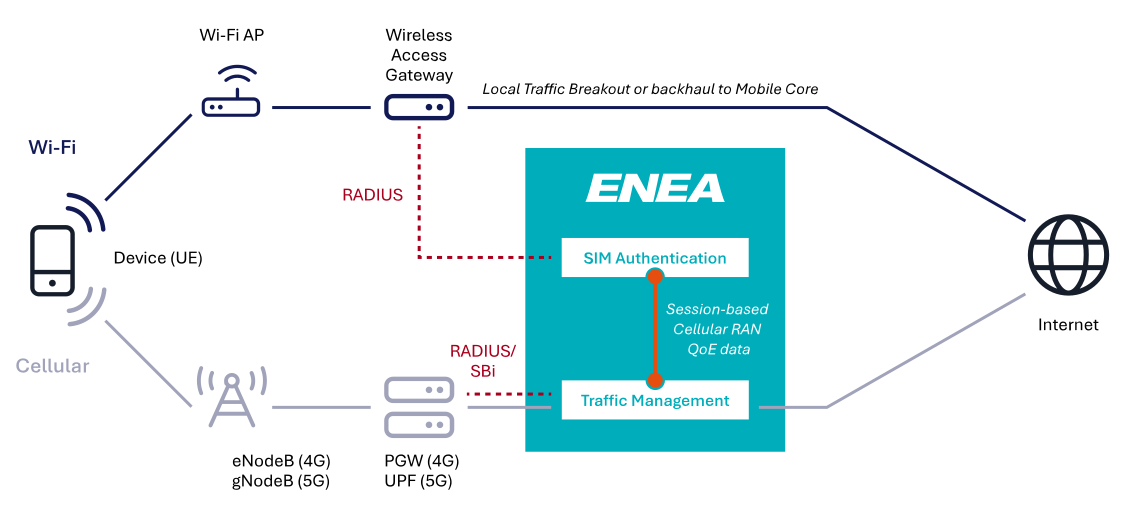
Enea brings a wealth of software and expertise, spanning both the 3GPP ecosystem and Carrier Wi-Fi. Our goal is to enhance the Wi-Fi offloading solution to improve on QoE-based decisions to always ensure that the user device selects the best available network across cellular and Wi-Fi networks, all while keeping the mobile operator firmly in control. While it’s still early in the process, we’re eager to share our ideas and would love to hear your feedback. Feel free to reach out to us through this form.
We believe the market needs a pragmatic solution. Here are some problems we aim to solve:
Short-term goal: Maintain UE (device) connectivity to the cellular network as long as it provides good performance, even when a preferred Wi-Fi offloading network is available.
Long-term goal: Ensure that a device always connects to the best-performing network—whether cellular or Wi-Fi—at any given moment.
In our companion white paper, Wi-Fi offloading – Why?, we suggest that mobile operators adopt selective offloading by deploying Wi-Fi only where it’s needed for indoor coverage and additional capacity. Now, taking this a step further, we propose making Wi-Fi offloading dynamic through a more intelligent network selection.
As discussed in the The Device is King insights post, the decision of connecting to a Wi-Fi network is in the hands of the device. A prerequisite for Intelligent Selective Offloading is to find a way to occasionally prevent the device from connecting without affecting its willingness to do so the next time. We have found a way to achieve this.
A first ambition is to prevent the device from automatically connecting to the MNO controlled Wi-Fi network if the quality and performance of the cellular session is already considered to be good. This means offloading will only occur when it clearly benefits the user, optimizing the overall network performance and maintaining a high quality of experience (QoE).
As a next step, we also aim to incorporate real-time quality data from the Wi-Fi network, allowing us to dynamically evaluate both cellular and Wi-Fi network performance. Using frequent Change of Authorization (CoA) requests, we can ensure that users are always connected to the network offering the best experience. Ideally, the Wi-Fi quality information would be provided during the authorization process and continuosly updated throughout the session.
Many Wi-Fi equipment vendors support signaling connection-related information using the RADIUS Connect-Info attribute (#77) defined in RFC2869. Some vendors have also extended this approach to include information about the Received Signal Strength Indication and Wi-Fi Channel Numbers. A challenge is that vendors have defined their own syntax for encoding the attribute’s quality information. There is ongoing work within the Wireless Broadband Alliance (WBA) to formalize the syntax for encoding the Wi-Fi quality information. If this is broadly implemented by Wi-Fi vendors, it will pave the way for a fully standardized way of providing Wi-Fi quality information to Wi-Fi service management systems such as the Enea Aptilo SMP. We are also able to extract performance KPI data via proprietary Wi-Fi vendor APIs if available.
Peak occupancy drives revenue. It can also expose weaknesses in your network.
When Wi-Fi performance drops during sold-out nights, the impact goes beyond speed tests. It affects the guest experience, online reviews, brand perception, and the likelihood of repeat stays.
When every room is booked, hundreds of devices compete for bandwidth. Guests stream video, join virtual meetings, scroll social media, and upload content at the same time.
If your infrastructure is not designed for those spikes, performance drops quickly. Slow speeds and buffering soon turn into front desk complaints.
Technology-driven amenities continue to shape guest satisfaction. A 2025 Hotel Dive report found that technology-related amenities influence how guests evaluate their stay. When connectivity supporting those amenities underperforms, the overall perception of the property can decline.
Bandwidth management during peak occupancy is about control, not just capacity.
Adding more internet speed alone will not solve the problem. You need intelligent distribution backed by proactive oversight.
Why Bandwidth Struggles at High Occupancy
Device counts per room continue to rise. Many travelers connect three to five devices during a stay. In fact, it’s not uncommon to find double that number of devices in a room. Smartphones, laptops, tablets, and streaming devices all draw from the same shared pool of bandwidth.
At full occupancy, even a well-designed network can become strained if traffic is unmanaged. A few heavy users streaming high-definition content can consume significant bandwidth. Multiply that across multiple rooms, and congestion builds fast.
The problem is rarely just due to the size of your internet pipe. The issue is how the network shares that bandwidth across users, networked devices, and applications.
What Works: Managed Networks with Traffic Shaping
A strong bandwidth strategy combines intelligent traffic control with expert network oversight. Hotels that rely on unmanaged or lightly supported systems often struggle during peak occupancy because no one is actively optimizing performance.
Managed Networks: Built for Hospitality Demands
A managed network goes beyond installing access points and increasing internet speed. It includes specialized design, continuous monitoring, performance tuning, and dedicated support.
With a hospitality-focused managed network:
Infrastructure is designed for high-density environments, not generic office settings.
Tools monitor performance in real time.
Teams can address network issues before they impact guests.
Internal IT teams are not burdened with constant troubleshooting.
This level of oversight is especially important at peak occupancy, when device counts surge and usage patterns change quickly.
Traffic shaping is a core component of smart bandwidth management. It prioritizes essential traffic and distributes bandwidth evenly across users and devices. This approach allows properties to:
Allocate bandwidth per room or per device.
Prioritize operational systems such as PMS, POS, and voice services.
Deprioritize large background downloads during peak demand.
Guests still enjoy strong performance for everyday use. At the same time, the network prevents a small number of users from overwhelming shared capacity.
This becomes especially important in hotels with meeting space. Conferences and group events can create sudden surges in demand. Without shaping policies, those spikes can affect the entire property.
Proactive Monitoring Prevents Potential Problems Before They Surface
Reactive troubleshooting is costly and disruptive. By the time guests report slow Wi-Fi, the experience has already suffered.
Managed Wi-Fi environments rely on proactive network monitoring tools. These tools track throughput, device density, latency, and performance trends across access points in real time. When the system detects strain, adjustments can happen automatically.
The right managed Wi-Fi solution can rebalance bandwidth allocations when needed. It can limit non-essential traffic, preventing individual users from overwhelming the network. Technical teams can receive alerts before congestion becomes visible to guests.
In this way, proactive network monitoring protects the guest experience by resolving issues before they turn into complaints. This approach protects satisfaction scores and reduces operational stress on staff.
Capacity Planning Still Matters
Traffic shaping is not a substitute for proper capacity planning.
Properties should size their internet service based on realistic peak conditions, not average occupancy. Planning should account for:
Total room count.
Expected devices per room.
Event and conference activity.
Growth in streaming and cloud-based applications.
If your hotel regularly reaches 90-100% occupancy, you should treat that level as standard operating conditions.
Modern Wi-Fi standards improve performance in high-density environments. However, successful performance at scale requires thoughtful design, segmentation, and continuous oversight.
WorldVue addresses this through our approach to network modernization and managed services. We focus on density planning and proactive monitoring to support peak demand scenarios.
Hardware alone cannot solve congestion. Without policy controls and continuous oversight, even advanced access points can become overloaded. Our team incorporates these aspects into your customized network design.
Signs Your Property Needs Stronger Bandwidth Management
If you notice performance issues primarily during high occupancy, distribution is likely the root cause.
Common warning signs include:
Wi-Fi complaints during sold-out weekends.
Slow speeds during conferences or group stays.
Overloaded access points in specific wings or floors.
Inconsistent performance between guest rooms.
These patterns suggest the need for smarter bandwidth control rather than simply more speed.
Why Managed Wi-Fi Protects the Guest Experience
Reliable connectivity is no longer a premium amenity. Guests view it as essential infrastructure, and it plays a central role in shaping the overall guest experience.
When performance remains stable at full occupancy:
Guest satisfaction improves.
Online reviews reflect satisfaction with consistency.
Staff spend less time troubleshooting.
Brand standards remain intact.
A managed network with traffic shaping and proactive monitoring ensures bandwidth is distributed fairly. It keeps guests online even at peak occupancy. Real-time adjustments prevent congestion before it affects the stay.
Peak nights should strengthen your reputation, not put it at risk.
WorldVue designs and supports hospitality networks built for high-density environments. Connect with our team to evaluate your current infrastructure and prepare for your next sold-out weekend with confidence. Outside the US, contact our international team.