Breaking News

GLOBAL Wi-Fi NEWS bulletin

In massive warehouses and factories around the world, fleets of autonomous guided vehicles (AGVs) and autonomous mobile robots (AMRs) are transforming the way goods move from shelf to shipment. Productivity can soar by 300%, but a single human step into the robot work zone can bring the entire operation to a halt. Every pause for safety costs time, money and momentum.

That’s the challenge Redpoint Positioning set out to solve—and they’re solving it with Qorvo Ultra-Wideband (UWB) technology.

The Challenge: Safety Without Shutdown

“For large-scale automated warehouses, efficiency and safety have always been in tension,” explains John Calcio, Vice President of Partnerships at Redpoint Positioning. “If a technician needs to enter an AGV zone, regulations require shutting down every robot in the area. It’s safe—but it’s also massively inefficient.”

High-volume warehouse environments may deploy thousands of fast-moving robots working side-by-side with human crews. Maintaining over 99% reliability in such a dynamic, high-density space is critical, particularly when functional safety standards like SIL2 (Safety Integrity Level 2) must be met.

“The easiest way to stay compliant is to stop everything,” Calcio says. “But that’s a brute-force solution. We knew we could do better with real-time, centimeter-level awareness.”

The Redpoint Solution: Real-Time Location, Real-Time Safety

Redpoint’s real-time location system (RTLS) integrates directly into AGVs and wearable safety gear. Each robot and worker is equipped with a UWB tag that continuously tracks its position with centimeter-level accuracy and millisecond latency. When a worker enters a restricted zone, nearby robots automatically slow or stop—without requiring a full fleet shutdown.

“Think of it as indoor GPS,” Calcio explains. “Our technology lets machines and people ‘see’ each other in real time, even in environments where Wi-Fi or vision systems struggle. It’s fast enough that a forklift can slow down or reroute before a collision is possible.”

The result is a SIL2-compliant wireless safety system that keeps both people and production moving.

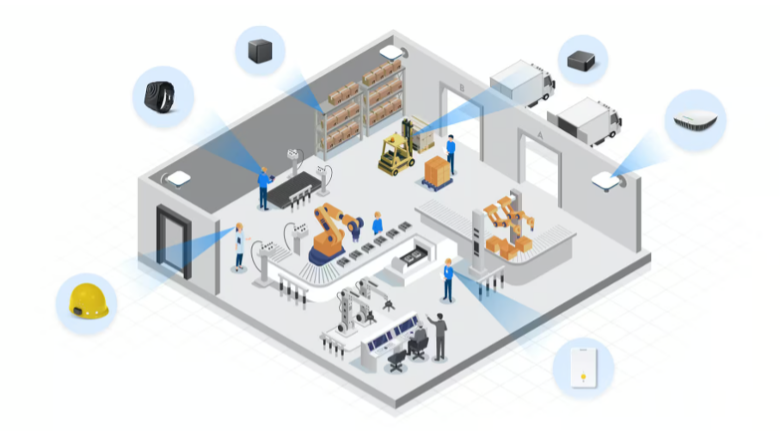
A graphic of a smart factory
 

High-volume warehouses rely on Redpoint’s RTLS to help people and robots see each other in real time, delivering over 99% reliability and meeting strict SIL2 functional safety requirements.
 

Why Qorvo UWB

At the heart of Redpoint’s RTLS is Qorvo’s UWB technology. With its low power consumption, precision ranging and robust performance in congested RF environments, Qorvo UWB provides the foundation Redpoint needed to meet industrial-scale performance and safety goals.

“Qorvo’s UWB delivers exactly what these environments demand—centimeter-level accuracy, millisecond response and exceptional reliability in complex, high-density deployments,” says Percy Yu, Qorvo Regional Marketing Manager in China. “Redpoint has been a long-term partner of Qorvo—over seven years now—and they’ve built on our UWB platform to create a proven, safety-certified RTLS solution.”

That partnership has already paid dividends: Redpoint’s system now powers tens of thousands of AGVs worldwide, improving operational efficiency by an average of 4–5%, with up to 15% increases in operator productivity and a 95% reduction in workplace accidents.

“These numbers may sound modest,” Calcio notes, “but when you’re talking about multi-million-square-foot facilities, a few percentage points translate to tens of millions of dollars in savings.”

Scaling Up—and Out

One of Redpoint’s key differentiators is scalability. Their RTLS solution is purpose-built for environments where hundreds or thousands of moving assets share the same wireless space.

“When you have that many nodes transmitting position data at once, congestion and interference can become real issues,” says Calcio. “We engineered custom wireless protocols to keep latency and reliability at SIL2 standards, even in massive deployments.”

And that scalability isn’t limited to warehouses. Redpoint’s technology is now being adopted in industries ranging from logistics to mining—and they’re not alone in this UWB-powered expansion.

Tsingoal: Widening the Field

In China, Tsingoal—the country’s largest RTLS solution provider—is leveraging Qorvo UWB across a diverse portfolio that includes robotics control, factory automation, mining, logistics, parking systems and smart city infrastructure. Tsingoal’s UWB-based systems provide real-time tracking of assets, vehicles and personnel, improving safety, workflow efficiency and spatial awareness across industrial and urban environments.

From intelligent manufacturing lines to airport logistics and even humanoid robotics demonstrations, Tsingoal’s implementations showcase the versatility of Qorvo’s UWB technology in complex, multi-layered operations.

Building the Future of Intelligent Automation

Both Redpoint and Tsingoal exemplify how Qorvo’s UWB technology is enabling a new generation of connected, intelligent and safer industrial ecosystems.

“What’s exciting,” says Yu, “is that we’re seeing global adoption. From North America to Asia, companies are realizing that UWB isn’t just about precision—it’s about trust, reliability and safety at scale.”

Calcio agrees. “This is where the market is going. The future of automation depends on real-time awareness—and that starts with UWB.”

Find out more about Qorvo UWB solutions here.

It often starts quietly.

A customer-facing AI assistant hesitates before responding.
An automated workflow pauses, then resumes.
A recommendation engine delivers inconsistent results—right one time, wrong the next.

Nothing is technically “down.”
No alerts are firing.
But confidence begins to slip.

Teams look first at the model. Then the data pipeline. Then cloud capacity. Everything appears healthy—until someone asks the uncomfortable question:

Could this be the network?

Across large, globally distributed enterprise networks, this pattern is emerging with increasing consistency. As organizations embed AI into core business workflows—customer engagement, software development, security operations, supply chain optimization—the network is being asked to support workloads it was never originally designed for.

Clearly understanding the limitations of your existing architecture can help you anticipate challenges before they impact operations, refine deployment strategies, and establish safeguards that prevent costly disruptions. This will enable smoother AI adoption and drive more reliable and successful technology outcomes for your organization. So, let’s examine AI workloads and where conventional networks struggle.

AI is not “just another application”

One of the most common missteps enterprises make is treating AI workloads like traditional applications.

They’re not.

AI workloads are highly sensitive to latency, intolerant of jitter, and dependent on continuous, real-time data movement across campuses, branches, clouds, and edges. They introduce new traffic patterns—east-west, north-south, machine-to-machine, agent-to-agent—that many existing network designs were never optimized to observe or assure.

In an AI-driven workflow:

  • A single user request can trigger multiple AI agents.
  • Those agents may access local GPUs, cloud models, and SaaS services simultaneously.
  • Decisions must happen in real time—often without retries or graceful degradation.

When performance degrades—even slightly—the impact isn’t just slower response times. It shows up as inconsistent outcomes, unreliable automation, and hesitation to trust AI-driven decisions.

Networks built for predictable applications don’t fail catastrophically here.
They struggle inconsistently—which is harder to diagnose and more damaging at scale.

Performance is the first stress point—and the cause isn’t obvious

Traditional network performance models assume:

  • Relatively static traffic paths
  • Predictable application behavior
  • Reactive troubleshooting when issues arise

AI breaks all three.

Traffic shifts dynamically based on where inference occurs. Application behavior changes in real time. Congestion doesn’t appear as a clean outage—it surfaces as erratic AI behavior that’s difficult to reproduce or explain.

Operations teams are left asking:

  • Is the model slow?
  • Is GPU capacity constrained?
  • Is the cloud provider at fault?
  • Or is the network introducing micro-latency we can’t see?

Many existing monitoring tools struggle here, but they report utilization, not experience. Health, not intent. Metrics without the context needed to explain why AI outcomes fluctuate.

The lack of insight is inevitably paired with the following result:
AI workloads run—but rarely deliver consistent performance as they scale.

Why AI turns assurance into a requirement

Before AI, network teams relied on assurance to gain end-to-end visibility and pinpoint network issues impacting user experience.

In an AI-driven world, assurance becomes foundational, providing dynamic, continuous monitoring and proactive management to keep pace with the complexity and speed of AI workloads.

AI systems depend on continuous confidence that:

  • Data is flowing correctly
  • Policies are enforced consistently
  • Performance objectives are met end-to-end, not just at isolated points

Networks designed for manual intervention rely heavily on after-the-fact investigation. Humans piece together logs, dashboards, and alerts across multiple tools and teams.

That approach doesn’t hold when AI systems operate continuously and autonomously.

AI doesn’t wait for tickets.
AI doesn’t pause for triage.
When visibility and trust degrade, AI systems don’t stop—they make poorer decisions.

Without assurance integrated into the network itself, organizations often slow AI adoption—not because the use cases lack value, but because outcomes become unpredictable.

Security was historically designed to protect human-driven applications moving at human speed.

AI operates at machine speed—and it exposes every point of friction in between.

Many traditional security approaches rely on:

  • Traffic backhaul
  • Centralized inspection
  • Static enforcement points

That friction was manageable for human-driven applications. For AI workloads operating continuously and autonomously, it becomes a limiting factor.

Every additional hop adds latency.
Every policy mismatch introduces unpredictability.
Every blind spot increases risk.

When security isn’t integrated directly into the network fabric, teams are forced into trade-offs they shouldn’t have to make—between protecting the environment and keeping AI responsive.

Architecture is where the pressure accumulates

Performance, assurance, and security challenges are symptoms. The underlying constraint is architectural.

Most enterprise networks evolved as collections of domains:

  • Campus
  • Branch
  • WAN
  • Cloud
  • Security

Each optimized independently. Each managed with its own tools, policies, and operational workflows.

AI workflows span all of them—simultaneously.

They require shared context, coordinated policy enforcement, and the ability to reason across domains in real time. When architecture remains fragmented:

  • Visibility becomes partial
  • Automation becomes fragile
  • Policy enforcement becomes inconsistent

This is why many AI initiatives stall after early success. The models work. The pilots prove value. But scaling exposes friction—not in AI itself, but in the network layers beneath it.

The turning point: recognizing when your network is holding back AI progress

As AI moves from experimentation to everyday operations, a pattern is becoming clear.

AI doesn’t struggle because models lack sophistication. It struggles because the networks they run on were designed for a different operating model.

Networks optimized for predictable, human-driven applications need to support continuous, autonomous, and outcome-driven workflows.

For many organizations, this realization doesn’t arrive as a dramatic failure. It surfaces through inconsistency, operational friction, or difficulty scaling what initially worked. Over time, these signals accumulate—prompting a broader rethinking of how the network fits into the AI roadmap.

Your AI roadmap can’t wait for pressure to build. In the years ahead, as AI becomes embedded into every workflow and decision loop, networks will increasingly be judged not just on availability, but on their ability to assure outcomes at machine speed. The time for recognition and action is now.

Because in the AI era, the network isn’t just infrastructure.

It’s part of how intelligence moves, reasons, and delivers value.

WASHINGTON, D.C. March 17, 2026: Today DNSFilter announced the launch of CyberSight, a new behavioral analytics and intelligence capability within the DNSFilter platform designed to move beyond DNS filtering and deliver full visibility into user activity across devices, applications, and web traffic.

With organizations now using an average of more than 100 SaaS applications, security teams lack visibility into who is using what applications and what threats are impacting their networks. Security teams and managed service providers (MSPs) face a growing challenge: traditional DNS filtering only reveals what was blocked, leaving critical blind spots around what users actually do online. Without visibility into real user behavior, organizations struggle to investigate incidents, identify risky SaaS usage, and detect emerging threats.

“DNS filtering has always been excellent at stopping threats, but security teams also need visibility into the activity that never gets blocked,” said Ken Carnesi, Chief Executive Officer at DNSFilter. “CyberSight delivers that missing context, giving organizations the ability to understand user behavior across the web, uncover shadow IT, and respond to incidents significantly faster. It’s a powerful new layer of intelligence within the DNSFilter platform.”

Architecturally integrated within the platform’s Pro and Enterprise tiers, CyberSight is a purpose-built user behavior analytics solution. By delivering clear, digestible insights into full user activity including what happened, when it occurred, and how long interactions lasted CyberSight enables organizations to move beyond reactive blocking and proactively reduce SaaS risk.

“CyberSight provides us with a much-needed lens into user data and behavioral patterns throughout the workday,” said Thomas Connolly, IT Manager at Crescent Crown. “By pairing these insights with DNSFilter’s Protective DNS, we’ve created a layered defense that makes it easy to spot and mitigate risky behaviors. This combination has fundamentally shifted our security posture, allowing us to understand the context behind user actions and respond significantly faster.”

Unlike traditional DNS filtering solutions that only log blocked requests, CyberSight captures activity across clicks, applications and full URLs, including IP addresses typed directly into browsers. The solution separates meaningful user actions from background system noise, providing security teams with clear behavioral timelines and actionable insights.

With CyberSight, organizations can:

Accelerate incident response
Detailed event timelines and granular logs help security teams quickly investigate suspicious activity and understand user behavior leading up to an incident.

Detect shadow IT and risky SaaS usage
CyberSight reveals previously hidden application usage, helping organizations identify unauthorized services and enforce security policies.

Optimize SaaS spending
Visibility into application activity helps IT teams identify redundant tools, eliminate unused licenses and better manage software investments.

Early adopters are already seeing the value of this additional visibility. CyberSight is currently available for Windows devices, with macOS support planned for the second half of 2026. Learn more about DNSFilter’s CyberSight offering here.

DNSFilter will be exhibiting at this year’s RSA Conference in San Francisco. Visit https://explore.dnsfilter.com/rsac to book a meeting.

In the embedded systems world, embedUR has spent the last twenty years in the trenches. We’ve built the wireless infrastructure that runs enterprise access points and the residential gateways sitting in millions of homes. In that time, we’ve learned one thing: regulatory shifts aren’t just legal problems. They are engineering problems.

The EU Cyber Resilience Act (CRA) is one of the biggest shifts we’ve seen in a decade. It isn’t just a footnote in a policy briefing; it’s a fundamental change in how we need to or should design, build, and most importantly, sustain products. At embedUR, we’ve guided teams through every Wi-Fi evolution from the early days of 802.11n to the complexities of Wi-Fi 6E and the new world of tinyML at the edge.

From where we stand, the CRA shouldn’t be a headache. It should be the catalyst that finally forces the industry to build smarter, more resilient systems.

But let’s be honest: for an engineering lead trying to hit a product launch date while staring down resource gaps, the CRA looks like a mountain of paperwork. To climb it, you have to bridge the gap between using an open-source RTOS like Zephyr and meeting the rigorous demands of European law.

The Clock is Ticking: Understanding the CRA Milestones

We are currently in early 2026. The grace period is evaporating. The CRA was formally adopted back in late 2024, and the first major hammer will drop on September 11, 2026. That is the date when mandatory vulnerability reporting goes live.

If your device has a digital element and you sell it in the EU, you have 24 hours to report an exploited vulnerability. Not 24 hours after you fix it—24 hours after you find it.

By December 2027, the remaining requirements kick in: security-by-design as a legal mandate, machine-readable Software Bills of Materials (SBOMs), and a 5-year support window. If you miss these marks, the fines are eye-watering: up to €15 million or 2.5% of your global turnover. For any U.S. company exporting to Europe, which is a massive chunk of the global market, this is now the cost of doing business.

Why Zephyr is our Go-To (And Why It’s Not a Silver Bullet)

We’ve been working with Zephyr RTOS since its early releases in 2016. It’s under the Linux Foundation, it’s transparent, and it’s modular. On paper, it’s the perfect answer to the CRA.

Zephyr’s PSIRT (Product Security Incident Response Team) is excellent. They handle CVEs (Common Vulnerabilities and Exposures) with a level of transparency that mirrors the Linux kernel. When a bug is found in the networking stack, the fix is public and documented.

Furthermore, the Long-Term Support (LTS) releases, like the 3.7 LTS, offer five years of security maintenance. That perfectly maps to the CRA’s support requirements.

Zephyr also gives us the “West” tool. Using west spdx, we can generate an SBOM automatically during the build process. If you’ve ever tried to manually track every library and sub-component in a proprietary RTOS, you know that automated SBOM generation is a godsend. It takes the drudgery out of compliance.

However, this is the local engineer’s truth: upstream Zephyr is not the same thing as a shipping product.

The Reality of “The Fork” and Maintenance Debt

Here is where the theory hits the floor. In our work sustaining Wi-Fi products for major global brands, where we manage fleets of over 10 million units, we’ve seen divergence as a major problem.

An engineer starts with a clean Zephyr LTS branch. Then, the silicon vendor provides a HAL (Hardware Abstraction Layer) that isn’t quite right for the specific power constraints of a Cortex-M4 gateway. So, the engineer tweaks the kernel. Then the marketing team requests a specific feature that requires a custom driver. Before you know it, you’ve forked the repo.

When a security patch comes down from the Zephyr upstream six months later, it doesn’t fit. It breaks your custom power management. It conflicts with your Wi-Fi driver. Now, compliance means a three-week rebase and a full regression test.

If you have a multi-SKU product line, maybe some devices use ARM and others use RISC-V, your vulnerability tracking turns into a nightmare. There are cases where a field-reported bug traced back to an unpatched erratum in a silicon vendor’s HAL. Because the team had drifted too far from the clean upstream code, they couldn’t pull the fix. 

This kind of delay is exactly what the CRA will penalize.

The tinyML Constraint

The complexity doubles when you add tinyML. We’re seeing more industrial gear using TensorFlow Lite Micro on Zephyr to do predictive maintenance at the edge. These models are ultra-constrained. Every byte of RAM matters.

When you’re fighting for every kilobyte to make an AI model work on an IoT sensor, security overhead feels like an enemy. But under the CRA, that edge intelligence is part of the product’s digital footprint.

If your ML inference engine has a buffer overflow vulnerability, you are liable. Shoehorning these models into Zephyr while maintaining a secure, updatable bootloader (like MCUboot) requires a level of memory management that most teams aren’t prepared for.

Making Compliance a Competitive Edge

So, how do we stop compliance from being a burden and turn it into a reason why customers choose you over a competitor? You have to treat security as a feature, not a chore.

1. Stop Wild Forking

The biggest mistake we see is that engineers treat Zephyr like a one-off download. You have to stay aligned with the LTS branches. We recommend a “cherry-pick” strategy. You pin your project to a stable LTS version and build a rigorous process for pulling in only the security patches you need. This keeps your custom “secret sauce” separate from the core RTOS plumbing.

2. Automate the Paperwork

If an auditor asks for your SBOM, you shouldn’t have to spend a week in Excel. We help our clients integrate SBOM tools directly into their CI/CD pipelines (like GitLab or GitHub Actions). 

Every time a developer pushes code, the system should automatically run a vulnerability scan (using tools like grype or trivy) and generate a new SPDX file. If a vulnerability is found, the build should fail before the code ever reaches a device.

3. Standardize via Device Tree Overlays

To handle the multi-SKU headache, we use Zephyr Device Tree overlays. Instead of having different codebases for different hardware, you keep one core application and use overlays to describe the hardware differences. This minimizes code drift and ensures that a security patch for your BLE stack works across every device in your catalog.

4. Hardware-in-the-Loop (HiL) Testing

You can’t trust a simulation for CRA compliance. You need automated test rigs where real hardware is subjected to simulated exploits. At embedUR, we’ve built environments where we test everything from LTE stack vulnerabilities to timing glitches in crypto libraries. 

This is how you catch a DoS (Denial of Service) bug before it gets found in the field and  becomes a mandatory 24-hour report to the EU.

The embedUR Difference: Real Engineers, Real Solutions

This is what we do. We aren’t a compliance consultancy that just hands you a PowerPoint. We are an engineering firm with over 400 expert embedded systems engineers who live in the kernel. Our architects have upstreamed code to Zephyr’s networking modules. We also know the silicon vendors—NXP, Infineon, Nordic, and Silicon Labs—and where their HALs usually break.

We have the sustainment framework ready to go. We handle the kernel upgrades, the CVE monitoring, and the SBOM maintenance so that your senior engineers can focus on the stuff that actually makes you money, like your next-gen predictive maintenance algorithms or your cloud-to-edge analytics.

The Bottom Line

The September 2026 deadline is closer than it looks on the calendar. In the world of embedded systems, eighteen months is one design cycle. If you start thinking about the CRA during the testing phase, you’ve already lost.

Is your Zephyr setup a solid foundation, or is it a house of cards? If you’re building for the EU market and worried about staying compliant without killing your product roadmap, let’s talk.

We can do a technical review of your current stack and show you exactly where the gaps are. We’ve been through the Wi-Fi wars and the IoT explosion; we can get you through this, too.

Let’s get your engineering team back to innovating. Schedule a Technical Review: Talk directly with our lead architects about your current Zephyr stack and CRA gaps.

Motors power billions of devices across homes, industry, agriculture, and consumer products. For decades, motor architectures were optimized around one primary objective: control performance. Connectivity, analytics, and intelligence were layered on only when necessary.

That model is reaching its limits because today’s motor-driven products are expected to connect, adapt, update securely, and respond intelligently to changing conditions. They’re no longer isolated control nodes, but intelligent endpoints within broader digital systems. This evolution requires more than better control algorithms. It requires integrated wireless, compute, and machine learning (ML) at the core of the motion system.

Silicon Labs’ MG24-based connected motor solution represents this architectural shift.

Why Traditional Motor System Architectures No Longer Scale

Historically, connected motor systems were assembled from multiple components:

  • A dedicated motor-control MCU
  • A separate wireless SoC or module
  • Optional security elements
  • Additional processors for sensing or analytics

While functional, this fragmented model increases bill of materials (BOM) cost, PCB footprint, firmware complexity, and system latency. More importantly, it divides processing responsibility across devices, making feature expansion more difficult over time.

Adding wireless commissioning, over-the-air (OTA) updates, predictive diagnostics, or anomaly detection often requires redesigning system architecture rather than extending it. At the same time, product expectations have expanded. Modern motor-driven devices must be:

  • Wirelessly connected for configuration and diagnostics
  • Secure and field-updatable
  • Capable of local analysis and intelligent response
  • Compact and energy-efficient
  • Cost-optimized for scale

Meeting all these requirements with a multi-chip approach is increasingly inefficient.

MG24: A Wireless Compute Platform for Connected Motion

MG24 Multiprotocol Wireless SoC is designed for mid-range, connected motor systems where integration, efficiency, and intelligence drive differentiation.

MG24 consolidates the following all within a single SoC:

  • Real-time BLDC Field-Oriented Control (FOC)
  • Bluetooth Low Energy (LE) connectivity
  • Hardware-based security with Silicon Labs Secure Vault
  • DSP capability and machine learning acceleration
  • Event-driven hardware subsystems such as PRS and LESENSE

This integration enables a unified architecture where motion control, wireless communication, and intelligent processing operate together without competing for system resources.

Deterministic Motion Meets Wireless Responsiveness

Running real-time FOC alongside an active Bluetooth stack traditionally required separate processors to consistently meet tight control loop deadlines. The MG24 demonstrates that this separation is no longer necessary by maintaining precise motor control while sustaining wireless communication and application-level processing.

Designers can build connected motion systems without worrying that protocol activity will disrupt time-critical control loops. This balance is fundamental to next-generation wireless compute architectures for motion.

Intelligence at the Edge

As motion systems become connected, they must also become aware. With integrated DSP capability and the Matrix Vector Processor (MVP) hardware accelerator, MG24 enables local data processing for:

  • Vibration analysis
  • Anomaly detection
  • Predictive maintenance
  • Performance optimization

By processing data at the edge, systems can respond immediately to mechanical changes, reduce cloud bandwidth, and improve overall efficiency. Motor-driven products evolve from executing commands to making informed decisions.

Hardware-Level Event Handling for Efficiency and Stability

The Peripheral Reflex System (PRS) and LESENSE allow hardware-triggered responses to motor and sensor events without CPU intervention. This event-driven design reduces latency, improves stability, and optimizes power consumption. It also frees processing headroom for higher-level functionality, strengthening the overall system architecture.Security as a System Foundation

Connected devices must be trusted over their lifetime. MG24 integrates Secure Vault™ with PSA Level 3 certification, ensuring secure boot, protected key storage, device identity, and encrypted OTA updates. This security foundation enables large-scale deployment of connected motor systems with confidence.Demonstration: Wireless Compute Controlling Motion in Real Time

The architectural shift becomes clear in this demonstration.

In this showcase, a BLDC motor is controlled entirely by a single MG24 device. The SoC executes real-time FOC while maintaining active wireless communication.

During operation, external mechanical interference is introduced. The system detects the anomaly immediately and safely stops the motor. Once normal conditions return, it resumes operation automatically. A connected mobile device provides live interaction and visibility into system behavior throughout the process.

What traditionally required separate controllers for motor control, connectivity, and supervisory logic is consolidated into one integrated wireless compute platform. The demonstration highlights how architectural integration improves responsiveness, safety, and system simplicity simultaneously.

Security as a System Foundation

Connected devices must be trusted over their lifetime. MG24 integrates Secure Vault™ with PSA Level 3 certification, ensuring secure boot, protected key storage, device identity, and encrypted OTA updates. This security foundation enables large-scale deployment of connected motor systems with confidence.

Demonstration: Wireless Compute Controlling Motion in Real Time

The architectural shift becomes clear in this demonstration.

In this showcase, a BLDC motor is controlled entirely by a single MG24 device. The SoC executes real-time FOC while maintaining active wireless communication.

During operation, external mechanical interference is introduced. The system detects the anomaly immediately and safely stops the motor. Once normal conditions return, it resumes operation automatically. A connected mobile device provides live interaction and visibility into system behavior throughout the process.

What traditionally required separate controllers for motor control, connectivity, and supervisory logic is consolidated into one integrated wireless compute platform. The demonstration highlights how architectural integration improves responsiveness, safety, and system simplicity simultaneously.

Enabling the Next Generation of Connected Motion

This approach unlocks new possibilities:

  • Smart shades that detect increased resistance and prevent wear
  • Fluid-handling pumps that identify cavitation and adjust proactively
  • Power tools that monitor vibration signatures for maintenance alerts
  • Actuators that receive firmware updates wirelessly to improve performance

In these applications, differentiation comes from integration and intelligence, not just torque precision.

Where This Architecture Delivers Immediate Value

The impact is strongest in mid-range, high-volume markets where size, efficiency, and connectivity are essential:

Smart Home and Building Automation

Curtains, blinds, vents, compact robotics

Light Industrial and IoT Automation

Actuators, valves, small conveyors

Connected Tools and Appliances

White goods, power tools

Smart Agriculture

Pumps, irrigation systems, feeders

In each category, consolidating motion, connectivity, and intelligent processing into a single device reduces complexity while expanding capability.

A Platform Approach to Motor Systems

The future of motor systems will not be defined solely by faster control loops. It will be defined by integrated platforms. By combining motion control, wireless connectivity, security, and edge intelligence within one architecture, manufacturers can:

  • Accelerate development cycles
  • Simplify hardware design
  • Enable fleet-wide OTA updates
  • Introduce predictive maintenance and service-based business models

MG24 represents this evolution toward wireless compute-driven motion systems.

One Device. Unified Architecture. Scalable Innovation.

Every motor that benefits from connectivity will ultimately require more than a standalone controller. MG24 demonstrates how a single secure, wireless-enabled platform can replace fragmented multi-chip designs and enable smarter, more adaptable products. As connected systems continue to evolve, wireless compute will sit at the center of motion, enabling a new generation of intelligent, integrated devices.

Esports is bigger than the NBA, NFL, MLB, and soccer combined

Joe Way from HETMA (Higher Education Technology Managers Alliance, 10,000+ members, $25B+ annual spend) delivers a reality check: esports is bigger than the NBA, NFL, MLB, and soccer combined. And if your university doesn’t have an esports program, you’re behind. In this episode of NETGEAR Now, we talk about the unique challenges of higher ed at scale; buying in hundreds, across 5,400+ US colleges, with budget cuts forcing “do more with less.”

Joe explains why AV departments no longer exist (it’s all IT now), how NETGEAR switches earned street cred with campus network teams, and why E-sports networks can’t go down when sponsors and revenue are on the line.

VIDEO


Anaheim, California, (March 11, 2026) — Zyxel Networks, a leading provider of secure, AI- and cloud-powered networking solutions for businesses and homes, has once again been recognized by CRN®, a brand of The Channel Company, with inclusion in the prestigious 2026 CRN Partner Program Guide. This continued recognition underscores Zyxel’s ongoing commitment to delivering a high-value, growth-focused partner program designed to help solution providers succeed in today’s competitive IT landscape.

The annual CRN Partner Program Guide serves as a trusted resource for solution providers evaluating vendor programs that align with their strategic goals and drive long-term profitability. As channel partners assess which IT vendors, service providers, and distributors to align with, the strength of a vendor’s partner program plays a critical role in shaping that decision.

Zyxel’s partner program stands out for its comprehensive support structure, including competitive financial incentives, robust sales and marketing enablement, training and certification programs, dedicated technical support, and ongoing communication designed to empower partners at every stage of growth.

For the 2026 Partner Program Guide, CRN’s research team evaluated vendors based on program requirements and overall partner value, including training and education resources, pre- and post-sales support, marketing programs, technical assistance, and partner communications. Zyxel’s continued inclusion highlights the strength, consistency, and partner-first focus of its channel strategy.

Zyxel Authorized Partner Program rewards VARs, MSPs and other solution providers with enhanced margin, and technical expertise needed to successfully deliver scalable enterprise-class networking solutions. As an added incentive, newly authorized partners automatically receive Silver status and they have 6 months to achieve the milestones required to maintain Silver or graduate to Gold. Through the Zyxel Education Center, partners gain access to training on networking fundamentals and product best practices, along with opportunities to earn certifications including Zyxel Certified Sales Associate, Zyxel Certified Network Associate, and Zyxel Certified Network Engineer.

“We thank our strong base of partners for their loyalty, and we look forward to welcoming new partners onboard in 2026,” said David Soares, Executive Vice President, Channel Sales and Marketing North America. “Our partner program has proven itself over the years by providing technical resources and enhanced margin. Our program combined with our comprehensive networking product stack and Nebula cloud network management, creates a foundation to help our partners flourish.”

“Being included in the 2026 CRN Partner Program Guide reflects how today’s technology vendors are rethinking their partner programs to keep pace with a rapidly evolving channel,” said Jennifer Follett, VP, U.S. Content, Executive Editor, CRN, at The Channel Company. “As solution providers navigate new customer demands, business models and technologies, this annual guide serves as a critical resource for identifying vendors that are investing in programs designed to drive long-term growth and shared success. The guide delivers meaningful insight into what sets each partner program apart, helping solution providers make confident, strategic partnership decisions.”

About Zyxel Networks:

Zyxel Networks is a technology provider with over 30 years of experience, specializing in delivering solutions for small to medium-sized businesses and the enterprise-edge in partnership with VARs, MSPs and System Integrators. We enable network professionals to connect and protect organizations with greater ease by bringing together intuitive, scalable and secure cloud management with a complete portfolio of network devices.

What is a Wi-Fi Heatmap?

To most users, Wi-Fi is invisible magic. To network engineers, that invisibility is a constant challenge. You can’t fix what you can’t see. When users complain that “the Wi-Fi sucks” in the conference room, staring at the access point (AP) won’t tell you if it’s a coverage gap, a channel conflict, or just the microwave in the breakroom nuking the 2.4GHz band.

This is where Wi-Fi heatmaps come in. They turn invisible RF chaos into actionable data you can analyze and fix. Think of it like an MRI for your network – stripping away the guesswork and showing you exactly where your signal is strong, where it’s weak, and where interference is impacting performance.

In this guide, we’ll break down exactly what a heatmap is, why you need one, and how to use a professional Wi-Fi analyzer to create one that provides genuine insight rather than just pretty colors.

What is a Wi-Fi heatmap?

A Wi-Fi heatmap – often called a Wi-Fi coverage map or visualization – is a visual representation of wireless data overlaid on a floor plan of your site. It uses a color-coded spectrum – usually blue for “good” (strong signal) and red for “bad” (weak signal) – to show how radio frequencies (RF) behave in the real world.

However, effective heatmapping requires understanding the two main categories:

  1. Design-Phase (Predictive) Heatmaps: This is the “theoretical” map used for Wi-Fi planning. You use Wi-Fi heatmap software like AirMagnet® Survey PRO to draw walls, place virtual APs, and simulate how the signal should propagate. It’s the blueprint you create before drilling a single hole.
  2. Validation (Real-World) Heatmaps: This is the “reality check.” You use a tool like the EtherScope® nXG, AirCheck® G3 or CyberScope®  to walk the site and measure the actual RF environment. Concrete walls often contain metal rebar you didn’t account for, and that “open space” might now be filled with metal filing cabinets.

Why use a Wi-Fi heatmap?

Simply placing APs where they look good isn’t a strategy. Beyond saving you from troubleshooting headaches, heatmaps offer serious business ROI.

  • Stop the Blame Game: When the network is slow, the network engineer is usually the first suspect. A heatmap gives you hard data to prove the network is performing correctly (and that the issue might be the client device).
  • Visualize the Invisible: Instantly spot dead zones, bleed-through from neighboring floors, and channel overlap.
  • Smarter Planning: Instead of the “spray and pray” method of adding more APs (which often worsens interference), you can place them exactly where they’re needed.
  • Save Time & Money: NetAlly users report cutting troubleshooting time by up to 60% just by having the right visibility. That’s less time chasing ghosts and more time working on strategic projects.

Types of Wi-Fi heatmaps

Most people stop at “Signal Strength,” but that’s just scratching the surface. If you’re using NetAlly’s Link-Live™ collaboration platform, you have access to 14 different visualizations that tell the whole story. Here are the heavy hitters:

  • Signal Strength: The classic view. This Wi-Fi signal strength map shows RSSI (Received Signal Strength Indicator) in dBm.
  • Signal-to-Noise Ratio (SNR): The truth-teller. A strong signal means nothing if the noise floor is high. This map shows the quality of the connection.
  • Noise: Visualizes ambient RF energy that could drown out your Wi-Fi signals.
  • Co-Channel Interference: Shows where APs are stepping on each other’s toes by talking on the same channel.
  • Adjacent Channel Interference (ACI): Highlights interference from APs on overlapping channels (a common killer in the 2.4GHz band).
  • AP Coverage: Visualizes redundancy. If an AP dies, who picks up the slack?
  • Min Basic Rate: Shows the minimum speed required for management traffic.
  • Beacon Overhead: Is your airtime being hogged by APs just announcing they exist?
  • Max TX/RX Rates: The theoretical speed limit of your Wi-Fi network.
  • Max TX/RX MCS: Visualizes the complexity of the data coding scheme (higher is better/faster).
  • QBSS Utilization: Provides visibility into how busy the channels being used are (low is better/faster).
  • QBSS Station Count: Shows how many client devices are connected to your network.
  • First AP Coverage: Ensures your primary coverage meets minimum requirements (e.g., -65 dBm).
  • Secondary AP Coverage: Verifies you have backup coverage for seamless roaming.

Pro Tip:

Don’t ignore the “Noise” heatmap. Everyone obsesses over signal strength, but noise is the silent killer of Wi-Fi performance. You can have a screaming loud signal (-40 dBm), but if your noise floor is also high due to non-Wi-Fi interference (like Bluetooth, microwaves, or security cameras), your SNR will tank, and your users will suffer. Always validate SNR alongside Signal Strength.

How to create a Wi-Fi heatmap

Creating a heatmap isn’t just walking around aimlessly. To get data you can trust, you need a process. Here’s how we do it with AirMapper™ Site Survey:

  1. Prep the Floor Plan: Get a clean image of the map.
  2. Upload it: Create a new site survey project in Link-Live and upload the map.
  3. Crop: Remove areas of the floor plan that you won’t be surveying by cropping the image.
  4. Calibrate: This is crucial. Draw a line on the map (like a wall) and tell the tool “this is 10 feet long.” If you skip this, your site survey data will be inaccurate.
  5. Push it:  Send the map to your AirCheck G3,  EtherScope nXG or CyberScope®.
  6. Choose your Path:
    • AutoSampling: You walk, the tool records. Good for large open spaces.
    • Click-to-Sample: You stop, tap the screen, and it records. Better for those new to the world of Wi-Fi site surveys, or spot checking.
  7. Walk the Walk: Move through the site. Don’t just stick to the main hallways – go where the users sit. Go into the corners.
  8. Upload & Analyze: Push the data to Link-Live. This is where you can toggle between those 14 different heatmap types we mentioned earlier.

How to read and interpret a Wi-Fi heatmap

Once you have your data, look for specific patterns that indicate trouble.

Look for the “Swiss Cheese” Effect: On your AP Coverage map, look for holes. If you see yellow or orange spots in areas where people actually work, you’ve found your dead zones.

Check for “Traffic Jams”: Pull up the Co-Channel Interference map. If you see bright orange areas, it means too many APs are shouting over each other on the same channel. This causes contention, meaning devices have to wait their turn to speak, slowing everything down.

Analyze Data Rates: Compare your Signal Strength map with your Max TX/RX Rates map. If you have strong signal (green) but low data rates (orange), you might be dealing with legacy devices dragging the network down, or hidden interference forcing devices to shift to slower, more robust modulation schemes.

Common Wi-Fi problems revealed by heatmaps

Heatmaps are excellent at exposing the gremlins hiding in your RF environment:

  • Dead Zones: Usually caused by physical obstructions you didn’t account for, like a new concrete elevator shaft or metal-lined breakroom walls.
  • Roaming Issues: If your Secondary AP Coverage map is blank, your users will drop calls when they walk down the hall because there’s no backup AP to hand off to.
  • Bleed-Through: Seeing a strong signal from the floor above? That’s not a bonus; that’s interference. It ruins your channel planning.
  • The “Sticky Client” Problem: Sometimes a heatmap shows you have too much power. If an AP is blasting at full volume, devices will cling to it even when they’re far away, rather than roaming to a closer AP that provides better performance.

Pro Tip:

Don’t have time to analyze heatmap data, or need help identifying the root cause of Wi-Fi network performance problems? The InSites engine in Link-Live simplifies the process by automatically comparing your site survey data against a set of customizable thresholds and giving you a quick pass or fail.

Choosing the right Wi-Fi heatmap tool

This really comes down to where you are in the project lifecycle. When selecting a Wi-Fi heatmap tool, consider your specific needs:

For Planning & Design:
You need AirMagnet® Survey PRO. This is the industry standard for predictive modeling. You can simulate walls, materials, and AP placement to get a “Bill of Materials” before you even buy the hardware. It’s about getting it right the first time.

For Validation & Troubleshooting:
You need a robust Wi-Fi site survey solution like AirMapper™ Site Survey. This runs on our handheld tools. It’s for when the network is live and you need to see what’s actually happening. Unlike a basic Wi-Fi heat mapping tool that might run on a laptop or phone, dedicated hardware ensures you measure what the network really looks like, not just what your laptop antenna sees.

Wi-Fi heatmap best practices

To ensure your data is reliable, follow these rules:

  1. Calibrate, Calibrate, Calibrate: If your scale is wrong, your heatmap is fiction.
  2. Survey All Bands: 2.4GHz and 5GHz (and 6GHz!) behave very differently. 2.4GHz punches through walls; 5GHz bounces off them. Surveying only one band gives you half the picture.
  3. Mind Your Body: Your body is a bag of salt water that blocks RF signals. Don’t hunch over the tester. Hold it up and away from you.
  4. Mimic the User: Don’t hold the tester near the ceiling if your users are sitting at desks. Survey at the height where the actual devices will be used.
  5. More is Better: Collect as many site survey data points as possible. The more data you have, the more accurate and colorful your heatmaps will be.

Conclusion

A Wi-Fi heatmap isn’t just a pretty chart to put in a report; it’s the difference between guessing and knowing. It turns the invisible physics of RF into actionable data that saves you time, money, and frustration. Whether you’re planning a new deployment or hunting down a ghost in the machine, you need the right visibility.

Ready to stop guessing? Check out our professional tools that make mapping simple:

The MediaTek Genio Pro 5100 brings flagship-class AI and computing performance to highly demanding industrial IoT applications such as robotics, commercial drones, machine vision systems, transportation, edge AI systems , and other advanced use cases.The Genio Pro 5100 supports powerful on-device generative AI, achieving token generation rates of up to 23 tokens per second for models with up to 7 billion parameters. The platform is designed to handle demanding real-time workloads where responsiveness, reliability, security, and data privacy at the edge are essential.

Built on an advanced 3nm process, the Genio Pro 5100 integrates an all-big-core octa-core CPU based on the latest Arm v9.2 architecture, delivering up to 260K DMIPS. It also features an Arm Immortalis-G925 GPU that provides up to 3.1 TFLOPS of compute performance, along with an 8th-generation MediaTek NPU offering more than 50 TOPS of system-level AI acceleration.

The platform supports up to 16 camera streams, up to three 4K displays, and 8K video encoding and decoding, making it well suited for sensor-rich and multimedia-intensive systems. With LPDDR5x memory support, extensive high-speed I/O, and an industrial temperature range of -40°C to +105°C, the Genio Pro 5100 is ready for robust commercial and industrial deployments.

Outdoor recreation venues have two built-in realities:

  • Your inventory is time-based (unused tee times/court hours/field rentals can’t be sold tomorrow)
  • Guests are on-site with phones in hand — but many visits still end with no permission-based way to follow up

GoZone Smart Wi‑Fi helps you turn on-site traffic into a measurable growth system:

  • Capture opt-in contacts from players and visitors (email + optional SMS)
  • Run timely promotions to fill unused inventory
  • Promote high-margin programs (memberships, lessons, leagues, tournaments, events)
  • Understand traffic patterns so staffing and marketing are less guesswork

The core problem: guests show up once, then you lose them

Many venues rely on booking engines, social posts, and paid ads to drive traffic. But if you’re not consistently capturing opt-ins on-site, you’re leaving repeat revenue on the table.

Common symptoms:

  • Slow list growth (mostly online-only)
  • Open tee times/court hours that stay empty
  • Weather-driven cancellations that create last-minute gaps
  • Lessons/leagues/events that are harder to fill than they should be
  • Reviews that come in inconsistently

Smart Wi‑Fi is designed to solve those problems by turning the Wi‑Fi moment into a repeatable marketing engine.

1) Build a list from on-site guests (not just online bookings)

Smart Wi‑Fi turns guest Wi‑Fi access into a branded opt-in experience.

You can capture:

  • Email opt-ins
  • Optional verified SMS opt-ins
  • A quick “intent” question (tee time, courts, lesson, league, event)

Why it matters: Your best audience is the people who already played, practiced, or attended an event. Capturing opt-ins gives you an owned channel to bring them back.

2) Fill unused inventory with same-day offers

Time-based businesses win by improving utilization.

With Smart Wi‑Fi, you can message opted-in guests with timely offers like:

  • “Courts open today 3–5pm — book now”
  • “Twilight tee time special tonight”
  • “Weather window deal — play this afternoon”

Why it matters: Even a small lift in utilization can change monthly revenue.

3) Promote memberships, lessons, leagues, tournaments, and events

Repeat programs are where outdoor venues build predictable revenue.

Smart Wi‑Fi helps you segment guests and run simple follow-ups:

  • First-time visitor → welcome-back offer
  • Lesson attendee → next-lesson package
  • League player → schedule + reminders
  • Event attendee → upcoming events + membership pitch

Why it matters: Relevant follow-ups drive higher engagement than one-size-fits-all blasts.

4) Improve operations with traffic insights

Operators and managers need practical answers:

  • When do we actually peak?
  • Did that promo move traffic?
  • Are we improving week over week?

Smart Wi‑Fi helps you see traffic patterns so staffing and promotions are less guesswork.

Why it matters: Better visibility protects guest experience during rushes and improves planning.

5) Systematize reviews (because reviews drive bookings)

For golf courses and court venues, reputation influences:

  • new player bookings
  • event inquiries
  • lesson demand

Smart Wi‑Fi can support automated follow-ups that ask happy guests to leave a review.

Why it matters: Consistent, recent reviews improve conversion from search and maps.

6) Add sponsorships (optional)

If you have steady traffic, you may have sponsor opportunities you’re not using.

Smart Wi‑Fi can support sponsor placements tied to real guest engagement.

Why it matters: Even modest sponsor revenue can offset costs and fund marketing.

A simple rollout plan

  1. Capture opt-ins (email + optional SMS)
  2. Add one quick intent question to segment guests
  3. Launch one campaign to fill unused inventory
  4. Add a repeat-visit follow-up (membership/lesson/league/event)
  5. Turn on review requests

Ready to start? It’s Free Forever