
Campground operators are juggling arrivals, maintenance, guest experience, and staffing—so WiFi can’t be another daily support ticket. The GoZone Smart WiFi Suite is designed to make guest internet access self-service, reduce front-desk load, and (optionally) turn premium access into a clean revenue stream.
Let guests activate internet access on their own using plans you create (day, week, month, seasonal).
Instead of one shared password for everyone, each camper can be assigned a secure, unique password automatically.
Need a simple “WiFi included” experience for certain guests?
Use vouchers to:
If you offer premium access, the model is straightforward: service fees go directly to the campground. Guests self-activate, and your team isn’t stuck managing devices or processing exceptions.
POS, reservation tools, and third-party booking channels don’t always capture everything you need.
WiFi gives you a second chance to collect opt-in guest data on-site—so you can build a reliable list for:
With optional marketing features enabled, you can automate:
The goal is simple: improve the guest experience and generate more reviews—without adding work for your team.
You can typically use what you already have—no rip-and-replace and no major IT project required.
If your team is too busy to build campaigns or guest messaging, we can provide ongoing marketing support so the system keeps working for you.

HOUSTON, TX – February 17, 2026: WorldVue today announced its new affiliation with Preferred Hotels & Resorts as the latest addition to the brand’s Alliance Partner Program. This partnership solidifies WorldVue’s position as a recommended provider of in-room entertainment and WiFi for Preferred Hotels & Resorts member properties across the globe.
Preferred Hotels & Resorts is renowned for its dedication to offering guests authentic, one-of-a-kind experiences across its global portfolio of independent hotels and resorts. By aligning with WorldVue, Preferred Hotels & Resorts further solidifies its mission to provide best-in-class services and resources to its member properties.
“Independent luxury properties deserve technology that supports their vision without compromising their identity. At WorldVue, we approach every partnership with long-term stewardship in mind, ensuring the infrastructure behind the experience is as exceptional as the experience itself. Joining Preferred Hotels & Resorts lets us build on this approach to ensure every property has technology stability and a partner to fully rely on,” said Robert Grosz, President and Chief Operating Officer at WorldVue.
For over five decades, WorldVue has partnered with independent hotels and resorts to create tailored infrastructure ecosystems that blend performance, discretion, and long-term reliability. The company understands the operational complexity behind refined guest experiences and builds every technology ecosystem custom to the property, their landscape, guest expectations and their goals. WorldVue’s role is to ensure the foundation remains uninterrupted, collaborating directly with ownership groups, asset managers, and property leadership to ensure alignment from implementation through long-term optimization.
Representing more than 625 luxury hotels, resorts, residences, and unique hotel groups in over 80 countries, Preferred Hotels & Resorts brings strategic advantage to hotel owners, operators, and management companies through brand prestige and global operating scale, supporting the goals of its member hotels by providing strategic sales, integrated marketing solutions, comprehensive revenue management, global connectivity through reservations services, progressive distribution technology, and solutions-focused products and services from trusted partners through its Alliance Partner Program.
For more information about WorldVue and its offerings, please visit www.worldvue.com.
For more information on Preferred Hotels & Resorts Alliance Partner Program, visit Preferredhotels.com/Alliance-Partner.
###
About WorldVue
WorldVue® is a trusted provider of video, advanced connectivity and professional services to properties and enterprises across the world. With a dedication to customer service, WorldVue is leading the way in delivering innovative technology solutions that enhance the resident, guest, and staff experience. From managed services to digital transformation, WorldVue is a single point of contact for all property technology needs.
Founded in 1975, WorldVue is a privately held company headquartered in the United States with offices in Canada, Mexico, United Kingdom, Netherlands, Dubai, Singapore and Australia. The company serves over 8,000 properties and over 1 million rooms.

Fixed Base Operators (FBOs) are the VIP terminals of the aviation world. Whether serving corporate executives, private charter passengers, or flight crews, FBOs are expected to deliver a premium experience—every time. And while amenities like leather lounges, valet services, and gourmet catering are front and center, there’s another element quietly shaping the customer experience and operational efficiency: Wi-Fi.
At 7SIGNAL, we’ve learned firsthand—through our work with some of the world’s busiest hubs like Atlanta’s Hartsfield-Jackson International Airport and Heathrow Airport in London that great Wi-Fi isn’t just a luxury in aviation. It’s an operational necessity.
FBOs may look like boutique lounges on the surface, but behind the scenes, they are complex operational environments. Pilots and crew rely on Wi-Fi for real-time weather updates, flight planning, and electronic manifests. Passengers expect fast, secure internet access for work or leisure, and increasingly, vendors—from catering to fuel services—depend on connected devices to stay in sync.
But FBOs face unique challenges:
The bottom line? When the Wi-Fi isn’t working, the entire operation feels it.
Most FBOs—like many enterprises—rely on infrastructure tools that monitor the network from the inside-out. These solutions provide insight into hardware status or WAN availability, but they miss the most important perspective: the experience of the client device.
This is what we call the visibility gap and it’s where 7SIGNAL shines.
7SIGNAL fills this critical gap with a unique outside-in approach to Wi-Fi and digital experience monitoring. Through a combination of software agents deployed on endpoint devices and cloud-managed sensors placed throughout facilities, 7SIGNAL gives IT teams complete visibility into how users and devices experience the wireless network—from the cockpit to the conference room.
For FBOs, this means:
Unlike other solutions, 7SIGNAL is vendor-agnostic, meaning it works across environments with Cisco Meraki, HPE Aruba, Extreme, or any other combination of networking gear. That’s crucial for FBOs, where network architecture can vary dramatically from one site to the next.
Speak with an airport network connectivity expert.
Our work with major global airports gives us the credibility and expertise to support FBOs of any size. At Atlanta Airport, one of the busiest in the world, 7SIGNAL helps ensure reliable Wi-Fi for millions of passengers and thousands of employees. At Heathrow, we support high-density environments where operational uptime is non-negotiable.
FBOs may not see the same foot traffic, but they serve customers who expect excellence—and who remember when technology fails them.
Whether it’s keeping a fueling operation online, ensuring a security camera is streaming, or helping a CEO download a presentation before takeoff, Wi-Fi is mission-critical for today’s FBOs. And with the rise of IoT devices, cellular failover, and cloud-based workflows, the complexity is only increasing.
7SIGNAL is purpose-built for these challenges. We empower IT teams with the visibility, control, and intelligence they need to deliver exceptional digital experiences—without needing to be on-site or in the dark.
If your FBO operations span dozens—or hundreds—of sites, and your team is still flying blind when it comes to Wi-Fi performance, it’s time to close the visibility gap with 7SIGNAL.

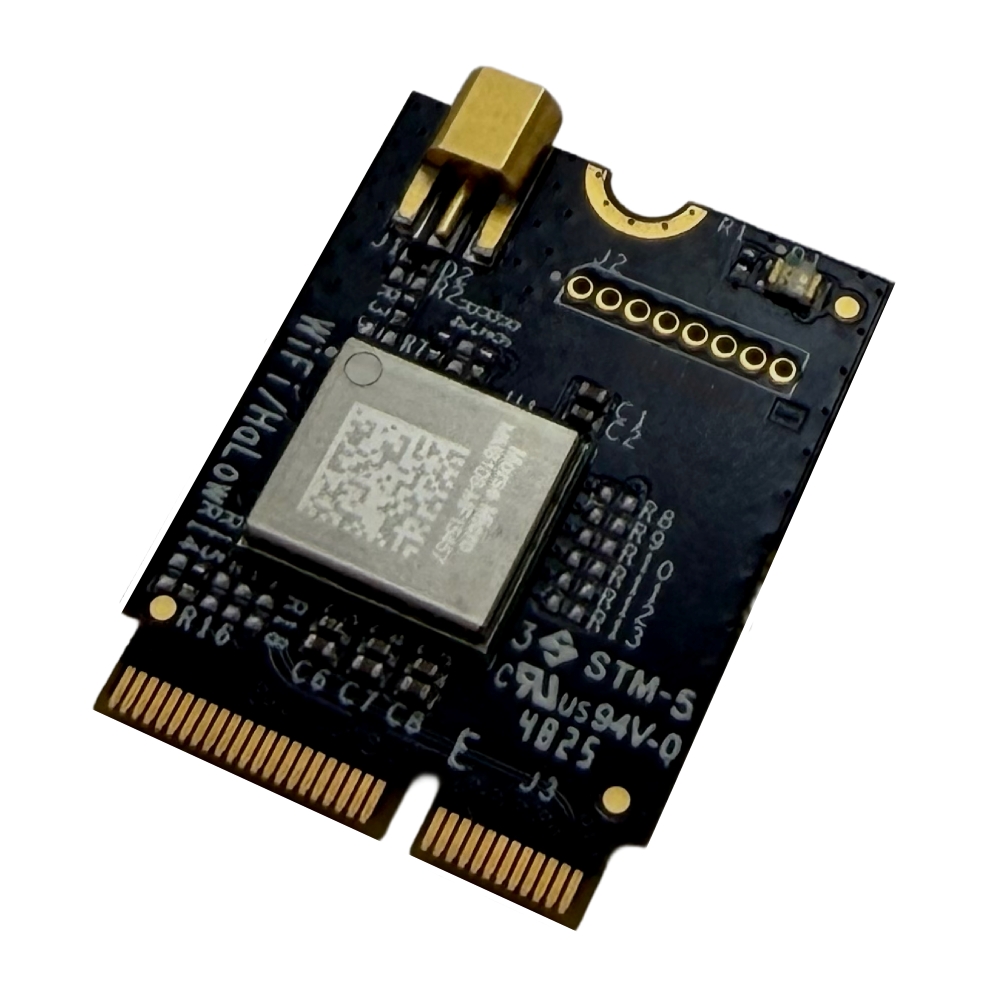
We are excited to announce our next-generation Wi-Fi HaLow M.2 module built with the Morse Micro MM8108 chipset. The USA-made GW16167 delivers unmatched long-range connectivity, high throughput and wall penetration. These features significantly reduce infrastructure costs and enhance system reliability for global Industrial IoT and Edge AI deployments.
Engineers can integrate the GW16167 as a drop-in solution with any single board computer (SBC) featuring a standard M.2 socket. It operates plug-and-play with Gateworks’ SBCs based on NXP Semiconductors’ i.MX 8M Mini, 8M Plus and i.MX 95 processors. Together, these platforms create a powerful, scalable foundation for long-range wireless connectivity and edge computing for advanced industrial, autonomous and edge AI-driven systems.
The reliability of the HaLow network under extremely demanding conditions exceeded our wildest expectations—we have not been able to break it.
We evaluated multiple HaLow technology partners, and it is clear that Gateworks was and remains the best choice for our requirements. Gateworks has exceeded our expectations across the board; it is rare to find a partner that delivers both top-tier technology and a genuine commitment to our success, but Gateworks does exactly that.
Scott Carter, Chief R&D Engineer, Gatekeeper Systems
Demand for Wi-Fi HaLow has surged as industries seek to solve the challenge of IoT connectivity at scale. The Gateworks GW16167 is the first to address these needs while enabling truly global operation in the 850 to 950 MHz range. Operating in the sub-GHz band delivers superior range and wall and object penetration compared to standard 2.4/5 GHz Wi-Fi.
This eliminates costly issues such as interference, congestion and coverage gaps, often replacing expensive cellular or legacy proprietary systems. By extending range and reducing the density of required infrastructure, this technology dramatically reduces the Total Cost of Ownership (TCO) for large-scale deployments by minimizing the quantity of required Access Points and simplifying network architecture.
The GW16167 delivers data rates up to 43.3 Mbps, maintains exceptional power efficiency and guarantees uninterrupted data flow for mission-critical applications:
Our partnership with Morse Micro is critical to delivering a robust, complete solution to the industrial market. Together, we have accelerated the adoption of high-performance Wi-Fi HaLow across the globe. This joint effort directly solves real wireless challenges for customers who need performance, reliability, and enterprise-grade WPA3 security in their most complex industrial environments.
Kelly Peralta, Vice President of Sales & Business Development, Gateworks Corporation
The GW16167, powered by our MM8108 chipset, is a prime example of how Wi-Fi HaLow is maturing into a critical technology for the industrial sector. Gateworks is ensuring system integrators have access to a reliable, long-range solution for their most challenging robotics and edge deployments.
Michael De Nil, CEO and Cofounder, Morse Micro
Morse Micro showcased the GW16167 at CES 2026, highlighting the rise of Wi-Fi HaLow adoption across industrial markets. Gateworks will continue to expand its industrial embedded technology portfolio and work closely with Morse Micro to accelerate Wi-Fi HaLow adoption across industrial markets.
The GW16167 is available now through us and authorized channel partners such as DigiKey, Braemac, Farnell and RoundSolutions.

When speaking with mobile operators, their primary concern regarding the use of Wi-Fi for indoor coverage and additional capacity is the Quality of Experience (QoE) for their subscribers. While this concern is understandable, it can also be seen as somewhat irrational—and even ironic. Many of these same operators have already implemented Wi-Fi Calling, which utilizes any available Wi-Fi network for voice services. This means they are willing to deliver voice—one of the most latency-sensitive services—over Wi-Fi networks that they do not control. Yet, they remain hesitant to use secure Wi-Fi networks under their own management for services like web browsing, downloads, and video streaming, which are far more tolerant of variable network conditions.
In fact, the need to backhaul traffic to the mobile core for session continuity has diminished as devices and applications have become more adept at maintaining a positive user experience when transitioning between Wi-Fi (with local traffic breakout) and cellular networks. For instance, if you step out of the range of your home Wi-Fi during a Microsoft Teams session, you might experience a brief disruption as the device switches to the mobile network. This minor interruption is similar to what can happen during a cellular call when the user moves between different base stations.
The simple explanation may lie in the differing perspectives: while devices—and many users—operate in a Wi-Fi-first world, mobile operators naturally adopt a cellular-first mindset. They fear that a user could unintentionally switch to a Wi-Fi network with a lower QoE than the cellular network they previously connected to.
This fear is further reinforced by common misconceptions about Wi-Fi, which we have addressed in a previous post Top Five Myths About Wi-Fi. Another reason could be that mobile operators are less concerned about Wi-Fi Calling, as it utilizes external networks, they neither manage nor fund. In such cases, we recommend leveraging the free Wi-Fi networks available through the OpenRoaming federation for Wi-Fi offloading. These networks are managed by reputable Wi-Fi access providers, offering reliable connectivity. For more details, refer to the OpenRoaming in Wi-Fi Offloading chapter.
Ultimately, some mobile operators’ concerns about Wi-Fi stem from the perception that it is outside their area of control. While we have emphasized throughout this paper that many of these concerns are unwarranted, we also recognize the importance of addressing them seriously.
With expertise spanning both the 3GPP ecosystem and Carrier Wi-Fi, Enea is uniquely positioned to offer practical solutions that increase mobile operators’ control over Wi-Fi offloading. We are actively looking at a concept for QoE-based communication across mobile and Wi-Fi networks. For more details, refer to the More Intelligent Network Selection chapter.
The user experience in Wi-Fi networks is influenced by a mix of persistent and intermittent factors, and each type requires a different resolution approach. Here’s a deeper look at these factors.
These are typically structural issues that remain constant unless the underlying design or hardware is improved. Addressing them often involves network redesign or hardware upgrades:
These factors can cause performance fluctuations that come and go, often influenced by changes in the environment or network load. Managing these requires ongoing monitoring and dynamic adjustments:
All of these challenges can be mitigated with effective network design, regular monitoring, and proper investment in modern infrastructure:
With the right planning and technology, Wi-Fi networks can achieve a much higher quality of service, making them capable of delivering a consistent, high-quality user experience.
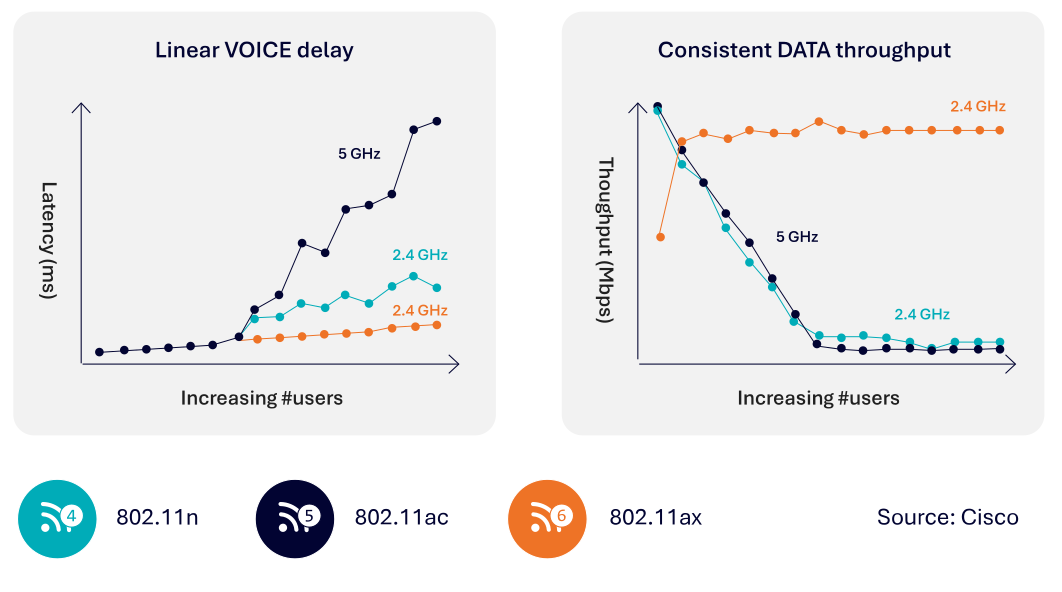 Previous Wi-Fi generations (Wi-Fi 4 and Wi-Fi 5) can be compared to a chaotic cocktail party, where everyone tries to talk at once; the more people present, the harder it is to communicate effectively. As a result, many messages had to be retransmitted, leading to increased latency and reduced data throughput. As shown in the diagrams below, the critical parameters for a good user experience—latency and data throughput—deteriorate rapidly as more users connect to a single Wi-Fi access point in these earlier Wi-Fi versions.
In contrast, this degradation is significantly mitigated with the introduction of Wi-Fi 6/6E and Wi-Fi 7. Wi-Fi 6 introduced Orthogonal Frequency-Division Multiple Access (OFDMA), a scheduling mechanism also used in cellular networks, which allows for more efficient and organized use of the spectrum. Today’s Wi-Fi is more like a well-coordinated choir, where a conductor controls when each voice can sing, resulting in a smoother and more deterministic user experience.
Though Wi-Fi operates on unlicensed spectrum, there is growing interest in using unlicensed spectrum for cellular as well. This shift, along with the improved efficiency and performance of Wi-Fi 6/6E and Wi-Fi 7, has led to increased respect and acceptance from 3GPP proponents.
It’s easy to blame the Wi-Fi radio network for a poor user experience since it’s the most visible part of the connection. However, based on our experience, backend systems often play an equally significant role in user satisfaction. The Enea Aptilo SMP has repeatedly improved existing Wi-Fi networks by addressing backend deficiencies.
A common example is an overloaded DHCP server. At large venues like stadiums or trade shows, where thousands of users try to connect simultaneously, an overwhelmed DHCP server can prevent users from obtaining an IP address, rendering Wi-Fi access impossible. Ensuring DHCP capacity to handle such surges—and implementing overload protection—is essential. It’s better to deny a portion of users than risk a situation where no users can connect or renew their leases.
Some VPN clients cause DHCP-related issues by modifying the routing table whenever a VPN connection is established. These clients retain only the route to the VPN server, rerouting the default pathway through the VPN tunnel. This configuration causes DHCP renewal requests to be sent through the tunnel rather than directly to the DHCP server, preventing the server from receiving and responding to them. Consequently, the client may lose its IP address when the lease expires and the gateway may mark the client as “inactive” due to its lack of response to pings. The DHCP server can then reassign the IP address to another device, potentially resulting in an
IP address conflict.
To effectively diagnose Wi-Fi performance issues, the entire network stack—from radio to backend systems—needs consideration. Furthermore, being able to troubleshoot individual sessions among potentially millions is critical and the trace should always be on otherwise it will be hard to capture intermittent issues.
Enea Aptilo SMP’s stability, scalability, powerful Distributed Tracing function, and overload protection are all vital to delivering an excellent user experience. Learn more in the next chapter.

?????? is heading to Wireless Global Congress Japan 2026, showcasing next-generation ??-?? ????? and ???????? ????????? designed for long range, low power, and ??-?? ? high-performance connectivity.
We focus on real-world wireless deployment—enabling smart cities, industrial IoT, UAVs, and large-scale sensing applications where traditional Wi-Fi falls short.
???????? ????????????
• ??-?? ? : Ultra-fast, low-latency connectivity for AI and high-density networks
• ??-?? ????? : Long-range, low-power wireless built for IoT scalability
• ???????? : Universal driver free for all OSs like Android and iOS, Windows and MAC OS, Linux etc.. Singal test tools embedded for Quick POC approval and link.
Meet us onsite and explore how ?????? helps you build reliable, future-ready wireless infrastructure.
????? ???????????
? Date: 2026
? Location: Tokyo Big Sight, Tokyo, Japan
#AsiaRF #WirelessGlobalCongress #solutions #WiFiHaLow #WiFi7 #HaLowFly #IoT #Japan2026

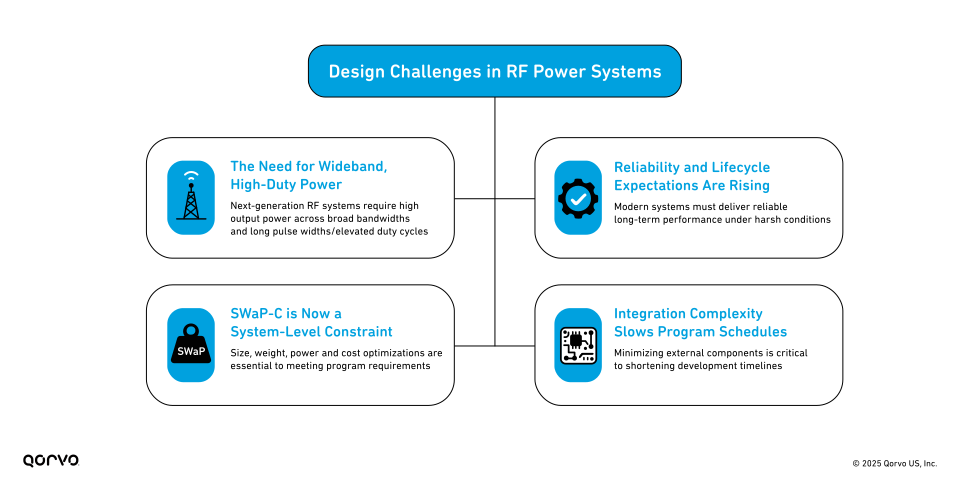
Across defense and aerospace programs, the expectations placed on RF power systems continue to intensify. Radar, SATCOM, electronic warfare (EW) and high-duty test environments demand various combinations of higher output power, wider bandwidth, improved linearity and increased operational reliability—often within shrinking size, weight and power consumption (SWaP) constraints.
These pressures create a set of design challenges that legacy RF power architectures can no longer solve. As programs evolve and timelines compress, engineering teams must rethink how they generate and manage RF power at the system level. The challenges include:
Half the size, Built for the Mission
Qorvo’s newest SSPAs enable up to 50 percent smaller and one-third lighter system-level solutions compared to legacy traveling wave tube amplifiers (TWTAs), supporting mission continuity and long-term reliability in demanding RF environments.
QPR3238: 32-38 GHz Wideband GaN SSPA Module
To address these challenges, a next-generation RF power amplifier must provide a combination of efficiency, reliability, integration and long-term availability that aligns with modern program requirements.

Among the various solid-state approaches available today, Qorvo’s wideband GaN-based amplifier technologies—including implementations that use spatial combining techniques—provide a practical illustration of how modern SSPA architectures can address the performance, reliability and integration needs described above. These solutions demonstrate how wideband GaN devices, efficient power combining and integrated control functions can be applied to meet system-level requirements across radar, SATCOM, EW and test environments.
Qorvo’s approach brings several characteristics that directly map to the needs of today’s radar, SATCOM and EW systems:
These characteristics make Qorvo solutions suitable for replacing aging TWTAs, improving system reliability and meeting the performance and SWaP-C expectations of modern defense and aerospace programs.

Modern RF systems demand more than incremental improvements—they require amplifier architectures that are efficient, reliable, broadband and simple to integrate. As TWTAs face supply limitations and higher sustainment costs, solid-state technology provides a compelling path forward. Solutions that combine high power, broad bandwidth, integrated functionality and rugged reliability will define the next generation of radar, EW, SATCOM and test platforms.
Qorvo’s GaN-based amplifier solutions are engineered to meet these exact demands, providing a field-proven, scalable technology path for programs seeking to modernize their RF power infrastructure.
For more information, read our press release on Qorvo’s new Spatium SSPAs replacing legacy TWTAs. Qorvo’s newest SSPAs enable up to 50 percent smaller and one-third lighter system-level solutions compared to legacy traveling wave tube amplifiers (TWTAs), supporting mission continuity and long-term reliability in demanding RF environments.
To learn more about Qorvo’s trusted RF solutions for defense and aerospace—including Spatium SSPAs and GaN-based front ends, visit www.qorvo.com/spatiumsspa.
Have another topic that you would like Qorvo experts to cover? Email your suggestions to the Qorvo Blog team and it could be featured in an upcoming post. Please include your contact information in the body of the email.

The enterprise branch has evolved from a simple extension of the data center into a critical gateway for cloud applications, Software-as-a-Service (SaaS) platforms, and an increasingly AI-driven workforce. But as encrypted traffic and threat volumes surge, IT leaders face an impossible choice: robust security or acceptable performance. Most branch deployments sacrifice one for the other.
To avoid compromising security or performance, branches have traditionally turned to a two-box model: a router for connectivity and a firewall for protection. This legacy approach increases complexity, costs, and operational risk. Cisco 8000 Series Secure Routers change that model by converging industry-leading routing and next-generation firewall into a single, purpose-built platform for the branch WAN edge.
Better yet, independent testing by NetSecOPEN proves that with Cisco 8000 Series Secure Routers, IT leaders no longer have to choose between performance and security.
NetSecOPEN is a widely trusted, vendor-neutral organization known for its rigorous security efficacy and performance testing. Their evaluations use real-world traffic mixes, enterprise workloads, and current threat samples following RFC 9411 open-standard testing methodology.
NetSecOPEN’s independent validation provides an objective, unbiased assessment. Transparency and impartiality are crucial in helping to inform vendor selection and confirm that products meet industry standards and perform as claimed in practical scenarios.
In NetSecOPEN’s rigorous evaluation, our latest generation 8375-E-G2 Secure Router sets a new benchmark for branch security and performance, with proven intrusion prevention system (IPS) effectiveness of 99.3%, 99.8% malware detection, and HTTPS and HTTP throughput of 1.63 Gbps and 8.01 Gbps, respectively. These results validate the router’s ability to block exploits, malware, and evasive threats under real-world conditions without compromising performance.
Figure 1: Test configuration: IPS + AMP + TLS + app ID + logging enabled
Powered by the new secure networking processor and unified Cisco platform, Cisco 8000 Series Secure Routers combine multi-threaded parallel processing, hardware-accelerated cryptography, an integrated artificial intelligence/machine learning (AI/ML) engine, hardware trust anchor, and a post-quantum cryptography (PQC)-ready encryption engine. It’s built to deliver high-performance encrypted traffic inspection without impacting application experience—game-changing capabilities in today’s AI-driven enterprise.
This also delivers end-to-end operational and business benefits to the branch:
The convergence of routing and secure access secure edge (SASE) with comprehensive security capabilities represents the future of branch connectivity. That future is available today with proven, independently validated performance.

by DNSFilter Team on Feb 3, 2026 8:03:00 AM
Users are encountering as many as 66 threats daily—and new domains are a top culprit
WASHINGTON, D.C. – Feb. 3, 2026 – DNSFilter announced today the release of its 2026 Annual Security Report, which reveals the massive surge in new malicious domains, child sex abuse material (CSAM) and other threats. Threat volume is rising, and that is becoming a daily, user-level problem. The report is available for download here.
DNSFilter processes over 200 billion DNS queries daily and blocks about 7% of all traffic. That includes hundreds of millions of threats each day. Every request that’s blocked means phishing attempts fail, and malware isn’t executed.
Key findings from the report include:
Ken Carnesi, CEO and co-founder, DNSFilter, said: “Our research continues to show that DNS filtering is one of the most effective ways to stop attacks before they ever reach users. Every blocked request isn’t just a data point; it’s a real attack prevented in real time. This report puts hard numbers behind the scale of that threat and the real-world harm organizations face every day.”
About the company:
DNSFilter is a cybersecurity company that protects every click, leveraging AI-driven content filtering and threat protection to block threats 10 days earlier than competitors. DNSFilter’s solution secures workers anywhere they are, helping to boost productivity, minimize compliance risk, and protect corporate brands on public Wi-Fi networks. Unlike traditional filtering solutions, DNSFilter deploys in minutes instead of days and is trusted by more than 43,000 organizations worldwide. Learn more about how DNSFilter is the first and last line of defense for corporate and hybrid networks at dnsfilter.com.

The fastest-growing products today are battery-powered, compact, and cost-sensitive, but building them is increasingly complex. Developers are under pressure to move quickly, minimize design risk, and deliver differentiated user experiences, all while working within tight power and size constraints.
This is driving strong adoption of pre-integrated, certified 2.4 GHz wireless modules as a way to reduce development cost, simplify system design, and accelerate time to market. A well-designed module eliminates the need to manage RF layout, component selection, and lengthy certification cycles, allowing teams to focus on real benefits: battery life, application features, sensor performance, and overall product differentiation.
Silicon Labs’ xGM270S wireless module family is purpose-built for this reality. These ultra-compact system-in-package (SiP) modules combine a high-performance wireless SoC, large on-chip memory, integrated RF components, and global regulatory certifications into an exceptionally small footprint. Compared to traditional PCB-based modules, xGM270S enables smaller end products, faster development cycles, and lower overall system cost, all without compromising performance or flexibility.
The BGM270S targets a broad set of Bluetooth (LE) end-node applications, including smart home devices, asset tracking and fleet monitoring, access control, industrial automation, sport and wellness products. With a compact 6.5 × 6.5 mm LGA SiP footprint, it’s well suited for space-constrained designs where fast integration and predictable development cycles are critical.
In industrial environments, the BGM270S Bluetooth LE module works well as a controller for sensors such as temperature, pressure, and water flow. For asset tracking tags, it enables reliable connectivity with long battery life, and for portable medical devices, including oximeters and other handheld diagnostic tools, it provides a practical path to connected health monitoring and data collection. In designs with sufficient PCB area to benefit from a fully integrated module, BGM270S SiP module simplifies RF design, reduces development risk, and accelerates time to market.
Long battery life is important for IoT end devices, but at scale—such as commercial buildings with thousands of deployed sensors—battery replacement becomes a significant operational cost. This is where the MGM270S stands out with support for Zigbee Green Power and battery-less operation.
With 768 kB of Flash and 64 kB of RAM, the MGM270S Zigbee module provides the memory footprint needed to support Zigbee Green Power while optimizing overall system cost. Its low RX and TX current enables operation from a wider range of ambient energy sources, and the compact SiP form factor makes it ideal for space-constrained devices such as sensors and switches. Combined with global regulatory certifications, MGM270S reduces both development effort and time to market for Zigbee Green Power designs.
Across competing 2.4 GHz module offerings in this class, customers often see similar connectivity features. Where xGM270S stands out is in its combination of an ultra-compact SiP footprint, support for both Bluetooth LE and Zigbee Green Power, and the practical advantage of global certifications and production-ready software. Together, these features reduce development risk and shorten the path from prototype to production.
For customers building smart home devices, patient health monitors, or Zigbee Green Power solutions, the xGM270S value proposition is simple: enable secure, reliable wireless connectivity while keeping system costs low and accelerating time to market—without spending months becoming wireless experts.
Explore the xGM270S wireless SiP module family (BGM270S and MGM270S) to see how quickly you can bring your next connected product to life.