
Why Wi-Fi 7 In-Room Connectivity for MDU and HospitalityThe EnGenius ECW515 Wi-Fi 7 wall-plate access point delivers enterprise-grade wireless and wired connectivity directly inside the room, enabling fast, reliable in-room communication for streaming, voice, IoT, and productivity devices—while supporting VLAN-based per-user traffic segmentation to help maintain privacy and network control.

The ECW515 enhances the in-room experience by enabling seamless content streaming, reliable voice communication, and consistent network access across devices. SmartCasting allows guests and residents to stream content directly from their mobile devices to in-room TVs, while SSID on LAN extends the same secure network policies to wired devices—supporting captive portals and access controls. Together with carrier-class Wi-Fi calling support, the ECW515 helps ensure uninterrupted voice, video, and data services throughout the room.
Key Features:
The ECW515 is ideal for organizations seeking to modernize in-room networking infrastructure while maintaining a clean aesthetic and reducing installation complexity.
ECW515 will be available from EnGenius authorized resellers and distribution partners by the end of March, with an MSRP of $199. For additional product specifications and purchasing information, visit: ECW515
About EnGenius Technologies
EnGenius Technologies Inc. is an industry leader in secure, AI cloud-driven networking solutions for enterprise and SMB environments. With over 26 years of innovation, EnGenius enables organizations to build smart, scalable, and easily managed networks with best-in-class total cost of ownership (TCO).

New Layer 3 access switches deliver 2.5G access, 10G uplinks and high-power PoE to unlock full WiFi 7 performance without rewiring
Anaheim, California, Feb. 11, 2026 — Zyxel Networks, a leader in delivering secure and AI-powered cloud networking solutions, today announced the launch of the XMG2230 series, a new generation of Multi-Gig Layer 3 Access PoE switches. Addressing the growing complexity of business environments where WiFi 6/7 access points require faster switch ports to deliver full performance, along with surveillance systems, POS terminals, NAS devices and IoT endpoints all compete for bandwidth and power, the XMG2230 series is designed to simplify and optimize small and medium-sized business (SMB) networks without costly rewiring or external power injectors.
Future-proof WiFi 7 networks without breaking the bank
As SMBs modernize networks without the luxury of enterprise budgets, the XMG2230 series delivers the flexibility to support both next-generation and existing devices without disruptive upgrades:
*Prices subject to change without advance notice.
Flexible management for growing SMBs
Managing a growing network can quickly become complex, draining IT resources and limiting scalability. The XMG2230 series delivers advanced control without adding complexity through:
“As our customers prepare for WiFi 7, many are discovering that their existing switching infrastructure is the real limiting factor,” said Tri Nguyen, Market Development Manager, Zyxel Networks North America. “The XMG2230 Series gives service providers and SMBs a practical path to upgrade delivering multi-gig performance, high-power PoE, and built-in resiliency without forcing a full rip-and-replace of their networks.”
About Zyxel:
Zyxel Networks is a technology provider with over 30 years of experience, specializing in delivering solutions for small to medium-sized businesses and the enterprise-edge in partnership with VARs, MSPs and System Integrators. We enable network professionals to connect and protect organizations with greater ease by bringing together intuitive, scalable and secure cloud management with a complete portfolio of network devices.

Running dedicated power cables to every single device on a network is a waste of time and budget. Finding an available outlet near a ceiling-mounted access point or drilling through exterior walls to power a security camera is expensive, frustrating, and limits where you can deploy infrastructure.
Power over Ethernet (PoE) solves this problem by allowing you to transmit both data and electrical power over a single Ethernet cable.
For network engineers and IT professionals, PoE is a fundamental technology that simplifies network deployment, reduces installation costs, and enables the modern smart building. Whether you are deploying a simple VoIP phone system or a complex mesh of Power over Ethernet devices like IoT sensors and LED lighting, understanding the mechanics, standards, and equipment behind PoE is critical for maintaining a reliable network.
Power over Ethernet is a technology defined by the IEEE 802.3 standards that allows Ethernet cables (Cat5e, Cat6, and above) to deliver DC power to devices while simultaneously transmitting data.
Before PoE became a standard, installing a network device required two separate connections: a data cable for network communication and an electrical cable for power. This double-cabling requirement limited where devices could be placed and significantly increased installation costs due to the need for qualified electricians to run conduit and AC power.
PoE eliminates this constraint. By leveraging the twisted pairs of copper wires within a standard Power over Ethernet cable, PoE creates a streamlined “single-cable” solution.
Key Concepts: PSE and PD
To understand PoE, you must distinguish between the two main roles in the power delivery process:
Sending electrical power down data cabling might sound risky for delicate electronics, but standard PoE is designed to be inherently safe. It uses a sophisticated negotiation process – often called a “handshake” – to ensure power is only sent to compatible devices.
When you connect a device to a PoE-enabled port, the Power Sourcing Equipment (PSE) does not immediately transmit full power. Instead, it follows a strict sequence:
Don’t Ignore the Power Budget.Just because a switch has 48 PoE+ ports doesn’t mean it can power 48 devices simultaneously. Exceeding the switch’s “Total Power Budget” causes random reboots and dropped connections. Always calculate your load first, and use the LinkRunner® AT 4000 to verify actual power availability under load.
PoE Standards Evolution
As network devices have become more powerful, PoE standards have evolved to deliver higher wattages:
Confused by the alphabet soup of acronyms? Read our detailed breakdown of PoE vs. PoE+ vs. and UPOE/PoE++ to understand exactly which standard your network needs.
While Voice over IP (VoIP) phones were the original driver for PoE adoption, the technology now powers a vast ecosystem of devices.
Core Network Devices
Smart Buildings and IoT
The introduction of high-power PoE (802.3bt) has opened the door to advanced smart building applications:
Understanding the strategic value of PoE helps in justifying infrastructure upgrades.
| Benefits | Limitations |
| Cost Efficiency: Eliminates the need for expensive electrical work. You do not need a licensed electrician to run Ethernet cable (in most jurisdictions), and you avoid the cost of installing dedicated AC outlets for every endpoint. | Distance Limits: Like all standard Ethernet copper cabling, PoE is limited to a maximum distance of 100 meters (328 feet). Extending beyond this requires PoE extenders or a mid-span switch. |
| Flexibility: Devices can be installed exactly where they are needed for performance, rather than being tethered to existing power infrastructure. | Power Budget Constraints: As mentioned in the Expert Tip, switches have a finite amount of power. High-power devices (like PTZ cameras or high-performance wireless access points) can quickly deplete a switch’s budget. |
| Centralized Control & Reliability: Power comes from a central switch, which can be backed up by a UPS (Uninterruptible Power Supply). This ensures that critical devices like security cameras and phones stay online even during a building-wide power outage. | Equipment Cost: PoE switches are generally more expensive than non-PoE switches. |
| Safety: PoE uses low-voltage DC power, which presents significantly lower risks than high-voltage AC power. | Cable Quality Dependency: Delivering power generates heat. Poor quality cabling (such as Copper Clad Aluminum) can lead to excessive voltage drop and power loss, especially over long runs. |
When deploying PoE, you generally have two equipment options: using a dedicated switch or adding an adapter.
Power over Ethernet Switch (Endspan)
A Power over Ethernet switch looks and functions like a standard network switch but has the built-in capability to inject power into the Ethernet cable.
PoE Injectors (Midspan)
A PoE injector (sometimes called a Power over Ethernet adapter) is a device that sits between a non-PoE switch and the PD. It takes the data signal from the switch, adds power from a wall outlet, and sends the combined signal to the device.
The physical quality of your cabling infrastructure is vital for PoE performance. As power travels down the wire, resistance causes some of that energy to be lost as heat (known as insertion loss).
Choosing the wrong cable can lead to intermittent power issues, where a device works fine on a short patch cable but fails when deployed at the end of a 90-meter run.
Learn more about cable selection: For a detailed breakdown of cable categories and their capabilities, read our guide on Ethernet Cable Types: Cat5e, Cat6, Cat6a, and Beyond.
Power over Ethernet has transformed from a niche telephony feature into the utility that powers the modern enterprise. By converging data and power onto a single part of the infrastructure, it offers unmatched flexibility and control for network engineers.
However, simply plugging in a device and hoping for the best is not a strategy. Successful PoE deployment requires understanding power budgets, cable quality, and the specific requirements of your Powered Devices.
Ensure your PoE network is delivering the power you need.


MediaTek has partnered with ADLINK to create the MXA-312M, powered by the MediaTek Genio 520/720, that’s designed to deliver high-performance visuals in space-constrained environments.
MXA-312M Key Features:
Both the MediaTek Genio 520 and Genio 720 offer fast, highly capable edge AI computing, yet without sacrificing essential power efficiency so it can use a fanless enclosure. The device offers an exceptional balance power consumption and robust capabilities, making it the perfect engine for retail and industrial applications such as digital signage, smart retail kiosks, and industrial-grade displays.
Campground operators are juggling arrivals, maintenance, guest experience, and staffing—so WiFi can’t be another daily support ticket. The GoZone Smart WiFi Suite is designed to make guest internet access self-service, reduce front-desk load, and (optionally) turn premium access into a clean revenue stream.
Let guests activate internet access on their own using plans you create (day, week, month, seasonal).
Instead of one shared password for everyone, each camper can be assigned a secure, unique password automatically.
Need a simple “WiFi included” experience for certain guests?
Use vouchers to:
If you offer premium access, the model is straightforward: service fees go directly to the campground. Guests self-activate, and your team isn’t stuck managing devices or processing exceptions.
POS, reservation tools, and third-party booking channels don’t always capture everything you need.
WiFi gives you a second chance to collect opt-in guest data on-site—so you can build a reliable list for:
With optional marketing features enabled, you can automate:
The goal is simple: improve the guest experience and generate more reviews—without adding work for your team.
You can typically use what you already have—no rip-and-replace and no major IT project required.
If your team is too busy to build campaigns or guest messaging, we can provide ongoing marketing support so the system keeps working for you.

HOUSTON, TX – February 17, 2026: WorldVue today announced its new affiliation with Preferred Hotels & Resorts as the latest addition to the brand’s Alliance Partner Program. This partnership solidifies WorldVue’s position as a recommended provider of in-room entertainment and WiFi for Preferred Hotels & Resorts member properties across the globe.
Preferred Hotels & Resorts is renowned for its dedication to offering guests authentic, one-of-a-kind experiences across its global portfolio of independent hotels and resorts. By aligning with WorldVue, Preferred Hotels & Resorts further solidifies its mission to provide best-in-class services and resources to its member properties.
“Independent luxury properties deserve technology that supports their vision without compromising their identity. At WorldVue, we approach every partnership with long-term stewardship in mind, ensuring the infrastructure behind the experience is as exceptional as the experience itself. Joining Preferred Hotels & Resorts lets us build on this approach to ensure every property has technology stability and a partner to fully rely on,” said Robert Grosz, President and Chief Operating Officer at WorldVue.
For over five decades, WorldVue has partnered with independent hotels and resorts to create tailored infrastructure ecosystems that blend performance, discretion, and long-term reliability. The company understands the operational complexity behind refined guest experiences and builds every technology ecosystem custom to the property, their landscape, guest expectations and their goals. WorldVue’s role is to ensure the foundation remains uninterrupted, collaborating directly with ownership groups, asset managers, and property leadership to ensure alignment from implementation through long-term optimization.
Representing more than 625 luxury hotels, resorts, residences, and unique hotel groups in over 80 countries, Preferred Hotels & Resorts brings strategic advantage to hotel owners, operators, and management companies through brand prestige and global operating scale, supporting the goals of its member hotels by providing strategic sales, integrated marketing solutions, comprehensive revenue management, global connectivity through reservations services, progressive distribution technology, and solutions-focused products and services from trusted partners through its Alliance Partner Program.
For more information about WorldVue and its offerings, please visit www.worldvue.com.
For more information on Preferred Hotels & Resorts Alliance Partner Program, visit Preferredhotels.com/Alliance-Partner.
###
About WorldVue
WorldVue® is a trusted provider of video, advanced connectivity and professional services to properties and enterprises across the world. With a dedication to customer service, WorldVue is leading the way in delivering innovative technology solutions that enhance the resident, guest, and staff experience. From managed services to digital transformation, WorldVue is a single point of contact for all property technology needs.
Founded in 1975, WorldVue is a privately held company headquartered in the United States with offices in Canada, Mexico, United Kingdom, Netherlands, Dubai, Singapore and Australia. The company serves over 8,000 properties and over 1 million rooms.

Fixed Base Operators (FBOs) are the VIP terminals of the aviation world. Whether serving corporate executives, private charter passengers, or flight crews, FBOs are expected to deliver a premium experience—every time. And while amenities like leather lounges, valet services, and gourmet catering are front and center, there’s another element quietly shaping the customer experience and operational efficiency: Wi-Fi.
At 7SIGNAL, we’ve learned firsthand—through our work with some of the world’s busiest hubs like Atlanta’s Hartsfield-Jackson International Airport and Heathrow Airport in London that great Wi-Fi isn’t just a luxury in aviation. It’s an operational necessity.
FBOs may look like boutique lounges on the surface, but behind the scenes, they are complex operational environments. Pilots and crew rely on Wi-Fi for real-time weather updates, flight planning, and electronic manifests. Passengers expect fast, secure internet access for work or leisure, and increasingly, vendors—from catering to fuel services—depend on connected devices to stay in sync.
But FBOs face unique challenges:
The bottom line? When the Wi-Fi isn’t working, the entire operation feels it.
Most FBOs—like many enterprises—rely on infrastructure tools that monitor the network from the inside-out. These solutions provide insight into hardware status or WAN availability, but they miss the most important perspective: the experience of the client device.
This is what we call the visibility gap and it’s where 7SIGNAL shines.
7SIGNAL fills this critical gap with a unique outside-in approach to Wi-Fi and digital experience monitoring. Through a combination of software agents deployed on endpoint devices and cloud-managed sensors placed throughout facilities, 7SIGNAL gives IT teams complete visibility into how users and devices experience the wireless network—from the cockpit to the conference room.
For FBOs, this means:
Unlike other solutions, 7SIGNAL is vendor-agnostic, meaning it works across environments with Cisco Meraki, HPE Aruba, Extreme, or any other combination of networking gear. That’s crucial for FBOs, where network architecture can vary dramatically from one site to the next.
Speak with an airport network connectivity expert.
Our work with major global airports gives us the credibility and expertise to support FBOs of any size. At Atlanta Airport, one of the busiest in the world, 7SIGNAL helps ensure reliable Wi-Fi for millions of passengers and thousands of employees. At Heathrow, we support high-density environments where operational uptime is non-negotiable.
FBOs may not see the same foot traffic, but they serve customers who expect excellence—and who remember when technology fails them.
Whether it’s keeping a fueling operation online, ensuring a security camera is streaming, or helping a CEO download a presentation before takeoff, Wi-Fi is mission-critical for today’s FBOs. And with the rise of IoT devices, cellular failover, and cloud-based workflows, the complexity is only increasing.
7SIGNAL is purpose-built for these challenges. We empower IT teams with the visibility, control, and intelligence they need to deliver exceptional digital experiences—without needing to be on-site or in the dark.
If your FBO operations span dozens—or hundreds—of sites, and your team is still flying blind when it comes to Wi-Fi performance, it’s time to close the visibility gap with 7SIGNAL.

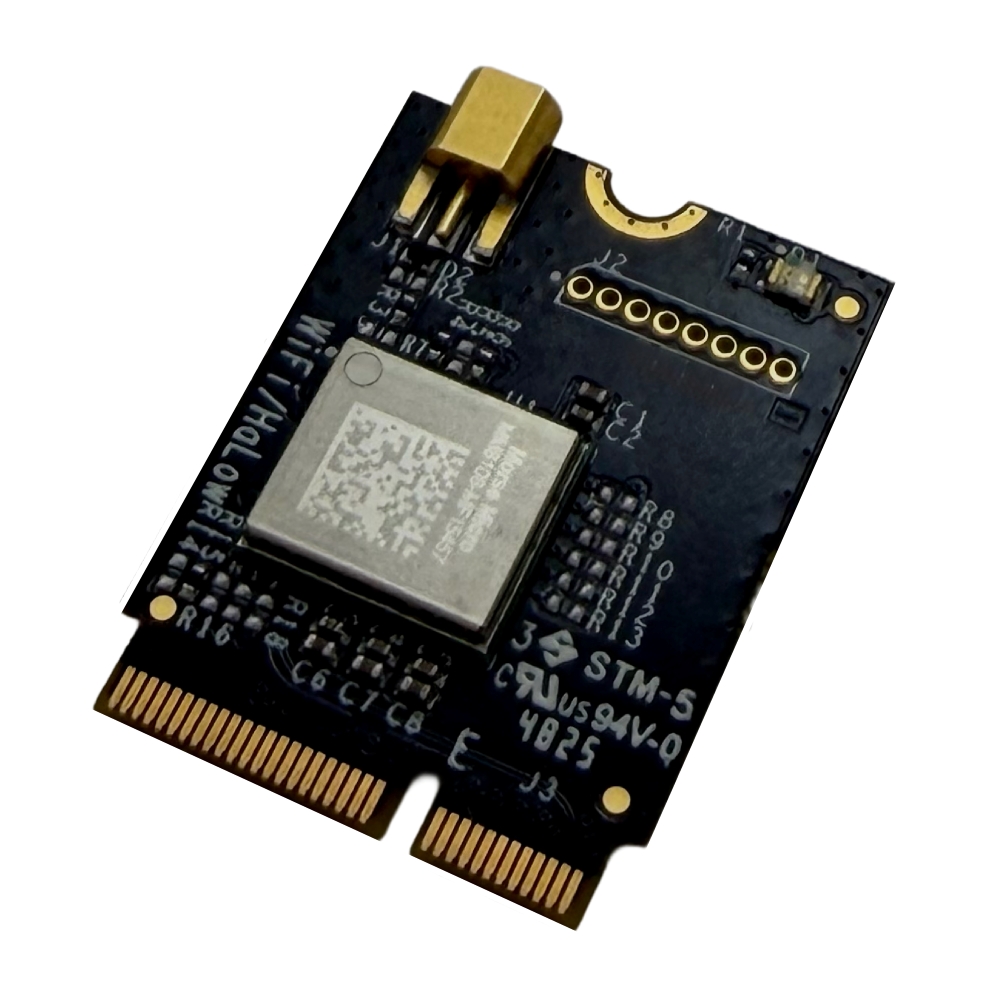
We are excited to announce our next-generation Wi-Fi HaLow M.2 module built with the Morse Micro MM8108 chipset. The USA-made GW16167 delivers unmatched long-range connectivity, high throughput and wall penetration. These features significantly reduce infrastructure costs and enhance system reliability for global Industrial IoT and Edge AI deployments.
Engineers can integrate the GW16167 as a drop-in solution with any single board computer (SBC) featuring a standard M.2 socket. It operates plug-and-play with Gateworks’ SBCs based on NXP Semiconductors’ i.MX 8M Mini, 8M Plus and i.MX 95 processors. Together, these platforms create a powerful, scalable foundation for long-range wireless connectivity and edge computing for advanced industrial, autonomous and edge AI-driven systems.
The reliability of the HaLow network under extremely demanding conditions exceeded our wildest expectations—we have not been able to break it.
We evaluated multiple HaLow technology partners, and it is clear that Gateworks was and remains the best choice for our requirements. Gateworks has exceeded our expectations across the board; it is rare to find a partner that delivers both top-tier technology and a genuine commitment to our success, but Gateworks does exactly that.
Scott Carter, Chief R&D Engineer, Gatekeeper Systems
Demand for Wi-Fi HaLow has surged as industries seek to solve the challenge of IoT connectivity at scale. The Gateworks GW16167 is the first to address these needs while enabling truly global operation in the 850 to 950 MHz range. Operating in the sub-GHz band delivers superior range and wall and object penetration compared to standard 2.4/5 GHz Wi-Fi.
This eliminates costly issues such as interference, congestion and coverage gaps, often replacing expensive cellular or legacy proprietary systems. By extending range and reducing the density of required infrastructure, this technology dramatically reduces the Total Cost of Ownership (TCO) for large-scale deployments by minimizing the quantity of required Access Points and simplifying network architecture.
The GW16167 delivers data rates up to 43.3 Mbps, maintains exceptional power efficiency and guarantees uninterrupted data flow for mission-critical applications:
Our partnership with Morse Micro is critical to delivering a robust, complete solution to the industrial market. Together, we have accelerated the adoption of high-performance Wi-Fi HaLow across the globe. This joint effort directly solves real wireless challenges for customers who need performance, reliability, and enterprise-grade WPA3 security in their most complex industrial environments.
Kelly Peralta, Vice President of Sales & Business Development, Gateworks Corporation
The GW16167, powered by our MM8108 chipset, is a prime example of how Wi-Fi HaLow is maturing into a critical technology for the industrial sector. Gateworks is ensuring system integrators have access to a reliable, long-range solution for their most challenging robotics and edge deployments.
Michael De Nil, CEO and Cofounder, Morse Micro
Morse Micro showcased the GW16167 at CES 2026, highlighting the rise of Wi-Fi HaLow adoption across industrial markets. Gateworks will continue to expand its industrial embedded technology portfolio and work closely with Morse Micro to accelerate Wi-Fi HaLow adoption across industrial markets.
The GW16167 is available now through us and authorized channel partners such as DigiKey, Braemac, Farnell and RoundSolutions.

When speaking with mobile operators, their primary concern regarding the use of Wi-Fi for indoor coverage and additional capacity is the Quality of Experience (QoE) for their subscribers. While this concern is understandable, it can also be seen as somewhat irrational—and even ironic. Many of these same operators have already implemented Wi-Fi Calling, which utilizes any available Wi-Fi network for voice services. This means they are willing to deliver voice—one of the most latency-sensitive services—over Wi-Fi networks that they do not control. Yet, they remain hesitant to use secure Wi-Fi networks under their own management for services like web browsing, downloads, and video streaming, which are far more tolerant of variable network conditions.
In fact, the need to backhaul traffic to the mobile core for session continuity has diminished as devices and applications have become more adept at maintaining a positive user experience when transitioning between Wi-Fi (with local traffic breakout) and cellular networks. For instance, if you step out of the range of your home Wi-Fi during a Microsoft Teams session, you might experience a brief disruption as the device switches to the mobile network. This minor interruption is similar to what can happen during a cellular call when the user moves between different base stations.
The simple explanation may lie in the differing perspectives: while devices—and many users—operate in a Wi-Fi-first world, mobile operators naturally adopt a cellular-first mindset. They fear that a user could unintentionally switch to a Wi-Fi network with a lower QoE than the cellular network they previously connected to.
This fear is further reinforced by common misconceptions about Wi-Fi, which we have addressed in a previous post Top Five Myths About Wi-Fi. Another reason could be that mobile operators are less concerned about Wi-Fi Calling, as it utilizes external networks, they neither manage nor fund. In such cases, we recommend leveraging the free Wi-Fi networks available through the OpenRoaming federation for Wi-Fi offloading. These networks are managed by reputable Wi-Fi access providers, offering reliable connectivity. For more details, refer to the OpenRoaming in Wi-Fi Offloading chapter.
Ultimately, some mobile operators’ concerns about Wi-Fi stem from the perception that it is outside their area of control. While we have emphasized throughout this paper that many of these concerns are unwarranted, we also recognize the importance of addressing them seriously.
With expertise spanning both the 3GPP ecosystem and Carrier Wi-Fi, Enea is uniquely positioned to offer practical solutions that increase mobile operators’ control over Wi-Fi offloading. We are actively looking at a concept for QoE-based communication across mobile and Wi-Fi networks. For more details, refer to the More Intelligent Network Selection chapter.
The user experience in Wi-Fi networks is influenced by a mix of persistent and intermittent factors, and each type requires a different resolution approach. Here’s a deeper look at these factors.
These are typically structural issues that remain constant unless the underlying design or hardware is improved. Addressing them often involves network redesign or hardware upgrades:
These factors can cause performance fluctuations that come and go, often influenced by changes in the environment or network load. Managing these requires ongoing monitoring and dynamic adjustments:
All of these challenges can be mitigated with effective network design, regular monitoring, and proper investment in modern infrastructure:
With the right planning and technology, Wi-Fi networks can achieve a much higher quality of service, making them capable of delivering a consistent, high-quality user experience.
 Previous Wi-Fi generations (Wi-Fi 4 and Wi-Fi 5) can be compared to a chaotic cocktail party, where everyone tries to talk at once; the more people present, the harder it is to communicate effectively. As a result, many messages had to be retransmitted, leading to increased latency and reduced data throughput. As shown in the diagrams below, the critical parameters for a good user experience—latency and data throughput—deteriorate rapidly as more users connect to a single Wi-Fi access point in these earlier Wi-Fi versions.
In contrast, this degradation is significantly mitigated with the introduction of Wi-Fi 6/6E and Wi-Fi 7. Wi-Fi 6 introduced Orthogonal Frequency-Division Multiple Access (OFDMA), a scheduling mechanism also used in cellular networks, which allows for more efficient and organized use of the spectrum. Today’s Wi-Fi is more like a well-coordinated choir, where a conductor controls when each voice can sing, resulting in a smoother and more deterministic user experience.
Though Wi-Fi operates on unlicensed spectrum, there is growing interest in using unlicensed spectrum for cellular as well. This shift, along with the improved efficiency and performance of Wi-Fi 6/6E and Wi-Fi 7, has led to increased respect and acceptance from 3GPP proponents.
It’s easy to blame the Wi-Fi radio network for a poor user experience since it’s the most visible part of the connection. However, based on our experience, backend systems often play an equally significant role in user satisfaction. The Enea Aptilo SMP has repeatedly improved existing Wi-Fi networks by addressing backend deficiencies.
A common example is an overloaded DHCP server. At large venues like stadiums or trade shows, where thousands of users try to connect simultaneously, an overwhelmed DHCP server can prevent users from obtaining an IP address, rendering Wi-Fi access impossible. Ensuring DHCP capacity to handle such surges—and implementing overload protection—is essential. It’s better to deny a portion of users than risk a situation where no users can connect or renew their leases.
Some VPN clients cause DHCP-related issues by modifying the routing table whenever a VPN connection is established. These clients retain only the route to the VPN server, rerouting the default pathway through the VPN tunnel. This configuration causes DHCP renewal requests to be sent through the tunnel rather than directly to the DHCP server, preventing the server from receiving and responding to them. Consequently, the client may lose its IP address when the lease expires and the gateway may mark the client as “inactive” due to its lack of response to pings. The DHCP server can then reassign the IP address to another device, potentially resulting in an
IP address conflict.
To effectively diagnose Wi-Fi performance issues, the entire network stack—from radio to backend systems—needs consideration. Furthermore, being able to troubleshoot individual sessions among potentially millions is critical and the trace should always be on otherwise it will be hard to capture intermittent issues.
Enea Aptilo SMP’s stability, scalability, powerful Distributed Tracing function, and overload protection are all vital to delivering an excellent user experience. Learn more in the next chapter.

?????? is heading to Wireless Global Congress Japan 2026, showcasing next-generation ??-?? ????? and ???????? ????????? designed for long range, low power, and ??-?? ? high-performance connectivity.
We focus on real-world wireless deployment—enabling smart cities, industrial IoT, UAVs, and large-scale sensing applications where traditional Wi-Fi falls short.
???????? ????????????
• ??-?? ? : Ultra-fast, low-latency connectivity for AI and high-density networks
• ??-?? ????? : Long-range, low-power wireless built for IoT scalability
• ???????? : Universal driver free for all OSs like Android and iOS, Windows and MAC OS, Linux etc.. Singal test tools embedded for Quick POC approval and link.
Meet us onsite and explore how ?????? helps you build reliable, future-ready wireless infrastructure.
????? ???????????
? Date: 2026
? Location: Tokyo Big Sight, Tokyo, Japan
#AsiaRF #WirelessGlobalCongress #solutions #WiFiHaLow #WiFi7 #HaLowFly #IoT #Japan2026